Best App for Barcode Scanning 2026 (Fast and Reliable)
 ChatGPT
  Claude
  AI Mode
  Perplexity
TL;DR - Best Barcode Scanning Apps 2026
• The scanner is not the differentiator: in our own hands-on testing, every app read a clean barcode in one to two seconds. What differs is the database row that barcode points to.
• Best overall: Cronometer, free scanning that resolves to verified USDA and research-grade data.
• Most generous free tier: MyNetDiary, staff-verified data with no ads.
• Free everywhere: FatSecret for international coverage, YAZIO if you want free fasting tools alongside.
• Now paywalled: Lose It is moving its scanner into Premium, and MyFitnessPal has required Premium since 2022.
• The honest note: NutriScan does not scan barcodes at all, so we are not in this ranking. Read on for where that line sits.
In a 2023 evaluation published in JMIR Formative Research, researchers tested 11 diet tracking apps against a registered dietitian's estimates and found that the apps consistently underestimated calorie intake (Gioia et al., 2023). That result should change how you shop for a barcode scanning app. The scanner is almost never the problem. Modern phone cameras read a barcode in a second or two in every app I tested. The number that lands in your food log comes from the database row behind that barcode, and the quality of that row is where apps genuinely differ.
As a NutriScan nutritionist, I need to be upfront about something unusual for this series. NutriScan, our own app, does not have a barcode scanner. It logs food through photos, voice, and manual search instead. That means our app is not in this ranking at all. I will explain at the end where it fits next to a barcode app, but the six apps below are ranked purely on how well they do the barcode job. If anything, writing about a feature we do not sell makes this an easier article to keep honest.
One more note before the list. Two of the biggest names in tracking now charge for their barcode scanner. MyFitnessPal moved scanning into Premium, and Lose It is midway through moving its scanner behind the paywall. So the first question in 2026 is no longer "which scanner is best" but "which app still lets you scan at all without paying." Prices below are standard US prices as of mid 2026. They change often and vary by region, so check the store page before you pay.
IMPORTANT
Your barcode scanning plan at a glance.
A quick roadmap so you can pick the right app without paying for the wrong one.
⏱️ Progress 0/4 • ~0 minutes in • Keep going
⏳ Step 1: The 3 moments a barcode scan wins
⏳ Step 2: Where the scan actually breaks
⏳ Step 3: All 6 apps, ranked and priced
🔍 The 10-item pantry test that picks your app before you pay (revealed near the end)
Three Moments When a Barcode Scan Wins 🛒
Barcode scanning is the fastest input method ever added to food logging, but only for one category of food: packaged products with a label. Here is where it clearly beats photo, voice, and typing.
The supermarket haul. You bought yogurt, protein bars, bread, and a frozen meal. Each one has a barcode and a legally required nutrition label behind it. Scanning four codes takes under a minute, and each scan can pull the exact product data instead of a generic guess. A photo of a sealed box, by contrast, tells an AI almost nothing about what is inside.
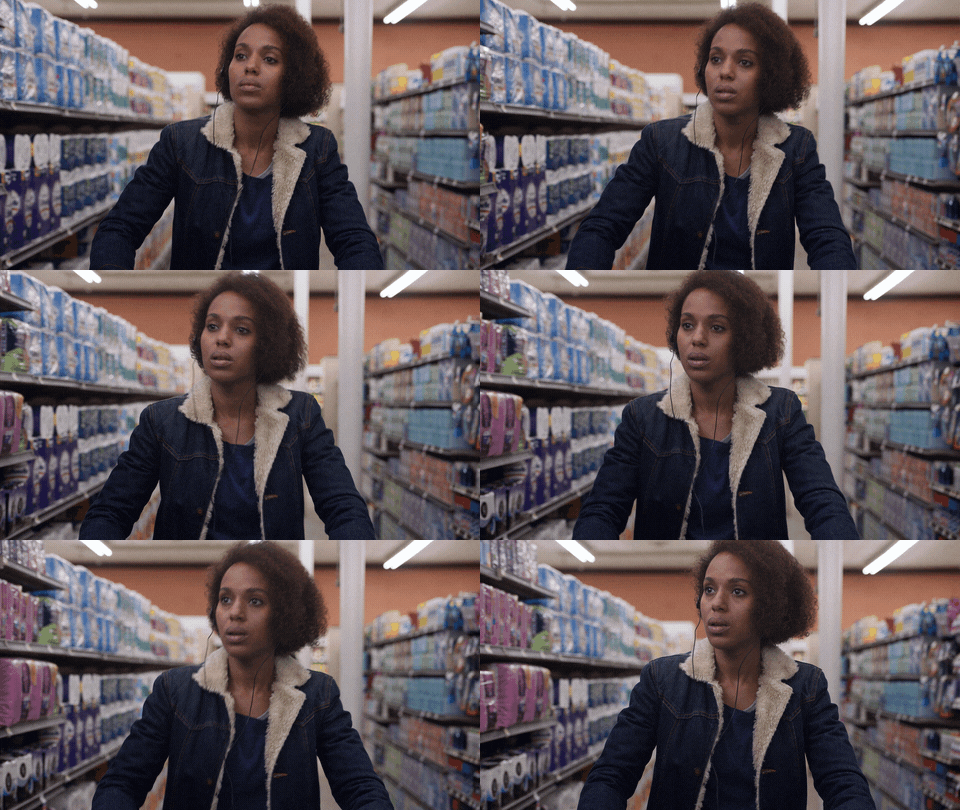 Four items in the cart, four barcodes, under a minute of logging. This is the trip where a scanner earns its place on your phone.
The repeat breakfast. Most people eat the same packaged items daily: the same cereal, the same milk, the same coffee creamer. Scan them once, and every app in this list lets you re-log them from history in one or two taps. The scan is the setup cost for weeks of fast logging.
The label you do not want to type. A protein bar label carries a dozen numbers. Typing them into a custom food entry invites mistakes, and searching by name often returns a long list of near-identical variants. A scan jumps straight to the right product, or at least to the right candidate you can verify against the label in your hand.
The pattern across all three: a barcode is a precise pointer to a specific product. When the food in front of you has one, scanning is the input to use. The rest of this article is about what happens after the scan.
IMPORTANT
Checkpoint: here's where you are right now.
Quick status update so you always know the next best move.
⏱️ Progress 1/4 • ~1 minute in • Keep going
✅ Step 1: The 3 moments a barcode scan wins (done)
👉 Step 2: Where the scan actually breaks (you're here)
⏳ Step 3: All 6 apps, ranked and priced
🧩 The 10-item pantry test that picks your app before you pay (coming soon)
What a Barcode Scan Actually Does (and Where It Breaks) 🔬
Every barcode scanner in every diet app runs the same three-step pipeline, and each step fails in its own way.
Step 1: read the code. The camera decodes the number printed on the package. In 2026 this step is essentially solved. In our own hands-on testing every app read a clean barcode in one to two seconds, and even dented or curved packages rarely caused trouble. No vendor here publishes a scan time, so do not pick an app on scanner speed claims. They are all fast.
Step 2: look the code up in a database. This is the step that decides your accuracy. The app matches the number against its food database, which may be staff-verified, licensed from a research source, or crowdsourced from users. A report from the 2025 International Diet and Activity Methods conference, published in 2026, describes how national branded-food databases power this lookup. The Dutch LEDA database, for example, holds label data for about 150,000 products and covers more than 75 percent of the items in Dutch supermarkets (Journal of Food Composition and Analysis, 2026). No single app database covers every product in every country, which is why the same app can feel flawless in the US and frustrating in India or Brazil.
Step 3: apply the serving math. The database row stores nutrition per serving or per 100 grams. The app then multiplies by the amount it assumes you ate. A scan of a family-size pack that defaults to one serving when you ate half the pack is precisely wrong, in both directions people rarely check.
The weak link is step 2, not the camera
When a database row is entered by another user instead of verified staff, the barcode points to whatever that user typed, with no review step in between. A 2025 validation study of 43 three-day food records from Canadian endurance athletes found that MyFitnessPal, the app with the largest crowdsourced database, showed poor validity for energy and carbohydrate values against reference methods, and traced the gap to its reliance on user-uploaded data (Morello et al., 2025). The scan was not wrong. The row it pointed to was.
How I Ranked These Apps 📋
I scored six popular trackers on three jobs, in this order of weight:
- Free access. Can you scan barcodes on the free plan in 2026? Two major apps now say no. A paywalled scanner is a real cost, and research on self-monitoring shows why friction matters: in a 502-participant randomized trial, the people who stuck with logging had greater odds of losing 5 percent or more of their body weight (Burke et al., 2025). That trial did not compare logging methods, but anything that interrupts logging, including a surprise paywall, works against the behavior it measured.
- The database behind the scan. Verified rows beat crowdsourced rows. Staff-checked or research-grade data means the number you log matches the label on the package.
- What happens on a miss. No database covers everything. The better apps make it fast to create a custom food from the label, submit the product, or fall back to search when a scan comes up empty.
I also left out pure product scanners that do not log calories at all, such as Yuka, whose free tier and $10 a year membership I broke down in is Yuka free?.
I did not rank on coaching, photo scanning, or fasting tools. Those matter, and we have compared them separately in our AI photo calorie counter ranking and our mixed-dish photo logging comparison.
IMPORTANT
Checkpoint: midway progress update.
You're past the theory. The ranking starts now.
⏱️ Progress 2/4 • ~3 minutes in • Keep going
✅ Step 1: The 3 moments a barcode scan wins (done)
✅ Step 2: Where the scan actually breaks (done)
👉 Step 3: All 6 apps, ranked and priced (current)
🧩 The 10-item pantry test that picks your app before you pay (next)
1. Cronometer: Best Overall for Barcode Scanning 🥇
Cronometer keeps its barcode scanner on the free plan and says so directly on its own site: the scanner is available for free, with no subscription required (Cronometer). That alone would place it high in 2026. What places it first is the database behind the scan. Cronometer builds on verified sources, including USDA data and the research-grade NCCDB, and every user-submitted food is reviewed by its curation team before other people see it (Cronometer data sources). In the JMIR evaluation that opened this article, Cronometer was the app the researchers singled out for accuracy (Gioia et al., 2023).
Third parties keep reaching the same verdict. Lifehacker named Cronometer the best MyFitnessPal alternative, noting specifically that its free version includes the barcode scanner (Lifehacker). In an r/Myfitnesspal thread about the change, one user wrote for future searchers that Cronometer is very similar and its scanner is free (r/Myfitnesspal).
The honest caveats: the free plan shows ads, the branded database is smaller than MyFitnessPal's, and the interface is denser because Cronometer tracks up to 84 nutrients on the free tier and up to 95 on Gold. If a scan misses, you create a custom food from the label, which takes a minute. Gold, at $4.99 per month billed annually ($59.99 per year) or $10.99 monthly, removes ads and adds extras, but nothing about scanning requires it (Cronometer Gold).
Choose Cronometer if: you want free scanning that resolves to verified data and you do not mind a data-dense interface.
2. MyNetDiary: Best Free Scanner With No Ads 🆓
MyNetDiary makes the strongest free offer on this list: barcode scanning, macro tracking, water tracking, a shopping list and a full-nutrient food diary on the free tier, with no ads (MyNetDiary). Voice logging is not part of that; it sits in the paid Premium Plus tier. The company states that its scanner pulls from a staff-verified database rather than open crowdsourcing, which addresses the step-2 problem directly. Community reports match the claim. In a 2022 weight-loss forum thread about MyFitnessPal's paywall, users pointed to MyNetDiary as the app that still does scanning and tracking free (r/1200isplenty).
Why second instead of first? Sourcing. Most of the detailed claims about MyNetDiary's database, including the verified food count, come from MyNetDiary's own published comparisons, and a vendor grading its own product deserves more skepticism than a third-party evaluation (MyNetDiary comparison, 2026). Cronometer has the independent accuracy nod from a peer-reviewed evaluation. MyNetDiary does not yet. Coverage also skews toward US products, so shoppers outside North America should run the pantry test below before committing.
Premium is $59.99 a year at list, though MyNetDiary runs frequent promotional SKUs, and it adds diet plans and deeper analysis. A Premium Plus tier above it adds meal scanning, voice logging and a restaurant menu scanner. Scanning barcodes stays free on all of them (MyNetDiary on the App Store).
Choose MyNetDiary if: you want the most generous free tier, no ads, and verified data, mostly shopping US brands.
3. FatSecret: Best Fully Free Package 🌍
FatSecret has quietly become the app people name when every competitor adds a paywall. The barcode scanner sits on the free plan, next to a free food diary, macro tracking, and a large community-driven database with international coverage. Premium runs $14.99 a month or $59.99 a year at list, with FatSecret pricing by region and running frequent promotions, and it adds meal planning, the Smart Assistant and dietitian-designed plans, not scanning (FatSecret Premium).
The trade-off is the database model. FatSecret's entries come substantially from its community, and community rows carry the risk this article keeps returning to: the barcode resolves, but the numbers were typed by a stranger. FatSecret does not automatically approve every user-submitted food for other people to see (FatSecret help), and popular products in most countries have solid rows. But the first time you scan a product, compare the result against the printed label before trusting it. For shoppers outside the US, FatSecret's international coverage is a real advantage. It is often the app that recognizes a local product when US-centric databases return nothing.
Choose FatSecret if: you want scanning plus a full tracker for exactly $0 anywhere in the world, and you will check new products against the label.
4. YAZIO: Best Free Scanner With Fasting Tools ⏱️
YAZIO keeps barcode scanning on its free plan, alongside free intermittent fasting timers, which makes it the pick if you want scanning and fasting in one app without paying (YAZIO on Google Play). The app is European in origin, and its product coverage in European markets is strong. PRO is $47.90 a year at list, though YAZIO also runs a $23.90 twelve-month SKU, and it adds recipes, meal plans, and deeper stats. The scanner is not behind that wall (YAZIO on the App Store).
The caveats: YAZIO's database mixes verified and user-submitted entries, so the same label-check habit applies, and its nutrient depth is shallower than Cronometer or MyNetDiary. If you track only calories and macros, that depth does not matter. If you care about iron, zinc, or vitamin D, it does.
Choose YAZIO if: you want fasting and tracking together on the free tier, especially in Europe.
5. Lose It: Good Scanner, Now Behind a Paywall 🔒
Lose It built one of the cleaner scanning experiences in the category, backed by a database of more than 50 million foods (Lose It membership tiers and pricing). The problem is access. Lose It says it is in the middle of moving Scan It and its nutrition label scanner into Premium: some free members still have them during the transition, others have already lost them, and once the features lock on your account a Premium membership is required (Lose It help center on Scan It). That is not a rule you can plan around, because nothing on either page ties access to when you signed up. Premium now costs $79.99 per year, up from $39.99, which puts it level with MyFitnessPal Premium at the top of this list rather than at the budget end. There is no monthly Premium plan; a lifetime license runs $299.99, or $229.99 if you already subscribe.
If you already pay for Lose It, the scanner is fast, the interface is friendly, and Premium adds photo logging, voice logging, and calorie cycling on top. But if you are choosing a new app in 2026 specifically for barcode scanning, paying $79.99 per year for a feature four other apps give away is hard to justify, and the price increase removed the one argument that used to carry this pick. The database is also largely crowdsourced, so the verification advantage of Cronometer and MyNetDiary does not come with the price.
Choose Lose It if: you already subscribe, or the interface alone is worth $79.99 a year to you.
Related: best Lose It alternatives in 2026.
6. MyFitnessPal: Biggest Database, Paywalled Scanner 🗄️
MyFitnessPal calls its database one of the largest in the world, more than 20 million entries (MyFitnessPal). Lose It publishes a bigger number, but coverage is still MyFitnessPal's strength: if a product exists anywhere, a MyFitnessPal scan will almost always find a row for it. A 2024 evaluation of 18 diet apps put it top of the seven AI-enabled apps at 97 percent accuracy identifying food components from photos, though the same paper concluded the automatic calorie estimates built on those photos were inaccurate (Li et al., 2024).
Two problems keep it last. First, the scanner requires Premium at $79.99 per year or $19.99 per month. Free users lost it in the 2022 paywall change, the move that pushed many users toward every other app in this article (MyFitnessPal Premium). Second, the database that makes every product findable is crowdsourced, and the 2025 validation study cited earlier found poor validity for its energy and carbohydrate values (Morello et al., 2025). That combination is the right name, wrong number pattern: the scan finds your exact product, and the row still carries whatever a past user typed. Paying $79.99, the top of the range alongside Lose It, for unverified rows is the weakest value here.
Choose MyFitnessPal if: you already live inside its ecosystem with Premium for other reasons, and you will verify scanned rows against labels.
Related: best MyFitnessPal alternatives in 2026.
Four apps down, two to go. Still ahead: the 10-item test that tells you which of these deserves your money.
Barcode Scanning Compared: The Quick Table 📊
| App | Free barcode scanner | Database model | Yearly price if you pay | Standout |
|---|---|---|---|---|
| Cronometer | Yes, with ads | Verified (USDA + NCCDB + curated brands) | Gold $59.99 (optional) | Verified data, free scanner |
| MyNetDiary | Yes, no ads | Staff-verified | Premium $59.99 list (optional) | Most generous free tier |
| FatSecret | Yes | Community, submissions moderated | Premium $59.99 list (optional) | Fully free, international reach |
| YAZIO | Yes | Mixed verified and user entries | PRO $47.90 list (optional) | Free fasting timers included |
| Lose It | Moving behind Premium | Crowdsourced, 50M+ foods | Premium $79.99 (required to scan) | Friendly interface |
| MyFitnessPal | No | Crowdsourced, 20M+ foods | Premium $79.99 (required to scan) | Broadest product coverage |
Prices are standard US prices as of mid 2026 and can change by region and promotion.
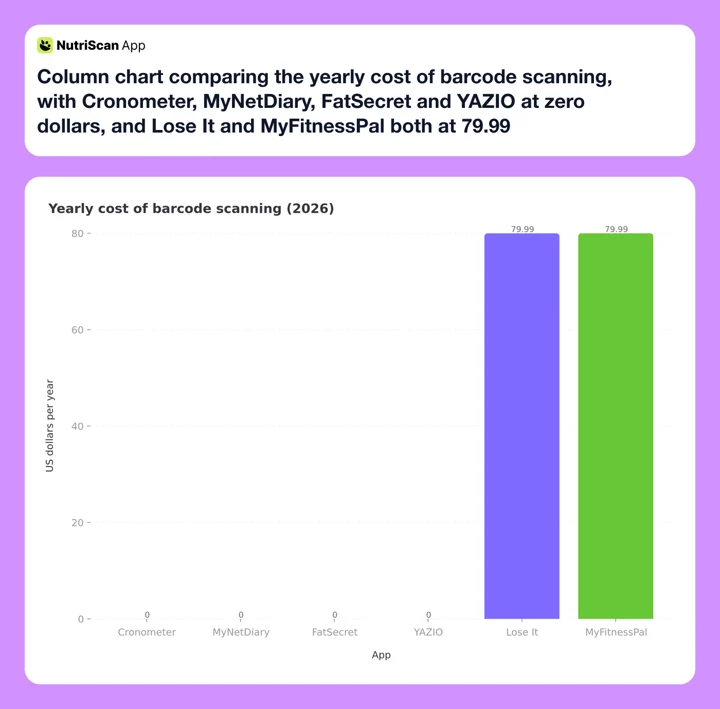 Figure 1: Four of the six apps charge nothing to scan. The two that do charge are the two whose databases are crowdsourced, which is the opposite of what the price suggests.
As Figure 1 shows, the money in this category does not buy better data. It buys access to a feature four competitors give away.
Where NutriScan Fits (and Where It Does Not) 🍛
NutriScan does not scan barcodes, and that is a deliberate design choice, not a missing feature we plan to hide. A barcode only exists on packaged food. The meals that cause the biggest logging errors, home-cooked dishes, mixed plates, and restaurant food, have no barcode to scan, and that is the problem NutriScan was built for. You photograph the plate, and the app asks about what the camera cannot see, like cooking oil and portion size. An evaluation of ChatGPT on meal photographs found a mean absolute percentage difference of 26.9 percent against measured nutrient content, with the model underestimating most nutrients (O'Hara et al., 2025). That study tested the model alone and never asked a user to confirm anything. Prompting for the oil and the portion is our own answer to the same gap. The paper does not measure it.

Home > Camera Icon > Click Picture: a packaged item gets the Packaged Food tag instead of a barcode, and the oil slider covers what a label never tells you about how it was served.
Packaged food still gets logged here, just through a different door. You can photograph the pack, type it in manually, or say it to Monika, our voice nutritionist, and tag it as Packaged Food from the same 8-tag list used for home-cooked and restaurant meals. Every logged meal then gets a NutriScore and a full macro and micronutrient breakdown.
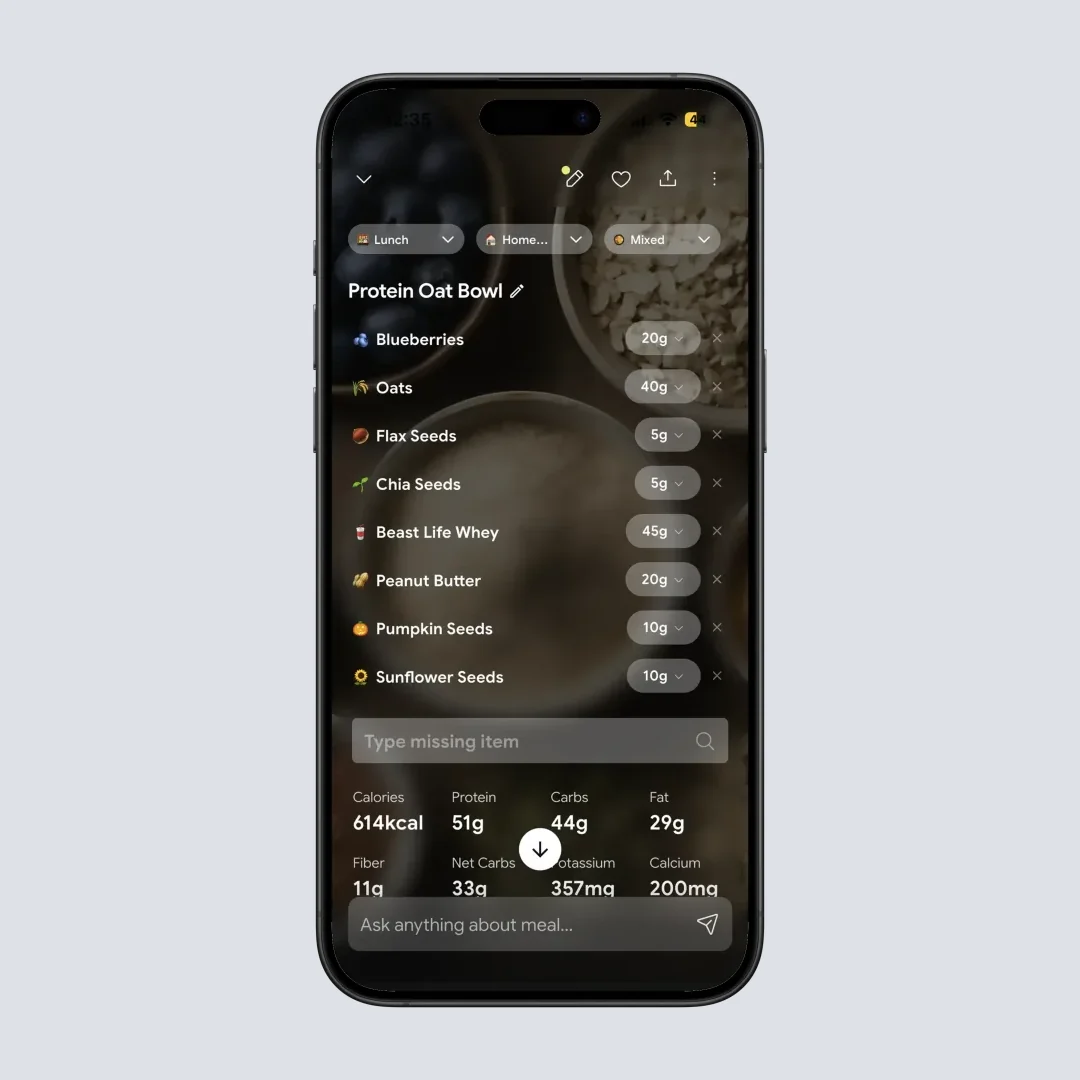
Home > Meal Item: the same nutrition detail view whether the meal came from a photo, from Monika, or from a manual entry.
So the honest guidance is this. If most of your calories come from packaged products, pick a barcode app from the list above and skip ours. If your days mix packaged snacks with cooked dinners and restaurant lunches, a practical setup is one free barcode app for the packaged half and NutriScan for the plates. The free plan gives you 5 AI meal scans a week with no ads, alongside 4 Monika voice calls per week, and Premium is $59.99 per year if you want unlimited scans, diet plans and unlimited calls (NutriScan pricing guide).
If you are still deciding whether a barcode, a label photo or a meal scan is the right input for your food, my calorie scanner comparison walks through where each number comes from and which one fits your week.
7 Tips to Get Accurate Numbers From Any Barcode Scanner 💡
- Verify the first scan of every new product against the label. Databases contain errors, especially crowdsourced ones. A ten-second comparison of calories and serving size catches most bad rows before they distort weeks of logs.
- Check the serving size math every time. The most common scan error is not the database. It is logging one serving of a package that holds three. Look at what amount the app assumed before you tap save.
- Scan the regional version you actually bought. The same brand name can carry a different recipe in different countries. A row created from the US version of a product can be wrong for the version sold in Europe or Asia, and national database coverage varies widely (Journal of Food Composition and Analysis, 2026).
- Save corrected products as favorites. Every app in this list has a favorites or recent-foods list. Scanning once and re-logging from history is faster and safer than re-scanning daily.
- Log what the barcode cannot know. The scan covers the tortilla chips. It does not cover the oil you fried them in or the cheese you added. Packaged ingredients inside a cooked meal still need the rest of the meal logged another way.
- Do not quit over one missing product. Create a custom food from the label instead of abandoning the log for the day. Sticking with self-monitoring was associated with greater odds of losing 5 percent or more of body weight (Burke et al., 2025).
- Re-check your staples every few months. Manufacturers reformulate products quietly, and branded databases exist partly to track those changes. If a wrapper says new recipe, treat it as a new product and scan it fresh.
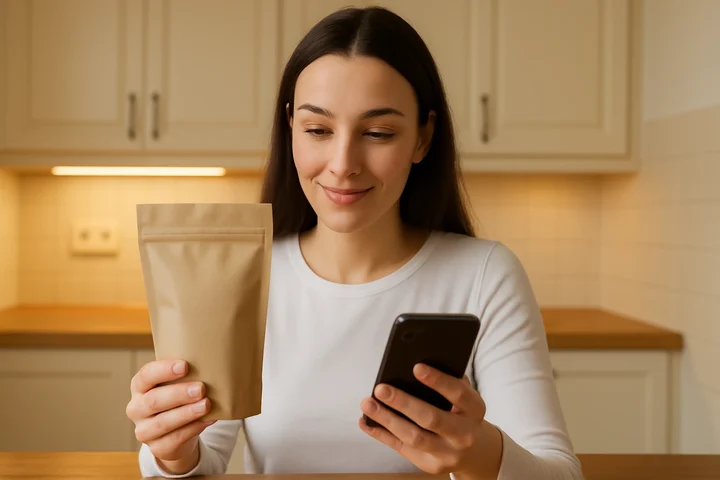 Ten seconds with the pack in one hand and the app in the other is the single highest-value habit in this article.
The habit that outranks every app choice
Whichever app wins for you, tip number 1 is the one that pays. Every study cited here points the same way: the scanners are excellent at finding products and the databases are uneven at describing them. Set your calorie targets first with our free macro calculator, then protect those targets with a label check on your highest-calorie staples.
IMPORTANT
Checkpoint: final stretch before the reveal.
One last nudge. The pantry test is next.
⏱️ Progress 3/4 • ~5 minutes in • Keep going
✅ Step 1: The 3 moments a barcode scan wins
✅ Step 2: Where the scan actually breaks
✅ Step 3: All 6 apps, ranked and priced
✨ The 10-item pantry test that picks your app before you pay (about to reveal)
The 10-Item Pantry Test That Picks Your App 🗓️
You've been patient. This is the part that saves you a wasted year of subscription, and it takes about 30 minutes in your own kitchen. Every review in this category, including this one, is written by someone who does not shop where you shop. Your shelves are the only benchmark that matters.
- Pick 10 real items from your own shelves. Not the national brands every database carries. Include your most local, most obscure, most regional products, the ones that made you doubt whether tracking works for you at all.
- Scan all 10 and count the hits. A miss is any scan that returns nothing, or returns a product that is clearly not the one in your hand. Under 7 hits out of 10 means this app does not cover your shopping, whatever its total database size says.
- Check three rows against the printed label. Compare calories, serving size, and protein on three of the hits. A row that disagrees with the pack is a database error, and it is the error you will never notice again once it is buried in your log.
- Test the miss flow deliberately. Take one item the app failed on and create a custom food from the label. Time it. A fast form and a submit option are what you want, because every database eventually misses, and step 3 of the pipeline above is where quitting usually starts.
- Re-log two items from history. Scanning is the setup cost, not the daily cost. Confirm that re-logging a saved product takes one or two taps, because after week one, most of your packaged logging should come from history and not from the camera.
Thirty minutes of this beats any review, including this one. Two apps, ten items each, and you will know which database was built for the shelves you actually shop.
What the Research Says About Scanning and Tracking 📚
The evidence on barcode-based logging points to three conclusions worth carrying into your decision.
Databases, not scanners, set your accuracy ceiling. The camera reads the code correctly. The question is what the code points to. Reviews of national branded-food databases show why coverage and correctness vary by country and by app, and why the same barcode can resolve to different numbers in different apps (Journal of Food Composition and Analysis, 2026). Validation work on the largest crowdsourced app found poor energy and carbohydrate validity, which is what unverified rows look like in aggregate (Morello et al., 2025).
Apps tend to underestimate, so verify in the direction that matters. The JMIR evaluation found consumer apps consistently underestimated calorie intake relative to a dietitian's estimates (Gioia et al., 2023). If your goal is weight loss, an underestimating log hides extra calories exactly where you can least afford it. Label checks on your highest-calorie staples protect the total.
The habit outlasts the feature. In a 502-participant trial, people who stuck with self-monitoring had greater odds of losing 5 percent or more of their body weight (Burke et al., 2025). A meta-analysis of 11 randomized trials found app-based interventions show little effect beyond six months, with a tendency toward weight regain (Pujia et al., 2025). Pick the app that removes your personal friction, whether that is ads, a paywall, or a broken miss flow, because six months is where most of these tools stop earning their place.
The Verdict: Buy the Database, Not the Scanner ✅
Every app we tested scanned a barcode in about a second. What you are actually choosing is the data behind the code and the price of reaching it. Cronometer wins for verified data on a free plan, MyNetDiary for the most generous ad-free tier, FatSecret for a fully free international package, and YAZIO for free scanning plus fasting tools. MyFitnessPal already charges for the scanner and Lose It is moving the same way, so both only make sense if you want the rest of their subscription anyway.
 When the scanned row and the printed pack agree on every number. Rarer than it should be, worth the ten-second check.
And for everything on your plate that never had a barcode, the cooked dinners, the mixed bowls, the restaurant meals, that is the half of your diet NutriScan was built to catch. Whichever combination you pick, run the pantry test, scan your staples once, check them against the label, and keep logging past month six. The habit is the feature. Try NutriScan free for the half of your food that no scanner can read.
IMPORTANT
Recap: everything you completed this round.
You finished the run. Save this for the day you test your shortlist.
⏱️ Progress 4/4 • ~7 minutes in • Nicely done
✅ Step 1: The 3 moments a barcode scan wins
✅ Step 2: Where the scan actually breaks
✅ Step 3: All 6 apps, ranked and priced
✅ The 10-item pantry test that picks your app before you pay (revealed)
Frequently Asked Questions ❓
Did MyFitnessPal really remove free barcode scanning?
Yes. Barcode scanning moved to MyFitnessPal Premium in the 2022 change, and it remains a paid feature in 2026 at $79.99 per year or $19.99 per month, with a Premium+ tier above it (MyFitnessPal Premium). The backlash to that decision is a large part of why the free-scanner apps in this article grew.
Which calorie apps still scan barcodes for free in 2026?
Cronometer, MyNetDiary, FatSecret, and YAZIO all keep barcode scanning on their free plans (Cronometer; MyNetDiary). Lose It is moving Scan It into Premium, so some free members still have it and others have already lost it (Lose It), and MyFitnessPal requires Premium. MacroFactor includes scanning but has no free tier at all, only a trial (MacroFactor).
Are barcode scans more accurate than photo logging?
For packaged food, usually yes, because the scan can resolve to the product's actual label data instead of a visual estimate. But the scan is only as accurate as the database row it points to, and validation research shows unverified rows can carry significant errors (Morello et al., 2025). For cooked and mixed meals there is no barcode, so photo or manual logging is the only option.
Why does a barcode scan show the wrong product or wrong numbers?
Three common reasons. The database row was entered incorrectly by another user, the row belongs to a different regional version of the same product, or the product was reformulated after the row was created. In all three cases the fix is the same: compare against the printed label and correct or replace the entry.
What should I do when a barcode is not in the database?
Create a custom food from the nutrition label. It takes about a minute and you only do it once per product. Most apps also let you submit the product to the shared database. Do not skip logging the item, because missed entries add up, and in a 502-participant randomized trial the people who stuck with self-monitoring had greater odds of losing 5 percent or more of their body weight (Burke et al., 2025).
Does NutriScan have a barcode scanner?
No, and this article is the honest version of why. NutriScan logs food through photos, through Monika by voice, and through manual entry with a Packaged Food tag, because the meals that produce the biggest logging errors are the cooked and mixed plates that never carry a barcode. If most of your calories come from packaged products, one of the free scanners above is the better first app. If your week mixes both, run them side by side.