Best App for Photo Logging Mixed Dishes 2026 (Ranked)
 ChatGPT
  Claude
  AI Mode
  Perplexity
TL;DR - Best App for Photo Logging Mixed Dishes 2026
NutriScan ranks first for mixed dishes: it asks about food type, cooking method and oil level before analyzing, then makes portions easy to fix on the results screen, with 5 free scans a week and Premium at about $59/yr. MacroFactor ($71.99/yr) is best for line-by-line editors. Lose It ($79.99/yr, up from $39.99) is the manual-portion pick, no longer a budget one. Cal AI wins on pure speed, Foodvisor locks its camera behind an $83.99/yr list price, and MyFitnessPal names foods best of anything tested but keeps Meal Scan behind Premium and did not hold up on validity.
IMPORTANT
Your mixed-dish logging plan at a glance.
A quick roadmap so you know exactly what this ranking covers.
⏱️ Progress 0/4 - ~0 minutes in - Keep going
⏳ Part 1: The 3 dishes that fool every camera
⏳ Part 2: All 6 apps ranked on prompts and edits
⏳ Part 3: What the research and the real screens show
🔍 The one-time 5-minute trick that makes every future scan more accurate (revealed near the end)
A 2024 study in Nutrients screened 800 popular nutrition apps, then tested the leading ones against real food records (Li et al., 2024). The results explain why so many people distrust their calorie numbers. Manual logging apps overestimated Western-style meals by about 1,040 kJ (roughly 250 calories) and underestimated Asian-style meals by about 1,520 kJ (roughly 360 calories). The AI photo apps were fast at naming foods, but the researchers found their automatic energy estimates were inaccurate, and they said AI models need better training "especially for mixed dishes and culturally diverse foods" (Li et al., 2024).
As a NutriScan nutritionist, I want to be upfront about two things. First, NutriScan is our app, and it appears in this ranking, so read my reasoning and check my sources. Second, I agree with that study. No photo logging app reads a mixed dish perfectly on the first try. The camera sees the surface of your plate. It does not see the oil in the pan, the cheese under the pasta, or how deep your bowl is.
That is why this comparison is not about which app has the smartest camera. It is about what happens in the ten seconds after the scan. The best app for mixed dishes is the one that asks you smart questions about what the photo cannot show, and then lets you fix its guesses quickly. Portion prompts and edits decide everything here, so that is exactly what I ranked.
Prices below are standard US prices as of mid 2026. They can change or vary by region, so check the store page before you pay.
Three Mixed Dishes That Fool a Camera
Before the rankings, here is what "mixed dish" means in practice, because these are the meals where photo logging wins or fails.
The vegetable stir-fry. The photo shows vegetables and maybe some chicken. It does not show the two tablespoons of oil the vegetables were cooked in, which add around 240 calories on their own at about 120 calories a tablespoon (USDA FoodData Central record 171413). An app that logs a plain "vegetable stir-fry" without asking about oil misses the largest single calorie source on the plate.
The pasta bake. A camera sees the browned top layer. It cannot see how much cheese, cream, or butter is layered underneath, and it cannot tell if your portion is one cup or two, because depth is very hard to judge from a single flat image.
The loaded salad. Greens photograph as "healthy." But dressing, nuts, cheese, and croutons often carry more calories than everything else on the plate combined. The base the camera identifies is the least important part of the calorie count.
In all three cases the failure is the same: the biggest calorie sources are the ones the camera cannot see. This gap between the test bench and the dinner table is old news in the field. An early food recognition system, described in the history section of Chotwanvirat and colleagues' review, dropped from 61 percent on a curated 50-image dataset to 37.5 percent on real-world phone photos (Chotwanvirat et al., 2024). Recognition has improved enormously since, but the review's point stands: lab performance has never transferred cleanly to real plates. Your app needs a plan for that.
 That golden sear looks great on camera, but the oil that made it happen never shows up in the photo.
The Two Features That Decide Accuracy: Prompts and Edits
Portion prompts. A good app treats its scan as a first draft and asks you to confirm what it cannot know. How much oil was used? Was this deep-fried or steamed? Did you eat the whole plate? The reason to ask is what happens when nobody does. When researchers put ChatGPT-4 in front of 114 meal photographs, it identified foods with 93.0 percent precision and matched the weight of small meals well, but it underestimated medium and large meals and agreed poorly with the real values on 10 of the 16 nutrients measured (O'Hara et al., 2025). Naming is the easy half. Amount is where a photo runs out of information, and a prompt is the only place a user can put that information back. No published study has tested whether answering prompts closes that gap, so this is our design position, not a research finding.
Fast edits. Every photo app is sometimes wrong. A scoping review of AI food measurement research reported food detection accuracy anywhere from 74 percent to 99.85 percent, a spread the authors put down to disparity between the studies themselves (Zheng et al., 2024). Those were research systems rather than the apps in this list, but the lesson carries: you will be correcting entries regularly. If fixing a wrong ingredient takes ten taps, you will stop fixing, and then you will stop logging. In the SMARTER trial, higher adherence to diet self-monitoring was associated with greater odds of losing 5 percent or more of body weight (Burke et al., 2025), so anything that adds friction works against you.
There is a third, smaller job: remembering your fixes. If you eat the same homemade curry every week, the app should let you save the corrected version and reuse it in two taps.
How I Ranked These Apps
I ranked six popular photo logging apps on the jobs above, in this order of weight:
- Portion prompts: does the app ask about oil, cooking method, and hidden ingredients around the scan?
- Edit flow: how many taps to change an ingredient, a quantity, or a whole line?
- Free testing: can you try photo logging before paying?
- Price: what does the paid plan cost per year?
I did not rank on scan speed alone, on database size, or on coaching features. Those matter for other use cases, and I have covered them in other comparisons. Reminder of my bias: NutriScan is our product. I have kept its weaknesses in plain view so you can judge fairly.
IMPORTANT
Checkpoint: here's where you are right now.
You know why cameras fail on mixed dishes. Now the rankings.
⏱️ Progress 1/4 - ~2 minutes in - Keep going
✅ Part 1: The 3 dishes that fool every camera (done)
👉 Part 2: All 6 apps ranked on prompts and edits (you're here)
⏳ Part 3: What the research and the real screens show
🧩 The one-time 5-minute accuracy trick (coming soon)
1. NutriScan: Best Portion Prompts for Mixed Dishes
NutriScan is built around the exact problem this article is about. When you photograph a meal, it asks for context before it analyzes anything: you tag the food type (Home Made, Restaurant / Cafe, Street Food, and five more), pick a cooking method from eleven options like Stir-fried, Deep-fried, or Steamed, and set an oil level on a four-step slider from No Oil to High Oil. Those inputs target the two largest hidden errors in mixed-dish logging, oil and cooking method, which is why they exist. After the analysis, the results screen lets you adjust the portion size with plus and minus taps or by typing it in, remove a wrong item, or add a missing one by text or voice, all before the entry settles into your day. Each saved meal also gets a NutriScore rating, so a corrected entry tells you more than a calorie count.
The honest trade-offs. A NutriScan scan takes around 15 to 20 seconds with the prompts, while the fastest scanner in this list finishes in 5 to 8 seconds without asking anything, a difference I measured in our Cal AI vs NutriScan comparison. NutriScan tracks micronutrients on every meal, on the free plan too, but it is not a searchable food-composition database the way Cronometer is, and if most of your food is packaged with barcodes, other apps serve that style better. The free plan includes 5 photo scans a week, enough to try the prompts on the curries, restaurant plates, and mixed bowls that usually break a food database, and Premium is about $59 a year, with details in our NutriScan pricing guide.
Choose NutriScan if: most of your meals are home-cooked, mixed, or from restaurants, and you want the app to ask about what the camera cannot see.
2. MacroFactor: Best Editable Entries After the Scan
MacroFactor treats AI logging the right way for careful trackers. When you photograph a meal, the app populates your plate with editable food entries, sometimes as individual foods and sometimes grouped into a recipe you expand to reach the ingredients, as described in its own AI food logging documentation. Each entry behaves like a normal food you logged by hand, so you can change grams or delete a line without fighting the interface. There is no text-only mode, but the Photo & Text option lets you add a description alongside the picture to improve the analysis.
MacroFactor itself says the AI "is not perfect and can make mistakes" and positions the editable output as the answer (MacroFactor). User reports match that: one MacroFactor user described the scan assuming 20 percent fat beef mince when they had used 5 percent and had typed the 5 percent into the description (r/MacroFactor). Correcting the grams on that line is quick. Noticing it in the first place is the hard part, and MacroFactor asks you no follow-up questions, so spotting the wrong assumption is entirely your job. There is no free tier, only a 7-day trial, and the subscription is $71.99 per year, covered in our MacroFactor cost breakdown.
Choose MacroFactor if: you know your ingredients well and want maximum control over every line, plus adaptive macro targets in the same app.
3. Cal AI: Fastest Scan, Fix It by Describing
Cal AI is the speed pick. A scan usually returns a full entry in 5 to 8 seconds in our own hands-on testing, and Cal AI publishes no timing figure of its own. It handles simple single foods well and drifts on layered plates, which is our observation rather than a published result, since no study has tested these apps against each other. Its correction tool is a "Fix Results" flow where you describe the change in natural language, by text or voice, and the AI revises the entry, which Cal AI demonstrates in its own product walkthrough.
Describing a fix sounds convenient, and for swapping a food it works. For precise quantity changes, results are mixed: one user testing the app reported that describing weight changes for ingredients was unreliable compared with editing numbers directly (Reddit discussion). Cal AI also does not prompt for cooking oil on its own, so stir-fries and curries start from a low estimate. Pricing is dynamic and only shown after onboarding. Live App Store SKUs run from $2.99 to $29.99, with third-party reviews reporting annual offers as high as $49.99, so treat any single figure as a snapshot. Cal AI fronts a 3-day free trial on its own site. We go deeper in our Cal AI pricing guide.
Choose Cal AI if: your plates are mostly simple, you value speed above prompts, and you will double-check quantities yourself.
4. Lose It: Snap It Estimates, Then Asks You to Review
Lose It's Snap It recognizes the food in your photo and, in Lose It's own words, "track[s] the calories and macros automatically. No speaking or searching is necessary". The last step of its instructions is to "review the food and amount recognized in the photo" before you add it, per the app's own Snap It guide. You can also photograph a meal now and finish logging it later, which is genuinely useful at dinners where you do not want to spend minutes inside an app.
That review step is worth something: nothing lands in your diary until you have looked at the amount. It is a confirmation, though, not a prompt. Lose It hands you its own guess and waits, and it asks nothing about oil, cooking method, or what is hidden under the top layer, which is where a curry or a stir-fry goes wrong. Everyone gets three free Snap It tries before upgrading. Premium is now $79.99 per year (Lose It Membership Tiers & Pricing), up from $39.99, which puts it level with MyFitnessPal at the top of this list. Plan details are in our Lose It pricing guide.
Choose Lose It if: you want a recognized estimate you can check before it saves, you already track weight and habits in Lose It, and you do not mind supplying the oil yourself.
5. Foodvisor: A Real Review Step, Behind a Paywall
Foodvisor's meal flow has the right shape. After recognition, you enter a meal screen where you "add and edit foods, then review your meal" before saving, per its own support documentation. That built-in review step catches errors that one-tap logging apps let through. Foodvisor is a Paris-based app and its database leans European, so French and continental plates resolve more cleanly than American or Asian ones.
The problem is access. Photo logging requires the Premium plan at an $83.99 a year list price, though Foodvisor runs ten concurrent App Store SKUs from $23.99 to $89.99, so what you pay depends on the offer you land on. The free version does not let you test the camera at all, as we found in our Foodvisor pricing review. Paying the highest list price here before you can test the core feature is a lot to ask.
Choose Foodvisor if: you eat a lot of European-style meals, want nutritionist-built guidance around your log, and are comfortable paying before testing.
6. MyFitnessPal: Strong Recognition, Risky Numbers
Here is the surprise from the research: in the Li study, MyFitnessPal had the highest food identification accuracy of the seven AI photo apps tested, at 97 percent (Li et al., 2024). Meal Scan is genuinely good at naming what is on your plate, and the Meal Scan FAQ sets out the flow: you point the camera and tap the shutter, or upload a photo, and MyFitnessPal returns a list of suggested database matches to pick from.
Naming the food is not the same as getting the calories right. MyFitnessPal says Meal Scan suggests "verified foods" specifically, so the unverified-community-entry problem does not apply to this path as documented. The numbers still did not hold up under testing. A 2025 validation study found MyFitnessPal had poor validity for energy and carbohydrate intake in its tested group of Canadian endurance athletes, and its authors put that down to "the copious options for each food entry, including non-verified consumer entries" (Morello et al., 2025). Nothing in the scan flow asks about oil or portion, so a confident wrong number has nothing to catch it. Meal Scan also sits behind Premium at $19.99 per month or $79.99 per year, as covered in our MyFitnessPal pricing guide.
Choose MyFitnessPal if: you already use MyFitnessPal and its connected tools, and you mostly eat foods with verified database entries.
IMPORTANT
Checkpoint: midway progress update.
All six apps reviewed. The comparisons get easier from here.
⏱️ Progress 2/4 - ~5 minutes in - Keep going
✅ Part 1: The 3 dishes that fool every camera (done)
✅ Part 2: All 6 apps ranked on prompts and edits (done)
👉 Part 3: What the research and the real screens show (current)
⏳ The one-time 5-minute accuracy trick (next)
Side-by-Side: Prompts, Edits, and Price 📊
| App | Portion prompts | Edit flow | Free photo logging | Price (yearly) |
|---|---|---|---|---|
| NutriScan | Yes, oil + cooking method + portion review | Edit before and after saving | 5 scans/wk free | about $59 |
| MacroFactor | No | Editable entries, some grouped into recipes; photo plus text description | No free tier, 7-day trial | $71.99 |
| Cal AI | No | Describe fixes in text or voice | 3-day trial, then limited free scans | Dynamic, $2.99 to $29.99 in store |
| Lose It | No, a review step instead | Confirm the recognized food and amount | 3 free Snap It tries | $79.99 |
| Foodvisor | Partial, review screen | Add and edit, then review | None | $83.99 list, SKUs from $23.99 |
| MyFitnessPal | No | Pick from suggested matches, then edit | Premium only | $79.99 |
Prices are standard US prices as of mid 2026 and change by region.
Price and quality do not line up neatly here. The cheapest app asks nothing at all, neither $79.99 app asks about oil, and the highest list price keeps its camera behind the paywall.
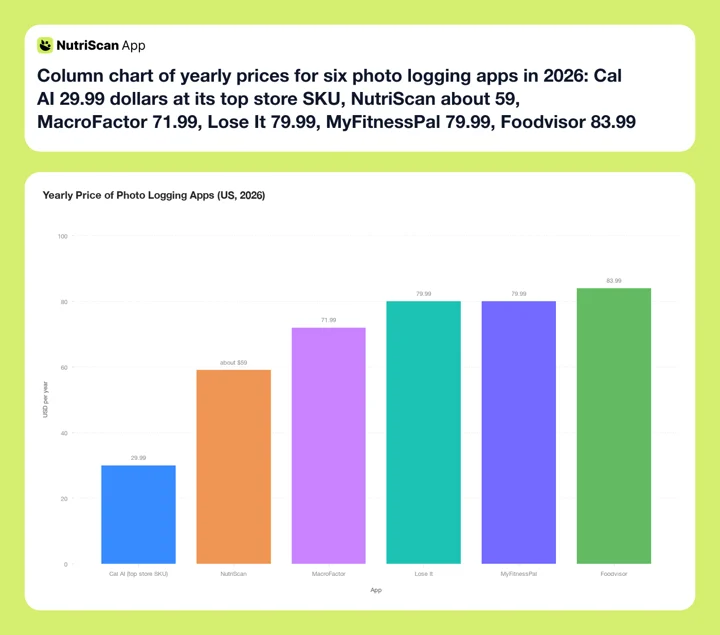 Figure 1: Yearly US prices across the six ranked apps. The strongest mixed-dish correction flows, NutriScan and MacroFactor, sit in the middle of the range. Lose It is drawn at $79.99, level with MyFitnessPal (Lose It Membership Tiers & Pricing). Cal AI has no fixed yearly price, so its bar plots the $29.99 top of the $2.99 to $29.99 store range.
Try before you pay
Every app here except Foodvisor and MyFitnessPal lets you test photo logging in some form before paying, and MacroFactor's route is a 7-day trial rather than a free tier. Run that test on your own three most common mixed dishes, not on a tidy plate the camera was trained to love.
What the Research Says About Fixing the Scan
The evidence base for photo logging in 2026 tells one consistent story: the technology is useful, and it is not finished.
A systematic review of 13 studies on AI dietary assessment found calorie estimates correlated above 0.7 with traditional methods in 6 of the 13 studies, a genuinely promising result, but the authors flagged moderate risk of bias in most of the evidence and called for more real-world testing (Cofre et al., 2025). The scoping review by Zheng and colleagues shows how unsettled the evidence still is: food detection accuracy across the studies it pooled ran from 74 percent to 99.85 percent, and the authors attribute that spread to disparity between studies rather than to any single system (Zheng et al., 2024).
Two things matter most for mixed dishes. First, lab numbers have never transferred cleanly to real plates, a point Chotwanvirat and colleagues make with an early system that fell from 61 percent on a curated 50-image set to 37.5 percent on real-world phone photos (Chotwanvirat et al., 2024). Second, the failure is in the amount, not the name (O'Hara et al., 2025). Nobody has published a test of whether asking the user about oil and portion size fixes that, so the case for prompts is ours.
One more finding worth knowing: tracking apps help most in the first months and the effect fades beyond six, and the review pins that on apps lacking the personalized support needed to sustain the loss (Pujia et al., 2025). An app that keeps up with you is not a luxury. It is what keeps the results coming.
Research Caveat
No study has compared these six apps head to head on mixed dishes, and no study has tested whether user-confirmed portions improve a scan. What the research does support is that mixed dishes are where AI recognition struggles most, and that logging consistently tracks with better results. The prompts argument in this post is our own design position, and it proves no brand claim, including ours.
What the Prompts Look Like in NutriScan 📸

The context prompts before analysis: tag the food type, pick one of eleven cooking methods, set the oil level from No Oil to High Oil. Path: Home > Camera Icon > Click Picture > Crop Picture.
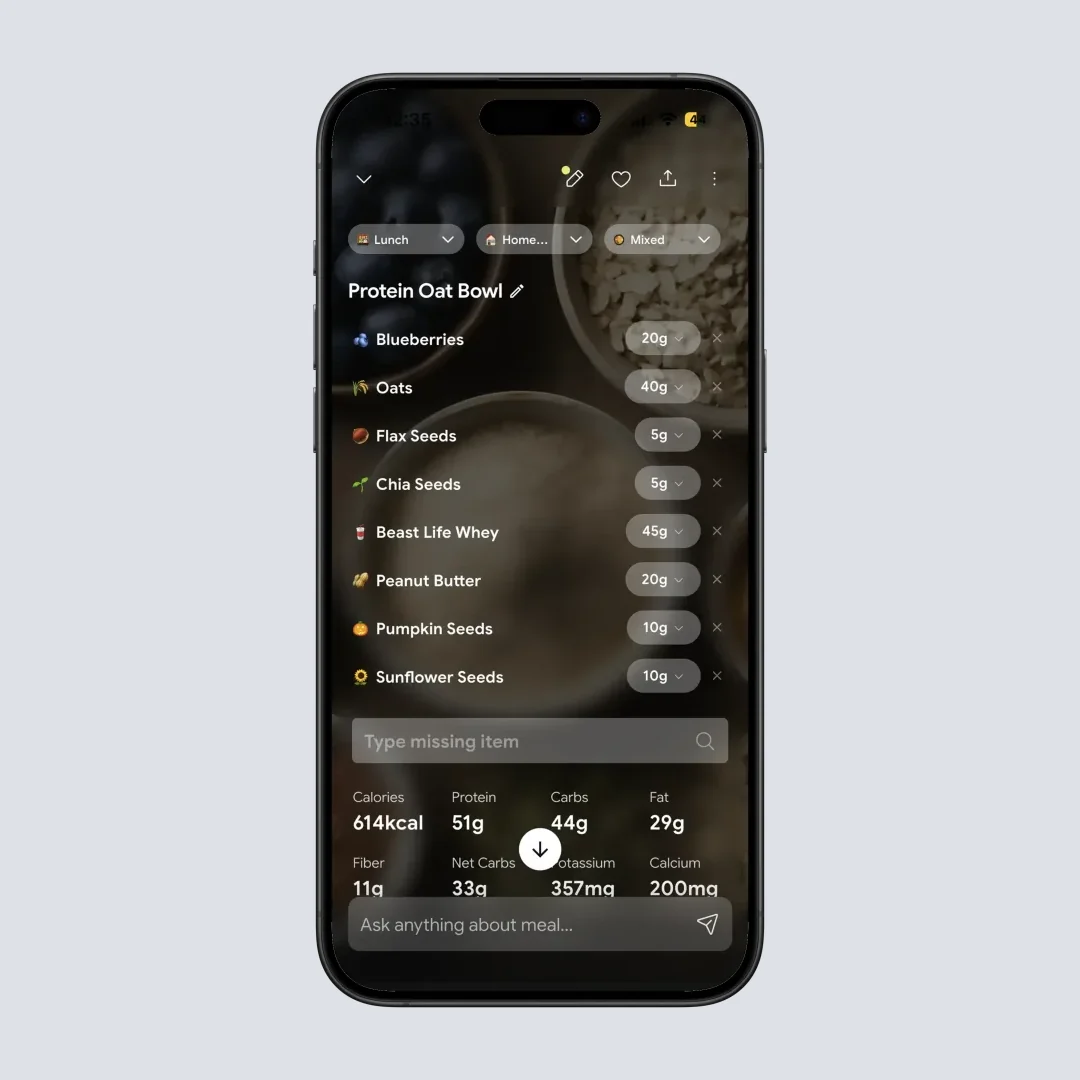
The edit surface after analysis: adjust the portion with plus and minus or type it in, remove a wrong item, or add a missing one by text or voice. Path: Home > Meal Item > Nutrition Details.

Corrected entries roll into the daily nutrition card, so your totals reflect the oil you confirmed rather than the oil the camera guessed. Path: Home > Daily Overview.
IMPORTANT
Checkpoint: final stretch before the reveal.
One last nudge, the 5-minute calibration trick is in the tips below.
⏱️ Progress 3/4 - ~7 minutes in - Keep going
✅ Part 1: The 3 dishes that fool every camera
✅ Part 2: All 6 apps ranked on prompts and edits
✅ Part 3: What the research and the real screens show
✨ The one-time 5-minute trick that makes every future scan more accurate (about to reveal)
For packaged food the photo is the wrong tool, and my meal scan vs photo scan vs barcode scan guide explains when to switch inputs and what to check after each one.
7 Tips for Better Numbers From Any Photo App 💡
- Always account for cooking oil. If your app does not ask, add it yourself. One tablespoon of oil is about 120 calories (USDA FoodData Central record 171413), and most mixed dishes contain at least one.
- Photograph before you eat, from a slight angle. A 45-degree angle shows depth better than a top-down shot, which helps the app and helps you judge the portion when you confirm it.
- Fix the biggest line first. If the scan got the rice and the garnish slightly wrong, ignore it. If it missed the oil or halved the meat portion, fix that. Errors are not equal.
- Save your corrected meals. If you fixed your weekly curry once, save it and reuse it. Your saved version with real oil amounts beats a fresh scan every time.
- Weigh one confusing dish once. This is the 5-minute trick. You do not need a food scale daily. Weigh your usual portion of the one dish you eat most, one time, then use that number to answer portion prompts accurately forever. One calibration, five minutes, and every scan of that dish for the rest of the year inherits the correction.
- Log restaurant mixed dishes as a best guess, then adjust the portion. Restaurant portions are usually larger and oilier than home versions. When in doubt, size the portion up, not down.
- Re-check your habits at month three. Apps that stop adapting to you are the reason people stop, per Pujia et al., 2025. If logging feels slow, that is the moment to simplify your routine or switch apps, not to quit.
 The pre-meal photo ritual: mildly annoying to your dinner companions, excellent for your calorie accuracy.
How to Choose in 5 Steps 🧭
- Write down your five most common dinners. If three or more are mixed dishes, prompts and edits should decide your choice. If most have barcodes, a database-first app serves you better.
- Check that you can test photo logging free. NutriScan gives 5 free scans a week, Lose It gives three free Snap It tries, Cal AI gives a 3-day trial, and MacroFactor gives 7 days. Foodvisor and MyFitnessPal both want payment first.
- Scan the same real meal three days in a row. Consistency matters more than a single lucky result.
- Count the taps to fix one wrong ingredient. This is the test that predicts whether you will still be logging in month three.
- Notice what the app asks you. An app that questions its own scan is being honest about what a photo can show. Silence after a scan of a curry is a warning sign.
My Verdict
For mixed dishes specifically, I rank NutriScan first because its context prompts attack the two biggest hidden errors, oil and cooking method, at the exact moment you can still fix them, and its results screen makes the portion easy to correct. MacroFactor is the strongest pick for people who want full manual control over every line and adaptive macro coaching in the same app. Lose It's review-before-you-save step is better than the apps that just log and move on, though at $79.99 it now costs as much as MyFitnessPal and still never asks about oil. Cal AI wins on speed for simple plates, Foodvisor has a good review flow behind the highest list price, and MyFitnessPal proves that naming the food correctly is only half the job.
Whichever app you pick, use the edit features. A scan you corrected is the only one that reflects what you actually ate. If your meals look like stir-fries, curries, casseroles, and restaurant plates, you can try NutriScan free with 5 scans a week and see what the prompts catch on your own food.
IMPORTANT
Recap: everything you completed this round.
You finished the full ranking - save this for your test week.
⏱️ Progress 4/4 - ~9 minutes in - Nicely done
✅ Part 1: The 3 dishes that fool every camera
✅ Part 2: All 6 apps ranked on prompts and edits
✅ Part 3: What the research and the real screens show
✅ The one-time 5-minute calibration trick (revealed)
FAQ
Are photo calorie counters accurate for mixed dishes? Partly. Reviews of the research show calorie estimates correlate well with traditional methods in about half of studies (Cofre et al., 2025), and the 2024 Nutrients study specifically named mixed dishes as the area needing better AI training (Li et al., 2024). Treat every scan of a mixed dish as a first draft that needs your confirmation.
Why do some apps ask questions around the scan? Because a photo physically cannot show cooking oil, hidden layers, or bowl depth. That gap is measurable: ChatGPT-4 named foods in 114 meal photographs with 93.0 percent precision but underestimated the weight of medium and large meals (O'Hara et al., 2025). No study has tested whether answering prompts fixes it, so the prompts are our design answer rather than a proven one.
Can I edit a photo scan if it is wrong? In every app on this list, yes, but the flows differ a lot. MacroFactor gives you fully editable lines, NutriScan lets you set oil and cooking method up front and then adjust portions, remove items, or add missing ones on the results screen, Cal AI asks you to describe the fix in words, and Lose It shows you the amount it recognized for you to review before it saves.
Which app lets me test photo logging for free? NutriScan gives you 5 photo scans a week on the free plan, enough to test the prompts on the dishes a database cannot read. Lose It gives everyone three free Snap It tries, Cal AI runs a 3-day trial, and MacroFactor runs 7 days. Two apps want your money first: Foodvisor keeps photo analysis in Premium, and MyFitnessPal's Meal Scan is Premium only.
Do I still need a food scale with photo logging? Not daily. Weighing your single most common dish once gives you a reference point that makes every future portion prompt more accurate. That one calibration covers most of the benefit of weighing.
Is photo logging better than barcode scanning? They solve different meals. Barcodes are more precise for packaged food because the label data is exact. Photos are the only practical option for home-cooked and restaurant mixed dishes, which is exactly where hidden calories concentrate.