Lifesum vs Lose It 2026: Photo, Voice Logging and Meal Plans
 ChatGPT
  Claude
  AI Mode
  Perplexity
As a NutriScan nutritionist, I get asked this often: should I use Lifesum or Lose It for tracking my meals? A 2025 meta-analysis of 11 randomized trials found smartphone apps produce a modest but statistically significant drop in body weight at 4 to 6 months, and that the effect fades beyond six months, which the authors attribute to apps that lack personalized support (Pujia et al., 2025). My own view, separate from that paper: the app you keep opening is the one that works for you, and the right tool makes that easier.
I compared these two apps across four areas that determine whether you will actually stick with tracking: photo logging, voice logging, meal plans, and pricing.
IMPORTANT
Your Lifesum vs Lose It comparison at a glance.
A quick roadmap so you can pick the right app fast.
⏱️ Progress 0/4 • ~0 minutes in • Keep going
⏳ Photo logging: which AI camera actually works
⏳ Voice logging: speak your meal and log it hands-free
⏳ Meal plans: guidance on what to eat, not just how much
🔍 What the research does and does not say about logging methods (near the end)
Quick Comparison Table
| Feature | Lifesum | Lose It |
|---|---|---|
| Price (annual) | About $49.99 on the offer currently shown, $99.99 and $119.99 listed | $79.99/yr, no monthly plan |
| Photo logging | AI Tracking (Premium) | Snap It (3 free tries, unlimited on Premium) |
| Voice logging | AI Tracking (Premium) | Voice Logging (3 free tries, unlimited on Premium) |
| Barcode scanning | Included, not on Lifesum's Premium list | Premium |
| Meal plans | Curated programs with a recipe library (Premium) | Meal & Exercise Planning (Premium), no curated programs |
| Diet programs | Mediterranean, Scandinavian, High Protein, Keto, fasting | None |
| Food database | AI-estimated plus community entries | 50M+ items per Lose It's help center |
| Life Score | Yes, a weekly wellness rating | No |
| Gamification | Minimal | Streaks, badges, community groups |
| Apple Watch app | Yes | Yes |
| Calorie Schedule | No | Yes, plan higher-calorie days in advance |
| App Store rating | 4.6/5, 150K ratings | 4.8/5, 770K ratings |
| Users | 65M+ in 182 countries | 57M+ users |
Prices are standard US prices as of mid 2026 and change by region. Lifesum in particular runs frequent promotions, so the annual figure you see at sign-up may not match any of the above. For a deeper look at each price list, see our Lifesum pricing breakdown and Lose It pricing guide.
 Both apps let you snap a photo and get instant calorie estimates - but the experience is very different
How Photo Logging Works in Each App 📸
Photo logging is one of the fastest ways to track a meal. Both apps support it, but the experience differs significantly.
IMPORTANT
Checkpoint: here's where you are right now.
Quick status update so you always know the next best move.
⏱️ Progress 1/4 • ~1 minute in • Keep going
✅ Quick comparison table (done)
👉 Photo logging (you're here)
⏳ Voice logging
⏳ Meal plans
🧩 What the research says about logging methods (coming soon)
Lifesum: AI Tracking
Lifesum launched Multimodal Tracking in February 2025 and has since renamed it AI Tracking. Snap a photo, speak, type or scan a barcode, and the AI estimates calories and macros for you. Note the gate before you count on it: AI Tracking sits on Lifesum's Premium feature list, so photo and voice logging are not free-tier tools.
AI Tracking did not replace the old system. Classic Food Tracking runs alongside it, and you can switch the AI off under Diary, Customise Diary, Track with AI. What changed is the default, and App Store reviewers are not uniformly happy about it. One writes that "foods are no longer organized by meal type. It just appears as one long list, and if they're not tracked in a timely manner they will show up as an incorrect meal" (App Store reviews, checked August 2026).
A 2024 scoping review of 25 studies on AI dietary assessment reported nutrient estimation errors of 10 to 15 percent across image, wearable-sensor and text inputs, and concluded that adapting to diverse food types remains a challenge (Zheng et al., 2024). Those are research models, not shipping apps, so read it as where the technology sits rather than a score for either app.
When Lifesum's photo logging works well, it is genuinely faster than searching a database. The friction comes when results are wrong and editing them takes more effort than manual logging would have.
Lose It: Snap It
Snap It is not locked behind Premium the way it is usually described. Lose It's own article says "free members can try Snap It and Voice Logging up to three times, while Premium members have unlimited access to these two smart logging tools" (Lose It tips and tricks). Three tries is enough to test the recognition on your food, not enough to log with.
Point your camera at your meal and Snap It identifies the food and the amount, then hands you the result to review before it goes in the diary. If it calls your chicken salad something else, you fix it first, and that correction step is what matters for daily accuracy. Lose It routes Snap It through the camera icon and the iOS Share Sheet; none of the pages I checked say outright whether you can pull in an older camera-roll photo.

NutriScan's photo logging: snap, crop, and get instant macros - Home > Camera Icon > Crop Picture
TIP
Test photo logging accuracy on your own meals before relying on it. Take a photo of a meal you already know the calories for and compare the app's estimate to the actual value. This gives you a personal accuracy benchmark.
How Voice Logging Works in Each App 🎙️
Voice logging is the fastest input method for people who cook at home or eat meals with many ingredients. Instead of searching for each item, you describe your entire meal in one sentence.
Lifesum: Voice Through AI Tracking
Lifesum's voice logging is one mode of AI Tracking, which means it sits behind Premium along with photo and text (Lifesum Premium features). Say "I had oatmeal with blueberries and honey" and the AI parses the sentence into individual food items with estimated portions and calories.
The voice feature shares the same AI engine as photo logging. When it works, it saves significant time. Correcting individual items within a voice-logged meal can be tedious when the AI estimates portions differently than what you actually ate.
Lose It: Voice Logging
Lose It markets this as Voice Logging, or AI Voice on its store listing, not as "Say It". Say "I had 2 eggs, toast with butter and jam" and the app creates separate entries for each item (App Store listing). Free members get three tries, the same allowance as Snap It, and Premium removes the cap (Lose It tips and tricks). Voice matching draws on Lose It's food database, which its help center puts at 50M+ items.
Both apps handle simple, clearly described meals well. Complex meals with sauces, mixed dishes, or non-English food names challenge both systems. Neither app excels at voice logging for Indian, Southeast Asian, or Latin American dishes where ingredient combinations are less standardized in Western food databases.
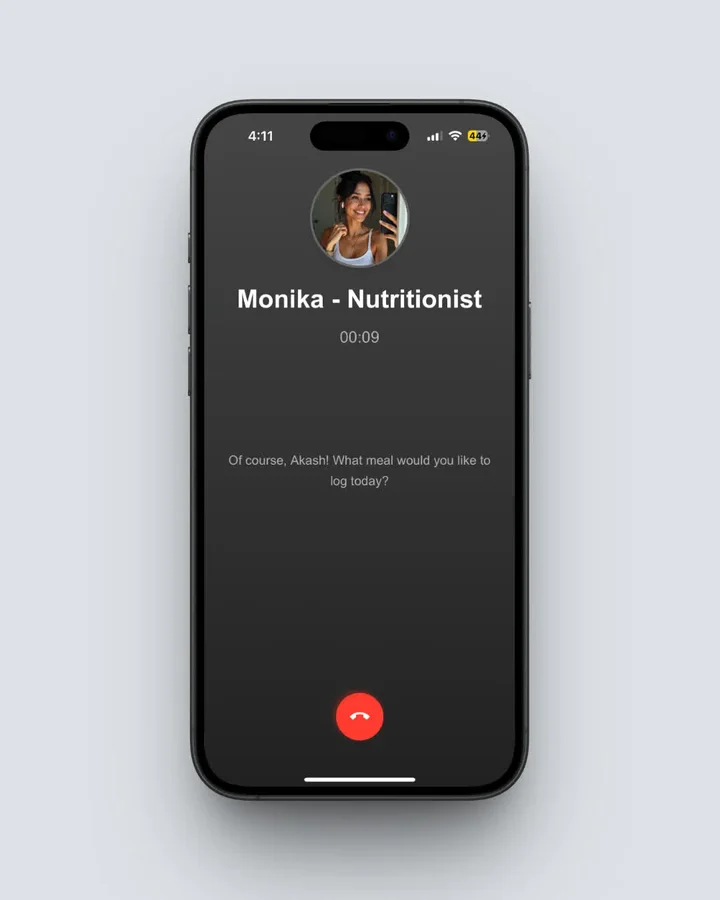 NutriScan's Monika handles voice logging for complex home-cooked meals - Home > Call Button
IMPORTANT
Checkpoint: midway progress update.
You're halfway - decisions get easier here.
⏱️ Progress 2/4 • ~2 minutes in • Keep going
✅ Photo logging (done)
✅ Voice logging (done)
👉 Meal plans (current)
⏳ What the research says about method (next)
Meal Plans and Diet Programs 🥗
This is where the two apps diverge the most.
Lifesum: Multiple Diet Programs
Lifesum's published program list covers:
- Lifesum Standard - the free default you land on when you first sign up
- Ketogenic - Easy, Medium and Strict versions, plus Keto Maintain and Keto Burn meal plans
- Intermittent fasting - 16:8 Morning, 16:8 Evening, 5:2 and 6:1
- Mediterranean - whole grains, healthy fats, lean proteins
- High Protein - for muscle building and recovery
- Scandinavian - Nordic diet principles
- Clean Eating, Climatarian and Vitality - also on the same list
Everything below Standard sits behind Premium. Each program adjusts your macro targets and suggests matching recipes under the Recipe tab. The time-boxed meal plans, like the 3-week weight loss plan, add a week-by-week structure; open-ended programs such as Mediterranean and High Protein do not.
Life Score is Lifesum's weekly wellness rating, a 0 to 150 score built from 16 nutrition and exercise metrics, banded from Off Track (0 to 30) up to Optimal (120 to 150) (Lifesum Helpdesk).
If you want guidance on what to eat and not just how much, that is the clearest gap between the two apps.
Lose It: Planning Tools, Not Programs
Lose It sells planning, it just does not sell a curriculum. Its App Store listing puts Meal Planning & Targets and Weight Loss Diet Plans under Premium features, loseit.com describes Meal & Exercise Planning as a Premium tool for pre-logging food and exercise, and you can build and save your own recipes. What it lacks is Lifesum's curated programs with a stocked recipe library attached. You get the machinery, not the menu.
The other planning tool is the Calorie Schedule. You pick which days should carry a bigger budget, usually weekends, and Lose It shifts calories toward them while your 7-day average stays exactly where you set it (Lose It help center). It is set in advance, not an automatic rescue after a heavy Saturday. Used before the weekend, it takes some sting out of the "I blew my day, why bother" feeling that ends a lot of streaks.
A 2026 decade-long scoping review of calorie-counting apps found the most cited acceptability factors were personalization, automation, user-friendly design, and data sharing with health care professionals (Dugas et al., 2026). It also watched self-monitoring with MyFitnessPal fall from 5.4 to 1.4 days a week between weeks 4 and 12. Feature choices are what that paper says move adherence.

NutriScan's home dashboard shows your daily breakdown with macro targets and remaining calories - Home > Daily Breakdown
 Meal plans only help if you actually cook the meals - consistency beats perfection every time
Pricing Breakdown 💰
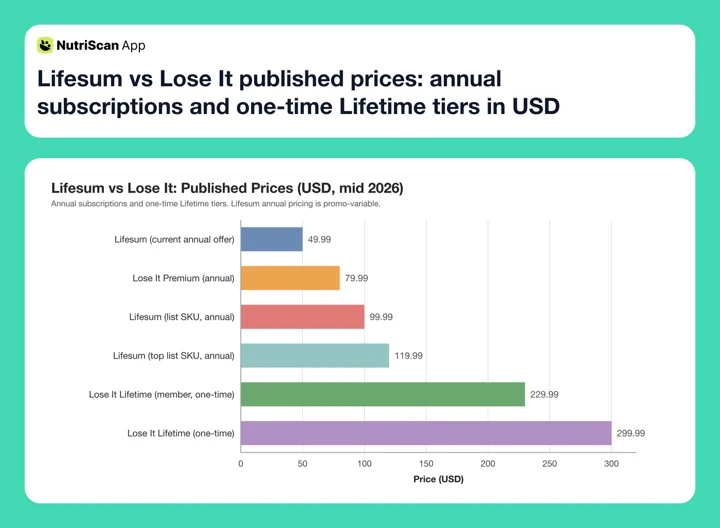 Figure 1: Published prices in USD. Lose It Premium is $79.99/yr, up from $39.99, and its one-time Lifetime tiers sit at $299.99 or $229.99 for existing Premium members. Lifesum's annual SKUs run from a $49.99 offer up to $119.99. Prices are standard US prices as of mid 2026 and change by region.
| Plan | Lifesum | Lose It |
|---|---|---|
| Free tier | Basic tracking, barcode scanning, the Lifesum Standard program | Basic calorie tracking, database search, 3 Snap It and 3 Voice Logging tries |
| Monthly | $7.49 on the SKU currently shown | No monthly plan |
| Annual | About $49.99 on the current offer, $99.99 and $119.99 listed | $79.99/yr |
| Lifetime | Not listed | $299.99, or $229.99 for active Premium members |
| Free trial | Marked on all three current Premium SKUs | Sales and free trials on the yearly plan, no length published |
Lifesum's annual cost depends on which promotional offer you see at sign-up. Its App Store listing carries $119.99 and $99.99 annual SKUs alongside a $49.99 annual offer (Lifesum on the App Store), and Lifesum's developer replies there describe the cheap ones as intro offers that renew at full price. Budget for roughly $50 if you take the offer in front of you, and treat $119.99 as the ceiling.
Lose It is simpler and no longer cheap: $79.99 a year, up from $39.99, with no monthly plan (Lose It membership tiers and pricing, 2026). That is a list price, not a fixed one. The same page says Lose It "regularly offer[s] sales and free trials for our yearly Premium membership", and its App Store listing carries nine concurrent Premium SKUs from $9.99 to $79.99 plus legacy Lifetime tiers at $49.99 and $59.99.
So the two land close together. On list annual prices Lose It's $79.99 undercuts Lifesum's $99.99 and $119.99. On the offers showing right now, Lifesum's $49.99 is the cheaper way in. Which applies to you depends on the screen you get.
IMPORTANT
Checkpoint: final stretch.
One last nudge, the research section is next.
⏱️ Progress 3/4 • ~3 minutes in • Keep going
✅ Photo logging
✅ Voice logging
✅ Meal plans + pricing
✨ What the research says about logging methods (up next)
App Ratings and User Base 📊
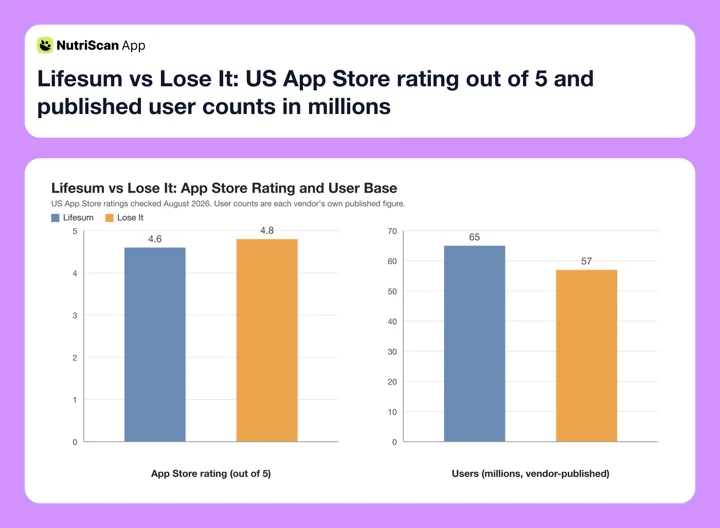 Figure 2: Lifesum leads on published users, 65 million against Lose It's 57 million, while Lose It leads on US App Store rating, 4.8 from 770K ratings against 4.6 from 150K, both checked August 2026. Lose It's own site says 50M+ members while its App Store listing says 57 million, so treat that bar as approximate.
Food Database and Accuracy
Lifesum: AI-Estimated Plus Community
Lifesum's database combines AI estimation with community-submitted entries. After the AI pivot, many logged foods go through the AI engine rather than a traditional lookup. This means the same food can return different calorie estimates depending on how you describe it or what angle you photograph it from.
The community database covers standard Western foods well. Coverage for regional cuisines - Indian, Middle Eastern, Southeast Asian, Latin American - is thinner.
Lose It: 50M+ Items, Crowd-Sourced
Lose It's help center puts the database at 50M+ items and gives it to the free Basic tier, not only to Premium. Its App Store listing says 56+ million and loseit.com quotes 32 million in one place and 50M+ in another, so take the lowest published figure and treat the rest as drift. The volume comes partly from crowd-sourced entries, which creates accuracy problems: wrong portions, implausible calorie counts, and duplicate entries for the same food.
For common foods, packaged items with barcodes, restaurant chains and standard ingredients, it works well. The catch is that the barcode scanner is Premium, listed as such on the same Membership Tiers page. Free search reaches the same 50M+ database; you type instead of scan.
App Stability and Reliability
Lose It has been generally stable across updates. Core tracking features - search, logging, barcode scanning, calorie display - work consistently.
Lifesum's AI pivot in early 2025 introduced instability. One reviewer writes that quick track and barcode logging stopped working for her and that a manually added food "refreshes and disappears", and says she cancelled her subscription after three months; another writes that "there's a lot of glitches with the new ai update" and that manually adjusting a food entry is gone (App Store reviews, checked August 2026).
For a tool you open 3-5 times per day, reliability matters more than feature count.
WARNING
Lifesum's AI pivot has introduced post-update instability that some users report. If you rely on the app multiple times daily, test it for a full week before committing to a paid subscription.
Real-World Examples: Who Picks Which App
The three profiles below are illustrative examples, not real users.
Example 1: The Meal Prep Planner
You meal prep every Sunday for the workweek. You want recipes that match your macro targets and a structured plan to follow.
Better fit: Lifesum. The diet programs and recipe library hand you specific meals to prepare. Follow the High Protein program and you get recipes suggested for that goal. Lose It would track your calories and let you save your own recipes, but it does not hand you a program with the meals already picked out.
Example 2: The Grab-and-Go Logger
You eat out several times a week. You scan barcodes at the grocery store and search restaurant names in your tracking app. You need fast logging, not meal planning.
Better fit: Lose It. The 50M+ item database and fast search workflow are built for this exact use case. One thing to price in: the barcode scanner is Premium on Lose It, so scanning at the grocery store means $79.99 a year. Lose It's Calorie Schedule also lets you set a bigger budget on the days you plan to eat out, with your 7-day average holding where you set it.
Example 3: The Hands-Free Home Cook
You cook at home most days and want to log meals while your hands are busy. You prefer voice input over typing.
Better fit: Lose It, narrowly. Both apps gate unlimited voice logging behind Premium, so neither is a free hands-free tracker. What separates them is what you can try before paying: Lose It publishes three free Voice Logging attempts, while Lifesum puts AI Tracking, voice included, entirely behind Premium. If your budget is tight, you can at least test Lose It's parser on your own cooking first.
Step-by-Step Guide: How to Pick Between Lifesum and Lose It 🔍
Step 1: Define your primary need. Are you looking for a program that tells you what to cook, or a tracker that gets a meal logged in ten seconds? Both apps sell planning tools at Premium, but only Lifesum sells a curated program with recipes attached.
Step 2: Test photo and voice logging, and budget for it. Both apps have free tiers, but neither gives away AI logging. Lose It hands free members three Snap It tries and three Voice Logging tries; Lifesum keeps AI Tracking behind Premium entirely. Spend Lose It's six free attempts on your usual food, and use Lifesum's trial rather than its free tier for the same test.
Step 3: Check your food coverage. If you eat foods from a specific cuisine - Indian, Korean, Mexican, Ethiopian - search for 10 common dishes in each app. The one with better coverage will save you time daily.
Step 4: Calculate the real annual cost. Lifesum's annual SKUs run from a $49.99 offer up to $119.99, and the cheap ones are intro rates that renew higher. Lose It Premium lists at $79.99 a year with no monthly option, and runs its own sales on top. Screenshot the offer each app shows you before you compare, because those are the only two numbers that apply to you.
Step 5: Evaluate stability. Use each app for a full week. Track whether any features break or behave inconsistently. Lose It's core features have been more consistent across updates.
Related: NutriScan vs Lifesum photo scan showdown and NutriScan vs Lose It.
What the Research Actually Says About Logging Methods ✨
You've read through photo logging, voice logging, and meal plans. Here is what the research supports, and where it runs out.
A 2025 umbrella review found mobile app interventions produced a modest but significant weight reduction, a mean difference of -1.32 kg, against -1.13 kg for long-term eHealth interventions and no significant effect for web-based ones (Couto and Almeida, 2025). Heterogeneity was high (I2 = 82%), so read -1.32 kg as a rough central estimate.
What that review does not do is compare logging methods. I could not find any published review that puts photo, voice and manual entry head to head, so nobody can honestly tell you one input format beats the others.
Here is my own recommendation, stated as mine rather than as a finding: pre-log before you eat. Deciding what goes on the plate is a different act from recording what you already finished, and both apps support it from any input method. No trial I can point to has tested it against after-the-fact logging, so treat it as practice worth trying.
TIP
Log before you eat, not after. Pre-logging what you plan to eat, in either app and using any input method, is the habit I recommend most often. It is a coaching preference, not something a published trial has measured against retroactive logging.
The second thing that moves your numbers: accuracy on calorie-dense foods. Oils, nuts, sauces, and dressings are where AI logging makes the biggest errors. A tablespoon of olive oil is about 120 calories (USDA FoodData Central record 171413). If the AI calls it "a drizzle" and charges you 40, that gap compounds every day you cook. Verify these manually regardless of which app you use.
Explore NutriScan's macro calculator to set personalized calorie targets before comparing apps - knowing your own numbers makes any tracker more effective.
IMPORTANT
Recap: everything you covered this round.
You finished the run - save this for next time.
⏱️ Progress 4/4 • ~4 minutes in • Nicely done
✅ Photo logging: Lifesum AI Tracking (Premium) vs Lose It Snap It (3 free tries, then Premium)
✅ Voice logging: both apps gate it, only Lose It publishes a free allowance
✅ Meal plans: Lifesum sells curated programs, Lose It sells planning tools
✅ No review compares input formats, so pick the one you will actually use
Who Should Choose Lifesum
- You want structured diet programs (Keto, fasting, Mediterranean, High Protein, Scandinavian)
- You prefer AI-driven logging over database search, and you are willing to pay for it
- You value a recipe library with meals matched to your nutrition goals
- You want a wellness score that tracks more than just calories
Who Should Choose Lose It
- You want calorie tracking at a published annual price ($79.99/year, no monthly plan)
- You eat out often and need a large food database (50M+ items, free on the Basic tier)
- You are motivated by streaks, badges, and Lose It's community groups
- You want a Calorie Schedule that front-loads your budget onto chosen days
- You value consistency and stability over feature breadth
Conclusion
Lifesum and Lose It serve different tracking philosophies. Lifesum is the broader tool: AI photo and voice logging, curated programs, recipes, and a weekly wellness score. Lose It is the narrower one: fast database search, gamification, planning targets, and a Calorie Schedule, with barcode scanning and unlimited smart logging held behind Premium.
If you need help deciding what to eat, Lifesum's programs provide that guidance. If you already know what to eat and just need it logged, Lose It is faster. On price it is no longer the budget pick: $79.99 a year list sits above the $49.99 offer Lifesum is currently showing, and below Lifesum's $99.99 and $119.99 list SKUs.
Both apps do ship recommendation surfaces. Lifesum markets Life Score tests and personalized nutrition plans; Lose It markets Weight Loss Diet Plans and its Patterns insights. Neither one turns today's logged shortfall into a specific answer about your next meal. That gap is what NutriScan is built around: photo scanning with a NutriScore on every meal, micronutrients on the free plan, Monika the voice AI nutritionist for hands-free logging, and a Premium 28-day personalized diet plan with weekly meal-plan suggestions and a goal-based grocery list.
Also see our NutriScore guide to understand how food quality scoring works across tracking apps, or use the diet plan guide to set up a macro framework before switching apps.
Frequently Asked Questions ❓
Q: Is Lifesum or Lose It better for photo logging?
Both apps offer AI photo logging, and both charge for it. Lifesum's AI Tracking sits on its Premium feature list. Lose It's Snap It gives free members three tries and unlimited use on Premium ($79.99/year), and it hands you the result to verify before it logs. A 2024 scoping review of 25 studies reported nutrient estimation errors of 10 to 15 percent across image, sensor and text inputs in research models (Zheng et al., 2024), which is a reason to check portion sizes in either app rather than a score for either one.
Q: Does Lose It have meal plans like Lifesum?
Not in the same form. Lose It does sell Meal & Exercise Planning and Weight Loss Diet Plans at Premium, and you can build your own recipes, but it has no curated program with a stocked recipe library attached. Lifesum's Premium subscription does: Ketogenic, intermittent fasting (16:8 Morning, 16:8 Evening, 5:2, 6:1), Mediterranean, High Protein, Scandinavian and more, per its published program list.
Q: Which app is cheaper - Lifesum or Lose It?
It depends entirely on the offer each app shows you. Lose It Premium lists at $79.99/year with no monthly plan, though Lose It says it runs regular sales and free trials on the yearly membership (membership tiers and pricing, 2026). Lifesum's App Store listing currently shows a $49.99 annual offer against list SKUs of $99.99 and $119.99. Paying Lifesum monthly at its current $7.49 SKU works out to $89.88 a year, about $10 more than Lose It's list price. Lose It used to charge $39.99 and was the clear budget pick; that stopped being true in 2026.
Q: Can I use voice logging on both Lifesum and Lose It?
Yes, but not for free on either. Lifesum's voice input is one mode of AI Tracking, which is a Premium feature. Lose It calls its version Voice Logging, or AI Voice on the store listing, and gives free members three tries before Premium. Both let you describe a meal aloud and log each item. Complex meals with sauces, mixed dishes, or non-Western food names challenge both systems.
Q: Which app is more reliable day to day?
Lose It has been more stable across updates. Core features work consistently each time you open it. Lifesum's AI pivot in early 2025 introduced some instability, and App Store reviewers report foods that fail to save and features lost or changed after updates (checked August 2026). For a tool you rely on multiple times daily, Lose It's consistency is a practical advantage.
Q: What logging method works best with either app?
No published review compares photo, voice and manual entry head to head, so use whichever input method feels fastest for your food. My own coaching preference, offered as that rather than as evidence, is to pre-log: decide what you will eat before the meal instead of recording it afterwards.