Calorie Scanner: Meal Scan vs Photo Scan vs Barcode Scan
 ChatGPT
  Claude
  AI Mode
  Perplexity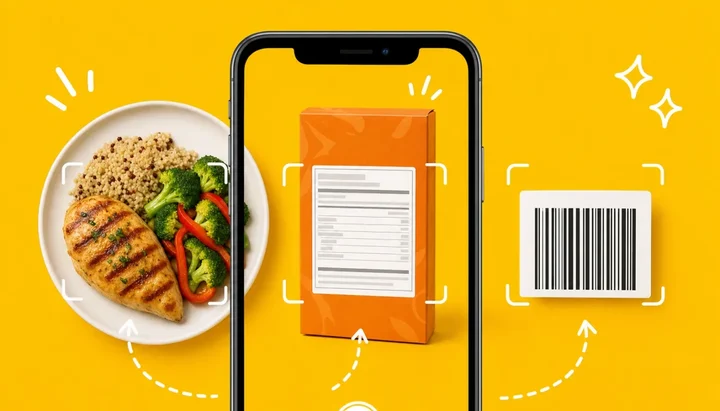
TL;DR - Calorie Scanner: Meal Scan vs Photo Scan vs Barcode Scan
• Three inputs, three sources: a barcode looks up a number someone stored, a label photo scan copies a number someone printed, a meal scan estimates a number from pixels.
• Barcode: best for mainstream packaged food, fails all-or-nothing when the database row is stale, regional or mistyped.
• Meal scan: the only input that works on cooked plates, restaurant food and home meals; recognition is excellent, portion and invisible oil are the weak spots.
• The ceiling: a printed label is legally allowed to be 20 percent light in the US and Canada, so no input delivers exact calories.
NutriScan publishes this post and makes a calorie tracking app. People ask which calorie scanner is most accurate, but the real question is which camera trick to trust: pointing the phone at the plate, at the nutrition label, or at the barcode. The choice matters more than most people expect. When researchers fed identical 3-day food records into 16 manual logging apps, the apps overestimated energy by a mean of 1040 kJ (about 249 calories) on a Western diet and underestimated it by a mean of 1520 kJ (about 363 calories) on an Asian diet (Li et al., 2024). Same meals, same 3 days, and a swing of roughly 600 calories depending on how the food entered the app. The input decides the number.
IMPORTANT
Your calorie scanner plan at a glance.
A quick roadmap so you can pick the right input without testing every app.
⏱️ Progress 0/4 • ~0 minutes in • Keep going
⏳ Step 1: What each scan actually does and where its number is born
⏳ Step 2: How barcode, label scan and meal scan each fail
⏳ Step 3: Three real meals, three different winners
🔍 The one-week routine that picks your default input (revealed near the end)
What the Three Scans Actually Do 📸
The three inputs look similar because they all use the camera. They are not similar at all.
Barcode scan. The camera reads the printed code on a package. The code itself contains no nutrition data. It is only an ID number. The app uses that ID to look up a row in its food database and shows you whatever that row says.
Photo scan of the label. The camera reads the nutrition facts panel itself. The app runs text recognition on the printed numbers and copies them into your log. Some apps call this a label scan. The result is the manufacturer's own declared values, read directly off the pack.
Meal scan. The camera looks at the food. An AI model identifies the dishes on the plate, estimates the portion of each, and produces calorie and macro numbers from that estimate. Apps market this as meal scan, food scan, AI food scanner, or AI photo logging, and it is the only one of the three that works on a cooked plate with no packaging anywhere in sight.
 The meal scan moment: the only one of the three inputs where the number does not exist yet when you press the shutter.
Where Each Number Comes From 🔍
The accuracy question becomes much easier once you ask where the number was born.
| Input | Source of the number | Who created it | Main failure |
|---|---|---|---|
| Barcode scan | A database row linked to that code | The app's database team, a data provider, or another user | Wrong, stale, or regional-mismatch row |
| Label photo scan | The printed nutrition facts panel | The manufacturer | Label rounding and legal tolerance, misread digits |
| Meal scan | An AI estimate from the image | A model, at the moment you shoot | Portion guessing and invisible ingredients |
Each path adds its own kind of error, and the three kinds behave very differently, which is the core of this whole comparison. Figure 1 shows how much of the daily error in published app tests traces back to the database rather than the camera.
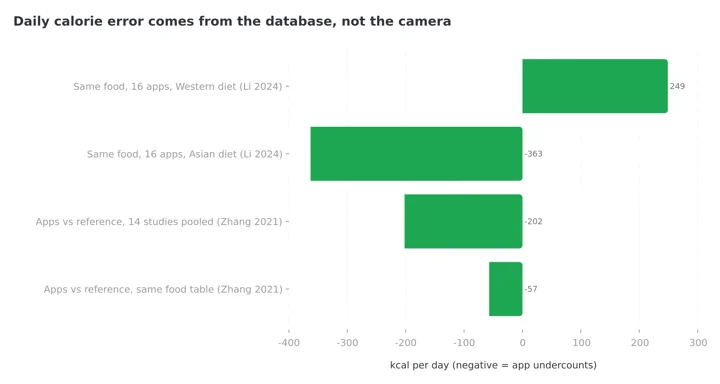 Figure 1: Identical food records produced a 600-calorie swing across 16 apps, and the pooled app error of 202 kcal a day collapsed to 57 kcal once both sides used the same food composition table (Li et al., 2024; Zhang et al., 2021).
IMPORTANT
Checkpoint: here's where you are right now.
You know where each number is born. Next is how each one breaks.
⏱️ Progress 1/4 • ~2 minutes in • Keep going
✅ Step 1: What each scan does (done)
👉 Step 2: How each input fails (you're here)
⏳ Step 3: Three real meals, three winners
🧩 The one-week routine (coming soon)
Barcode Scan: An Exact Row, Not an Exact Food 🛒
A barcode feels like the most scientific option. Beep, done, exact product. The beep is real. The exactness depends entirely on the row behind the code.
The row can be wrong in ways the scanner will never show you. Community-built databases say this openly: Open Food Facts, which supplies packaged food data to many apps, states in its own documentation that "there are no assurances that the data is accurate, complete, or reliable" (Open Food Facts API docs). Commercial databases carry a version of the same problem. The US government's own branded food data comes from industry data providers and reflects the values that appear on the product label, not independent lab analysis (USDA FoodData Central FAQ). A barcode result that looks official is, in most cases, a typed copy of a label.
Three failure patterns show up again and again:
- The stale row. Products get reformulated. If the database row was created before the recipe changed, you log the old product while eating the new one.
- The regional twin. The same brand often sells different recipes in different countries under near-identical packaging. A code scanned in Mumbai or Berlin can resolve to a row typed from a US pack.
- The community typo. In apps with user-generated entries, the row behind a code may have been typed by another user in a hurry, with the serving size wrong or a digit missing.
The practical defense is simple and takes 5 seconds: after a scan, compare the calories on screen with the calories on the pack. If they match, trust the row. If they do not, you have just learned something about your database. we ranked the strongest options in my barcode scanning app comparison, and the ranking is mostly a database ranking, because the scanner hardware is the same phone camera everywhere.
Photo Scan of the Label: The Shortest Path to the Printed Number 🏷️
Scanning the label itself skips the database completely. The camera reads the panel, the app copies the digits, and your log now holds exactly what the manufacturer declared. For imported foods, small local brands, and anything the barcode lookup cannot find, this is the most reliable input available.
Text recognition can misread. A smudged pack, a curved bottle, or glare can turn an 8 into a 3. This error is easy to catch because the misread number sits right next to the real one in your hand. Check the calories line after the scan and you have removed most of the risk.
The label scan also inherits a human problem: serving size. The panel might declare numbers per 30 g serving while you ate 75 g. The scan copies the panel faithfully. It is your job to set how much of it you actually ate. Every app with a label scan has a portion field for exactly this reason, and it is the field most worth 5 seconds of your attention.
Meal Scan: The Camera Makes an Estimate 🍛
The meal scan is the only input that handles the food most people actually eat most of the time: cooked plates, mixed dishes, restaurant meals, and home food with no packaging. It is also the only input where the number is created, not copied.
The research on it is honest and mixed. In the same 2024 evaluation, the two best AI photo apps identified foods correctly 97 percent and 92 percent of the time, yet the authors still concluded that automatic energy estimations from AI food-image recognition were inaccurate (Li et al., 2024). Recognizing the dish is the easy part. Weighing it with a camera is the hard part.
The error concentrates in the portion. An evaluation of ChatGPT-4 on 114 meal photographs found portion weight underestimated in 76 percent of photos, with good agreement on small portions and poor agreement on medium and large ones (O'Hara et al., 2025). The direction matters: big plates get undercounted, and the miss grows with the meal.
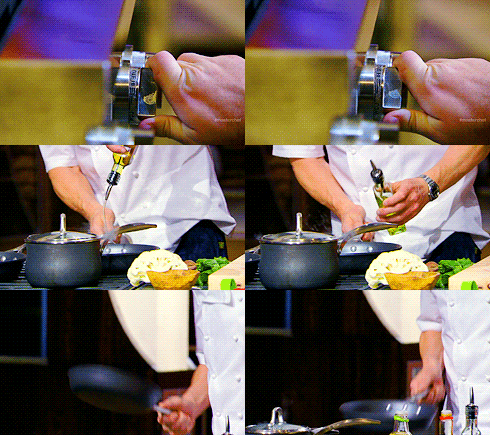 The highest-calorie ingredient in many meals goes in before the photo and leaves no pixels behind.
The camera also cannot see what is not visible. Cooking oil is the classic case. Two tablespoons of oil is roughly 240 calories with no pixels to show for it. Ghee in dal, butter finishing a steak, dressing folded into a salad: the highest-calorie part of many meals is optically invisible. This is why the apps that do meal scan well are the ones that ask follow-up questions about oil, cooking method, and portion after the photo, a pattern I covered in detail in the photo logging comparison for mixed dishes.
The Label Itself Has Legal Headroom ⚖️
One fact reframes the accuracy debate: the printed label, the gold standard that both the barcode and the label scan ultimately point at, is allowed to be off.
Under US rules, for calories, sugars, total fat, and similar nutrients, a product is out of compliance only if lab analysis finds more than 120 percent of the declared value (FDA labeling database guidance, 21 CFR 101.9(g)). In plain terms, a bar labeled 200 calories can contain up to 240 calories and the label remains legal. Canada applies the same 20 percent tolerance to its nutrition facts table (CFIA compliance test). Food varies batch to batch, and regulators chose a workable tolerance.
That tolerance sets the ceiling for two of our three inputs. A perfect barcode match and a perfect label scan both deliver a number that was allowed to be 20 percent light on the day it was printed. Nobody should chase single-calorie precision through a packaged food label, because the label itself was never that precise.
IMPORTANT
Checkpoint: midway progress update.
You're halfway, and the failure modes are now on the table.
⏱️ Progress 2/4 • ~4 minutes in • Keep going
✅ Step 1: What each scan does (done)
✅ Step 2: How each input fails (done)
👉 Step 3: Three real meals, three winners (current)
⏳ The one-week routine (next)
Three Error Shapes, and Why the Shape Matters 📊
The three inputs do not just have different error sizes. They have different error shapes.
Barcode errors are all-or-nothing. When the row is right, you are within label tolerance, which is as good as packaged logging gets. When the row is wrong (stale, regional, mistyped), the error can be huge, and the app gives no visual warning. You are either nearly right or badly wrong, rarely in between.
Label scan errors are small and bounded. Misreads are catchable on the spot, and the underlying number sits inside the legal tolerance. This input has the tightest worst case of the three, which is why it deserves more use than it gets.
Meal scan errors are continuous and directional. The estimate is rarely exactly right and rarely absurdly wrong. It drifts, mostly downward as portions grow, and it misses invisible fats entirely unless the app asks.
The shape tells you where to spend your checking effort. With a barcode, check identity: is this row actually my product? With a label scan, check digits: did it read the panel correctly? With a meal scan, check size and fat: is the portion right, and did I account for the oil? Three different 5-second habits, one per input, and each removes most of that input's risk.
Three Real Meals, Three Different Winners 🍽️
A packaged protein bar. Barcode, by a wide margin. The product is standardized, the row is likely correct for a mainstream brand, and the scan takes 2 seconds. If the lookup returns nothing or the numbers disagree with the wrapper, photograph the label panel instead and you are done in 10 seconds. A meal scan is the worst choice here: the camera would be estimating a wrapped rectangle when the exact declared values are printed on the back.
Dal, rice, and sabzi at home. Meal scan, because nothing else works at all. There is no barcode on a home-cooked thali and no label to photograph. A good meal scan identifies the components in one shot. Then the two edits do the real work: set the portion honestly, and answer the oil question honestly, because the cooking fat carries the hidden calories. A manual search could match this accuracy, but it costs 3 minutes against 20 seconds.
A restaurant burger and fries. Meal scan first, then your own judgment. No packaging exists, so label-based inputs are out unless the chain publishes data. The camera will recognize burger and fries with ease and will most likely under-guess the size, since large portions are exactly where photo estimation agreed worst in the research above. Scan it, then push the portion up to what was actually on the plate, and add the sauce the camera could not see.
Which Input Fits Your Week 🗓️
Put your last 7 days of meals into three buckets: packaged, home-cooked, restaurant or takeaway.
- Mostly packaged (heavy snacker, shakes, ready meals). Barcode is your primary input. Pick an app whose database covers your country well, and keep the label scan as backup for anything not found. A meal scan feature matters little for you.
- Mostly home-cooked. Meal scan is your primary input, and its quality should decide your app choice. Prompts for oil and cooking method are worth more to you than a million-item barcode database, because your food never had a barcode.
- Mostly eating out. Meal scan again, but your accuracy depends on your own portion edits more than on the model, so favor apps where editing is fast. Our AI photo calorie counter ranking weights exactly this.
- A genuine mix. You want an app that does two of the three well, and you should decide which two based on your bigger buckets. Very few apps do all three well, and the marketing will not tell you which one is weak.
IMPORTANT
Checkpoint: final stretch before the reveal.
You know which input wins each bucket. The routine that locks it in is next.
⏱️ Progress 3/4 • ~6 minutes in • Keep going
✅ Step 1: What each scan does
✅ Step 2: How each input fails
✅ Step 3: Three real meals, three winners
✨ The one-week routine that picks your default input (about to reveal)
5 Tips for Cleaner Scans, Whatever You Use 💡
- Verify the first scan of every new product. Compare the app's calories against the pack once. If the row is right, it stays right, and every future scan of that product is safe.
- Shoot the plate from slightly above, with everything visible. In a study of an image-based logging app, 12.8 percent of food photo recordings had to be discarded, mostly for avoidable capture problems like partly hidden plates and hands in front of the camera (Vasiloglou et al., 2021). A clean angle costs nothing.
- Answer the oil question honestly. The single largest invisible error in home cooking is fat used in preparation. If your app asks, answer. If it does not ask, add a teaspoon or two of oil manually to cooked dishes.
- Edit the portion on every large meal. Photo estimation agrees well on small plates and poorly on big ones, with the miss pointing down. If the plate was generous, assume the scan guessed low.
- Match the serving size after a barcode or label scan. The panel's per-serving numbers are useless until the app knows how many servings you ate. This field, not the scan, is where packaged logging goes wrong.
A 5-Step Routine to Pick Your Default Input 🧭
- Audit one week. Count your meals in the three buckets: packaged, home-cooked, eating out.
- Assign the winning input to each bucket. Barcode or label scan for packaged, meal scan for the other two, using the reasoning above.
- Test your app's weakest link against your biggest bucket. If half your meals are home-cooked, run 5 meal scans this week and check each against your own portion sense. If half your food is packaged, scan 10 pantry items and compare rows against packs.
- Set your two check habits. One per input you actually use: identity check for barcodes, digit check for label scans, portion-and-oil check for meal scans.
- Re-run the audit when life changes. A new job with a canteen, a move to another country, a cooking phase: each shifts your buckets, and your default input should shift with them.
Where NutriScan Fits 🥣
NutriScan is a meal-scan-first app, and we describe it the same way as everything else here: by input.
The meal scan is the center of the product. You photograph the plate, the app identifies the foods, and then it does the thing this post keeps asking for: it prompts. An oil level slider (No Oil, Low Oil, Medium Oil, High Oil), a cooking method tag list with 11 options (Deep-fried, Air-fried, Stir-fried, Oven-baked, Roasted, Steamed, Boiled, Grilled, Raw, Mixed, Not Sure), a food type tag (Home Made, Packaged Food, Restaurant / Cafe, Street Food and four more), plus portion controls you can nudge with plus and minus or type exactly. Those prompts target the exact places where the research says photo estimation fails: invisible fat and portion size. You can also add a missed item by typing or voice, so the sauce the camera never saw still makes the log. The free plan includes 5 meal scans per week; Premium removes the cap.

Home > Camera Icon > Click Picture: the food type, cooking method and oil level prompts sit between the photo and the number, covering what the camera cannot see.
What NutriScan does not have is a barcode scanner. If your week is dominated by packaged food, we would rather you know that now: pair NutriScan with a barcode app for your pantry, or photograph the label and log packaged items with the food type tag set to Packaged Food. For home-cooked and restaurant-heavy weeks, which is how most of our users eat, the meal scan plus its follow-up questions is the strongest input for food that never had a label in the first place.
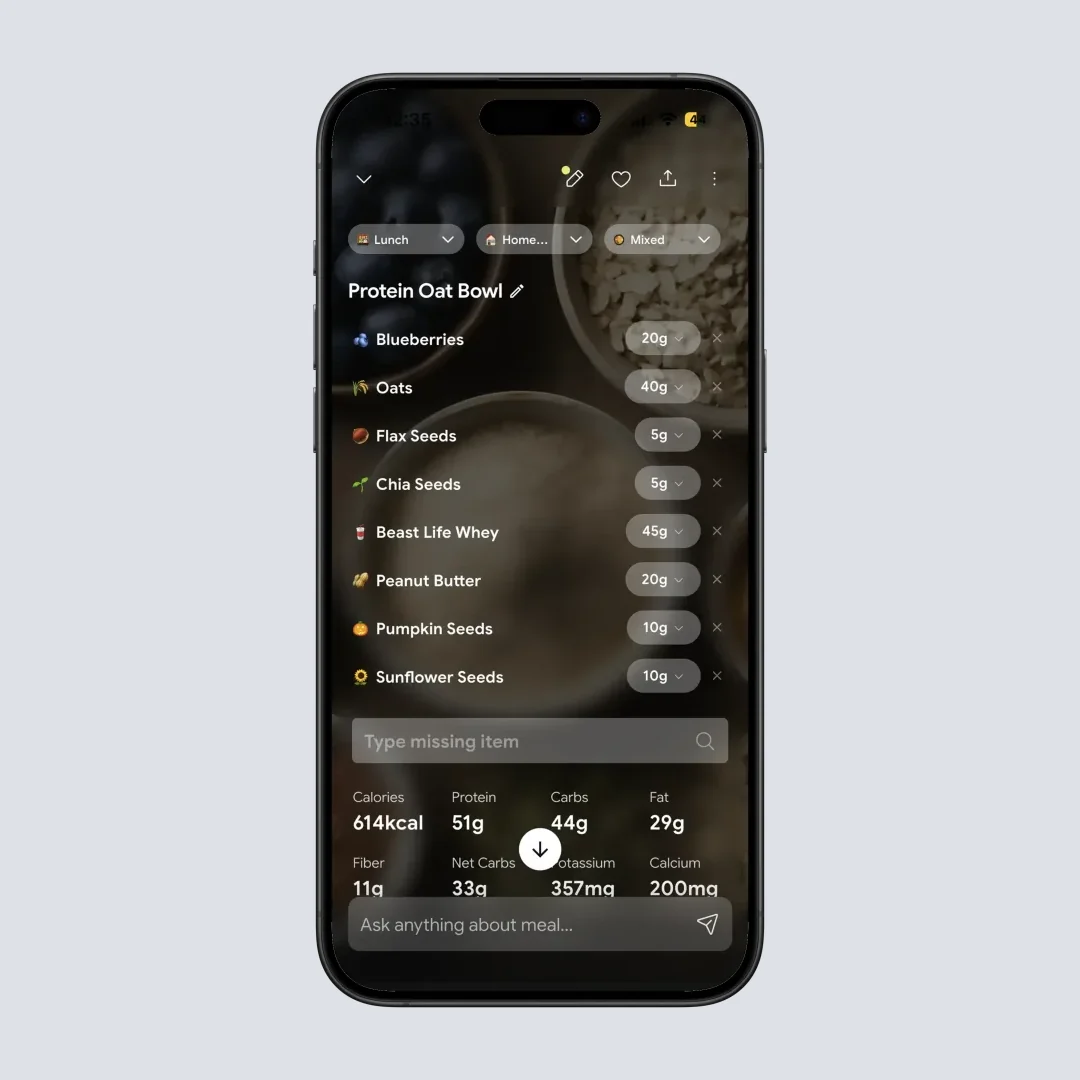
Home > Meal Item: edit or type the portion, remove an item, or add a missing one by voice, the 10-second edits that close most of a meal scan's gap.
The Verdict ✅
Pick the scan by the food in front of you, not by an accuracy ranking.
Barcode scan wins on mainstream packaged food, where a correct database row delivers the manufacturer's number in 2 seconds, and loses badly the moment the row is stale, regional, or mistyped. Photo scan of the label has the tightest worst case of the three and is widely underused for imported and local products. Meal scan is the only input that works on the majority of real meals, and it performs best when you treat its output as a first draft and spend 10 seconds on portion and oil.
Match the input to the plate, keep the method consistent, and let the trend do the judging. If most of your plates are cooked rather than wrapped, that is the problem NutriScan was built for.
IMPORTANT
Recap: everything you completed this round.
You finished the run, save this for the next app decision.
⏱️ Progress 4/4 • ~8 minutes in • Nicely done
✅ Step 1: What each scan does and where its number is born
✅ Step 2: How barcode, label scan and meal scan each fail
✅ Step 3: Three real meals, three different winners
✅ The one-week routine that picks your default input (revealed)
Frequently Asked Questions ❓
Q: Is barcode scanning more accurate than photo scanning?
For packaged food with a correct database row, yes: a barcode delivers the manufacturer's declared values, while a meal scan would only estimate them. But the advantage flips when the row is wrong or missing, and it disappears entirely for cooked meals, which have no barcode. Accuracy belongs to the match between input and food, not to the input itself.
Q: Why does my barcode scan show different calories than the pack?
Because the code only points to a database row, and that row can be outdated after a reformulation, typed from another country's version of the product, or entered incorrectly by another user. Trust the pack in your hand over the row on the screen, and either photograph the label panel or correct the entry manually.
Q: Can an AI meal scan count calories accurately?
It recognizes food very well and estimates portions imperfectly. Top apps identified foods correctly up to 97 percent of the time, yet their automatic energy estimates were still rated inaccurate (Li et al., 2024), and portion weight was underestimated in 76 percent of test photos in a separate evaluation (O'Hara et al., 2025). Fix the portion and account for cooking oil, and the result is solid for daily tracking.
Q: What should I do when a barcode is not found?
Photograph the nutrition label instead, or type the panel's values in manually. Missing codes are most common for imported goods and small local brands, exactly where the label in your hand is more trustworthy than any database. In apps without a label scan, save the item as a custom food once and reuse it.
Q: Do nutrition labels show the exact calories in my food?
No. US rules treat a label as compliant as long as the product contains no more than 120 percent of the declared calories, and Canada applies the same 20 percent tolerance (FDA guidance). Labels are averages with legal headroom, not lab reports for your exact unit. Track trends over days rather than chasing single-calorie precision in any one number.
Q: Does NutriScan have a barcode scanner?
No. NutriScan is meal-scan-first: you photograph the plate and the app asks about oil level, cooking method, food type and portion, the exact places where photo estimation fails. Packaged items can be photographed or typed in with the Packaged Food tag. If most of your calories come from packaged products, pair it with a barcode app from the barcode scanning comparison.