Best App for Beginners Who Hate Tracking Calories (2026)
 ChatGPT
  Claude
  AI Mode
  Perplexity
What if the reason you quit calorie tracking was never willpower, but the search box? 🤔
TL;DR - Easiest Calorie Apps for Beginners in 2026
• Ranked on: can you log without typing, does day two get faster than day one, and does the free tier actually include the easy inputs
• Winner overall: Lose It, the only app here with photo, voice and barcode under one subscription, with three free tries of each
• Best free photo path: NutriScan, 5 AI meal scans per week free plus unlimited copy and weekday repeats, though it has no barcode scanner
• Watch the paywall: MyFitnessPal keeps barcode and Meal Scan behind Premium at $79.99/yr, and MacroFactor has no free tier at all
• The finding that matters most: a lighter tracking standard still produced real weight loss, revealed near the end
In a 2022 study of 90 adults asked to track their diet with a mobile app for eight weeks, participants logged their food on only 50.1% of days, 28 days out of 56, and kept up consistent tracking for an average of just 4.4 weeks (Payne et al., 2022, Obesity Science and Practice). The same study found that each additional week of consistent tracking was associated with an extra 0.23% of weight lost. Read those two findings together. Tracking works, and the average participant kept it up for about a month.
As a NutriScan nutritionist, I meet the people behind that statistic every week. They did not fail at nutrition. They failed at typing "chicken breast, grilled, 140 g" into a search box for the ninth day in a row. So this ranking is not about which app has the most features. It is about which app asks the least of you on day nine.
One honest note before we start. NutriScan is in this ranking, at number two, and I will tell you plainly what it does not have. The other four placements are based on what each app's own documentation says, not on marketing pages.
IMPORTANT
Your no-typing tracking plan at a glance.
A quick roadmap so you can skip ahead to whichever part you need.
⏱️ Progress 0/4 • ~0 minutes in • Keep going
⏳ Step 1: Why beginners quit tracking
⏳ Step 2: The five apps ranked on effort
⏳ Step 3: How accurate photo and voice logging really is
🔍 The lighter tracking standard that still moved the scale (revealed near the end)
Why Beginners Quit Tracking Calories
The evidence that logging your food helps is solid. In a 2025 analysis of 502 adults in a behavioral weight loss program, higher adherence to dietary self-monitoring was associated with greater odds of achieving at least 5% weight loss (Burke et al., 2025, Obesity). The record predicts the result.
The problem is what producing that record costs. Traditional logging means searching a database, choosing between twelve near-identical entries, guessing a portion, and repeating that for every item on the plate. For a mixed home-cooked meal, that can take longer than eating it.
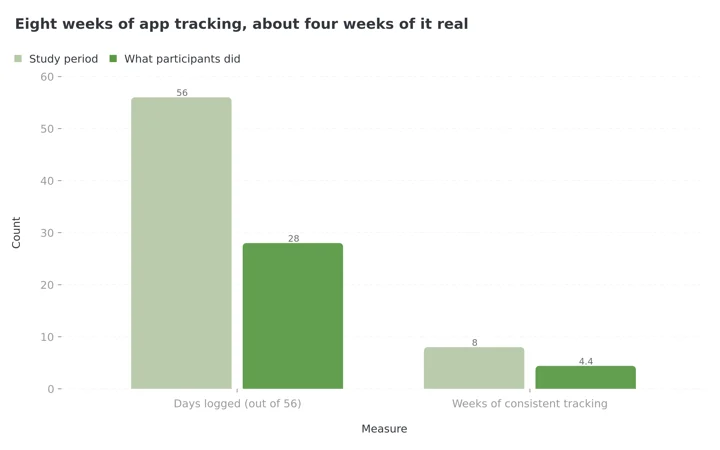 Figure 1: The gap between what a tracking study asks for and what people actually do. Participants logged on 28 of 56 days and held consistent tracking for 4.4 of the 8 weeks (Payne et al., 2022).
This is why the input method is the whole decision for a beginner. Photo logging turns a plate into one camera tap. Voice logging turns it into one sentence. Barcode scanning turns a packaged snack into one point-and-hold. Repeat and copy functions turn your usual breakfast into zero taps after the first day. Every one of those replaces manual search, the exact activity the adherence data shows people abandon.
 One camera tap, and the hardest part of logging is already done
Tracking is not right for everyone
If tracking food makes you anxious, or you have a history of disordered eating, an app that makes tracking easier is not automatically good for you. There is more on this at the end of the article.
IMPORTANT
Checkpoint: you now know why the input method decides everything.
Quick status update so you always know the next best move.
⏱️ Progress 1/4 • ~1 minute in • Keep going
✅ Step 1: Why beginners quit tracking (done)
👉 Step 2: The five apps ranked on effort (you're here)
⏳ Step 3: How accurate photo and voice logging really is
🧩 The lighter tracking standard (coming soon)
The Three Jobs I Ranked On
Job 1: can you log a real meal without typing? Photo, voice or barcode. Not as a demo, but as the app's main path. A beginner who hates tracking will use the camera or say a sentence. They will not browse a database.
Job 2: does day two get faster than day one? Most people eat the same breakfast most days. The apps that win let you copy yesterday's meal, mark favorites, or set a meal to repeat automatically, so the boring half of your diet logs itself.
Job 3: does the free tier let you use the easy inputs? This one decides more than people expect. Several famous apps keep manual logging free and put every low-effort input behind the paywall. For this audience that is the difference between starting and uninstalling.
Quick Comparison of the Five Apps
| App | Photo | Voice | Barcode | Repeat or copy meals | Easy inputs on the free tier | Annual price |
|---|---|---|---|---|---|---|
| Lose It | Yes (Snap It) | Yes (Say It) | Yes (Scan It) | Yes | 3 free tries each, then Premium | $79.99 |
| NutriScan | Yes, 5 scans per week free | Yes, for adding items and Monika calls | No | Copy, favorites, weekday repeat | Photo scan, copy and repeat are free | about $59 |
| MyFitnessPal | Yes (Meal Scan) | Premium voice logging | Yes | Yes, remembered meals | No, barcode and Meal Scan are Premium | $79.99 |
| Cal AI | Yes, core feature | Not documented | Yes | Limited | Limited free scans | $29.99, dynamic |
| MacroFactor | Yes (AI logging) | No, typed describe | Yes | Yes | No free tier | $71.99 |
1. Lose It: Best Overall for People Who Hate Logging
Lose It is the only mainstream tracker whose home page is literally its input methods: "Say It. Snap It. Scan It." (Lose It). That focus is why it takes first place for this audience. All three no-typing inputs exist, they are documented, and they work on both iOS and Android.
Snap It is the photo path. You open the Log tab, pick a meal, tap Snap It, take or upload a photo, review what the app recognized, and add it. The company's own guide states the honest limit: "Snap It is available as a Premium feature, but everyone can try it up to three times before upgrading" (Lose It, Snap It guide). Voice Logging has the same three-try rule on the free tier (Lose It, tips article).
Lose It publishes its own member data claiming users of these AI tools logged meals 3.5 times faster, logged twice as many foods, and lost 6% more weight (Lose It, tips article). Treat those numbers as the vendor's own analysis of its members, not independent research. The direction still matches the published adherence evidence above: lower effort, more logging.
So why does it beat the bigger names? Because it is the only app in this comparison where all three inputs sit under one subscription and you can test each one free before paying anything. That is a genuine advantage for someone who does not yet know whether they are a camera person or a voice person.
The price doubled
Lose It Premium went from $39.99 to $79.99 per year, which is now the same as MyFitnessPal Premium. Older articles quoting $39.99 are out of date. The free tier still keeps a full manual logger with no time limit.
Choose Lose It if: you want every low-effort input in one app, and you want to try each one before deciding which you will actually use.
2. NutriScan: Best Free Photo-First Logging (With One Gap)
NutriScan is our app, so read this placement with that in mind. I ranked it second because it does the two things this audience needs most, and I will also tell you the thing it does not do.
The main path is the camera. You photograph your plate, the AI identifies the foods, and you confirm portions before anything is saved. The portion review step matters, because photo AI is good at naming foods and weaker at judging amounts, which is exactly where a ten-second human check does the most good. If the scan missed an item, you can add it by typing or by voice. Our meal scan guide walks through the full flow.

Home > Camera Icon > Click Picture. You crop, tag the food type and cooking method, then continue. Typing is optional at every step.
The free plan includes 5 AI meal scans per week with the count resetting weekly, unlimited manual logging, macro and calorie tracking, micronutrients, NutriScore ratings, copy meals, weekday repeats, the fasting timer and hydration tracking, plus 4 Monika voice assistant calls per week, with no ads and no time limit (NutriScan pricing). Five scans a week is a real cap, and it is worth knowing before you start. It also covers the meals most people find hardest to type, which are the mixed cooked ones.
Job 2 is where NutriScan is strongest. Long-press any logged meal and you can copy it to today, mark it as a favorite, or start a daily repeat with specific weekdays, so your Tuesday and Thursday oats log themselves on Tuesdays and Thursdays. For a beginner, the repetitive half of the week costs zero effort, and the camera only comes out for meals that are actually new.
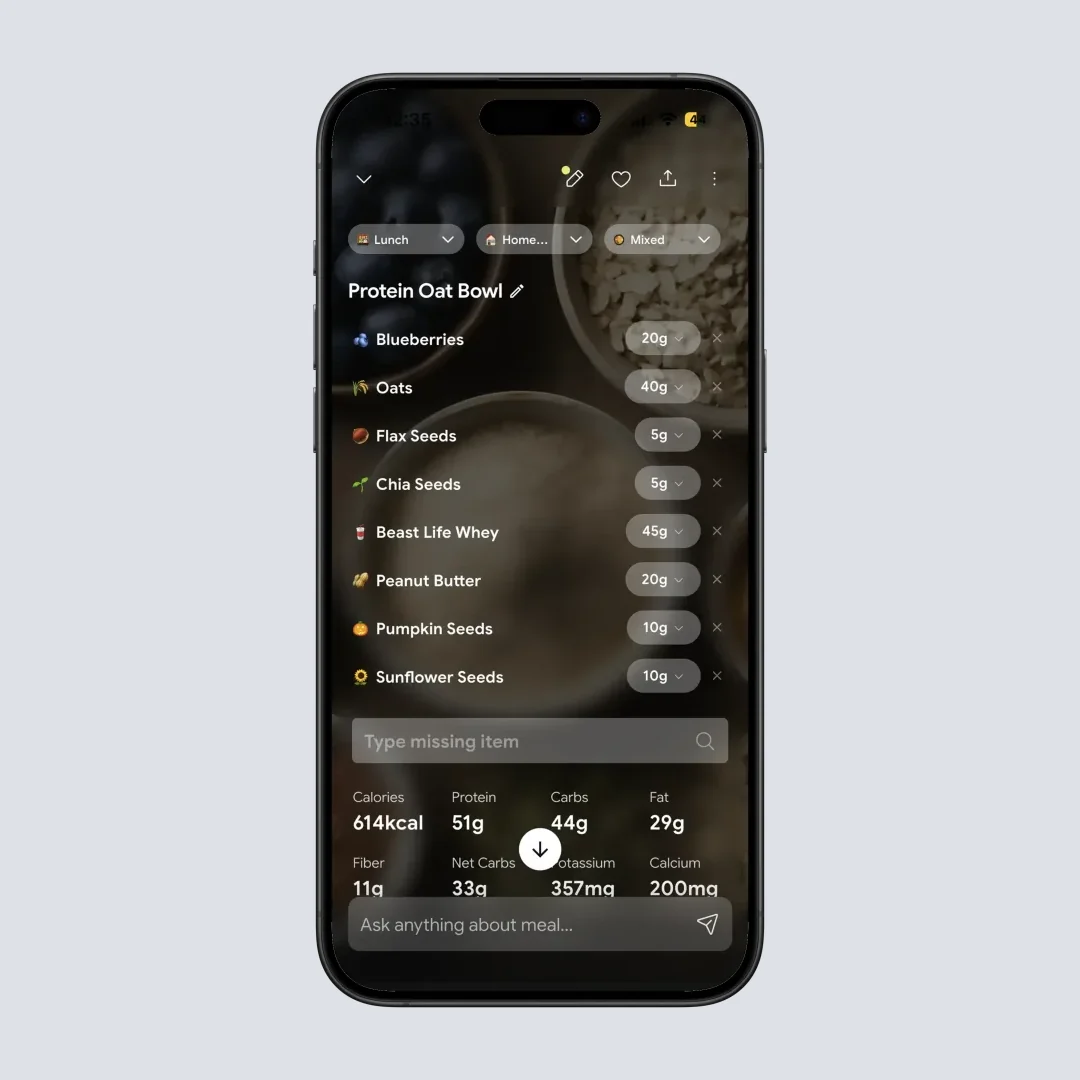
Home > Meal Item. The copy, favorite and repeat controls are what make week two cheaper than week one.
Now the gap. NutriScan has no barcode scanner. If most of your diet is packaged food with labels, an app with a barcode path will serve you better for those items. Our answer for packaged food is scanning the plate or the label with the camera, and I will not pretend that replaces a true barcode database lookup. Premium, at about $59 a year with a 7-day trial, removes the scan and call limits and adds deeper insights.
Choose NutriScan if: most of your meals are cooked rather than packaged, and you want photo logging plus automatic repeats without paying first.
3. MyFitnessPal: The Biggest Database, Behind a Paywall
MyFitnessPal has the largest food database of the group and the most mature logging ecosystem. It also demonstrates exactly why this ranking needed job 3. The support pages are direct: "As of October 1, 2022, Barcode Scan will be available only with a Premium subscription" (MyFitnessPal support). Meal Scan, the photo feature, is also listed as "a Premium only feature" (Meal Scan FAQ).
So the free tier of MyFitnessPal is precisely the experience this article's readers are trying to escape: search, scroll, select, repeat. What stays free is still useful, including a huge database, remembered meals, and the ability to copy previous entries, and for someone comfortable with manual logging that may be enough. A beginner who hates tracking would need Premium at $79.99 per year before the easy inputs appear, with no free trial runs of the kind Lose It offers.
Choose MyFitnessPal if: you want the deepest database and either tolerate manual logging or are ready to pay for Premium.
4. Cal AI: The Simplest Scanner, With Pricing You Cannot See First
Cal AI is built around one interaction: point the camera, get calories. It also includes a barcode scanner and a manual food database. For pure day-one simplicity it is real competition, and its App Store listing shows 4.8 stars across 358K ratings (Cal AI on the App Store).
Two things keep it at fourth for beginners. First, the app is thin beyond the scan. There is no meal-plan structure, coaching depth, or the kind of repeat-meal automation that makes week two cheaper than week one. It is a scanner with a diary attached. Second, the pricing is dynamic and only appears after you complete onboarding, with reported figures ranging from $2.99 per week to $29.99 per year depending on path and region. A beginner cannot easily compare its cost against the table above, because the number is not public.
The free version allows limited scanning, which is enough to judge whether the camera-first workflow suits you before any payment.
Choose Cal AI if: you want the most minimal possible scanning app and are comfortable with subscription pricing that reveals itself only inside the app.
5. MacroFactor: The Fastest Logger, If You Will Pay and Want Depth
MacroFactor claims the fastest food logging on the market, and unusually, it publishes its method. The team benchmarked logging workflows across 20 apps and reports its own required the fewest taps (MacroFactor). That is still a vendor's own benchmark, but it is a documented one. The AI logging path accepts a plain photo or a photo plus a short typed description, and returns editable food entries (MacroFactor AI food logging).
Why is the fastest logger last on a list for people who hate logging? Two reasons. There is no free tier at all, only a trial, then $11.99 per month or $71.99 per year. And the app is built for people who want algorithmic macro coaching, weekly target adjustments and expenditure modeling. That depth is the product. A beginner who mainly wants to stop typing food names is paying for, and navigating, a set of features they did not ask for. If you want to see your own numbers before committing to any of this, our macro calculator gives you the same targets for free.
Choose MacroFactor if: you already know you want macro coaching and speed, and the missing free tier does not bother you.
IMPORTANT
Checkpoint: midway progress update.
You have the full ranking. Now for the part that decides whether you trust it.
⏱️ Progress 2/4 • ~2 minutes in • Keep going
✅ Step 1: Why beginners quit tracking (done)
✅ Step 2: The five apps ranked on effort (done)
👉 Step 3: How accurate photo and voice logging really is (current)
⏳ The lighter tracking standard (next)
How Accurate Are Photo and Voice Logging?
Honest answer: accurate enough to be useful, not accurate enough to trust blindly.
A 2025 evaluation of AI photo-based dietary assessment found the technology identified foods with about 93% precision, but portion size estimation was imprecise and energy intake tended to be underestimated (O'Hara et al., 2025). In plain terms, the camera almost always knows it is looking at rice and curry. It is guessing at how much rice.
That is why the review screen is not a formality. In NutriScan, Lose It and MacroFactor, the photo flow hands you the recognized foods and estimated portions to edit before anything is saved. Portions are the part that evaluation found imprecise, so the ten seconds you spend correcting "1 cup" to "2 cups" goes into the weakest number in the log. The same discipline applies to voice: say quantities, not just foods. "Two eggs and one slice of toast with butter" logs far better than "eggs and toast."
Keep the comparison fair, though. A 2020 evaluation comparing MyFitnessPal's nutrient output against a national food composition database found it underestimated protein by 7.8%, carbohydrates by 6.4% and fat by 1.7% (Evenepoel et al., 2020, Journal of Medical Internet Research).
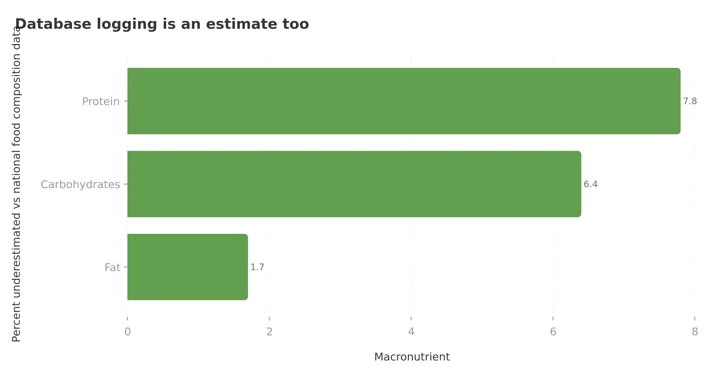 Figure 2: Manual database logging feels precise, and it carries its own systematic errors (Evenepoel et al., 2020).
The choice is not between a sloppy camera and a precise search box. It is between two estimates, one of which you will still be producing in November.
IMPORTANT
Checkpoint: final stretch before the reveal.
One last nudge, because the most useful finding in this article is next.
⏱️ Progress 3/4 • ~3 minutes in • Keep going
✅ Step 1: Why beginners quit tracking
✅ Step 2: The five apps ranked on effort
✅ Step 3: How accurate photo and voice logging really is
✨ The lighter tracking standard that still moved the scale (about to reveal)
The Lighter Tracking Standard That Still Worked
Here is the part most app rankings skip: you may not need complete logging at all.
A 2022 pilot randomized trial tested a deliberately simplified approach, tracking only high-calorie foods, against standard full calorie logging in a mobile weight loss program with 72 adults. Both groups logged a similar number of days, about 86 versus 89 on average. The simplified group lost 4.0% of body weight, about 3.5 kg. The standard group lost 5.7%, about 5.9 kg (Nezami et al., 2022, Obesity).
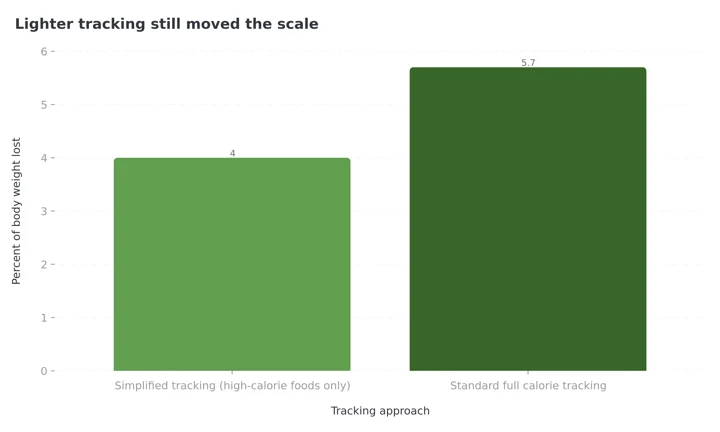 Figure 3: Full tracking produced numerically more loss, and the deliberately lighter version still produced a clinically meaningful result (Nezami et al., 2022).
This was a small pilot, so treat the comparison gently. Full tracking produced more loss. But the lower-burden version got roughly 70% of the result from a fraction of the work, and it did so without asking anyone to log a teaspoon of oil.
The practical reading for a beginner is freeing. A photo of your plate with a roughly confirmed portion, logged every day, beats a gram-perfect diary you abandon in week five. The Payne data at the top of this article showed consistency collapsing after about a month. The Nezami trial shows a lighter version of the habit still pays. Pick the app and the standard you can still imagine using in week ten.
 The permission slip most beginners never get: good enough, done daily, is the winning strategy

Seven Ways to Make Tracking Feel Smaller
- Log before you eat, not after. The plate is still in front of you, the portion is visible, and the task cannot be forgotten. Post-meal logging is how whole days get skipped.
- Set your repeat meals in the first week. If your breakfast is the same five days a week, automate it once. That single setup step removes a large share of your logging workload permanently.
- Photograph first, review later. Every photo app here lets you snap now and confirm when you have a quiet minute. A photo taken is a meal that will be logged. A meal remembered at 10 pm is a guess.
- Say quantities out loud when using voice. Numbers are the difference between a useful voice log and a vague one.
- Accept the estimate on mixed dishes. Confirm the obvious corrections, portion size and missed items, then move on. Chasing the last 30 calories of a curry is how tracking becomes a second job.
- Track the day, not the weekend exception. One unlogged dinner out does not break the record. Payne et al., 2022 counted days logged, not perfection within each day.
- Decide your quitting rule in advance. If you miss three days, the rule is "log the next meal," not "start over Monday."
Your First Two Weeks, In Five Steps
- Days 1 to 2: pick one input and ignore the rest. Choose the camera, or voice if you prefer talking. Learning one path well beats sampling four badly.
- Days 3 to 4: set up repeats and favorites. Long-press or save the meals you eat most. Your goal is that by day five, breakfast logs itself.
- Days 5 to 7: add the portion check. Keep logging everything, and now spend the extra ten seconds confirming amounts on each scan. This is the accuracy step.
- Week 2: aim for five days out of seven. Not seven. The Payne study measured weeks of consistent tracking, not perfect days. Five real days beats seven intended ones.
- End of week 2: review one number. Open your weekly average calories or protein. If the app has made that number easy to find, keep it. If you had to dig, you have learned something about the app too.
The step that pays back the most
Step 2. Setting up repeat meals takes a few minutes once and then removes effort every week after that. It is easy to skip because it feels like admin on day three, which is exactly when it pays off the most.
What the Research Says About Apps and Weight Loss
Zoom out from features, and the evidence for app-based tracking is positive but modest. A 2025 meta-analysis of 11 randomized controlled trials covering 1,717 adults found that mobile app interventions produced a small but significant reduction in body weight at 4 to 6 months, with a standardized mean difference of -0.33 (Pujia et al., 2025).
The honest summary: an app produces a record and a modest average effect. The people who do better than average are the ones who keep the record going, which is the Burke and Payne finding again. Nothing in the research says the app must be expensive, complete or precise. It says the habit must survive. That is the entire case for choosing your tracker by friction rather than by feature count.
IMPORTANT
Recap: everything you covered this round.
You finished the run, so save this for the next time someone asks you which app to start with.
⏱️ Progress 4/4 • ~4 minutes in • Nicely done
✅ Step 1: Why beginners quit tracking
✅ Step 2: The five apps ranked on effort
✅ Step 3: How accurate photo and voice logging really is
✅ The lighter tracking standard that still moved the scale (revealed)
The Short Answer
If you want every no-typing input in one app and will pay $79.99 a year, choose Lose It, and use your three free tries of Snap It and Voice Logging before deciding. If your meals are mostly cooked rather than packaged and you want free photo logging plus automatic repeat meals, choose NutriScan. If you want the deepest food database and either tolerate typing or will pay $79.99 a year, choose MyFitnessPal. If you want the most minimal scanner and accept hidden pricing, Cal AI. If you want speed plus full macro coaching and will pay from day one, MacroFactor.
Whichever you choose, the finding worth remembering is the one from the top. Consistent tracking lasted about a month on average in the study above, and each extra consistent week was associated with measurably more progress. Choose the app that makes week ten plausible, not the one that impresses you on day one.
Start with the camera, not the search box
Download NutriScan and log your next meal by photo. Five scans a week are free, copy and weekday repeats are unlimited, and there is nothing to type on day one.
Frequently Asked Questions
Is the MyFitnessPal barcode scanner free? No. MyFitnessPal's support pages state that as of October 1, 2022, barcode scanning requires a Premium subscription (MyFitnessPal support). The photo-based Meal Scan feature is also Premium-only. Free users log by manual search, or by copying previously logged meals.
Do I have to log every single day for tracking to work? No, but consistency matters more than perfection. In a 2022 study, each additional week of consistent dietary self-monitoring was associated with an extra 0.23% of weight lost (Payne et al., 2022). Aim for most days, and when you miss one, log the next meal rather than restarting next week.
Is photo calorie counting accurate? It is good at identifying foods and weaker at portions. A 2025 evaluation found about 93% precision in recognizing foods, with imprecise portion estimates and a tendency to underestimate energy (O'Hara et al., 2025). Always confirm portion sizes on the review screen, because portions are the part that evaluation found imprecise.
What is the easiest way to log food if I hate typing? Use a photo for cooked or mixed meals, a barcode scan for packaged food, and repeat or copy functions for meals you eat often. Voice works well if you state quantities. The apps ranked above differ mainly in which of these inputs they offer and whether their free tier includes them.
Does NutriScan have a barcode scanner? No. NutriScan logs food through AI photo scanning, manual entry and voice, with copy, favorite and weekday-repeat functions for regular meals (NutriScan pricing). If most of your diet is barcoded packaged food, pair it with an app above or scan the label with the camera.
How many photo scans do you get on the NutriScan free plan? Five AI meal scans per week, and the count resets weekly. Manual logging, macro and calorie tracking, NutriScore, copy meals, weekday repeats, the fasting timer and hydration tracking are unlimited on the free plan, plus 4 Monika voice assistant calls per week. Premium removes the scan and call limits.
This article is for general information and is not medical advice. Calorie tracking is not appropriate for everyone. If you have a history of disordered eating, or if logging food increases anxiety or guilt, stop and speak with a qualified clinician before using any tracking app.