Best App for Micronutrient Tracking 2026 (Compared)
 ChatGPT
  Claude
  AI Mode
  Perplexity
A 2024 modeling analysis in The Lancet Global Health estimated that more than 5 billion people do not eat enough iodine (68% of the global population), vitamin E (67%) or calcium (66%), and more than 4 billion fall short on iron (65%), riboflavin (55%), folate (54%) and vitamin C (53%) (Passarelli et al., 2024). As a NutriScan nutritionist, I find that sobering and also useful. A micronutrient gap is not a rare problem for a few unlucky people. It is the normal state of most diets, and you cannot fix what you cannot see.
TL;DR - Best Micronutrient Tracking Apps 2026
• Best overall: Cronometer, up to 95 nutrients from lab-analyzed data with micronutrients free
• Best custom targets and reminders: MyNetDiary, up to 108 nutrients with secondary tracking on Premium
• Best with adaptive macros: MacroFactor, common vitamins and minerals alongside weekly macro coaching
• Biggest database: MyFitnessPal, but micronutrients and custom goals sit behind Premium
• For cooked and mixed meals: NutriScan photo scanning, plus weekly targets for 11 vitamins and minerals
• Safety first: an app estimates intake, not blood levels, so confirm any real concern with a doctor and a blood test
That is the real reason to track micronutrients. Calories tell you how much you ate. Micronutrients tell you what your food was actually made of, and whether your iron, magnesium or vitamin D has been quietly running low week after week.
The catch is that most calorie apps were never built for this. They count protein, carbs and fat, then stop. Below I compare the apps I would shortlist for real micronutrient tracking in 2026, judged on the three jobs that decide whether a vitamin and mineral log changes anything.
This is not medical advice
Nothing here replaces your doctor or registered dietitian. Tracking shows dietary intake, not blood levels. If a nutrient stays low or you have symptoms, get tested rather than self-treating with supplements.
IMPORTANT
Your micronutrient tracking plan at a glance.
A quick roadmap so you can pick your app fast.
⏱️ Progress 0/4 • ~0 minutes in • Keep going
⏳ Step 1: The 3 jobs a micronutrient app must do
⏳ Step 2: The nutrient-first picks
⏳ Step 3: Coverage, cost, and the meals where micros hide
🔍 The 4-nutrient shortlist that beats tracking all 95 (revealed near the end)
 Ask anyone how much iron or folate they ate yesterday and this is the honest answer. Macros you can guess from a plate. Micronutrients you cannot.
Micronutrient Tracking App Comparison at a Glance 📊
| App | Nutrients tracked | Custom targets | Micros on free tier | Price (US, 2026) |
|---|---|---|---|---|
| Cronometer | Up to 95, lab-analyzed | Yes, per nutrient | Yes | Free; Gold $49.99/yr |
| MyNetDiary | Up to 108, staff-verified | Yes, on Premium | Limited | Free tier; $59.99/yr Premium |
| MacroFactor | Common vitamins and minerals | Macros adapt weekly | No | About $71.99/yr |
| MyFitnessPal | Full micros on Premium | Yes, on Premium | No | $79.99/yr or $19.99/mo |
| NutriScan | Top micros per meal, 11 weekly targets | Set from your profile | Yes, 5 scans/wk | about $59/yr |
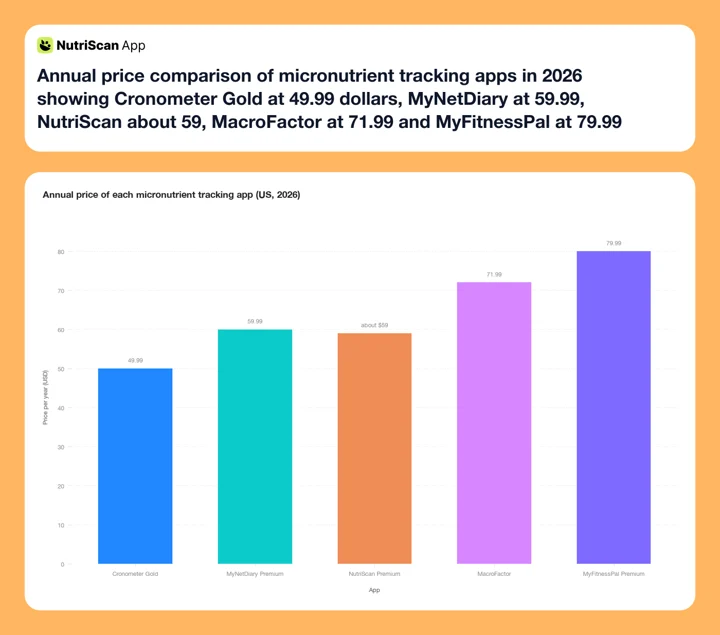 Figure 1: Annual premium pricing across the five apps compared here. Cronometer Gold is the cheapest paid tier at $49.99, and MyFitnessPal Premium tops the range at $79.99. Cronometer is also the only one that gives you the full micronutrient view without paying at all.
Prices change and vary by region. Check the store listing on your device before subscribing.
What a Micronutrient Tracking App Must Do 🔍
A vitamin and mineral tracker has three jobs, and most apps only do one of them well.
Job 1: track enough nutrients from accurate data. Counting calories from a shaky database is annoying. Counting micronutrients from a shaky database is worse, because a wrong iron or folate number is invisible. You cannot look at a plate and sense that the magnesium entry was off by 40 percent, the way you might notice a calorie count that looks too low. A 2025 validation study in 43 endurance athletes found MyFitnessPal showed poor validity for total energy and carbohydrates, driven by user-uploaded entries, while Cronometer performed at an excellent level (Morello et al., 2025). When the whole point is nutrient detail, a database that is right by default matters more than a database that is merely large.
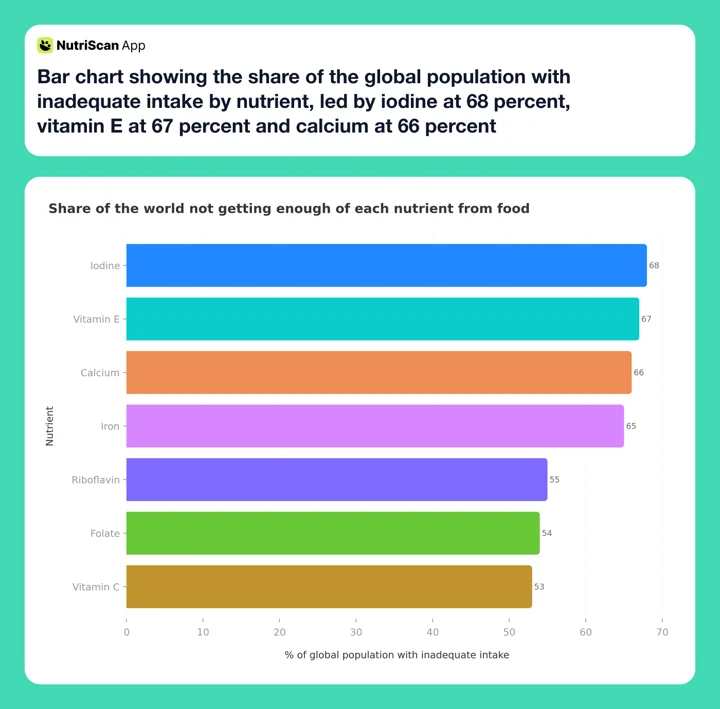 Figure 2: The gaps are not rare. Estimated share of the global population with inadequate intake from food, before fortification and supplements (Passarelli et al., 2024). Iodine, vitamin E and calcium each affect roughly two thirds of people.
Job 2: let you set custom targets. The standard recommended intake is an average, not your number. Someone recovering from low iron, a pregnant person, a plant-based eater watching vitamin B12 or an athlete losing minerals through sweat may all need targets that differ from the default. An app that only compares you to one fixed reference forces you to do the maths in your head. The best trackers let you type your own goal for a specific vitamin or mineral and then hold you to it.
Job 3: show your gaps clearly. A list of 90 nutrients you never open changes nothing. The value comes from a screen that shows, at a glance, which nutrients you hit and which you missed this week, so you can adjust tomorrow's meals. A number buried three taps deep is a number you will ignore.
I also weighed price, free tier limits and logging speed, because the most accurate nutrient database in the world does nothing if you stop logging by week three. Adherence to self-monitoring is one of the strongest predictors of whether tracking changes anything (Burke et al., 2025).
IMPORTANT
Checkpoint: here's where you are right now.
Quick status update so you always know the next best move.
⏱️ Progress 1/4 • ~2 minutes in • Keep going
✅ Step 1: The 3 jobs a micronutrient app must do (done)
👉 Step 2: The nutrient-first picks (you're here)
⏳ Step 3: Coverage, cost, and the meals where micros hide
🧩 The 4-nutrient shortlist (coming soon)
Cronometer: Best Overall for Micronutrient Tracking 🏆
Cronometer is built around micronutrients in a way no other mainstream app is, and it wins all three jobs.
For coverage and accuracy, it tracks up to 95 nutrients and compounds and builds its database from lab-analyzed sources rather than open user uploads (Cronometer). That combination is the whole point here. You get vitamins, minerals, amino acids and fatty acids, and the numbers behind them are curated rather than crowdsourced. For a nutrient you cannot eyeball, that reliability is a feature, not a luxury.
For custom targets, Cronometer lets you set fixed gram or milligram goals for individual nutrients, so your vitamin C or magnesium target can match what your dietitian or your own research says instead of a generic reference. Crucially, micronutrient tracking is available on the free tier, so you can see your full vitamin and mineral breakdown without paying.
For clarity, the app plots each nutrient against its target and flags where you fall short, so a weekly scan tells you exactly which minerals need attention. Logging stays reasonably fast too, with free barcode scanning alongside classic text search.
Gold, the paid tier, runs about $8.99 per month or $49.99 per year and adds deeper reports, custom charts and more custom biometrics. Most people who just want to see their micronutrients can stay on the free plan. If you want the same depth in a different package, our roundup of Cronometer alternatives covers the closest options.
Pick Cronometer if: micronutrients are your main reason for tracking and you want the most trustworthy numbers.
Skip it if: you want built-in coaching, photo logging or a lighter, less detailed experience.

MyNetDiary: Best for Custom Targets and Reminders 🎯
MyNetDiary is the closest competitor on pure nutrient depth, and it edges ahead in one area: personalisation for people who forget.
On coverage, MyNetDiary tracks up to 108 nutrients with a staff-verified food database and no ads on the free tier (MyNetDiary). Its Premium plan monitors more than 100 nutrients including fiber, added sugars, sodium, potassium, vitamins, minerals and amino acids, and lets you customise your own nutrient targets through a feature it calls secondary tracking (MyNetDiary Premium). That means you can pin the three or four micronutrients you care about most to the top of your view instead of scrolling a long list.
Where MyNetDiary shines is nudging. It supports custom goals paired with reminders, which is exactly what people who forget their greens or their iron need. If your weak link is not knowledge but consistency, that combination matters, especially since app benefits tend to fade after about six months largely because people disengage (Pujia et al., 2025).
The trade-off: the deep nutrient customisation sits behind Premium at $59.99 per year, and the iOS app has historically run ahead of the Android version. Our list of MyNetDiary alternatives is worth a look if that pricing is the sticking point.
Pick MyNetDiary if: you want custom nutrient targets plus reminders and an ad-free free tier.
Skip it if: you want the deepest micronutrient tracking for free, since Cronometer gives you more without paying.
IMPORTANT
Checkpoint: midway progress update.
You're halfway - decisions get easier here.
⏱️ Progress 2/4 • ~4 minutes in • Keep going
✅ Step 1: The 3 jobs a micronutrient app must do (done)
✅ Step 2: The nutrient-first picks (done)
👉 Step 3: Coverage, cost, and the meals where micros hide (current)
🧩 The 4-nutrient shortlist (coming soon)
MacroFactor: Best If You Want Adaptive Macros Too ⚖️
MacroFactor started as a macro coaching app and added micronutrient tracking, which makes it a good fit for one specific person: someone who wants adaptive calorie and macro targets and a look at their vitamins and minerals in the same app.
MacroFactor now includes a dedicated interface for tracking micronutrients, showing how each food contributes to your daily totals (MacroFactor). It covers the common vitamins and minerals such as vitamins A and C, calcium, magnesium and zinc. The depth is narrower than Cronometer's, and the app itself recommends logging common foods rather than branded items for the most reliable micronutrient numbers, since not every database entry carries a full micronutrient profile.
What MacroFactor adds that pure trackers do not is an algorithm that recalculates your calorie and macro targets each week based on your real results. If you are watching micronutrients while also trying to lose fat or gain muscle, that adaptive layer is genuinely useful. MacroFactor costs about $71.99 per year with a 7-day free trial that does not require a card up front. For a head-to-head on nutrient depth specifically, see our MacroFactor vs Cronometer comparison.
Pick MacroFactor if: you want adaptive macro coaching and a solid, if not exhaustive, micronutrient view together.
Skip it if: micronutrients are your only goal, because you are paying for coaching features you may not use.
MyFitnessPal: Biggest Database, Micros Behind a Paywall ⚡
MyFitnessPal is the default calorie app for millions of people, and it can track micronutrients, but two things hold it back for this specific job.
First, the database. Its catalog of more than 20 million foods is the biggest selling point for speed and coverage, but many entries are user-submitted, which is why the validation research flagged its accuracy for energy and carbs (Morello et al., 2025). For calories that is a minor annoyance. For a micronutrient you are trying to correct, an unverified entry can quietly send you the wrong way.
Second, the paywall. Setting custom nutrient goals and viewing a full micronutrient breakdown are Premium features, so the free tier gives you a limited view. Premium runs $79.99 per year, and even then you are working from a database that mixes verified and crowd-sourced entries.
Check the entry before you trust the nutrient
Prefer entries with a verified check mark and be sceptical of suspiciously round numbers. A calorie count that is 10 percent off is forgivable. A folate number that is invented is not, because you will never notice it. Our roundup of MyFitnessPal alternatives covers apps with tighter databases, and we compared the two nutrient philosophies directly in MyFitnessPal vs Cronometer.
Pick MyFitnessPal if: you already use it for calories and just want to peek at micros now and then.
Skip it if: micronutrient accuracy is the reason you are tracking at all.
NutriScan: Best for Mixed Meals Where Micros Hide 📸
I will be honest about where NutriScan fits. It is not a 95-nutrient database like Cronometer and it does not try to be. What it solves is the step that breaks every nutrient tracker before the database is even involved: working out what was actually on the plate when the meal was cooked, mixed or ordered out.
Micronutrients hide inside real food. A vegetable curry, a grain bowl, a restaurant plate or a home-cooked sabzi does not come with a label, and manually breaking it into ingredients is exactly the step most people skip. NutriScan reads the meal from a photo, then asks short confirmation questions: which of 8 food types, which of 11 cooking methods, and how much oil went in.

NutriScan's scan flow (Home > Camera Icon > Click Picture > Crop Picture): confirm the crop, the food type, the cooking method and the oil level so the nutrient estimate matches your actual plate. The full meal scan guide walks through each step.
Get the food right and the vitamins and minerals that follow are closer to reality. Each meal's Nutrition Details page shows its top micronutrients ordered high to low, alongside the NutriScore, and the Nutrition Breakdown screen opens the full list of nutritional values.
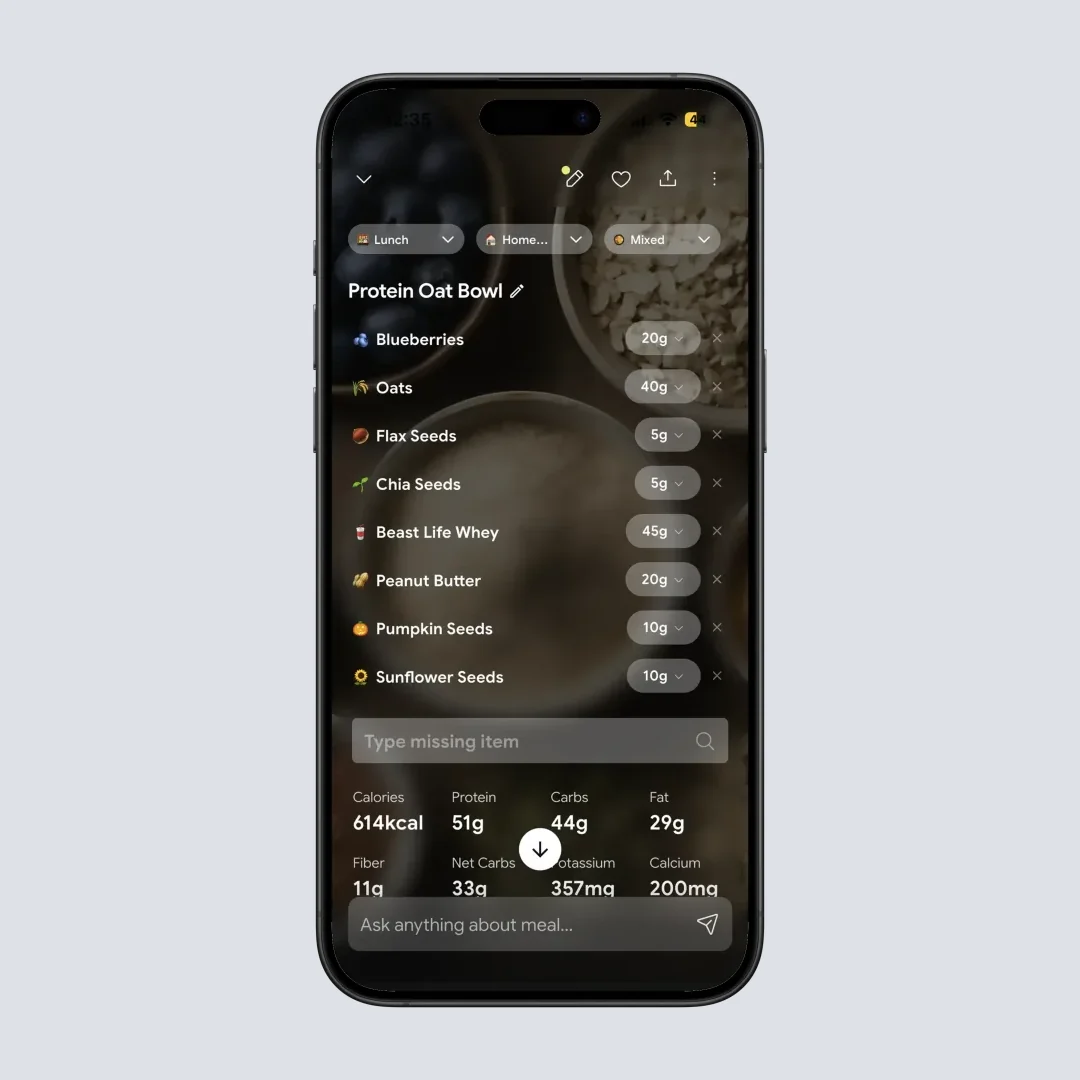
Nutrition Details (Home > Meal Item): the top micronutrients for that meal sit next to the macros, and tapping through to Nutrition Breakdown opens every value. Learn how the score works in the NutriScore guide.
Where NutriScan does more than most photo apps is the weekly view. The Progress tab tracks targets for 11 vitamins and minerals, vitamin D, calcium, vitamin B12, vitamin E, zinc, magnesium, vitamin C, omega-3, iron, vitamin A and vitamin K, so you see which ones you keep missing rather than only what a single meal contained. Those targets come from your profile rather than being typed in per nutrient, which is the honest limitation compared with Cronometer.
You get 5 free photo scans a week, which is enough to test the scanner on the mixed dishes a food database cannot read, and Premium is about $59 a year. The micronutrient view itself is free on both plans. If you want to see how it compares with other camera-first trackers, see our comparison of photo scanning apps like NutriScan.
Pick NutriScan if: most of your meals are cooked, mixed or eaten out and the logging step is where your tracking dies.
Skip it as your only tool if: you need a full 90-nutrient breakdown with per-nutrient custom targets.
How to Set Up Micronutrient Tracking in 5 Steps 🎯
A tracking setup you improvised is a setup you abandon. Here is the order that holds up.
- Name the nutrients you actually suspect. Write down the two or three vitamins or minerals your diet pattern, blood work or symptoms point to. A plant-based eater, a heavy sweater and a pregnant person all start from different lists.
- Pick the app that fixes your weakest job. Use the three-job test: coverage and data quality, custom targets, gap reporting. Choose for the job you currently fail, not the prettiest screenshots.
- Set your targets in milligrams or micrograms. A fixed amount stays put. A percentage drifts every time your calorie goal changes, and your magnesium need does not care how many calories you ate.
- Log everything for 14 days, including oil and sauces. Two weeks is enough to see which nutrients come up short consistently and to find out whether the app is fast enough to keep.
- Review weekly averages and fix the two lowest. Micronutrient status moves slowly. Averages tell you more than any single day, and two targeted fixes beat a total diet overhaul.
Start with the macro layer
Micronutrients ride along with the food you already eat, so a sane calorie and macro base makes the rest easier. Our free macro calculator turns your body profile and goal into daily numbers you can type straight into any app.
7 Tips That Actually Close Micronutrient Gaps 💡
Knowing your numbers is not the same as fixing them. These habits close the distance.
- Start with one week of honest logging. Do not aim for perfect. Log everything for seven days, then look at which nutrients came up short repeatedly. That pattern is worth more than any single day.
- Fix the two lowest first. If iron and magnesium are always short, work there before worrying about a nutrient you miss once a month.
- Learn three foods per weak nutrient. Lentils and spinach for iron, nuts and seeds for magnesium, dairy or fortified alternatives for calcium. This turns "eat healthier" into a shopping list.
- Set custom targets if your needs are not average. Pregnancy, plant-based diets, heavy training or a doctor's advice can all shift your numbers. Use the custom-target feature so the app measures you against the right goal.
- Log fortified foods and supplements too. If you take a multivitamin, log it. Doubling up is not automatically harmless, and more is not better for fat-soluble vitamins and certain minerals.
- Review monthly, not daily. Micronutrient status changes slowly. A monthly look at your averages is more meaningful, and far less exhausting, than obsessing over each day's totals.
- Take a real deficiency to a professional. An app can flag a pattern. It cannot diagnose or treat. If a nutrient stays low or you have symptoms, see a doctor or registered dietitian and, where relevant, get a blood test.

A live daily readout, like NutriScan's home screen (Home > Report), keeps today's macros and micronutrients in view instead of arriving as a surprise at bedtime. The weekly insights view is where the repeat gaps show up.

What the Research Says About Tracking and Deficiencies 🔬
The case for micronutrient tracking rests on two findings.
First, gaps are widespread. The Lancet Global Health analysis put inadequate intakes in the billions for several key nutrients and found clear differences by sex: estimated inadequate intakes were higher for women than men for iodine, vitamin B12, iron and selenium, and higher for men than women for magnesium, vitamin B6, zinc, vitamin C, vitamin A, thiamin and niacin (Passarelli et al., 2024). That is a strong argument for looking at your own intake rather than assuming a varied diet covers everything.
Second, the tool has to be accurate and you have to keep using it. The validation work showed that database quality decides whether your numbers mean anything, favoring lab-verified sources over crowd-sourced ones (Morello et al., 2025). The behavioral research is consistent that adherence predicts results (Burke et al., 2025), while benefits fade when people disengage after a few months (Pujia et al., 2025).
None of this replaces medical testing. Tracking shows dietary intake, not blood levels, and the two can differ. Use the app to spot patterns and guide food choices, then use lab work and a clinician to confirm and treat anything real.
 The fix for almost every gap on your screen is a food, not a screen. Tracking just tells you which food to add.
IMPORTANT
Checkpoint: final stretch before the reveal.
One last nudge - the reveal is next.
⏱️ Progress 3/4 • ~7 minutes in • Keep going
✅ Step 1: The 3 jobs a micronutrient app must do
✅ Step 2: The nutrient-first picks
✅ Step 3: Coverage, cost, and the meals where micros hide
✨ The 4-nutrient shortlist that beats tracking all 95 (about to reveal)
The 4-Nutrient Shortlist That Beats Tracking All 95 🔎
You have been patient, so here is the thing I wish more people knew before they download a 95-nutrient app.
Tracking every nutrient is the reason most people quit. Ninety-five numbers on a screen is not information, it is noise, and noise is what you stop opening in week three. Adherence is the variable that predicts whether tracking changes anything (Burke et al., 2025), and app benefits fade when people disengage after about six months (Pujia et al., 2025). A tracker you abandon has a coverage of zero.
So use the wide database, but watch a shortlist. Build it from four inputs:
- One from the global gap list. Iodine, vitamin E, calcium, iron, riboflavin, folate and vitamin C are the nutrients most people miss (Passarelli et al., 2024). Pick the one your diet most plausibly misses.
- One from your diet pattern. Plant-based eating points at vitamin B12 and iron. Little dairy points at calcium. Little sun points at vitamin D. Heavy sweating points at magnesium and sodium.
- One from your sex and life stage. Inadequate intakes run higher in women for iodine, vitamin B12, iron and selenium, and higher in men for magnesium, zinc and vitamin A, among others.
- One from your blood work or your clinician. If a test has ever flagged something, that nutrient earns a permanent seat.
Then run it like this: log every meal for four weeks ➡️ read only those four nutrients in your weekly review ➡️ learn three foods that fill each one ➡️ re-check after a month and swap out anything you have fixed.
Four nutrients is small enough that you will actually look, and specific enough that looking leads to a change on your plate. The 95-nutrient database is still doing the work underneath. You are just refusing to read all 95 every day, which is the difference between a habit and a chore.
If a nutrient on your shortlist stays low after a month of real effort, that is the moment to book a blood test rather than buy a bigger supplement.
The Verdict: Pick by Your Weakest Job 🤔
If I had to hand one app to most people whose main goal is vitamins and minerals, it would be Cronometer. It tracks the most nutrients from the most trustworthy data, it lets you set custom targets per nutrient, and it shows your micronutrient breakdown for free. That is the rare case where the best tool is also the cheapest to start with.
But the better answer is to pick by your weakest job:
- Consistency is your weak link: MyNetDiary, for custom targets paired with reminders.
- You want macro coaching in the same app: MacroFactor.
- You already live in MyFitnessPal: keep it, use verified entries only, and expect to pay for the micronutrient view.
- Your meals are cooked, mixed or eaten out: NutriScan, so the food is right before any nutrient maths runs.
Three situations make the choice concrete.
Meera, plant-based for two years, worried about B12 and iron. Her nutrients are specific and her food is mostly home-cooked. Cronometer for the numbers, NutriScan for logging the mixed dishes quickly, and a blood test at the six-month mark.
Dan, lifting four times a week, cutting for summer. He wants macros that adapt and a sanity check on his micronutrients. MacroFactor covers both without a second subscription, and our guide to the best app for tracking protein uses the same three-job test for his macro side.
Priya, told her calcium and vitamin D are low, eats out four nights a week. Her problem is not the database, it is that half her meals never get logged. A photo-first logger plus a weekly target view fixes the input first, then Cronometer's depth becomes useful.
If you also track carbohydrate for a health condition, our guide to the best app for tracking carbs for diabetes runs the same test with different jobs.
Track Your Micronutrients With Confidence ✅
IMPORTANT
Recap: everything you completed this round.
You finished the run - save this for next time.
⏱️ Progress 4/4 • ~9 minutes in • Nicely done
✅ Step 1: The 3 jobs a micronutrient app must do
✅ Step 2: The nutrient-first picks
✅ Step 3: Coverage, cost, and the meals where micros hide
✅ The 4-nutrient shortlist: watch four nutrients, not 95, and let the database do the rest (revealed)
The best app for micronutrient tracking in 2026 is the one that counts enough nutrients from accurate data, lets you set your own targets, and shows your gaps clearly enough that you act on them. By that standard Cronometer leads for most people, MyNetDiary wins on custom targets and reminders, and MacroFactor fits anyone who wants adaptive macros alongside their micros. If your meals are cooked, mixed or eaten out, get them logged accurately first, then let a nutrient app do the deep analysis on clean entries.
Whatever you choose, the value is not in the tracking. It is in seeing a gap you did not know you had, and closing it one meal at a time.
For the meals no barcode can read, from a rice-and-curry plate to a restaurant dinner, try NutriScan's photo scan free with 5 free scans a week and see how many of your vitamins and minerals were never getting logged at all.
Frequently Asked Questions ❓
What is the best free app for tracking micronutrients?
Cronometer is the strongest free choice. It tracks up to 95 nutrients and compounds from lab-analyzed sources, and micronutrient tracking is included on the free tier, so you can see your full vitamin and mineral breakdown without paying (Cronometer). MyNetDiary also offers an ad-free free tier, but its deepest custom nutrient tools sit behind Premium.
How many micronutrients should a tracking app cover?
More coverage only helps once accuracy is solid. Cronometer tracks up to 95 nutrients and MyNetDiary up to 108, covering vitamins, minerals, amino acids and more (MyNetDiary). For most people, reliable coverage of the common vitamins and minerals plus fiber, iron, calcium, magnesium and potassium is enough, and a shorter list you actually review beats a long list you never open.
Is micronutrient tracking accurate?
It is only as accurate as the database behind it. Research found large differences between apps, with lab-verified databases outperforming crowd-sourced ones for nutrient values (Morello et al., 2025). Even the best app estimates intake, not blood levels, so treat the numbers as a guide and confirm real concerns with a blood test.
Can I track vitamins and minerals in MyFitnessPal?
Yes, but the full micronutrient breakdown and custom nutrient goals are Premium features at $79.99 per year, and its large database mixes verified and user-submitted entries. If micronutrients are your main goal, a nutrient-first app like Cronometer usually serves you better.
Does NutriScan track vitamins and minerals?
Yes, as a focused set rather than a 95-nutrient database. Each meal shows its top micronutrients on the Nutrition Details page, the Nutrition Breakdown screen opens the full nutritional values, and the Progress tab tracks weekly targets for 11 vitamins and minerals including vitamin D, calcium, vitamin B12, vitamin E, zinc, magnesium, vitamin C, omega-3, iron, vitamin A and vitamin K.
Why are micronutrients in home-cooked meals so hard to track?
Because the vitamins and minerals are already mixed into the dish and no barcode describes your plate. A curry, a grain bowl or a restaurant meal has to be broken into ingredients before any nutrient maths can run, and that is the step most people skip. A photo tool that asks you to confirm portion size, cooking method and added oil fixes the input before the nutrient database ever sees it.
Do I still need to see a doctor if I track my micronutrients?
Yes. An app can flag a pattern of low intake, which is useful, but it cannot diagnose or treat a deficiency. Tracking shows dietary intake, not blood levels, and the two can differ. If a nutrient stays low or you have symptoms, see a doctor or registered dietitian for testing and advice. Tracking supports that conversation, it does not replace it.