Best App for Tracking Protein 2026 (Set Goals, Log Fast)
 ChatGPT
  Claude
  AI Mode
  Perplexity
A 2024 meta-analysis of 47 studies with 3,218 adults found that eating more than 1.3 grams of protein per kilogram of body weight each day increases muscle mass during weight loss, while eating less than 1.0 gram per kilogram raises the risk of losing muscle (Kokura et al., 2024). As a NutriScan nutritionist, I use that single finding to settle most protein questions. The number matters, and the only way to know if you hit it is to track it. The problem is that most calorie apps treat protein as an afterthought, buried inside a calorie count as a percentage rather than a real gram target you can aim for.
TL;DR - Best Protein Tracking Apps 2026
• Best overall: MacroFactor for a stable gram goal that never drifts with your calories
• Best free gram targets: Cronometer, plus the deepest protein quality and micronutrient data
• Fastest logging: MyFitnessPal, but gram-based goals need Premium
• Fastest photo logging on a paid plan: Lose It, though Premium is now $79.99 per year, not the bargain it used to be
• Best reminders: MyNetDiary for nudges before the day ends
• For cooked and restaurant meals: NutriScan photo scanning catches the protein a barcode cannot see
Tracking protein is a different job from tracking calories. For calories you only need one running total. For protein you need three things at once. You need to set a goal in grams, you need to add food fast enough that you actually log every protein source, and you need to see where you stand during the day so you can top up before bed. An app that does the first two but not the third leaves you guessing at 9pm whether you are 20 grams short.
Below I rank the apps I would actually hand a client who wants to hit a protein number in 2026. I judged each on the three jobs that matter for protein: setting a gram goal, adding food fast, and keeping you on track with a live count and reminders.
IMPORTANT
Your protein tracking plan at a glance.
A quick roadmap so you can pick your app fast.
⏱️ Progress 0/4 • ~0 minutes in • Keep going
⏳ Step 1: The 3 jobs a protein app must do
⏳ Step 2: The gram-goal champions
⏳ Step 3: Speed, budget, and reminder picks
🔍 The two-app combo that logs almost everything you eat (revealed near the end)
 Choosing a protein tracker should not feel this hard. Match the app to your weakest link and the choice makes itself.
Protein App Comparison at a Glance 📊
| App | Gram goals | Free tier | Price per year | Standout feature |
|---|---|---|---|---|
| MacroFactor | Yes, by default | No (7-day trial) | $71.99 | Adaptive algorithm, stable protein target |
| Cronometer | Yes, free | Yes | $59.99 (Gold) | 84 nutrients free, 95 on Gold |
| MyFitnessPal | Premium only | Yes | $79.99 | 20M+ food database, fastest search |
| Lose It | Premium only | Yes | $79.99 | Snap It photo logging, copy-day |
| MyNetDiary | Yes | Yes | $59.99 | Reminders and custom nutrient goals |
| NutriScan | Yes | 5 scans/wk | about $59 | Photo scan for cooked and restaurant meals |
Prices are standard US prices as of mid 2026 and change by region.
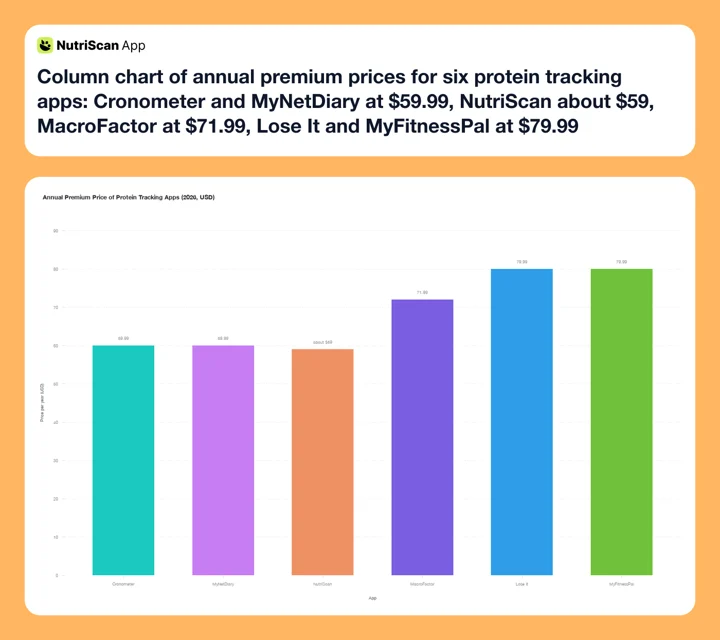 Figure 1: Annual premium pricing across the six protein tracking apps compared in this guide. Cronometer Gold and MyNetDiary share the bottom at $59.99, NutriScan is about $59 a year, and Lose It sits level with MyFitnessPal at the $79.99 top of the range after its 2026 increase.
What Makes an App Good at Tracking Protein 🔍
Before naming apps, it helps to name the job. A protein app has three requirements that a plain calorie counter often misses.
It has to set a protein goal in grams. Protein targets are calculated per kilogram of body weight, not as a slice of your calories. The accepted range for adults sits between roughly 1.05 and 3.67 grams per kilogram per day, depending on your goal and activity (NIH Endotext, 2023). An app that only lets you set protein as "30 percent of calories" makes this awkward, because your gram target then shifts every time your calorie goal changes. The best apps let you lock a fixed gram number and leave it there.
It has to be fast to add food. Protein comes from many small sources across a day: eggs at breakfast, yogurt as a snack, chicken at lunch, a scoop of whey after training. If logging each one takes 60 seconds of manual search, you skip some, and the skipped ones are exactly the protein you needed to count. Adherence to self-monitoring is one of the strongest predictors of reaching a body composition goal (Burke et al., 2025), so speed is not a luxury. Barcode scanning, photo logging, quick-add, and copy-meal buttons are what keep you logging every source.
It has to keep you on track. A goal you cannot see is a goal you miss. The best apps show a live "protein remaining" number all day and send a reminder if you are behind. This matters more than it sounds. App effects on weight and habits tend to fade after about six months, largely because people disengage (Pujia et al., 2025). A well-timed nudge is a cheap way to stay in the game.
Keep those three jobs in mind and the ranking almost writes itself.
IMPORTANT
Checkpoint: here's where you are right now.
Quick status update so you always know the next best move.
⏱️ Progress 1/4 • ~1 minute in • Keep going
✅ Step 1: The 3 jobs a protein app must do (done)
👉 Step 2: The gram-goal champions (you're here)
⏳ Step 3: Speed, budget, and reminder picks
🧩 The two-app combo (coming soon)
MacroFactor: The Best App for a Protein Goal in 2026 🏆
MacroFactor is the app I recommend first for anyone serious about a protein number. It sets your protein target in grams by default, not as a percentage, and it holds that gram target steady even as it adjusts your calories week to week. This is the detail that matters. As you lose or gain weight, your calorie needs change, but your protein target should stay anchored to your body weight and goal. MacroFactor handles both at once, so your protein floor does not drift just because your calorie target moved.
The app is built around an adaptive expenditure algorithm that recalculates your real calorie burn every week from your weight trend and your logged intake. For protein, the practical benefit is a target you can trust and a clear daily readout of how many grams you have left. Logging is quick once your foods are saved, with a clean barcode scanner, a fast quick-add, and a Favorites shelf for the protein staples you eat on repeat. MacroFactor also added AI photo logging in 2025, which speeds up mixed dishes where a manual search is slow.
The cost is $71.99 per year or $11.99 per month, with no free tier but a 7-day free trial that does not ask for a card up front. It holds a 4.8-star App Store rating and is the smartest algorithm in the category (MacroFactor, 2026). If you are bulking or cutting, we compared it against other trackers in our guides to the best macro tracker for bulking and the best macro tracker for cutting.
Pick MacroFactor if: you want a real gram protein target that stays stable, with fast logging and a clear daily remaining count.
Skip it if: you want a free option, or you need detailed micronutrient tracking beyond the main macros.

Cronometer: Best for Protein Quality and Exact Gram Targets 🧪
Cronometer is the app I reach for when protein quality matters as much as the total. It lets you set a fixed gram target for protein directly, using its Fixed Targets setting, so you can type "150 grams" and the app holds it regardless of your calorie goal. That alone puts it ahead of any app that forces you into percentages.
What sets Cronometer apart is depth. It tracks up to 84 nutrients on the free tier and up to 95 on Gold, all from a verified database, so you can see not just how much protein you ate but the amino acid profile behind it. For anyone building meals around plant protein, where combining sources matters, this view is genuinely useful. The database is staff-verified rather than fully crowd-sourced, which reduces the odds of a wrong protein number sneaking into your log.
Cronometer has a free tier that already lets you set gram targets, track macros, and scan barcodes. Gold, the paid plan, costs $10.99 per month, or $4.99 per month billed annually at $59.99, and adds the extra nutrients, custom charts, and nutrient timing. Independent reviewers rate it highly for accuracy, giving it a 4.5 out of 5 and naming it a top overall calorie tracker (Garage Gym Reviews, 2026).
Pick Cronometer if: you want exact gram targets, high database accuracy, and a full view of protein quality and micronutrients.
Skip it if: you want the fastest possible logging or a simpler interface with fewer numbers on screen.
IMPORTANT
Checkpoint: midway progress update.
You're halfway - decisions get easier here.
⏱️ Progress 2/4 • ~3 minutes in • Keep going
✅ Step 1: The 3 jobs a protein app must do (done)
✅ Step 2: The gram-goal champions (done)
👉 Step 3: Speed, budget, and reminder picks (current)
🧩 The two-app combo (coming soon)
MyFitnessPal: The Fastest to Add, If You Pay for Grams ⚡
MyFitnessPal has the largest food database in the category, with more than 20 million entries, and it is genuinely fast to log. Barcode scanning, a copy-meal button, saved meals, and quick-add all make adding protein sources quick once your routine is set. For sheer speed of finding a food and logging it, few apps match it.
There is one catch that matters specifically for protein. On the free plan, you can only set your macros as percentages of your calories, not as fixed grams. Setting a protein goal in grams instead of a percentage is a Premium feature (MyFitnessPal, 2026). That is the exact setting most protein-focused users want, so on MyFitnessPal you are effectively paying to track protein the right way. The free version still shows your protein total, but you cannot lock a clean gram target without upgrading.
Database accuracy caution
Because much of MyFitnessPal's database is user-uploaded, protein numbers can vary between entries for the same food. Choose verified entries and double-check a food the first time you log it.
Premium costs $19.99 per month or $79.99 per year, with a 7-day free trial.
Pick MyFitnessPal if: you want the biggest database and the fastest search, and you are willing to pay Premium for gram-based protein goals.
Skip it if: you want gram targets without paying, or you prefer a verified database over crowd-sourced entries.
Lose It: Fast Photo Logging at a Price That Just Doubled 💰
Lose It used to be the value choice for protein tracking. It is not any more. Its own pricing page now lists Premium at $79.99 per year, up from $39.99, with no monthly plan at all. That puts it level with MyFitnessPal at the top of this roundup rather than at the bottom. Reviewers still name it a top free calorie counter (Garage Gym Reviews, 2026), so the free tier is where its value now sits.
Logging is fast thanks to Snap It, its photo logging feature, plus barcode scanning and a copy-day option that lets you repeat a full day of meals in one tap. That repeat function is underrated for protein, because most people eat similar protein sources day to day. Set your protein-heavy breakfast once, then copy it forward. Premium unlocks custom macro goals, so you can set a protein budget in grams and track against it, along with more detailed nutrient reports.
The free tier is capable for calorie tracking, but the gram-level macro targets and the more advanced tracking sit behind Premium. At $79.99 you are paying MyFitnessPal money for a smaller database, so the case for Lose It now rests on Snap It, copy-day, and the one-time Lifetime plan rather than on price.
Pick Lose It if: you want Snap It photo logging and copy-day, and you value that speed enough to pay the same as MyFitnessPal.
Skip it if: you want deep micronutrient data or an adaptive algorithm that adjusts your targets over time.
MyNetDiary: Best for Protein Reminders and Custom Goals ⏰
MyNetDiary is the pick when reminders are the feature you actually need. Many people do not have a logging problem so much as a memory problem: they simply forget to eat enough protein until the day is nearly over. MyNetDiary lets you set custom nutrient goals, including a protein target, and it supports reminders and notifications that prompt you to log and check in through the day.
The app pairs a clean daily dashboard with a staff-reviewed database of around two million foods, so your protein entries stay consistent. It also shows your protein progress against your goal in a way that is easy to read at a glance, which is the whole point when you are trying to top up before dinner. The free tier handles manual logging, while photo and AI features and the deeper analysis sit in the paid plans.
MyNetDiary Premium costs $59.99 per year, with a Premium Plus tier at $99.99 per year that adds AI features. The app holds a strong App Store rating and a slightly lower Google Play rating, so the experience is a little smoother on iPhone. If ads and privacy are your bigger concern, see our roundup of the best MyNetDiary alternatives.
Pick MyNetDiary if: you want reminders and custom nutrient goals to keep protein front of mind all day.
Skip it if: you are on Android and want the most polished version, or you want an adaptive coaching algorithm.
NutriScan: For Protein That Hides in Cooked and Restaurant Meals 📸
Every app above works well for packaged foods with a barcode or a clean database entry. The trouble starts with cooked meals, restaurant plates, and home-style dishes, where the protein is real but hard to log. How much chicken is actually in that curry? How much paneer is in the sabzi? A barcode cannot answer that, and manual search turns into guesswork.
This is the gap NutriScan is built for. You photograph the meal, and it estimates the protein and the rest of the macros from the image.

NutriScan's scan flow (Home > Camera Icon > Click Picture > Crop Picture): confirm the crop, cooking method, and oil level so the protein estimate matches your actual plate. See the full meal scan guide for how the flow works. What makes it accurate is that it asks about the details a camera cannot see on its own, including the cooking oil and the cooking method across 11 different styles. That step matters for protein because portion size is easy to underestimate, and food photo tools tend to undercount unless the user confirms the amount (O'Hara et al., 2025). A confirmation prompt turns a rough guess into a usable number.
NutriScan gives you five free scans a week, enough to test the scanner on the plates that usually break a food database, with Premium at about $59 a year and a 7-day trial that starts through your app store. It is not a replacement for a full database app, but as the tool that catches protein in mixed and restaurant meals, it fills a real hole. Curious how it stacks up against other photo tools? See our comparison of photo scanning apps like NutriScan.
Pick NutriScan if: you eat a lot of cooked, mixed, or restaurant meals where protein is hard to log by hand.
Skip it if: you eat mostly packaged foods that scan cleanly by barcode.
How to Set a Protein Goal That Actually Fits You 🎯
A goal you picked at random is a goal you will ignore. Here is a simple way to set a protein target you can defend, in five steps.
- Find your body weight in kilograms. If you weigh in pounds, divide by 2.2. A 165-pound person is about 75 kilograms.
- Pick a gram-per-kilogram number for your goal. For general health, aim near 1.2 to 1.6 grams per kilogram. For losing weight while keeping muscle, aim higher, around 1.6 to 2.0 grams per kilogram, which fits the evidence that intake above 1.3 grams per kilogram protects muscle during weight loss (Kokura et al., 2024).
- Multiply to get your daily grams. A 75-kilogram person aiming for 1.6 grams per kilogram lands at 120 grams of protein per day.
- Enter it as a fixed gram goal in your app. Use an app that lets you lock grams rather than a percentage, so the target does not drift when your calories change.
- Split it across your meals. Divide your total by the number of meals you eat. For 120 grams across four meals, that is 30 grams per meal, an easy checkpoint to hit.
Skip the math
Our free macro calculator does steps 1 through 3 for you and gives you a protein number you can type straight into your app.
Setting the number is the easy part. The next section is about actually reaching it every day.

Tips to Actually Hit Your Protein Target Every Day 💪
Knowing your goal is not the same as reaching it. These habits close the gap between the target and the plate.
- Front-load protein at breakfast. Most people eat too little protein in the morning and scramble to catch up at dinner. A 30-gram breakfast makes the rest of the day easier.
- Log the food before you eat it. Logging first shows you the protein gap while you can still fix it. Logging after dinner only tells you what you missed.
- Save your protein staples as favorites. The eggs, yogurt, chicken, tofu, and whey you eat often should be one tap away, not a fresh search each time.
- Use the live remaining number as a checkpoint. Check your protein-remaining count in the afternoon. If you are behind, a snack now beats a scramble at bedtime.
- Turn on a reminder if you forget. A single afternoon nudge is enough for most people to top up in time, which matters because tracking works best when you stay engaged (Pujia et al., 2025).
- Photograph the meals you cannot search. For curries, stews, and restaurant plates, a photo estimate beats skipping the entry, and confirming the portion keeps it honest (O'Hara et al., 2025).
- Keep a backup protein source at home. A tub of Greek yogurt or a scoop of whey turns a 15-gram shortfall into a solved problem in seconds. Need ideas? Our complete guide to high-protein snacks has options for every fridge.

A live daily readout, like NutriScan's home screen, shows your protein progress all day so you can top up before the day ends.
 Hitting your protein number every day is what turns tracking into visible results.
What the Research Says About Protein and Your Body 🔬
The case for tracking protein rests on a clear body of evidence. The 2024 meta-analysis behind this article pooled 47 studies and 3,218 adults, and found that increased protein intake significantly prevents muscle mass decline during weight loss, with a standardized mean difference of 0.75 (Kokura et al., 2024). In plain terms, when you lose weight, protein is what decides whether the weight you drop is fat or muscle.
Protein also helps with the losing itself. Higher-protein diets preserve lean body mass during weight loss better than normal-protein diets, and they support fullness, which makes a calorie target easier to hold (NIH review, 2023). That is a double benefit: you keep more muscle and you feel more satisfied on fewer calories.
None of this works without measurement. The benefit of any tracking app comes from consistent self-monitoring, which is among the strongest predictors of reaching a body composition goal (Burke et al., 2025). An app cannot eat the protein for you, but it can tell you, every single day, whether you actually hit the number the research says matters.
IMPORTANT
Checkpoint: final stretch before the reveal.
One last nudge - the reveal is next.
⏱️ Progress 3/4 • ~6 minutes in • Keep going
✅ Step 1: The 3 jobs a protein app must do
✅ Step 2: The gram-goal champions
✅ Step 3: Speed, budget, and reminder picks
✨ The two-app combo that logs almost everything (about to reveal)
Which Protein App Should You Pick? 🤔
You've been patient, so here is the answer most reviews never give you. There is no single winner, because the best app depends on which of the three jobs you struggle with most.
If your problem is setting and holding a real gram target, pick MacroFactor for its stable gram goal and clear daily readout, or Cronometer if you also want protein quality and micronutrients. If your problem is logging speed, MyFitnessPal has the biggest database and fastest search, though you will pay Premium for gram-based goals, and Lose It now charges the same $79.99 for a faster photo flow and a smaller database. If your problem is forgetting, MyNetDiary and its reminders keep protein in view all day. And if your problem is cooked and restaurant meals that no database covers, add NutriScan to photograph what you cannot search.
Here is the reveal: the honest answer for most people is a pair, not one app. A database app for your packaged and everyday foods (Cronometer free if you want gram goals at no cost, MacroFactor if you want the smartest algorithm), plus NutriScan as the photo tool for the cooked, mixed, and restaurant meals that hide protein. Log packaged food by barcode ➡️ photograph the meals a database cannot describe ➡️ watch one protein number all day. That combination logs almost everything you eat, which is the only way a protein goal turns into a protein habit.
Track Your Protein With Confidence ✅
IMPORTANT
Recap: everything you completed this round.
You finished the run - save this for next time.
⏱️ Progress 4/4 • ~8 minutes in • Nicely done
✅ Step 1: The 3 jobs a protein app must do
✅ Step 2: The gram-goal champions
✅ Step 3: Speed, budget, and reminder picks
✅ The two-app combo: database app + NutriScan photo scan (revealed)
Hitting a protein target is a measurement problem before it is a diet problem. Set your goal in grams, log every source fast enough that you never skip one, and watch your remaining count so you can top up before the day ends. The evidence is clear that protein protects your muscle and supports fat loss, but only if you actually reach the number (Kokura et al., 2024). Pick the app that fixes your weakest link, whether that is the goal, the speed, or the reminder.
For the meals a barcode cannot read, from a chicken curry to a paneer sabzi, track your protein with NutriScan and let the photo scan and portion prompt do the counting for you. The right tool is the one that makes hitting your protein goal the easy default, not a nightly guess.
Frequently Asked Questions ❓
How much protein should I track per day?
Most adults do well between 1.2 and 2.0 grams of protein per kilogram of body weight, with the higher end for those losing weight or building muscle. A 2024 meta-analysis found that intake above 1.3 grams per kilogram increases muscle mass during weight loss, while below 1.0 gram per kilogram raises the risk of muscle loss (Kokura et al., 2024). A 70-kilogram person aiming for 1.6 grams per kilogram would target about 112 grams per day.
Which app lets me set a protein goal in grams for free?
Cronometer lets you set a fixed gram target for protein on its free tier using Fixed Targets. On MyFitnessPal, setting macros in grams rather than percentages is a Premium feature (MyFitnessPal, 2026), so the free version only offers percentage-based goals. MacroFactor uses gram targets by default but has no free tier.
Do protein apps send reminders to hit my goal?
Some do. MyNetDiary supports custom nutrient goals with reminders and notifications, which helps if you tend to forget protein until late in the day. Most other apps show a live remaining count you can check yourself. Reminders help because tracking works best when you stay engaged over time (Pujia et al., 2025).
Is protein still useful if I am not trying to build muscle?
Yes. Higher-protein diets preserve lean body mass during weight loss and support fullness, making a calorie goal easier to hold (NIH review, 2023). Even without a muscle goal, tracking protein helps you keep the muscle you have and feel more satisfied on fewer calories.
Why is my protein hard to log in restaurant and home-cooked meals?
Because the protein is mixed into the dish and no barcode or clean database entry describes your exact plate. Food photo tools tend to underestimate portions unless you confirm the amount (O'Hara et al., 2025). An app like NutriScan that photographs the meal and asks about oil and cooking method turns a rough guess into a usable protein number.