Best Macro Tracker for Cutting 2026 (Fast + Adaptive)
 ChatGPT
  Claude
  AI Mode
  Perplexity
A 2024 meta-analysis found that higher protein intake significantly prevents muscle-mass decline in adults with overweight or obesity who are trying to lose weight (Kokura et al., 2024). That single finding is why a cut lives or dies on the numbers. As a NutriScan nutritionist, I tell every client the same thing: on a cut, your macro tracker is not a diary. It is the tool that decides whether you keep muscle or lose it along with the fat.
Cutting is the hardest phase to track well. You are eating less, your body fights back by slowing down, and one week of sloppy logging can erase two weeks of progress. The right app does two jobs. It changes your calorie and macro targets as you lean out, and it lets you log a meal in seconds so you never skip an entry. Get both right and the fat comes off while the muscle stays. Get either one wrong and you stall.
Below I rank the macro trackers I would actually hand a client for a cut in 2026, judged on the two things that matter most: adaptive targets and logging speed.
TL;DR - Best Macro Tracker for Cutting in 2026
• Best overall: MacroFactor, for weekly adaptive targets that catch your stall automatically and a preferred rate of weight change you set yourself, so the deficit cannot run away.
• Best prescriptive coach: Carbon Diet Coach, for scheduled check-ins and a built-in reverse diet after the cut.
• Fastest logging on real plates: Lose It, with photo and voice input, though Premium is now 79.99 dollars per year and no longer the budget choice.
• Cheapest real free tier: Cronometer, barcode scanner included, up to 84 nutrients without paying.
• Best micronutrient safety net: Cronometer, for long or aggressive cuts.
• Best for real, cooked meals: NutriScan, the photo-first tracker that prompts you for oil and cooking method, the calories a barcode cannot see. 5 free scans per week.
• Smartest setup: pair two apps, an adaptive coach for the targets and a fast logger for the meals.
IMPORTANT
Your best-tracker-for-cutting plan at a glance.
A quick roadmap so you can pick fast and start logging today.
⏱️ Progress 0/4 • ~0 minutes in • Keep going
⏳ Step 1: Know what a cut actually demands from an app
⏳ Step 2: Meet the adaptive-target leaders
⏳ Step 3: Meet the fast-logging picks
🔍 The tracker most cutters overlook that fixes the oil problem (revealed near the end)
 Prep and log real food fast. The app you keep using through a 12-week cut beats the one with more menus.
What a Cut Demands From a Macro Tracker
Before naming apps, it helps to name the job. A cut has three requirements a "close enough" calorie counter cannot meet.
It has to change your targets. After weight loss, total energy expenditure runs lower than your new body weight and body composition alone would predict, and it stays lower well past the period of active loss (Rosenbaum and Leibel, Am J Clin Nutr). That is metabolic adaptation, and it is why a deficit that worked in week one can stall by week six. An app with a fixed calorie goal cannot see this. You keep eating the same number, the scale stops moving, and you assume you are broken. You are not. Your target is stale.
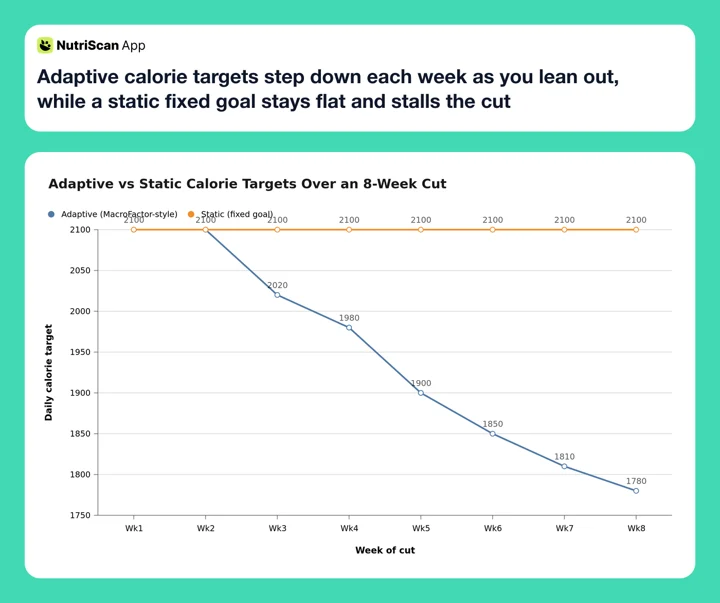 Figure 1: An adaptive app trims your target as your weight trend drops, so your deficit stays alive. A fixed goal holds the same number for weeks and quietly stalls you. Illustrative example, not MacroFactor output.
It has to be fast to log. A cut can run 8 to 16 weeks. Nobody sustains 90 seconds of manual food search per meal for four months. Food logging takes active effort in a way that wearing a step tracker does not, and adherence to it drops over time. In a 12-month randomized trial of 502 adults, higher adherence to self-monitoring was associated with greater odds of losing at least 5 percent of body weight (Burke et al., 2025). Fast logging is not a convenience. It is the difference between finishing the cut and abandoning it in week three.
It has to protect your protein and your floor. Deep deficits strip muscle if protein is too low, and crash diets that push calories too far down backfire. A good cutting app holds a protein target to the gram and lets you cap how fast you are trying to lose. If you are not sure where your numbers should land, our online macro calculator gives you a research-based starting point in under a minute.
Keep those three in mind and the ranking almost writes itself.
IMPORTANT
Checkpoint: you now know the job.
Quick status update so you always know the next best move.
⏱️ Progress 1/4 • ~1 minute in • Keep going
✅ Step 1: What a cut demands (done)
👉 Step 2: The adaptive-target leaders (you're here)
⏳ Step 3: The fast-logging picks
🧩 The overlooked oil-problem fixer (coming soon)
MacroFactor: The Best Tracker for a Cut in 2026
MacroFactor is the app I recommend first for almost any cut. It is built around an adaptive expenditure algorithm that recalculates your real calorie burn every week based on your weight trend and your logged intake (MacroFactor, 2026). When your loss stalls, the app sees it in your data and adjusts your targets down.
That weekly recalibration is the exact feature a cut needs. You are not guessing whether your metabolism adapted. The algorithm reads it from the scale and your food log, then hands you fresh numbers. You also select your preferred rate of weight change, which is the setting that stops a coaching program from turning into a reckless crash diet.
Logging is faster than its reputation suggests. Alongside the barcode scanner and quick-add, MacroFactor now ships AI photo logging, a nutrition label scanner and speech-to-text entry (MacroFactor, 2026). Garage Gym Reviews named it the best calorie counter app with a barcode scanner in its 2026 roundup (Garage Gym Reviews, 2026). Its 1.36 million entries are verified rather than fully crowd-sourced, which matters more than most people think on a cut, where a database that runs high can eat most of a 400-calorie deficit.
The cost is 71.99 dollars per year or 11.99 dollars per month, with no free tier but a 7-day free trial, started through the App Store or Google Play, so whether a card is collected depends on your platform and region (MacroFactor, 2026).
Pick MacroFactor if
You want targets that adapt on their own and you are willing to pay for the smartest algorithm on the market. Skip it if you want a free option, or you need a fasting timer, which it does not offer.
Related: Is MacroFactor worth it in 2026? and MacroFactor vs Carbon for cutting.
Carbon Diet Coach: The Prescriptive Cut
Carbon Diet Coach, built with input from Layne Norton, takes a coach-style approach. Instead of a passive algorithm, you check in on a schedule and Carbon prescribes your next set of macros like a human coach would. For lifters who want to be told exactly what to eat rather than interpret a trend graph, this feels more direct. Day-to-day logging is not the slog it once was either: Carbon's Smart Logger turns a meal photo or a typed or spoken description into a draft diary entry (Carbon help center).
Carbon's real edge for cutting is what happens after the cut. It has a built-in reverse diet mode that walks your calories back up slowly once you hit your goal weight, which helps you avoid the rapid regain that ends most cuts badly. Most trackers stop caring the moment you reach your target. Carbon plans the exit.
The trade-off is the renewal price. Carbon runs 99.99 dollars per year (Carbon pricing), the most expensive of the six apps here. You can test it first: the standard offer is a 7-day free trial that includes your first check-in (Carbon subscribe page), and its Huberman landing page runs a 14-day version.
Pick Carbon if
You want a prescriptive coach that tells you what to eat and plans your reverse diet after the cut. Skip it if you would rather have an algorithm adjust silently in the background than wait for a scheduled check-in to hand you new numbers.
Two adaptive picks down. Still building to that overlooked tracker that solves the hidden-calorie problem most cutters never see coming.
IMPORTANT
Checkpoint: midway progress update.
You're halfway - the fast-logging picks are next.
⏱️ Progress 2/4 • ~2 minutes in • Keep going
✅ Step 1: What a cut demands (done)
✅ Step 2: The adaptive-target leaders (done)
👉 Step 3: The fast-logging picks (current)
⏳ The overlooked oil-problem fixer (next)

MyFitnessPal: Fast Logging, Stale Targets
MyFitnessPal earns a place here on logging speed and database size alone. With more than 20 million foods and a huge library of restaurant and packaged items, you can log almost anything fast, and that speed keeps a cut on track. The Premium trial is 7 days, the same as most of this list (MyFitnessPal Premium).
Its targets move, but only when you push them. MyFitnessPal offers to recalculate your calorie goal every ten pounds you lose, and recalculates when you update your current weight (MyFitnessPal support). What it does not do is read your weight trend against your logged intake the way MacroFactor does, so between those prompts your target sits still. On a cut, ten pounds is a long time to spend on a stale number.
Accuracy is the second concern. When two trained raters entered the same three-day food records for 43 Canadian endurance athletes, MyFitnessPal overestimated total energy and carbohydrate against the reference database, with poor validity across six of the measures tested (Morello et al., 2025). The paper attributes those differences mainly to the women in the cohort. Our own read is that the volume of non-verified consumer entries is part of why two careful raters can log the same meal differently, which is the reliability problem the authors do describe. On a cut, where your deficit might be only 400 calories, a database that runs high can eat most of it.
Premium is 79.99 dollars per year (MyFitnessPal Premium). Fast, familiar, and enormous, but you are the one doing the math the app should do.
Pick MyFitnessPal if
You want the biggest database and fastest search, and you are comfortable recalculating your own targets between the app's ten-pound prompts. Skip it if you want the app to catch your stall for you, or you need verified data you can trust to the gram.
Lose It: Photo and Voice Logging, at a Higher Price Than It Used To Be
Lose It is the friction pick, not the price pick. Its Snap It photo logging and Say It voice logging both cut the effort that kills a long cut. Point your camera at a plate or say what you ate, and you are logged in seconds. Both sit in Premium, not the free tier, and Premium is now 79.99 dollars per year with no monthly option, up from 39.99 (Lose It membership tiers and pricing). That puts it level with MyFitnessPal and above MacroFactor, so the case for it is the logging speed, not the bill.
Lose It uses a simple budget model: it sets a personalized daily calorie number from your goal weight and the weekly rate you pick, then counts down. It is not adaptive in the MacroFactor sense, but you can adjust your plan as you go, and for a straightforward cut the countdown is easy to follow. Lose It runs a 7-day free trial on its current new-member offer, though the help center describes trials as promotional rather than permanent.
The limits show up if you want deep macro coaching or automatic target changes. Lose It is built for weight loss more than for physique-level macro precision. For a straightforward cut, that is plenty.
Pick Lose It if
You want photo and voice input built in and the fastest meal entry on this list. Skip it if you want adaptive targets, gram-level macro coaching, or the lowest yearly price.
Related: Lose It pricing 2026, free vs Premium.
Cronometer: The Micronutrient Safety Net
Cronometer is the app I add to a cut, not the one I replace it with. Its strength is nutrient depth: the free tier tracks up to 84 nutrients and Gold tracks up to 95, drawn from a database of over a million lab-analyzed or verified foods (Cronometer Gold). That is deeper than most general trackers expose. On a deep or long cut, where you are eating less food overall, that depth is a genuine safety net. It flags when your iron, magnesium, or potassium is quietly dropping because your intake shrank.
For cutting, that matters more than people admit. You can hit your calorie and protein targets perfectly and still run low on the micros that keep training and recovery going. Cronometer is the app that catches it.
Its free tier is generous, barcode scanner included, though reports and charts on free are limited to a 7-day window, which is short for reading a 12-week cut. Gold is 4.99 dollars a month billed annually at 59.99 dollars, or 10.99 dollars billed monthly (Cronometer Gold). Garage Gym Reviews named Cronometer its best overall calorie counter app for 2026 (Garage Gym Reviews, 2026). Gold also adds Photo Log, Voice Log, a fasting timer, and Crono Coach. What Cronometer does not publish is a weekly target recalculation of the kind MacroFactor runs; Crono Coach gives guidance from your own data, not a new calorie number. That is why many lifters pair it with a coach app.
Pick Cronometer if
You are running a long or aggressive cut and want to guard your micronutrients. Skip it as your only app if you need targets that recalculate themselves.
IMPORTANT
Checkpoint: final stretch before the reveal.
One last nudge - the overlooked pick is next.
⏱️ Progress 3/4 • ~3 minutes in • Keep going
✅ Step 1: What a cut demands
✅ Step 2: The adaptive-target leaders
✅ Step 3: The fast-logging picks
✨ The overlooked oil-problem fixer (about to reveal)
NutriScan: The Overlooked Fix for Real, Cooked Meals
Here is the tracker most cutters overlook. Cutting on home-cooked or restaurant food is where every app above breaks, because the calories on a cut hide in exactly the things a barcode cannot read: cooking oil, ghee, sauces, and portion size. This is the gap NutriScan is built for. You photograph the plate, and the app prompts you for the oil level and the cooking method, which is where cut calories usually leak.
Portion accuracy is the reason those prompts exist. ChatGPT-4 underestimated weight in 76 percent of 114 meal photographs, with the gap concentrated in medium and large portions (O'Hara et al., 2025). That study tested the model on its own, with no step where a person confirms the amount, so what follows is our argument rather than the paper's finding: the extra tap that asks how much oil went in is not friction. It is the step that keeps a photo estimate honest during the phase where honesty matters most.

Home > Camera Icon > Crop Picture. Photograph the plate, then confirm oil level and cooking method so the estimate reflects what you actually ate.
After the scan, NutriScan asks two questions that fix the biggest leak on a cut: an oil-level slider (No Oil, Low, Medium, High) and a cooking-method tag (Deep-fried, Air-fried, Stir-fried, Steamed, Grilled, and more). That is the tablespoon of ghee a barcode will never see.
For logging speed on a cut, photo-first entry is hard to beat for mixed and cooked meals. You can also log hands-free through Monika, the voice AI nutritionist, and use NutriBites to ask questions about your own meal timeline. NutriScan offers 5 free photo scans a week, enough to test it on the cooked plates where a cut usually leaks calories, and runs 59.99 dollars per year for unlimited scanning. The 7-day trial starts through your app store, and whether a card is collected depends on your platform and region. It is not an adaptive coach like MacroFactor, so many people run it as the fast-logging layer and set their targets elsewhere. See how the scanner handles real plates in the meal scan guide.
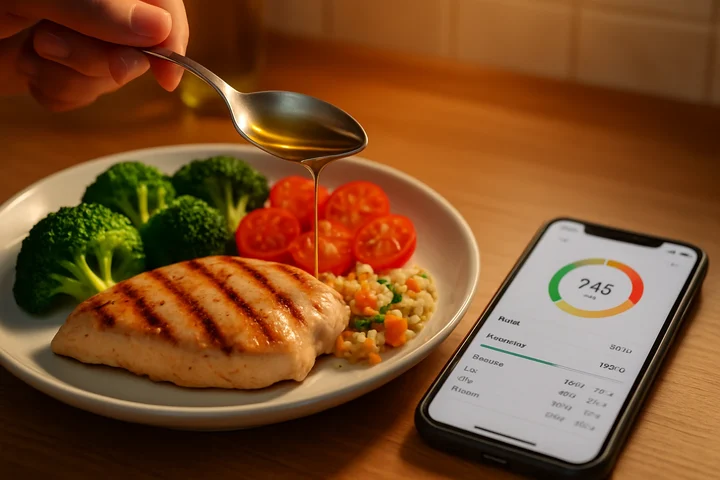 A single tablespoon of oil is roughly 120 calories. Three untracked tablespoons is 360, nearly all of a 400-calorie deficit.
Pick NutriScan if
You eat a lot of home-cooked or restaurant meals and want photo logging that accounts for oil and portions. Skip it if you want an adaptive TDEE algorithm or a prescriptive coach.
Comparison Table: Cutting Trackers in 2026
| App | Adaptive targets | Fast logging | Price/year | Free trial |
|---|---|---|---|---|
| MacroFactor | Yes, weekly recalc | Photo, barcode, label scan, quick-add | 71.99 dollars | 7-day |
| Carbon | Yes, scheduled check-ins | Photo, describe, barcode | 99.99 dollars | 7 days (14 on the Huberman offer) |
| MyFitnessPal | Prompted, per 10 lb | 20M+ database | 79.99 dollars | 7-day |
| Lose It | Partial, plan-based | Photo + voice on Premium | 79.99 dollars | 7-day |
| Cronometer | Not published | Barcode, photo on Gold | 59.99 dollars | Free tier |
| NutriScan | No | Photo + oil prompt | 59.99 dollars | 7 days |
Prices are standard US prices as of mid 2026 and change by region.
Read the table with your two priorities in mind. If adaptive targets top your list, MacroFactor and Carbon lead. If fast logging on real food matters most, Lose It and NutriScan win on friction. The best cut often uses two: an adaptive coach for the numbers and a fast logger for the meals.
 The payoff of an honest cut: muscle kept, fat gone. The right tracker is what makes the numbers trustworthy enough to get here.
Tips for Tracking a Cut That Actually Works
These are the habits I coach clients through, independent of which app they pick.
Weigh daily, judge weekly. Your weight bounces from water, sodium, and glycogen. A single day means nothing. Log every morning and read the 7-day average. Adaptive apps need this trend to adjust your targets correctly.
Set protein first, then fill the rest. Protein is what protects muscle in a deficit. A 2024 meta-analysis of 47 trials found that higher protein intake significantly prevents muscle-mass decline in adults with overweight or obesity who are losing weight, with intake above 1.3 grams per kilogram a day expected to increase muscle mass and intake below 1.0 raising the risk of decline (Kokura et al., 2024). Lock your protein target, then distribute the remaining calories between carbs and fat.
Log the oil. A tablespoon of oil is roughly 120 calories (USDA FoodData Central, record 171413). Untracked cooking fat is one of the most common causes of a stall we see, before you assume your metabolism is the problem. If your app does not ask about oil, add it manually every time.
Respect the calorie floor. Bigger deficits are not better. Crash cuts tank your energy, your training, and your muscle. Do not run a deeper deficit than you can hold, and do not take daily intake below the ranges Mayo Clinic publishes for weight loss, 1,200 to 1,500 calories for women and 1,500 to 1,800 for men, without clinical supervision (Mayo Clinic).
Pre-log your day. Enter your meals in the morning before you eat them. This turns tracking from a guilt-ridden diary into a plan you follow, and it removes the temptation to "forget" the snack you already ate.
Do not fear the plateau. A stall is data, not failure. It usually means your metabolism adapted and your target needs to come down. The step we use with clients is 100 to 200 calories, a coaching heuristic rather than a published guideline, small enough that you can hold it and read the next two weeks. An adaptive app does this for you. A static app makes you do it by hand.
A cut is not a crash
Losing faster is not losing better. Aggressive deficits cost you muscle, sleep, and training quality. If you manage a medical condition or take medication, check with a clinician before running a deep or long cut.

How to Set Up Any App for a Cut in 5 Steps
Whichever tracker you choose, the setup is the same.
- Enter accurate stats and a modest goal. Aim for the pace CDC calls gradual and steady, about 1 to 2 pounds a week (CDC), which for most people lands near 0.5 to 1 percent of body weight. In coaching practice, faster targets tend to cost you muscle.
- Set your protein target before anything else. Use at least 1.6 grams per kilogram of body weight, the point beyond which extra protein stopped adding fat-free mass in training adults (Morton et al., 2018). Many coaches go to 2.2 on a deep cut, which is practice rather than a tested threshold. Our macro calculator sets this for you.
- Build your quick-log list in week one. Save your 10 most common meals so logging drops to a few taps for the rest of the cut.
- Establish a two-week baseline before judging. Do not change anything until you have a clean 14-day weight trend to read.
- Adjust on the trend, not the day. If the 7-day average has not moved in two weeks, make a small cut, 100 to 200 calories in our coaching practice, or let your adaptive app do it.
If you would rather follow a structured plan than build one from scratch, the NutriScan diet plan tools set your cutting targets and adjust them as you go.
What the Research Says About Tracking and Fat Loss
The evidence for tracking during a cut is strong, but it comes with a catch worth knowing.
In a 12-month randomized trial of 502 adults, higher adherence to self-monitoring was associated with greater odds of losing at least 5 percent of body weight (Burke et al., 2025). That is the case for fast logging: the easier the app makes it, the more likely you are to keep doing it through a long cut.
The catch is that app effectiveness tends to fade past the six-month mark, often because users disengage when the app stops feeling personal to their results. A systematic review of 11 randomized trials covering 1,717 participants found a modest but significant effect on weight over 4 to 6 months, and limited effect beyond six months, with a tendency to regain (Pujia et al., 2025). This is the strongest argument for adaptive targets. An app that changes with you stays relevant. A static one becomes a chore you eventually ignore.
On protein specifically, the muscle-retention evidence is clear. A meta-analysis of 47 trials found that higher protein intake significantly prevents muscle-mass decline in adults with overweight or obesity aiming for weight loss (Kokura et al., 2024), which is why every app I rank for cutting has to make a protein target easy to hit and easy to see.
The Verdict: Which Tracker Wins Your Cut
For most people, MacroFactor is the best macro tracker for cutting in 2026. Its weekly adaptive recalculation solves the exact problem that stalls a cut, the rate of weight change you select keeps the deficit from running away, and it logs fast, by photo, barcode, label scan or voice. The 71.99 dollars price and lack of a free tier are the only real drawbacks, and the 7-day trial removes most of that risk.
Choose Carbon if you want a prescriptive coach and a built-in reverse diet for after the cut, and you can live with the highest renewal price here. Choose Lose It if photo and voice logging is what keeps you consistent and you accept the 79.99 dollars a year it now costs. Add Cronometer if your cut is long or aggressive and you want to guard your micronutrients, and note that its free tier alone covers a lot of that job. And reach for NutriScan if you eat mostly home-cooked or restaurant meals, where photographing the plate and confirming the oil beats hunting a barcode.
The strongest setup pairs two apps: an adaptive coach for the targets and a fast logger for the meals. Whatever you pick, track your cut with NutriScan or a partner app that keeps your numbers honest, because on a cut, the numbers are the plan.
IMPORTANT
Recap: everything you covered this round.
You finished the run - save this for your next cut.
⏱️ Progress 4/4 • ~4 minutes in • Nicely done
✅ Step 1: What a cut demands
✅ Step 2: The adaptive-target leaders (MacroFactor, Carbon)
✅ Step 3: The fast-logging picks (MyFitnessPal, Lose It, Cronometer)
✅ The overlooked oil-problem fixer, revealed: NutriScan for real, cooked meals
Frequently Asked Questions ❓
Q: What is the single most important feature in a cutting app?
A: Adaptive targets. Your metabolism slows as you lose weight, so a fixed calorie goal goes stale within weeks. An app that recalculates your target from your weight trend, like MacroFactor, catches the stall automatically instead of leaving you to guess.
Q: Do I need a paid app to cut successfully?
A: No. Cronometer's free tier supports a solid cut on its own: it includes the barcode scanner and tracks up to 84 nutrients without paying (Cronometer Gold). Paid adaptive coaching helps most on longer cuts, where metabolic adaptation makes manual target changes harder to judge.
Q: How fast should logging be for a long cut?
A: Fast enough that you never skip it. Photo and voice logging, in Lose It Premium and in NutriScan, cut a meal entry to seconds. In a 12-month randomized trial of 502 adults, higher adherence to self-monitoring was associated with greater odds of losing at least 5 percent of body weight (Burke et al., 2025), so the app you will actually keep using beats the one with more features.
Q: Why does my weight stall even when I am tracking perfectly?
A: Usually metabolic adaptation. After weight loss, total energy expenditure runs lower than your new body weight and body composition alone would predict (Rosenbaum and Leibel, Am J Clin Nutr), so the deficit you set at the start shrinks. The fix is a smaller target, 100 to 200 calories in our coaching practice. Adaptive apps do this for you; static apps require a manual recalculation.
Q: How much protein should I track on a cut?
A: Aim for at least 1.6 grams per kilogram of body weight, the intake beyond which added protein stopped adding fat-free mass in training adults (Morton et al., 2018). Many coaches go to 2.2 on a deep cut. Higher protein intake significantly prevents muscle-mass decline in adults losing weight (Kokura et al., 2024), so set protein as your first target and build the rest of your macros around it.