Best Macro Tracker for Bodybuilding 2026: 3 Apps Tested
 ChatGPT
  Claude
  AI Mode
  Perplexity
When two trained raters logged the same three days of food for 43 Canadian endurance athletes into MyFitnessPal, the app showed poor validity for total energy, carbohydrate, protein, cholesterol, sugar and fiber against the Canadian Nutrient File reference, while Cronometer performed better (Morello et al., 2025). I keep that study in mind every time a lifter asks me which macro tracker to buy. For bodybuilding, the numbers are not a rough guide. They are the whole plan.
A bodybuilder does not just want to eat healthy. You have protein targets to the gram, a calorie ceiling on a cut, a calorie floor on a bulk, and a metabolism that fights back the longer you diet. The right app has to track precisely, adapt when your weight stalls, and keep working through a full bulk and cut cycle. The wrong app quietly feeds you bad numbers for months.
TL;DR - Best Macro Tracker for Bodybuilding 2026
- Overall pick: MacroFactor, for its running expenditure model and the best accuracy per dollar at about $71.99 per year list
- Contest prep and peak week: Carbon Diet Coach, for prescriptive check-ins and a built-in reverse diet at about $99.99 per year
- Beginners and heavy packaged-food eaters: MyFitnessPal, for database breadth only, not for macro precision
- Key finding: the 2025 Morello study found MyFitnessPal had poor validity on six measures in real athlete use, including total energy, carbohydrate and protein
- The gap none of them close: cooked and mixed meals, where hidden oil silently blows a cut. Scroll to the reveal near the end.
IMPORTANT
Your macro tracker decision plan at a glance.
Three sections and one reveal, so you can buy with confidence in under 7 minutes.
⏱️ Progress 0/4 • ~0 minutes in • Keep going
⏳ What bodybuilding demands that calorie counting cannot do
⏳ The three apps, judged against those demands
⏳ Which tracker to buy for each phase of your season
🔍 The logging gap that quietly costs you muscle on a cut (revealed near the end)
What Bodybuilding Demands That Calorie Counting Cannot Do 🏋️
Before comparing apps, name the job. General calorie counters aim for close enough. Bodybuilding tracking has four hard requirements.
Accurate macros, not just calories. Protein drives muscle growth and muscle retention. If your database inflates protein or undercounts carbs, your prep drifts off course without warning. The Morello study is the clearest recent example of why database quality matters when you log every day.
Adaptive targets. Your body lowers its energy use as you diet. A number set in week one will be too high by week eight. A tracker that recalculates your real expenditure from your intake and weight trend keeps the deficit honest.
Phase support. Bodybuilding runs in phases: an off-season bulk, a cutting phase, peak week, then a careful return to maintenance. Good apps let you switch goals and rebuild targets without starting over.
Fast logging. You log the same chicken, rice, and whey dozens of times a week. If logging is slow, you stop doing it. Speed is not a luxury here. It is the difference between finishing a prep and abandoning the log in month two.
Keep those four in mind. Each app below wins on some and loses on others. If you want to set your starting numbers before you pick an app, our online macro calculator gives you a baseline in about a minute.
 The training is the easy part to stay consistent with. The logging is where most preps fall apart.
IMPORTANT
Checkpoint: here's where you are right now.
You know the four requirements. Now watch how each app scores against them.
⏱️ Progress 1/4 • ~1 minute in • Keep going
✅ The four bodybuilding requirements (done)
👉 The three apps compared (you're here)
⏳ Which tracker to buy for each phase
🧩 The logging gap that costs you muscle (coming soon)
MacroFactor: The Adaptive Engine for a Bulk and a Cut 📈
MacroFactor is built by Stronger By Science Technologies, the team behind Stronger by Science (App Store developer record), and it shows. Its core feature is an adaptive expenditure algorithm. Instead of asking you to guess your calories, it models your real total daily energy expenditure from your logged intake and your weight trend. MacroFactor says that after 3 to 4 weeks of logging, its recommendations are fully informed by your real weight and nutrition data rather than the demographic estimate it starts you on (MacroFactor help center).
For a bodybuilder, that solves the biggest problem in a long diet: metabolic adaptation. When your weight stalls, MacroFactor sees it and rebuilds your targets at the next weekly adjustment, so your deficit stays real instead of imaginary. It offers three program styles: Coached, where the app sets and updates macros, Collaborative, where you set some rules, and Manual, where you control everything. It also enforces a calorie floor, a standard 1,200 kcal per day or an individualised low floor, so you cannot accidentally crash your intake during a hard cut (MacroFactor help center).
Logging is fast, with a clean barcode scanner, a searchable database of more than 1.36 million verified entries, a nutrition label scanner, AI photo logging, and quick repeat-meal tools. It smooths your weight trend statistically and exports your data cleanly (MacroFactor feature breakdown).
What it lacks for bodybuilding
No fasting timer. The only fasting item it publishes is support for fasting days inside the macro program, which is calorie cycling, not a timer. The database is solid but far smaller than MyFitnessPal's, 1.36 million verified entries against 20 million. There is no free tier at all.
Price: about $71.99 per year list or roughly $11.99 per month (MacroFactor pricing), though the US App Store runs other annual and monthly SKUs alongside those. The 7-day free trial starts through the App Store or Google Play, so whether a card is collected depends on your platform and region.
Pick MacroFactor if: you want the most accurate self-adjusting targets and you are happy to log carefully. It is my default recommendation for the data-driven lifter on either a bulk or a cut. For a deeper head-to-head on the cutting phase specifically, see our MacroFactor vs Carbon breakdown.
Skip MacroFactor if: you want to be told exactly what to do each week with a human-coach feel, or you need a free option. In that case our roundup of MacroFactor alternatives covers the rest of the field.
Carbon Diet Coach: Prescriptive Structure for Contest Prep 💪
Carbon Diet Coach, built by Dr. Layne Norton and registered dietitian Keith Kraker (joincarbon.com), has the opposite personality. Where MacroFactor is a flexible engine, Carbon is an opinionated coach. It runs on regular check-ins: you weigh in, report your data, and the app hands you updated targets with a clear instruction to follow.
That structure suits contest prep. A bodybuilder deep in a cut, tired and second-guessing everything, often does better with firm direction than with options. Carbon adjusts your calories and macros from your check-in results, and reverse dieting is one of the four goals you can pick at setup (joincarbon.com), which is genuinely useful for the delicate post-show return to maintenance where many lifters rebound.
Carbon has been shipping since 2019, two years longer than MacroFactor, and both sit at 4.8 on the App Store (Carbon from 8K ratings, MacroFactor from 20K, checked 7 August 2026). Its coaching logic is simpler and more prescriptive, which is a strength for people who want less to think about.
What it lacks for bodybuilding
It is the most expensive of the three. There is no photo meal logging, only a camera-based nutrition label scanner. And its adjustment is gated on you completing a check-in and marking yourself compliant, where MacroFactor hands you a new weekly target whether or not you hit last week's.
Price: about $99.99 per year, with monthly at around $11.99 and six-month at around $59.99 (Carbon pricing). There is a 7-day free trial, though a week buys exactly one check-in, so you see a single adjustment cycle before the $99.99 renewal lands.
Pick Carbon if: you want a coach-style experience that tells you what to do, and you value the reverse-diet tooling for after a show. Our full Carbon Diet Coach review has the detail.
Skip Carbon if: you want the lowest price or the most granular data.

MyFitnessPal: The Big Database Generalist 📱
MyFitnessPal is the app most lifters already have. Its main advantage is scale: a database of more than 20 million foods (MyFitnessPal blog), which means almost any packaged item, restaurant meal, or supplement is already in there. For a beginner in the gym, that low-friction start matters.
Premium lets you set macro goals by gram or percentage, set a different macro goal for each day of the week, and use Meal Scan to log from a photo. It syncs with more than 35 fitness apps and wearables, which some lifters value for tying steps and workouts to intake (MyFitnessPal Premium).
The honest catch for bodybuilding is what sits inside that giant database. Most of it is user submitted, and Morello et al. suggest the low reliability and validity they measured may come from the sheer number of options attached to each food entry in MyFitnessPal, including non-verified consumer entries (Morello et al., 2025). Their raters deliberately picked green-check verified foods where they could, and the app still showed poor validity on six measures, because the authors note verified entries can carry incomplete or incorrect information too. For someone eating close enough, that is fine. For someone whose protein target and calorie ceiling decide whether they hold muscle on a cut, it is a real risk. MyFitnessPal also does not adapt your targets automatically the way MacroFactor and Carbon do.
Price: Premium is about $79.99 per year or $19.99 per month, and Premium+ is $99.99 a year (MyFitnessPal Premium). The trial is 7 days and takes a card. MacroFactor and Carbon both run 7 days as well, so trial length is not a differentiator here.
Pick MyFitnessPal if: you eat a lot of packaged or restaurant food and want the biggest database, or you are early in your journey and already comfortable in the app.
Skip MyFitnessPal if: you need verified macro accuracy and self-adjusting targets, which describes most serious physique athletes.
Side by Side: MacroFactor vs Carbon vs MyFitnessPal 📊
| Feature | MacroFactor | Carbon Diet Coach | MyFitnessPal |
|---|---|---|---|
| Best for | Adaptive, data-driven lifters | Coach-style structure, prep | Big database, beginners |
| Adaptive targets | Yes, weekly, from a running expenditure model | Yes, weekly, from your check-in | No |
| Reverse diet mode | Manual | Built-in | No |
| Database size | 1.36M+, verified entries | Large, FatSecret-powered | 20M+, mostly user submitted |
| Macro accuracy for athletes | Strong | Strong | Weaker (user entries) |
| Photo food logging | AI photo logging | No photo meal logging | Meal Scan (Premium) |
| Calorie floor | Yes, published | Not published | No |
| Free trial | 7 days | 7 days | 7 days |
| Annual price | ~$71.99 | ~$99.99 | ~$79.99 |
Prices are standard US prices as of mid 2026 and change by region. MacroFactor and MyFitnessPal both run promotional SKUs alongside the list price, so confirm at checkout.
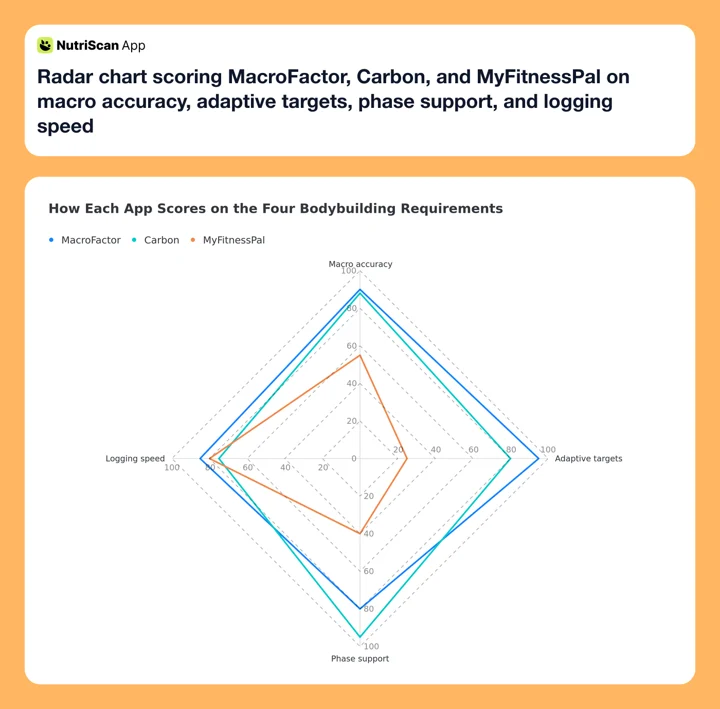 Figure 1: Our own scoring against the four requirements above, not a published benchmark. MacroFactor and Carbon trade places on adaptation versus phase support, while MyFitnessPal falls away sharply on adaptive targets.
IMPORTANT
Checkpoint: midway progress update.
You're halfway, and this is where the decision gets concrete.
⏱️ Progress 2/4 • ~3 minutes in • Keep going
✅ The four bodybuilding requirements (done)
✅ The three apps compared (done)
👉 Which tracker to buy for each phase (current)
⏳ The logging gap that costs you muscle (next)
Which Macro Tracker to Buy for Each Phase of Your Season 🗓️
Bodybuilding is not one goal, so the best app depends on where you are in the calendar. This is the part most app comparisons skip. If you train for endurance rather than physique, our comparison of the same three apps for athletes weighs fuelling and carbohydrate accuracy more heavily instead.

Off-season bulk ➡️ MacroFactor. A lean bulk needs a small controlled surplus, and MacroFactor's expenditure model keeps that surplus from ballooning as your maintenance rises with added mass. Your calorie targets grow as you do, without a manual recalculation every month.
Cutting phase ➡️ MacroFactor or Carbon. If you want the app to quietly keep your deficit accurate as your metabolism adapts, choose MacroFactor. If you are the type who does better with firm weekly instructions when willpower is low, choose Carbon.
Contest prep and peak week ➡️ Carbon. The check-in structure and prescriptive targets remove decision fatigue at the hardest point of the season, and the coaching format keeps you honest when your own judgement is least reliable.
Post-show return ➡️ Carbon. Its built-in reverse diet is the strongest tool of the three for the phase where lifters most often rebound. MacroFactor in Coached mode with a gradual surplus is a reasonable second choice.
Beginner still learning foods ➡️ MyFitnessPal. The database and the gentle on-ramp win here, with a plan to graduate to a verified tracker once your macros start to matter.
What Each App Costs You Per Year 💰
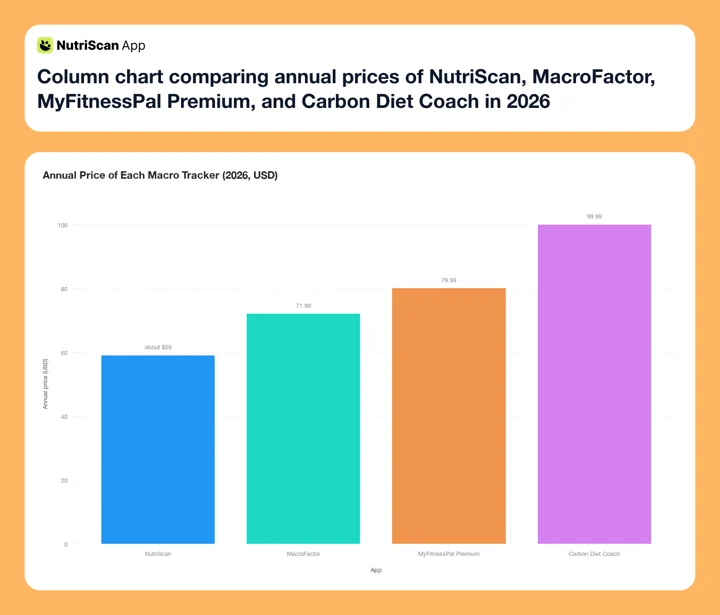 Figure 2: Carbon costs roughly 39 percent more per year than MacroFactor. Over a two-year bulk and cut cycle that is about $56, which is worth paying only if you genuinely use the coaching structure.
Price should be your last filter, not your first. The cost difference across all four options here is smaller than the cost of one bad cut where you lose muscle you spent a year building. Choose on accuracy and adherence, then check whether the price stings.
The Protein Science That Should Set Your Targets 🔬
No app matters more than hitting your protein. Nunes et al.'s 2022 systematic review and meta-analysis found that increasing daily protein intake produced small but real additional gains in lean body mass (SMD 0.22, 95% CI 0.14 to 0.30) and lower-body strength in healthy adults doing resistance training, with the strength benefit showing up at 1.6 g of protein per kg of body weight per day and above (Nunes et al., 2022). Deldicque's 2020 editorial in Nutrients puts the mechanism plainly: protein intake combined with resistance exercise is the most efficient strategy for muscle hypertrophy, though it adds that certain conditions have to be met for that to hold (Deldicque, 2020).
Protein matters even more on a cut. Kokura et al., 2024, found that adults with overweight or obesity who are losing weight retain muscle mass more effectively on higher protein intake (Kokura et al., 2024). That is the entire goal of a bodybuilding cut: lose fat, keep muscle. Timing plays a smaller supporting role. Zhou et al.'s 2023 network meta-analysis found post-exercise protein worked best for muscle mass and night-time protein best for strength (Zhou et al., 2023).
The takeaway for app choice: a tracker that undercounts protein is not a small annoyance for a lifter. It can be the reason a cut costs you hard-won muscle. That is why accuracy, not database size, should decide your purchase.
IMPORTANT
Checkpoint: final stretch before the reveal.
One last nudge, because the gap none of these three apps close is next.
⏱️ Progress 3/4 • ~5 minutes in • Keep going
✅ The four bodybuilding requirements
✅ The three apps compared
✅ Which tracker to buy for each phase
✨ The logging gap that costs you muscle (about to reveal)
The Logging Gap That Quietly Costs You Muscle on a Cut 🧩
Here is the thing every one of these three apps assumes: that you weigh raw ingredients and log packaged foods. That assumption holds beautifully for chicken, rice, oats, and whey. It falls apart the moment someone else cooks your food.
The culprit is cooking oil. A single tablespoon is roughly 120 calories, 119 for olive oil in USDA FoodData Central, and other common cooking oils land within a few calories of that. A restaurant stir fry or a home-cooked curry can carry two or three tablespoons you never see, 240 to 360 calories, and a generic database entry averages that away. On a 500-calorie deficit, 300 unlogged calories leaves you 200, so your cut runs at well under half the speed you planned for.
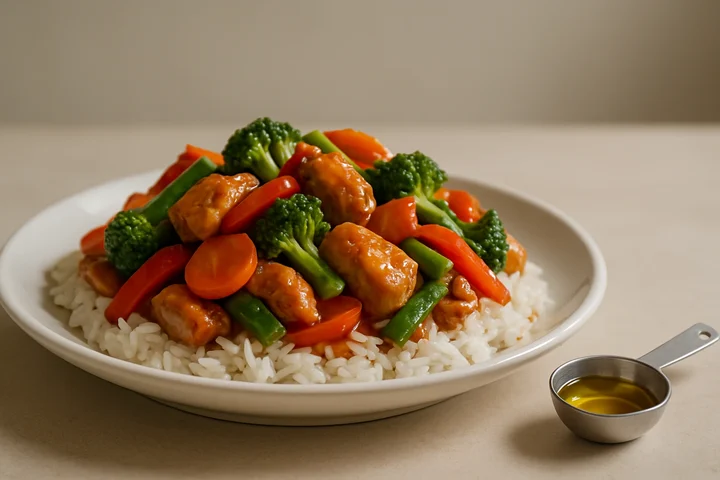
A bigger database cannot fix this, because the answer is not in any database. It is a question the food itself cannot answer. A camera on its own does not fix it either. MacroFactor and MyFitnessPal both ship AI photo logging now, and both estimate straight from the picture without stopping to ask how the dish was cooked or how much oil went into the pan. A camera can see a curry. It cannot see the ladle of ghee that went in twenty minutes earlier.
 Fat melts into the pan and vanishes into the dish. If you did not cook it yourself, you are guessing at it. Every time.
How NutriScan Closes That Gap
This is the specific problem NutriScan is built for. You photograph the meal, and the app asks the two questions the camera cannot answer before it estimates your macros:
- Cooking method, chosen from 11 tags: Not Sure, Mixed, Deep-fried, Air-fried, Stir-fried, Oven-baked, Roasted, Steamed, Boiled, Grilled, or Raw.
- Oil level, set on a slider: No Oil, Low Oil, Default or Medium Oil, or High Oil.

Home > Camera Icon > Click Picture > Crop Picture. The cooking method and oil slider are set before the estimate is calculated, not after.
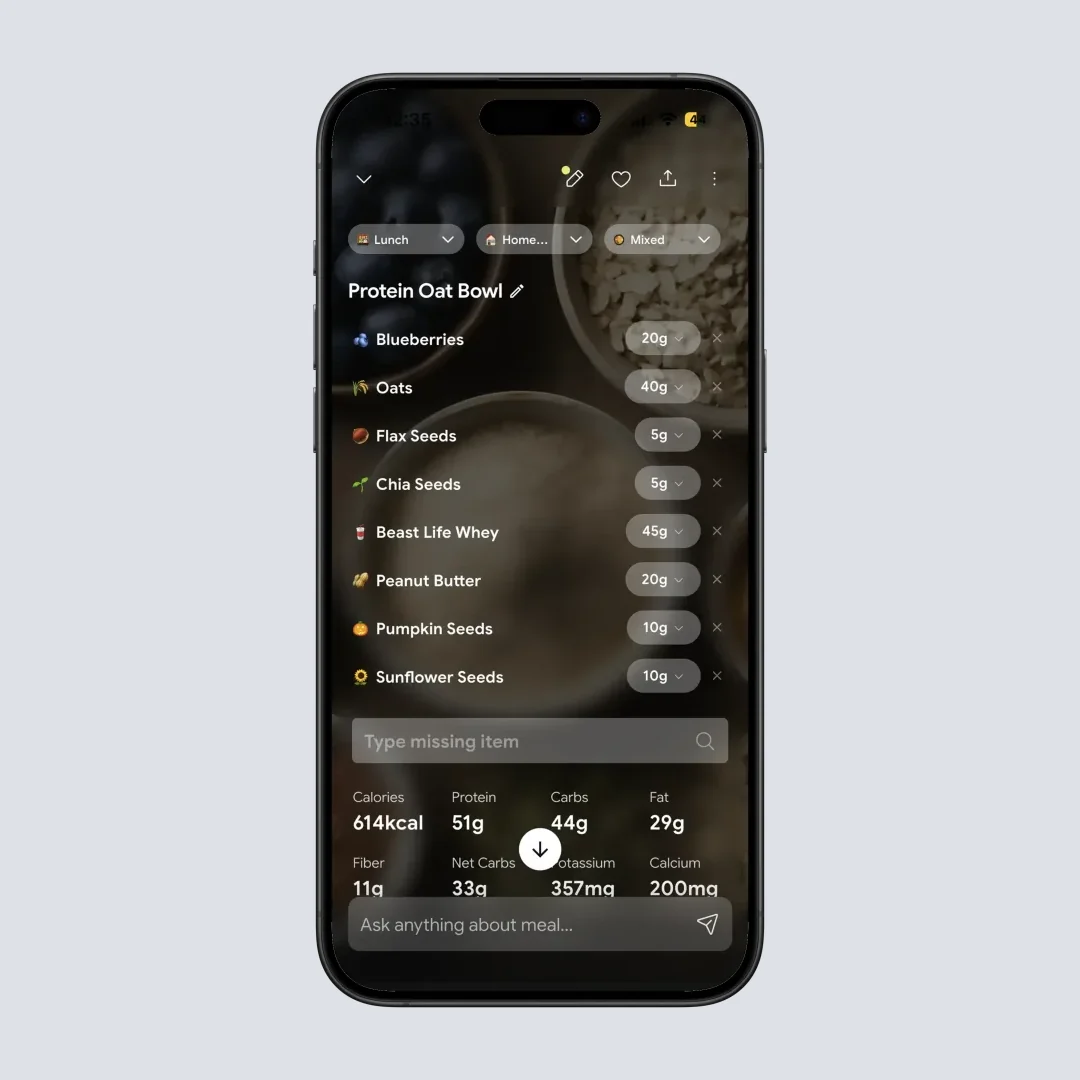
Home > Camera Icon > Click Picture > Crop Picture > Nutritional Details Page. You can adjust the portion size here before saving.
Read more about how the scan works in our meal scan guide, and see how the daily patterns surface in Insights.
The realistic setup for a lifter
Run a precise macro tracker for your weighed staple foods, and reach for photo logging with cooking-method and oil prompts when you eat out or eat food someone else prepared. NutriScan gives you 5 AI photo scans per week on the free plan, and Premium is $59.99 per year. Prices are standard US prices as of mid 2026 and change by region. The 7-day trial starts through your app store; whether a card is collected depends on your platform and region.
I do not think NutriScan replaces a dedicated macro coach like MacroFactor or Carbon for structured prep. It is the tool that catches the meals those apps make you guess at.

Tips for Tracking Macros as a Bodybuilder 💡
A few habits matter more than which app you choose.
Verify your staple foods once. Build accurate custom entries for your daily chicken, rice, oats, and whey, then log them repeatedly. That removes the entry-selection ambiguity the Morello study flagged, where a single food carries dozens of competing entries.
Weigh solids in grams, not cups. A cup measure of rice varies with the grain, how tightly it is packed, and whether you measure it raw or cooked. A gram weight does not. A food scale is the cheapest accuracy upgrade you can buy.
Prioritize protein first. Hit protein every single day before you worry about the exact carb and fat split. The research is clearest on protein's role in muscle retention.
Trust the trend, not the day. Daily weight bounces with water and food volume. Adaptive apps smooth this. Do not change your plan off a single high reading.
Log oil and cooking fats honestly. Hidden cooking oil is the most underestimated calorie source on a cut, and it is where the photo prompts above earn their keep.
Give an adaptive app three to four weeks before judging it. MacroFactor says its recommendations are only fully informed by your own weight and intake data after 3 to 4 weeks (MacroFactor help center). Carbon publishes no calibration window, so give it at least one or two full check-in cycles. Early numbers are estimates either way.
Plan your reverse diet before the show, not after. A structured return to maintenance protects the progress you just spent months earning.
What the Research Says About Sticking With an App 🔬
App accuracy is only half the story. Consistency is the other half. A 2025 systematic review and meta-analysis of 11 randomized trials and 1,717 participants found nutrition apps produced a modest but statistically significant effect on weight and BMI over 4 to 6 months (SMD -0.33, 95% CI -0.48 to -0.17), with effectiveness limited beyond six months and high dropout where the app lacks personalized support (Pujia et al., 2025). For a bodybuilder running month-long phases, an app that adapts and keeps you engaged has a structural advantage over a static logger.
Self-monitoring tracks with results. In the 12-month SMARTER trial of 502 adults, adherence to self-monitoring and to the study's diet and activity goals was associated with greater weight loss, and the group that also received feedback saw its adherence decline more slowly than the self-monitoring-only group (Burke et al., 2025). The practical reading: pick the app you will actually open every day. A perfectly accurate tracker you abandon in week three loses to a slightly simpler one you use for a full prep.
IMPORTANT
Recap: everything you covered this round.
You finished the run. Save this for your next phase change.
⏱️ Progress 4/4 • ~7 minutes in • Nicely done
✅ The four bodybuilding requirements
✅ The three apps compared
✅ Which tracker to buy for each phase
✅ The hidden-oil logging gap (revealed)
The Verdict: My Pick for Most Lifters 🏆
For most bodybuilders in 2026, MacroFactor is the tracker I recommend first. It gives you verified-quality logging, targets that adapt to your real metabolism through a full bulk and cut, a published calorie floor to protect a hard diet, and the lowest annual list price of the three.
Carbon Diet Coach is the better choice if you want a prescriptive coach-style experience and you value its reverse-diet tooling for after a show, provided you accept the higher price. MyFitnessPal earns its place only if database breadth or an easy start matters more to you than macro precision, which for a physique athlete it rarely does.
Whichever you choose, accuracy beats size and consistency beats perfection. Track your protein first, weigh your staples, trust the trend, and pick the app you will still be logging in month three. For the cooked and mixed meals your macro tracker makes you guess at, layer in photo logging with NutriScan and its cooking-method and oil prompts to keep those estimates honest.
Frequently Asked Questions ❓
Is MacroFactor or Carbon better for bodybuilding?
Both are strong. MacroFactor is better if you want transparent weekly target adjustments driven by a running expenditure model, plus the lower price, which suits most bulks and cuts. Carbon is better if you want a prescriptive check-in model and a built-in reverse diet for after a show. Both run a 7-day free trial through the app stores, so trial length will not decide it for you.
Is MyFitnessPal accurate enough for a cutting phase?
It can undercount macros because most of its 20 million food database is user submitted. Morello et al., 2025 found MyFitnessPal showed poor validity for total energy, carbohydrate, protein, cholesterol, sugar and fiber against the Canadian Nutrient File reference, while Cronometer performed better (Morello et al., 2025). For a cut, where every gram of protein and every calorie counts, build verified custom entries for your staples or use a tracker with a curated database.
How much protein do I need to build muscle?
Most evidence supports higher protein intakes for lifters. Nunes et al.'s 2022 meta-analysis found more daily protein produced small additional gains in lean mass and lower-body strength during resistance training (Nunes et al., 2022). On a cut, Kokura et al., 2024 found adults with overweight or obesity who are losing weight retain muscle more effectively on higher protein (Kokura et al., 2024). Your app should make hitting that target easy and accurate.
Do these macro apps adjust my calories automatically?
MacroFactor and Carbon do, both on a weekly cycle. MacroFactor models your expenditure from your logged intake and weight trend and hands you a new target every week from that running estimate. Carbon adjusts once you complete a scheduled check-in. MyFitnessPal does not adapt targets on its own, so you have to recalculate manually when your weight stalls.
Can I use a free app for serious macro tracking?
You can start free, but the adaptive coaching features that matter most for bodybuilding sit behind paid tiers. MacroFactor has no free tier and Carbon has none either, though both run a 7-day trial, and the free MyFitnessPal tier lacks gram-level macro goals. Pujia et al., 2025 found apps without personalized support see high dropout (Pujia et al., 2025), so pick the paid tool you will actually stick with for a full phase.
Why do my macros drift when I eat home cooked meals?
Cooking oil is the most commonly underestimated calorie source. A tablespoon of oil is roughly 120 calories, and a generic database entry for a curry or a stir fry rarely matches how much oil was actually used. Logging the cooking method and the oil level separately, as described in the reveal section above, closes most of that gap.