Carbon Diet Coach Review: Is It Worth $99.99 a Year?
 ChatGPT
  Claude
  AI Mode
  Perplexity
 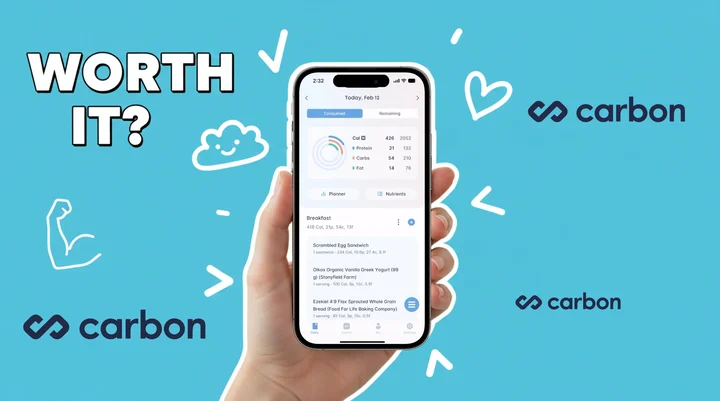 Photo by Vitaly Gariev on Unsplash
Carbon Diet Coach is worth paying for if you log food at least five days a week and want your macros recalculated for you every seven days. It is a poor buy if you want to test an app before you pay. The Carbon app costs $11.99 a month, $9.99 a month on the six-month plan, or $8.33 a month on the $99.99 annual plan. Prices are standard US prices as of mid 2026 and change by region. There is no free plan and no free trial, so you pay from day one. It was built by Dr. Layne Norton, a PhD in nutritional sciences, and Keith Kraker, a registered dietitian, and it coaches rather than counts.
TL;DR - Carbon Diet Coach 2026 Review
- What it is: An algorithm-driven macro coaching app that adjusts your targets weekly based on check-in data
- Cost: $8.33-$11.99/mo (no free trial, no free plan)
- Best for: Disciplined trackers with clear physique goals (fat loss, muscle gain, reverse diet)
- Skip if: You want micronutrient tracking, flexibility on missed targets, or a free trial before committing
- Bottom line: Great coaching value at a fraction of human coach costs, but only if you track consistently 5-6 days per week
As a NutriScan nutritionist, I have tested Carbon alongside several other macro apps. This review breaks down exactly what you get, what you do not get, and who should (or should not) spend their money here.
A 2025 umbrella review in the International Journal of Environmental Research and Public Health pooled 11 systematic reviews covering 261 primary studies and 62,407 participants, and found that mobile app interventions cut body weight by 1.32 kg on average. Tracking works. The real question is whether Carbon's coaching layer adds enough on top of basic tracking to be worth the price.
What Carbon Diet Coach Actually Does 🎯
Carbon calls itself a "smart diet coach" rather than a food tracker. The app includes a food log, but its main job is to set your calorie and macro targets, then adjust them every week based on your check-in data.
When you sign up, you pick one of four goals:
- Fat loss - calorie deficit with weekly adjustments
- Muscle gain - controlled surplus with macro targets
- Maintenance - hold your current weight steady
- Reverse diet - gradually increase calories after a cut
The app asks your age, gender, height, weight, and activity level. It calculates your starting calories and macros. If you want to see how these calculations work before paying, try the free NutriScan macro calculator to get your baseline numbers. Every seven days, you check in with your weight and tell the app whether you followed the plan. If you were adherent, Carbon recalculates your targets based on your progress. If you were not adherent, the targets stay the same and the app tells you to stick closer to the plan next week.
This is the core coaching loop. No human coach. No chat support. Just an algorithm that adjusts your numbers weekly - if you give it the data it needs.
 When the weekly check-in says your macros are on point
Carbon App Cost: What You Pay Monthly and Yearly 💰
Carbon has three subscription tiers. There is no free version and no trial period.
| Plan | Monthly Cost | Billed As |
|---|---|---|
| Monthly | $11.99/mo | $11.99 every month |
| 6-Month | $9.99/mo | $59.99 every 6 months |
| Annual | $8.33/mo | $99.99 per year |
The annual plan saves you 30% compared to monthly billing. You can upgrade, downgrade, or cancel at any time through the App Store or Google Play.
For context, here is how Carbon compares to other popular macro trackers:
| App | Annual Cost | Free Trial | Free Plan |
|---|---|---|---|
| Carbon Diet Coach | $99.99/yr | No | No |
| MacroFactor | $71.99/yr | 7 days | No |
| MyFitnessPal Premium | $79.99/yr | 7 days | Yes (limited) |
| Cronometer Gold | $59.99/yr | Free tier | Yes |
Prices are standard US prices as of mid 2026 and change by region. Cronometer Gold is $4.99 a month billed annually at $59.99 (Cronometer Gold), and MyFitnessPal's trial is 7 days, not the month older roundups still quote (MyFitnessPal Premium).
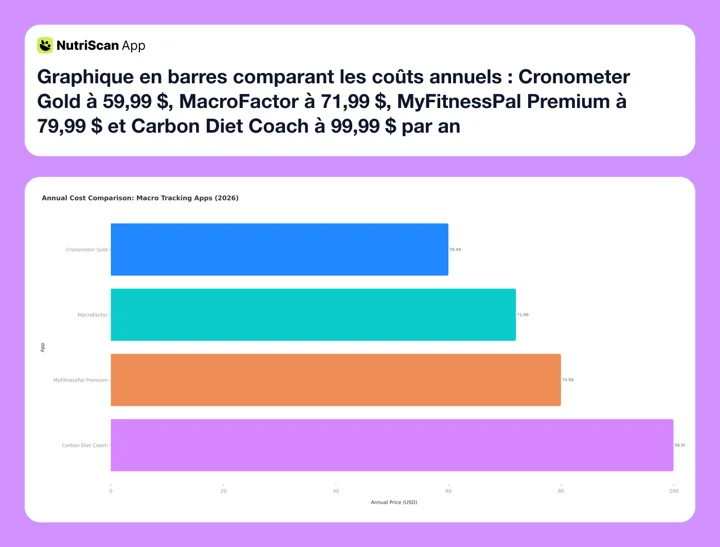 Figure 1: Annual cost comparison of popular macro tracking apps in 2026
Carbon is the most expensive annual option in this group and the only one without any free trial. That is a real barrier for people who want to test before committing. For a deeper pricing breakdown, see our Carbon Diet Coach pricing 2026 guide.
No Free Trial Available
Unlike MacroFactor (7-day trial) and MyFitnessPal (7-day trial), Carbon requires payment from day one. Make sure you are committed to consistent macro tracking before subscribing.

The Coaching Algorithm: How Weekly Check-Ins Work 🔄
The weekly check-in is what separates Carbon from a standard food logger. Here is how the process works step by step.
Step 1: Log your food daily. Carbon has a food database with branded and generic items. You log meals by searching, scanning barcodes, or creating custom foods and recipes.
Step 2: Weigh yourself regularly. The app works best when you weigh in at least 3-4 times per week. More data points give the algorithm a clearer picture of your trend.
Step 3: Complete the weekly check-in. Every seven days, the app asks you to submit your weight and confirm whether you hit your macro targets. This is a yes-or-no question.
Step 4: Get updated targets. If you were adherent, Carbon adjusts your calories and macros based on your rate of progress. If your weight dropped too fast during a cut, it might increase calories slightly. If progress stalled, it might reduce them.
Step 5: Repeat. The cycle continues weekly. Over time, the algorithm learns your metabolic response and gets more precise with its recommendations.
The Adherence Catch
If you report non-adherence, Carbon keeps your targets the same. It simply tells you to try again. The algorithm needs reliable data to make good adjustments - if your intake was inconsistent, the app cannot tell whether the problem is the targets or your behavior.
A 2021 meta-analysis in Obesity Reviews found that people who self-monitored both food and activity with digital tools lost 2.87 kg more than controls. Carbon's strict adherence requirement leans on that finding, because the algorithm only works with consistent data.
Carbon App Review: What Carbon Does Well
Expert-designed algorithm. Dr. Layne Norton has decades of experience in competitive bodybuilding and published nutrition research. The coaching algorithm reflects real-world coaching patterns, not just generic calorie math.
Simple, focused interface. Carbon does one thing: macro coaching. There are no social feeds, no recipe databases, no wellness scores, no meditation features. You open the app, log food, and check in weekly. That simplicity is a feature for people who just want to follow a plan.
Goal-specific coaching. The four goal modes (fat loss, muscle gain, maintenance, reverse diet) each use different algorithms. A reverse diet phase, for example, slowly increases calories to restore metabolic rate after a prolonged cut. Most trackers do not have a dedicated reverse diet mode.
Strong user ratings. Carbon holds 4.8 stars from more than 8,000 ratings on the US App Store and 4.7 stars from about 2,900 reviews on Google Play, both checked in August 2026.
Affordable compared to human coaching. A one-on-one nutrition coach costs many times more per month than Carbon's $8.33 to $11.99. If you would otherwise pay a coach just for macro adjustments, Carbon is a fraction of the cost.
What Carbon Does Not Do ❌
No free trial. You pay before you try. This is the biggest friction point. MacroFactor offers a 7-day trial. MyFitnessPal has a 7-day trial. Carbon asks for your credit card immediately.
No micronutrient tracking. Carbon tracks calories, protein, carbs, and fat. It does not show vitamins, minerals, fiber breakdowns, or amino acid profiles. If you care about iron, vitamin D, or sodium, you need a different app or a separate tool.
No body measurements or progress photos. You can log your weight, body fat percentage, and lean body mass. But there is no place to track waist circumference, arm measurements, or save progress photos inside the app.
No flexibility when you miss targets. If you had a bad week and report non-adherence, Carbon keeps your targets the same. Compare this to MacroFactor, which adjusts based on what you actually ate - even if you missed your goals. MacroFactor's approach is more forgiving for people who struggle with consistency.
No exercise calorie tracking. Carbon does not connect to fitness trackers or adjust calories based on daily activity. It accounts for your general activity level at setup, but a long hike or extra gym session does not change your daily targets.
Carbon vs MacroFactor: The Core Difference ⚖️
This is the comparison most people want. Both are paid macro coaching apps. Both adjust your targets over time. The difference is in how they coach.
| Feature | Carbon | MacroFactor |
|---|---|---|
| Coaching style | Strict adherence required | Adjusts based on actual intake |
| Coaching options | One mode | Three modes (coached, collaborative, manual) |
| Weekly check-in | Yes/no adherence question | Automatic based on logged data |
| Micronutrients | No | Yes (vitamins, minerals, fiber) |
| Progress photos | No | Yes |
| Body measurements | Weight, body fat, lean mass | Weight, body fat, measurements, photos |
| Food database | Good (branded + generic) | Verified entries with deep nutrient data |
| Annual price | $99.99 | $71.99 |
| Free trial | No | 7 days |
| App Store rating | 4.8 (8,000+ ratings) | 4.8 (21,000+ ratings) |
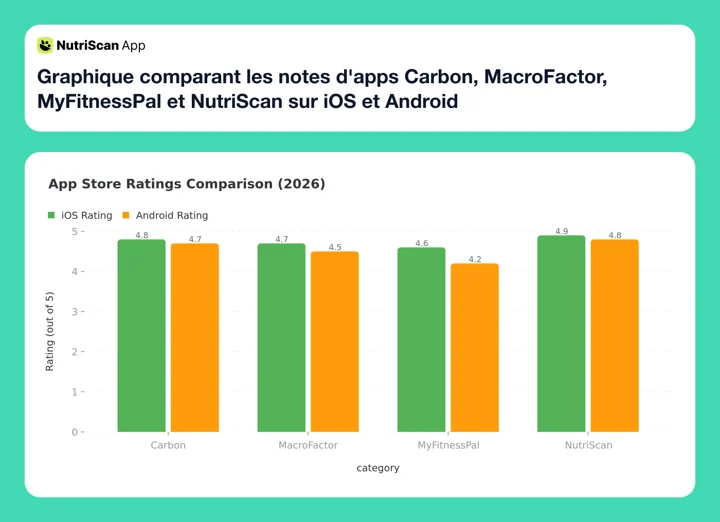 Figure 2: App Store ratings comparison across iOS and Android platforms
MacroFactor is cheaper, more flexible, and tracks more data. Carbon is simpler and more opinionated. Both sit at 4.8 stars on the US App Store, where MacroFactor has more than twice as many ratings. If you want the full MacroFactor breakdown, read our Is MacroFactor worth it? review, or our head-to-head on MacroFactor vs Carbon for cutting.
The key philosophical difference: Carbon says "follow the plan and I will adjust for you." MacroFactor says "show me what you actually did and I will work with that." Neither approach is wrong. But they suit different personalities.
 Trying to pick between Carbon and MacroFactor like...
Carbon's structure works for disciplined trackers who like clear rules. MacroFactor's flexibility works better if your weeks vary a lot.
Carbon vs MyFitnessPal: Coaching vs Tracking 📱
MyFitnessPal is a food tracker with a massive database. Carbon is a coaching app with a food tracker built in. They solve different problems.
Choose Carbon if:
- You want automated weekly macro adjustments
- You are cutting, bulking, or reverse dieting with specific goals
- You do not need barcode scanning or recipe import as primary features
- You prefer a focused, no-frills interface
Choose MyFitnessPal if:
- You want the largest food database available
- You need barcode scanning, Meal Scan (photo AI), or voice logging
- You want a free plan to start with
- You prefer an app that connects to dozens of fitness devices and apps
MyFitnessPal Premium costs $79.99 per year, which is $20 less than Carbon's annual plan. But MyFitnessPal does not adjust your macros for you. You set your targets manually and they stay the same until you change them. For a full breakdown, see our MyFitnessPal Premium vs Premium+ comparison, or the direct Carbon vs MyFitnessPal matchup.
Want Photo-Based Tracking Instead?
If you prefer scanning your plate over manual logging, NutriScan's meal scan feature uses AI to analyze your food in seconds. Just take a photo and get your macros instantly - no barcode scanning or database searching required.

NutriScan's home dashboard - scan your meals and track macros with a photo-first approach (Home > Overview)
Is the Carbon Diet App Worth It for You? 🎯
Carbon is worth it for a specific type of user. Be honest about whether you fit the profile.
Carbon is worth it if you:
- Are serious about a structured cut, bulk, or reverse diet
- Will track food consistently at least 5-6 days per week
- Want automated macro coaching without paying for a human coach
- Prefer a simple app that does not try to do everything
- Have used a calorie tracker before and know the basics of macro tracking
- Are comfortable paying without a trial period
Carbon is probably not worth it if you:
- Are new to calorie tracking and want to explore first
- Track food inconsistently (3 or fewer days per week)
- Want to track micronutrients, body measurements, or progress photos
- Need a free plan or a trial before committing
- Want exercise integration or wearable device syncing
- Prefer an app that adjusts even when you miss your targets
If you land in the second list, our roundup of Carbon Diet Coach alternatives covers the cheaper and more forgiving options.

Real User Feedback 💬
App Store reviews split along a predictable line. People who follow the plan rate it highly, and people who want looser or cheaper tracking do not.
A five-star reviewer on the US App Store listing writes: "The app adjusts to your actual progress and adherence."
A two-star reviewer on the same listing pushes back on price: "There are cheaper ones that are just as useful. I have not seen the value of spending $99 a year."
Price, gaps in the food database, and the fact that daily activity does not change your targets are the complaints that repeat across the one and two star reviews.
How to Decide in 5 Minutes
Ask yourself these three questions:
Will you track food at least 5 days a week? If yes, Carbon's coaching loop will work. If no, the app cannot help you because it needs consistent data.
Do you have a specific physique goal? Fat loss, muscle gain, or reverse dieting are Carbon's strengths. If you just want general calorie awareness, a free app or a personalized diet plan is fine.
Are you okay paying $99.99 per year without trying first? If that feels risky, start with MacroFactor's 7-day trial or MyFitnessPal's free plan. You can always switch to Carbon later.
If you answered yes to all three, Carbon is likely worth it for you.
A 2016 meta-analysis in Obesity Reviews found that people given personalized feedback in internet-delivered weight loss programs lost 2.13 kg more than control groups who got no personalized feedback. Carbon's weekly check-in is that combination of tracking plus coached adjustments.
Quick Decision Flowchart
Start here: Do you track macros consistently (5+ days/week)?
- No ➡️ Start with a free app like MyFitnessPal or try NutriScan for photo-based tracking
- Yes ➡️ Do you want the app to adjust your targets automatically?
- No ➡️ MyFitnessPal Premium or Cronometer Gold
- Yes ➡️ Do you need flexibility on missed days?
- Yes ➡️ MacroFactor
- No ➡️ Carbon Diet Coach
Conclusion
Carbon Diet Coach is a focused, well-designed macro coaching app. It does one thing and does it well: it sets your targets, checks your progress weekly, and adjusts your plan. For disciplined trackers with clear physique goals, it delivers real coaching value at a fraction of what a human coach costs.
But it is not for everyone. The lack of a free trial, strict adherence requirement, and limited tracking scope mean Carbon fits a narrow audience. If you want flexibility, more data tracking, or the ability to test before buying, MacroFactor or MyFitnessPal may be a better starting point.
If you want to track your meals, macros, and nutrition with a photo-first approach and no commitment required, try tracking with NutriScan - scan your plate, get your numbers, and build better habits one meal at a time.
Frequently Asked Questions ❓
Does Carbon Diet Coach have a free version?
No. Carbon is a paid-only app. There is no free tier and no free trial. You must subscribe to access any features. Plans start at $8.33 per month on the annual plan ($99.99/year).
How much does the Carbon app cost?
The Carbon app costs $11.99 a month, $9.99 a month if you pay six months up front ($59.99), or $8.33 a month on the annual plan ($99.99 per year). Prices are standard US prices as of mid 2026 and change by region. There is no free plan and no trial, so the first payment comes before you see the app.
Is the Carbon diet app the same as Carbon Diet Coach?
Yes. "Carbon app" and "Carbon diet app" are shorthand for Carbon Diet Coach, the macro coaching app from Dr. Layne Norton and Keith Kraker. There is no separate free version under a different name.
Is Carbon better than MacroFactor?
It depends on your style. Carbon requires strict adherence and rewards consistency with weekly adjustments. MacroFactor is more flexible and adjusts even when you miss targets. MacroFactor also costs less annually ($71.99 vs $99.99) and offers a 7-day free trial. Carbon has the simpler interface, and both apps sit at 4.8 stars on the US App Store.
Can I use Carbon for a reverse diet?
Yes. Carbon has a dedicated reverse diet mode that gradually increases your calories and macros after a prolonged cut. This is one of its standout features. Most calorie trackers do not have a built-in reverse diet protocol.
Does Carbon track vitamins and minerals?
No. Carbon only tracks calories, protein, carbs, and fat. If you need micronutrient tracking (vitamins, minerals, fiber details), you would need a separate app like Cronometer or MacroFactor.
Who created Carbon Diet Coach?
Carbon was created by Dr. Layne Norton, who holds a PhD in nutritional sciences and is a competitive powerlifter and bodybuilder, along with Keith Kraker, a registered dietitian with a BS in nutrition and dietetics. Their coaching methodology is built into the app's algorithm.