Is MacroFactor Worth It? Review, Cost, and Who Should Pay
 ChatGPT
  Claude
  AI Mode
  Perplexity
Is MacroFactor worth it? Yes, it is worth it, but only if you weigh yourself and log food most days. MacroFactor costs $71.99 a year or $11.99 a month, standard US prices as of August 2026 that change by region, and there is no free tier, only a 7-day trial. What you are paying for is the expenditure algorithm, which reads your intake against your weight trend and resets your calorie and macro targets every week. Log twice a week and skip the scale, and that algorithm has nothing to work with.
Is MacroFactor Worth It? The Short Answer
TL;DR - MacroFactor Review
Best for: Serious fat loss or muscle gain phases where weekly adaptive coaching makes a real difference
Price: $71.99/year ($0.20/day) with no free tier and a 7-day free trial
Standout feature: Expenditure algorithm that watches your weight and adjusts calorie and macro targets every week
Skip if: You dislike daily food logging or prefer simple photo-based tracking
Bottom line: The best adaptive macro tracker available in 2026, but not for everyone
A 2025 meta-analysis of 29 randomized controlled trials found that mobile app-based nutrition interventions reduced body weight by an average of 1.45 kg, BMI by 0.35, and waist circumference by 1.98 cm compared to controls (Li et al., 2025). The apps that worked best shared one thing in common: they adapted to the user over time rather than giving static calorie targets.
That is exactly what MacroFactor does. It tracks what you eat, watches how your weight responds, and adjusts your calorie and macro targets every week. No other nutrition app does this as well. But at $71.99 per year with no free tier, you need to know whether that algorithm is worth your money.
MacroFactor Review: What Makes It Different from Every Other Tracker 🔬
MacroFactor was created by Greg Nuckols, a world-record powerlifter and one of the most respected research reviewers in the fitness industry. He co-founded Stronger By Science and the MASS research review alongside Dr. Eric Trexler, a metabolism researcher. Jeff Nippard later joined the marketing side.
This matters because the app's core algorithm was built by people who review fat loss and muscle building research for a living. The expenditure algorithm is the heart of MacroFactor and what separates it from competitors.
Here is how it works:
- You log your food intake daily
- You weigh yourself regularly (ideally daily, minimum 3 times per week)
- The algorithm calculates your actual energy expenditure based on what you ate and how your weight changed
- Every week, it adjusts your calorie and macro targets to match your goal
Think of it Like a Fuel Gauge
If the app knows how much fuel you put in (calories eaten) and how far you traveled (weight change), it can calculate your fuel efficiency (expenditure). The math behind this is far more sophisticated, but that is the core idea.
A 2025 systematic review of calorie counting apps over the past decade confirmed that adaptive algorithms with personalized feedback produce better outcomes than static calorie goals (Dugas et al., 2026).
 Whether you are meal prepping or tracking macros, consistent food logging is what makes the algorithm work

MacroFactor App Review: Real-World Results From Long-Term Users 💪
MacroFactor is not short on real-world success stories. Here are three examples that show how different types of users benefit.
The 50-pound transformation. Matteo Marra, a strength coach, logged food in MacroFactor for over 500 consecutive days. He lost 50 pounds using the coached mode, where the app set and adjusted all targets automatically. He calls it a "10/10 product" and rates it the fastest tracking app he has ever used (Marra Strength).
The skinny guy bulk. One user on the Outlift blog gained 10 pounds using MacroFactor's algorithm combined with Jeff Nippard's hypertrophy programs. After stopping the app, the weight stayed. The algorithm had taught him what and how much to eat (Outlift).
The registered dietitian switch. An RD on the App Store left a 5-star review after switching from MyFitnessPal. She specifically noted the verified food database and the scientific backing from the Stronger By Science team. When a registered dietitian prefers your app over the industry standard, that says something.
A 2024 observational study found that weight loss outcomes were directly associated with the level of app engagement, meaning consistent logging produced better results regardless of which app was used (Huntriss et al., 2024). MacroFactor's speed and design are built to maximize that engagement.
 Photo by Neuro Equilibrium on Unsplash
The Features That Justify the Price Tag 🏷️
MacroFactor packs more useful features than most premium trackers. Here are the ones that actually matter.
Trend Weight Smoothing
Daily weight fluctuates because of water, salt, carbs, and stress. MacroFactor calculates a trend weight that filters out the noise. When you eat a salty restaurant meal and "gain" 2 pounds overnight, the trend line barely moves. This keeps users from panicking and quitting. Almost every long-term user mentions this as their favorite feature.
Verified Food Database
Unlike MyFitnessPal's user-generated database, MacroFactor uses a premium verified database. User-generated databases are full of errors. Someone enters "chicken breast" as 50 calories instead of 165, and thousands of people use that wrong entry. A verified database costs more to maintain, but accuracy matters when your algorithm depends on intake data.
Three Coaching Modes
- Coached mode sets everything automatically
- Collaborative mode lets you adjust protein or calorie targets while the app handles the rest
- Manual mode gives you full control
This flexibility means the app works for beginners who want it simple and advanced users who want to fine-tune every detail.
Micronutrient Tracking
MacroFactor tracks vitamins, minerals, and fiber beyond just calories and macros. This is especially important during a calorie deficit when nutrient density matters most. Few competitors offer this at the same depth.
AI Logging Tools
You can scan nutrition labels with your camera, take a photo of your meal, or describe your food in words. The AI estimates the calories. It is not perfect, but MacroFactor's algorithm self-corrects. If the AI consistently underestimates your breakfast smoothie by 100 calories, the weekly check-in notices you are gaining faster than expected and adjusts your targets down.
Coaching Modules
Weekly educational tips appear based on your specific habits and progress. These are not generic tips. The app looks at your data and surfaces relevant advice.
Expenditure Modifiers
Added in late 2025, these optional tools let you account for changes like increased activity, illness, or travel. They build on the V3 expenditure algorithm for more responsive adjustments.
MacroFactor Cost: What You Actually Pay Per Month and Per Year 💰
MacroFactor has not raised its prices since launch, despite inflation and continuous development. Prices below are standard US prices as of August 2026 and change by region.
| Plan | Price | Monthly Cost | Annual Cost |
|---|---|---|---|
| Monthly | $11.99/mo | $11.99 | $143.88 |
| 6-month | $47.99/6mo | $8.00 | $95.98 |
| Annual | $71.99/yr | $5.99 | $71.99 |
MacroFactor Workouts, a separate workout tracking app, costs the same. A bundle of both apps runs $89.99 per year.
The 7-day free trial lets you test everything before committing. We break the numbers down further, including what happens when the trial ends, in our MacroFactor cost guide and the MacroFactor free trial walkthrough.
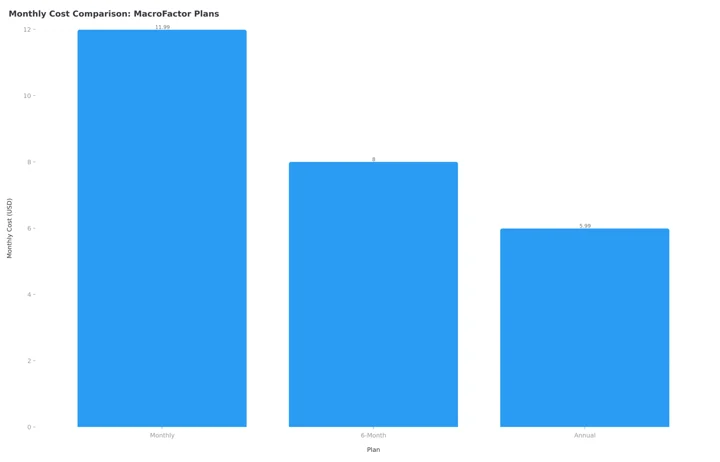 Figure 1: MacroFactor's annual plan drops the effective monthly cost to just $5.99
No Free Tier
MacroFactor is paid-only. If you cannot commit to at least a monthly subscription, consider free options like FatSecret or MyFitnessPal's free tier first.
How MacroFactor Stacks Up Against Competitors 📊
| App | Annual Price | Monthly Price | Adaptive Coaching | Verified Database |
|---|---|---|---|---|
| MacroFactor | $71.99 | $11.99 | Yes | Yes |
| MyFitnessPal Premium | $79.99 | $19.99 | No | No (user-generated) |
| MyFitnessPal Premium+ | $99.99 | $24.99 | No | No (user-generated) |
| Carbon Diet Coach | $99.99 | $11.99 | Yes | Yes |
| Cronometer Gold | $49.99 | $10.99 | No | Yes |
| NutriScan Premium | about $59 | yearly (weekly in some regions) | No | Yes (AI-verified) |
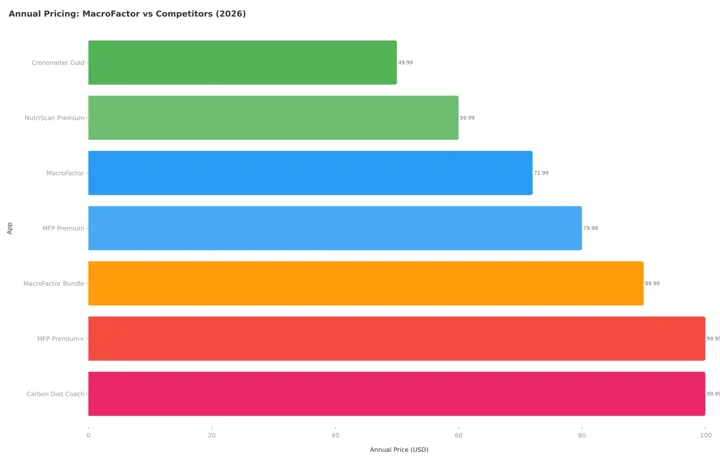 Figure 2: MacroFactor sits in the mid-range for annual pricing while being the only app with both adaptive coaching and a verified database
MacroFactor vs MyFitnessPal. MFP has a larger food database (user-generated, less accurate) and a free tier. MacroFactor has a verified database, adaptive algorithm, faster logging workflow, and cheaper annual price. If you are paying for a premium tracker anyway, MacroFactor wins on value and accuracy. Read our full MyFitnessPal Premium review for more details.
MacroFactor vs Carbon Diet Coach. Both offer adaptive macro coaching. Carbon was created by Layne Norton, PhD. The key difference: MacroFactor uses a continuous expenditure algorithm that adjusts weekly, while Carbon uses periodic check-ins. MacroFactor is also $28 per year cheaper on annual plans ($71.99 vs $99.99).
MacroFactor vs Cronometer. Cronometer excels at micronutrient tracking and costs less ($49.99/yr). But it does not have an adaptive calorie algorithm. You set your targets manually and they stay fixed. If micronutrients are your priority and you know your calorie needs, Cronometer is a strong choice. Our MacroFactor vs Cronometer comparison puts both databases side by side.
MacroFactor vs NutriScan. NutriScan publishes this post, and we make a competing app. NutriScan focuses on AI photo scanning and "what to eat next" guidance for about $59 a year. It is simpler and faster for casual tracking. MacroFactor is deeper for serious macro and expenditure tracking. They serve different audiences. NutriScan is built for quick photo logs and guidance, MacroFactor for detailed data-driven coaching. See the NutriScan vs MacroFactor breakdown or the AI food tracker page if camera logging sounds closer to your routine.
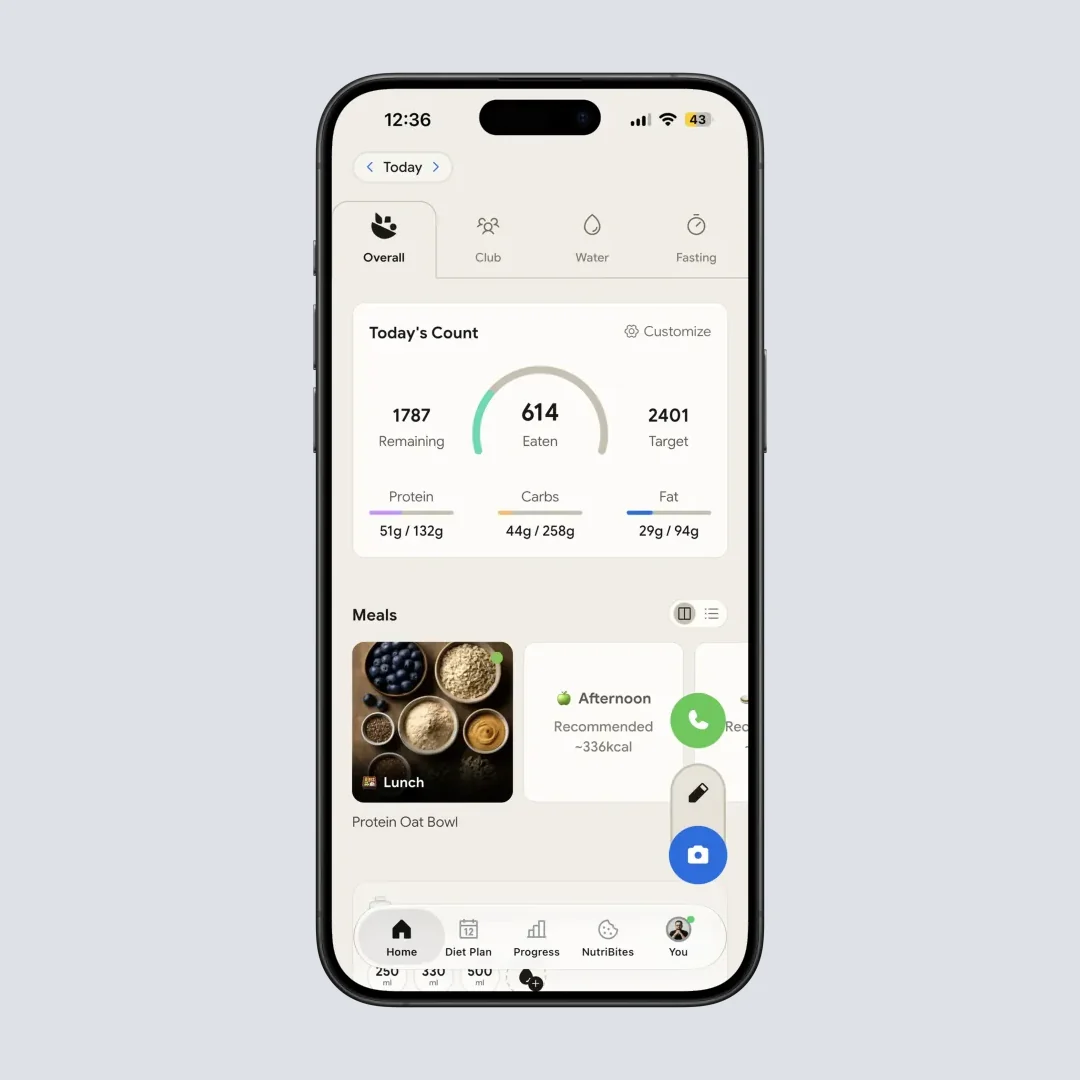
NutriScan's home dashboard gives you a quick daily breakdown with photo-based logging (Home > Dashboard)
MacroFactor vs RP Diet Coach. RP is a meal planner that tells you what to eat and when. MacroFactor is a flexible tracker that lets you eat what you want within your targets. If you want rigid structure, RP is better. If you want flexibility with adaptive coaching, MacroFactor wins. Before you pay for RP, read our RP Diet Coach pricing and refund guide.
Step-by-Step: How to Decide if MacroFactor Is Worth It for You 🧭
Follow this simple process to figure out whether MacroFactor fits your situation.
Step 1: Define your goal. Are you trying to lose fat, build muscle, maintain weight, or eat more nutritiously? MacroFactor works for all four, but it excels at fat loss and muscle gain where weekly target adjustments make the biggest difference.
Step 2: Check your tracking willingness. MacroFactor requires daily food logging to work. If you hate tracking and will not log consistently, the algorithm cannot help you. Consider a simpler approach like photo-based tracking with NutriScan's meal scanner or check your NutriScore insights for a lower-effort option.
Step 3: Calculate the daily cost. The annual plan costs $0.20 per day. Compare that to a single coffee, a protein bar, or one restaurant meal. If macro coaching from a human nutritionist costs $100 to $300 per month, MacroFactor delivers a similar adaptive experience for $6 per month.
Step 4: Start the free trial. Use the 7-day trial to log at least 5 days of food and weigh yourself daily. After the first weekly check-in, you will see the expenditure estimate and target adjustment. That single moment tells you whether the algorithm adds value for you.
Step 5: Evaluate after one month. If you are losing or gaining weight at the rate you chose, the app is working. If you stopped logging after week 2, you know tracking is not for you, and you can cancel.
What the Research Says About Paid Nutrition Apps 🔎
A 2024 Cochrane systematic review of mHealth interventions found that smartphone apps produced modest weight loss effects, with engagement being the strongest predictor of success (Metzendorf et al., 2024). The review noted that app design features like personalized feedback and adaptive goals improved adherence.
A 2025 systematic review examining mobile apps for obesity management confirmed that apps with behavioral change techniques, especially self-monitoring and goal setting, were most effective (Pujia et al., 2025). MacroFactor incorporates both: daily food logging is self-monitoring, and the weekly check-in adjusts goals based on real data.
The evidence is clear. Nutrition apps work when people use them consistently, and apps that adapt to the user keep people engaged longer. MacroFactor is built around this principle.

7 Tips to Get the Most Out of MacroFactor 💡
If you decide MacroFactor is right for you, these tips will help you get better results faster.
Weigh yourself every morning. The expenditure algorithm needs weight data to work. More data points mean a smoother trend line and more accurate calorie adjustments. Weigh yourself after using the bathroom, before eating or drinking, wearing minimal clothing. Aim for 7 days per week, minimum 3.
Use coached mode for your first month. Even if you are an experienced tracker, start with coached mode. Let the algorithm calibrate to your body before switching to collaborative or manual mode. Fighting the targets in week 1 defeats the purpose.
Log everything, even bad days. The algorithm works best with complete data. If you eat an entire pizza, log it. MacroFactor does not judge. Skipping a day because you overate makes the expenditure estimate less accurate and can slow your progress.
Trust the trend weight, not the daily number. If you ate salty food and the scale jumps 1.5 pounds overnight, check the trend weight line. It will barely move. This is the number that matters. Daily weight fluctuations of 1 to 3 pounds are completely normal and meaningless.
Use the micronutrient explorer weekly. Most people discover they are low in at least one vitamin or mineral. Common gaps include magnesium, potassium, vitamin D, and fiber. A quick weekly check helps you add the right foods to fill those gaps.
Set the right rate of change. For fat loss, 0.5% to 1% of body weight per week is sustainable. For muscle gain, 0.25% to 0.5% per week works for most people. Setting the rate too aggressively leads to muscle loss during cuts or excessive fat gain during bulks.
Export your data before making big changes. MacroFactor lets you export all your food and weight data to CSV. Before switching goals from cutting to bulking or vice versa, export your data so you have a record of what worked. MacroFactor ranks first in our nutrition app data export comparison for exactly this reason.
 When you realize MacroFactor's algorithm has been quietly adjusting your targets for weeks and you are actually hitting your goals
 Photo by Hailey Tong on Unsplash
Who Should Pay for MacroFactor (and Who Should Not)
Not everyone needs MacroFactor. Here is an honest breakdown.
You should pay if:
- You are serious about a fat loss phase or muscle building bulk and want weekly accountability with data-driven target adjustments
- You have tried free trackers but find the calorie targets never seem right, and you plateau quickly
- You want to learn about your real energy expenditure rather than relying on generic calorie calculators like the NutriScan Macro Calculator
- You are a coach, trainer, or advanced lifter who wants deep data on macros, micros, and expenditure trends
- You enjoy data and find numbers motivating
You should skip if:
- You dislike daily food logging and will not stick with it for at least 4 weeks
- You only need a basic calorie counter without adaptive coaching - free options like FatSecret or MyFitnessPal's free tier will work fine
- You prefer photo-based logging over manual entry - apps like NutriScan or Cal AI focus on camera-first workflows that require less effort
- You are on a tight budget and $72 per year is a real stretch, in which case start with our MacroFactor alternatives roundup
- You are looking for meal planning, grocery lists, or recipe suggestions - MacroFactor is a tracker and coach, not a meal planner. Check out NutriScan's diet plans for meal planning guidance
Conclusion
MacroFactor is the best adaptive macro tracking app available in 2026. The expenditure algorithm, verified food database, trend weight smoothing, and coaching modules combine into something no free app matches.
At $0.20 per day on the annual plan, it costs less than most nutrition apps while delivering more. The science behind it is credible, the development team is active, and the user base is vocal about results.
But it is not for everyone. If you will not log food daily, the algorithm cannot help you. If you prefer simple photo-based tracking, look at NutriScan or similar apps that require less manual effort.
For anyone willing to invest 5 minutes a day into food logging and wants their calorie targets to actually mean something, MacroFactor is worth every dollar.
Track your daily nutrition with NutriScan to see how your meals stack up, whether you are counting macros or just scanning for quick insights.
Coming from MyFitnessPal? Read what transfers when you switch from MyFitnessPal to MacroFactor before you cancel anything.
Frequently Asked Questions
How much does MacroFactor cost?
$11.99 per month, $47.99 for six months, or $71.99 per year. The annual plan works out to $5.99 a month, roughly $0.20 a day. Those are standard US prices as of August 2026 and they change by region. Adding MacroFactor Workouts as a bundle costs $89.99 a year.
Is MacroFactor worth it if you already use a free tracker?
It is worth it if your free tracker keeps handing you a calorie target that stops working after a few weeks. MacroFactor recalculates expenditure from your own intake and weight data every week, which a fixed free target cannot do. If you log a couple of times a week and rarely weigh in, stay where you are.
Does MacroFactor have a free version?
No. MacroFactor is a paid-only app with a 7-day free trial. After the trial ends, you must subscribe to continue using the app. There is no free tier with ads or limited features. The founders have stated they will never offer a free version because they want to keep the database verified and ad-free.
How accurate is MacroFactor's expenditure estimate?
The expenditure estimate is not perfect on day one because it uses a generic equation. But after 2 to 4 weeks of consistent logging and weighing, it converges on your real energy expenditure. The more data you give it, the more accurate it gets. This self-correcting behavior is the app's biggest advantage.
Can I use MacroFactor just for maintenance?
Yes. You can set a maintenance goal and the app will track your expenditure and adjust targets to keep your weight stable. This is useful for people coming off a cut or bulk who want to lock in their new weight. The expenditure graph shows whether your metabolism is recovering after a diet.
Is MacroFactor good for beginners?
Yes, especially in coached mode. You enter your stats and goals, and the app handles everything else. You just log food and weigh yourself. The weekly check-in adjusts your targets automatically. One reviewer noted it has "the gentlest learning curve" of any premium tracker (Outlift).
What happens if I miss a day of logging?
MacroFactor assumes you ate your typical amount of food on unlogged days. The algorithm keeps running and your targets stay valid. This "adherence neutral" design means one missed day does not break your progress or give you a guilt-inducing red warning. That said, frequent missed days reduce the algorithm's accuracy.
Does MacroFactor work for vegetarians and vegans?
Yes. The verified food database includes plant-based foods, and you can set custom macro targets to prioritize protein from plant sources. The micronutrient explorer is particularly useful for vegans who need to monitor B12, iron, zinc, and omega-3 intake.
Can I cancel MacroFactor and keep my data?
You can export all your food logs, weight data, and progress to CSV before canceling. Our step-by-step MacroFactor cancellation guide covers the iPhone and Android paths. After cancellation, your subscription remains active until the end of the billing period. You lose access to all features once it expires, with no free tier to fall back on.