Best Macro Tracker for Bulking (Surplus + Fast Logging)
 ChatGPT
  Claude
  AI Mode
  Perplexity
The best macro tracker for bulking is MacroFactor, $71.99 a year as of mid 2026, because it recalculates your real calorie burn every week and raises your surplus the moment your gain stalls. Carbon Diet Coach ($99.99) is the coach-style alternative, MyFitnessPal and Lose It ($79.99 each) log the fastest, Cronometer covers a clean bulk, and NutriScan handles the cooked plates a barcode database cannot read. As a NutriScan nutritionist, I tell every client the same thing: on a bulk, your tracker is the tool that decides whether you eat enough to grow. A 2022 meta-regression found that a 500 calorie deficit stops lean mass gains outright, even in people training hard (Murphy and Koehler, 2022).
TL;DR - Best Macro Trackers for Bulking 2026
• Top pick: MacroFactor ($71.99/yr), adaptive algorithm raises your surplus as you gain and caps fat gain
• Coach-style alternative: Carbon Diet Coach ($99.99/yr), prescribed check-ins plus reverse-diet planning
• Fast loggers: MyFitnessPal (biggest database), Lose It (photo and voice entry, though Premium jumped to $79.99/yr)
• Clean bulk pick: Cronometer, up to 84 nutrients free and 95 on Gold, so your surplus is not junk
• Cooked meals: NutriScan photo scanning with oil and cooking-method prompts, so curries and rice bowls get counted honestly
• Best setup: Pair one surplus coach with one fast logger matched to the food you actually eat
Bulking looks easier than cutting. Eat more, lift hard, gain muscle. In practice most people get it wrong in one of two directions. They under-eat without realizing it, log sloppily, and wonder why the scale will not move. Or they eat with no ceiling, gain a pound of fat for every pound of muscle, and spend the next season cutting it all back off. The right app fixes both. It sizes your surplus and pushes your calories up as you gain, and it lets you log large, calorie-dense meals in seconds so you hit your number every single day.
Below I rank the best macro trackers for bulking in 2026, the apps I would actually hand a client, judged on the two things that matter most: surplus control and logging speed.
 A bulk means more food, more often. Your tracker has to keep up with the plate.
IMPORTANT
Your bulking tracker plan at a glance.
A quick roadmap so you can act fast.
⏱️ Progress 0/4 • ~0 minutes in • Keep going
⏳ Step 1: What a bulk demands from a tracker
⏳ Step 2: The adaptive surplus coaches
⏳ Step 3: The fast loggers, ranked
🔍 The two-app stack that keeps your surplus real for the whole bulk (revealed near the end)
What a Bulk Demands From a Macro Tracker 📋
Before naming apps, it helps to name the job. A bulk has three requirements a "close enough" calorie counter cannot meet.
It has to size and raise your surplus. As you gain weight, your body burns more calories. A surplus that worked in month one becomes maintenance by month three, and your gains quietly stall. An app with a fixed calorie goal cannot see this. You keep eating the same number, the scale stops climbing, and you assume you have hit your ceiling. You have not. Your target is stale, and it needed to go up.
It has to be fast to log big meals. A bulk means more food, more often, and heavier plates. Nobody sustains 90 seconds of manual food search per meal when they are eating five or six times a day for four months. Logging fatigue is the number one reason people quit tracking, and adherence to self-monitoring is one of the strongest predictors of actually reaching a body composition goal (Burke et al., 2025). On a bulk, fast logging is also how you catch the days you thought you ate enough but did not.
It has to protect your protein and cap the fat. A surplus without enough protein turns into fat gain. And a surplus that is too large adds fat you will only have to cut off later. A good bulking app holds a protein target to the gram and keeps the surplus modest, so most of what you gain is muscle rather than waistline. If you are not sure where your numbers should land, our online macro calculator gives you a research-based starting point in under a minute.
Keep those three in mind and the ranking almost writes itself.
IMPORTANT
Checkpoint: here's where you are right now.
Quick status update so you always know the next best move.
⏱️ Progress 1/4 • ~1 minute in • Keep going
✅ Step 1: What a bulk demands (done)
👉 Step 2: The adaptive surplus coaches (you're here)
⏳ Step 3: The fast loggers, ranked
🧩 The two-app stack (coming soon)
MacroFactor: The Best Tracker for a Bulk in 2026 🏆
MacroFactor is the app I recommend first for almost any bulk. It is built around an adaptive expenditure algorithm that recalculates your real calorie burn every week from your weight trend and your logged intake. When your gain stalls, the app sees it in your data and raises your target. When you gain too fast, it eases the surplus so you add less fat. You do not have to guess when to bump your calories up. The algorithm does it for you.
That weekly recalibration is the exact feature a bulk needs. You pick a rate of gain, and MacroFactor works backward to the calorie surplus that hits it, then adjusts as your body changes. It also enforces guardrails, so a program cannot push you into a reckless dirty bulk. For a lifter chasing lean gains, this is the closest thing to an automated coach.
Logging is quick once your foods are saved, with a clean barcode scanner, fast quick-add, and a Favorites shelf for the staple bulking meals you eat on repeat. MacroFactor also added AI photo logging in 2025 to speed up complex dishes. The database is verified rather than fully crowd-sourced, which matters on a bulk, where a 15 percent logging error can hide whether you are actually in a surplus at all.
The cost is $71.99 per year or $11.99 per month, with no free tier but a 7-day free trial that does not ask for a card up front. It holds a 4.8-star App Store rating and is the smartest algorithm in the category (MacroFactor, 2026). If you want to see how it stacks up against the field beyond bulking, I broke down the full landscape in Best MacroFactor Alternatives 2026.
Pick MacroFactor if: you want targets that raise your surplus on their own and keep the fat gain in check.
Skip it if: you want a free option, or you need a fasting timer, which it does not offer.
Carbon Diet Coach: The Prescriptive Lean Bulk 🎯
Carbon Diet Coach, built with input from Layne Norton, takes a coach-style approach. Instead of a passive algorithm, you check in on a schedule and Carbon prescribes your next set of macros like a human coach would. For lifters who want to be told exactly how much to eat on a bulk rather than interpret a trend graph, this feels more direct.
Carbon's real edge is structure. It walks your calories up in controlled steps as you gain, and it has a built-in reverse diet mode for when you decide to end the bulk and lean out without crashing. Most trackers stop caring the moment you reach your goal weight. Carbon plans the whole arc, from the gaining phase to the transition after it.
The trade-off is price and access. Carbon runs $99.99 per year, the most expensive of the dedicated macro coaches, and it does not offer a free trial. You commit before you test it. For a deeper head-to-head, see my athlete-focused comparison of Carbon vs MacroFactor vs MyFitnessPal.
Pick Carbon if: you want a prescriptive coach that tells you how much to eat and plans your transition out of the bulk.
Skip it if: you want to try before you buy, or you prefer an algorithm that adjusts silently instead of scheduled check-ins.
IMPORTANT
Checkpoint: midway progress update.
You're halfway - decisions get easier here.
⏱️ Progress 2/4 • ~2 minutes in • Keep going
✅ Step 1: What a bulk demands (done)
✅ Step 2: The adaptive coaches, MacroFactor and Carbon (done)
👉 Step 3: The fast loggers, ranked (current)
⏳ The two-app stack (next)

MyFitnessPal: Fast Logging, Static Surplus ⚡
MyFitnessPal earns a place here on logging speed and database size alone. With more than 20 million foods and a huge library of restaurant and packaged items, you can log almost any calorie-dense bulk meal fast, and that speed keeps you eating enough. Copy-meal and recipe tools make repeat bulking days quick, though the free trial is 7 days, the same length most of this list offers.
But MyFitnessPal has a hole exactly where a bulk needs strength: its targets do not adapt. You set a calorie goal, and the app holds it until you manually change it. When your gain stalls because you now weigh more and burn more, MyFitnessPal will happily let you eat the same stale number for weeks. You have to know to recalculate the surplus yourself.
Accuracy is the second concern. When trained raters logged the same three days of food for 43 athletes, MyFitnessPal showed poor validity for total energy and carbohydrates, largely because so many entries are user-uploaded and unverified (Morello et al., 2025). On a bulk, a database that runs 15 percent off can leave you thinking you are gaining when you are barely at maintenance.
Premium is $79.99 per year. Fast, familiar, and enormous, but you are the one doing the math the app should do. That gap between fast logging and smart targets is exactly what the two-app stack at the end solves.
Pick MyFitnessPal if: you want the biggest database and the fastest search for varied, calorie-dense meals.
Skip it if: you want the app to size and raise your surplus for you.
Lose It: The Fast Logger That Lost Its Price Edge 💰
Lose It's logging tools fit a bulk better than its name suggests. Snap It lets you log a plate from a photo, Say It takes a spoken entry, and copy-previous-day rebuilds a repeat bulking menu in one tap. For the half of the job that is "hit a high number every day without friction," Lose It is quick.
The catch is that Lose It is built for weight loss, not gaining. It will let you set a higher calorie goal, but there is no surplus coaching, no adaptive expenditure, and no rate-of-gain planning. You get fast logging and a clean interface, and you supply the strategy yourself.
Price used to be the clincher, and it is not any more. Lose It raised Premium from $39.99 to $79.99 a year and dropped the monthly plan entirely, so it now costs the same as MyFitnessPal and $20 more than NutriScan or Cronometer Gold. Buy it for the photo and voice entry, not for the receipt.
Pick Lose It if: you want the fastest photo and voice logging and you are comfortable managing your own surplus.
Skip it if: you want the app to plan and adjust your bulk rather than just record it.
Cronometer: The Clean-Bulk Micronutrient Pick 🥦
Cronometer is the app for a clean bulk, where quality matters as much as quantity. It tracks up to 84 nutrients on the free tier and up to 95 on Gold, all from lab-analyzed databases, which most trackers ignore entirely. When you are eating big, it is easy to hit your calories on refined food and quietly run low on fiber, potassium, or magnesium. Cronometer surfaces those gaps so your extra calories come with real nutrition, not just more of the same.
For a bulk, that turns Cronometer into a nutrition safety net rather than a coach. It will not size your surplus or push your calories up automatically, but it will tell you whether the food filling that surplus is doing you any good. Many lifters run it alongside a coaching app for exactly this reason.
Cronometer has a genuinely useful free tier, barcode scanner included, and Gold runs $4.99 a month billed annually at $59.99, or $10.99 a month if you pay monthly.
Pick Cronometer if: you want a clean bulk with full micronutrient visibility.
Skip it if: you want automated surplus coaching or fast photo logging.
Five trackers down, one to go. Then the two-app stack that ties them together.
NutriScan: For the Calorie-Dense Cooked Meals 📸
NutriScan fills the gap the other apps leave open on a bulk: the cooked, mixed, and restaurant meals where calories hide. Barcode databases are excellent for a protein bar and useless for a home-cooked curry or a loaded rice bowl. Those dishes are exactly where a bulk's calories live, and where most people under-log by hundreds of calories and then wonder why they are not gaining.
NutriScan logs from a photo, then asks the questions a camera cannot answer on its own. It prompts you for the oil or ghee in the pan and the cooking method across 11 options, because a plate fried in three tablespoons of oil is a very different calorie total from the same plate steamed. Research on image-based tracking shows these apps systematically underestimate larger portions unless the user confirms the details, which is precisely what the prompt captures (O'Hara et al., 2025). On a bulk, that under-logging can be the difference between a real surplus and a phantom one.

The oil-level slider (No Oil, Low, Medium, High) and the cooking-method tags are the two taps that keep a bulk's biggest plates honest.

Home > Camera Icon > Crop Picture. Photograph the plate, then confirm oil level and cooking method so the estimate reflects what you actually ate.
The free tier gives 5 scans per week, enough to test it on the plates that decide a bulk rather than to log every meal, and Premium is $59.99 per year. The 7-day trial starts through your app store, and whether a card is collected depends on your platform and region. It is not a surplus coach, but it is the most honest way to log the calorie-dense meals that decide a bulk. See how the scanner handles real plates in the meal scan guide, and what the app tracks through a gaining phase on the NutriScan for muscle gain page.
Pick NutriScan if: you eat a lot of cooked, mixed, or restaurant meals and want their calories logged accurately.
Skip it if: you eat mostly packaged food and want a full macro-coaching algorithm.
Quick Comparison of the Best Bulking Trackers 📊
| App | Adaptive surplus | Fast logging | Yearly price | Free trial |
|---|---|---|---|---|
| MacroFactor | Yes, weekly | Barcode, favorites, AI photo | $71.99 | 7-day, no card |
| Carbon | Yes, check-in | Manual, coached | $99.99 | None |
| MyFitnessPal | No | 20M+ database, copy-meal | $79.99 | 7-day |
| Lose It | No | Photo, voice, copy-day | $79.99 | 7-day |
| Cronometer | No | Manual, verified | $59.99 | Free tier |
| NutriScan | No | Photo plus oil prompt | about $59 | 7 days |
Prices are standard US prices as of mid 2026 and change by region, so confirm at checkout. As shown in Figure 1, the yearly spread across these six apps is narrower than it used to be: Carbon at the top costs about 1.7 times Cronometer Gold or NutriScan at the bottom, and Lose It has moved from the cheap end to the expensive end.
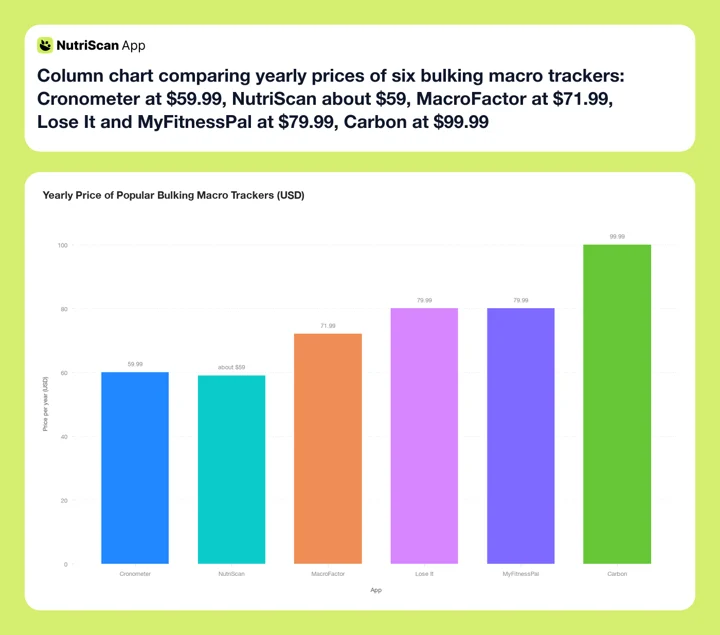 Figure 1: Yearly price of popular bulking macro trackers. Lose It now sits at $79.99, level with MyFitnessPal. Adaptive coaching (MacroFactor, Carbon) still holds the premium end, while the fast loggers leave the surplus math to you.
IMPORTANT
Checkpoint: final stretch before the reveal.
One last nudge - the reveal is next.
⏱️ Progress 3/4 • ~4 minutes in • Keep going
✅ Step 1: What a bulk demands
✅ Step 2: The adaptive coaches
✅ Step 3: All six trackers ranked and priced
✨ The two-app stack (about to reveal)
How to Pick the Right Bulking Tracker 🧭
Here is the stack I promised at the top. The best setup for most people is not one app. It is a pair: one tool that sizes the numbers and one that logs the meals fast enough to hit them. That covers both halves of the job.
If you want the numbers handled for you, start with MacroFactor. Its adaptive algorithm raises your surplus as you gain and caps the fat, which is the single hardest part of a bulk to manage by hand. If you prefer a human-style coach that prescribes exactly how much to eat, choose Carbon instead, and lean on its structured gaining and reverse-diet planning.
For the logging half, match the app to your food. If you eat a lot of packaged and restaurant items, MyFitnessPal or Lose It will log them fastest. If your calories come from cooked, mixed, or home-made meals, add NutriScan so the oil and portions actually get counted. And if you care about the quality of a clean bulk, run Cronometer alongside to watch your micronutrients.
Here is a simple way to decide in five steps:
- Name your rate of gain. Aim for a slow gain, roughly 0.25 to 0.5 percent of body weight per week, to keep the fat low.
- Pick your coach. MacroFactor for an automatic algorithm, Carbon for prescribed check-ins.
- Pick your logger. Match it to the food you eat most, packaged or cooked.
- Set a protein floor. Lock a protein target first, then fill the surplus around it. Our macro calculator sets this for you.
- Weigh in and review weekly. Let the app adjust, and only change things if the trend stalls for two weeks.
If you would rather follow a structured plan than build one from scratch, the NutriScan diet plan tools set your targets and adjust them as you go.
Planning the other direction too?
A bulk ends with a cut. When you get there, the priorities flip from surplus control to deficit adherence, and the app ranking changes with them. I covered that side in Best Macro Tracker for Cutting 2026.

Tips to Track a Bulk Without Gaining Excess Fat 💡
A bulk is where sloppy tracking does the most quiet damage. These habits keep the surplus honest.
- Keep the surplus small. A modest 200 to 400 calorie surplus builds muscle with far less fat than a large one. Bigger is not faster for muscle, only for fat.
- Log before you eat, not after. On a bulk it is easy to forget the second helping. Pre-logging the plate keeps your real intake visible.
- Weigh your calorie-dense foods. Nut butters, oils, rice, and granola are easy to underestimate by hundreds of calories. A food scale removes the guesswork.
- Do not chase the daily number with junk. If you are short at night, reach for milk, oats, or nuts rather than empty calories, so the surplus feeds muscle.
- Trust the weekly trend, not the daily scale. Weight jumps around with water and food volume. Judge your bulk on the seven-day average.
- Recheck your target every few weeks. If you gain weight, your maintenance rises. A tracker that does not adapt needs a manual bump to keep the surplus real.
- Set a hard stop. Decide in advance how much you will gain before you transition out. A bulk without an exit becomes a long, unnecessary fat gain.
 Photo by Maria Molinero on Unsplash
What the Research Says About Surplus Size 🔬
The gap between a good bulk and a bad one is mostly about how big the surplus is. In a 2025 trial, well-trained men and women ate a 10 percent hypercaloric high-protein diet while resistance training for eight weeks. Both groups built fat-free mass, but the group whose eating was spread across a longer daily window added 1.4 kilograms more fat mass than the other, despite matched calories (2025 randomized trial, Journal of the International Society of Sports Nutrition). The lesson is not about meal timing. It is that at the same surplus, small differences in how you eat can meaningfully change how much fat you carry off a bulk. Control the surplus and the details, and more of your gain is muscle.
Protein does the rest of the work. A 2022 meta-analysis found that increasing daily protein intake enhanced gains in lean body mass in people doing resistance exercise (2022 meta-analysis, PubMed). This is why the best bulking apps lock a protein target first and let calories fill in around it. The surplus supplies the energy to grow, and protein supplies the material.
There is one more research theme worth knowing. App effectiveness tends to fade after the first several months, often because fixed programs stop feeling personal and people disengage (Pujia et al., 2025). A bulk can run a long time, so an app that adapts its targets as you change is more likely to keep you logging to the finish. That is the strongest argument for an adaptive tracker over a static one.
 Control the surplus, hit the protein, and the mirror does the reporting.
IMPORTANT
Recap: everything you completed this round.
You finished the run - save this for next time.
⏱️ Progress 4/4 • ~6 minutes in • Nicely done
✅ Step 1: What a bulk demands
✅ Step 2: The adaptive coaches
✅ Step 3: All six trackers ranked
✅ The two-app stack: one surplus coach plus one fast logger (revealed)
Conclusion
The best macro tracker for bulking is really two numbers done well: a surplus large enough to grow and small enough to stay lean, and a logging habit fast enough to keep every day honest. No single app does both perfectly, which is why the smart move is a pair. MacroFactor or Carbon to size and adjust the surplus, plus a fast logger matched to the food you actually eat.
For the meals that decide most bulks, the cooked, mixed, and restaurant plates where calories hide, you can track your intake with NutriScan and its oil and portion prompts, so the surplus you think you are eating is the surplus you actually are. The free tier gives you 5 photo scans a week to test it on your heaviest plates. Whatever pair you choose, pick tools that adapt and that you will keep using for the whole gaining phase. Consistency, not the perfect app, is what puts muscle on the frame.
Frequently Asked Questions
What is the best macro tracker for bulking in 2026?
MacroFactor is my top pick for most people. Its adaptive algorithm raises your calorie target as you gain and eases the surplus if you gain too fast, which keeps most of the weight as muscle. It costs $71.99 per year with a 7-day free trial that needs no card. If you prefer a prescribed, coach-style plan, Carbon Diet Coach is the strong alternative at $99.99 per year.
Do I need a paid app to track a bulk?
Not always. Cronometer has a capable free tier, and NutriScan gives 5 free photo scans per week, enough to test the scanner on your heaviest cooked plates. But the feature that helps a bulk most, an algorithm that raises your surplus as you gain, sits behind the paid tiers of apps like MacroFactor and Carbon. If you are comfortable recalculating your own target every few weeks, a free tracker can work.
How big should my calorie surplus be for lean muscle gain?
A modest surplus of roughly 200 to 400 calories a day builds muscle with far less fat than a large one. A 2022 meta-regression showed that even a 500 calorie deficit stops lean mass gains, so you do want a clear surplus, not maintenance (Murphy and Koehler, 2022). But bigger is not faster for muscle, only for fat. Aim to gain slowly, around 0.25 to 0.5 percent of body weight per week.
Why does my weight stop climbing halfway through a bulk?
Because you now weigh more, so you burn more, and the surplus that once worked has become maintenance. This is normal. An adaptive app like MacroFactor catches it in your weight trend and raises your target automatically. On a static app, you have to spot the stall and bump your calories up yourself.
Can I use a photo scanning app for bulking?
Yes, and it helps most with the calorie-dense cooked and restaurant meals that barcode databases cannot read. NutriScan logs from a photo and then asks about oil, ghee, and cooking method, because those details change the calorie total a lot. Research shows photo apps underestimate larger portions unless the user confirms the specifics, so the prompt is what keeps a bulk's numbers accurate (O'Hara et al., 2025).