Best MacroFactor Alternatives 2026 (Cheaper + Free Picks)
 ChatGPT
  Claude
  AI Mode
  Perplexity
 MacroFactor costs $71.99 a year with no permanent free tier, so once the 7-day trial ends you subscribe or stop using it. YAZIO PRO at $47.90 is about $24 cheaper, Cronometer and MyNetDiary run $59.99, and Carbon Diet Coach costs $28 more at $99.99. NutriScan is about $59, and its free plan keeps 5 AI photo scans a week, all micronutrients and a fasting timer, though no alternative reproduces MacroFactor's expenditure model.
Last verified: August 23, 2026

MacroFactor is one of the best macro trackers ever built - so why do so many people quit it after the 7-day trial? 💸
TL;DR - Best MacroFactor Alternatives 2026
• The problem: MacroFactor costs $71.99/year with no permanent free tier - once the trial ends, you subscribe or stop using the app
• Cheapest paid swap: YAZIO PRO lists at $47.90/year, about $24 less than MacroFactor, with free AI calorie tracking and a fasting timer. YAZIO runs frequent regional promotions, so treat that as a list price. Lose It used to hold this spot, but Premium went to $79.99/year in 2026, which is more than MacroFactor
• Best free plans: Cronometer (unlimited logging, 84 nutrients, free barcode scanner), MyNetDiary (ad-free, all 108 nutrients), YAZIO (free fasting timer), NutriScan (5 free AI photo scans/week + free fasting + all micronutrients)
• Same coaching style: Carbon Diet Coach costs $28/year MORE. MyNetDiary Premium runs Autopilot, the same weight-trend idea, at $12/year LESS
• The catch: No alternative reproduces MacroFactor's expenditure model exactly. Know what you are trading before you switch
Curtin et al., writing in the International Journal of Behavioral Nutrition and Physical Activity in 2025, reviewed app-based interventions aimed at healthier and more sustainable diets and found behavior change was most pronounced 4 to 12 weeks after enrolment, with the effect fading after that (Curtin et al., 2025). As a NutriScan nutritionist, I read that and immediately thought of the friction point that stops people getting through those twelve weeks with MacroFactor: price.
MacroFactor is genuinely good at what it does. The expenditure model adjusts your calorie and macro targets based on your actual weight trend rather than a generic formula. The food search is fast. The logging interface is clean. But the app costs $71.99 per year with no free tier once the 7-day trial ends, and that single fact drives a consistent stream of searches for alternatives - from people who cannot justify the cost, people who want a free plan to test the habit first, and people who need something MacroFactor does not offer, like a fasting-window timer or cooking-method prompts on a photo estimate.
This guide ranks seven alternatives across those three reasons. Each entry names what you are trading away from MacroFactor and what you are gaining. And near the end, I'll share the one 5-minute routine that replaces most of what MacroFactor's algorithm does - for free.
IMPORTANT
Your MacroFactor exit plan at a glance.
A quick roadmap so you can act fast.
⏱️ Progress 0/4 • ~0 minutes in • Keep going
⏳ Step 1: Name your reason for leaving
⏳ Step 2: Know what you are giving up
⏳ Step 3: Meet the 7 alternatives
🔍 The free 5-minute routine that replaces the algorithm (revealed near the end)
Why People Look for MacroFactor Alternatives 🤔
Before picking a replacement, it helps to name exactly what is frustrating you. The fix depends on the problem.
Cost after trial. MacroFactor charges $11.99 per month, $47.99 for six months, or $71.99 per year (macrofactor.com). Prices here are standard US prices as of mid 2026 and change by region. There is no permanent free tier, and MacroFactor's own FAQ says there never will be. The 7-day trial starts through the App Store or Google Play, so whether a card is collected depends on your platform. Once it ends, you either subscribe or stop using the app. For users testing whether macro tracking is worth it, this is a hard barrier.
 Subscription math at renewal time: $71.99 here, $99.99 there... it adds up fast
Photo logging without the cooking prompts. Photo logging is no longer a reason to leave. MacroFactor added AI photo food logging in April 2025 and now lists it as one of seven logging workflows, alongside barcode, label scanning, recipe import and speech-to-text (macrofactor.com). What the camera flow does not ask is how the dish was cooked or how much oil went into it, and that is where estimates on home-cooked mixed dishes drift. Apps that put an oil-level and cooking-method prompt in front of the estimate handle that step differently.
Regional packaged foods outside its barcode countries. MacroFactor publishes strong barcode support in the US, Canada, the UK, Australia, Ireland, New Zealand, Japan, France and Spain, says Germany is improving quickly, and warns that countries outside that list may see fewer localized options (macrofactor.com). Its database holds more than 1.36 million verified entries, so this is coverage thinning at the regional edge rather than a small database. The documented workaround is the Label Scanner plus custom foods, which is extra steps on every new product.
No fasting timer. MacroFactor tracks food and body weight but has no intermittent fasting window or countdown timer. Its published feature list mentions fasting once, as "support for fasting days" inside the macro program, which is calorie cycling for a fast day rather than a timer (macrofactor.com). Users who want fasting plus macros in one app have to pair it with something else.
No coaching chat. Carbon Diet Coach, which uses a similar adaptive macro model, adds a weekly check-in before it recalculates your targets (joincarbon.com). MacroFactor's Coached mode applies the weekly adjustment on its own and asks nothing. It is deliberately adherence-neutral: your next week's numbers come from what you actually ate and what the scale did, not from how well you followed the plan. Some users find the check-in accountability more useful than an adjustment that just appears.
What You Are Giving Up ⚖️
Switching away from MacroFactor is not free. Before downloading an alternative, understand what you are leaving behind.
The core value MacroFactor offers is its expenditure model. It watches your actual weight change and reverse-engineers how many calories you are burning, then adjusts your targets to keep you on pace. Most apps use a static TDEE formula. MacroFactor uses your real data, and in Coached mode it applies the weekly adjustment for you; Collaborative and Manual modes hand that decision back to you (macrofactor.com). We have not found a published trial that pits adaptive feedback against fixed targets head to head, so treat the case for adaptive targets below as our reading rather than a research finding.
The honest trade-off
None of the seven alternatives below reproduce MacroFactor's expenditure model exactly. Carbon Diet Coach and MyNetDiary's Autopilot come closest, and both recalculate off your real weight trend. The rest offer static calorie targets. If adaptive coaching is the main reason you chose MacroFactor, switching comes with a real trade-off - though the manual routine at the end of this guide closes most of that gap.
If you chose MacroFactor because it was the best option available and you are now reconsidering on price, the alternatives below offer real value.
IMPORTANT
Checkpoint: here's where you are right now.
Quick status update so you always know the next best move.
⏱️ Progress 2/4 • ~2 minutes in • Keep going
✅ Step 1: Reason named (done)
✅ Step 2: Trade-offs clear (done)
👉 Step 3: Meet the 7 alternatives (you're here)
🧩 The free 5-minute routine (coming soon)
Quick Comparison: MacroFactor vs. 7 Alternatives 📊
| App | Free tier | Paid annual cost | Adaptive targets | Photo scan | Fasting timer |
|---|---|---|---|---|---|
| MacroFactor | No (7-day trial) | $71.99/yr | Yes (expenditure model) | Yes (Snap, since 2025) | No (fasting-day calories only) |
| Carbon Diet Coach | No (14-day trial) | $99.99/yr | Yes (weekly check-in) | Yes (Smart Logger) | No |
| Cronometer | Yes (unlimited logging) | $59.99/yr Gold | No | Yes (Photo Log, Gold) | Gold only |
| Lose It | Yes | $79.99/yr | No | Yes (Snap It, 3 free tries) | Not published |
| MyFitnessPal | Yes | $79.99/yr Premium | No | Yes (Meal Scan, Premium) | Yes (Premium) |
| YAZIO | Yes (incl. barcode + fasting) | $47.90/yr list | No | Yes (AI, free tier) | Yes |
| NutriScan | Yes (5 scans/wk, all micros) | about $59/yr | No | Yes (AI, oil prompt) | Yes (free) |
| MyNetDiary | Yes (ad-free, 108 nutrients) | $59.99/yr | Yes (Autopilot, Premium) | Yes (Premium) | Yes (Premium) |
Prices are standard US prices as of mid 2026 and change by region.
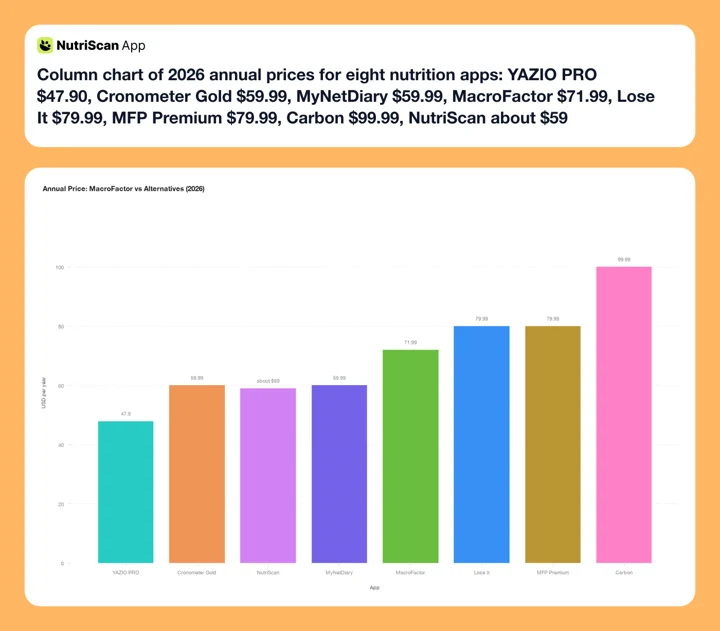 Figure 1: Annual pricing across the eight apps compared. YAZIO PRO is the cheapest paid plan at $47.90. Cronometer Gold and MyNetDiary sit together at $59.99. NutriScan Premium is about $59. Lose It Premium moved to $79.99 a year in 2026 (Lose It membership tiers), which puts it above MacroFactor alongside MFP Premium.
Four of the seven alternatives undercut MacroFactor's $71.99 annual price: NutriScan at about $59, YAZIO PRO at $47.90 list, Cronometer Gold at $59.99 and MyNetDiary at $59.99. Three of the seven cost more. And six of the seven keep a permanent free tier, so Carbon is the only one that gives you nothing after the trial runs out.

1. Carbon Diet Coach - Same Coaching Style, Higher Price 🏋️
Best for: Users who leave MacroFactor because they want weekly accountability check-ins added to adaptive macro coaching.
Carbon Diet Coach and MacroFactor are built on the same idea: your targets should adjust based on your results, not a formula. The difference is how each app handles the adjustment.
MacroFactor's Coached mode runs the expenditure model on its own. You log food, weigh yourself, and the app updates your targets in the background. (Its Collaborative and Manual modes hand that decision back to you.) Carbon adds a human-feeling layer instead: a weekly check-in that Carbon says it uses to "adjust your targets and keep you on track" (joincarbon.com). In our own use of the app that screen collects weight, hunger and energy before it recalculates; Carbon publishes the check-in but not the exact question list. Many users find it creates a structured review moment that an automatic adjustment does not.
Carbon builds the plan around a named goal you pick at setup: fat loss, muscle gain, maintenance, or reverse dieting. The reverse-diet goal is the one athletes usually come for, because it ramps calories back up in controlled steps after a cut. For a deeper look at how Carbon stacks up for athletes, see our Carbon vs MacroFactor vs MyFitnessPal comparison.
The trade-off: Carbon costs $99.99 per year (joincarbon.com), which is $28 more per year than MacroFactor's annual plan. It has no permanent free tier, though every plan carries a 14-day free trial and Carbon says you are not charged if you cancel inside it (joincarbon.com). That is a week longer than MacroFactor's trial, so testing the check-in style costs nothing; it is the renewal that costs more. If price is the reason you are leaving MacroFactor, Carbon is not the fix. If coaching accountability is the reason, Carbon is the closest match.
2. Cronometer Gold - Free Tier and Micronutrient Depth 🔬
Best for: Users who want to test macro tracking for free, or users who care more about micronutrients than adaptive TDEE coaching.
Cronometer's free tier is one of the most generous in this category. Free users get unlimited food logging, access to eight lab-analyzed nutrition databases (USDA, NCCDB, CNF, NUTTAB, CoFID, NEVO, IFCDB and Cronometer's own CFCD), tracking for up to 84 nutrients, and custom macro and micronutrient targets (cronometer.com). There is no barcode paywall on the free plan. Two things the free tier does not give you: it carries ads, and its reports and charts only look back 7 days, so you can log indefinitely but you cannot review a month of it without Gold (cronometer.com).
The difference from MacroFactor is what Cronometer tracks and what it does not. Cronometer does not have an adaptive TDEE engine. Calorie targets are set manually using your goal, body weight, and activity level, then held fixed unless you update them. For users who followed MacroFactor primarily because they wanted the expenditure model, Cronometer will feel passive by comparison.
But for a different kind of user - someone who wants to audit micronutrients, track vitamin D, magnesium, zinc, or omega-3 alongside macros, or monitor detailed nutrition for a condition like diabetes, PCOS, or osteoporosis - Cronometer is the deepest option here among apps that also carry lab-analyzed sourcing. On raw nutrient count MyNetDiary publishes a higher number, 108 to Gold's 95, so pick Cronometer for where the numbers come from and MyNetDiary for how many of them there are. If that describes you, our macro calculator can help you set those manual targets correctly from day one.
Cronometer Gold, at $4.99 per month billed annually at $59.99 (cronometer.com), raises the nutrient ceiling from 84 to 95 and adds the Oracle nutrient search, Custom Charts, a fasting timer, Photo Log and Voice Log for camera and spoken entry, unlimited history instead of the 7-day window, an ad-free app and Crono Coach. The Gold plan costs $12 less per year than MacroFactor. The free plan costs nothing.
3. Lose It Premium - Photo and Voice Logging, Now Priced Above MacroFactor 💰
Best for: Users who want two fast input methods, camera and voice, and who care more about logging speed than about saving money on the switch.
Lose It Premium raised its price to $79.99 per year in 2026, up from $39.99 (Lose It membership tiers, 2026). That is $8 more per year than MacroFactor, so switching here to save money no longer works. There is no monthly Premium plan; the other way in is Lifetime at $299.99, or $229.99 if you are already a Premium member. The free tier gives you a personalized daily calorie budget and the full 50M+ food database, which is the biggest published count in this comparison. Barcode scanning is not free here: Lose It lists it as a Premium feature alongside smart photo and voice logging.
The feature that distinguishes Lose It is logging input variety. Snap It uses AI to estimate calories from a food photo. Say It transcribes a spoken description, "two eggs fried in butter with rye toast", and returns a calorie estimate without a manual search. Free members get three tries of each; Premium makes them unlimited (loseit.com). MacroFactor now offers both too, photo and speech-to-text, so this is a difference in how the two flows feel rather than a feature MacroFactor lacks.
Lose It publishes no expenditure or weight-trend adjustment, so calorie targets are calculated once from your goal, weight, and activity level. Burke et al. ran a 502-adult randomized controlled trial over 12 months and found that higher adherence to diet, activity and weight self-monitoring, and to calorie goals, was associated with greater odds of losing at least 5% of body weight, with adherence dropping off nonlinearly across the year (Burke et al., Obesity 2025, PMC11897847). The paper measures whether you keep logging, not whether the app adjusts for you. Lose It's answer to the first half is to make logging fast.
So the case for Lose It is about input speed, not cost. If Snap It and Say It are what get you to log every day, $79.99 buys that. If you came here to spend less than MacroFactor's $71.99, YAZIO PRO at $47.90 list or Cronometer Gold at $59.99 are the swaps that actually do it.
4. MyFitnessPal - A Big, Crowdsourced Free Database 🗄️
Best for: Users who leave MacroFactor because a regional packaged food kept returning nothing, and who will trade entry quality for the odds of a hit.
MyFitnessPal's database is large and largely crowdsourced. MyFitnessPal's own site puts it at "over 2,000,000 foods" (myfitnesspal.com), which is not the biggest published count here; Lose It claims 50M+. What crowdsourcing buys is breadth at the edges: regional foods, restaurant menu items and packaged products from countries outside MacroFactor's named barcode list. If you logged a regional packaged snack in MacroFactor and got zero results, the same search in MFP often returns something. It may also return six versions of it with different serving sizes.
The free tier includes food database text search. Barcode scanning moved to Premium in 2022 for new accounts ($79.99 per year), and the Compare table on MyFitnessPal's own premium page still shows barcode and meal scan as Premium features. The free text search is untouched, which makes MFP a usable free tracker for people who type food names rather than scan.
The relevant comparison for MacroFactor users is simple: MFP publishes no expenditure model. Calorie targets are fixed. Premium at $79.99 buys the logging tools, Meal Scan photo logging, barcode and an intermittent fasting tracker. The planning tools are a tier up: Premium+ at $99.99 is what adds the Meal Planner, 1,500+ recipes and grocery-app syncing (myfitnesspal.com). If you are weighing MFP itself against its own rivals, we ranked them in our Best MyFitnessPal Alternatives 2026 guide.
MFP Premium at $79.99 per year costs $8 more than MacroFactor. Premium+ at $99.99 per year costs $28 more. For users moving from MacroFactor for database coverage reasons, the free MFP tier covers that need without any subscription cost.
IMPORTANT
Checkpoint: midway progress update.
You're halfway - decisions get easier here.
⏱️ Progress 2/4 • ~4 minutes in • Keep going
✅ Carbon, Cronometer, Lose It, MFP reviewed
👉 YAZIO, NutriScan, MyNetDiary (current)
🧩 The free 5-minute routine (getting closer...)
5. YAZIO PRO - Free Tracking Plus a Fasting Timer ⏱️
Best for: Users who want intermittent fasting integrated with calorie tracking, and who want a free tier before committing.
YAZIO is the closest thing to a free MacroFactor for users whose goals include intermittent fasting alongside macros. The free tier covers calorie tracking, meal logging from a database of four million-plus entries, a barcode scanner, AI calorie tracking (the app is now listed as "AI Calorie Tracker by Yazio") and a fasting tracker with flexible plans including 16:8 and 5:2 (App Store). MacroFactor has no fasting timer at all, and no free tier to try any of it on.
YAZIO PRO lists at $47.90 per year, about $24 less than MacroFactor's annual plan. Treat that as a list price: YAZIO runs frequent regional promotions and its App Store listing carries several lower annual SKUs at the same time, from $23.90 upward. PRO buys advanced tracker tools, a custom plan, in-depth food analysis, custom meal plans, Fitbit and Garmin sync, mood and body metrics, long-term trend insights and an ad-free app. Barcode, photo and fasting are not what you are paying for; those are already free. The free tier is usable indefinitely, and YAZIO advertises instant access with no signup required.
The limitation is the same as every static-target app in this list: YAZIO does not watch your weight trend and adjust your macro targets. You set a calorie goal, YAZIO helps you log, and the rest is manual. For users who followed MacroFactor specifically for the expenditure model, YAZIO will feel like a step back in coaching intelligence. For users who followed MacroFactor because it was the best comprehensive app available, and who also want fasting, YAZIO covers the fasting gap at lower cost.
Pavlicek et al. content-analyzed 13 diet apps for Preventive Medicine Reports in 2025 and found most packed in a high number of behavior change techniques, goal setting, self-monitoring and feedback among them, while lacking any published evidence base: no studies existed at all for 69.2% of the apps they looked at (Pavlicek & Cradock, 2025). Thirteen apps is a small sample, so read it as a warning about the category rather than a measurement of it. YAZIO's combination of fasting tracker, calorie log and recipe bank covers more of those techniques in one place than MacroFactor does.
6. NutriScan - Free Photo Scan of Mixed Dishes 📸
Best for: Users who want AI photo logging as their primary input method, especially for home-cooked meals, curries, and dishes that have no barcode.
NutriScan's free tier includes 5 AI-powered photo scans per week with no subscription required, plus NutriScore on every meal, all micronutrients with no gating, unlimited meal history and 4 Monika voice calls a week. The scan screen includes two prompts that distinguish it from other photo loggers: an oil level slider (No Oil, Low Oil, Medium Oil, High Oil) and a cooking method selector with 11 options including deep-fried, air-fried, stir-fried, oven-baked, roasted, steamed, boiled, grilled, and raw. Those two prompts move the number more than people expect. Cooking oil runs about 120 calories a tablespoon (USDA FoodData Central, record 171413), so the same plate of stir-fried vegetables cooked in one tablespoon rather than two is roughly a 120 calorie difference, and a heavy restaurant hand can be double that again.

NutriScan's scan flow (Home > Camera Icon > Click Picture): crop, pick a cooking method from 11 tags, set the oil level, done
MacroFactor has photo logging of its own now, so the difference is not the camera. It is what the app asks you after the photo, and what it costs to find out. MacroFactor's flow takes the picture and produces an estimate; NutriScan's stops to ask how the dish was cooked and how much oil went in, which is exactly where a home-cooked curry or a restaurant plate drifts. And you can test that for nothing. The 5 free weekly scans are enough to try the scanner on the dishes a database reads worst, curries, restaurant plates and mixed bowls, before you pay anything - see how meal scanning works for the full flow.
Unlike MacroFactor, NutriScan also includes a free intermittent fasting timer (14:10, 16:8, 18:6, 20:4, or custom windows) with streak tracking and weekly fasting charts, directly on the home screen - no subscription needed.
NutriScan Premium at about $59 a year (a standard US price as of mid 2026, and it changes by region) removes the scan cap, makes Monika unlimited, and adds the 28-day personalized diet plan, weekly meal-plan suggestions and a goal-based grocery list. The 7-day trial starts through your app store, and whether a card is collected depends on your platform and region. The Refer and Earn program gives one week of Premium time for each friend invited, extending free access without a subscription (nutriscan.app).
NutriScan does not have an adaptive TDEE engine. Calorie targets are goal-based and static. Users who relied on MacroFactor's expenditure model will need to track body weight trends manually or recalibrate targets periodically. For users who primarily want fast, accurate photo logging of mixed meals, NutriScan is the clearest free alternative to a MacroFactor paid plan. Curious how it compares to other AI scanners? Read our Cal AI vs NutriScan photo scanner comparison.

7. MyNetDiary - Ad-Free Tracking with 108 Nutrients 🧾
Best for: Users who want no ads, a generous free tier, and nutrient tracking that goes deeper than macros without the subscription cost of MacroFactor.
MyNetDiary's free tier is ad-free. No banner ads, no promoted content in the diary view, and MyNetDiary says it has never shipped third-party ads or ad-tracking SDKs in any version. The free plan includes barcode scanning, a database of two million-plus staff-verified entries, voice logging, no account or email required, and all 108 nutrients (mynetdiary.com). That 108 is the highest published nutrient count in this comparison, ahead of Cronometer Gold's 95, and you do not have to pay for it.
What Premium at $59.99 per year actually adds is meal scanning, intermittent fasting, meal plans, custom trackers and Autopilot. Autopilot is the one that matters to anyone leaving MacroFactor: instead of holding your calorie target static, it adjusts your daily budget from your real weight trend (mynetdiary.com). That is the same idea as MacroFactor's expenditure model, in a plan that costs $12 less a year.
MyNetDiary also argues its entries are more reliable than crowdsourced ones, because staff verify each submission against USDA FoodData Central and NCC research data before it goes live. Worth knowing that this comes from MyNetDiary's own comparison page, which carries a disclosure that MyNetDiary has a commercial interest in the comparison. Duplicate entries and odd serving sizes are a commonly reported complaint about MFP's community database, not something we measured.
So for users who want a lower-cost move without landing in an ad-filled app, MyNetDiary is a clean alternative, and it is the closest thing on this list to keeping the adaptive layer you are leaving. The trade-off is that Autopilot and meal scanning both sit behind Premium, so the strong free tier and the coaching layer are not the same purchase.
IMPORTANT
Checkpoint: final stretch before the reveal.
One last nudge - the reveal is next.
⏱️ Progress 3/4 • ~6 minutes in • Keep going
✅ Step 1: Reason named
✅ Step 2: Trade-offs clear
✅ Step 3: All 7 alternatives reviewed
✨ The free 5-minute routine (about to reveal)
How to Pick the Right Alternative 🎯

The seven apps above do not all solve the same problem. Match your reason for leaving MacroFactor to the best fit.
If price is the only issue: YAZIO PRO at $47.90 list is the cheapest paid plan here, with Cronometer Gold and MyNetDiary next at $59.99. NutriScan Premium is about $59. YAZIO's promotions move that figure often, so check what your store actually shows. Cronometer's free tier costs nothing and covers unlimited logging. YAZIO's free tier adds fasting and barcode on top. Lose It is no longer on this shortlist at $79.99.
If you want the same adaptive coaching style: two options, not one. Carbon Diet Coach is the direct match on format, at $28 more per year, with a weekly check-in instead of an automatic adjustment. MyNetDiary Premium runs Autopilot off your weight trend for $12 less per year than MacroFactor, without the check-in ritual. Carbon has no permanent free tier; MyNetDiary does.
If the food database had gaps for your region or cuisine: MyFitnessPal's free tier is the broadest crowdsourced search here. No subscription required for text search, though barcode scanning is Premium.
If you want photo logging: everything on this list does it now, including MacroFactor. What separates them is cost and prompting. Free or nearly free: YAZIO AI (free tier), NutriScan (5 scans a week), Lose It Snap It (3 tries, then Premium). Paid: Cronometer Photo Log (Gold), MyFitnessPal Meal Scan (Premium), MyNetDiary meal scanning (Premium). NutriScan is the only one that asks for oil level and cooking method before it commits to a number.
If you want fasting integrated with food tracking: YAZIO and NutriScan both include free fasting timers, and NutriScan adds 5 free photo scans a week on top. Cronometer Gold, MyFitnessPal Premium and MyNetDiary Premium all include one behind a subscription. MacroFactor and Carbon are the two that do not offer one at any price.
If you want no ads and verified data: MyNetDiary, free tier or Premium. It is the only app here whose free tier is ad-free; Cronometer's free tier carries ads and sells ad-free as a Gold benefit.
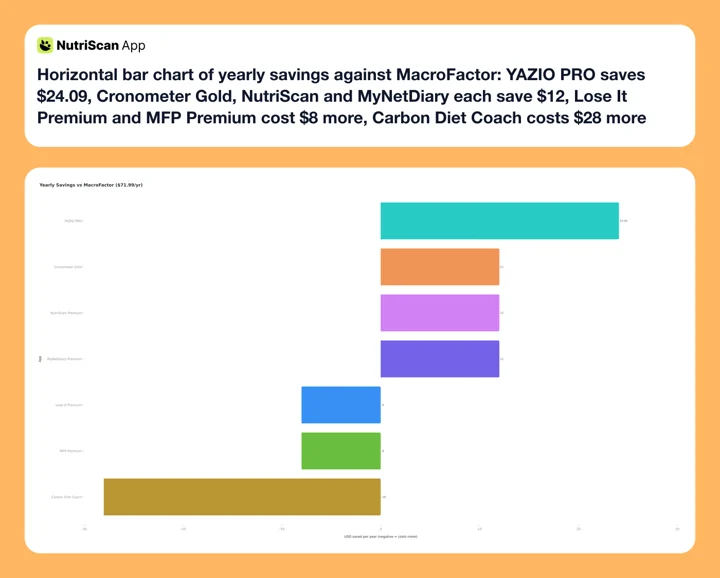 Figure 2: What each switch saves (or costs) per year against MacroFactor's $71.99 annual plan. YAZIO PRO saves the most at $24.09. Cronometer Gold, NutriScan and MyNetDiary each save $12. Lose It Premium and MyFitnessPal Premium cost $8 more, and Carbon Diet Coach costs $28 more.
Pujia et al. pooled 11 randomized controlled trials covering 1,717 participants for the Journal of Medical Internet Research in 2025 and found app-based interventions significantly reduced body weight and BMI at 4 to 6 months of follow-up, with effectiveness limited beyond 6 months and a tendency to regain. The review's own explanation is that many apps lack the personalized support needed to sustain a long-term loss (Pujia et al., JMIR e66887, 2025). The practical implication: any of these apps will carry you through the first few months when the habit is new. Six months is where the adaptive layer, MacroFactor's model, Carbon's check-in, MyNetDiary's Autopilot, or the manual routine below, starts to matter.
The 5-minute routine that replaces the algorithm ✨
You've been patient - here it is. MacroFactor's expenditure model boils down to one loop: compare your average weekly weight change against your average intake, then nudge the target. You can run that loop yourself. Every four to six weeks: take your 7-day average weight ➡️ compare it to last month's average ➡️ recalculate your TDEE with your recent data in our free macro calculator ➡️ update the target in your new app. Five minutes, zero dollars. The apps above make this possible. They just do not do it automatically.
IMPORTANT
Recap: everything you completed this round.
You finished the run - save this for next time.
⏱️ Progress 4/4 • ~7 minutes in • Nicely done
✅ Step 1: Reason named
✅ Step 2: Trade-offs clear
✅ Step 3: All 7 alternatives reviewed
✅ The free 5-minute routine (revealed)
Frequently Asked Questions ❓
Is there a free version of MacroFactor? No, and MacroFactor's own FAQ says there never will be one. The 7-day free trial starts through the App Store or Google Play, so whether a card is collected depends on your platform. After 7 days you either subscribe or stop using the app. MacroFactor does let you export your data at any time, so leaving does not cost you your history.
Which MacroFactor alternative has the best free plan? Cronometer's is the deepest on logging: unlimited food entries, 8 lab-analyzed databases, 84 nutrients, custom macro and micronutrient targets and a free barcode scanner. Two catches, it shows ads and its reports only look back 7 days. MyNetDiary's free tier is the one to beat if those catches bother you, ad-free with all 108 nutrients and no account required. YAZIO's free tier adds a fasting tracker and free AI calorie tracking. NutriScan's adds 5 AI photo scans per week, a free fasting timer, all micronutrients and unlimited meal history. All four are usable indefinitely at no cost.
Is Carbon Diet Coach better than MacroFactor? Carbon and MacroFactor both use adaptive macro coaching. Carbon builds around a named goal (fat loss, muscle gain, maintenance, reverse dieting) and adds a weekly check-in before it recalculates. MacroFactor's Coached mode adjusts targets automatically and asks nothing. Carbon costs $99.99 per year versus MacroFactor's $71.99, and gives you 14 days free to MacroFactor's 7. Neither is clearly better; the choice is between check-in accountability and an adjustment that just happens.
Can I export my MacroFactor data before switching? Yes. MacroFactor allows food log and body weight exports from the app settings. Export the data before cancelling your subscription. Most alternative apps accept manual entry rather than direct import, so the export serves primarily as a personal record.
How accurate is AI photo logging compared to MacroFactor's manual database search? Accuracy depends on meal type. O'Hara et al. tested ChatGPT-4 on 114 meal photographs for Nutrients in 2025 and found a mean absolute percentage difference of 26.9% against weighed values, with the model naming foods at 93% precision but significantly underestimating the weight of medium and large portions (O'Hara et al., 2025, PMC11858203). For simple foods, a grilled chicken breast, a banana, photo estimates are close to manual search. For mixed dishes with oil and sauces, the estimates diverge more. Asking for oil level and cooking method before committing to a number is NutriScan's answer to that, and it is a design choice rather than a tested one; no published study compares prompted photo logging against unprompted.
What should I use on MacroFactor's 7-day trial to decide? Log every meal during the trial and weigh yourself daily. At the end of 7 days, check whether the expenditure model gave you a revised calorie target or confirmed your starting target. If the model adjusted your targets based on your actual weight data, and if you found the logging speed worthwhile, the subscription is easier to justify. If you only used it as a food diary and the targets never changed, a free alternative covers that need.
Does MacroFactor have a student or annual discount? MacroFactor does not advertise a student discount. The annual plan at $71.99 per year is the lowest public price. The six-month plan at $47.99 works out to $7.99 per month against the $5.99 per month MacroFactor prints beside the annual (macrofactor.com). There is no lifetime plan.
Which Alternative Should You Choose ✅
MacroFactor earns its price if you use the expenditure model. Nothing here reproduces it exactly. Two apps get close from different directions: Carbon's weekly check-in, at $28 more a year, and MyNetDiary's Autopilot, at $12 less.
But that feature is not what every user needs. If you want to test the tracking habit before paying, Cronometer's free tier or YAZIO's free tier remove the trial pressure. If you want lower annual cost without giving up core macro tracking, YAZIO PRO at $47.90 list is the value pick now that Lose It has moved to $79.99. And if you eat mixed dishes, the question is no longer whether an app can read a photo, because they all can now. It is whether it asks how the food was cooked. NutriScan's 5 free weekly scans are a cheap way to find out whether that changes your numbers.
 That feeling when the new app fits your routine AND your budget
The right answer depends on the specific gap you are trying to fill. Name the gap first. The alternative that fills it follows from there.
Try photo-first tracking with NutriScan - 5 free photo scans per week plus a free fasting timer.