Best App for Tracking Carbs for Diabetes: 5 Compared
 ChatGPT
  Claude
  AI Mode
  Perplexity
The best app for tracking carbs for diabetes is MyNetDiary Diabetes Tracker. It is the only one of these five that holds your counting method, your carb grams, your glucose readings, your insulin, and your medication in the same place, and Premium runs $59.99 a year on top of a usable free tier. Prices here are standard US prices as of August 2026 and change by region. mySugr is the free pick if glucose logging matters more to you than food search, Cronometer has the most trustworthy gram counts, MyFitnessPal has the biggest barcode database, and NutriScan reads the cooked and mixed plates a barcode cannot.
A 2025 meta-analysis pooled 16 trials in type 1 diabetes and 6 trials in type 2 diabetes and found that carbohydrate counting lowered HbA1c by 0.21 percentage points on average in type 1 diabetes, rising to 0.47 points when adults used advanced carb counting to match insulin to carb grams (Sakane et al., 2025). As a NutriScan nutritionist, I read that as good news with a catch. Carb counting works, but the careful version is the version that works, and careful means counting actual grams at every meal, every day.
TL;DR - Best Carb Tracking Apps for Diabetes 2026
• Best overall: MyNetDiary Diabetes Tracker, the only app here that does carbs, glucose, insulin, and medication in one place
• Best free logbook: mySugr for glucose-first tracking with carbs, doses, and notes at no cost
• Best carb accuracy: Cronometer for a lab-verified database and Dexcom CGM import
• Biggest database: MyFitnessPal for barcoded packaged foods, with verified entries only
• For cooked and mixed meals: NutriScan photo scanning for the plates a barcode cannot read
• Safety first: no app replaces your doctor, diabetes educator, or dietitian, and dosing decisions stay with your care team
That daily gram count is exactly the job a phone app should make easier. Yet most calorie apps were built for weight loss, not diabetes. They bury carbohydrate under a calorie total, they default to one counting method whether or not it matches your care plan, and they leave you nowhere to record the glucose reading that tells you what the meal actually did.
Below I compare the apps I would shortlist for carb tracking with diabetes in 2026, judged on the three jobs that decide whether a carb log changes anything.
This is not medical advice
Nothing here replaces your doctor, diabetes educator, or dietitian. If you dose insulin, any change to how you count carbs or how you set a ratio should go through your care team first.
IMPORTANT
Your carb tracking plan at a glance.
A quick roadmap so you can pick your app fast.
⏱️ Progress 0/4 • ~0 minutes in • Keep going
⏳ Step 1: The 3 jobs a diabetes carb app must do
⏳ Step 2: The diabetes-first picks
⏳ Step 3: Accuracy, speed, and the meals with no label
🔍 The 20-gram carb error that breaks insulin math (revealed near the end)
 Counting carbs should not feel like this. Most of the confusion comes from an app that counts a different way than your care team does.
Carb Tracking App Comparison at a Glance 📊
| App | Carb method options | Glucose logging | Fastest logging tool | Price (US, 2026) |
|---|---|---|---|---|
| MyNetDiary Diabetes | Total, net, diabetes carb count | Yes, plus insulin and meds | Barcode, voice, photo (paid) | Free tier; $59.99/yr Premium |
| mySugr | Manual carb entry | Yes, meter sync (Accu-Chek) | Quick logbook entry | Free core app |
| Cronometer | Gram targets, fiber for net carbs | Via Dexcom CGM import | Barcode, verified search | Free tier; $59.99/yr Gold |
| MyFitnessPal | Total carbs; gram goals paid | No | Barcode, saved meals | $79.99/yr or $19.99/mo |
| NutriScan | Total carbs and fiber from a photo | No | Photo scan with prompts | 5 scans/wk free; about $59/yr |
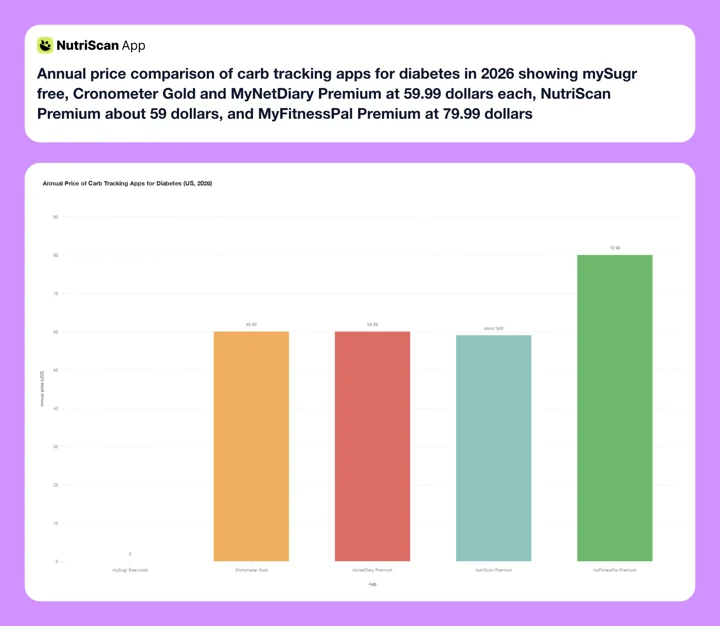 Figure 1: Annual premium pricing across the five apps compared here. mySugr's core logbook is free, Cronometer Gold sits level with MyNetDiary Premium at $59.99 a year, NutriScan is about $59 a year, and MyFitnessPal Premium tops the range at $79.99.
Prices change and vary by region. Check the store listing on your device before subscribing.
What a Carb Tracking App Must Do for Diabetes 🔍
A diabetes carb app has three jobs, and most apps only do one of them well.
Job 1: count carbs the way your care plan counts them. There is more than one counting method. Some plans count total carbohydrates. Some subtract fiber and count net carbs. Insulin users often need grams per meal to apply an insulin-to-carb ratio, and that ratio math only works when the gram number is right. An app that shows carbohydrate only as a percentage of calories, or only as one fixed method, forces you to translate at every meal. The research reflects how much method matters: advanced carb counting moved HbA1c in adults with type 1 diabetes, while basic counting alone did not show a significant effect in adults with type 2 diabetes (Sakane et al., 2025).
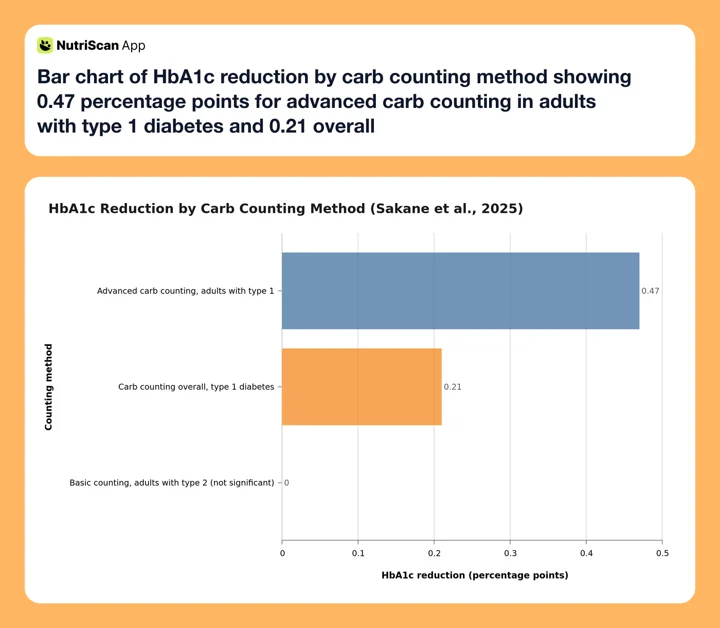 Figure 2: Precision pays. Advanced carb counting, where insulin is matched to actual carb grams, more than doubled the HbA1c benefit of carb counting overall, while basic counting in adults with type 2 diabetes did not reach significance (Sakane et al., 2025).
Job 2: show food and glucose side by side. A carb number without the glucose response is half the story. Sixty grams of white rice and sixty grams of lentils are the same entry in a plain calorie app, but your meter or CGM may tell a very different story two hours later. Apps that log blood glucose next to meals let patterns surface: which breakfasts spike you, which dinners hold steady, what a late snack does overnight. Mobile health apps built this way earn their keep. A 2025 meta-analysis of 7 randomized trials with 490 older adults with diabetes found that app use significantly reduced HbA1c, with a Hedges g of -0.40 (Azevedo et al., 2025).
Job 3: be fast enough to use at every meal. Carb counting is a per-meal habit, not a weekly one. If logging lunch takes two minutes of database search, most people quit by week three. Adherence to self-monitoring is one of the strongest predictors of whether tracking changes outcomes (Burke et al., 2025), and app benefits tend to fade after about six months largely because people disengage (Pujia et al., 2025). Barcode scanning, photo logging, saved meals, and copy-yesterday buttons are what keep a carb log alive.
Judge every app against those three jobs and the field narrows fast. I also weighed price, free tier limits, and database accuracy, because a wrong carb entry is worse than a slow one when insulin is involved.
IMPORTANT
Checkpoint: here's where you are right now.
Quick status update so you always know the next best move.
⏱️ Progress 1/4 • ~2 minutes in • Keep going
✅ Step 1: The 3 jobs a diabetes carb app must do (done)
👉 Step 2: The diabetes-first picks (you're here)
⏳ Step 3: Accuracy, speed, and the meals with no label
🧩 The 20-gram carb error (coming soon)
MyNetDiary Diabetes Tracker: Best Overall for Diabetes Carb Tracking 🏆
MyNetDiary is the only mainstream food app in this group with a dedicated diabetes mode, and that focus shows up in all three jobs.
For counting method, MyNetDiary lets you choose between total carbs and net carbs in settings, and its dedicated Diabetes Tracker app also supports a diabetes carb count view (MyNetDiary). That flexibility means the number on screen can match the number your educator taught you to use, with no mental math at the table.
For patterns, it logs blood glucose with labels, tracks insulin and medications, sets reminders to check your glucose, and produces daily and weekly reports that put meals and readings on one timeline (Diabetes Tracker by MyNetDiary, App Store). It can also pull glucose data through phone health platforms, so meter readings sync instead of being typed twice.
For speed, you get barcode scanning, voice logging, and a staff-curated database, plus photo-based meal scan on paid tiers. The free tier is ad-free and already tracks a wide nutrient set. Premium is $59.99 per year and unlocks the photo tools and the deeper analysis. If ads and privacy are your bigger worry, see our roundup of the best MyNetDiary alternatives.
Pick MyNetDiary if: you want carbs, glucose, insulin, and medications in one app with a counting method you choose.
Skip it if: you want the largest possible food database or the most polished Android build, since its iOS app has historically run ahead of Android.
mySugr: Best Free Glucose-First Logbook 🩸
mySugr comes at the problem from the glucose side. It is a diabetes logbook first: blood sugar entries, carb estimates, insulin doses, medications, and notes, arranged so that hypos and highs are easy to spot. Its store listing describes exactly this scope, from diet to medication to blood sugar in one personalized dashboard (mySugr, Google Play). Everyday Health's roundup of diabetes apps lists it at 4.7 stars on the App Store and 4.4 on Google Play (Everyday Health), and the core logbook is free.
The trade-off is the food side. mySugr expects you to already know the carb count and type it in. There is no deep food database and no photo scan to work out the grams for you, so it does job 2 very well and job 1 only halfway. Owned by Roche, it pairs tightly with Accu-Chek meters, which removes manual glucose entry for those users.
Pick mySugr if: glucose logging is your anchor habit and you already know the carb counts of your usual meals.
Skip it if: you need the app to tell you how many carbs are on the plate, because that is the one thing it will not do.
IMPORTANT
Checkpoint: midway progress update.
You're halfway - decisions get easier here.
⏱️ Progress 2/4 • ~4 minutes in • Keep going
✅ Step 1: The 3 jobs a diabetes carb app must do (done)
✅ Step 2: The diabetes-first picks (done)
👉 Step 3: Accuracy, speed, and the meals with no label (current)
🧩 The 20-gram carb error (coming soon)
Cronometer: Best for Verified Carb Data and CGM Users 🧪
Cronometer's case rests on data quality, and quality matters more for carbohydrate than for almost any other nutrient. It builds its database from lab-analyzed sources rather than open user uploads. A 2025 validation study in 43 endurance athletes found that MyFitnessPal showed poor validity for total energy and carbohydrates, driven by user-uploaded entries, while Cronometer performed at an excellent level (Morello et al., 2025). If an insulin ratio depends on the gram count, a database that is right by default is a safety feature, not a luxury.
Cronometer also fits glucose work. It supports direct integration with Dexcom CGM data alongside food logs, and it charts nutrients against biometrics so you can hunt for patterns yourself. On the free tier you can set fixed gram targets for carbohydrate, and it tracks fiber closely enough to compute net carbs. Gold costs $59.99 per year, or $10.99 a month if you pay monthly (Cronometer Gold).
The gaps: there is no dedicated diabetes coaching layer and no insulin dose log as polished as MyNetDiary's. Photo logging does exist, but only on Gold, where it ships as Photo Log alongside Voice Log and Crono Coach. For other options in that shape, see our list of Cronometer alternatives.
Pick Cronometer if: you wear a CGM or want the most trustworthy gram number on every entry.
Skip it if: you want photo logging without paying for Gold, or a guided diabetes mode.
MyFitnessPal: Biggest Database, but Check the Entries ⚡
MyFitnessPal has the largest food database in this group, fast barcode scanning, and saved meals that make repeat logging quick. For packaged foods with a barcode, it is often the fastest route to a carb number. Premium is $19.99 per month or $79.99 per year, and the free trial runs 7 days, the same length most apps here offer.
Two cautions for diabetes use. First, accuracy: much of the database is user-uploaded, and the same 2025 validation study that rated Cronometer excellent rated MyFitnessPal poor for energy and carbohydrate validity in the athletes it tested (Morello et al., 2025). Second, there is no blood glucose logging inside the app, so patterns need a second app or a connected platform, and finer control over macro goals in grams sits behind the paywall (MyFitnessPal).
Database accuracy caution
For carb counting, prefer entries with a verified check mark and be skeptical of suspiciously round numbers. When an insulin dose rides on the gram count, one bad entry is not a rounding error. Our roundup of MyFitnessPal alternatives covers apps with tighter databases.
Pick MyFitnessPal if: most of your carbs come from packaged, barcoded foods and you want the biggest database.
Skip it if: you want glucose in the same app, or you dose insulin off unverified entries.
NutriScan: Best for Cooked and Mixed Meals 📸
NutriScan is not a diabetes app. It has no glucose log and no insulin tracker, and I will not pretend otherwise. What it does solve is the hardest carb counting moment there is: a cooked, mixed meal with no label and no barcode.
Rice under a curry, noodles in a stir-fry, a stuffed flatbread, a restaurant plate. This is where carb counts go wrong, because you cannot weigh what is already mixed. NutriScan reads the plate from a photo, then asks short confirmation questions about portion size and how the dish was cooked, including added oil.

NutriScan's scan flow (Home > Camera Icon > Click Picture > Crop Picture): confirm the crop, the food type, one of 11 cooking methods, and the oil level so the carb estimate matches your actual plate. The full meal scan guide walks through each step.
That design matches what the research says photo apps need. A 2025 scoping review of 14 image-based dietary apps for diabetes found that accurate volume estimation still relies heavily on user input (Rouhafzay et al., 2025), and a separate 2025 trial of a photo-recognition app found that users systematically underestimate medium and large portions unless they are prompted to confirm (O'Hara et al., 2025). The prompts are the accuracy.
The Nutrition Details page then shows carbs next to fiber in its top micronutrients, which is the pair you need if your plan counts net carbs rather than total carbs.
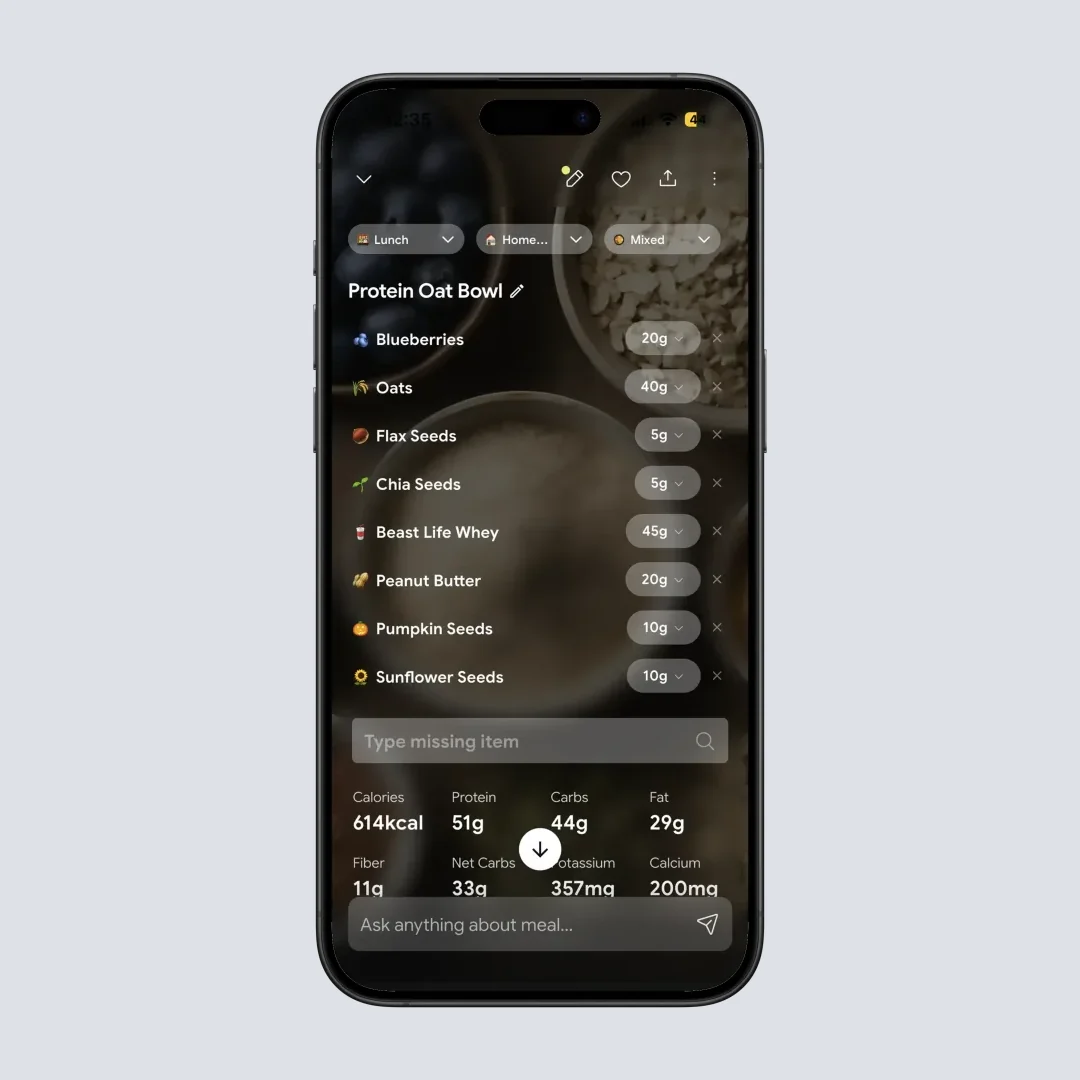
Nutrition Details (Home > Meal Item): carbs and fiber on the same screen, which is what net carb counting needs. Learn how the score works in the NutriScore guide.
You get 5 free photo scans a week, which is enough to test the scanner on the plates that break a database, your curry, your restaurant dinner, your mixed bowl. Premium is about $59 a year and there is a 7-day trial, which starts through your app store, so whether a card is collected depends on your platform and region. The practical setup I suggest is pairing NutriScan for meals without labels with a glucose logbook such as mySugr, or using it alongside whichever diabetes app your clinic prefers. Curious how it compares with other photo tools? See our comparison of photo scanning apps like NutriScan.
For a fuller walkthrough of how the scan handles carbs, sugar, and fiber on a diabetes plate, see the NutriScan diabetes diet app page.
Pick NutriScan if: your carb counting falls apart on home-cooked or restaurant meals.
Skip it if: you want glucose and insulin logging inside the same app.
How to Set Up Carb Tracking for Diabetes in 5 Steps 🎯
A tracking setup you improvised is a setup you abandon. Here is the order that holds up.
- Ask your care team which method you should count: total carbs, net carbs, or grams per meal for a ratio. This decision belongs to your clinician, and it decides which app features matter.
- Pick the app that fixes your weakest job. Use the three-job test: counting method, glucose patterns, logging speed. Choose for the job you currently fail, not the prettiest screenshots.
- Set your carb target or ratio in the app in grams. Percentages drift every time your calories change. A gram number stays put.
- Log every meal for 14 days, including glucose readings if you test. Two weeks is enough to see your first patterns and to find out whether the app is fast enough to keep.
- Review the log, keep what worked, fix what did not. If you skipped meals because logging was slow, change tools, not goals. If the numbers looked right but glucose surprised you, bring that log to your next appointment.
Skip the math on step 3
Our free diabetes macro calculator turns your body profile and goal into a daily carb number in grams that you can type straight into any app. For a week of meals already built around steady carbs, see our 7-day diet plan for diabetic patients.
7 Tips That Make Carb Tracking Work With Diabetes 💡
Knowing your method is not the same as counting well. These habits close the gap.
- Match the app's counting method to your care plan on day one. If your educator taught total carbs, do not let an app quietly show you net carbs. In MyNetDiary this is a settings toggle (MyNetDiary).
- Log before you eat, not after. For insulin users the count has to come before the dose. For everyone else, pre-logging catches a high-carb meal while you can still change it.
- Weigh your five most common carb foods once. Rice, bread, flatbread, pasta, potatoes. One week with a kitchen scale calibrates your eye for years of estimates.
- Confirm portions in photo apps instead of accepting the first guess. Users underestimate medium and large portions unless prompted (O'Hara et al., 2025). The extra tap is the accuracy.
- Save your repeat meals. Most people rotate 10 to 15 meals. Once each is saved with a verified carb count, logging drops under ten seconds and the habit survives busy weeks.
- Note the glucose reading next to any unusual meal. A reading two hours after a new dish teaches you more about that dish than any database entry. A visual review of your week, like NutriScan's insights view, makes those pairings easier to spot.
- Review one week per month, on your own or with your care team. Patterns, not single days, are where carb data pays off. Telemedicine-delivered carb counting support has shown measurable benefits in type 1 diabetes (Li et al., 2025), and your logged data is what makes those conversations concrete.

A live daily readout, like NutriScan's home screen, keeps your carb total in view all day instead of arriving as a surprise at bedtime. Stocking the right staples helps too: see our diabetic grocery list for stable blood sugar.

What the Research Actually Says About Apps and Carb Counting 🔬
The evidence for carb counting itself is method-dependent. Across 22 trials, carb counting improved HbA1c in type 1 diabetes, with the strongest effect of 0.47 percentage points from advanced counting in adults, while basic counting did not show significant benefit in adults with type 2 diabetes (Sakane et al., 2025). In plain terms: precision pays, and casual counting pays less.
The evidence for app support is positive but honest about limits. Apps significantly reduced HbA1c in older adults with diabetes across 7 randomized trials (Azevedo et al., 2025), and remote carb-counting education delivered through technology helps in type 1 diabetes (Li et al., 2025). But effects fade when people stop using the tools, which happens often after about six months (Pujia et al., 2025). The app you will still open in month seven beats the app with the longest feature list.
For the newest tool in the box, photo recognition, the picture is promising with a caveat: image-based apps for diabetes still depend on user input for portion size (Rouhafzay et al., 2025). Treat any photo estimate as a draft you confirm, not a verdict you accept.
 One honest photo plus one confirmed portion beats a skipped entry, and a skipped entry is the most common carb counting error of all.
IMPORTANT
Checkpoint: final stretch before the reveal.
One last nudge - the reveal is next.
⏱️ Progress 3/4 • ~7 minutes in • Keep going
✅ Step 1: The 3 jobs a diabetes carb app must do
✅ Step 2: The diabetes-first picks
✅ Step 3: Accuracy, speed, and the meals with no label
✨ The 20-gram carb error that breaks insulin math (about to reveal)
The 20-Gram Carb Error That Breaks Insulin Math 🔎
You have been patient, so here is the error I see most often, and it is not the one people worry about.
Almost nobody miscounts a barcode. Packaged food has a label, the label has grams, and every app in this comparison reads it correctly. The error lives in the meals with no label, and it is bigger than it looks. A cup of cooked white rice carries roughly 45 grams of carbohydrate. Serve it under a curry, and the eye that says "about half a cup" is often looking at closer to one cup. That single guess is a swing of about 20 grams.
Now put that swing through an insulin-to-carb ratio. At 1:10, twenty grams is two units. At 1:5, it is four. A 2025 trial of photo recognition found that users systematically underestimate medium and large portions unless the app prompts them to confirm (O'Hara et al., 2025), and reviews of image-based diabetes apps confirm that volume estimation still leans on user input (Rouhafzay et al., 2025). The gap is not the camera. The gap is the unconfirmed portion.
So the fix is not one perfect app. It is a pairing plus one habit:
- A logbook for glucose, doses, and medication. mySugr free, or MyNetDiary if you want carbs and glucose in a single app.
- A tool for the meals a database cannot describe. A photo scan that asks about portion, cooking method, and oil, then hands you a gram number you confirmed rather than one you guessed.
- One counting method, everywhere. Total or net, chosen with your care team, used in every entry with no exceptions.
Barcode the packaged food ➡️ photograph the plate no database can describe ➡️ confirm the portion before you accept the number ➡️ write the glucose reading next to anything new. That sequence closes the 20-gram gap, and closing it is worth more than any feature list, because it is the one error that reaches your dose.
If you dose insulin, agree that workflow with your diabetes educator before you rely on it.
The Verdict: Pick by Your Weakest Job 🤔
If I had to hand one app to most people tracking carbs with diabetes, it would be MyNetDiary Diabetes Tracker, because it is the only one that does all three jobs in one place: your counting method, your glucose and insulin, and quick logging.
But the better answer is to pick by your weakest job:
- Glucose habit weak: mySugr, free.
- Gram accuracy critical because insulin depends on it: Cronometer.
- Packaged-food speed: MyFitnessPal, with verified entries only.
- Cooked and mixed meals where the carbs hide: NutriScan, paired with whichever logbook your clinic likes.
Three real situations make the choice concrete.
Ravi, type 2 diabetes, no insulin, eats home-cooked meals. His problem is not ratios, it is knowing what is in an unlabeled plate and seeing which dinners drive his morning readings. A photo-first logger plus a simple glucose log covers him: NutriScan with mySugr, or MyNetDiary alone if he prefers one app.
Priya, type 1 diabetes, insulin-to-carb ratio of 1:10. Her carb number decides a dose, so entry accuracy is the whole game. Cronometer's verified database or MyNetDiary's curated one beats a crowd-sourced entry that might be 20 grams off. Her ratio and any dosing change stay between her and her endocrinologist.
Tom, 67, type 2 diabetes on a fixed medication schedule. He mainly needs consistency and patterns his doctor can read. MyNetDiary's reports and reminders fit, and the evidence for app-based support in older adults is encouraging: significantly lower HbA1c across 7 trials (Azevedo et al., 2025).
If you also track protein alongside carbs, our guide to the best app for tracking protein uses the same three-job test. And if you are weighing a CGM-plus-coaching bundle instead, we broke down one option in our review of the HealthifyMe CGM plan.
Track Your Carbs With Confidence ✅
IMPORTANT
Recap: everything you completed this round.
You finished the run - save this for next time.
⏱️ Progress 4/4 • ~9 minutes in • Nicely done
✅ Step 1: The 3 jobs a diabetes carb app must do
✅ Step 2: The diabetes-first picks
✅ Step 3: Accuracy, speed, and the meals with no label
✅ The 20-gram carb error: pair a logbook with a photo tool and confirm every portion (revealed)
Carb counting with diabetes is a measurement problem before it is a diet problem. Agree your counting method with your care team, set the target in grams, log every meal fast enough that you never skip one, and put the glucose reading next to anything new. The evidence says precision is where the benefit lives, with advanced carb counting reaching 0.47 HbA1c points in adults with type 1 diabetes (Sakane et al., 2025). Pick the app that fixes your weakest job, then bring the log to your next appointment, because carb data changes outcomes when it changes decisions.
For the meals a barcode cannot read, from a rice-and-curry plate to a restaurant dinner, try NutriScan's photo scan free with 5 scans a week and see whether the portion prompts fix the number that matters most.
Frequently Asked Questions ❓
Should I count total carbs or net carbs for diabetes?
Ask your care team, because the answer depends on your treatment plan and how your educator taught you to dose or plan meals. Total carbs counts every gram of carbohydrate; net carbs subtracts fiber. What matters most is consistency: use one method everywhere, and pick an app that supports your method directly, like MyNetDiary's total or net carb setting (MyNetDiary).
What is the best free app for counting carbs with diabetes?
mySugr offers the strongest free diabetes logbook, with glucose, carbs, insulin, and medication logging (mySugr, Google Play). Cronometer's free tier is the better pick for accurate gram counts, since you can set a fixed carbohydrate target without paying. MyNetDiary and NutriScan both have usable free tiers with paid upgrades.
Do carb counting apps actually improve blood sugar?
The method they support does. Carbohydrate counting lowered HbA1c in type 1 diabetes across 16 trials, with the largest effect from advanced counting in adults (Sakane et al., 2025). App-based support also reduced HbA1c in older adults with diabetes across 7 randomized trials (Azevedo et al., 2025). The benefit depends on consistent use.
Can a photo scanning app count carbs accurately enough for insulin dosing?
Not on its own, and no honest app claims otherwise. Reviews of image-based dietary apps for diabetes show portion estimation still relies on user input (Rouhafzay et al., 2025). Use photo estimates as a starting point, confirm the portion, and make all insulin dosing decisions with your care team's guidance.
Which carb tracking app logs blood glucose in the same place as food?
MyNetDiary Diabetes Tracker and mySugr both log blood glucose next to meals, and both also record insulin and medication. Cronometer imports Dexcom CGM data alongside food logs. MyFitnessPal and NutriScan do not log glucose, so pairing one of them with a diabetes logbook is the practical setup.
Why are carbs in home-cooked and restaurant meals so hard to count?
Because the carbohydrate is already mixed into the dish and no barcode or clean database entry describes your exact plate. You cannot weigh rice that is already under a curry. A photo tool that asks you to confirm portion size, cooking method, and added oil turns that guess into a usable gram number, which matters most when an insulin-to-carb ratio depends on it.
Do these apps replace a dietitian or diabetes educator?
No. Apps handle the daily counting and the pattern spotting; your care team handles targets, ratios, medication, and method. Remote and telemedicine carb-counting education has shown real benefits in type 1 diabetes (Li et al., 2025), which argues for combining professional guidance with a good app rather than choosing between them.