Best Cronometer Alternatives 2026: 7 Apps for Micronutrients
 ChatGPT
  Claude
  AI Mode
  Perplexity
 Cronometer's free plan shows ads, stops at 84 nutrients and caps reports at 7 days, and Photo Log, Voice Log, the fasting timer and Crono Coach all need Gold at $59.99 a year. NutriScan matches that price and gives 5 AI photo scans a week free, with all micronutrients and a free fasting timer on the free plan. MyNetDiary Premium is also $59.99 and MacroFactor runs $71.99 with no permanent free tier.
Last verified: August 23, 2026
| App | Annual price | Photo logging on the free plan |
|---|---|---|
| Cronometer | $59.99 (Gold) | No, Photo Log needs Gold |
| NutriScan | about $59/yr | Yes, 5 scans a week |
| MyNetDiary | $59.99 | No, Premium |
| MacroFactor | $71.99 | No free tier, 7-day trial |
TL;DR - Best Cronometer Alternatives 2026
• Why people leave: Cronometer's free plan shows ads, tracks 84 nutrients, and caps reports at 7 days. Photo Log, Voice Log, the fasting timer, and Crono Coach all sit behind Gold at $59.99/yr.
• Best free micronutrients: MyNetDiary tracks 108 nutrients with no ads.
• Best free photo logging: NutriScan gives 5 AI photo scans per week with an oil-level prompt for mixed dishes.
• Best adaptive coaching: MacroFactor recalculates your targets from your weekly weight trend.
• How to choose: Name your one biggest complaint, then match it to the app that fixes exactly that.
What a tracker changes about your eating is smaller than the feature list suggests. A 2025 systematic review and meta-analysis by Curtin et al. in the International Journal of Behavioral Nutrition and Physical Activity found that app-based dietary interventions raised fruit and vegetable intake by 0.48 portions a day and cut meat intake by 0.10 portions a day (Curtin et al., 2025). Modest numbers, and they only accrue for as long as you keep opening the app. As a NutriScan nutritionist, I have tested dozens of trackers and that is the pattern I see. Cronometer's 95-nutrient depth is real and well-earned, but that detail becomes irrelevant the moment the app gets in your way.
Cronometer is one of the most nutrient-detailed apps available. It pulls from over 10 sources, eight of them lab-analyzed food composition databases: NCCDB, its own Cronometer Food Composition Database (CFCD), USDA SR28, CNF 2015, IFCDB, NEVO, CoFID, and NUTTAB, plus the branded-food feeds Nutritionix and FDC UPC (Cronometer data sources). Between them they cover vitamins, minerals, amino acids, and fatty acids in more depth than nearly every competitor. With 15 million users and a dedicated micronutrient community, it is a serious tool for serious trackers.
Three issues push users toward alternatives: the free plan shows ads, stops at 84 nutrients, and caps reports at 7 days; every convenience feature, Photo Log, Voice Log, the fasting timer, and Crono Coach, needs Gold; and Gold costs $59.99 per year (Cronometer Gold). If any of those gaps affect you, one of these seven alternatives covers it directly.
Prices below are standard US prices as of mid 2026 and change by region.
IMPORTANT
Your Cronometer switch plan at a glance.
A quick roadmap so you can decide fast, not scroll forever.
⏱️ Progress 0/4 • ~0 minutes in • Keep going
⏳ Step 1: Understand why people leave Cronometer
⏳ Step 2: Compare the 7 alternatives side by side
⏳ Step 3: Match your one biggest complaint to an app
🔍 The free app that gives away Cronometer's biggest paywalled feature (revealed near the end)
Why People Leave Cronometer
The Free Plan Has Ads and Fewer Nutrients Than Expected
Cronometer Basic tracks macros and up to 84 nutrients for free, includes the barcode scanner, but displays ads and restricts reports to a 7-day rolling window (Cronometer Gold). The jump to 95 nutrients, plus Oracle Nutrient Search, custom biometrics tracking, and any trend graph beyond one week, all require Gold.
MyNetDiary states its own count: up to 108 nutrients per entry on a staff-verified database of over 2 million foods (MyNetDiary on the App Store), and its free-app comparison table puts 108 in the free column (MyNetDiary). Cronometer Basic gives you 84 with ads, and even Gold tops out at 95. Both apps use the same USDA and NCC research-grade databases. The common assumption that Cronometer offers the deepest free micronutrient tracking does not hold in 2026, MyNetDiary has quietly closed that gap on the free tier. One caveat before you switch on that number alone: MyNetDiary lists detailed micronutrient analysis among its Premium features, so check that the readouts you care about are in the free view.
Everything Convenient Sits Behind Gold at $59.99 Per Year
Cronometer Gold at $4.99 per month, billed annually at $59.99, adds Oracle Nutrient Search, custom biometrics, reporting past the 7-day window, and ad-free browsing (Cronometer Gold). It sits in the same price range as MyNetDiary Premium ($59.99/yr). NutriScan Premium is about $59 a year.
Gold also holds the four features most people actually want day to day: Photo Log, Voice Log, the fasting timer, and Crono Coach, Cronometer's AI coaching layer. On Basic you are back to typing food names into a search bar. So the question is not whether Cronometer can do photo logging, it is whether you want to pay $59.99 a year to get it. MyNetDiary gives you 108 nutrients free, and NutriScan gives you 5 AI photo scans a week free.
Photo Logging Costs $59.99 a Year
Cronometer's free plan is manual text entry and barcode scanning. Photo Log and Voice Log both launched behind Gold, so a Basic user who eats restaurant plates, mixed home-cooked dishes, Indian curries, or any meal that is hard to describe in a search bar gets no shortcut without paying.
Every other app here logs from a photo too, including MyNetDiary Meal Scan, MacroFactor, and FatSecret's Smart Food Scan, so the difference is what it costs rather than whether it exists. NutriScan covers 5 meals a week free, with an oil level slider and cooking method selection inside the meal scan flow - inputs that matter for any dish where oil absorption changes the calorie count.
 Photo logging turns a two-minute search into a one-second snap. Cronometer charges $59.99 a year for it.
IMPORTANT
Checkpoint: you know the "why," now meet the "who."
Quick status so you always know the next best move.
⏱️ Progress 1/4 • ~1 minute in • Keep going
✅ Step 1: Why people leave Cronometer (done)
👉 Step 2: Compare the 7 alternatives (you're here)
⏳ Step 3: Match your complaint to an app
🧩 The free gap-fixer app (coming soon)
7 Best Cronometer Alternatives in 2026
1. MyNetDiary - Best Free Alternative for Micronutrients
Best for: Users who want 100+ nutrient tracking without ads or a Gold subscription
MyNetDiary tracks 108 nutrients on its free plan with no ads. This makes it the clearest free upgrade from Cronometer Basic for anyone focused on vitamins, minerals, and health markers. You get more nutrients tracked for free, without the Cronometer Basic ad experience. It also ships photo logging, branded Meal Scan, alongside AI voice logging (MyNetDiary AI food scanner), so leaving Cronometer for MyNetDiary does not mean giving up the camera.
Both apps use the same USDA and NCC (Nutrient Coordinating Center) research-grade databases, so food data reliability is comparable on verified entries (MyNetDiary on the App Store, Cronometer data sources). MyNetDiary's database is also larger by staff-verified branded foods, over 2 million entries against Cronometer's "over 1M lab-analyzed or verified foods". Abeltino et al., writing in Nutrition Reviews, surveyed the current crop of diet-monitoring and precision-nutrition tools and mapped where they help and where they fall short (Abeltino et al., 2025). It does not rank micronutrient apps against calorie-only ones, and the choice between Cronometer and MyNetDiary is not whether micronutrients matter, it is which free tier gives you more of them.
MyNetDiary Premium at $59.99 per year adds the Diabetes Tracker: blood glucose, insulin and medication logging, net carbs, custom trackers, cholesterol entries, and diabetes-specific charts and reports (MyNetDiary diabetes tracking). Above it sits Premium Plus, roughly $6 a month more, which adds an AI Coach, AI meal suggestions, an AI restaurant menu scan and AI voice logging (MyNetDiary Premium). There is also a one-time Lifetime option at $179.99 (MyNetDiary pricing comparison). The App Store also runs $39.99 and $29.99 annual SKUs alongside the $59.99 one, so what you pay depends on the offer you land on (App Store listing).
Ratings: 161K App Store ratings (4.8/5), 32 million users (App Store, checked 7 August 2026). Forbes Health 4.0/5.
When to pick this: If you are leaving Cronometer specifically because Gold costs money and the free tier has ads, MyNetDiary gives you more nutrients for free. If you need diabetes-specific tracking, the Premium tier adds it at roughly the same annual cost.
2. MacroFactor - Best for Adaptive Macro Coaching
Best for: People who want their calorie and macro targets to adjust based on weekly results, not just database entries
MacroFactor is a paid-only app - no free tier after the 7-day trial. At $71.99 per year it sits near the top of this comparison, under Lose It and MyFitnessPal at $79.99, but it does something Cronometer does not: it estimates your actual energy expenditure from your weight trend and updates your targets each week.
If you lost weight as expected last week, it holds your targets. If you ate at the same level and did not lose weight, it recalculates. This adaptive engine removes the guesswork from "why is my plan not working" - the app tells you, numerically, whether your intake matches your goal and adjusts accordingly. If you like this style of number-driven planning, our online macro calculator gives you a free starting point before you commit to a paid app.
Morello et al., writing in the Journal of Human Nutrition and Dietetics in 2025, found that MyFitnessPal showed poor validity for six measures in Canadian endurance athletes: total energy, carbohydrates, protein, cholesterol, sugar, and fiber. Cronometer, tested in the same study, showed good reliability and validity (Morello et al., 2025). MacroFactor addresses the database problem differently: rather than trusting that entries are always correct, it calibrates targets from your body's actual response over time. Logging errors that persist consistently still get corrected in the weekly update.
On micronutrients, MacroFactor does track them, alongside macros (App Store listing). The depth does not reach Cronometer's 84-to-95 range, and a review Apple carries on MacroFactor's own listing puts it plainly: Cronometer's food database is more detailed. MacroFactor is the alternative when your goal shifts from "understand what I eat" to "know whether my targets are producing results."
MacroFactor also has AI photo logging, shipped in April 2025 with Photo and Text modes and extended in mid 2026 with AI custom food creation and label scanning, per its App Store version history.
Pricing: $11.99/mo, $47.99/6mo, $71.99/yr (App Store listing). The listing also carries $9.99 monthly and $59.99 annual SKUs, so check the price in-app before you commit. 7-day free trial, no free tier after. 60-day refund via support email.
Ratings: 20K App Store ratings (4.8/5) (App Store, checked 7 August 2026). Endorsed by Andrew Huberman and Peter Attia.
When to pick this: If you tracked nutrients in Cronometer and now want a tool that actively moves your targets toward your goal each week, MacroFactor is the clearest path.
3. Lose It - Most Input Methods, But No Longer Cheap
Best for: Users who want photo, voice, and barcode entry in one app and do not mind paying top-of-range for it
Lose It Premium now costs $79.99 per year (Lose It membership tiers and pricing). That is $20 more than Cronometer Gold, not $20 less, and it puts Lose It level with MyFitnessPal at the top of this list. There is no monthly Premium plan. What you get is Snap It (photo logging), Say It (voice logging by speaking meal descriptions aloud), and full barcode scanning. The free tier covers calorie and macro tracking with a basic food search.
Nutrient depth is not Lose It's strength. It tracks macros, calories, fiber, and some micronutrients, but not at the 84-108 nutrient level of Cronometer or MyNetDiary. What it sells is method variety, and at $79.99 that is the whole pitch. If price is what pushed you off Cronometer Gold, Lose It is now the wrong direction. YAZIO at $47.90 and NutriScan's free 5 scans a week both cost less and both do photo logging.
Lose It has 50M+ downloads, and holds 4.6 stars from 181K reviews on Google Play (Play listing, checked 7 August 2026). Forbes Health rates it 5.0/5. Lose It says its plans are FSA/HSA eligible in many cases in the United States (membership tiers and pricing), which can pull the real cost down if you have a health savings account.
Pricing: Free (limited), $79.99/yr Premium, Lifetime at $299.99 for free accounts or $229.99 if you are already a Premium member.
When to pick this: If you want three input methods inside one app and the annual price is not your deciding factor. If it is, look at YAZIO or NutriScan first.
4. MyFitnessPal - Best for Branded and Packaged Food Coverage
Best for: Users who eat many packaged or branded foods and need broad food search coverage
MyFitnessPal publishes "nutrition facts for over 2,000,000 foods" (MyFitnessPal Premium), which is the same order of magnitude as MyNetDiary's 2 million and behind the 50M+ Lose It claims, so the old "largest database in calorie tracking" line does not survive. What it does have is breadth on packaged foods, fast food chains, and international brands that return zero results in Cronometer. That is its main advantage over Cronometer, not raw size.
The free tier has ads and a paywalled barcode scanner. Premium at $79.99 per year adds barcode scan and meal scan, voice and multi-day logging, custom macros and goals, an intermittent fasting tracker, and downloadable progress reports. Premium+ at $99.99 per year adds the Meal Planner, automated grocery lists, time and budget-friendly options, and grocery app delivery syncing (MyFitnessPal Premium).
On micronutrient depth, MyFitnessPal tracks macros and about 25 common nutrients (sodium, cholesterol, potassium, vitamin A, vitamin C, calcium, iron). Evenepoel et al., in a 2020 JMIR validation study, found MyFitnessPal accurate for total energy, macronutrients, sugar, and fiber, but not for cholesterol and sodium (JMIR 2020 e18237). It is not a replacement for Cronometer's nutrient detail. It is the option when the core problem is not finding your foods.
Pricing: Free (limited), $79.99/yr Premium, $99.99/yr Premium+.
When to pick this: If you left Cronometer because it did not have your packaged foods or restaurant items, MyFitnessPal's database breadth solves that problem.
IMPORTANT
Checkpoint: midway progress update.
You're halfway - the free tiers get interesting from here.
⏱️ Progress 2/4 • ~2 minutes in • Keep going
✅ Step 1: Why people leave Cronometer (done)
✅ Step 2a: The four paid-first alternatives (done)
👉 Step 2b: The strong free-tier options (current)
⏳ The free gap-fixer app (next)
5. FatSecret - Best Completely Free Plan
Best for: Users who want a capable free tracker with barcode scanning and a built-in community at no cost
FatSecret keeps its barcode scanner in the free plan (FatSecret Premium comparison). This distinguishes it from both Cronometer Basic (barcode included but community-sourced data) and MyFitnessPal (scanner paywalled). The free tier is macro tracking, a calorie diary, food search, the barcode scanner, a supportive community, achievements and streaks, reports, and a limited weekly review. Recipe logging and custom meals are Premium, so the free plan is thinner than a "recipe builder included" reading suggests.
FatSecret publishes no list price. It says pricing varies by region and currency and tells you to check the Premium page inside the app (FatSecret Premium). On the US App Store today, annual SKUs run $38.99 to $59.99 concurrently, with quarterly at $19.99 to $28.99 and monthly at $10.49 to $14.99 (App Store listing, checked 7 August 2026). Premium adds Smart Assistant voice logging, Smart Food Scan photo logging, a Meal Planner, dietitian-designed meal plans, the Learning Center, 1-tap recipe logging, custom meals, and copy food. Ad-free is not one of them; FatSecret markets no ad-free tier either way.
The app has 50M+ downloads and 544K Google Play reviews at 4.6 stars (Play listing, checked 7 August 2026), strong retention for a free-first product. Nutrient depth covers macros, fiber, sugar, sodium, and key vitamins and minerals for verified entries. It does not match Cronometer's 84-nutrient free baseline, but it covers the nutrients most users check daily without any subscription pressure.
When to pick this: If your tracking budget is zero and you need a reliable barcode scanner with no upgrade required, FatSecret's free plan is the strongest option in this comparison.
6. YAZIO - Best for Fasting Plus Calorie Tracking
Best for: Users who want calorie tracking combined with intermittent fasting at a price below Cronometer Gold
YAZIO PRO at $47.90 per year is roughly $12 less than Cronometer Gold and bundles a calorie tracker with a fasting timer. Cronometer added a fasting timer too, but only on Gold, so if fasting is the reason you would upgrade, YAZIO gets you the same pairing for less.
The app tracks macros, calories, and fiber, along with about 40 key nutrients. Micronutrient depth is less than Cronometer's 84-nutrient free baseline. YAZIO adds features Cronometer keeps behind Gold: fasting window tracking with guidance on ketosis, autophagy and energy use, plus 2,900+ goal-friendly recipes with low-carb, vegetarian and vegan filters (App Store listing), diet plans (keto, Mediterranean, low-carb, high-protein), and AI calorie logging, which the app is now named and marketed around.
Forbes Health rates YAZIO 4.1/5. The free plan keeps calorie tracking, meal browsing, and the barcode scanner, which YAZIO lists twice in the free base feature set (App Store listing). That is one gate MyFitnessPal has and YAZIO does not.
Pricing: $47.90/yr standard, as low as $23.90/yr on promotional pricing. No monthly subscription in most markets.
Ratings: 50K App Store ratings (4.7/5) (App Store, checked 7 August 2026). 4M+ food database. Available in 20 languages.
When to pick this: If you want calorie tracking combined with intermittent fasting at a price below Cronometer Gold, YAZIO is the cleaner option.
IMPORTANT
Checkpoint: final stretch before the reveal.
One last nudge - the app that gives away Cronometer's paywalled feature is next.
⏱️ Progress 3/4 • ~3 minutes in • Keep going
✅ Step 1: Why people leave Cronometer
✅ Step 2: Six alternatives compared
✅ Step 2b: The strong free-tier options
✨ The free gap-fixer app (about to reveal)
7. NutriScan - Best Free Photo Logging
Best for: Users who want AI photo scanning, mixed dish accuracy, and an oil-level prompt for home-cooked meals
Here is the app that gives away what Cronometer keeps behind Gold: NutriScan offers 5 AI photo scans per week on its free plan, no subscription needed. Five a week does not cover every meal. It covers the meals worth photographing, the curry, the restaurant plate, the bowl you cannot describe in a search bar. The photo scan includes an oil level slider (no oil, low oil, medium oil, high oil) and 11 cooking method options. These inputs are designed specifically for home-cooked curries, stir-fries, and mixed dishes where oil content changes calorie estimates by 100 to 300 calories per serving. Cooking oil runs about 120 kcal a tablespoon (USDA FoodData Central, record 171413), so one to two and a half unrecorded tablespoons covers that whole range.

NutriScan photo scan flow: Home > Camera Icon > Crop Picture, then set oil level and cooking method.
Cronometer's Photo Log needs Gold, and it has no oil or cooking method prompt. For any user whose meals are photo-first rather than text-entry-first, and who does not want to pay $59.99 before finding out whether photo logging works on their food, NutriScan is the cheaper test.
Photo estimation is not a solved problem for anyone. When researchers put 114 meal photographs from Ireland's National Adult Nutrition Survey through ChatGPT-4, meal weight came back with a mean absolute percentage difference of 27.8% and the model underestimated 11 of 16 nutrients, with the misses concentrated in medium and large portions (O'Hara et al. 2025, Nutrients, PMC11858203). Portion size is where photo logging breaks. The oil prompt and cooking method selection in NutriScan's scan flow exist to put that information back in by hand instead of guessing it from a picture. Every scanned meal also gets a NutriScore health grade so you see quality, not just calories.
NutriScan Premium at about $59 a year adds unlimited photo scans, unlimited Monika voice calls, a 28-day personalized diet plan, weekly meal-plan suggestions, a goal-based grocery list, and deeper progress insights. The fasting timer, micronutrients, and NutriBites AI stay on the free plan. NutriBites is the meal Q&A that explains what is high in your logged meal and suggests what to eat next based on your actual food timeline.
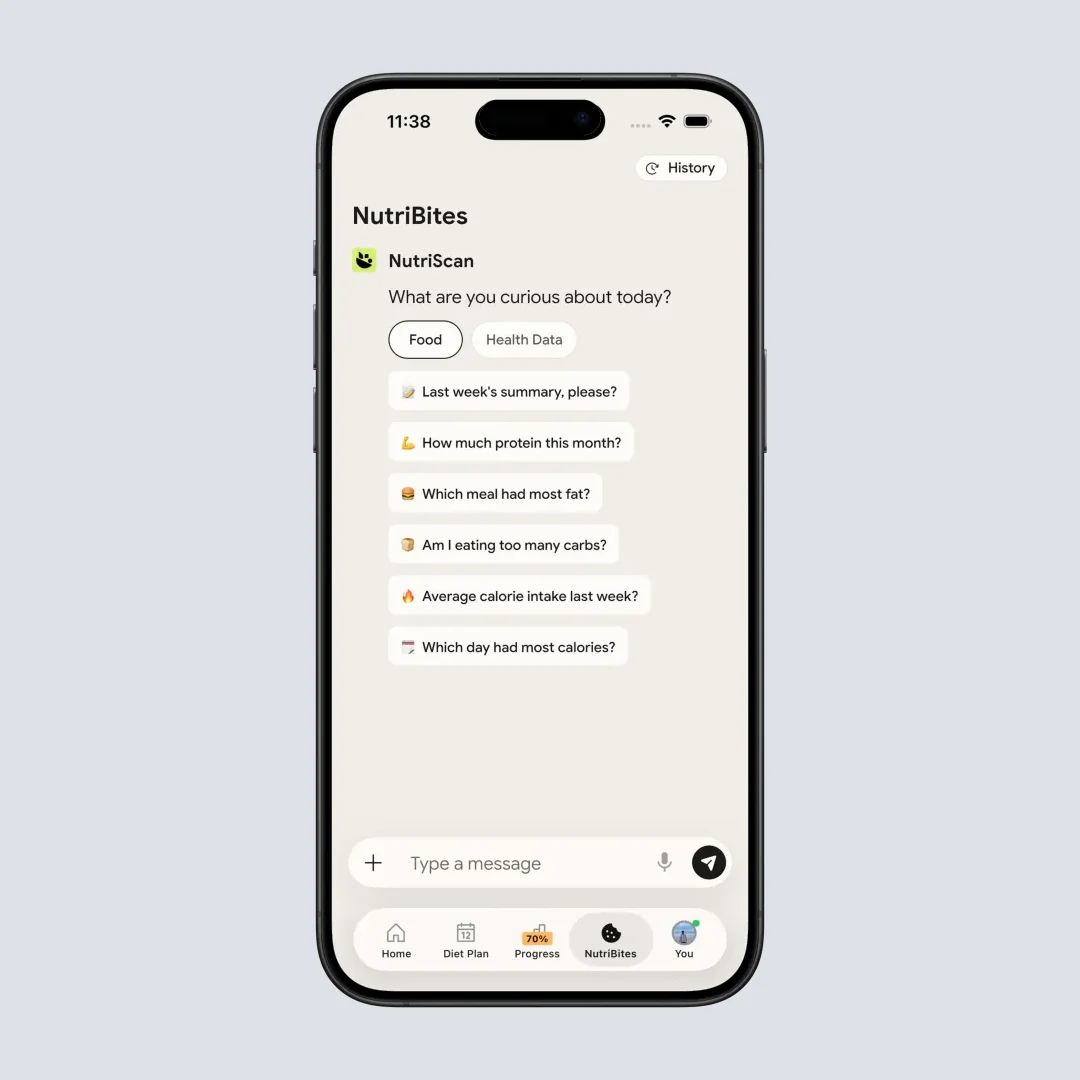
NutriBites reads your food timeline and tells you what to eat next. Cronometer's equivalent, Crono Coach, is Gold only.
Pricing: Free (5 photo scans/week), Premium about $59 a year. The 7-day trial starts through your app store; whether a card is collected depends on your platform and region.
Ratings: 439 App Store ratings (4.6/5) (App Store, checked 7 August 2026), 50K+ downloads.
Refer and Earn: 1 referral = 1 week Premium. 5 referrals = 1 month. 10 referrals = 3 months free.
When to pick this: If you used Cronometer to understand what you eat but your meals are mostly home-cooked, mixed, or difficult to describe by name in a text search, NutriScan's photo logging plus NutriBites guidance covers the practical problem Cronometer leaves unsolved.

Side-by-Side Comparison
| App | Free nutrient depth | Best for | Annual price | Photo logging |
|---|---|---|---|---|
| Cronometer (baseline) | 84 nutrients (with ads) | Micronutrient detail, lab databases | $59.99/yr Gold (95 nutrients) | Gold only (Photo Log) |
| MyNetDiary | 108 nutrients (no ads) | Diabetes tracker + micronutrients | $59.99/yr | Yes (Meal Scan) |
| MacroFactor | No free tier | Adaptive weekly coaching | $71.99/yr | Yes |
| Lose It | Macros + key nutrients | Photo + voice + barcode in one app | $79.99/yr | Yes (Snap It) |
| MyFitnessPal | Macros + ~25 nutrients | Branded and packaged foods | $79.99/yr | Yes |
| FatSecret | Macros + key nutrients | Best free scanner, community | ~$39-60/yr, no list price | Yes (Premium, Smart Food Scan) |
| YAZIO | Macros + ~40 nutrients | Fasting + calorie tracking | $47.90/yr | Yes (AI scan) |
| NutriScan | Macros + micronutrients + NutriScore | Photo scan, mixed dishes | about $59/yr | Yes (5/wk free) |
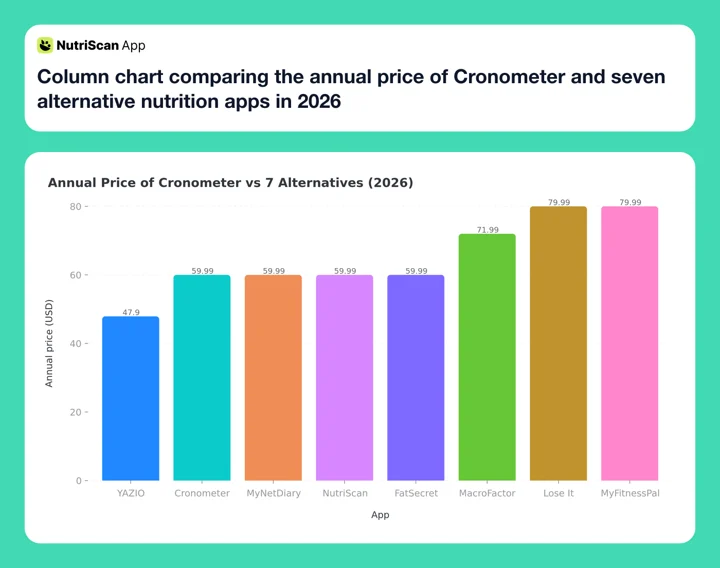 Figure 1: Annual price by app. YAZIO ($47.90) is the cheapest paid tier. Lose It and MyFitnessPal are tied at the top at $79.99 after Lose It's 2026 price rise, with MacroFactor at $71.99 just below them, while Cronometer and MyNetDiary sit at $59.99. NutriScan Premium is about $59. FatSecret publishes no list price, so its bar plots the highest live annual SKU, $59.99; the lowest is $38.99. Prices are standard US prices as of mid 2026 and change by region.
How to Pick the Right Alternative
 Eight apps is noise. One complaint is a filter - start there.
Step 1: Name your primary complaint about Cronometer. The most common reasons are ads on the free plan, the 7-day report cap, and paying $59.99 for Gold just to get photo logging. Your specific complaint points directly to the right alternative.
- Ads + limited free tier - MyNetDiary (108 nutrients, no ads, free)
- Photo logging without paying for Gold - NutriScan (free 5/wk) or YAZIO ($47.90/yr)
- Want macro coaching - MacroFactor
- Cannot find your foods - MyFitnessPal
- Budget is zero - FatSecret
- Want fasting + calories together - YAZIO
Step 2: Check whether you actually need the paid tier. MyNetDiary, FatSecret, and NutriScan have meaningful free tiers. MacroFactor is paid-only after the trial. Lose It and MyFitnessPal both restrict barcode scanning on their free plans. If your budget is the reason you are leaving Cronometer Gold, check which apps give you what you need before committing to another paid plan.
Step 3: Export your Cronometer data first. Cronometer allows CSV exports from the web app under Settings > Export Data. Download your diary before switching. The file shows your daily nutrient totals across your full logging history - useful for setting targets in your new app based on what you have actually been eating.
Step 4: Run both apps for one week before committing. Most alternatives have free tiers or trials. Log the same meals in both for seven days to compare search accuracy for your typical foods before canceling Gold.
Step 5: Consider keeping Cronometer as a periodic check. If you manage a diagnosed nutrient deficiency or follow a therapeutic diet under medical guidance (iron deficiency anemia, B12 insufficiency, vitamin D management), Cronometer's 95-nutrient Gold depth is still the most thorough available. Switching your daily logging to a faster app does not mean deleting Cronometer - you can run a monthly nutrient audit there while logging daily in whichever alternative fits better. On Basic that audit covers 84 nutrients, which is enough for most deficiency checks.
Tips for Switching From Cronometer 💡
Export your food diary before you cancel Gold. Cronometer web (cronometer.com > Settings > Account > Export Data) provides a full CSV of your daily nutrient summaries. This is your baseline for understanding what you have actually been eating and what to target in your new app.
Rebuild only your top 10 meals first. You do not need to recreate every food in your Cronometer diary. Start with the 10 meals you log most often. Add more foods as they come up naturally. Trying to import everything at once is the main reason people abandon a new tracker in the first week.
Run a one-week parallel test before committing. Log in both Cronometer and your new app for seven days. Compare the nutrient outputs for the same meals. This tells you whether the alternative's database accuracy is close enough for your goals before you cancel.
Match nutrient depth to your actual need. Most users check macros and a handful of nutrients - protein, fiber, sodium, iron, vitamin D. If that describes you, every app in this comparison covers those. The gap between 84 and 108 tracked nutrients matters most for clinical tracking (managing a deficiency, working with a dietitian) or advanced use (tracking amino acid profiles). For general healthy eating, any app in this list covers what you need.
Keep your Cronometer account on Basic after switching. You do not need to delete it. The free Basic tier is limited but it gives you a way to run a full micronutrient audit on a single day's eating if you want a detailed view once a month. Using it alongside a faster daily tracker keeps the depth available without making it the logging bottleneck.
Fastest path to a decision
Pick the single friction that annoys you most about Cronometer today, open the app that fixes exactly that, and log tomorrow's breakfast in it. One real meal tells you more than a week of comparison reading.
What the Research Says About Nutrition App Tracking 🔬
Start with what the review literature actually claims. Abeltino et al., in Nutrition Reviews, surveyed digital tools for diet monitoring, diet planning and precision nutrition and set out where they help and where they still fall short (Abeltino et al., 2025). It maps the field rather than pitting micronutrient apps against calorie-only ones, so treat "more nutrients is better" as a reasonable hypothesis, not a settled result.
The case for switching rests on whether you keep logging at all. A 2024 scoping review of health app abandonment found that a median 70% of users stop inside the first 100 days, and sorted 22 stated reasons into six categories, with poor user experience the most consistently reported (Kidman et al., JMIR 2024). Curtin et al. put a size on what sticking with it buys: 0.48 more portions of fruit and vegetables a day and 0.10 fewer portions of meat (Curtin et al., 2025). An app you open daily with minimal friction outperforms an app with deeper data that you open twice a week.
On database accuracy there is a direct head-to-head. Morello et al. 2025 had trained raters log the same food for Canadian endurance athletes in both apps: MyFitnessPal showed poor validity for total energy, carbohydrates, protein, cholesterol, sugar and fiber, and raters were inconsistent on sodium and sugar, while Cronometer showed good reliability and validity (Morello et al., 2025). Apps that build on lab-analyzed databases (Cronometer, MyNetDiary) consistently perform better for users whose goals depend on precise nutrient data. If clinical accuracy is your primary reason for using Cronometer, MyNetDiary is the alternative built on the same USDA and NCC sources. MacroFactor is not one of them; it runs its own verified database plus Open Food Facts (App Store listing).

Who Should Stay With Cronometer
Switching is not always the right call. Cronometer remains the best choice in specific situations.
You track a diagnosed nutrient deficiency. If you are managing iron deficiency anemia, vitamin D insufficiency, B12 deficiency, or zinc levels under medical guidance, Cronometer's 95-nutrient depth backed by eight lab-analyzed food composition databases is still the most thorough available, and Morello et al. rated its reliability and validity good in the one head-to-head study here (Morello et al., 2025).
You use Oracle Nutrient Search regularly. Gold's Oracle Nutrient Search lets you filter the food database by a specific nutrient to build meals around a target (for example, "show me high-magnesium foods"). No alternative in this comparison offers the same filtered nutrient-based food search. If you rely on this feature for meal planning, it does not exist elsewhere.
You track amino acids or fatty acid profiles. Cronometer breaks down protein into individual amino acids and fat into fatty acid subtypes for many foods. This depth matters for users following specific therapeutic diets, endurance athlete protocols, or working with a sports dietitian. Apps focused on macros alone do not track at this level.
You are happy with the price and workflow. If Gold at $59.99/yr fits your budget, its Photo Log covers your meals, and you use the fasting timer or Crono Coach, there is no urgent reason to switch. The alternatives in this list solve specific problems Cronometer has. If those problems do not affect you, the switching cost (rebuilding meals, adjusting to a new interface, running a parallel test) may not be worth it.
Conclusion
Cronometer's micronutrient depth is genuine and unmatched for specific clinical tracking needs. If you manage a diagnosed nutrient deficiency, follow a therapeutic diet under medical guidance, or track amino acid profiles as part of a performance protocol, no alternative in this list fully replaces it.
For every other use case, the right alternative depends on your actual complaint. MyNetDiary gives you 108 nutrients with no ads on a free plan. Lose It gives you photo, voice, and barcode entry in one app, though at $79.99 per year it is now the joint most expensive plan here. MacroFactor adjusts your weekly targets based on real-world results. NutriScan gives you 5 free photo scans per week with an oil prompt that improves accuracy on mixed dishes. FatSecret keeps the barcode scanner free.
IMPORTANT
Recap: everything you worked through this round.
You finished the run - save this for next time.
⏱️ Progress 4/4 • ~4 minutes in • Nicely done
✅ Step 1: Why people leave Cronometer
✅ Step 2: All 7 alternatives compared
✅ Step 3: Match your complaint to an app
✅ The free gap-fixer app revealed: NutriScan photo logging
Pick the app that removes the friction Cronometer creates, run it for one week alongside your current setup, and switch based on what you find. The best tracker is the one you actually use.
Track your meals and spot your nutritional gaps with NutriScan - 5 free photo scans per week, no subscription needed.
Frequently Asked Questions ❓
Q: Is any app better than Cronometer for micronutrient tracking?
A: MyNetDiary's free plan tracks 108 nutrients with no ads, a count MyNetDiary publishes itself on both its App Store listing and its free-app comparison page. Cronometer Basic tracks 84 with ads, and Gold only lifts that to 95. Both apps use the same USDA and NCC research-grade databases, so accuracy on verified foods is comparable. For users who do not want to pay for Gold, MyNetDiary's free tier provides more nutrient data at no cost and without ads.
Q: What do you actually get with Cronometer Gold?
A: Cronometer Gold ($59.99/yr or $10.99/mo, source) removes ads, raises nutrient tracking from 84 to 95, and adds Photo Log, Voice Log, a fasting timer, Crono Coach, Oracle Nutrient Search (a filtered food search by specific nutrient content), custom biometrics logging (blood glucose, cholesterol, blood pressure, and others), printable PDF reports for a health professional, custom charts, and reporting past the free 7-day window. One thing it does not add: syncing with apps and devices is already on the free Basic tier. Gold is worth the price if you want photo logging inside Cronometer, use Oracle Search to build menus around a specific vitamin or mineral target, or log health markers alongside your food diary regularly.
Q: Which Cronometer alternative is best for photo logging?
A: All eight apps here log meals from a photo now: Lose It (Snap It), NutriScan, YAZIO (AI scan), MyFitnessPal (Meal Scan), MyNetDiary (Meal Scan), MacroFactor, FatSecret (Smart Food Scan), and Cronometer itself. What separates them is the price. Cronometer's Photo Log needs the $59.99 Gold plan, FatSecret's needs Premium, and MyFitnessPal's needs the $79.99 Premium tier. NutriScan is the only one here that publishes an oil level slider and 11 cooking method options inside the photo scan, which matters for curries, stir-fries, and any dish where oil absorption changes calorie estimates significantly. NutriScan allows 5 free photo scans per week with no subscription required, enough to test the scanner on the dishes a food database reads worst.
Q: Can I track micronutrients for free without Cronometer?
A: Yes. MyNetDiary tracks 108 nutrients on its free plan with no ads. FatSecret tracks macros, fiber, sugar, sodium, and key vitamins and minerals on its free plan with a free barcode scanner. Cronometer's own Basic plan also tracks 84 nutrients for free and keeps the barcode scanner, but it shows ads and caps reports at 7 days. MyNetDiary is the strongest free micronutrient option in 2026.
Q: Does switching from Cronometer mean losing all my food history?
A: No. Cronometer allows a full CSV export from the web app (Settings > Export Data). The file includes your daily nutrient summaries, food diary entries, weight log, and biometric data. Download it before canceling Gold. Most alternative apps do not import Cronometer data directly, but the CSV gives you a reference for your average intake patterns that you can use to set starting targets in your new app.