Mealime Alternatives After the Oct 21 Closure (2026)
 ChatGPT
 Claude
 AI Mode
 Perplexity
TL;DR - Mealime Alternatives After the October 21 Closure
- Official successor: Meals Hub, free inside Albertsons Companies grocery apps, built by the same team. It has no calendar and sets servings to 2, 4 or 6.
- Best for your own recipes: Plan to Eat at $49 a year, or Paprika at a one-time $4.99 on iPhone.
- Best free planner outside Albertsons: Samsung Food, free, with Food+ at $59.99 a year.
- Best if you plan around a calorie target: Eat This Much ($59.99 a year on the annual plan) or NutriScan (5 free AI scans a week, Premium about $59 a year with a 28-day plan and grocery lists).
- No export: Mealime lists none and says personal data is deleted at shutdown, so you start fresh.
Mealime stopped working on October 21, 2026. Its own closing page says the app "will be discontinued as of October 21, 2026", paid plans are wound down and personal data is deleted. If you used it for weeknight dinners and a grocery list, you need a new home for both.
I work on NutriScan, which is one of the apps below, so I put it in its own section and rank it by the same rules as the rest. NutriScan is an AI nutrition tracker for iPhone and Android. You photograph, speak or type a meal and get calories, macros and a NutriScore grade from A to E. Free gives you 5 AI scans a week. Premium costs about $59 a year and adds a personalized 28-day diet plan with grocery lists. It is not a recipe-library planner like Mealime was, and I say where that matters.
Every price and feature below comes from the app's own pricing page or store listing, read on October 31, 2026. Where I rely on someone else's review, I name it.
IMPORTANT
What this guide covers.
⏱️ Progress 0/4 • ~0 minutes in • Keep going
⏳ Step 1: What Mealime did and what the shutdown means for your data
⏳ Step 2: Meals Hub, the official successor, described fairly
⏳ Step 3: Six alternatives with prices and trade-offs
🔍 A five-step restart plan (revealed near the end)
What Mealime Did Before It Closed 🍽️
Mealime was a weeknight dinner planner. You picked a plan type, listed allergies and dislikes, chose how many servings you needed and got recipes built around about 30 minutes of cooking. The home page still advertises "over 200 personalization options", a grocery list with ingredients sorted into categories, and a hands-free cooking mode that lets you change steps without touching the phone.
Pro cost about $2.99 a month, according to Fortune's 2026 meal planning roundup. Mealime's closing page says Pro subscribers are not charged any further fees and that Pro recipes and features opened to all users before the shutdown.
Two things made Mealime easy to like. The recipes were short and the grocery list took no effort. That is the standard to hold the alternatives against.
What Happens to Your Mealime Data ⚠️
The closing page answers this in one line: "All personal data will be deleted when the Mealime application is shut down." It also says dietary preferences have to be set again inside Meals Hub, and that "certain preferences and settings will need to be established directly within Meals Hub".
It offers no recipe export. Plan to Eat's migration post also says Mealime has no bulk export. Plan to Eat describes a workaround from September, an importer that reads a pasted list of Mealime recipe links. I could not confirm it still works now that the app is off, so I would not count on it.
Start fresh
Treat your old Mealime plans, saved recipes and preferences as gone. If you still have a recipe open on a device, copy the text out now. Everything else gets rebuilt in the new app.

Meals Hub: The Official Successor 🏪
Mealime's closing page names Meals Hub as the replacement. It is a recipe and meal planning section inside Albertsons Companies grocery apps, including Albertsons, Safeway, Vons and Jewel-Osco. You find it by tapping More, then Meals Hub. The page says it is 100% free, carries all Mealime recipes plus thousands more, and comes from the same team. There is also a web version through the store websites, and the page says you can use it without an Albertsons store nearby.
The independent view is less rosy on planning. Plan to Eat reviewed it on September 15, 2026 and listed these points:
- What works: a budget setting while you plan, dietary preference filters, recipes that walk you through cooking without touching the screen, sale and coupon flags, and ingredients that go straight into an Albertsons cart.
- What does not: servings are limited to 2, 4 or 6, there is no calendar so you cannot assign a recipe to a day, you cannot sort recipes into your own folders, and pickup or delivery works only through Albertsons-owned stores.
Plan to Eat sells a competing app, so read its review with that in mind. The calendar and serving limits are easy to check yourself in a few minutes.
Pick Meals Hub if you already shop at an Albertsons-owned store and want the closest thing to Mealime at no cost. Skip it if you want delivery from another store or a day-by-day calendar.
Six Alternatives, Checked October 31, 2026 🔎
1. Plan to Eat: Best for Your Own Recipes 📅
Plan to Eat costs $5.95 a month or $49 a year, with a 14-day trial and a 60-day refund policy. There is no free plan. It has a calendar planner, a recipe clipper that saves from websites and social media, a shopping list organized by store and aisle, and nutrition facts for your recipes. It runs on iPhone, Android and the web, and one account covers a household.
Pros: real calendar planning, reusable saved menus, editable servings, grocery delivery and pickup through several providers. Cons: it is built around recipes you collect, so a blank recipe book makes for a slow first week.
2. Samsung Food: Best Free Planner With a Recipe Library 🍳
Samsung Food (formerly Whisk) is free on iPhone, Android and the web. Its Google Play listing describes over 240,000 recipes, a weekly meal planner that turns into a grocery list, shared lists, ordering from 23 grocery retailers and nutrition facts on 218,500+ recipes. The paid Food+ plan is $6.99 a month or $59.99 a year, each starting with 7 days free.
Pros: the closest free match to Mealime's recipe-led planning, with shared lists and a large recipe library. Cons: Plan to Eat's January 2026 review found only one grocery store can be set on the shopping list, and several tools sit behind Food+. Check which ones you need before you decide it is free enough.
3. Paprika: Best One-Time Purchase 💾
Paprika organizes recipes you save from the web, then adds meal plans, grocery lists sorted by aisle and a pantry. The iPhone and iPad listing shows $4.99, and the site says each platform is sold separately. The same listing also shows Paprika 4 Premium in-app purchases at $14.99 and a discounted $9.99, and the home page announces a Paprika 4 open beta, so confirm what you are buying.
Pros: you pay once, all data lives on your device, and cloud sync is free. Cons: I found no recipe suggestions or calorie targets in its listing. It is a filing cabinet with a calendar.
4. Eat This Much: Best When Calories Drive the Plan 🎯
Eat This Much builds a day or a week of meals around calorie and macro targets. Its help page says Premium is $5 a month on an annual membership ($59.99 a year) or $14.99 month to month. The pricing page lists a free tier with daily plans and food tracking, and Premium adds planning a week at a time, an automatic grocery list and grocery delivery integration.
Pros: you set a target and it generates the day, with different targets for each weekday. Cons: the free tier plans one day at a time, and the meals come from its generator rather than a cookbook you browse.
5. Prepear: Best for Browsing Food Blogger Recipes 🥗
Prepear rates 4.4 from 503 ratings on the App Store. The listing says you can plan a full week and build a grocery list from the plan for free. It also lists Prepear Gold subscriptions at several prices from $9.99 to $119.99. Peel's roundup says the planner and grocery list sit behind Gold, which conflicts with the listing, so open the app before you commit.
Pros: the App Store listing says planning a week and building the list are free. Cons: the paywall lines are unclear across sources and the Gold price range is wide.
6. NutriScan: Best When You Also Want to Log What You Ate 📱
See the next section.
Where NutriScan Fits 🧭
NutriScan starts from the other end of the day. Mealime told you what to cook. NutriScan tells you what you ate and whether it fits your goal.
- Logging: photograph, speak or type a meal and get calories, macros and a NutriScore from A to E. The Free plan includes 5 AI scans a week.
- Planning: Premium, at about $59 a year, builds a personalized 28-day diet plan with two options per meal slot. The weekly meal planner page shows how the plan is built.
- Grocery list: a weekly and a monthly list, sorted into sections with quantities, and a Copy button. Free accounts cannot generate it. The grocery list guide and the monthly grocery list page cover the details.
- Also in the app: Monika, a voice AI nutritionist, fasting and water tracking, glucose and vitals from Apple Health and Health Connect, an Apple Watch app and 12 languages.
- Reach: more than 150k downloads and a 4.6 rating on the App Store.
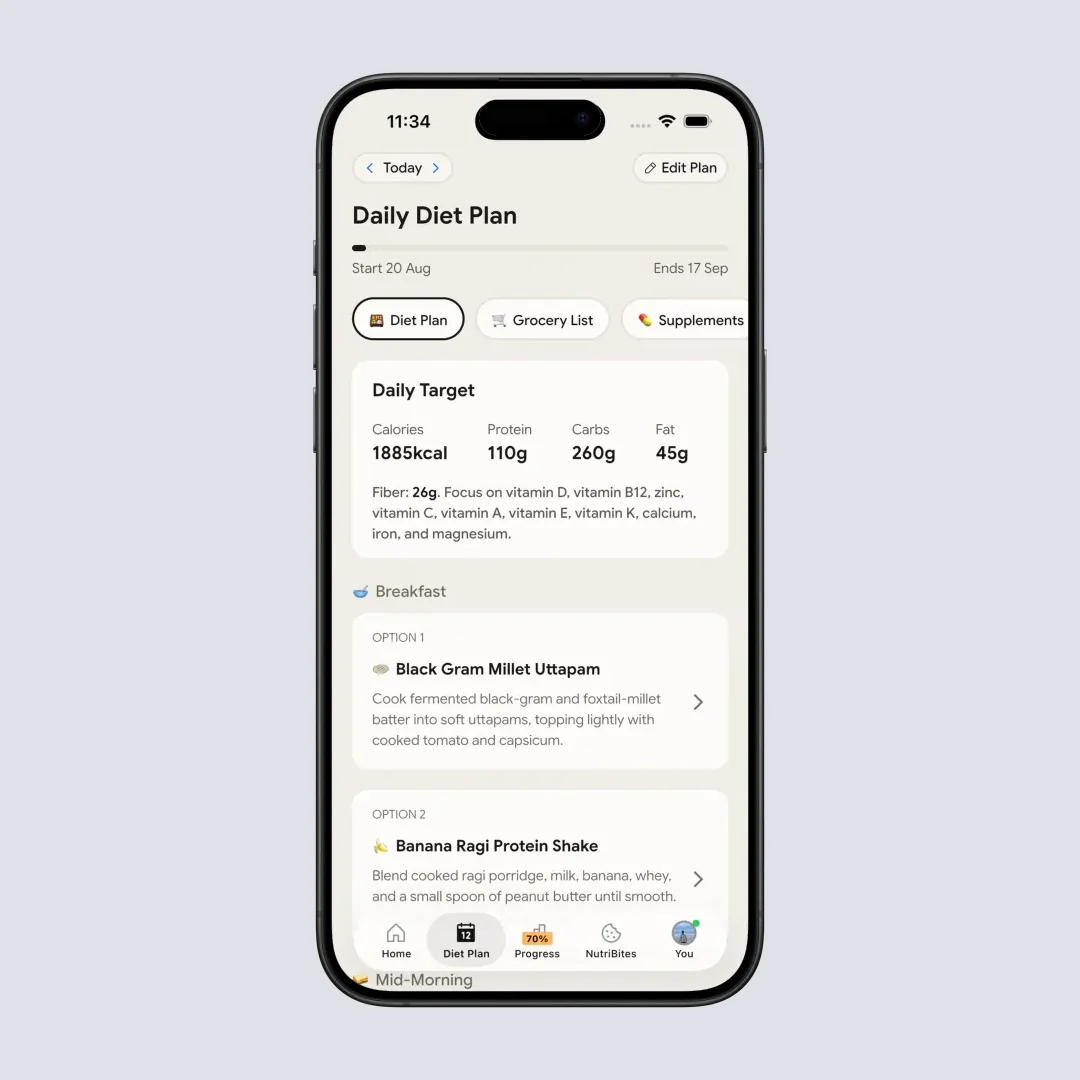
@Path - Home > Bottom Nav Diet Plan. The 28-day plan is what the grocery list is built from.
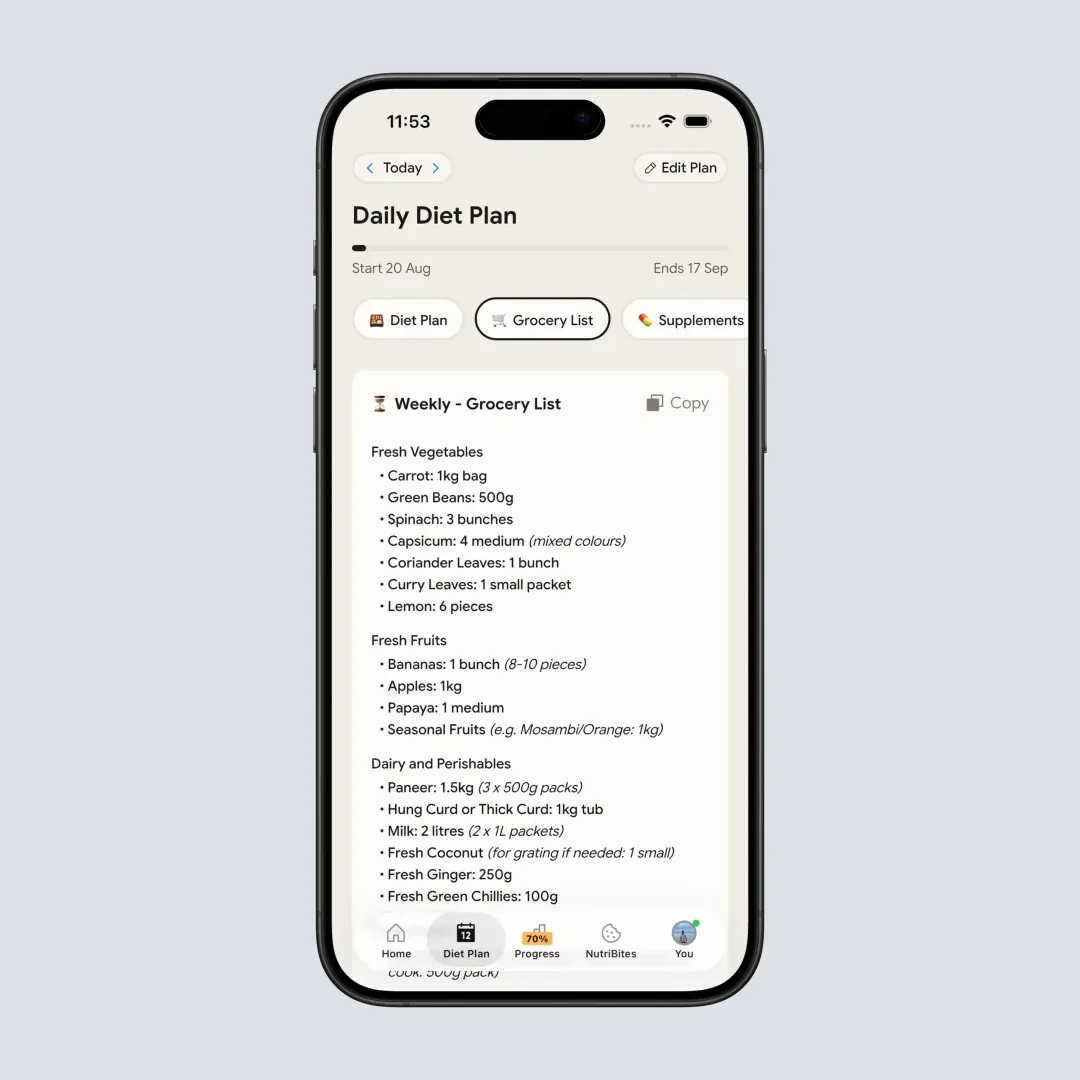
@Path - Home > Bottom Nav Diet Plan > Grocery List tab. Premium only.
What it does not do matters for a Mealime user. It has no library of cookbook-style recipes you browse and no calendar of dinners to drag around. The list is something you copy out, so there is no in-app delivery order. If your Mealime routine was "show me 30-minute dinners," pick one of the apps above. If it was "plan the week, then keep an honest count of what I eat," NutriScan covers the second half that Mealime never did. Get it on the App Store or Google Play.
The Seven Side by Side 📐
| App | Best for | Plans the week | Grocery list | Price checked Oct 31, 2026 |
|---|---|---|---|---|
| Meals Hub | Albertsons shoppers | General weekly list, no calendar | Yes, to an Albertsons cart | Free |
| Plan to Eat | Your own recipes | Calendar | Yes, by store and aisle | $5.95/mo or $49/yr |
| Samsung Food | Free recipe library | Weekly planner | Yes | Free, Food+ $6.99/mo or $59.99/yr |
| Paprika | Buy once, no subscription | Calendar and menus | Yes, by aisle | $4.99 on iPhone and iPad |
| Eat This Much | Calorie and macro targets | Day free, week on Premium | Premium | Premium $59.99/yr or $14.99/mo |
| Prepear | Browsing recipes | Per App Store listing, free | Per App Store listing, free | Gold $9.99 to $119.99 |
| NutriScan | Planning plus food logging | 28-day plan, Premium | Weekly and monthly, Premium | Free, 5 AI scans/week; Premium about $59/yr |

How to Choose in Two Minutes ✅
- You shop at Safeway, Albertsons, Vons or Jewel-Osco: try Meals Hub first. It costs nothing and the recipes carried over.
- You want Mealime's recipe-led weeknights without a store tie: try Samsung Food on the free tier.
- You have a folder of your own favorite recipes: Plan to Eat if you want a calendar and shared household list, Paprika if you want to pay once.
- You plan around calories or macros: Eat This Much generates the day, NutriScan generates 28 days and logs what you actually eat.
- You are unsure: use one free option for a week before paying for anything.
Check the grocery list first
The grocery list was Mealime's best feature. Build one plan in each app you are considering, generate the list and see whether it merges quantities and groups items the way you shop.
Restart Plan: Five Steps 🗓️
- Write down what you used Mealime for. Recipes, the grocery list or the plan itself. The answer picks your app.
- Copy out any recipe you still need. The shutdown deletes personal data and no export exists.
- Set dietary preferences again. Allergies and dislikes do not carry over to any app here.
- Plan one week in the new app. Pick five dinners, generate the list and shop from it.
- Review on Sunday. Note what you skipped and what you bought but did not cook, then adjust the next week.
If you track calories as well, the best weekly meal plan apps, the grocery list ranking and the recipe import comparison go deeper on several of these apps.
Conclusion ✨
Mealime is gone and nothing carries over except the recipes inside Meals Hub. That makes this a clean choice rather than a migration. Albertsons shoppers should start with Meals Hub. Everyone else should pick by how they plan: recipes (Plan to Eat, Samsung Food, Paprika), calories (Eat This Much) or the whole day including what you actually eat. For that last group, NutriScan is free to start, with Premium at about $59 a year for the 28-day plan and grocery lists.
Frequently Asked Questions ❓
Why did Mealime shut down? Mealime's closing page says Albertsons Companies acquired it in 2021 and is moving customers to Meals Hub as its main recipe and meal planning platform. The app was discontinued on October 21, 2026.
Can I export my Mealime recipes? No export is listed on Mealime's closing page, and Plan to Eat's migration post says there is no bulk export. Personal data is deleted at shutdown, so rebuild your plans and preferences in the new app.
What is the official replacement for Mealime? Meals Hub, a free recipe and meal planning section inside Albertsons Companies grocery apps. Mealime says it carries all Mealime recipes plus thousands more. It has no calendar and serving sizes of 2, 4 or 6 according to Plan to Eat's September 2026 review.
Is there a free alternative to Mealime? Yes. Meals Hub is free, Samsung Food has a free tier with its paid Food+ at $59.99 a year, and Prepear's App Store listing says weekly planning and the grocery list are free. NutriScan has a Free plan with 5 AI scans a week, but its meal plan and grocery lists are Premium.
Which Mealime alternative has the best grocery list? Plan to Eat organizes the list by store and aisle and Paprika sorts by aisle and merges duplicates. Meals Hub sends ingredients to an Albertsons cart. Build one plan in each app you are considering and compare the lists before paying.
Does NutriScan replace Mealime? Partly. NutriScan has a 28-day diet plan with two options per meal slot and weekly and monthly grocery lists on Premium, about $59 a year. It has no browsable recipe library or dinner calendar, so choose it if you also want to log what you eat.