Best Meal Planner App With Grocery List 2026 (Ranked)
 ChatGPT
  Claude
  AI Mode
  Perplexity
TL;DR - Best Meal Planner App With Grocery List 2026
• Overall pick: MyFitnessPal Premium+ at $99.99/yr, one of two apps here that carries a meal from plan to grocery cart to food diary without leaving the app, and the one with the deeper diary
• Best free: Mealime, with an automatic aisle grouped list you can check off in the store
• Best for your own recipes: Plan to Eat at $49/yr, with a shared household list that updates on both phones
• Ranked on: how the list is built ➡️ how it survives the store ➡️ delivery sync, food logging and price
• Honest note: NutriScan's own grocery list does not win this ranking, and it is placed accordingly near the end
A meal plan is a document. A grocery list is a decision that has already been made.
That difference is the whole reason to pay for a meal planner instead of pulling free recipes off the internet. Recipes are everywhere. What costs money is the conversion: five chosen dinners collapsing into one ordered, checkable, quantity merged list that survives a Tuesday.
As a NutriScan nutritionist, I should say upfront that our own app has a grocery list feature, and it is not the best one in this article. I have placed it honestly, in its own section near the end, rather than at the top of a ranking it does not deserve to lead.
One note on prices. These are standard US list prices as of mid 2026, and meal planning apps change tiers and regional pricing often. Check the store page or the app's own site before you pay.
IMPORTANT
Your meal planner plan at a glance.
A quick roadmap so you can pick the right app without paying for the wrong one.
⏱️ Progress 0/4 • ~0 minutes in • Keep going
⏳ Step 1: The 3 moments the list decides your week
⏳ Step 2: The 3 jobs a list feature has to do
⏳ Step 3: All 6 apps, ranked and priced
🔍 The 2026 trial that beats every feature in this ranking (revealed near the end)
Three Moments Where the Grocery List Decides Your Week 🛒
Here is where the plan-to-list gap actually shows up.
Sunday evening, planning for the week. You choose five dinners. In an app with a real list feature, those five recipes collapse into one list with the quantities added together: not "2 onions" three separate times, but "6 onions" in the produce section. The planning step and the shopping step become the same step, which is the only reason weekly planning survives a busy week.
Standing in the store aisle. This is where most planning apps quietly fail. A list that is not grouped by aisle sends you back and forth across the store, and every extra lap is a chance to add something you did not plan for. A list you cannot check off means you buy the same item twice or forget it entirely.
Wednesday night, when the plan breaks. Someone works late, the chicken never got cooked, and you order in. A good app lets you move that meal to Friday and updates what is left on the list. A weak app just leaves you with a stale document you stop opening.
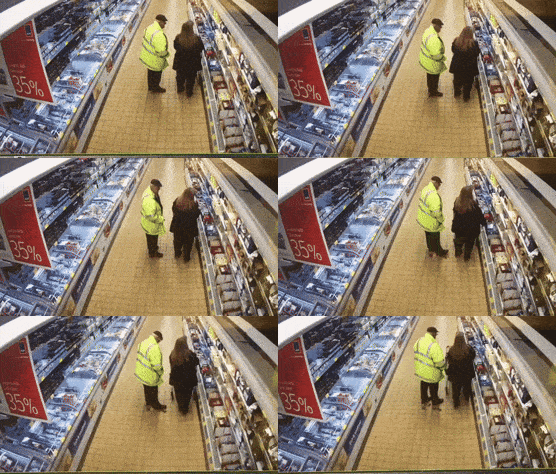 The aisle is where a badly ordered list costs you twenty extra minutes and three impulse buys.
IMPORTANT
Checkpoint: here's where you are right now.
Quick status update so you always know the next best move.
⏱️ Progress 1/4 • ~1 minute in • Keep going
✅ Step 1: The 3 moments the list decides your week (done)
👉 Step 2: The 3 jobs a list feature has to do (you're here)
⏳ Step 3: All 6 apps, ranked and priced
🧩 The 2026 trial that beats every feature in this ranking (coming soon)
What a Grocery List Feature Actually Has to Do 🔬
Every app in this article runs the same three-step job, and each step fails differently.
Step 1: build the list from the plan. The app reads your chosen meals and extracts ingredients. The quality question is whether it merges duplicate items and scales quantities to your household size. Apps that build plans from a calorie or macro target do this differently from apps that build plans from recipes you saved yourself, and neither approach is automatically better. It depends on whether your goal is a number or a dinner.
Step 2: survive the store. Aisle grouping, check-off, editing on the spot, and sharing the list with whoever else is shopping. This step sounds trivial and is where the most annoyance lives.
Step 3: close the loop. Either the list goes out to a delivery service, or the meals come back into your food log so the plan and your tracking agree. Very few apps do both.
Which step matters most
Step 1 carries the most weight, and there is trial evidence for that claim. It is the reveal at the end of this article, so hold the thought.
How I Ranked These Apps 📊
I scored six apps on those three jobs, in this order of weight:
- How the list is built. Does it merge quantities, scale to household size, and update when the plan changes? Automatic beats manual, and pantry awareness beats both.
- How the list behaves in the store. Aisle grouping, check-off, live sharing with a partner, and quick edits.
- What happens at the ends. Delivery sync on one side, food logging on the other. Also price, because a planner you cancel in March plans nothing.
I did not rank on recipe count or photo quality. A large recipe library is easy to buy and easy to match. I weighted price heavily, because research on self-monitoring keeps finding that consistency matters. In a 12-month trial of 502 adults, adherence to self-monitoring and to calorie goals was associated with greater odds of losing 5 percent or more of body weight (Burke et al., 2025).
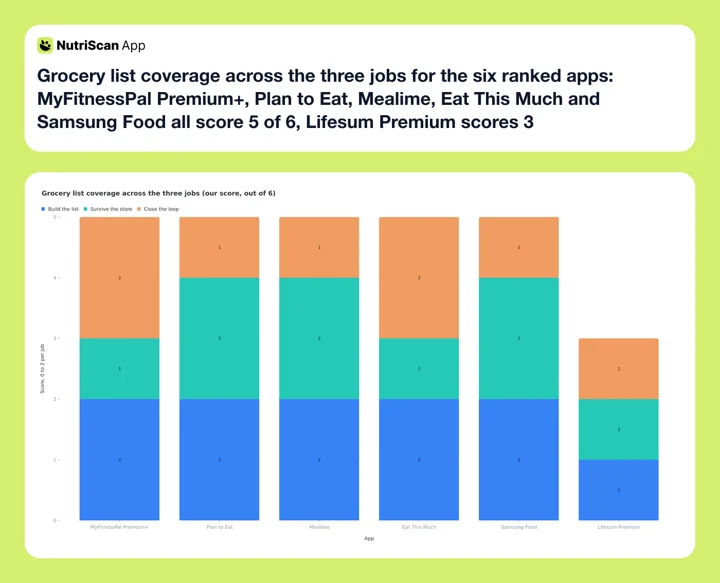 Figure 1: Each app scored 0 to 2 on building the list, surviving the store and closing the loop. These are our scores, not a vendor metric. MyFitnessPal, Plan to Eat, Mealime, Eat This Much and Samsung Food all land on 5 of 6 by different routes, and no app scores full marks, which is why the sections below turn on price and on which of the three jobs you care about.
IMPORTANT
Checkpoint: midway progress update.
You're past the theory. The ranking starts now.
⏱️ Progress 2/4 • ~3 minutes in • Keep going
✅ Step 1: The 3 moments the list decides your week (done)
✅ Step 2: The 3 jobs a list feature has to do (done)
👉 Step 3: All 6 apps, ranked and priced (current)
🧩 The 2026 trial that beats every feature in this ranking (next)

1. MyFitnessPal Premium+: Best End-to-End Plan, List and Log 🥇
MyFitnessPal's Meal Planner and Eat This Much are the two tools in this ranking that carry a meal from plan to grocery cart to food log without leaving the app, and MyFitnessPal's diary is much the deeper of the two. Premium+ users in the United States can sync the Meal Planner grocery list to Instacart, Walmart, Kroger, Amazon Fresh and Whole Foods on iOS, and to Instacart and Walmart on Android (MyFitnessPal); the older help article still lists Instacart alone on Android, so the two pages disagree and the product page is the newer of them. MyFitnessPal says a planned meal logs to the food diary with one click. Meal Planner supports ten diet approaches, including vegetarian, keto, Mediterranean, pescatarian and vegan, and it accounts for allergies, dislikes and household size.
That closed loop is the reason it ranks first. If you already track calories, a plan that logs itself removes the single most common failure point in food tracking: the gap between what you planned to eat and what you recorded. A CNET reviewer who tested the feature found the recipes practical rather than aspirational, which is the correct standard for a weeknight (CNET).
The caveats are real and several
Meal Planner requires Premium+, at $99.99 per year or $24.99 per month. That is the most expensive option here and exactly $20 a year above standard Premium's $79.99 (MyFitnessPal). It is available in only six countries: the United States, United Kingdom, Canada, Ireland, New Zealand and Australia. Your device language must be set to English and the app must be on version 25.10.0 or later. Plans target a minimum of 1,200 calories for women and 1,500 for men (MyFitnessPal Help). The delivery sync is thinner on Android than on iOS.
Best for: people already paying for calorie tracking who want the plan, the list and the log in one place.
2. Plan to Eat: Best for Your Own Recipes and a Shared Household 🥈
Plan to Eat inverts the model. Instead of giving you recipes, it organizes the ones you already cook. You import recipes from the web, drag them onto a calendar, and the app generates a shopping list from whatever is on that calendar. You can tick items off in the store or send the whole list to a grocery delivery or pickup service (Plan to Eat). It costs $5.95 per month or $49 per year with a 14-day free trial, and every feature is included from the first day rather than split across tiers (Plan to Eat FAQ).
This is the right pick for a specific and common person: someone who already has twenty dinners they know how to cook and does not want an app to suggest a twenty-first. The shared list is the standout. When one person plans and another shops, a list that updates on both phones at once removes an entire category of household friction. Worth knowing how it works: Plan to Eat shares one account across devices rather than giving each household member their own login.
The caveats: Plan to Eat calculates nutrition facts for your saved recipes and shows daily macro totals on the planner, but there is no food diary, so meals you did not plan never enter the picture (Plan to Eat). If you want a target to plan against before you fill the calendar, our online macro calculator will give you one. There is also no automatic plan generation, so the planning work stays yours. The Recipe Clipper pulls from recipe sites and from Instagram, Facebook, Pinterest and Substack, and you can paste in text from a PDF or Word doc, but there is no scan-a-handwritten-card path.
Best for: households that cook from their own recipe collection and shop together.
3. Mealime: Best Free Grocery List 🥉
Mealime is the strongest free option, and it earns that on the list itself rather than on the plan. You pick recipes for the week, and the ingredients combine into a single grocery list organized for the store, which you can check off as you shop or send to a delivery partner (Mealime). Its Google Play listing describes the intended workflow directly: recipes become a grocery list you can have delivered, at grocery store prices rather than meal kit prices (Google Play).
The free tier is genuinely usable, which matters more than it sounds. A paid planner you abandon in month two is worse than a free one you keep opening. A 2025 systematic review and meta-analysis of 11 randomized trials covering 1,717 participants found that app-based interventions produced modest weight loss at 4 to 6 months, with limited effect beyond 6 months and a tendency to regain (Pujia et al., 2025). Starting free lets you find out whether weekly planning fits your life before you commit money to it.
The caveats: Mealime's library is its own, though it can import a recipe from a URL (Mealime Support). Nutrition figures, meaning calories, macros and micronutrients, sit behind Pro, so the free tier gives you no numbers at all. Pro is $2.99 a month, a single price both store listings state outright (Google Play). There is no live shared household list, only a send-a-copy share.
Best for: anyone who wants a clean automatic grocery list without paying anything to start.
Three apps down, three to go. The trial that outranks all six of these features is still coming.
4. Eat This Much: Best When the Plan Has to Hit a Number 🎯
Eat This Much is the most clinical option in this set. You enter a calorie and macro target, and it generates meal plans that hit that target, then builds the grocery list from those meals. Daily plans and food tracking are free; the automatic grocery list, grocery delivery integration, leftovers management and week-at-a-time planning are Premium, at $5.00 per month on annual billing, which is $60 a year (Eat This Much). That combination is why it is the other app here that closes the loop in both directions. It is closer to a nutrition tool with a planning interface than to a cooking app. For the trial, refund and cancel steps, see is Eat This Much free.
That focus is a real advantage for one group: people in a defined phase with a defined number, such as a cut, a bulk or a medically guided target. The list that comes out is downstream of arithmetic rather than of appetite, which is exactly what you want when the number is the point. If you are planning around a weekly cooking session, our meal prep guide for busy professionals pairs well with this approach.
The caveats: auto-generated plans can produce combinations that are technically on target and unappealing to cook, so expect to swap meals manually. Most meals come from the built-in library, though you can create custom foods and recipes on the free tier and put favorites on repeat. Eat This Much publishes nothing about how the grocery list is grouped, so do not assume aisle ordering.
Best for: people whose primary goal is a calorie or macro number, not cooking enjoyment.
 The list is only half the job. Two of the apps here are built for people who already know what they want to cook.
5. Lifesum Premium: Best List Inside a Calorie Tracker 📋
Lifesum takes a narrower approach than MyFitnessPal but a similar one in spirit. Its shopping list mirrors the meals and ingredients in your meal planner, built from a plan by tapping the shopping cart icon next to each meal (Lifesum Help). The company's own documentation is clear that all programs and meal plans require an active Premium subscription, and that the shopping list works across all of its meal plans (Lifesum Help).
Lifesum's meal plans are pre-built themed programs, such as keto, sugar detox or a three-week weight loss plan, rather than fully custom weekly menus. If you like the idea of following a structured program instead of assembling your own week, that is a feature and not a limitation.
Pricing is where Lifesum gets hard to pin down, because it runs several promotions at once. The US App Store currently lists annual subscriptions at $119.99 and $99.99 alongside shorter terms from $21.99 to $69.99, while the live trial offers are $49.99 for a year, $14.99 for three months and $7.49 for a month (App Store). Any single figure, including the one in the table below, is a snapshot rather than the price.
The caveats: the list is tied to Lifesum's own plans, so bringing your own recipes is not the workflow. There is no grocery delivery sync, and the only export the help center describes is plain text you can hand to Messages, Mail or Notes. The whole feature sits behind Premium, though all three Premium terms carry a free trial on the App Store, so testing it costs nothing up front.
Best for: existing Lifesum users who want a program to follow and a list that comes with it.
6. Samsung Food: Best Free Recipe Library With a List Attached 📚
Samsung Food, formerly Whisk, is the broadest free catalog in this group. Browsing 180,000-plus recipes, saving recipes from anywhere, making meal plans and creating shopping lists are all free, and the list can be sorted by aisle or by recipe and shared with family (Samsung Food, Samsung Food Support). Food+ costs $6.99 per month or $59.99 per year.
It is the best answer for a person who browses food content constantly and wants a place to put it. Save from anywhere, plan what you saved, get a list. For households with Samsung kitchen appliances there are additional connections, though those are a bonus rather than a reason to choose it.
The list also hands off to a store. Samsung Food's help center names Walmart, Instacart, Amazon Fresh and Kroger in the US, plus Tesco, Ocado and Sainsbury's in the UK, REWE in Germany and Woolworths in Australia (Integrated Stores), which is the widest non-US reach of any app here.
The caveats: nutrition tracking is a Food+ feature, so the free tier gives you a plan and a list but no numbers. A free account can also store only three meal plans, which bites the moment you want a history to reuse. And a large saved recipe library becomes its own form of clutter if you never actually schedule anything.
Best for: heavy recipe savers who want free planning and a list, with no interest in calorie targets.
The Short Comparison 📐
| App | List built from | Aisle grouping | Shared list | Delivery sync | Logs to a food diary | Price (2026) |
|---|---|---|---|---|---|---|
| MyFitnessPal Premium+ | Auto plan from your goals | Yes | No | Yes (5 on iOS, 2 on Android) | Yes | $99.99/yr |
| Plan to Eat | Your imported recipes | Customizable | Yes, one shared login | Yes, delivery or pickup | No, macros on the planner only | $49/yr |
| Mealime | Recipes you pick | Yes | Send a copy | Partner delivery | No | Free, Pro $2.99/mo |
| Eat This Much | Calorie and macro target | Not published | No | Yes, on Premium | Within app | $5/mo annual, $60/yr |
| Lifesum Premium | Pre-built programs | Yes | Send a copy | No | Yes | $21.99 to $119.99, promo-variable |
| Samsung Food | Recipes you save | Yes | Yes | Yes (4 in the US) | No | Free, Food+ $6.99/mo or $59.99/yr |
Prices are standard US prices as of mid 2026 and change by region. Quiz-first apps such as Unimeal, which also builds a shopping list into its meal plans, show no price until checkout; our Unimeal pricing guide lists its App Store prices and renewal rules.
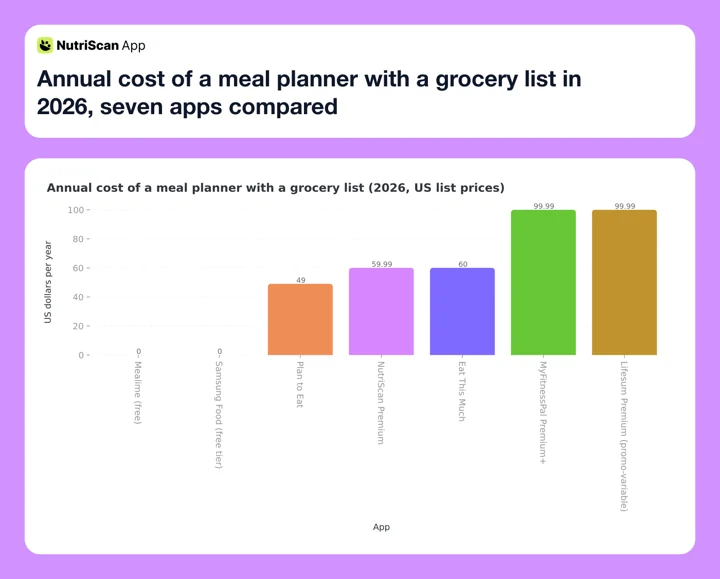 Figure 2: US list prices per year. Lifesum's bar is one of several App Store subscriptions live at the same time, with a $119.99 annual above it and a $49.99 trial offer below, so read it as a snapshot rather than the price. Mealime and Samsung Food are plotted at their free tiers; Samsung Food's paid Food+ is $59.99 a year.
Where NutriScan Fits 📱
NutriScan does generate a grocery list, and I want to describe it accurately rather than favorably. On the Premium plan, once you complete the diet plan questionnaire, the app builds a 28-day plan around your goals, cuisines, restrictions and eating schedule. A Grocery List tab then produces a weekly and monthly list from that plan, which you can copy out to any notes or grocery list app. Premium is about $59 a year, with a 7-day trial that starts through your app store (NutriScan pricing).
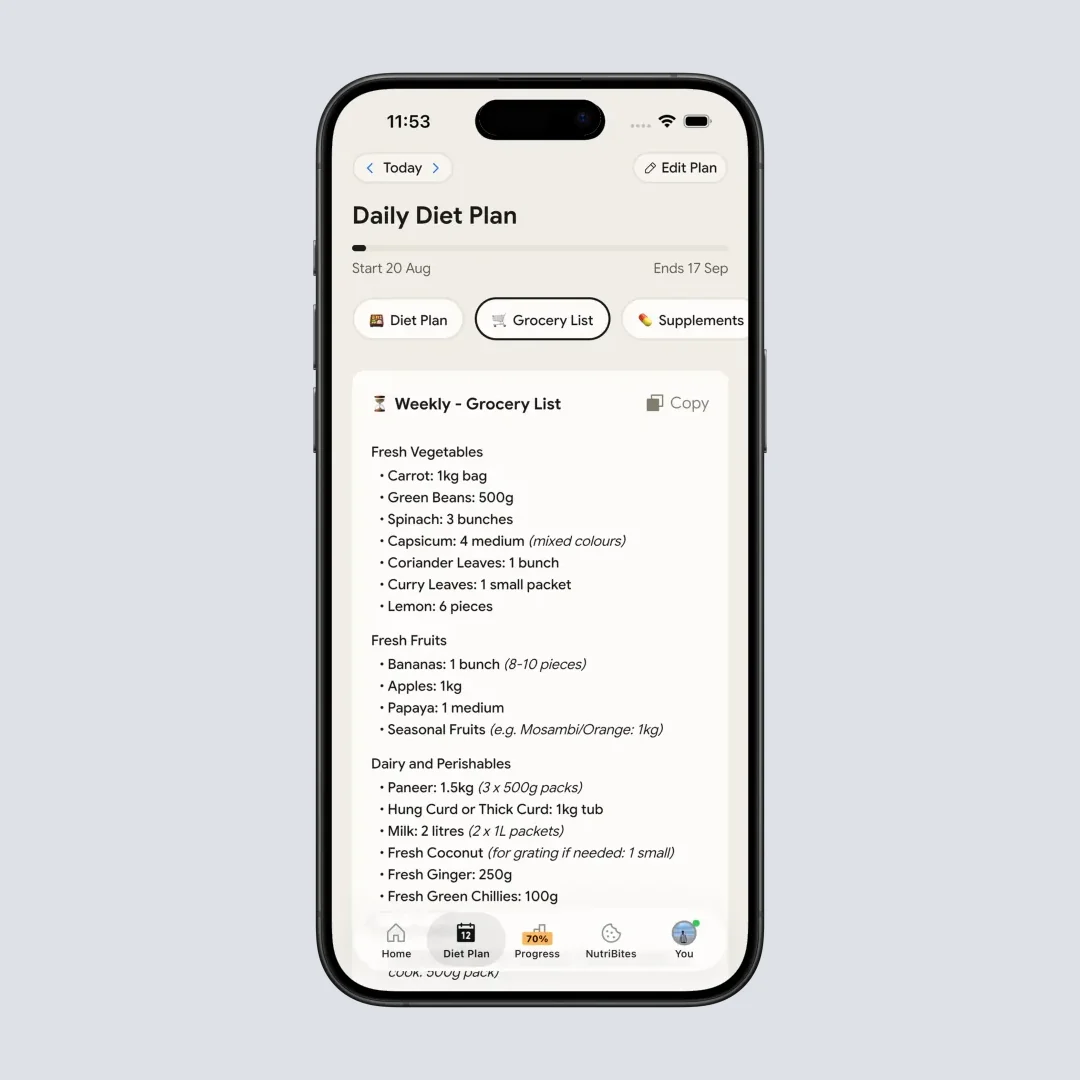
@Path - Home > Bottom Nav Diet Plan > Switch Tab to Grocery List. The list generates only after a diet plan exists on a Premium account.
What it does not do: there is no aisle grouping, no check-off inside the app, no shared household list and no grocery delivery sync. It is a generated list you copy, not a shopping tool you carry. Against the six apps above, on the specific job of grocery list quality, it does not win.
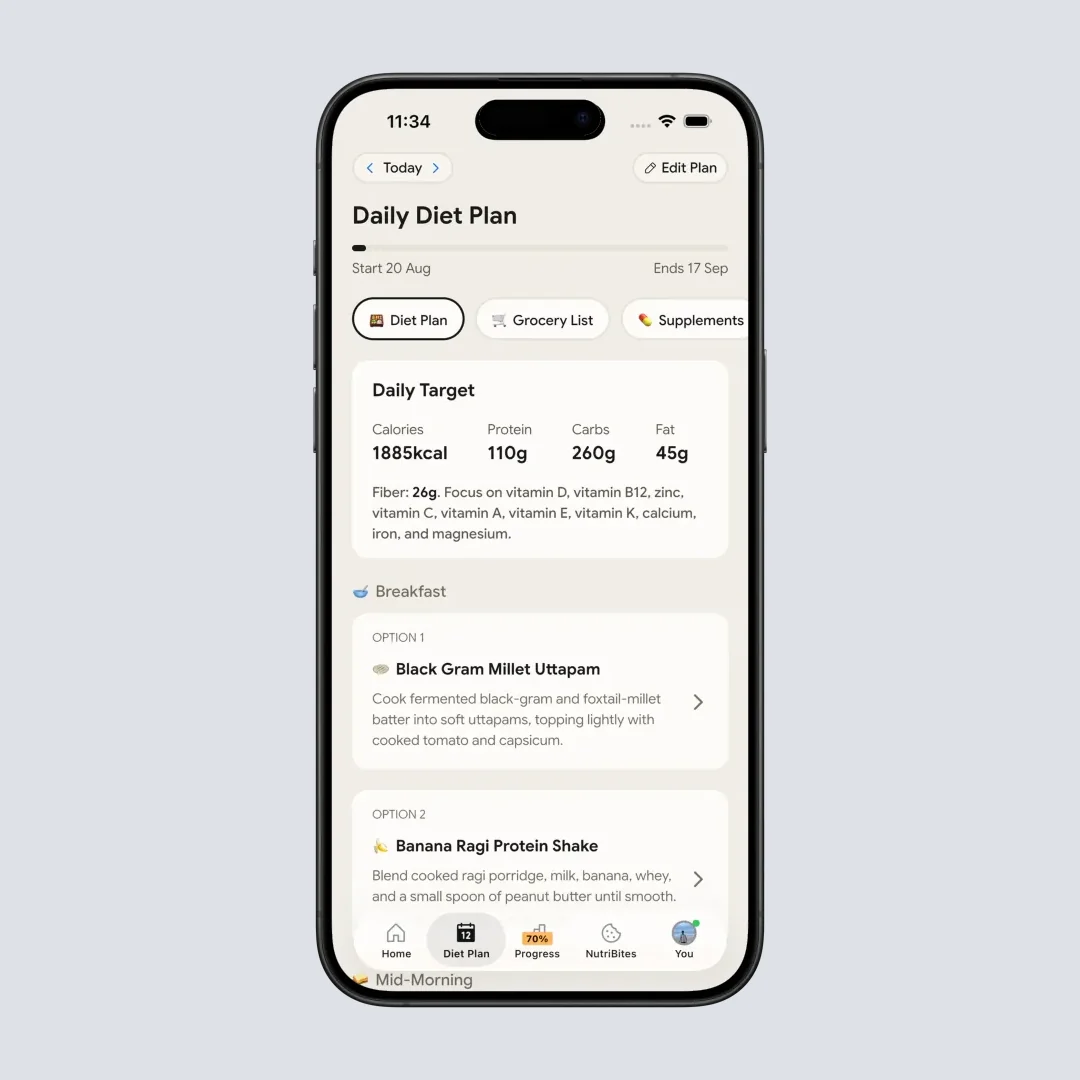
@Path - Home > Bottom Nav Diet Plan. The 28-day plan is what the grocery list is generated from, so the list only exists downstream of this screen.
Where NutriScan is genuinely stronger is on the other side of the meal. Photo logging handles the food a plan never predicts: the restaurant plate, the leftovers, the dish someone else cooked. Research on photo estimation puts the honest limits in context. One 2025 evaluation uploaded 114 meal photographs to ChatGPT and found a mean absolute percentage difference of 26.9 percent against known nutrient values, with poor agreement on 10 of the 16 nutrients tested, even though the model named the foods correctly 93 percent of the time (O'Hara et al., 2025). Recognizing the dish is the easy half. That gap is why our meal scan asks follow-up questions about oil and portion rather than trusting the image alone.

@Path - Home > Camera Icon > Crop Picture. This is the path for the meals a weekly plan never predicted.
If you want the strongest grocery list, pick from the six above. If your problem is the unplanned meals, that is a different tool, and the rest of what NutriScan does sits around that: a NutriScore band on every meal, Monika the voice AI nutritionist, a fasting timer, and the 28-day diet plan the grocery list is generated from.
All six apps are now ranked and priced. Two sections from here is the 2026 trial that explains why the ranking looks the way it does.
Seven Tips for Getting Value From a Grocery List Feature 💡
1. Plan five dinners, not seven. Two unplanned nights are realistic, and they keep one changed evening from ending the whole plan. Every app here handles a partial week fine.
2. Check the list against your kitchen before you shop. Only a few apps track your pantry. Two minutes of deleting items you already own is the difference between a useful list and a duplicate shop.
3. Set your household size correctly on day one. Quantity scaling is the feature you are paying for, and it silently produces the wrong amounts if the household number is wrong.
4. Use the aisle grouping instead of your own order. It feels wrong for one trip and then saves ten minutes every trip after that.
5. Reuse a good week. Most apps let you save or copy a past plan. A repeated week is not a failure of imagination. It is the reason the habit lasts past month two.
6. Shop from the list, not from the plan. The list already merged the quantities. Working from the recipes instead is how people end up with three separate bunches of parsley.
7. Watch what you throw away. The EPA puts the cost of wasted food at about $728 per consumer per year, roughly 11 percent of total annual food spending (EPA, 2025). If the same vegetables spoil every week, the plan is buying for a version of you that does not exist. Adjust the plan, not your willpower.
Working from a condition-specific list instead
If your list is shaped by a medical goal rather than a calorie target, the app choice matters less than the item choice. Our diabetic grocery list and keto grocery list both work as a manual starting set you can paste into any of the apps above.
IMPORTANT
Checkpoint: final stretch before the reveal.
One last nudge. The trial is next.
⏱️ Progress 3/4 • ~5 minutes in • Keep going
✅ Step 1: The 3 moments the list decides your week
✅ Step 2: The 3 jobs a list feature has to do
✅ Step 3: All 6 apps, ranked and priced
✨ The 2026 trial that beats every feature in this ranking (about to reveal)
The 2026 Trial That Beat Every Feature in This Ranking ✨
Here is the finding I have been holding back, and it outranks every feature comparison above.
The Pre-Filled Cart Trial
In a 2026 randomized pilot trial published in Appetite, researchers gave 69 families with children aged 2 to 5 at elevated obesity risk the same set of healthy recipes. For half of them, they also pre-filled the families' online grocery carts with the ingredients. The nutritional quality of the pre-filled group's household grocery purchases improved significantly against the controls, a 5.4 percent rise on the Healthy Eating Index versus an 8.3 percent fall (Anzman-Frasca et al., 2026).
Energy content and dollars spent fell in both groups, so the pre-filled cart moved what families bought, not how many calories or dollars went through the till.
Both groups got the recipes. Only one group got the list built for them. The researchers call this an optimal defaults effect: the healthy option was not merely available, it was already in the cart.
Why In-Store Nudges Did Not Work
Now put that next to what happens when you try to fix the same behavior inside the store. A 2024 pooled analysis of four controlled trials of in-store nudges, covering placement and presentation changes in real supermarkets, found no effect on the percentage of fruit and vegetable purchases, and no sign that the nudges worked better for shoppers experiencing socioeconomic disadvantage (Stuber et al., 2024).
Rearranging the store did nothing measurable. Pre-filling the cart changed what got bought.
That is the practical instruction hiding inside a feature comparison. The decision point sits earlier than most people assume, at the moment the list is created, not at the moment you are standing in the aisle deciding. Every app above is, at its best, a machine for moving your decision earlier. Judge them on that and the ranking makes sense: the apps that generate a complete, merged, ready-to-shop list with the fewest taps are doing the thing the trial measured.
The Durability Caveat
In the 12-month SMARTER trial, adherence to self-monitoring fell over time in both arms, and the participants who kept it up had the better weight outcomes (Burke et al., 2025). The 2025 meta-analysis of app-based interventions reached a similar place, with modest results at 4 to 6 months and weak evidence of long-term benefit (Pujia et al., 2025). That is the strongest practical argument for the cheaper picks on this list. The best planner is the one still open on your phone in November.
Step-by-Step: Setting Up Your First Planned Week 🗓️
- Pick the app based on where your recipes live. If you already have recipes you cook, choose Plan to Eat or Samsung Food. If you want the app to decide, choose MyFitnessPal Premium+, Mealime or Eat This Much.
- Enter restrictions and dislikes before you generate anything. Every app here supports allergies and dislikes, and fixing them afterwards means regenerating the whole week.
- Generate the plan, then swap two meals immediately. There will be at least two you do not want to cook. Swapping them now is faster than abandoning the plan later.
- Generate the grocery list and edit it against your pantry. Delete what you have. Add the household items the plan does not know about.
- Shop once, either in store from the grouped list or through a delivery sync. Check items off as you go so anything missing is visible before you get home.
- Log the meals you actually eat, including the ones that were not in the plan. A plan that only records its own successes teaches you nothing about your real week.
- Review on day seven. Which meals did you skip, and what spoiled? Those two answers shape next week's plan more usefully than any recipe suggestion.
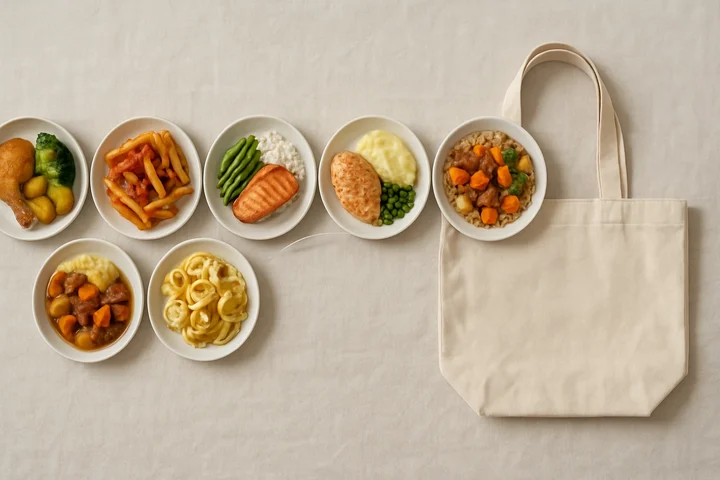 A week that fits on one list. Five planned dinners and two open nights is the version most people actually finish.
IMPORTANT
Recap: everything you completed this round.
You finished the run. Save this for the next time a subscription tempts you.
⏱️ Progress 4/4 • ~7 minutes in • Nicely done
✅ Step 1: The 3 moments the list decides your week
✅ Step 2: The 3 jobs a list feature has to do
✅ Step 3: All 6 apps, ranked and priced
✅ The 2026 trial that beats every feature in this ranking (revealed)
Conclusion ✅
If you want one recommendation: MyFitnessPal Premium+ if you already track calories and want the plan, list, delivery and log connected, and Mealime if you want to find out whether weekly planning works for you without paying for the privilege. Plan to Eat is the pick for households cooking from their own recipes, and Eat This Much for anyone whose plan has to hit a specific number.
The research points the same way as the practical advice. A recipe you have read is a suggestion. A list already built from that recipe is closer to a decision, and the trial evidence suggests decisions made before you reach the store are the ones that change what you eat. Whichever app you choose, generate the list, edit it once against your kitchen, and shop from the list rather than the plan.
For the meals no plan predicts, the restaurant dinner and the leftovers and the thing someone else cooked, you can log them in seconds with a photo in NutriScan, and see how the planned week and the real week compare. And if the grocery bill is the reason you are planning at all, the budget meal planning comparison works out how much waste each of these apps has to prevent before it pays for itself.
Frequently Asked Questions ❓
What is the best meal planner app with a grocery list in 2026? For most people it is MyFitnessPal Premium+. It and Eat This Much are the two options here that carry a meal from plan to grocery cart to food log in one place, and MyFitnessPal's diary is the deeper of the two. It is also the most expensive at $99.99 per year and available in only six countries. Mealime is the best free alternative, and Plan to Eat is the best choice for households cooking from their own recipes.
Is there a free meal planning app with a grocery list? Yes. Mealime and Samsung Food both build automatic grocery lists on their free tiers, with items grouped for the store. Mealime keeps its nutrition figures and its extra recipes for Pro, and a free Samsung Food account can store only three meal plans, but the core loop of plan to list works without paying. Start free for a month before deciding whether a paid planner adds anything for you.
Can a meal planner app send my grocery list to a delivery service? Some can. MyFitnessPal Premium+ syncs its list to Instacart, Walmart, Kroger, Amazon Fresh and Whole Foods on iOS in the United States, and to Instacart and Walmart on Android. Plan to Eat sends its list to a delivery or pickup service, Mealime sends it to a fulfillment partner, and Eat This Much has grocery delivery integration on its paid tier. Samsung Food's help center lists Walmart, Instacart, Amazon Fresh and Kroger in the US, plus Tesco, Ocado, Sainsbury's, REWE and Woolworths abroad (Integrated Stores). Availability varies by country, and delivery sync is generally a United States feature first.
Do meal planning apps reduce food waste? There is no strong trial evidence that an app alone reduces waste, though the mechanism is plausible: a merged list matched to planned meals means buying quantities you intend to use. The EPA puts uneaten food at $728 per consumer per year, roughly 11 percent of total annual food spending (EPA, 2025), so the potential saving is real. Tracking what spoils each week and adjusting the plan is the part that does the work.
Should I pay for a meal planner if I already pay for a calorie tracker? Usually no. Check your existing app first. Lifesum Premium and MyFitnessPal Premium+ both include planning and lists, so a second subscription may be spending twice for one job. The exception is if you cook from your own recipe collection, which calorie trackers generally do not organize well. In that case a dedicated planner like Plan to Eat covers a genuinely different need.
Does NutriScan have a grocery list feature? Yes, on the Premium plan and only after you complete the diet plan questionnaire. Go to Home, then the Diet Plan tab in the bottom navigation, then switch to the Grocery List tab and generate a weekly or monthly list you can copy out. It has no aisle grouping, no in-app check-off, no shared household list and no delivery sync, so it is a generated list rather than a shopping tool.