Best Meal Planner Apps With Grocery Delivery Sync 2026
 ChatGPT
  Claude
  AI Mode
  Perplexity
TL;DR - Best Meal Planner Apps With Grocery Delivery Sync 2026
• Widest reach: eMeals, six direct partners for about $4.99 a month on the annual plan, nutrition analysis on every menu but no food diary
• Best free sync: Mealime, four partners at no cost, and the only integration here documented to pre-fill the cart for you
• Deepest food diary: MyFitnessPal Premium+ at $99.99 a year, five delivery partners on iOS and two on Android
• Ranked on: partner reach ➡️ how well the cart gets matched ➡️ what the whole stack costs a year
• Honest note: NutriScan does not have delivery sync at all, and it is not in the ranking
Delivery sync is the only feature in meal planning where you can measure the payoff in minutes. A plan tells you what to cook. A grocery list tells you what to buy. Delivery sync is what removes the hour between them.
As a NutriScan nutritionist, I should say upfront that our own app cannot do this. NutriScan builds a grocery list inside its Premium diet plan, but the list is copy only. It does not push to Instacart and it does not check out for you, so it is not in the ranking below. It gets one honest section near the end instead.
The five apps here are judged on one job: how well they turn a week of chosen meals into groceries that arrive at your door. Every partner list below is cited to the app's own documentation, checked in August 2026, because the secondhand lists floating around are mostly stale.
One note on prices. These are US list prices as of August 2026, and planning apps change tiers and regional availability often. Check the app's own page before you pay.
IMPORTANT
Your delivery sync plan at a glance.
A quick roadmap so you pick the app that reaches your stores, not just the one with the best marketing.
⏱️ Progress 0/4 • ~0 minutes in • Keep going
⏳ Step 1: The 3 things sync does, and where each breaks
⏳ Step 2: The 3 jobs I scored them on
⏳ Step 3: All 5 apps, ranked and priced
🔍 The one integration that fills the cart for you, and it is free (revealed near the end)
What Grocery Delivery Sync Actually Does 🔄
The phrase gets used loosely, so it helps to be precise. Sync is three steps in sequence, and each one can fail on its own.
It merges your plan into one list. You pick the week's meals and the app pulls every ingredient into a single list, combining duplicates and adding up quantities. Three recipes that each want an onion become "6 onions" on one line, not three separate entries you have to reconcile in the aisle.
It matches your list to a real catalog. This is the step people underestimate, and the step where value leaks. "Olive oil" in a recipe has to become a specific bottle, at a specific store, at a specific price. The app hands the list to a delivery partner, and the partner guesses the closest match in its inventory. Guess badly and a 2 pound bag becomes a 5 pound one.
It sends the matched cart out for delivery or pickup. One action moves the cart to the delivery service, you pick a time slot, and the food arrives.
A plain grocery list stops at step one. Every app in this ranking carries all three. The difference between them is almost entirely about steps two and three.
 The dream of delivery sync: somebody else does the shopping run while you stay home.
IMPORTANT
Checkpoint: here's where you are right now.
Quick status update so you always know the next best move.
⏱️ Progress 1/4 • ~1 minute in • Keep going
✅ Step 1: The 3 things sync does (done)
👉 Step 2: The 3 jobs I scored them on (you're here)
⏳ Step 3: All 5 apps, ranked and priced
🧩 The one integration that fills the cart for you (coming soon)
The Three Jobs I Scored Them On 📐
I weighted three things, in this order.
1. Partner reach. How many delivery services can the app send a list to? An app tied to a single grocer is useless if that grocer does not serve your address. Reach that includes Instacart quietly counts for more, because Instacart itself fronts hundreds of chains.
2. Cart matching quality. Does the app hand over a raw text list and leave the partner to guess, or does it select actual products in the right quantity? This is the difference between a sync that saves you an hour and one that saves you five minutes and then makes you fix twenty line items.
3. Cost of the whole stack. The subscription is the small number. Delivery fees and the impulse items a fixed list keeps out of your cart are the big ones. I weighed total spend, not just the app fee.
Here are the five.
1. eMeals: The Widest Delivery Reach 🛒
eMeals is built around exactly this job, and the partner list shows it. Your combined list sends directly to Walmart, Amazon Fresh, Instacart, Albertsons, Kroger with its banner stores including Fred Meyer, Fry's, King Soopers, Pick 'n Save, Ralphs and Smith's, and Safeway (eMeals). Because Instacart is one of those six, thousands of further stores are reachable through it, including chains eMeals does not partner with directly such as Publix, ALDI and HEB (Instacart).
Of the apps that make you pay to sync at all, it is the cheapest, at $4.99 a month on the 12 month plan, or $9.99 a month on the 3 month plan, with a 14 day free trial. Subscribers get the full range of dinner food styles rather than one fixed plan, and breakfast and lunch plans can be added (eMeals).
The trade-off is that eMeals is a planning and shopping service, not a tracker. Every menu carries a nutrition analysis, and the keto plan publishes its macro split (eMeals), but there is no food diary, so nothing you eat gets logged. It is also US only: the terms of use say the site is provided "for use only by persons located in the United States" (eMeals terms). If your goal is "plan dinners, get groceries delivered," eMeals sends your list to more stores directly than anything else here, for $4.99 a month. If you want your intake tracked afterwards, it is the wrong tool.
Best for: households who want the shopping solved and do not track macros.
2. Mealime: The Best Free Sync 🆓
Mealime is the pick if you do not want another subscription, and its delivery support is better than its reputation suggests. It sends your list to Kroger, Walmart, Amazon Fresh and Instacart (Mealime). Four partners, on a free tier.
The list itself is unusually good for something free. It merges quantities, groups items by store department, and shows which recipe each ingredient belongs to (Mealime). Recipes are built to be quick and to overlap on ingredients, which cuts waste before you even reach the list. The free tier also carries 8 diet types, 12 allergy filters and 124 removable disliked ingredients.
There is one thing Mealime does that no other app in this ranking documents doing, and I am saving it for the reveal near the end, because it changes which app I would actually install.
The caveats: pantry filtering, nutrition figures and calorie filters sit on the $2.99 a month Pro tier, along with full access to the recipe library (Mealime Pro), and Mealime keeps no food diary of its own, though it can push a cooked recipe's nutrition to Apple Health. For a single person or a couple who want weeknight dinners delivered without paying a subscription, this is the strongest entry point.
Best for: anyone testing whether weekly planning fits their life before spending money on it.
IMPORTANT
Checkpoint: midway progress update.
You're halfway. The remaining three apps are the specialist picks.
⏱️ Progress 2/4 • ~3 minutes in • Keep going
✅ Step 1: The 3 things sync does (done)
✅ Step 2: The 3 jobs I scored them on (done)
👉 Step 3: All 5 apps, ranked and priced (current)
⏳ The one integration that fills the cart for you (next)
3. MyFitnessPal Premium+: The Deepest Food Diary 📓
MyFitnessPal and Eat This Much are the two apps here that carry a meal from plan to grocery cart to food log, and MyFitnessPal's diary is the deeper of the two: full macros on every entry, against a database MyFitnessPal puts at over 20 million foods (MyFitnessPal). Its Meal Planner builds weekly plans around your goals, budget and diet across 10 diet approaches, and it lives only on the Premium+ tier (MyFitnessPal Help).
US subscribers can sync the grocery list to Instacart, Walmart, Kroger, Amazon Fresh and Whole Foods on iOS, and to Instacart and Walmart on Android (MyFitnessPal). The help article still lists Instacart alone for Android, so treat the product page as the newer of the two. That gap is part of why this sits at number three: Android gets two of the five doors, and the sync is US only.
The other costs are real. Premium+ runs about $99.99 a year (MyFitnessPal), the highest price here, about 1.7 times what a year of eMeals costs. Meal Planner is limited to six countries (United States, United Kingdom, Canada, Ireland, New Zealand and Australia), requires the device language set to English and app version 25.10.0 or higher, and does not exist on the website. Plans also target a minimum of 1,200 calories for women and 1,500 for men (MyFitnessPal Help), which rules it out for anyone eating below that under supervision.
For someone who already tracks macros daily and wants planning, delivery and logging without app switching, this is the strongest of the two options that cover all three. Our Premium+ review covers whether the rest of the tier justifies the price.
Best for: people who already track macros and want one app for the whole loop, with the fullest partner list on iPhone.
4. Eat This Much: Sync From a Calorie Target 🎯
Eat This Much inverts the logic of every other app here. You give it a calorie and macro target plus your diet and budget, and it generates the plan backwards from that number. The grocery list it produces names Instacart, Amazon Fresh and Walmart, and the vendor adds "and more" without listing the rest (Eat This Much), so three is a floor rather than a total.
The important detail is what sits behind the paywall. On the free tier you get daily plan generation and tracking, but the automatic grocery list and the delivery integration are both Premium features at $5.00 a month on the annual plan. Free here does not mean free sync.
Its pantry tracks what you already own so the generator can build meals around it, and it handles per day macro targets for carb cycling or keto (Eat This Much). Mealime Pro ships a pantry filter too, so treat "which one is better" as a matter of how you plan rather than a settled score. If you plan around a number rather than around dishes, this is your app. Working out your target first is worth doing with a macro calculator rather than guessing.
Best for: macro-driven planners who want the number to decide the menu.
5. Samsung Food: Save From Anywhere, Then Deliver 📚
Samsung Food, formerly Whisk, earns its spot on flexibility rather than depth. It is free, it saves recipes from almost any website, and it turns whatever you collected into one combined, aisle-categorized list (Samsung Food). Its reach is wider than most write-ups give it: the help center's integrated-store list names Walmart, Instacart, Amazon Fresh and Kroger in the US, alongside Tesco, Ocado and Sainsbury's in the UK, REWE in Germany and Woolworths in Australia (Samsung Food Help). It is the only one of the five that publishes retailer integrations outside the US.
What keeps it fifth is what happens after the handoff. It passes a plain list, so the store does the matching, and detailed nutrition tracking sits behind Food+ at $6.99 a month or $59.99 a year with a 7 day trial (Samsung Food). On the free tier it is a recipe and list tool rather than a tracker. A large saved library also becomes its own clutter if you never schedule anything from it.
Best for: people whose recipes already live scattered across blogs and social posts.
The Short Comparison 📊
| App | Direct delivery partners | Cart pre-filled for you | Logs to a food diary | Sync on free tier | Price (2026) |
|---|---|---|---|---|---|
| eMeals | 6 (Walmart, Amazon Fresh, Instacart, Albertsons, Kroger, Safeway) | No | No, nutrition analysis only | 14 day trial only | From $4.99/mo annual |
| Mealime | 4 (Kroger, Walmart, Amazon Fresh, Instacart) | Yes, on Kroger | No, Apple Health export only | Yes | Free, Pro $2.99/mo |
| MyFitnessPal Premium+ | 5 on iOS, 2 on Android | No | Yes | No | $99.99/yr |
| Eat This Much | 3 named (Instacart, Amazon Fresh, Walmart), vendor says "and more" | No | Within app | No | $5.00/mo annual |
| Samsung Food | 4+ in the US (Walmart, Instacart, Amazon Fresh, Kroger) | No | No, Food+ tracks nutrition | Yes | Free, Food+ $6.99/mo |
Prices are standard US prices as of mid 2026 and change by region.
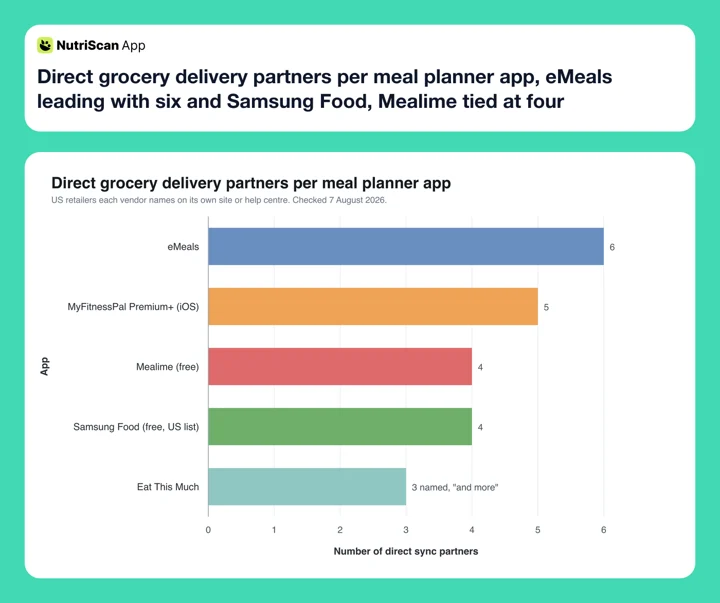 Figure 1: Direct sync partners per app, counting the US retailers each vendor names. All five include Instacart, which itself fronts more than 2,200 retail banners, so the practical gap is narrower than the bars suggest. Eat This Much's bar is a floor: its page says "and more" without listing the rest.
What a Year of This Actually Costs 💸
Here is the number that changes how you should shop for one of these apps.
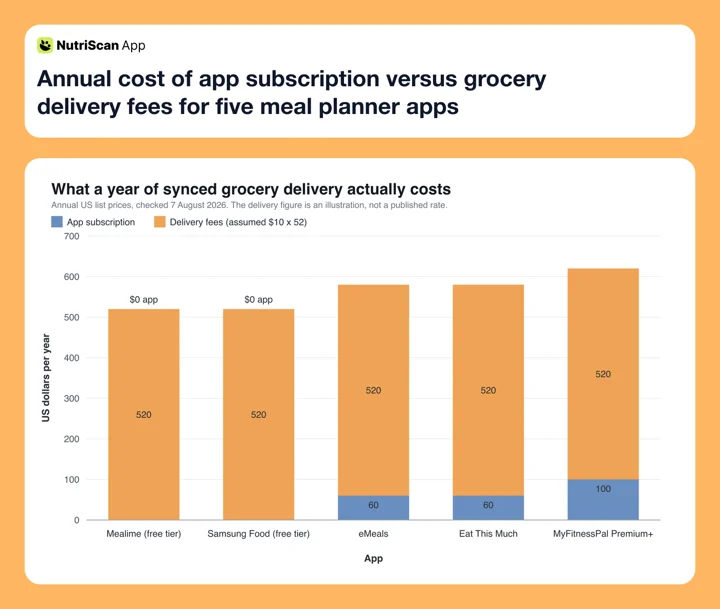 Figure 2: Delivery is charged at an assumed $10 an order, once a week, which is $520 a year. That figure is an illustration, not a published rate: fees vary by retailer, basket size, membership and tip. Subscriptions are the annual list prices above, with Mealime and Samsung Food plotted on their free tiers.
The delivery fee dwarfs every subscription in this ranking. Choosing Mealime's free tier over MyFitnessPal Premium+ saves $100 a year, or about $64 if you pay for Mealime Pro. Cutting from weekly delivery to fortnightly saves $260. Both matter, but only one of them is about the app.
That reframes the buying decision. Do not optimize for the cheapest subscription. Optimize for the app whose list is accurate enough that you can batch to fewer, larger orders without running out mid-week, because that is where the actual money is.
Where the saving really comes from
A pre-built list is a spending cap you set on Sunday. The EPA puts wasted food at about $728 per US consumer per year, roughly 11 percent of what each of us spends on food at home and away from home (EPA, 2025). A list built from meals you actually plan to cook attacks that number directly.
Where NutriScan Fits (We Do Not Sync Deliveries) 📱
Here is the honest part. NutriScan has no grocery delivery sync, and no plan to pretend otherwise.
Our Premium diet plan does build a weekly and monthly grocery list once you complete the questionnaire, and you can copy that list out to a notes app or paste it into Instacart yourself. That is the whole feature. There is no push to a delivery partner, no product matching, no checkout. If a synced cart is what you came for, one of the five apps above is your answer.
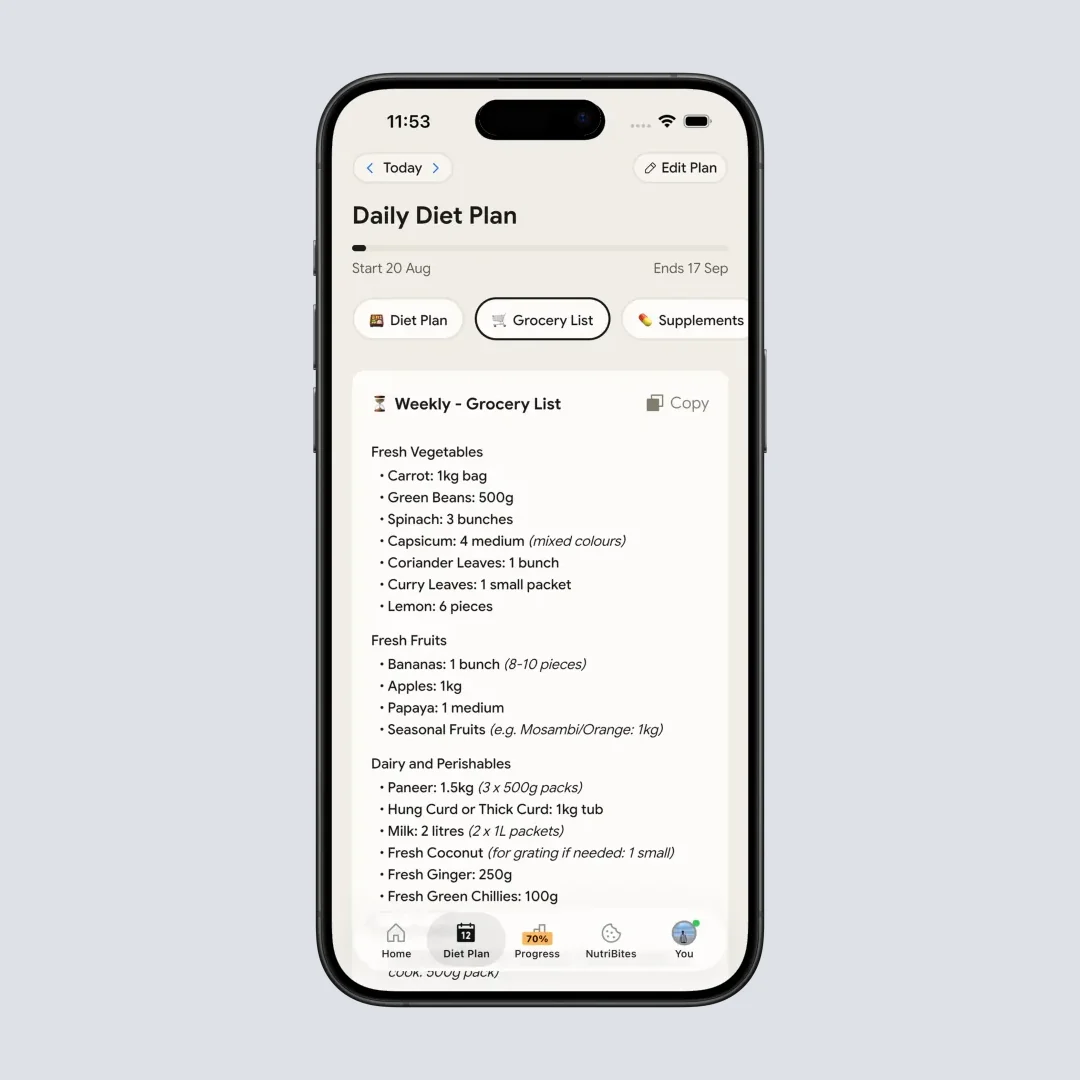
@Path - Home > Bottom Nav Diet Plan > Switch Tab to Grocery List. The list is copy only, and it generates only after a diet plan exists on a Premium account.
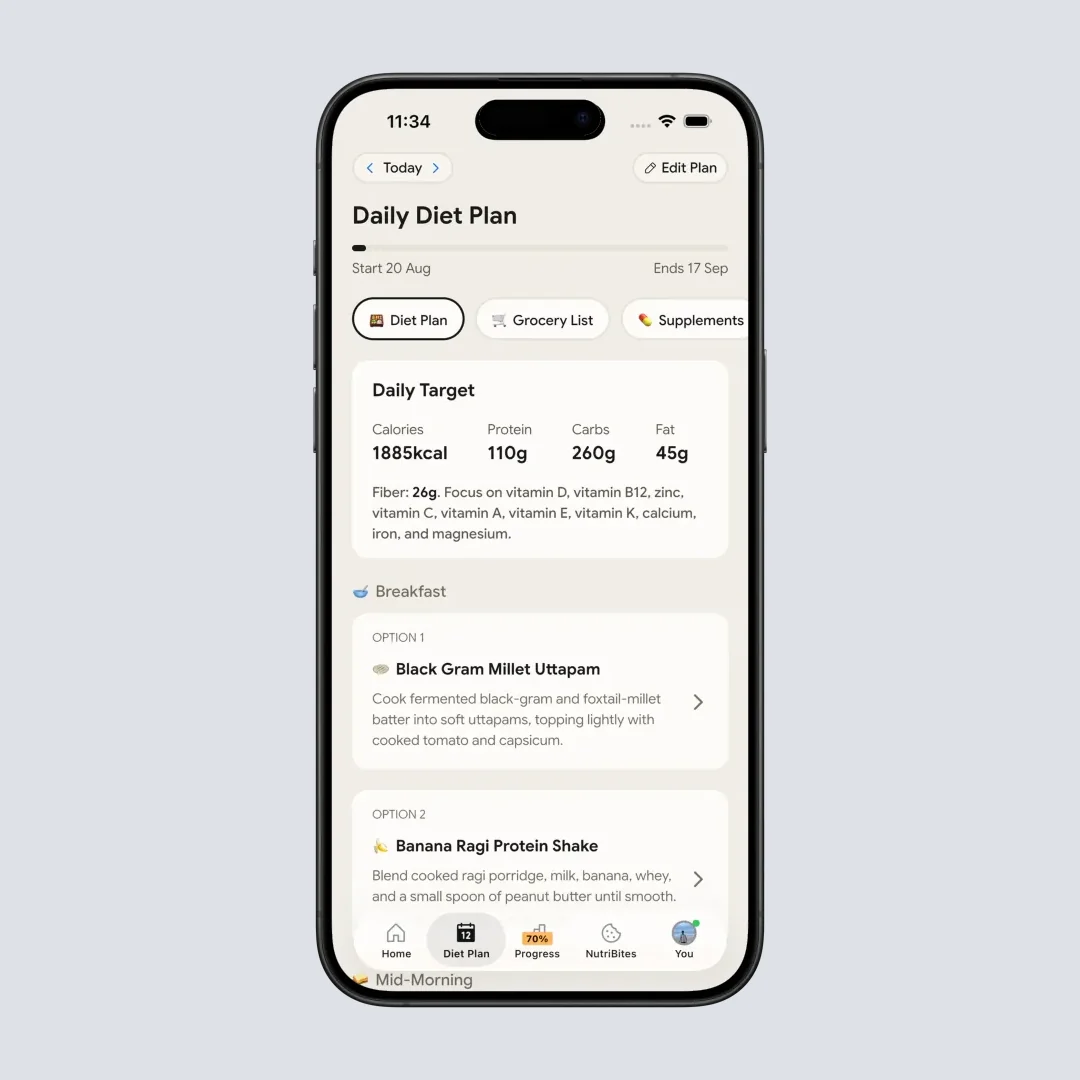
@Path - Home > Bottom Nav Diet Plan. The grocery list is generated downstream of this plan, so the plan has to exist first.
What NutriScan does well is the step after the groceries arrive: knowing what you actually ate. Plans slip. You order in on Wednesday, a colleague brings sweets, the portion on your plate is not the portion in the plan. NutriScan's meal scan reads a photo of real food, including mixed and home-cooked dishes that barcode-based apps miss, and gives each one a NutriScore so your week has a quality signal and not just a calorie total.

@Path - Home > Camera Icon > Crop Picture. This is the path for the meals a weekly plan never predicted.
Photo estimation is not magic, and the honest numbers matter. A 2025 evaluation put 114 meal photographs through ChatGPT-4 and found a 26.9 percent mean absolute percentage difference against known nutrient values, with poor agreement on 10 of 16 nutrients even though food identification precision was 93 percent (O'Hara et al., 2025). Naming the food is the easy half. Quantifying it is where the error lives, which is why NutriScan asks you to confirm portion, oil level and cooking method rather than trusting the image alone.
The sensible setup, if you want both, is a pair: one of the delivery sync planners above to shop, and NutriScan to log what you eat, planned or not. NutriScan's free plan includes 5 AI meal scans a week, enough to cover the couple of nights a week the plan slips, and Premium is about $59 a year with a 7 day trial (NutriScan pricing). We would rather tell you to pair us with the right shopping tool than pretend we replace it.
Want the list itself rated rather than the delivery?
If you care more about how the grocery list is built than about where it gets sent, that is a different comparison. Our best meal planner app with a grocery list ranking scores six apps on aisle grouping, shared household lists and quantity merging instead of delivery reach.
IMPORTANT
Checkpoint: final stretch before the reveal.
One last nudge. The integration is next.
⏱️ Progress 3/4 • ~5 minutes in • Keep going
✅ Step 1: The 3 things sync does
✅ Step 2: The 3 jobs I scored them on
✅ Step 3: All 5 apps, ranked and priced
✨ The one integration that fills the cart for you (about to reveal)
The One Integration That Fills the Cart For You ✨
The other four apps here do the same thing at the handoff: they pass a list of ingredient names to the delivery partner and let the partner guess. You then open a cart of twenty guesses and correct it. That is the step that eats the time sync was supposed to save.
Mealime's Kroger integration is the one whose own documentation describes doing something else. It pre-selects the products that suit each recipe, in the correct quantity, and puts them in the cart before you look at it. You review and swap rather than build. Pantry staples are the one exception, left for you to pick at the bottom of the list (Mealime). It is free, and it works across the 13 Kroger banners Mealime lists, including Fred Meyer, Fry's, King Soopers, City Market, Smith's, Ralphs, QFC and Food 4 Less.
Why that matters more than partner count is the part with evidence behind it.
The Trial That Explains Why Pre-Filling Wins
In a 2025 randomized trial published in the American Journal of Preventive Medicine, researchers gave 328 online grocery shoppers in Singapore either a standard online store or an enhanced one with clearer nutrition labels, real-time feedback and healthier products moved to the front. The enhanced group improved the average Nutri-Score of their carts by 4.06 points, enough to move a typical cart from a grade C to a grade B (Shin et al., 2025).
Nothing about the food changed. Nobody was asked to try harder. What changed was what appeared in front of the shopper by default.
Compare that with the physical store. A 2024 pooled analysis of four controlled trials of in-store nudges, moving products around and changing how they were presented inside real supermarkets, found no effect on the share of fruit and vegetables in shoppers' baskets, and no sign that the nudges worked better for shoppers with less education (Stuber et al., 2024). Rearranging the aisle did very little.
So the value of a good sync is not convenience. It is that the cart gets built once, in advance, by something that already knows the recipe, rather than by you at 6pm with a half-remembered list. An integration that pre-selects the right product in the right quantity is doing that job. An integration that hands over twenty text strings is not.
Which means: if a Kroger banner store delivers to your address, Mealime's free tier gives you the best-documented matching in this ranking at no cost. If it does not, eMeals buys you the most doors for $4.99 a month. Partner count is what you check second, not first.
One thing pre-filling does not fix
Auto-selection still guesses on pack size and brand, and a store-brand item can silently become a name brand at double the price. Reviewing the cart takes thirty seconds and is the single highest-value habit in this whole workflow.
How to Set Up Delivery Sync in 6 Steps 🧭
Whichever app you land on, the path is the same.
- Pick your delivery partner first. Check which service actually delivers to your address, then choose an app that supports it. Reach only counts if it reaches you.
- Set household size and restrictions before you plan. Quantity scaling is the thing you are paying for, and it silently produces the wrong amounts if the household number is wrong. Fixing it afterwards means regenerating the week.
- Choose meals that share ingredients. Pick dinners that reuse a protein or a vegetable so one purchase covers two meals. This shrinks the list and the spend at the same time.
- Edit the combined list against your pantry. Delete the oil, rice, spices and canned goods you already own. The app does not know what is in your kitchen. You do.
- Send the list to the store. Use the sync action to push the list to your partner, which then matches each line to a product in its catalog.
- Audit the matched cart, then check out. Scan for wrong pack sizes and swapped brands, fix what is off, pick a slot and confirm. This review decides both your cost and your accuracy.
 Everything above exists so that this part happens on a Tuesday instead of a takeaway order.
Seven Habits That Make a Synced List Pay 💡
1. Always audit the matched cart before checkout. Auto-matching guesses sizes and brands. Thirty seconds of review protects the budget more than any subscription choice.
2. Keep a running pantry list. The biggest source of waste is buying staples you already own. Note what you have and delete it from each week's list.
3. Reuse a core week. Save one plan of meals your household reliably eats and re-sync it on busy weeks. A repeated week is not a failure of imagination, it is why the habit survives past month two.
4. Plan five dinners, not seven. Two unplanned nights are realistic, and they stop one changed evening from ending the whole plan.
5. Watch the delivery fee, not the app fee. A $10 delivery charge every week is a $520 a year habit, several times what any app in this ranking costs. Batching to fewer, larger orders is the real lever.
6. Accept the healthier default when it is offered. When an app suggests a better substitute or puts a better option first, take it. That is the exact mechanism the Singapore trial measured.
7. Log what you actually ate, not what you planned. A week that only records its own successes teaches you nothing. Tracking the takeaway night is how next week's plan gets more realistic.
Working from a condition-specific list instead
If your list is shaped by a medical goal rather than a calorie target, the app matters less than the items. Our diabetic grocery list and keto grocery list both work as a manual starting set you can paste into any of the apps above.
IMPORTANT
Recap: everything you covered this round.
You finished the run. Save this for the next time a planner tries to sell you on partner count.
⏱️ Progress 4/4 • ~7 minutes in • Nicely done
✅ Step 1: The 3 things sync does
✅ Step 2: The 3 jobs I scored them on
✅ Step 3: All 5 apps, ranked and priced
✅ The one integration that fills the cart for you (revealed: Mealime on Kroger, free)
Conclusion
If a Kroger banner store delivers to you, start with Mealime. It is free, it syncs to four partners, and it is the only one here documented to build the cart instead of describing it. If Kroger does not reach you, eMeals opens the most doors directly, at $4.99 a month. If you already track macros and want one app for planning, delivery and logging, MyFitnessPal Premium+ has the deeper diary of the two apps that close that loop, at $99.99 a year, and Eat This Much closes it for $60. Samsung Food fits people whose recipes live all over the internet, and it is the one to check first if you shop outside the US.
Delivery sync handles the shop. It cannot tell you what you actually ate once Wednesday goes sideways, which is a different job and the one we built for. Track your real meals, planned or not, with NutriScan, and let the planner handle the cart.
Ready to see what your real week looks like? Download NutriScan and scan your next meal. The free plan gives you 5 scans a week.
Frequently Asked Questions
Which meal planner app has the most grocery delivery partners in 2026?
eMeals has the widest direct reach with six partners: Walmart, Amazon Fresh, Instacart, Albertsons, Kroger with its banner stores, and Safeway (eMeals). Because Instacart is one of those, thousands of further stores are reachable through it, including Publix, ALDI and HEB (Instacart). eMeals starts at $4.99 a month on the 12 month plan. Every menu carries a nutrition analysis, but there is no food diary, so nothing you eat gets logged.
Is there a free meal planner with grocery delivery sync?
Yes. Mealime syncs to Kroger, Walmart, Amazon Fresh and Instacart, and its Kroger integration pre-selects products in the right quantity and adds them to your cart (Mealime). Samsung Food is also free, and its help center lists Walmart, Instacart, Amazon Fresh and Kroger among its US store integrations (Samsung Food Help). Neither keeps a food diary of its own, though Mealime can send a cooked recipe's nutrition to Apple Health, and Mealime keeps pantry filtering, nutrition figures and calorie filters on its $2.99 a month Pro tier.
Does MyFitnessPal deliver groceries?
MyFitnessPal does not deliver groceries itself, but Premium+ subscribers in the US can sync the Meal Planner grocery list to Instacart, Walmart, Kroger, Amazon Fresh and Whole Foods on iOS, and to Instacart and Walmart on Android (MyFitnessPal), though the help article still lists Instacart alone for Android (MyFitnessPal Help). Meal Planner is limited to six countries, needs the device language set to English and app version 25.10.0 or higher, and is not available on the website.
Does grocery delivery sync actually help you eat better?
The evidence points that way when the decision is made before you shop. A 2025 randomized trial of 328 online grocery shoppers found that clearer labels, real-time feedback and better default ordering raised the average Nutri-Score of a cart by 4.06 points, roughly a grade C cart becoming a grade B (Shin et al., 2025). A 2024 pooled analysis of four controlled trials of in-store nudges found no effect on the share of fruit and vegetables in shoppers' baskets, and no sign that the nudges worked better for shoppers with less education (Stuber et al., 2024).
Does NutriScan sync with grocery delivery services?
No. NutriScan generates a weekly and monthly grocery list inside the Premium diet plan, and that list is copy only. It does not push to Instacart or any delivery service and does not check out for you. Pair a delivery sync planner for the shopping with NutriScan for logging what you actually ate.
Is a delivery sync app worth the delivery fees?
The subscription is the small number. One delivery a week at an assumed $10 an order runs about $520 a year, which is five to nine times what most of these apps cost. Delivery sync pays for itself only if the fixed, pre-built list keeps enough impulse buys and duplicate staples out of the cart. Batching to fewer, larger orders spreads the fee.