Best Budget Meal Planning App: Cheap Meals That Cut Waste
 ChatGPT
  Claude
  AI Mode
  Perplexity
The average US consumer throws away $728 of edible food a year, about $14 a week. That number, not the app subscription, is the budget a meal planner has to recover. Below: the break-even math for every major planner, the one app with a real spending limit, the cheap option that quietly beats the expensive one, and a seven-step Sunday routine that keeps your grocery bill under a number you chose.
TL;DR - Budget Meal Planning App Guide
• Who it's for: Anyone whose grocery bill keeps creeping up and who suspects an app might help, but doesn't want to pay for one that won't
• The math: A $59.99-a-year app must prevent about 8% of your yearly food waste to pay for itself; a $99.99 one needs almost 14%
• Top picks: Eat This Much for a direct price limit ➡️ Cooklist for pantry-first planning. Mealime, the old cheapest pick, closed on October 21, 2026
• The bigger lever: Six planned dinners, repeated lunches, and one list audit beat any recipe library
NutriScan publishes this post, and we make a competing app. Anyone asking which meal planning app saves the most money should first ask the question that decides the answer. In 2025 the US Environmental Protection Agency estimated that the average American consumer throws away $728 worth of edible food every year, about $14 a week, which works out to roughly 11 percent of what they spend on food (EPA, 2025). For a household of four the estimate rises to $2,913 a year.
That number is the budget you are actually trying to recover. It is money you already spent on food you never ate.
So the real test for a budget meal planning app is simple. It costs you money every month. Does it prevent more waste than it costs? The math for the main apps of 2026 is below.
IMPORTANT
Your budget meal planning plan at a glance.
A quick roadmap so you can act fast.
⏱️ Progress 0/4 • ~0 minutes in • Keep going
⏳ Step 1: Name which of the three grocery costs is eating your money
⏳ Step 2: Run the break-even math on every app
⏳ Step 3: Match one app to your actual problem
🔍 The one-list audit that recovers most of the waste money (revealed near the end)
The Three Costs Hiding in Your Grocery Bill 💸
People say "my food is expensive" and mean three different problems. Each one needs a different fix, and most apps only fix one of them.
Cost one: the price of what you buy. Beef instead of lentils, out-of-season berries, pre-cut vegetables at four times the whole-vegetable price. This is a shopping-list problem. An app helps here only if it can steer recipes toward cheaper ingredients.
Cost two: the food you buy and never eat. Half a bunch of cilantro. The second half of a 500g pack of paneer. Two of the six bell peppers. This is a planning problem, and it is the biggest one for most households.
Cost three: the meals you did not plan, so you ordered out. One skipped dinner plan turns into a $22 delivery order. This is a decision-fatigue problem, and it is where a boring, repetitive plan beats a clever one.
Every app below is good at one or two of these. None is good at all three.
 The list is the plan. Everything that goes in the cart without being on it is cost two waiting to happen.
What a Budget Meal Planner Actually Has to Do
Strip the marketing away and a budget meal planner needs four working parts.
- A plan that covers whole packages. If a recipe needs 200g of a 400g pack, the plan must use the other 200g somewhere that week.
- A grocery list built from the plan, not typed by you afterward.
- A way to cap cost, either by setting a spend limit directly or by filtering toward cheaper ingredients.
- A pantry or leftovers step so the app plans around what you already own.
Number one matters more than people expect. A 2024 optimization study in Resources, Conservation and Recycling built a model that generates meal plans and shopping lists by picking recipe combinations that fit real retail package sizes, and found it could produce healthy, affordable plans with essentially no waste (van Rooijen et al., 2024). The authors named poor meal planning combined with fixed package sizes as a key driver of household food waste. Almost no consumer app does this properly. Most generate recipes first and hand you a list second, which is how you end up with three-quarters of a bunch of celery.
The Break-Even Test: How Much Waste Must the App Prevent? 🧮
Here is the calculation to run before paying for any planner. Take the app's annual price, divide it by the $728 per person that the EPA estimates you waste each year, and you get the share of your own waste the app has to prevent just to pay for itself.
| App | Annual price (US) | Waste cut needed to break even |
|---|---|---|
| Mealime Pro (closed) | $35.88 ($2.99/mo) | 4.9% |
| Plan to Eat | $49.00 | 6.7% |
| Eat This Much Premium | $59.99 | 8.2% |
| NutriScan Premium | about $59/yr | ~8% |
| Samsung Food+ | $59.99 | 8.2% |
| Cooklist Pro | $71.88 ($5.99/mo) | 9.9% |
| MyFitnessPal Premium+ | $99.99 | 13.7% |
Prices are US list rates at the time of writing and vary by country and by promotion.
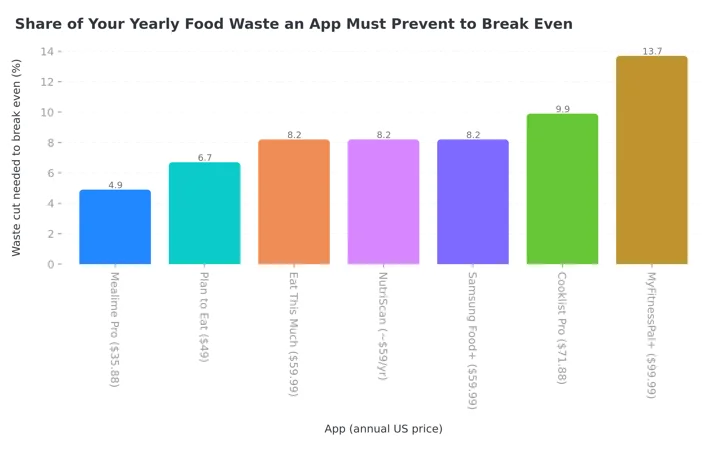 Figure 1: The cheaper the app, the smaller the waste cut it needs to justify itself. Plan to Eat clears the bar with about one saved vegetable a week; MyFitnessPal Premium+ has to earn its price on more than waste.
A 5 percent cut in your own food waste is not hard. That is one fewer wilted vegetable per week. A 13.7 percent cut is real work, so MyFitnessPal Premium+ has to earn its price on something other than waste alone, which it can, as a later section explains.
One caution on this math. The EPA figure is a per-person average across all US consumers and includes food eaten away from home, so if you rarely eat out and already shop tightly, your personal waste number is lower and every break-even threshold above gets harder to clear. Use it as a direction, not a promise.
IMPORTANT
Checkpoint: here's where you are right now.
Quick status update so you always know the next best move.
⏱️ Progress 1/4 • ~2 minutes in • Keep going
✅ Step 1: The three grocery costs (done)
👉 Step 2: The break-even math (you're here)
⏳ Step 3: Match an app to your problem
🧩 The one-list audit (coming soon)

The Apps, Compared on Price and Budget Features 📊
| App | Free version | Paid price | Direct cost control | Auto grocery list | Pantry or leftovers |
|---|---|---|---|---|---|
| Eat This Much | Daily plans, tracking, barcodes | $8.99/mo or $59.99/yr | Yes, daily price limit | Yes (paid) | Yes, pantry and auto leftovers |
| Mealime (closed Oct 21, 2026) | Full planner, basic recipes | $2.99/mo | No | Yes (free) | No |
| MyFitnessPal Premium+ | Tracking only | $24.99/mo or $99.99/yr | Cost and time filters | Yes, with delivery link | Meal Prep Mode |
| Samsung Food | Recipes, manual plans, lists | $6.99/mo or $59.99/yr | No | Yes (free) | No |
| Cooklist | Basic planning | $5.99/mo | No | Yes | Yes, pantry-first |
| Plan to Eat | 14-day trial only | $5.95/mo or $49/yr | No | Yes | Partial |
| NutriScan | 5 scans/wk, logging, macros | about $59/yr | No | Yes, weekly and monthly | No |
Two apps stand out for different reasons, and one very cheap option beats both for a specific kind of person.
Eat This Much: The Only App With a Direct Price Limit
Eat This Much is the one app in this list that lets you cap spending as a setting rather than a hope. Its help documentation describes a "daily price limit" control, and setting it to the low option excludes ingredients that are generally more expensive (Eat This Much Help). You give the generator a calorie target and a money target, and it solves for both.
The free tier generates one day of meals at a time, tracks food, reads barcodes, and lets you build custom recipes. Premium is what makes it a budget tool: a full week planned at once, an automatic grocery list, automatic leftovers, and a pantry where you record what you already have so the generator can plan around it (Eat This Much). App Store subscription tiers are listed at $8.99 monthly and $59.99 annually (App Store). Our Eat This Much pricing guide covers the free trial, the refund and how to cancel.
Where it works. One or two adults, comfortable cooking, willing to eat the same lunch twice. The leftovers logic is the part that saves money, because it is what closes the gap between a 400g package and a 200g recipe.
Where it fails. The generated meals lean Western and can be repetitive in a way some people find joyless. If you cook Indian, Chinese, or West African food most nights, the recipe pool will feel thin.
MyFitnessPal Premium+: Expensive, But It Replaces Two Subscriptions
MyFitnessPal is the most expensive option here and still the right answer for one group of people. Premium+ costs $99.99 a year, which the company lists as $8.34 a month, or $24.99 billed monthly (MyFitnessPal). The planning features live only in Premium+: Meal Plan Builder, Meal Prep Mode, Diet Preference settings, automatic grocery lists, connected grocery shopping, a library of more than 1,500 recipes, and what the company calls cost and time-saving customizations (MyFitnessPal Support).
The honest case for it is bundling. If you were going to pay for calorie tracking anyway, adding a standalone planner on top of Premium costs more than moving up to Premium+. That arithmetic is worked through in the Premium vs Premium+ comparison, and the short version is that one subscription at $99.99 beats two at $130 or more.
The dishonest case for it is savings. At $99.99 a year it needs to cut nearly 14 percent of your food waste before it has returned a cent. If you do not already track calories, this is the wrong app to buy for budget reasons.
Mealime and Samsung Food: The Cheap Route
Mealime closed on October 21, 2026. Its recipes moved to Meals Hub inside the Albertsons Companies apps, so it is no longer an option. Our pick of replacements: Mealime alternatives after the closure.
Mealime was free to plan with, and Pro cost $2.99 a month for the full recipe library, extra diet filters, and longer meal history. It had no budget setting at all. What it had instead was short recipes with small ingredient lists, and small ingredient lists are quietly the strongest anti-waste feature in any app. A recipe with six ingredients leaves fewer orphans in your fridge than one with fourteen.
Samsung Food, previously Whisk, keeps recipe saving, manual meal planning, and shopping lists on the free tier, with a Food+ subscription at $6.99 a month or $59.99 a year for AI plans and ad removal. For most budget shoppers the free tier is enough, and free is a very good price to pay for an app whose main job is turning recipes into one organized list.
Where they work. People who already know what they want to cook and just need the list built for them. If your problem is cost three from earlier, the unplanned takeout order, either of these fixes it for under $36 a year.
IMPORTANT
Checkpoint: midway progress update.
You're halfway - decisions get easier here.
⏱️ Progress 2/4 • ~4 minutes in • Keep going
✅ Step 1: The three grocery costs (done)
✅ Step 2: The break-even math (done)
👉 Step 3: Match an app to your problem (current)
⏳ The one-list audit (next)
Cooklist and Plan to Eat: Planning Around What You Already Own
Cooklist takes the pantry-first approach: it tracks what is in your kitchen and suggests meals that use it up, with Pro at $5.99 a month. Plan to Eat is for people who already have their own recipes and want a calendar and a list, at $5.95 a month or $49 a year after a 14-day trial.
Neither will cut your ingredient prices. Both attack the waste line directly, which per the EPA numbers is the larger pot of money for most households.
Simple Prep Beats Clever Prep 🍳
The "simple prep" half of this question gets less attention than price, and it decides whether you stick with any of this past week three.
A budget plan that requires four separate cooking sessions on a Sunday will not survive February. A plan that asks you to cook two base ingredients and assemble them five ways will. This is why apps with a leftovers or repeat-meal feature outperform apps with a bigger recipe library.
 Two base ingredients, five assemblies. Boring prep is the prep you will still be doing in month six.
A simple method is three anchors. Pick one grain, one protein, and one vegetable you will cook in bulk each week, then let the app fill the gaps around them. You are using the app for variety at the edges, not for the whole plan, and your grocery list stays short enough to actually price-check. If you want the calorie side of that plan grounded in real numbers, our free macro calculator gives you a daily target to hand any of these apps.

Seven Tips That Cut the Bill More Than Any App 💡
- Plan six dinners, not seven. One night will go wrong. Planning for it stops the wrong night from becoming a delivery order.
- Shop your fridge before you open the app. Enter what you already own first, or the plan will buy you a second jar of it.
- Cap the perishables. Fresh herbs, berries, and delicate greens are where waste concentrates. Buy one, not three.
- Use the price limit if the app has one. Eat This Much is the only mainstream option with a direct control, so set it rather than estimating the cost of the plan yourself.
- Repeat lunches on purpose. Cooking one lunch five times is the single biggest reduction in both cost and effort. Variety at dinner is enough variety.
- Buy the package size the recipe finishes. If the recipe uses 200g and the pack is 500g, either scale the recipe up or pick a different one.
- Check the plan against a real budget number. The USDA publishes a monthly Cost of Food at Home report, which for May 2026 put the Low-Cost plan at $63.40 a week for a woman aged 20 to 50 and $72.90 for a man in the same range, with the Moderate plan at $77.50 and $91.60 (USDA Food Plans, May 2026). Those are US averages for people in four-person households.
IMPORTANT
Checkpoint: final stretch before the reveal.
One last nudge - the reveal is next.
⏱️ Progress 3/4 • ~6 minutes in • Keep going
✅ Step 1: The three grocery costs
✅ Step 2: The break-even math
✅ Step 3: App matched to your problem
✨ The one-list audit that recovers most of the waste money (about to reveal)
Step by Step: Build a Budget Meal Plan This Sunday 📝
Step 1: Set your weekly number. Take the USDA Low-Cost figure for your household, or take your last three grocery receipts and average them. Write the number down. A plan without a number is a wish.
Step 2: Inventory the kitchen. Ten minutes with the fridge, freezer, and dry goods. List anything that must be used within seven days.
Step 3: Pick three anchors. One grain, one protein, one vegetable, bought in the largest size you will finish. These carry most of your calories for the week.
Step 4: Generate six dinners. In whichever app you chose, set your calorie target and, if available, your price limit. Six, not seven. Force the app to use your inventory items where it can.
Step 5: Assign lunches by repetition. Take one dinner and double it. That is lunch on two days. Take a second and double it for two more. Day five is leftovers of whatever survived.
Step 6: The orphan audit. This is the one-list trick I promised, and it is worth more than any subscription in this article. Read your finished grocery list and mark every ingredient that is used in exactly one recipe in a quantity smaller than its package. Each mark is pre-paid waste: the half bunch of cilantro, the fourth bell pepper, the 300g of a 500g pack. For each one, either find a second recipe that uses the rest or swap the recipe out entirely. Five minutes of reading recovers most of the $14 a week the EPA says you throw away, and it works with a paper list just as well as with any app.
Step 7: Price the list before you shop. Most delivery apps will total a basket for free even if you buy in store. If the total exceeds your Step 1 number, swap the most expensive protein and re-check.
Do this for three weeks and the plan stops being a project. By week four you are editing last week's plan instead of building a new one, which takes about ten minutes.
What the Research Says About Planning and Cost 🔬
The evidence for meal planning as a money lever is better than most app marketing suggests, and more limited in one specific way.
The strongest finding is the waste one. The EPA's 2025 analysis found consumer food waste costs $728 per person per year, roughly 11 percent of total food spending (EPA, 2025). The 2024 optimization study showed that plans built around real package sizes can push waste close to zero while holding cost and nutrition targets (van Rooijen et al., 2024).
There is also direct evidence that digital planning tools reach people under real financial pressure. A 2022 longitudinal study in JMIR Formative Research followed 4,595 users of a telehealth and nutrition platform between February and October 2021. Of those food insecure at baseline, 16 percent of the sample, 29 percent became food secure over the study period, and the authors linked that change to platform features including meal planning and discounted grocery access (Bakre et al., 2022).
The limitation worth stating plainly: these are observational and modeling results, not randomized trials of "app versus no app." People who choose to plan meals differ from people who do not, in time, in kitchen confidence, in income. The plan is probably doing real work. It is not doing all of it.
Which One Should You Pay For? ✅
If you want the cheapest thing that works: Samsung Food's free tier, which covers recipe saving, manual meal planning, and shopping lists. Mealime used to be the answer here, but it closed on October 21, 2026.
If your grocery spending is the actual problem: Eat This Much Premium at $59.99 a year. It is the only major app with a daily price limit, and its leftovers and pantry logic attacks waste where waste happens.
If you already pay for calorie tracking: MyFitnessPal Premium+ at $99.99 a year, because bundling beats two subscriptions. Do not buy it for savings alone.
If you forget what you own: Cooklist, and plan from the pantry backward.
If you need the plan to match how you actually cook, especially if that means Indian, Middle Eastern, or East Asian food most nights, most Western planners will frustrate you. This is the gap NutriScan Premium was built for: you set cuisine preferences and restrictions during setup, get a diet plan with macro and micronutrient targets, and generate a weekly and monthly grocery list you can copy straight into a notes app or a delivery basket.
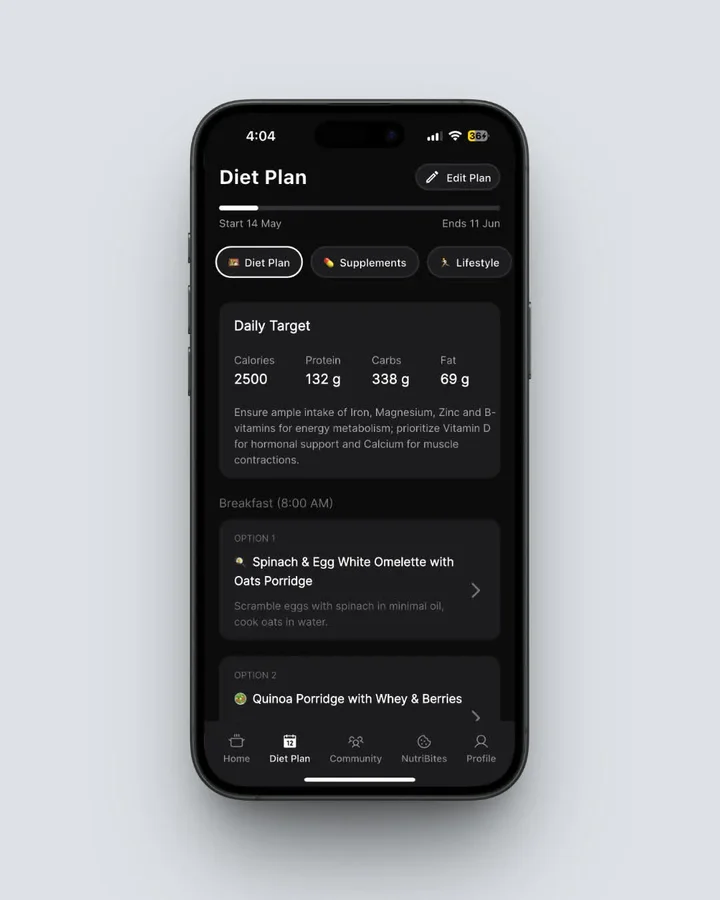 NutriScan's diet plan with daily macro and micronutrient targets. Home > Bottom Nav Diet Plan
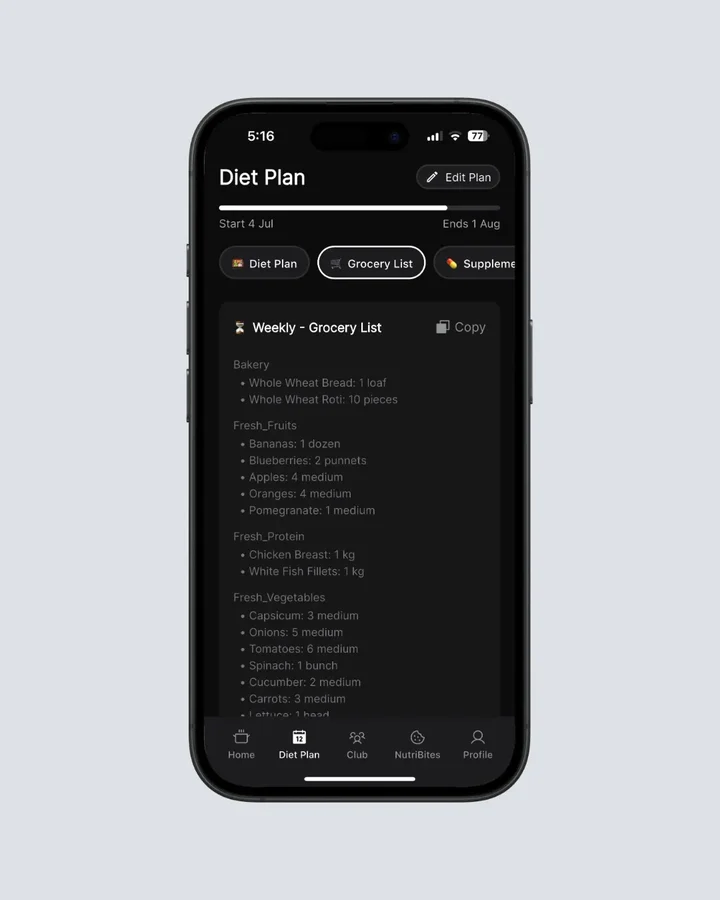 The grocery list is built from the plan, weekly and monthly, and copies in one tap. Home > Bottom Nav Diet Plan > Switch Tab to Grocery List
NutriScan Premium runs about $59 a year, and the free plan covers 5 meal scans a week, logging, macros, and meal grades if you want to test the food database before paying anything. Full details are in the NutriScan pricing breakdown.
Whichever you pick, the saving comes from the plan itself. The app earns its price by making that plan take ten minutes instead of an hour, and ten minutes is short enough that you will still be doing it in March.
IMPORTANT
Recap: everything you completed this round.
You finished the run - save this for next time.
⏱️ Progress 4/4 • ~8 minutes in • Nicely done
✅ Step 1: The three grocery costs
✅ Step 2: The break-even math
✅ Step 3: App matched to your problem
✅ The one-list orphan audit (revealed)
FAQ ❓
Q: Which meal planning app is cheapest?
Mealime Pro at $2.99 a month, or $35.88 a year, was the cheapest paid planner in this comparison, but Mealime closed on October 21, 2026. Free options exist too: Samsung Food's core tier includes recipe saving, manual meal planning, and shopping lists at no cost, and Eat This Much generates one day of meals free.
Q: Can a meal planning app really save me money?
It can, and the size of the effect depends on how much you currently waste. The EPA estimates the average US consumer discards $728 of edible food a year, about $14 a week (EPA, 2025). A $59.99-a-year app needs to prevent about 8 percent of that to break even.
Q: Which app lets me set a spending limit?
Eat This Much is the only mainstream planner with a direct control. Its help documentation describes a daily price limit that you can set to a low option to exclude generally more expensive ingredients (Eat This Much Help). MyFitnessPal Premium+ offers cost and time filters on recipes, which is a softer version of the same idea.
Q: How much should I be spending on groceries?
The USDA's Cost of Food at Home report for May 2026 lists the Low-Cost plan at $63.40 a week for a woman aged 20 to 50 and $72.90 for a man, with the Moderate plan at $77.50 and $91.60 (USDA, 2026). These are US averages for individuals in four-person households and assume all meals are prepared at home, so treat them as a benchmark rather than a rule.
Q: Is meal prep the same as meal planning?
No, and the difference matters for your budget. Planning decides what you will eat and what you will buy, which is where waste is prevented. Prep is the cooking session that makes the plan easy to follow. You can plan without prepping and still save money.
Q: Do I need a paid app to plan meals on a budget?
No. A paper list, a phone note, and the rule that every ingredient must appear in two recipes will get you most of the benefit. Pay for an app when the ten minutes it saves each week is the difference between planning and not planning.