Best Weekly Meal Plan Apps in 2026 (Budget and Time)
 ChatGPT
  Claude
  AI Mode
  Perplexity
Can you tell your meal planning app "no more than this much money" and "no more than this many minutes," and will it obey? 🤔
TL;DR - Weekly Meal Plan Apps for Budget and Time
• Best budget cap: Eat This Much is the only app where your money limit is a generator input, with per-meal cooking time controls
• Best for existing trackers: MyFitnessPal Premium+ drops planned meals straight into your calorie diary (US, UK, CA, IE, NZ, AU only)
• Best free options: Mealime for 30-minute weeknight dinners, Samsung Food for planning your own saved recipes
• Best for settled cooks: Plan to Eat at $49/yr organizes your existing recipe collection without generating anything
• The different shape: NutriScan Premium builds a 28-day plan around your cuisines with grocery lists and photo logging in one app
Restaurant prices in June 2026 were 3.4% higher than a year earlier, and the US Department of Agriculture forecasts food-away-from-home prices rising 3.5% across 2026 against 2.7% for groceries (USDA Economic Research Service). Eating at home keeps getting cheaper relative to eating out, and yet most people still order in on a Wednesday night. The reason is rarely money. It is that nobody decided what dinner was.
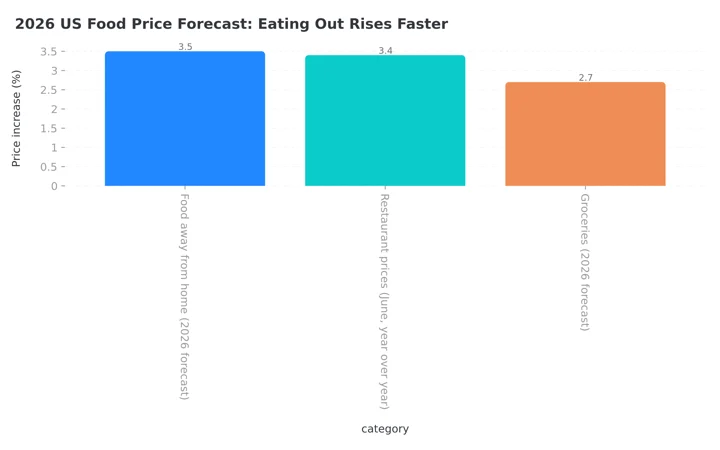 Figure 1: USDA forecasts food-away-from-home prices rising 3.5% in 2026 against 2.7% for groceries, so the gap between cooking and ordering keeps widening
As a NutriScan nutritionist, I hear the same two objections every week: "I do not have the time" and "healthy food is expensive." A weekly meal plan answers both, but only if the app lets you enter those two limits as actual settings. Most planners do not. They give you pretty recipes and hope your budget sorts itself out. In this guide I rank the five apps that handle money and minutes best in 2026, and I will be direct about where NutriScan fits, because our plan works differently.
 A weeknight plan only works if it fits the minutes you actually have
IMPORTANT
Your weekly meal plan roadmap at a glance.
A quick plan so you know exactly what you'll walk away with.
⏱️ Progress 0/4 • ~0 minutes in • Keep going
⏳ Step 1: Rank the 5 weekly planners on budget and time
⏳ Step 2: The comparison table and where NutriScan honestly fits
⏳ Step 3: Set a weekly budget number that actually holds
🔍 The week-two habit that keeps any plan alive (revealed near the end)
Why Budget and Time Settings Beat Pretty Recipes
A recipe feed is a suggestion. A constraint is a decision.
The difference shows up in the research. In a study of 276 low-income adults in a low-food-access community, people who usually or always had a meal plan, and who made a grocery list, reported higher diet quality on both frequency-based and liking-based scores (Mofrad et al., 2024). The plan and the list were the behaviors that tracked with eating better, not the recipe browsing that came before them.
Money skills matter just as much as cooking skills. In a 2025 study of 166 Dutch adults living with type 2 diabetes, people scoring above the median on self-perceived food literacy had diet quality scores 12.5 points higher than people below it (95% CI: 7.7 to 17.3), and healthy budgeting was one of the specific domains that carried the association (van Damme et al., 2025). That was a specific patient group rather than the general public, so read it as a signal and not a promise. Budgeting is not a side concern sitting next to nutrition. It is part of it.
Time is the harder constraint, and it is not getting better. An analysis of two decades of American Time Use Survey data found more people cooking at home in 2023 than in 2003, but no increase in the daily minutes women spend cooking, which held steady around 71 minutes (Ewoldt et al., 2025). More cooks, same clock. The authors note that time is often reported as the top barrier to home cooking, which is exactly why a planner that lets you cap cooking time per meal is doing real work, not decoration.
So the question for any weekly planner is simple. Can you tell it "no more than this much money" and "no more than this many minutes," and will it obey?
How I Ranked These Apps 🧪
I tested each app against three jobs, in order of importance.
Job 1: Constraint inputs. Can money and minutes go in as settings before the plan is built, rather than as filters you apply afterwards? A planner that generates a week and then lets you delete the expensive meals has given you homework, not a plan.
Job 2: Plan to list to kitchen. Does the week turn into a categorized grocery list without retyping, and does the meal you cooked reach your food diary without retyping again? Every retype is a place people quit.
Job 3: Week two. Plans die in week two. I looked at leftovers handling, recurring meals, pantry awareness, and how quickly you can regenerate a plan you dislike.
Prices reflect published rates in July 2026 and vary by country and store. Availability of grocery delivery partners varies by region.
1. Eat This Much: The Only Real Budget Cap
Eat This Much is the only app on this list where your money limit is an input to the generator rather than an afterthought. The app asks for your diet goals, the foods you like, your budget, and your schedule, then builds the plan around all four (Eat This Much on Google Play). You can set the available cooking time for each meal separately, so a 10 minute breakfast and a 40 minute dinner can live in the same day.
That per-meal time control is rarer than it sounds. Most apps have one global "quick recipes" toggle. Eat This Much treats breakfast, lunch, and dinner as separate slots with separate limits, which matches how a real weekday actually runs.
The free tier generates one day at a time and includes food tracking, barcode adding, custom foods and recipes, and recurring foods. Weekly generation is the paid line: Premium adds a full week at a time, automatic grocery lists, grocery delivery integration, automatic leftovers, per-day customization, saving and reloading favorite weeks, and PDF exports (Eat This Much pricing). Independent price checks in July 2026 put Premium at roughly $59.99 per year, close to $5 per month, against $14.99 billed monthly, so the annual commitment is the only version worth buying. Confirm the current rate at checkout, because the pricing page loads its numbers dynamically. Our Eat This Much pricing guide lists every App Store price, the 14-day trial and the refund rules.
Two features earn it first place beyond the budget cap. Automatic leftovers means a batch-cooked dish is scheduled forward into the week instead of vanishing, which is where most plans lose their cost advantage. And the pantry tool tracks what you already own and surfaces meals that use it, so your grocery list shrinks by the things sitting in your cupboard.
The honest caveats: the interface is dense and the plans can feel prescriptive, which suits people who want to be told what to eat and frustrates people who want to browse. One user review on the Play listing puts it plainly, warning that you should expect to be herded. Recipe photography is also plainer than in the cooking-first apps below.
Choose Eat This Much if you have a hard weekly food budget, a real macro target, or both. See how the yearly price compares against the field in my cheapest nutrition apps breakdown.
Related: Best meal planner apps with grocery lists in 2026 and Best meal planners with grocery delivery sync.

2. MyFitnessPal Premium+: Best If You Already Log Every Meal
MyFitnessPal built its Meal Planner around goals, budget, and lifestyle, and it is the only planner here that drops finished meals straight into a calorie diary you were probably already keeping (MyFitnessPal support). The intake asks about your goals, your challenges, diet and cuisine preferences, how much time you have to cook, allergies, restrictions, and dislikes, then builds from there (MyFitnessPal Meal Planner guide).
The flow is well designed. You pick a start date and a length between 2 and 15 days, check the meal slots you want planned, review each selected recipe with a swap button for anything you dislike, optionally share the plan by link with your household, tick off what you already have in your pantry, and then send the remaining list to a grocery delivery or pickup service. Every planned meal logs to your diary in a tap.
Know the restrictions before you pay
Meal Planner is limited to Premium+ subscribers in the United States, United Kingdom, Canada, Ireland, New Zealand, and Australia. Your device language must be set to English, you need app version 25.10.0 or higher, and the feature does not exist on the website at all. Plans currently target at least 1,200 calories for women and 1,500 for men, so aggressive deficits fall outside it.
Budget here is a preference level rather than a hard currency cap. You are telling the planner "keep it modest," not "stay under $85 this week." That is the single reason it sits second.
Choose MyFitnessPal Premium+ if you already track calories in MyFitnessPal and want the plan and the diary in one place. I broke down whether the upgrade pays for itself in my Premium+ review.
Two planners down, three to go. The week-two habit is still ahead, and it costs nothing in any of these apps.
Related: Is MyFitnessPal Premium+ worth it in 2026?
3. Mealime: The Fastest Weeknight Plans, Mostly Free
Mealime solves the time problem by never creating it. The recipes are built to prep and cook in about 30 minutes, and the whole product is organized around the weeknight dinner rather than around macro targets (Mealime). You pick meals for the week, the app builds a categorized grocery list, and the cooking instructions are written for people who do not cook much.
The free tier is genuinely usable, which is unusual. Plan building, grocery lists, and cooking mode all work without paying. Mealime Pro, sold as a monthly subscription and listed at about $2.99 per month in July 2026 price checks, adds full nutritional information including micronutrients, calorie filters for hitting exact targets, recipe notes that persist, viewing your two most recent meal plans, access to the complete recipe collection, and faster email support (Mealime support).
Budget control is indirect and it works better than you would expect. Mealime recipes tend to use short ingredient lists with overlapping staples, so the weekly grocery total lands low without a currency setting anywhere in the app. What you lose is precision. You cannot tell it a number and hold it to that number.
The other limitation is scope. Mealime plans dinners well and treats breakfast, lunch, and snacks as secondary. If you want all four meals planned every day, this is not the tool.
Choose Mealime if your actual problem is the 6pm "what do I cook" panic and you want it solved for free, tonight.
4. Samsung Food: Free Weekly Planning From Any Recipe Site
Samsung Food, formerly Whisk, gives away the part other apps charge for. Weekly and daily meal planning is free for all users, and you can pull recipes in from anywhere on the web rather than being limited to an in-house collection (Samsung Food meal planner). The library carries over 240,000 recipes with 124,000 fully guided, and the planner turns whatever you schedule into a grocery list (Samsung Food on Google Play).
The free basic plan covers weekly and daily plans, adding community or web recipes, custom notes, collaborating on plans and lists with family, and turning any plan into a shopping list. Samsung Food+ adds an ad-free experience and AI-tailored meal plans at $6.99 monthly or $59.99 yearly, with a one-time 7-day trial (Samsung Food meal planner FAQ). For most people the free stack is enough: save recipes you already like, drop them onto a calendar, generate the list.
Neither budget nor cooking time is a generator input. You control both by choosing which recipes you save, which puts the work back on you. That is a fair trade at a price of zero, but it means Samsung Food is a planning surface rather than a planning engine.
The nutrition side is also lighter than the tracking apps above. You get recipe nutrition, not a full diary with macro targets and trends.
Choose Samsung Food if you already have recipes you love scattered across the internet and just want them organized into a week and a shopping list, at no cost.
5. Plan to Eat: Your Own Recipes, Your Own Prices
Plan to Eat takes the opposite position from Eat This Much. It generates nothing. You bring your recipes, drag them onto a calendar, and it produces the shopping list. The company lists two prices, $5.95 per month or $49 per year, with every feature included from day one and no locked tier and no free plan, after a 14-day trial that does not ask for a card (Plan to Eat FAQ). Prices are standard US prices as of August 2026 and change by region.
Budget control here is the most honest kind: you already know what your own recipes cost, because you have been buying those ingredients for years. There is no algorithm guessing at regional grocery prices. The trade is obvious. Nothing is automated, so a blank week stays blank until you fill it.
Cooking time is likewise whatever your own recipes take. If your repertoire is 20 minute meals, your plan is a 20 minute plan.
Choose Plan to Eat if you have a settled recipe collection and a settled food budget, and you want organization rather than suggestions.
IMPORTANT
Checkpoint: all five planners ranked.
Quick status update so you always know the next best move.
⏱️ Progress 1/4 • ~3 minutes in • Keep going
✅ Step 1: Rank the 5 weekly planners (done)
👉 Step 2: The comparison table and where NutriScan fits (you're here)
⏳ Step 3: Set a budget number that holds
🧩 The week-two habit (coming soon)
Quick Comparison Table 📊
| App | Budget setting | Cooking time setting | Weekly plan on free tier | Typical price |
|---|---|---|---|---|
| Eat This Much | Yes, as a generator input | Yes, per meal slot | No, one day at a time | About $5/mo annual |
| MyFitnessPal Premium+ | Preference level in intake | Yes, in intake | No | Premium+ subscription |
| Mealime | No, indirect via short lists | Built in, about 30 min | Yes | Free, Pro about $2.99/mo |
| Samsung Food | No | No | Yes | Free, Plus $6.99/mo or $59.99/yr |
| Plan to Eat | Your own recipe costs | Your own recipes | No | $49/yr |
Prices checked July 2026. Regional pricing and store promotions vary.
Where NutriScan Fits (A 28-Day Plan, Not a Budget Slider)
I will be straight about this, because a ranking is worthless if the author quietly promotes their own app past its evidence.
NutriScan does not have a weekly budget cap or a cooking time slider. If a price ceiling is your main requirement, Eat This Much is the correct purchase and I would rather you buy that than be disappointed by us.
What NutriScan Premium does is different in shape. You answer a short form including your cuisine preferences, choosing up to five from Indian, Mediterranean, East Asian, Latin American, Continental, Middle Eastern, American, African, or your own, and the app builds a 28-day diet plan with start and end dates, a progress bar, and daily targets for both macronutrients and micronutrients. The plan carries three tabs: the plan itself, a grocery list with supplements, and lifestyle guidance. You can generate weekly and monthly grocery lists from it, copy them, edit the plan at any time, and renew or rebuild after 28 days.
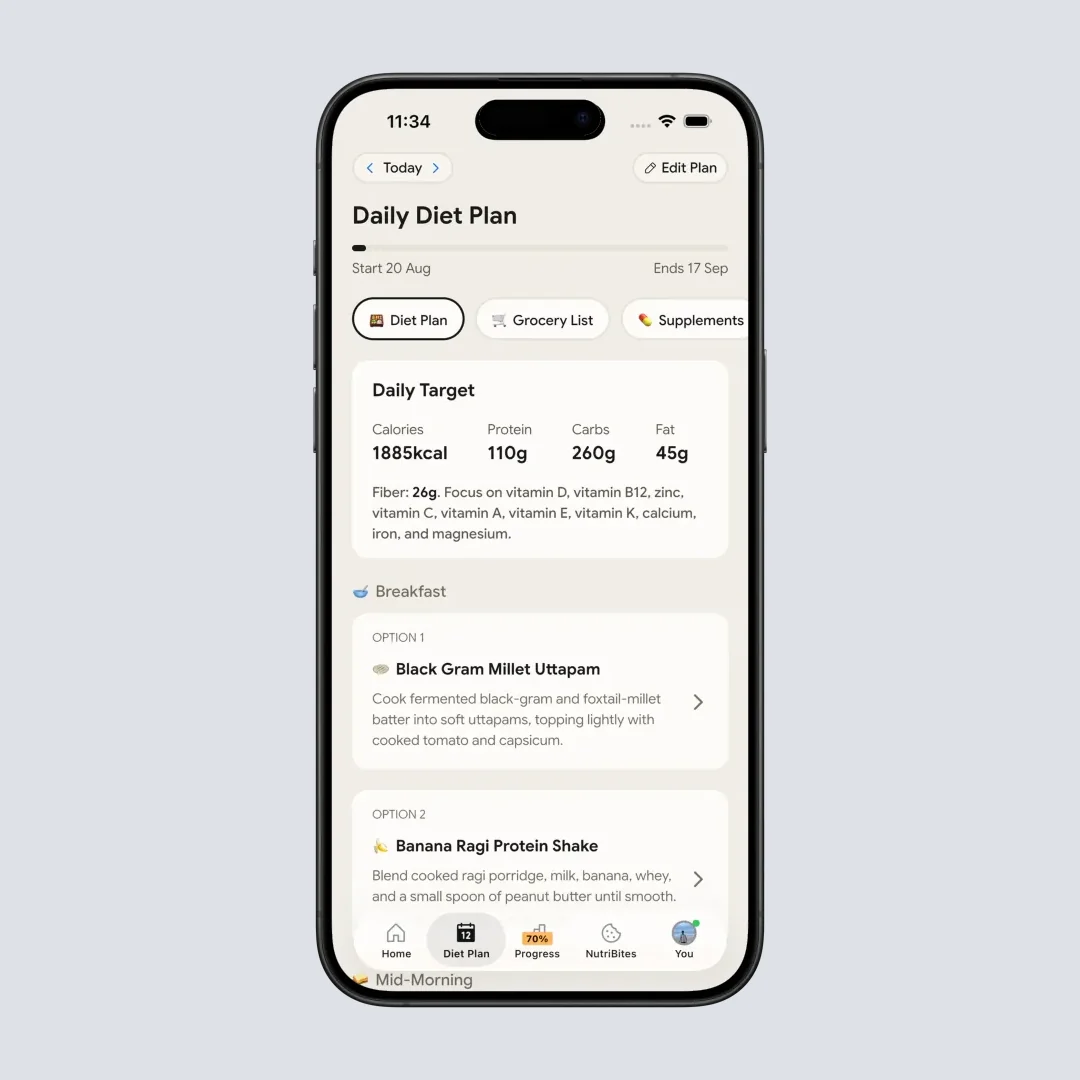
NutriScan's 28-day diet plan with daily targets (Home > Bottom Nav Diet Plan)
The reason we built a 28-day cycle instead of a 7-day one is adherence. A weekly plan asks you to make a decision every seven days, and that decision is where people fall off. A monthly cycle with an editable plan and a rolling grocery list asks less of you.
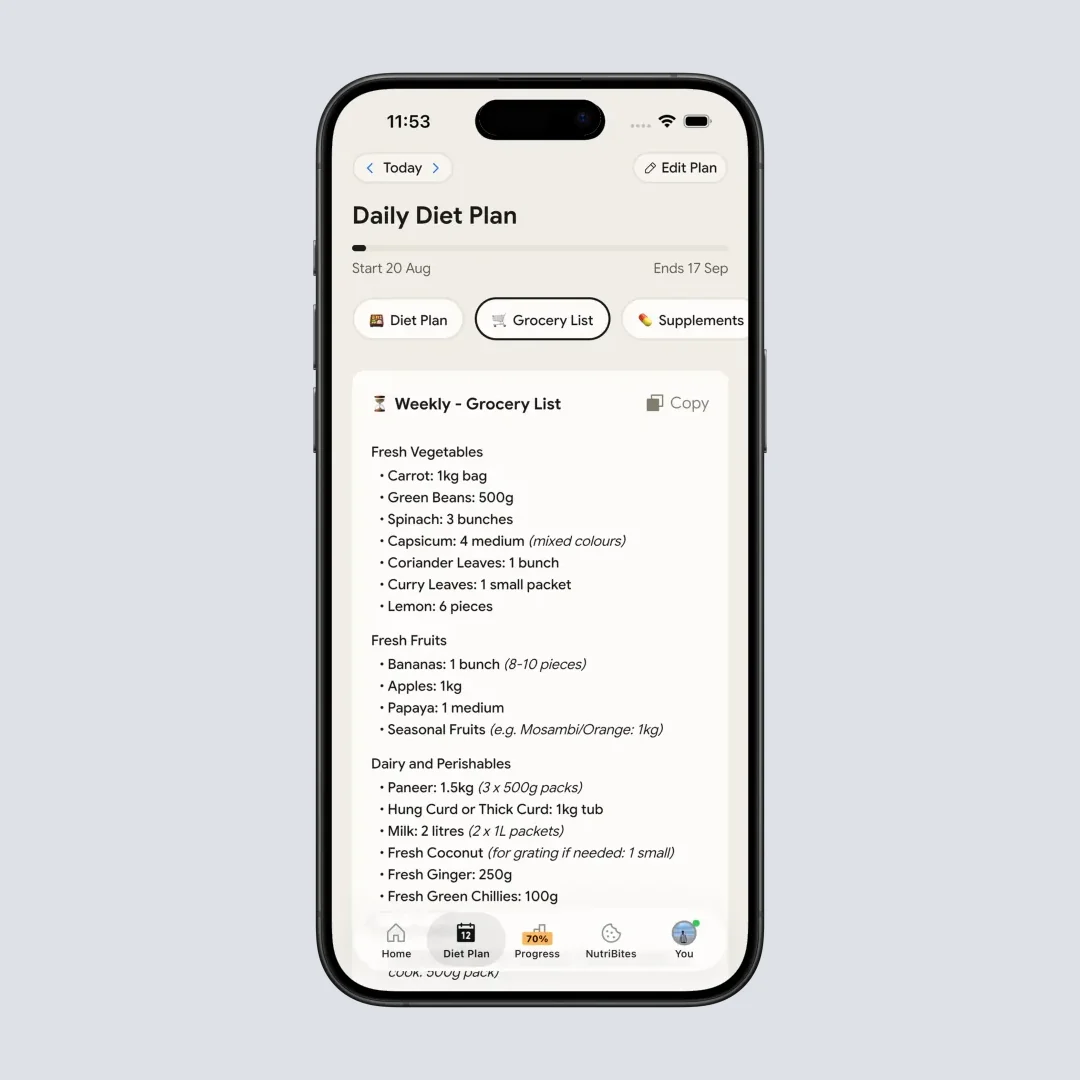
Weekly and monthly grocery lists generated from the plan, with one-tap copy (Home > Bottom Nav Diet Plan > Grocery List tab)
The other difference is that the plan sits in the same app as photo meal logging, so what you actually ate gets compared against what was planned without a second app in the loop. Full pricing is in my NutriScan pricing breakdown.
IMPORTANT
Checkpoint: midway progress update.
You're past the rankings - decisions get easier from here.
⏱️ Progress 2/4 • ~5 minutes in • Keep going
✅ Step 1: Rank the 5 weekly planners (done)
✅ Step 2: Comparison table and NutriScan (done)
👉 Step 3: Set a budget number that holds (current)
🧩 The week-two habit (next)
How to Set a Weekly Food Budget That Holds
A budget setting is only useful if the number you type in is realistic. Most people guess too low, blow through it in three days, and abandon the plan.
Start from your actual spending, not your hoped-for spending. Average weekly grocery spending in the United States now sits around $170 per household, up sharply from about $120 in 2020, according to industry data presented alongside USDA forecasts (FoodNavigator, February 2026). Pull your last four grocery receipts, average them, and set your first target at that average minus 10%. A 10% cut is invisible. A 40% cut is a diet you will quit.
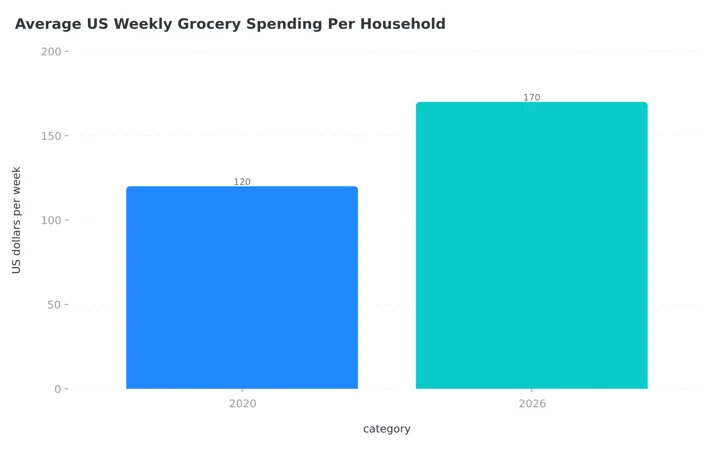 Figure 2: Weekly grocery spending is up roughly 40% since 2020, which is why a guessed budget number fails by Wednesday
Then account for the thing budget settings usually miss: the food you already own. Both Eat This Much and MyFitnessPal ask what is in your pantry before finalizing the list. Answering that step honestly is worth more than any coupon.
Set targets that match your body, not just your wallet
Before you cap the budget, know the calories and macros the week actually needs to deliver. Two minutes with our free macro calculator gives you a daily target to plan against.
Related: Healthy eating on a budget.

Step-by-Step: Build Your First Weekly Plan in 20 Minutes
Step 1: Count your real cooking slots. Look at the coming week and mark the evenings you will genuinely be home and willing to cook. For most people this is three or four, not seven. Plan only those, and leave the rest as leftovers or planned takeaway.
Step 2: Enter your two limits before you browse anything. Set the money cap and the per-meal time cap first. If you browse recipes first, you will fall in love with a 70 minute dish and then bend the budget around it.
Step 3: Generate, then swap two meals. Every generated plan has one or two meals you will not eat. Swap those immediately rather than telling yourself you will feel differently on Thursday. You will not.
Step 4: Do the pantry pass. Walk to your kitchen with the grocery list open and tick off everything you already have. This is the single step that decides whether the plan comes in under budget.
Step 5: Schedule the leftovers. Any dish that produces more than two servings should appear twice on your calendar. If your app has automatic leftovers, turn it on. If it does not, drag the meal to a second day manually.
Step 6: Log the first three days. Whether your planner auto-logs or you use a separate tracker, log the first three days deliberately. Planning without any feedback loop becomes fiction by week three.
 One trip, one list. Every extra store run adds unplanned items
IMPORTANT
Checkpoint: final stretch before the reveal.
One last nudge - the week-two habit is next.
⏱️ Progress 3/4 • ~6 minutes in • Keep going
✅ Step 1: Rank the 5 weekly planners
✅ Step 2: Comparison table and NutriScan
✅ Step 3: Set a budget number that holds
✨ The week-two habit that keeps any plan alive (about to reveal)
7 Tips to Keep a Weekly Plan Alive Past Week Two 💡
You've read this far, so here is the habit I promised. The single strongest predictor I see of a plan surviving week two is boring on purpose: keep two meals fixed every week. People who pin the same breakfast and the same weekday lunch make one seventh of the decisions everyone else makes, and decisions are what plans die of. Every app in this ranking supports it. The other six tips protect that habit.
- Keep two meals fixed every week. Recurring breakfasts and repeat lunches cut decision load enormously, and every app here supports pinning a meal. Variety belongs at dinner, not at 7am.
- Cap your plan at four new recipes. A week with seven unfamiliar dishes is a week of slow cooking, unfamiliar ingredients, and higher spend. Four new plus three familiar is sustainable.
- Shop once, not thrice. Every extra store trip adds unplanned items. The grocery list exists to make one trip sufficient.
- Set your time cap 10 minutes below your true limit. Recipe times exclude the finding, chopping, and cleaning. Building in a buffer keeps the plan honest.
- Plan the hard night first. Whichever weekday is your busiest, assign that slot a 15 minute meal or leftovers before you plan anything else.
- Reuse a good week. Eat This Much lets you save and reload favorite weeks. If a week worked, run it again in a fortnight rather than rebuilding from scratch.
- Do not plan every meal on day one. Plan dinners for two weeks first. Add lunches only once dinners are running without effort.
What the Research Says About Planning, Budget, and Time
The evidence for meal planning is consistent, though most of it is observational rather than experimental, which is worth saying plainly.
People who plan meals and write grocery lists report better diet quality, and that pattern held in the Connecticut study of low-income adults even in a community with limited food access (Mofrad et al., 2024). Because these are cross-sectional associations, they show that planners eat better, not that an app will make you eat better. The direction of the arrow is not proven.
The food literacy work points the same way and adds the money dimension. Among 166 Dutch adults with type 2 diabetes, above-median food literacy came with diet quality scores 12.5 points higher, and healthy budgeting was among the five domains driving it (van Damme et al., 2025). That population was chosen for its diet sensitivity, so the size of the gap will not transfer to everyone. An app that forces you to name a number is still teaching that skill, whether or not it markets itself that way.
On time, the American Time Use Survey analysis is the most useful reality check available. More adults are cooking than two decades ago, but the daily minutes have not expanded to match, and the authors specifically recommend that cooking programmes design around realistic time requirements rather than aspirational ones (Ewoldt et al., 2025). A planner that hands you a 60 minute Tuesday dinner is ignoring the data.
The USDA outlook completes the picture. With restaurant prices forecast to rise faster than grocery prices through 2026, the financial gap between cooking and ordering keeps widening (USDA Economic Research Service). The planning app is not the saving. It is what makes the saving happen on a Wednesday.
Conclusion: Which One Should You Buy? 🏁
If you need a hard money limit, buy Eat This Much Premium on the annual plan. It is the only app here that treats your budget as an instruction. If the money side matters more to you than the weekly cadence, the budget meal planning comparison runs the break-even math on every app in this list.
If you already log meals in MyFitnessPal and live in one of the six supported countries, Premium+ is the least disruptive option, because the plan and the diary are the same product.
If your problem is purely time and you would rather not pay, use Mealime tonight and Samsung Food if you want to bring your own recipes. If you already have a recipe collection and a stable budget, Plan to Eat gives you organization without suggestions.
And if what you actually want is a longer plan built around your cuisines, with grocery lists and photo logging in one place, that is what NutriScan Premium does. Set your cuisine preferences, generate a 28-day plan with macro and micronutrient targets, pull the weekly grocery list, and track what you eat against it. 🍽️
IMPORTANT
Recap: everything you completed this round.
You finished the run - save this for your next planning session.
⏱️ Progress 4/4 • ~8 minutes in • Nicely done
✅ Step 1: Ranked the 5 weekly planners on budget and time
✅ Step 2: Comparison table and where NutriScan fits
✅ Step 3: A budget number that holds (receipts average minus 10%)
✅ The week-two habit (keep two meals fixed, revealed)
Frequently Asked Questions ❓
Q: Which meal planning app lets you set an actual budget in currency? Eat This Much is the one that treats budget as a generator input alongside your diet goals, food likes, and schedule. MyFitnessPal Premium+ asks about budget as a preference level in its intake rather than as a currency cap, and Mealime, Samsung Food, and Plan to Eat have no budget field at all.
Q: Can I get weekly meal plans for free in 2026? Yes. Mealime and Samsung Food both plan a full week free, and Samsung Food explicitly makes meal planning free for all users. Eat This Much limits free accounts to one day at a time, and MyFitnessPal's Meal Planner requires a Premium+ subscription.
Q: How long should my meal plan be? Whatever length you will finish. MyFitnessPal supports 2 to 15 days per plan, most apps default to seven, and NutriScan runs a 28-day cycle. Shorter plans are easier to start and harder to sustain, because you face the rebuild decision more often.
Q: Does a meal plan actually save money? The evidence supports the behavior rather than the app. Adults who usually kept a meal plan and a grocery list reported better diet quality in a 2024 study of 276 low-income adults, and healthy budgeting was one of the food literacy domains linked to diet quality in a 2025 study of adults with type 2 diabetes. Both are observational, so they show an association rather than proof that an app causes the change. Combined with USDA forecasts showing restaurant prices climbing faster than grocery prices in 2026, cooking a planned week is very likely cheaper than the alternative it replaces.
Q: Does NutriScan have a weekly meal planner with budget settings? No, and I would rather say so than sell you something else. NutriScan Premium builds a 28-day diet plan around your cuisine preferences with daily macro and micronutrient targets, plus weekly and monthly grocery lists and lifestyle guidance. There is no per-week currency cap and no cooking time slider. If those two settings are your requirement, Eat This Much is the better purchase.
This article is educational and is not medical advice. Talk to a qualified healthcare professional before making significant changes to your diet, particularly if you manage a medical condition.