Pretty good app honestly. Logging meals is fast and the macro breakdown is easy to read. Photo scan gets confused on some Indian dishes though, fix that and it's 5 stars for sure.
Weekly Meal Planner App With Calories and Grocery List
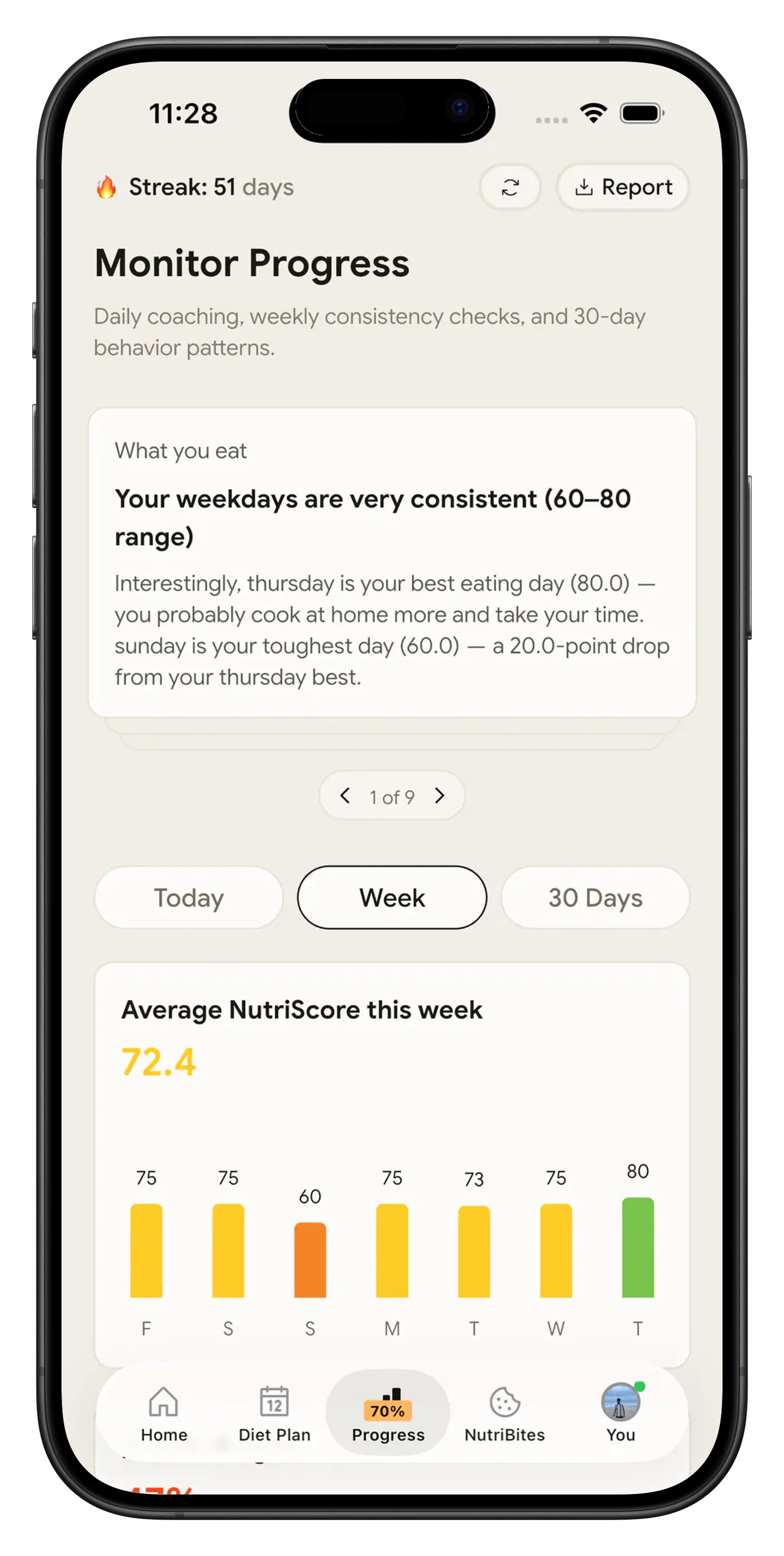
Sunday evening, seven dinners to decide, a shopping list to write. Most weekly meal planner apps hand you the recipes and stop there: you add up the calories yourself, you copy ingredients into a list, and by Wednesday nothing knows whether you cooked any of it. NutriScan builds the plan from your goal and your kitchen, prints the grocery list off the back of it, and logs what you actually ate from a photo of the plate.

The gap between a recipe list and a week that works 📋
Planning ahead is not a small habit. Ducrot and colleagues, in the International Journal of Behavioral Nutrition and Physical Activity in 2017, studied 40,554 French adults in the NutriNet-Sante cohort: meal planners ate a wider variety of foods and scored better on national dietary guidelines, and the women among them had lower odds of being overweight (odds ratio 0.92) and of obesity (0.79).
The apps built for that habit tend to be recipe apps with a calendar attached. Three things usually go missing:
- The numbers. A recipe card gives calories per serving. Nobody adds up the day, so a 500 calorie lunch and a 900 calorie dinner stay two separate facts.
- The list, unless you pay. Eat This Much puts daily plan generation and food tracking in its free tier. Planning a whole week at a time and the automatic grocery list sit on the paid tier.
- What you actually ate. Mealime plans a week and sorts the shopping list into aisles for free, with over 200 personalization options, but keeps no food log. It is also closing: the team says the app is discontinued on October 21, 2026, moving to Meals Hub inside the Albertsons store apps.
So the week gets planned and then quietly stops being tracked.
What the NutriScan plan actually contains 🧾
A dated plan, not a recipe feed
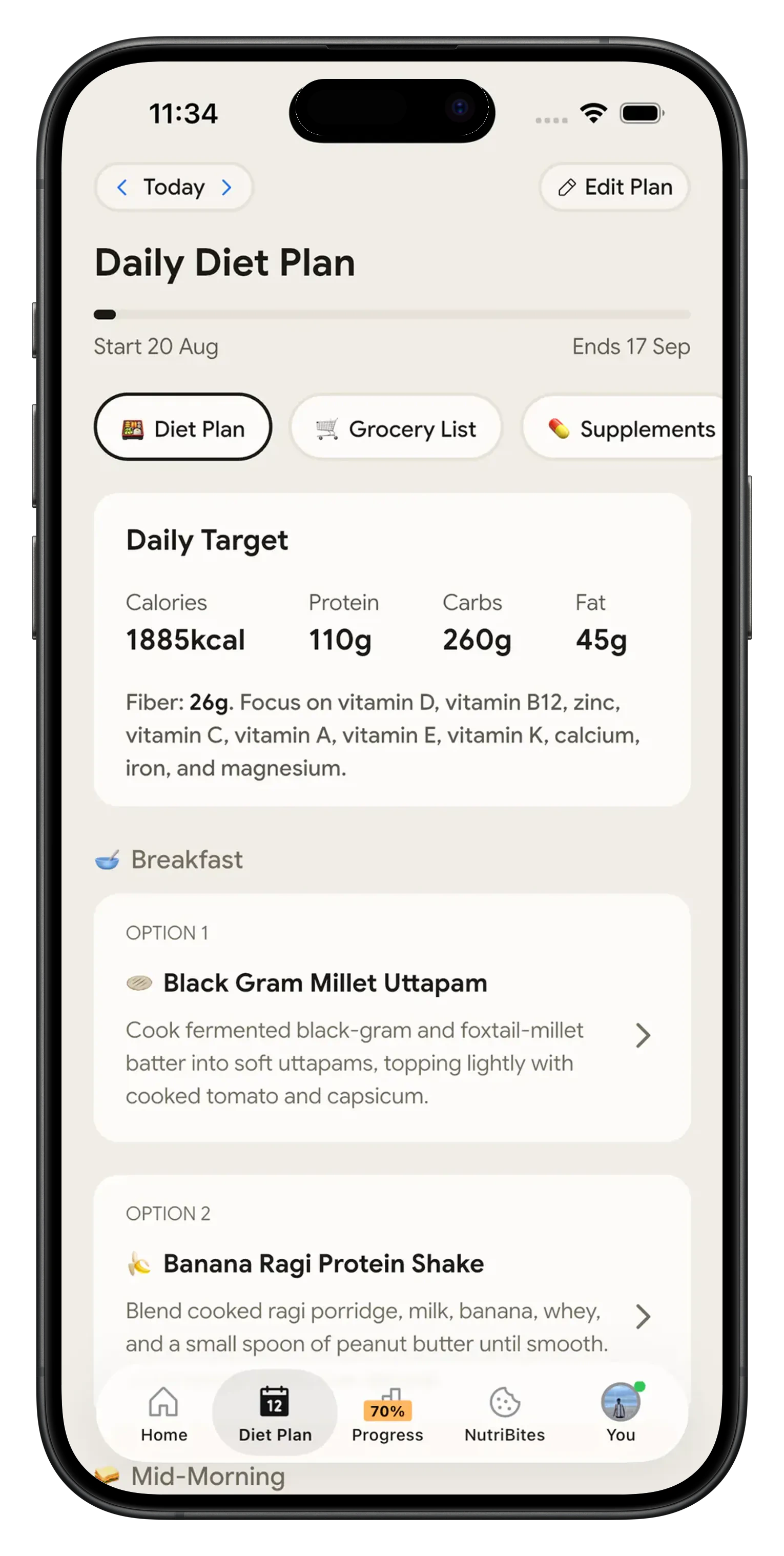
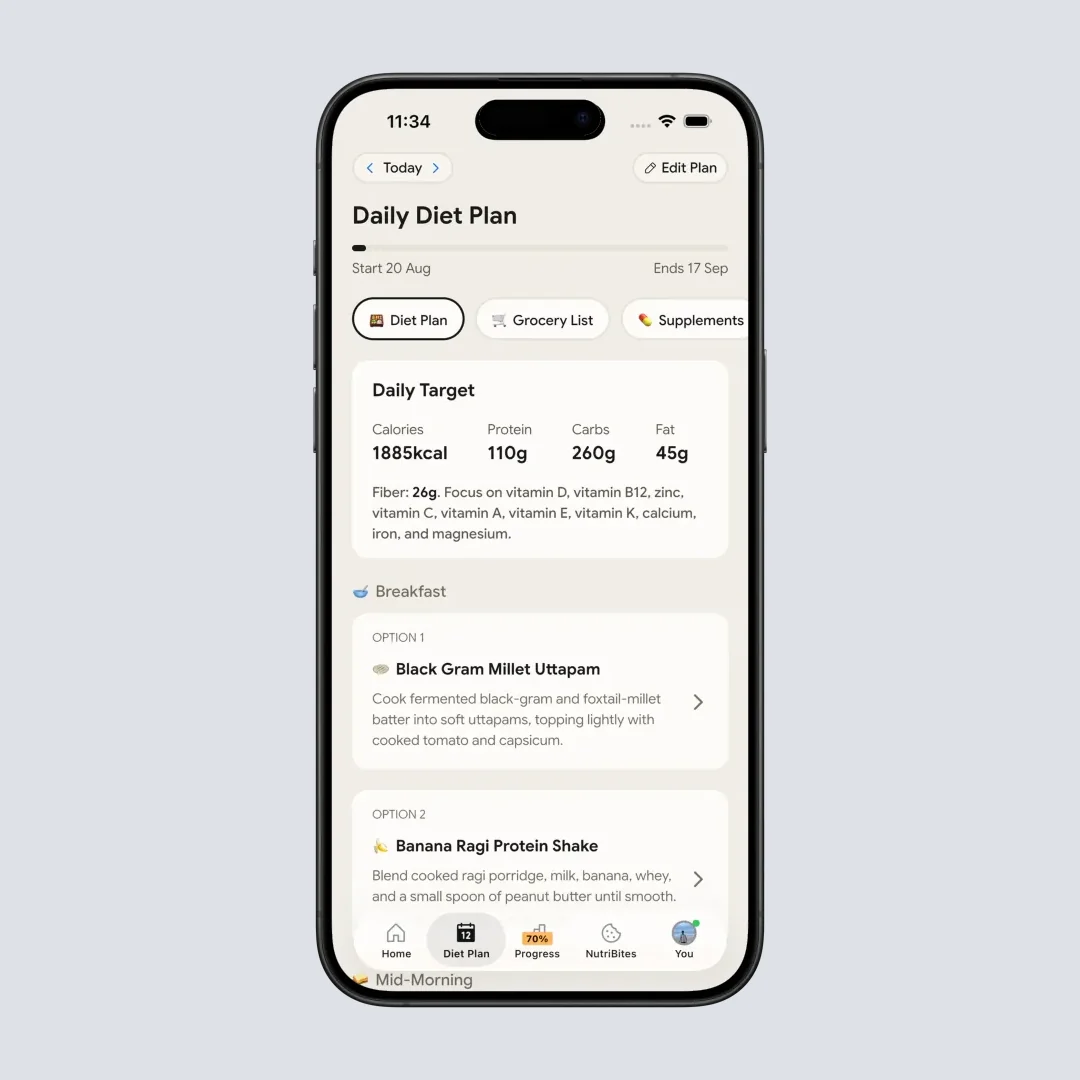
28 days with a start date, an end date and a progress bar. Every slot in your eating schedule gets two meal options, and tapping one opens the quick recipe, the portion size, what the dish helps with and the full nutrition breakdown. It is built from your goal, your food preference (vegan, vegetarian, eggitarian or non-veg), anything you cannot eat, and up to five cuisines out of eight, from Indian and Mediterranean to Latin American and African.
Every day has a target
Calories, protein, carbs, fat and fiber for the day, plus the micronutrients the plan is steering toward, sitting at the top of the screen above the meals.
The shopping list writes itself
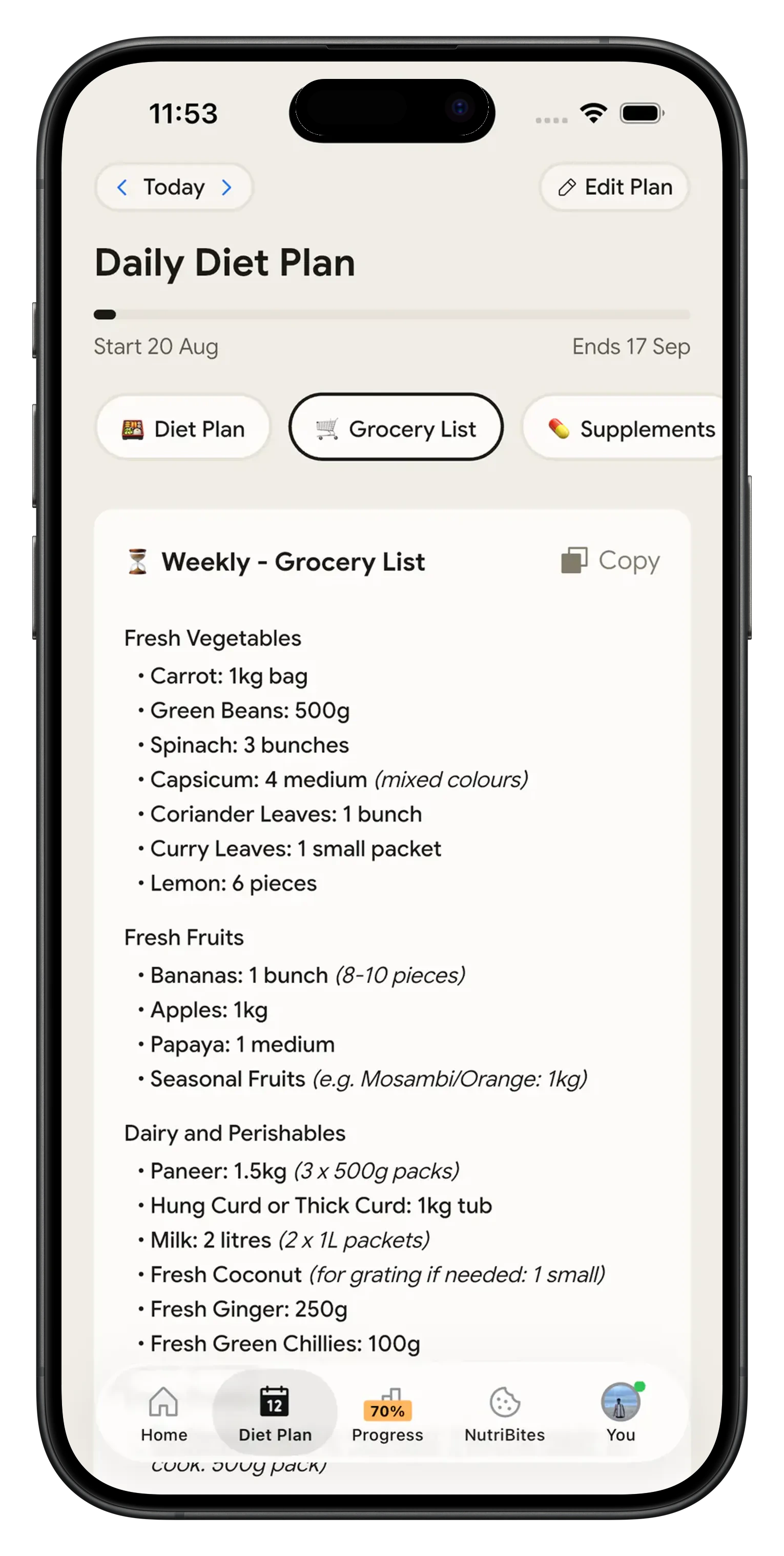
Weekly and monthly lists generated from the plan, grouped into fresh vegetables, fruit, dairy and the rest, with real quantities. One tap copies the whole thing.
Photo logging on the same screen
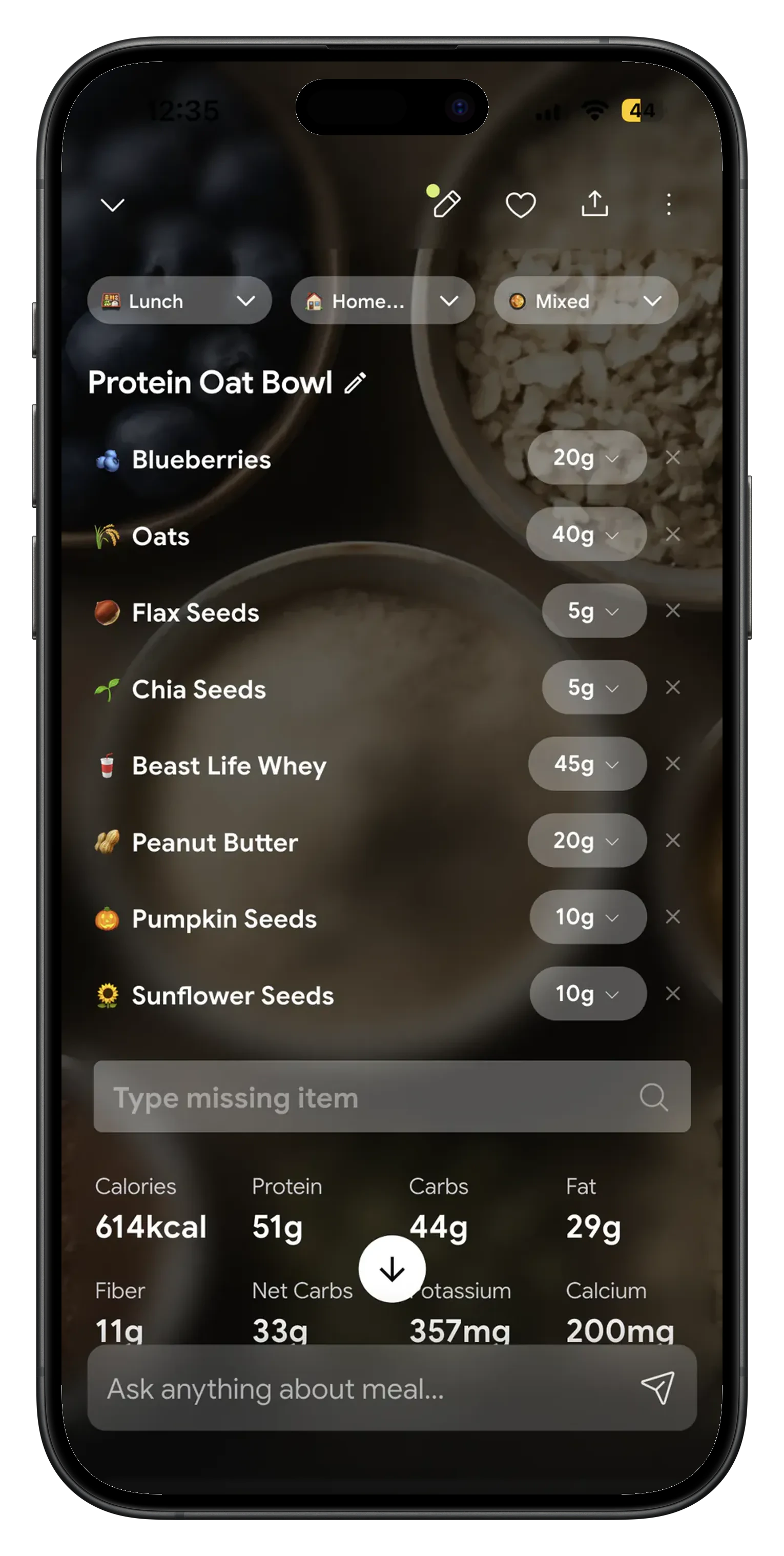
Point the camera at the plate and get calories, macros, micronutrients and a NutriScore back. Five scans a week are free; typing and voice entry are unlimited.
Edit Plan instead of starting over
New shift pattern, a food that stopped agreeing with you, a goal that changed: tap Edit Plan, change the answers, and the plan is rebuilt. Renew it the same way after 28 days. If you already know your numbers, set them in Profile, Modify Macros, and the plan and the log both work to those.
From an empty week to a shopping list 🛠️
Answer the setup form once
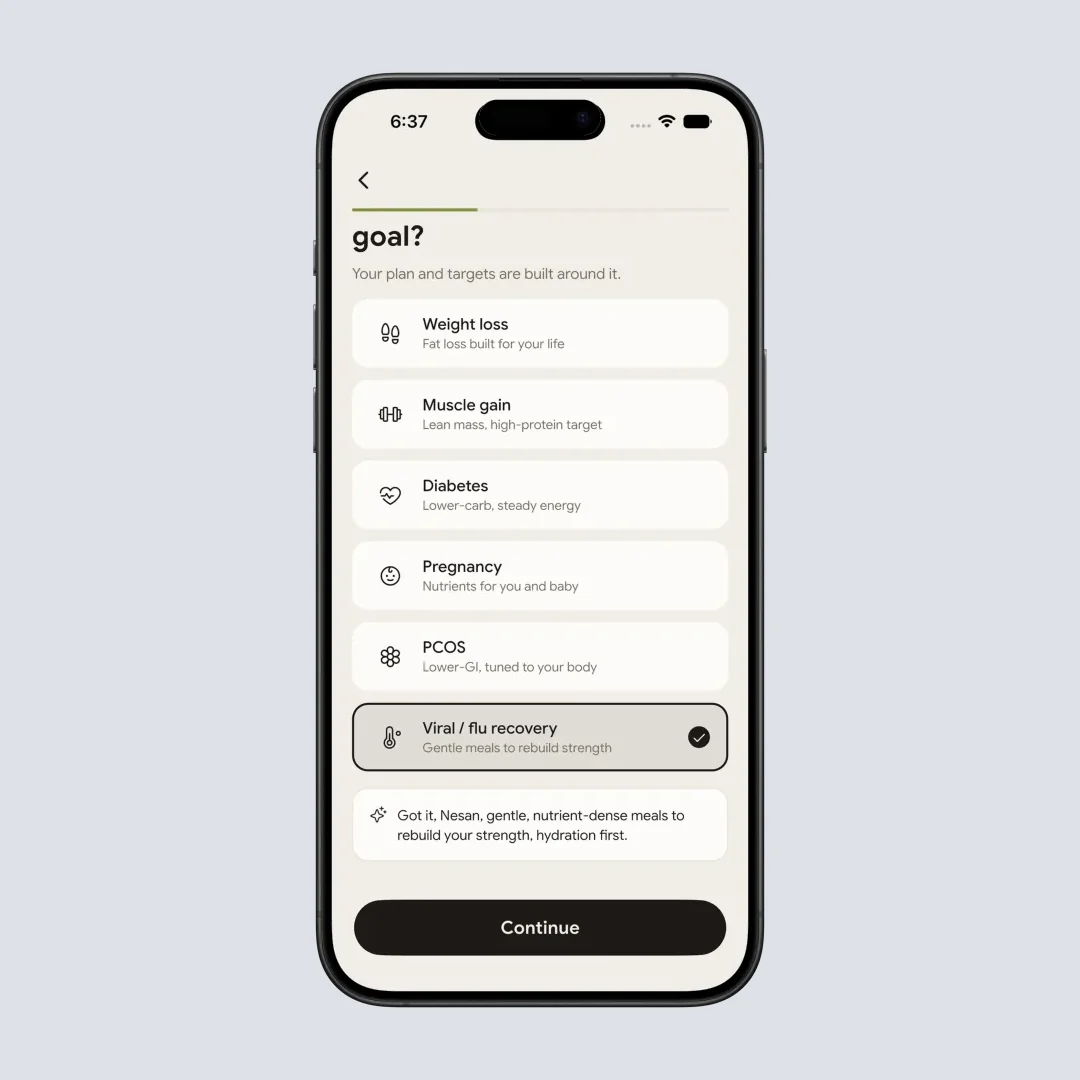
Age, gender, height, weight, goal, activity level, food preference, anything you cannot eat, your eating schedule, and up to five cuisines you actually cook. NutriScan turns that into a daily calorie number and a protein, carb and fat split, and the sliders are there if you already know the numbers you want.
Read the week off the Diet Plan tab
The plan opens on today with a start date, an end date and a progress bar. Every slot in your eating schedule gets two meal options, and each one opens a page with the quick recipe, the portion size, what it helps with and the nutrition breakdown. The Grocery List tab next to it writes the weekly and monthly shopping list, with a Copy button for your notes app.
Photograph what you actually ate
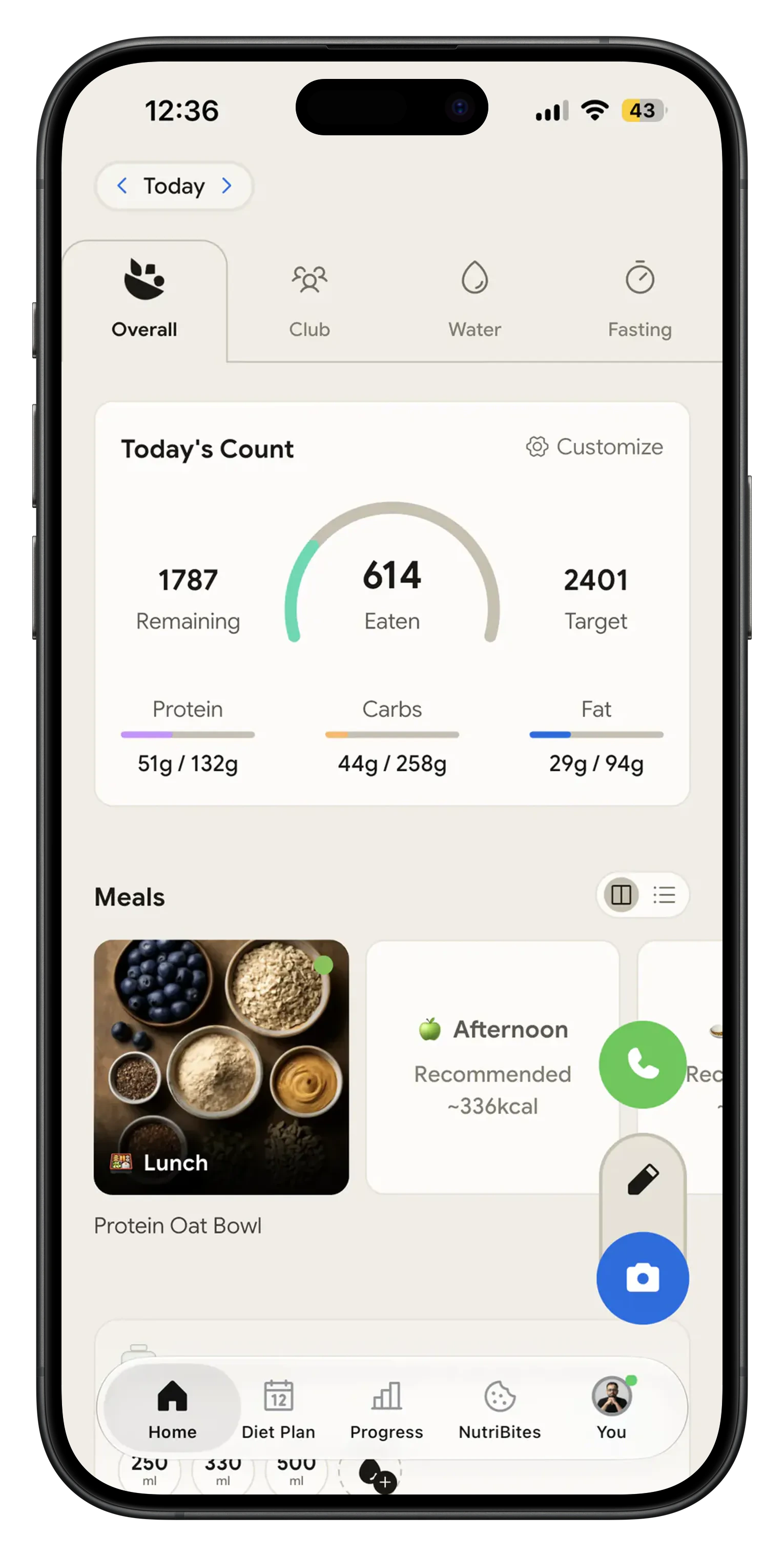
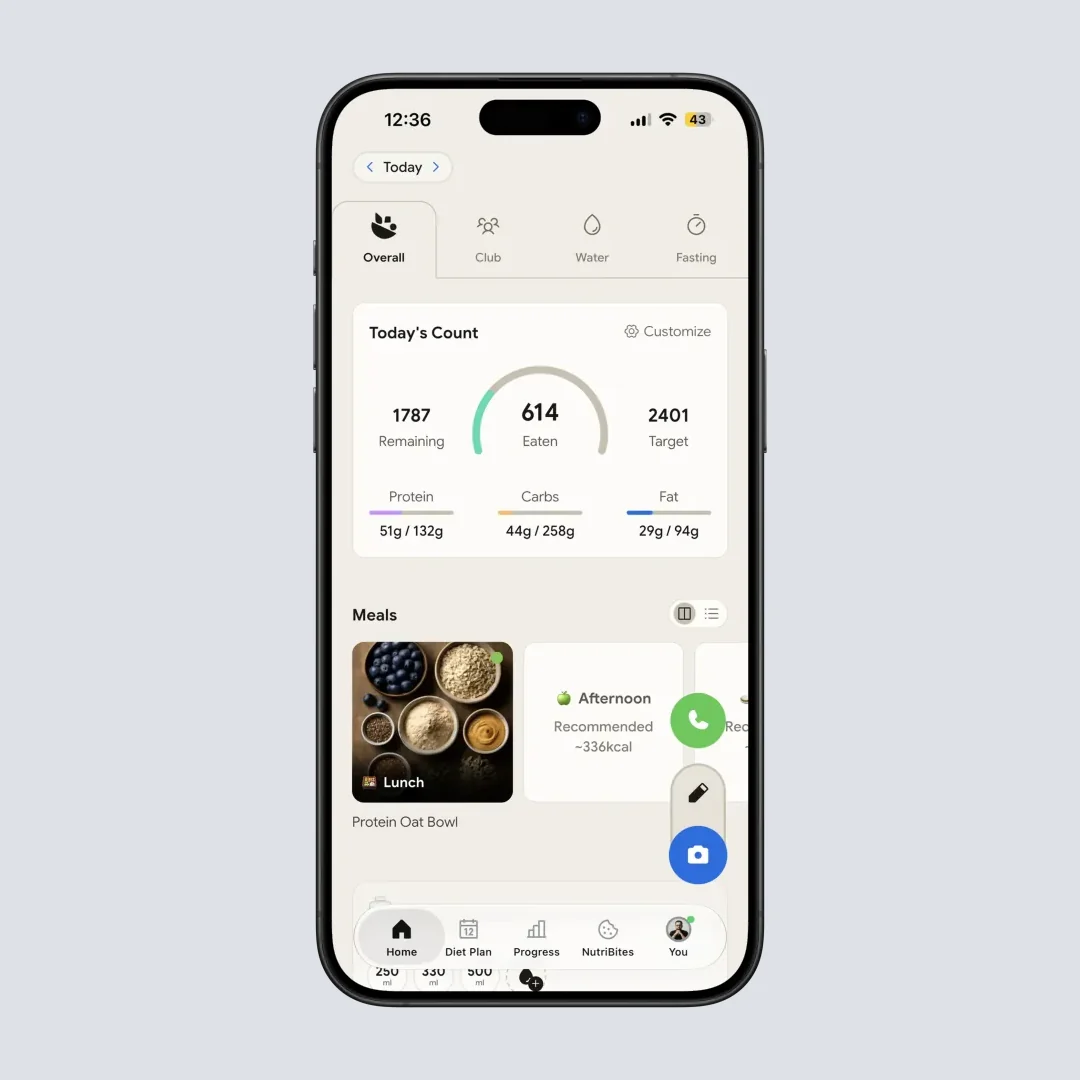
The plan says paneer and salad. Thursday said pizza. Point the camera at the plate and NutriScan reads it back as calories, protein, carbs, fat, fiber and micronutrients, then the Home screen shows what is left of today's target. The plan and the log sit in the same app, so Friday starts from a real number.
NutriScan, Mealime and Eat This Much side by side 🔍
| Mealime | Eat This Much | NutriScan | |
|---|---|---|---|
| Plans a full week ahead | Yes | Paid tier; free tier plans a day at a time | Yes, 28 days from a form |
| Grocery list | Yes, auto-sorted, free | Paid tier | Weekly and monthly, from the plan |
| Daily calorie and macro target | Nutrition shown per recipe | Yes, per day, adjustable per weekday | Yes, plus fiber and micronutrients |
| Logs what you actually ate | No food log | Type it in or scan a barcode | Photo, text or voice; the photo reads the plate |
| Meal options per slot | Pick from the recipe library | Regenerate any meal | Two options per slot, plus Edit Plan |
| Cuisine choice built into setup | Diet types and dislikes | Ingredient filters | Up to 5 of 8 cuisines |
| Still around next year | Shutting down October 21, 2026 | Yes | Yes |
| Cost | Free, Pro fees stopped ahead of the shutdown | Free tier, paid plan | Free tier; Premium about 59 dollars a year |
Mealime is the better cookbook. Eat This Much is stronger if you want different macro targets on different weekdays. NutriScan is the one that keeps counting after Sunday.
Meal prep for the week, without the spreadsheet 🧭
Cook on Sunday, portion it out, and the plan tells you what a portion should weigh. Photograph one container and NutriScan stores it, so the next four lunches are two taps each. Shop the monthly list for staples and the weekly list for produce.
Before you commit to a target, run your stats through the macro calculator and see whether it matches what the plan proposes. The diet planner page covers the 28 day plan in more detail, and the grocery list generator page covers the shopping side.
What people are saying
Real reviews from people tracking their meals with NutriScan.
Finally sticking to a diet plan because of this app 👍🏻
Surprisingly fun to use? Lost 1 kg in 4 days just by logging stuff and keeping my NutriScore green. Still on the free side, will probably grab Premium soon.
You take a photo and seconds later you have your macros and micronutrients. That's basically why I stuck with it.
Translated review
Did some homework before installing and yeah, the photo scan accuracy is legit. NutriScore is solid too. Keep building, this is great.
Translated review
Just started but it looks promising. Big plus that you can try it for free.
Translated review
Finally a calorie counter without ads or upsells every two screens. Photograph the meal, done. Free, simple, exactly what I needed.
Translated review
Found it right when I needed help fixing my eating. Really glad I did.
Solid pick if you want to track calories and stay on a diet plan without overthinking it.
Lost weight using this. The diet plan kept me honest on bad days. People sleep on how much diet actually matters.
Tracks calories, macros, and even the small stuff like micronutrients. If you're trying to build muscle, this is the app to get.
150k+ downloads and a 4.6 star average across the app stores.
Get the plan, the list and the log in one app 📱
Install it, answer the form, look at Monday.
🚀 What you get
28 days of meals with dates
Two options per slot, built around your goal, cuisines and schedule. Premium, about $59 a year.
Weekly and monthly grocery lists
Generated from the plan, grouped by aisle, copied out in one tap.
5 photo scans a week, free
Premium makes the scans unlimited.
The week, reviewed
Weekly and 30 day views, the NutriScore calendar, sync to Apple Health or Google Fit.
Start on the free plan, 5 photo scans a week with no card. Upgrade to Premium when you want unlimited scans.
Frequently Asked Questions ❓
Does the weekly meal plan come with a grocery list?
Yes. The Grocery List tab sits next to the plan and builds two lists from it, one weekly and one monthly, sorted into sections like fresh vegetables, fruit and dairy, with quantities such as spinach, 3 bunches. A Copy button drops the list into your notes or a message, and it is regenerated whenever the plan changes.
Is it a 7 day meal plan or a longer one?
The plan runs 28 days, which is four weeks, and you read it one day at a time with arrows to move forward and back. The grocery list is where the weekly view lives, because that is the part you shop on. After 28 days you renew the plan, or tap Edit Plan earlier if your schedule, goal or food preference changed.
Can I change a meal I do not want to cook?
Every slot in your eating schedule comes with two options, so breakfast and dinner already have a second choice that fits the same daily target. If the whole plan is wrong for you, Edit Plan reopens the setup form and rebuilds it from the new answers. And nothing forces you to cook the plan at all: log whatever you ate and the daily total still adds up.
How does it know how many calories the week should hit?
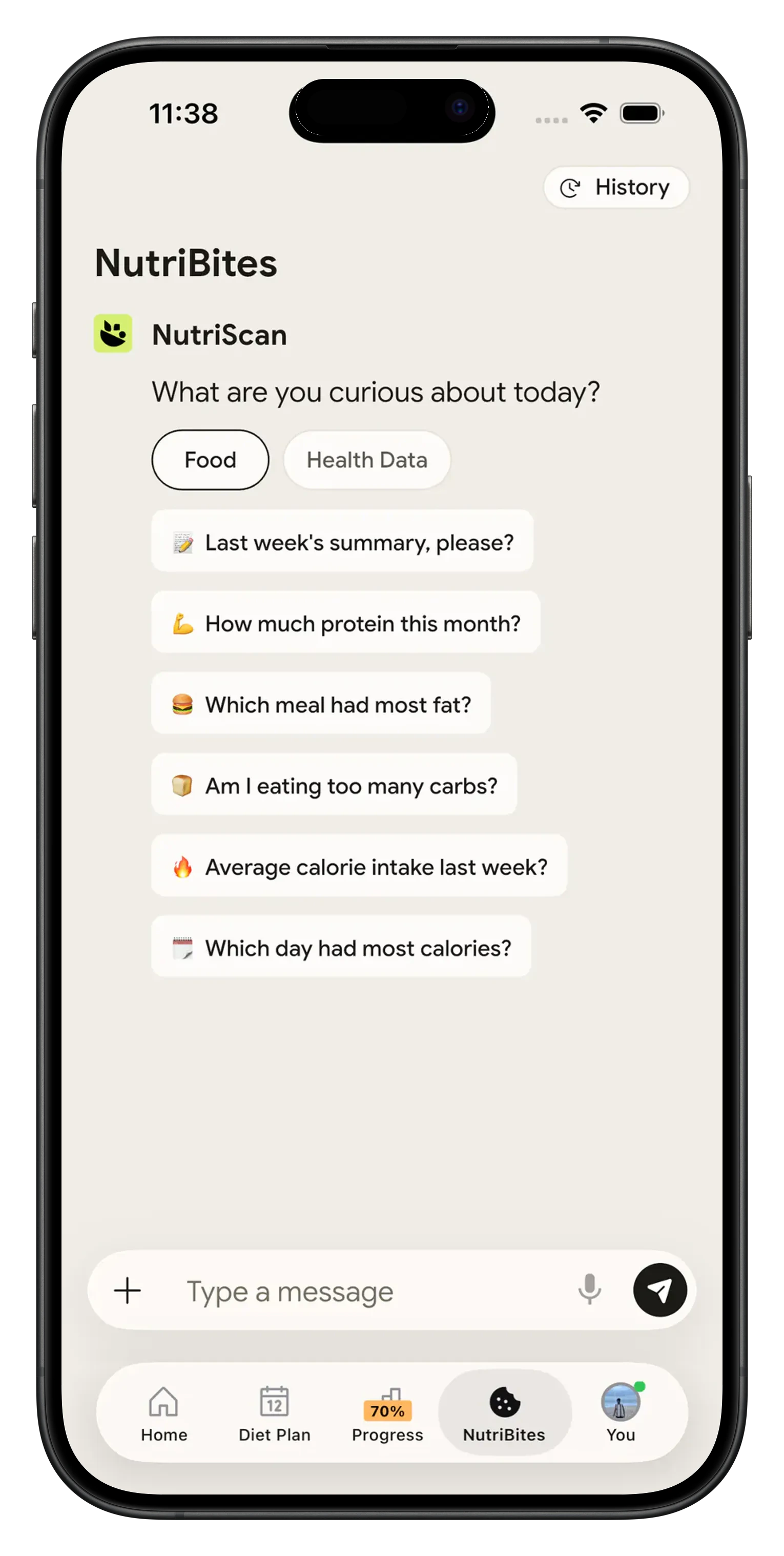
From your age, gender, height, weight, activity level and goal, whether that is weight loss, muscle gain, diabetes, pregnancy or PCOS. The review step shows the protein, carb and fat sliders with calories recalculated at 4, 4 and 9 per gram, so you can move them before the plan is built. You can change them later under Profile, Modify Macros.
What does the free plan include?
Free gives you 5 AI photo scans a week, calories, macros, micronutrients and a NutriScore on every meal, unlimited history, water tracking and the fasting timer. The 28 day meal plan and the grocery lists are Premium, along with unlimited photo scans. There are two plans, Free and Premium, and Premium works out to about 59 dollars a year.
Discover More Nutrition Tracking Tools
AI Calorie Counter App - Snap a Photo, Get Macros
AI Nutritionist App That Reads Your Logged Meals
Best Protein Supplements for Women
Bulking Meal Plan App That Sets Your Surplus
ChatGPT Calorie Counter Alternative That Keeps the Total
ChatGPT Diet Plan Alternative That Tracks What You Eat
ChatGPT Weight Loss Coach Alternative With a Food Log
Fast Food Calorie Counter App That Reads the Tray
Free Calorie Tracker App with AI Photo Scans | NutriScan
Indian Diet Plan App With Veg and Non Veg Meals
Indian Food Calorie Calculator - Get Instant Nutrition Facts for Desi Meals (2026)
Intermittent Fasting for Women, Timer and Meal Log App
Intermittent Fasting Tracker App - Free Fasting Timer
Macro Tracker App That Fills the Numbers From a Photo
Mediterranean Diet Meal Plan App That Counts the Oil
Micronutrient Tracker App for Vitamins and Minerals
MyFitnessPal Alternative That Stays Free | NutriScan
NutriScore App: A Free Grade on Every Meal | NutriScan
Nutrition Label Scanner App for the Amount You Ate
Second Trimester Protein Guide
Vegetarian Meal Plan App With a Protein Target
Voice Calorie Counter - Speak to Track Meals Hands-Free
Water and Calorie Tracker App - Free Water Log