Pretty good app honestly. Logging meals is fast and the macro breakdown is easy to read. Photo scan gets confused on some Indian dishes though, fix that and it's 5 stars for sure.
Macro Tracker App That Fills the Numbers From a Photo
Most people looking for a macro tracker app already have their split. Forty percent carbs, thirty protein, thirty fat, or whatever a calculator handed them last week. The part that falls apart is the plate. A bowl of dal and rice, a curry someone else cooked, a sandwich from the counter downstairs: nobody can say how many grams of protein that was. NutriScan sets the split during onboarding, keeps it editable under Profile then Modify Macros, and fills the three numbers from a photo, with the portion, the cooking method and the oil level left in your hands.

Where a macro tracker app usually breaks 🔬
The targets are the easy half. A November 2024 letter report from the National Academies of Sciences, Engineering, and Medicine restates the Acceptable Macronutrient Distribution Range set in 2002: 45 to 65 percent of calories from carbohydrate, 10 to 35 percent from protein, 20 to 35 percent from fat. Any calculator lands you inside that in thirty seconds.
Measuring what you actually ate is the hard half. In a 2021 study in the Journal of Human Nutrition and Dietetics, Lucassen and colleagues served forty people a lunch of known weight, then asked them to report the portions. Only 13 percent of the estimates made with food images came within 10 percent of the true amount. Text descriptions reached 31 percent, so roughly two in three reports were still off by more than a tenth.
Every macro app inherits that error. A million verified database entries do not help if the gram figure you type beside one is a guess.
How to track macros without weighing food 🍽️
Your macro split, set once and always editable
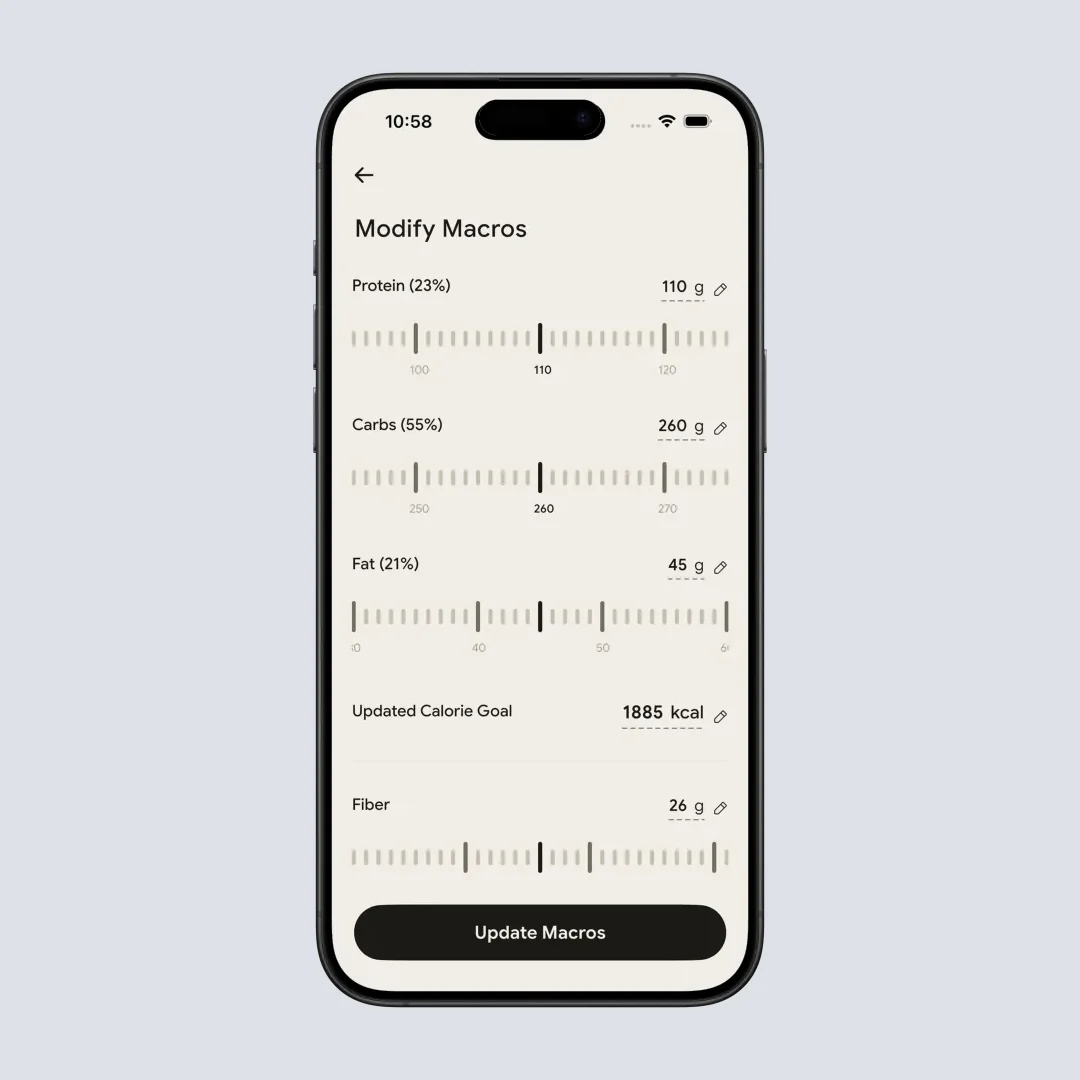
Onboarding asks for your goal, age, gender, height, weight and activity level, then shows a macros breakdown with calories, protein, carbs, fat, fiber and water filled in. None of it is fixed. Profile then Modify Macros gives you a slider for each of the three, in grams or in percent, and the calorie goal recalculates on the 4-4-9 rule as you drag. An Auto-Set Macros by Goal card redoes the calculation if you would rather not move sliders.
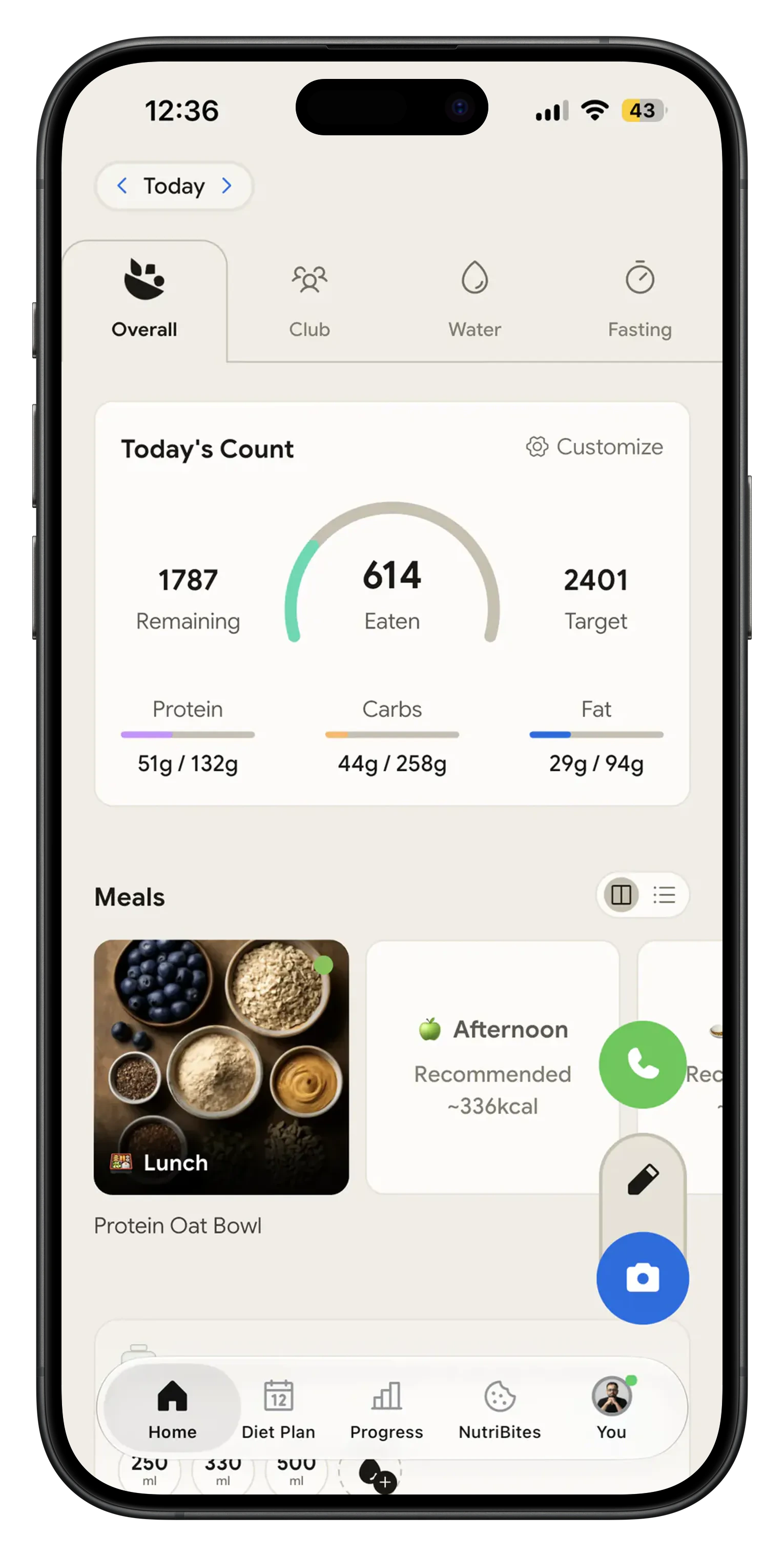
Three bars on the first screen
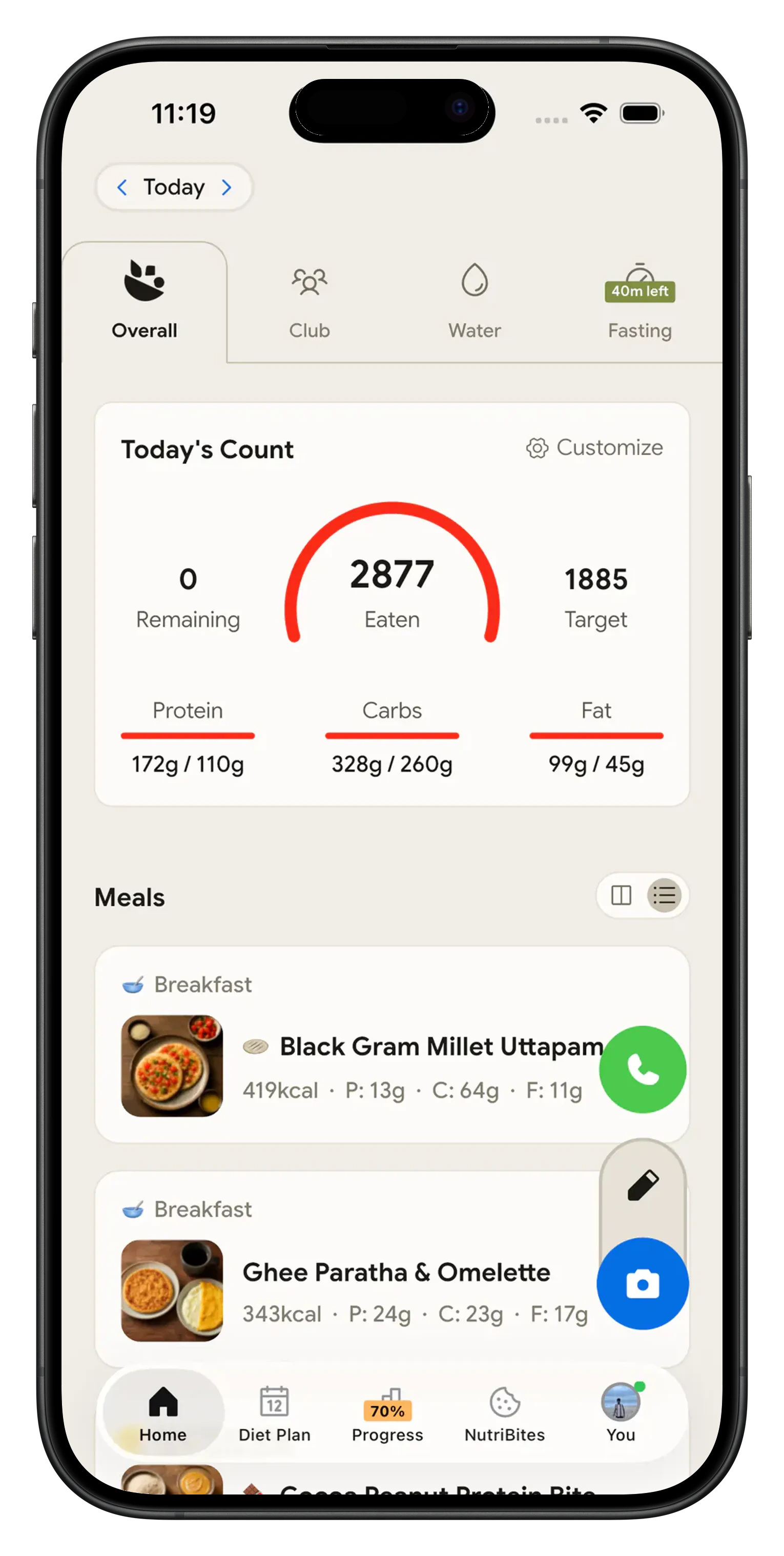
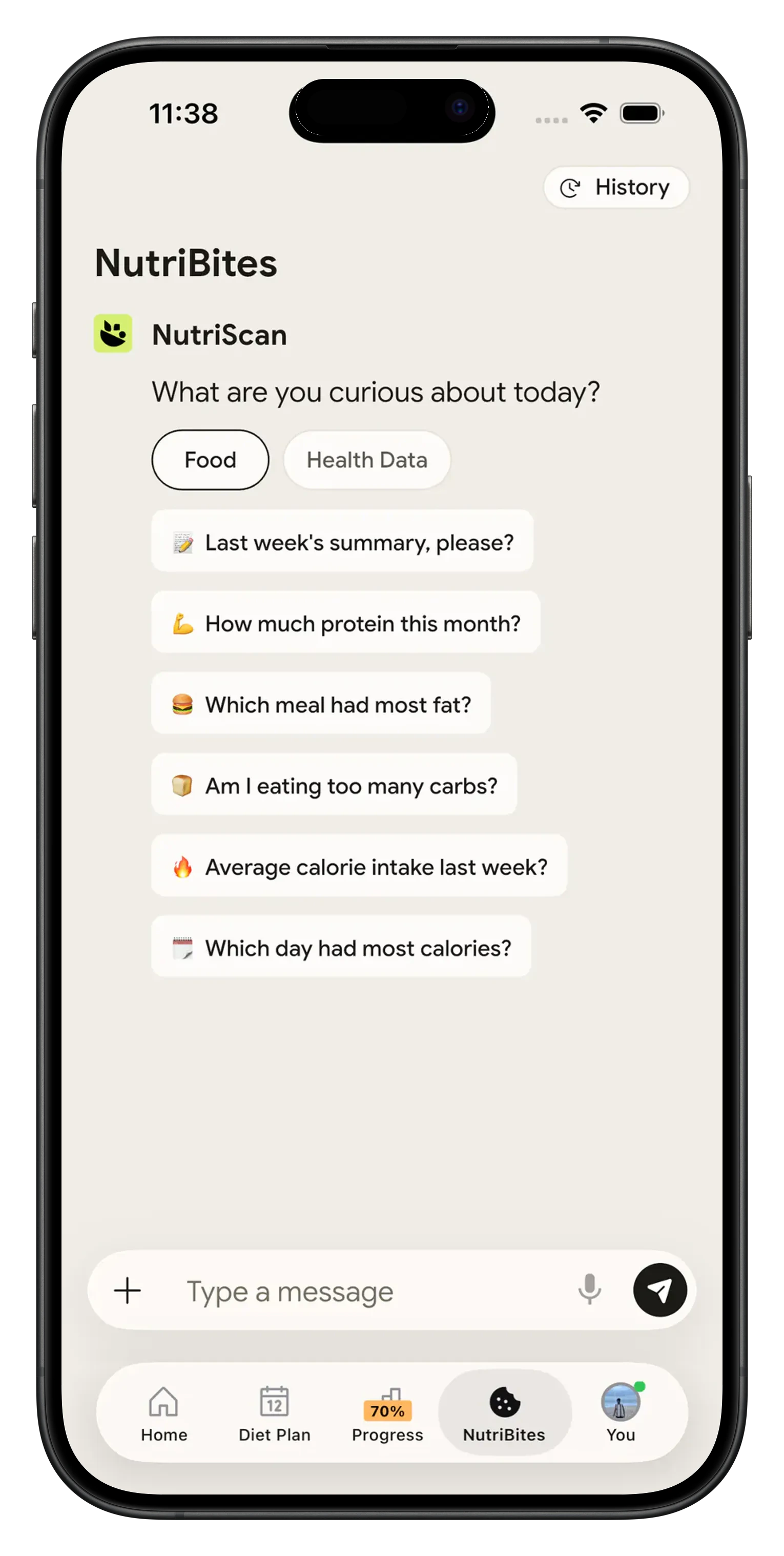
Today's Count shows calories eaten, calories left and protein, carbs and fat against target.
Grams you can edit per item
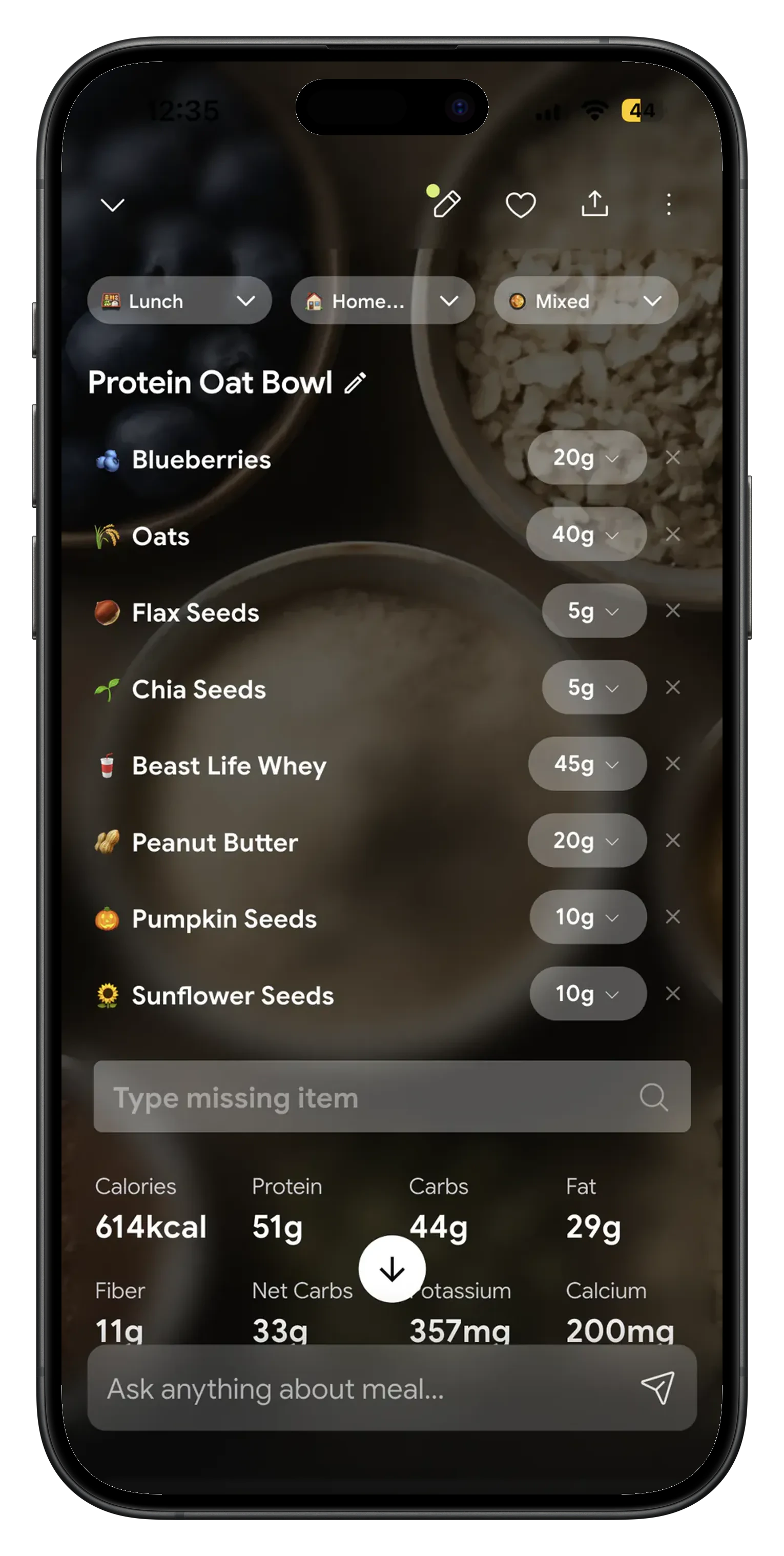
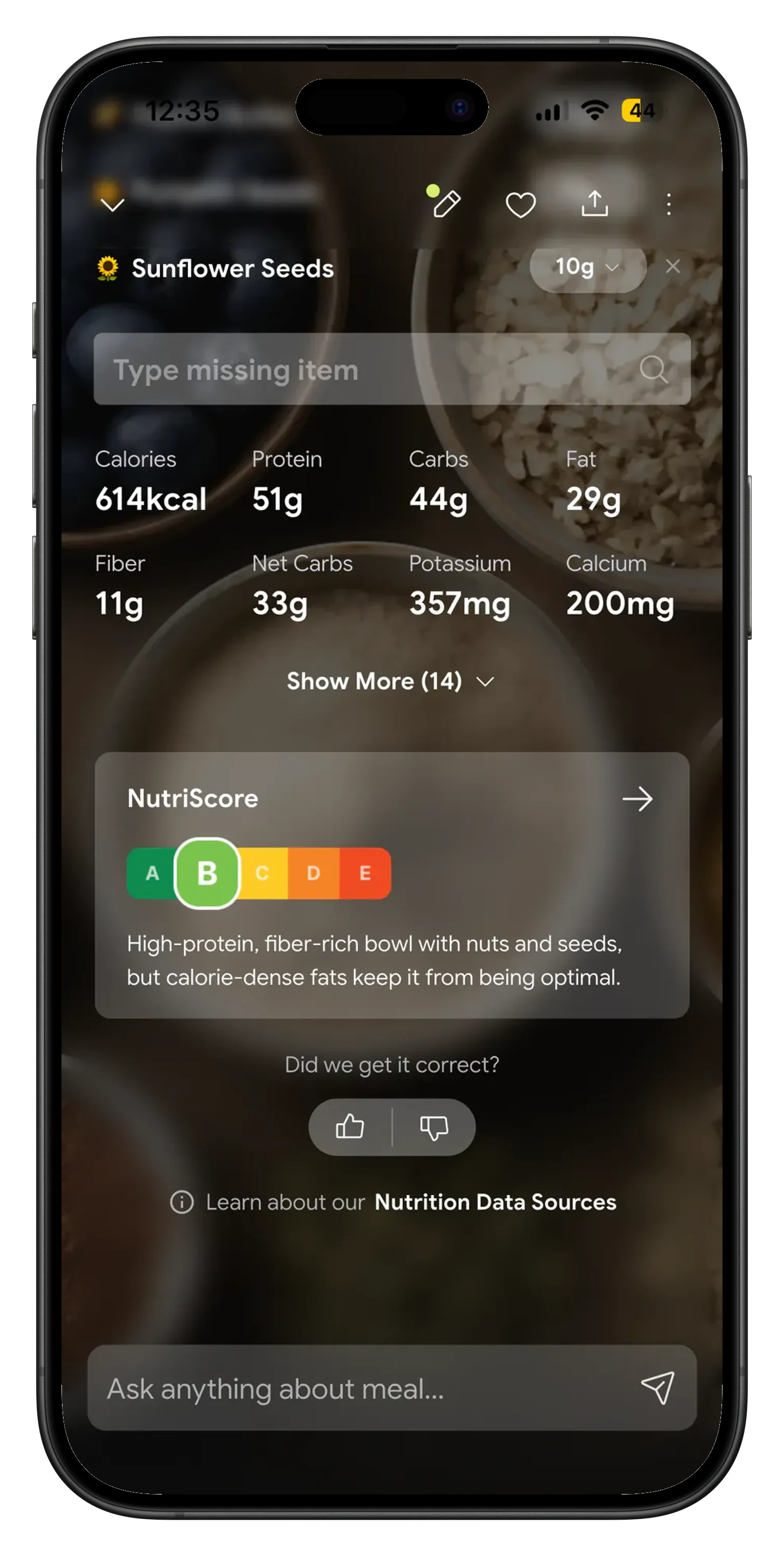
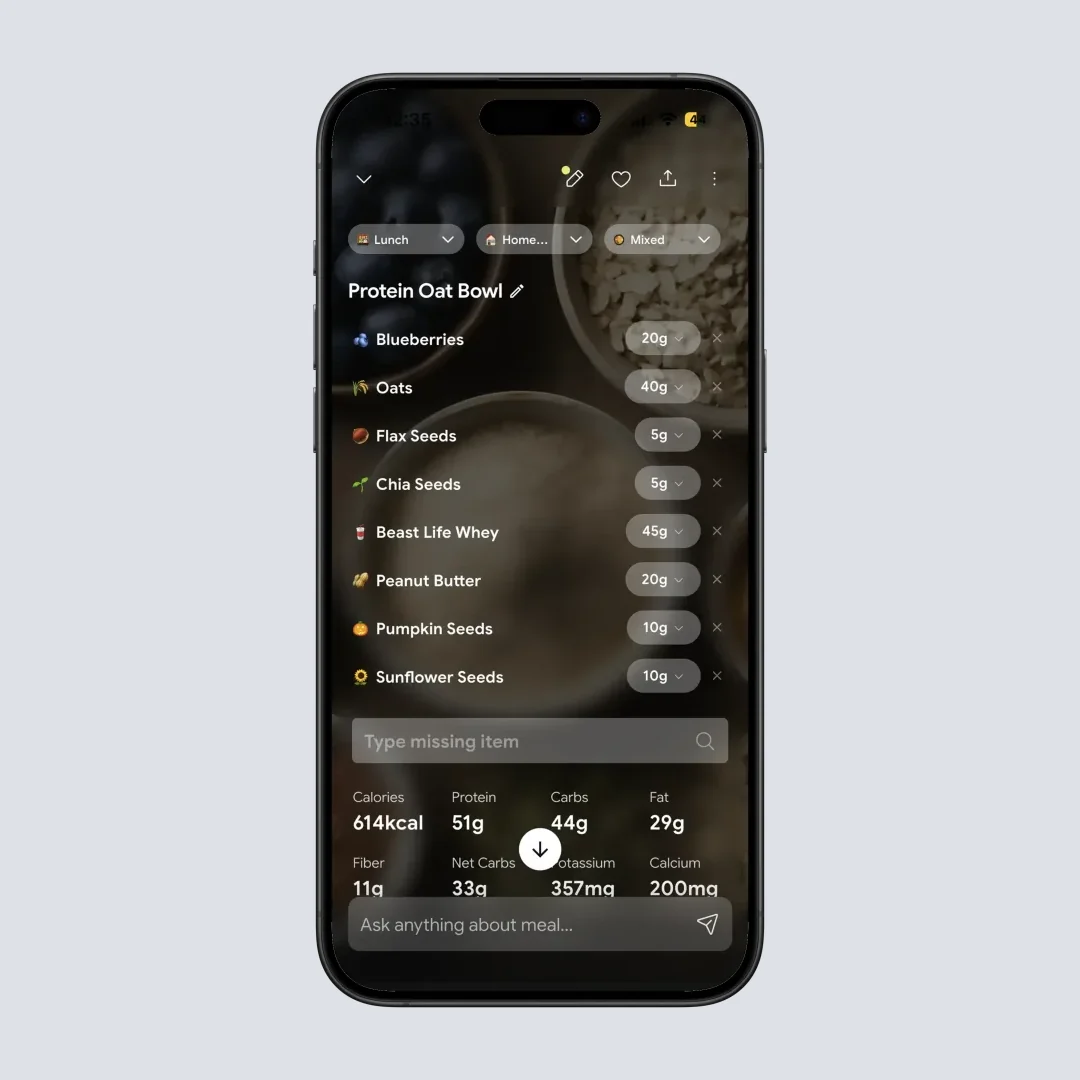
The scan returns 40g oats, 45g whey, 20g peanut butter as separate lines. Change one and the total follows.
Cooking method feeds the fat number
8 food type tags, 11 cooking methods, four oil levels. Deep fried and steamed do not come back with the same fat figure.
Protein target hit rate for the week
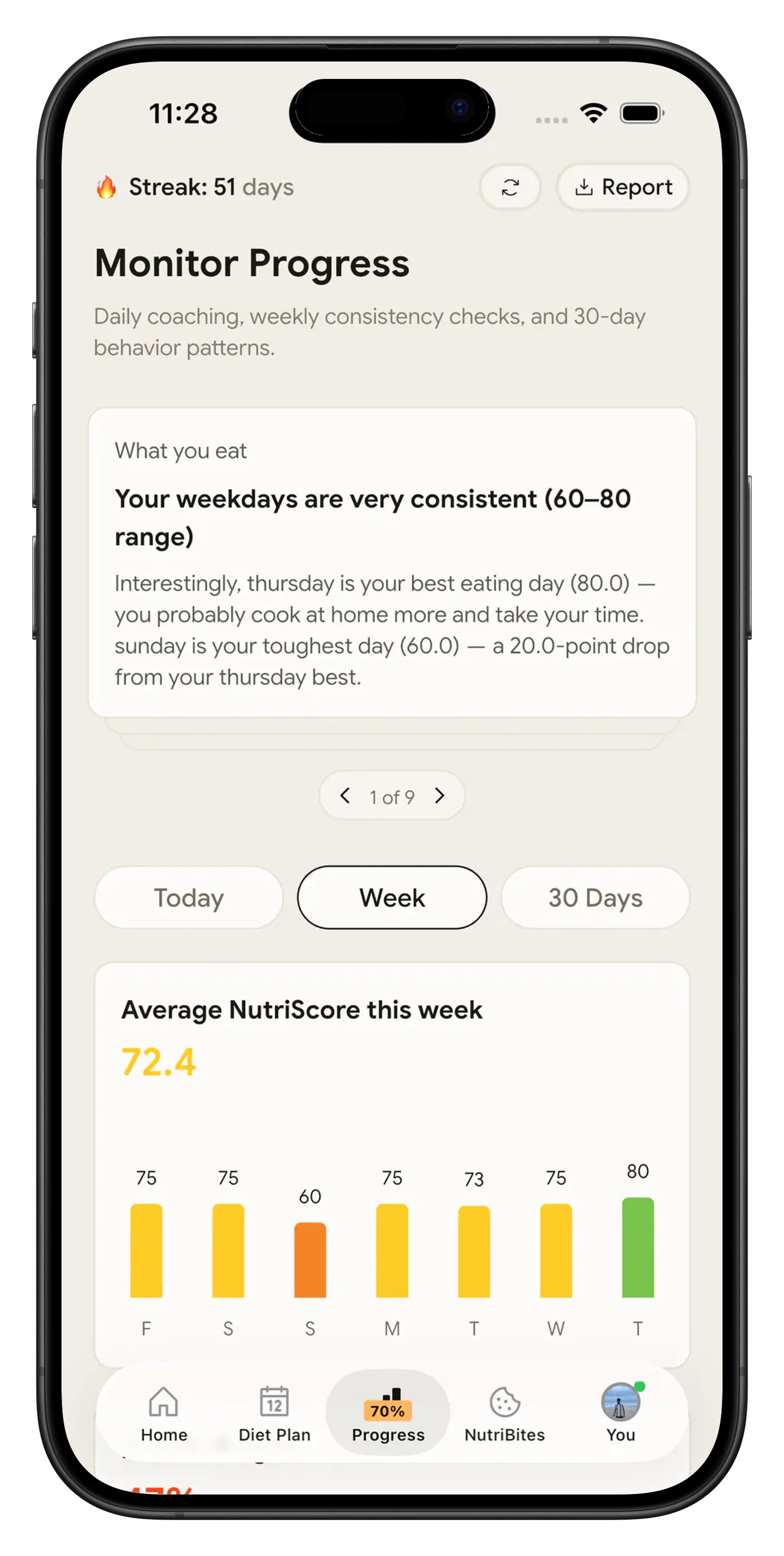
The Progress tab, part of Premium, keeps a week view with the percentage of days you hit your protein target, the grams for each of the seven days and the foods that contributed most of it. A weekly rate tells you more than any single Tuesday.
How the tracking works, step by step 🛠️
Set the split, then change it whenever you want
Onboarding asks for your goal, age, gender, height, weight and activity level, then shows a macros breakdown with calories, protein, carbs, fat, fiber and water filled in. Nothing is locked. Profile then Modify Macros lets you drag protein, carbs and fat in grams or in percent, and the calorie goal recalculates on the 4-4-9 rule as you move each slider.
Photograph the meal and correct the grams
Take the photo, pick the food type from 8 tags, the cooking method from 11 and the oil level from four steps. The meal comes back as separate items, each with its own gram value and its own share of the protein, carbs and fat. Tap plus or minus on any item, type an exact weight, delete what was never on the plate, or add a side the camera missed by typing or speaking it.
Read the three bars on the Home screen
Today's Count sits at the top of Home with calories eaten, calories remaining and one bar each for protein, carbs and fat against your target. Every meal you log moves those bars, so what is left tonight is on the first screen you open.

NutriScan, MacroFactor and Cronometer on macros 🔍
| NutriScan | MacroFactor | Cronometer | |
|---|---|---|---|
| Free plan | Yes, 5 photo scans a week | No, 7 day trial only | Yes, with ads |
| Custom macro targets | Grams or percent sliders under Profile then Modify Macros | Coached, collaborative or manual programs | Yes, on the free tier |
| Photo of the plate fills the macros | Yes, on the free plan | Yes, on the paid plan | Photo Log, Gold only |
| Correct the portion after the estimate | Plus and minus per item, or type the grams | Edit the logged entry | Edit the serving |
| Cooking method and oil as inputs | 11 methods and four oil levels on every scan | Not an input | Not an input |
| Different macros on different days | No, one split at a time | Yes | Macro Scheduler, Gold only |
| Micronutrients | Top micronutrients plus a NutriScore per meal | Full micronutrient tracking | Up to 84 nutrients, the deepest here |
| Price | Free plan, Premium about 59 dollars a year | 71.99 dollars a year, 11.99 a month | Free, Gold 59.99 dollars a year |
MacroFactor says on its own site that it will never have a free version, and prices the year at 71.99 dollars against MyFitnessPal Premium at 79.99. That buys an adaptive algorithm that rewrites your targets each week from your weigh ins. Cronometer goes the other way, up to 84 nutrients on a lab verified database, with Photo Log behind Gold. We broke down what MacroFactor costs in a separate post.
Where to start 🧭
Get the split first. Run your height, weight, activity and goal through the macro calculator, then log two days and see whether you can open Home at 6 pm and know what dinner has to be.
If calories matter to you more than the split, the calorie counter app page covers the same scan from the calorie side, and the free calorie tracker page lists what the free plan includes.
What people are saying
Real reviews from people tracking their meals with NutriScan.
Finally sticking to a diet plan because of this app 👍🏻
Surprisingly fun to use? Lost 1 kg in 4 days just by logging stuff and keeping my NutriScore green. Still on the free side, will probably grab Premium soon.
You take a photo and seconds later you have your macros and micronutrients. That's basically why I stuck with it.
Translated review
Did some homework before installing and yeah, the photo scan accuracy is legit. NutriScore is solid too. Keep building, this is great.
Translated review
Just started but it looks promising. Big plus that you can try it for free.
Translated review
Finally a calorie counter without ads or upsells every two screens. Photograph the meal, done. Free, simple, exactly what I needed.
Translated review
Found it right when I needed help fixing my eating. Really glad I did.
Solid pick if you want to track calories and stay on a diet plan without overthinking it.
Lost weight using this. The diet plan kept me honest on bad days. People sleep on how much diet actually matters.
Tracks calories, macros, and even the small stuff like micronutrients. If you're trying to build muscle, this is the app to get.
150k+ downloads and a 4.6 star average across the app stores.
Set your split, then stop doing math 📱
Set the three numbers, log one dinner from a photo.
🚀 What you get
A split you control
Gram and percent sliders for protein, carbs and fat, calories recalculated as you drag.
5 photo scans a week, free
Premium removes the scan cap.
Editable grams on every item
Fix the portion, drop what you did not eat, add what the camera missed.
Weekly protein hit rate
How many days you hit protein, and the foods that got you there.
Start on the free plan, 5 photo scans a week with no card. Upgrade to Premium when you want unlimited scans.
Frequently Asked Questions ❓
How to count macros for weight loss?
Set the calorie number first, then split it. NutriScan does this in onboarding from your goal, age, gender, height, weight and activity level, and you can move any of the three under Profile then Modify Macros. Protein is the one worth protecting on a deficit, so raise it in grams and let carbs or fat come down to hold the calorie total. After that the job is logging, which is where most attempts stall.
How to track macros without weighing food?
Photograph the plate and correct what looks wrong. NutriScan returns the meal as separate items with a gram value on each one, so you are editing a starting number instead of inventing one. The free plan includes 5 photo scans a week. A scale is still more accurate for anything you cook at home, which is why the plus and minus controls stay on every item.
How to count macros for muscle gain?
Same setup, different numbers. Pick Muscle Gain as the goal in onboarding and the split comes back with more calories and more protein. Push it further under Profile then Modify Macros if a coach gave you a figure, since the sliders take grams directly. On Premium, the Progress tab shows a protein target hit rate for the week with the day by day grams and your top protein sources.
How to count macros when eating out?
This is the case photo logging was built for. Tag the food type as Restaurant or Cafe, set the cooking method and raise the oil slider, because a restaurant kitchen uses more fat than you do. The estimate comes back per item, so you can delete the bread you did not touch and halve the rice. An estimate beats skipping the meal in your log.
What are free macro tracking apps?
Cronometer has a free tier with custom macro targets and a barcode scanner, though Photo Log and Macro Scheduler are Gold only. MyFitnessPal has a free tier with basic macro tracking. MacroFactor has no free version, only a 7 day trial. NutriScan is free with 5 AI photo scans a week, macros and micronutrients on every meal, water tracking and the fasting timer. Premium makes scans unlimited and adds the 28 day diet plan and the Progress tab, for about 59 dollars a year.
Discover More Nutrition Tracking Tools
AI Calorie Counter App - Snap a Photo, Get Macros
AI Nutritionist App That Reads Your Logged Meals
Best Protein Supplements for Women
Bulking Meal Plan App That Sets Your Surplus
ChatGPT Calorie Counter Alternative That Keeps the Total
ChatGPT Diet Plan Alternative That Tracks What You Eat
ChatGPT Weight Loss Coach Alternative With a Food Log
Fast Food Calorie Counter App That Reads the Tray
Free Calorie Tracker App with AI Photo Scans | NutriScan
Indian Diet Plan App With Veg and Non Veg Meals
Indian Food Calorie Calculator - Get Instant Nutrition Facts for Desi Meals — 2026
Intermittent Fasting for Women, Timer and Meal Log App
Intermittent Fasting Tracker App - Free Fasting Timer
Macro Tracker App That Fills the Numbers From a Photo
Mediterranean Diet Meal Plan App That Counts the Oil
Micronutrient Tracker App for Vitamins and Minerals
MyFitnessPal Alternative That Stays Free | NutriScan
NutriScore App: A Free Grade on Every Meal | NutriScan
Nutrition Label Scanner App for the Amount You Ate
Second Trimester Protein Guide
Vegetarian Meal Plan App With a Protein Target
Voice Calorie Counter - Speak to Track Meals Hands-Free
Water and Calorie Tracker App - Free Water Log