Best Apps for Recipe Import in 2026 (URL and Custom)
 ChatGPT
  Claude
  AI Mode
  Perplexity
TL;DR - Best Recipe Import Apps 2026
• Widest free importer: MyFitnessPal, with URL import, plain-text paste and the most mature match-and-fix screen.
• Most accurate serving math: Cronometer, the only app here that recalculates nutrition from the weight of the finished, cooked dish.
• Best fallbacks: MacroFactor, which builds recipes from links, AI parsing or foods you already logged.
• Free recipe box that counts calories: Samsung Food. Budget simplicity: Lose It.
• The honest note: NutriScan has no recipe importer. It logs the cooked plate by photo instead, and this article explains exactly when each approach wins.
• The one habit that fixes most recipe logs: weigh the dish after cooking ➡️ set servings by weight ➡️ stop guessing at "1 of 8 slices".
The share of US men who cook at home rose from 36% in 2003 to 52% in 2023, and the share of women rose from 69% to 72%, according to an analysis of the American Time Use Survey (Ewoldt et al., 2025). Men who cook now spend about 50 minutes a day on it, and women average 71 minutes. That is a lot of meals that never came with a nutrition label.
The most common logging problem is home cooking. A packaged snack has a barcode. A restaurant chain has a menu entry. Your own dal, pasta bake, or Sunday curry has neither. The fix is a recipe feature: you enter or import the ingredients once, set the servings, and from then on your home cooking logs as fast as a barcode scan. NutriScan publishes this post, and we make a competing app. This guide ranks the five apps that do this best in 2026 and says plainly where NutriScan fits, because our app takes a different route entirely.
IMPORTANT
Your recipe logging plan at a glance.
A quick roadmap so you can pick the right tool for how you actually cook.
⏱️ Progress 0/4 • ~0 minutes in • Keep going
⏳ Step 1: Why recipe import beats database guessing
⏳ Step 2: All 5 apps, ranked on three jobs
⏳ Step 3: When a photo beats a recipe file
🔍 The 60-second scale trick that fixes recipe calories in any app (revealed near the end)
Why Recipe Import Matters More Than You Think 🍲
Logging a home-cooked meal without a recipe feature usually goes one of two ways, and both are bad.
The first way is searching the database for a generic match. You type "vegetable lasagna" and pick a stranger's entry with unknown ingredients and a serving size that may not match your pan. The second way is entering all 12 ingredients by hand, every single time you eat leftovers. Most people do that twice, get tired, and stop logging home food at all.
 Every one of these meals needs a log entry, and none of them comes with a label. A recipe feature is how the entry gets made once instead of twelve times.
Ingredient-level logging matters because database shortcuts carry real error. A validation study that compared MyFitnessPal calculations against a reference nutrition database found the app underestimated protein by 7.8% and carbohydrate by 6.4% on matched foods (Evenepoel et al., 2020). When you build a recipe from your actual ingredients and your actual amounts, you remove the biggest source of that drift: guessing what is in the dish.
There is also a diet quality reason to care. A study of US households found that families who cooked dinner seven times a week had significantly lower ultraprocessed food intake and better Healthy Eating Index scores than families who rarely cooked (Tucker et al., 2024). Home cooking is the habit worth protecting. A good recipe tool removes the logging friction that makes people abandon it.
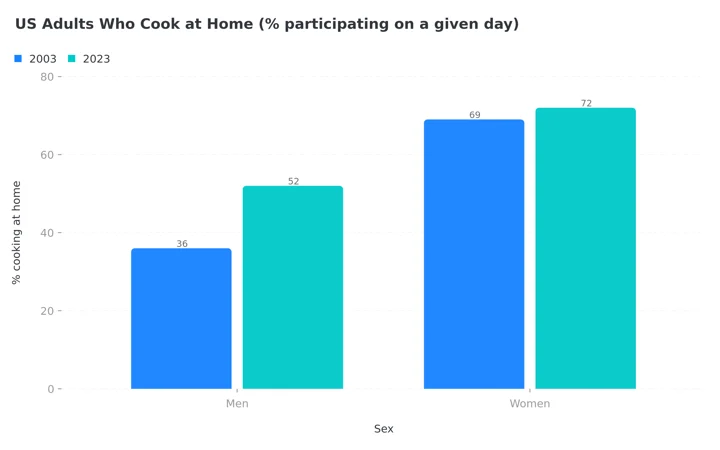 Figure 1: Home cooking participation from the American Time Use Survey analysis. The 16 point rise among men is the fastest growth in the data, and every one of those new cooks owns a plate no database has ever seen.
IMPORTANT
Checkpoint: here's where you are right now.
Quick status update so you always know the next best move.
⏱️ Progress 1/4 • ~2 minutes in • Keep going
✅ Step 1: Why recipe import beats database guessing (done)
👉 Step 2: All 5 apps, ranked on three jobs (you're here)
⏳ Step 3: When a photo beats a recipe file
🧩 The 60-second scale trick (coming soon)
How These Apps Are Ranked 📋
Each app is compared on three jobs, in order of importance, using its published features and pricing.
Job 1: Import quality. Can you paste a URL from a normal recipe site and get a usable result? Just as important: when the parser gets an ingredient wrong, how easy is it to see the error and fix it? Every importer makes mistakes, so the review screen matters more than the parse itself.
Job 2: Serving math. A recipe is only accurate if the portion math holds up after cooking. Water evaporates, rice absorbs, sauces reduce. The best apps let you define servings by weight, not just "1 of 8 slices," and the very best let you weigh the finished dish.
Job 3: Speed on day two. The whole point of a recipe is that the second log takes five seconds. The comparison covers how fast a saved recipe reaches your diary, whether you can copy and share recipes, and whether leftovers and multi-day dishes are handled sensibly.
Pricing notes reflect published prices in August 2026 and can change by region and store.
1. MyFitnessPal: Widest Importer, Free to Use 🥇
MyFitnessPal has run a recipe importer longer than anyone on this list, and it remains the most complete flow. You paste a recipe URL, the app pulls the ingredient list, and a match screen shows each ingredient with a green check for a confident match or a red X where you need to pick a food yourself (MyFitnessPal support). You can edit quantities, replace items, convert units within the same type (grams to ounces, cups to tablespoons), and add extra ingredients the site did not list, like the oil you actually cooked in.
Two details push it to first place. You can also paste a plain text list of ingredients, so recipes from a family group chat or an old notebook work as well as a food blog. And the finished recipe supports "Save & Log It" in one step, which is exactly the day-two speed a recipe tool exists for.
The honest caveats: the URL importer lives on the website and in the iOS and Android apps, but the web version is English-only, and users on other language versions get the older manual tool. Ingredient matching is only as good as the database entry it picks, so review every green check the first time.
Choose MyFitnessPal if you import from many different recipe sites and want the most mature match-and-fix screen, at no cost. We covered what the paid tier adds in our MyFitnessPal Premium review.
Related: best MyFitnessPal alternatives in 2026.

2. Cronometer: The Most Accurate Serving Math 🎯
Cronometer's importer is similar on the surface: paste a URL, or paste an ingredient list one line per row, review the matches, and fix anything the parser flags before it lets you save (Cronometer support). Cronometer will not let you save a recipe with unresolved ingredients, which sounds strict but prevents silent errors.
What earns Cronometer second place is what happens after import. It is the only app here with a dedicated "Set Cooked Recipe Weight" step: you weigh the finished dish, enter the real cooked weight, and the app recalculates nutrition per gram of what actually came out of the pot. This solves the most common recipe accuracy failure, and the manual version of the same move appears near the end, because it works in every app on this list.
Cronometer also supports weight-based servings, multiple serving sizes per recipe, recipe sharing with other users, and export of recipes to CSV or JSON if you ever want your data out. Because Cronometer tracks up to 84 micronutrients, an imported recipe shows vitamins and minerals, not just macros.
The caveat is personality. Cronometer expects precision from you, and people who want a casual log can find the strictness tiring.
Choose Cronometer if you weigh food, batch cook, and want the portion math to survive the cooking process. The paid tier details are in our Cronometer Gold review.
Related: best Cronometer alternatives in 2026.
3. MacroFactor: The Newest Importer, Smart Fallbacks 🧠
MacroFactor added its Recipe Importer in July 2025, and it arrived polished. Paste a link and the app populates the recipe name, serving size, ingredients, and even the preparation steps (MacroFactor, July 2025). It reads the standard machine-readable recipe format most food sites use, and when a site does not use it, MacroFactor's AI parses the page as a fallback, so unusual blogs still import more often than not.
Two features fit real cooking habits well. First, you can build a recipe from your food timeline: if you already logged chicken, rice, and sauce separately at lunch, you can convert that logged group into a saved recipe without re-entering anything. Second, recipes can be shared with other MacroFactor users by text, email, or messenger, which is genuinely useful for couples who cook from the same rotation.
The caveats: MacroFactor has no free tier, at roughly 72 US dollars a year after the trial, and the importer is newer than MyFitnessPal's or Cronometer's, so expect more edge cases on obscure sites. There is also no cooked-weight step like Cronometer's, though weight-based servings get you close.
Choose MacroFactor if you already want its adaptive macro coaching and log the same home recipes weekly. Whether the subscription earns its price is the subject of our MacroFactor review.
IMPORTANT
Checkpoint: midway progress update.
Three apps down, two to go, then the part most people never do.
⏱️ Progress 2/4 • ~5 minutes in • Keep going
✅ Step 1: Why recipe import beats database guessing (done)
👉 Step 2: All 5 apps, ranked on three jobs (current)
⏳ Step 3: When a photo beats a recipe file
🧩 The 60-second scale trick (almost there)
Related: best MacroFactor alternatives in 2026.
4. Samsung Food: Best Free Recipe Box That Also Counts Calories 📦
Samsung Food comes at this from the opposite direction. It began as a recipe manager (formerly Whisk), so saving recipes from anywhere on the web is its core skill, not an add-on. Choose "Save recipe link," paste any URL, and the recipe lands in your Recipe Box with photos and steps intact (Samsung Food support). A separate Recipe Builder lets you create your own dishes from scratch, and nutrition information and calorie counts are available for saved and self-built recipes (Samsung Food).
For a home cook, the surrounding features are strong: meal planning from your saved recipes, shopping lists, and communities where creators share collections. The basic app is free, with a paid Food+ tier for deeper nutrition detail.
The honest caveat is that Samsung Food is a cooking app with nutrition attached, not a full diet tracker. Its food diary is lighter than the other four apps here, there is no barcode-level database depth, and serious calorie tracking usually means pairing it with a dedicated tracker.
Choose Samsung Food if your first problem is collecting and cooking recipes, your second problem is knowing their nutrition, and you do not want to pay anything to solve both.
5. Lose It: Budget Pick With a Working Importer 💰
Lose It rounds out the list. It has a recipe builder for custom dishes and a Recipe Importer for pulling recipes in from the web, with its own support documentation for fixing importer errors (Lose It help center). The flow is simpler than MyFitnessPal's, with fewer review tools, but for straightforward recipes from mainstream sites it does the job, and the core app remains one of the friendliest trackers for beginners.
The caveats are real, though. Recipes behind paywalls or on unusual page layouts fail more often, ingredient matching offers less control than the apps above, and there is no cooked-weight correction. Lose It is the right answer when price and simplicity beat precision.
Choose Lose It if you want a low-cost, low-friction tracker and your home cooking comes from normal recipe sites. We compared its paid tier in our Lose It Premium review.
Quick Comparison Table 📊
| App | URL import | Paste ingredient list | Cooked weight step | Free option | Best for |
|---|---|---|---|---|---|
| MyFitnessPal | Yes (web + apps, English web) | Yes | No | Yes | Widest importer, free |
| Cronometer | Yes | Yes | Yes | Yes | Serving accuracy, micros |
| MacroFactor | Yes (AI fallback) | No, builds from logged foods | No | No, trial then paid | Macro coaching + recipes |
| Samsung Food | Yes (any site) | Builder only | No | Yes | Recipe collecting + cooking |
| Lose It | Yes | Limited | No | Yes | Budget simplicity |
Where NutriScan Fits (It Does Not Import Recipes) 📱
NutriScan does not have a URL recipe importer or a custom recipe builder today, so if ingredient-level recipe storage is your main requirement, one of the five apps above is the right tool for that job.
What NutriScan does instead is solve the same problem from the other end: it logs the cooked plate. You photograph the finished meal and the scanner identifies the dish and estimates the portion. On the crop screen, before the scan is even processed, you tag how tonight's version was actually cooked: one of 11 cooking method tags, from Deep-fried to Steamed, and an oil level slider with four steps from No Oil to High Oil. Those are exactly the two questions a recipe file cannot answer about tonight specifically.

Home > Camera Icon > Click Picture. Cooking method and oil level are set before the scan runs, which is how a photo of tonight's plate stays honest about tonight's cooking.
That design follows the research. Studies of photo-based nutrition estimation show the pattern clearly: AI is good at identifying what food is on the plate, with about 93% precision in one evaluation, but portion size and energy are where estimates drift, usually toward underestimation (O'Hara et al., 2025). NutriScan's design accepts that finding and puts your confirmation on exactly the weak points: the portion stays editable on the nutrition details page, with plus and minus controls or a typed amount.
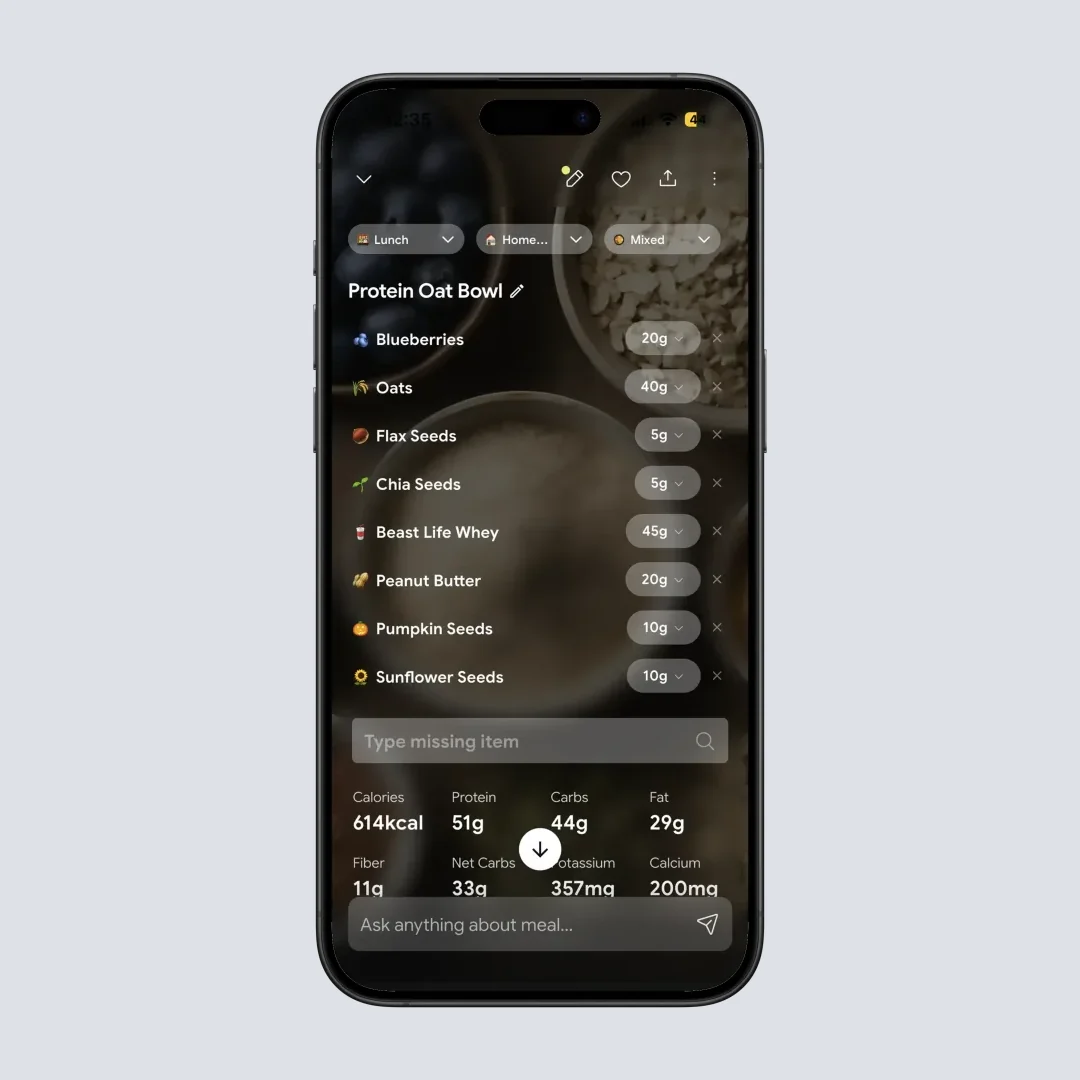
Home > Camera Icon > Click Picture > Crop Picture. The portion is the number the research says to double-check, so it is the easiest number to change. See how a full scan works in our meal scan guide.
The two approaches pair well. A recipe file is precise about ingredients but assumes every serving is identical. A photo scan is flexible about servings but estimates ingredients. If you cook in batches from the same recipes, import them into one of the apps above. If your cooking is improvised, changes daily, or you often eat home food someone else cooked, a scan of the actual plate asks less of you than reconstructing an ingredient list you never had.
Real-World Examples 👥
The Sunday batch cook. Take a typical batch-cooking week: one big pot of rajma on Sunday, eaten across the next four days. In Cronometer, you import the recipe once, weigh the finished pot, set the cooked weight, and then log "320 g rajma" each night by weight. All four logs match what was actually eaten, including the water the beans absorbed.
The food blog cook. Or take a cook who tries three new food blog recipes a week. In MyFitnessPal, you paste each URL, spend two minutes fixing red-X ingredients, and save. The first log costs those two minutes; every repeat of the same dish costs five seconds.
The improviser. A third pattern: almost never following a recipe, stir-frying whatever vegetables are left in the fridge with a different sauce each time. A saved recipe would be wrong by Tuesday. Photograph the finished bowl instead, confirm the portion, and set the oil level. That log is an estimate, but it is an estimate of the meal actually eaten, not of a recipe nobody followed.
IMPORTANT
Checkpoint: final stretch before the reveal.
One last nudge, the scale trick is next.
⏱️ Progress 3/4 • ~7 minutes in • Keep going
✅ Step 1: Why recipe import beats database guessing
✅ Step 2: All 5 apps, ranked on three jobs
✅ Step 3: When a photo beats a recipe file
✨ The 60-second scale trick that fixes recipe calories in any app (about to reveal)
The 60-Second Scale Trick That Fixes Recipe Calories in Any App 🧩
Here is the move promised at the top. Cronometer automates it, but you can do it manually in every app in this ranking, and it repairs the single biggest error in recipe logging: cooking changes weight, and ingredient totals do not.
A stew that starts as 2,400 g of raw ingredients might weigh 1,900 g after simmering. The calories did not go anywhere, but every "1 of 6 servings" you log from the original ingredient math is now wrong by the difference. Rice runs the other way: it absorbs water, so a portion that looks huge can be lighter in dry-weight terms than it appears. Fractions of a pan are guesses. Weight is a measurement.
The trick takes three steps and about 60 seconds:
- Weigh your empty pot once and write the number on tape on the cupboard door. You only ever do this once per pot.
- After cooking, weigh the full pot and subtract the empty weight. That difference is the real cooked weight of the whole recipe.
- In your app, set the recipe's serving size by weight. Enter the cooked total as the batch, then log portions in grams: "320 g" instead of "1 of 6 servings."
From then on, every portion you weigh out is exactly right, leftovers included, no matter how much the dish reduced or absorbed. In Cronometer this is the built-in Set Cooked Recipe Weight step. In MyFitnessPal, MacroFactor, Samsung Food and Lose It, you do the subtraction yourself and set servings by weight, and the result is the same honest number.
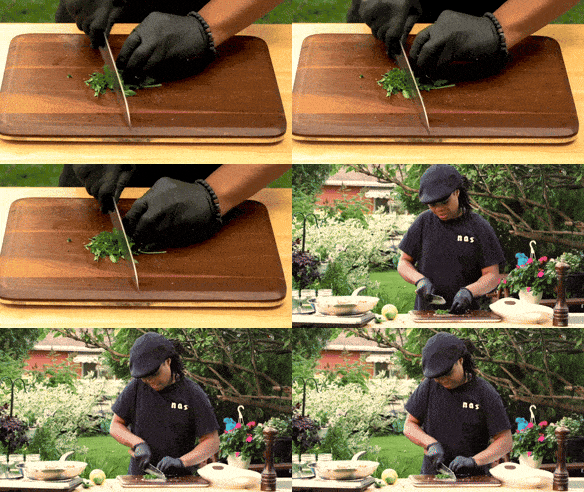 The ingredient list is the easy half. What comes out of the pot weighs something different from what went in, and the scale is the only tool that knows.
How to Import a Recipe Correctly, Step by Step 📝
With the scale trick in your pocket, here is the full import routine that survives contact with a real kitchen:
- Copy the recipe URL from the site, not the homepage or a search result page. The importer needs the page with the ingredient list on it.
- Paste it into your app's import screen and let it parse. If the site fails, copy the ingredient list text and use the manual paste option instead.
- Set the serving count before reviewing ingredients. Serving math applied afterward is the most common source of doubled or halved calories.
- Review every ingredient match, not just the flagged ones. A confident match to the wrong yogurt is worse than a flag, because you will never look at it again.
- Add what the site left out, usually cooking oil, butter for the pan, and garnishes you actually eat.
- Cook, then weigh the finished dish and set the cooked weight if your app supports it, or use the scale trick above if it does not.
- Log a portion immediately to confirm the numbers look sane. A 700-calorie bowl of vegetable soup is a sign something in the match went wrong.
More Tips for Accurate Recipe Logging
- Fix the red X items first. Unmatched ingredients default to nothing or to a wrong guess. The two minutes you spend on the review screen is where all the accuracy lives.
- Add the cooking fat by hand. Recipe sites often list "oil for frying" without an amount, and importers drop it. One tablespoon of oil is roughly 120 calories, which is a large error to repeat daily.
- Log leftovers by weight, not by fraction. "A quarter of the pan" is a guess. "310 g" is a measurement, and it takes the same ten seconds with a kitchen scale.
- Update the recipe when you change it. If you halved the sugar or swapped cream for yogurt, edit the saved recipe. A stale recipe file is a quiet, permanent logging error.
- Name recipes so future-you can search them. "Mom's chicken curry (low oil)" beats "Recipe 7." Day-two speed depends on finding the entry in one search.
- Do not force improvised meals into recipe files. If the dish changes every time, a photo log or a quick ingredient estimate for that meal is more honest than reusing a recipe you deviated from.
What the Research Says About Home Cooking and Tracking 📚
The evidence behind this whole category is encouraging. Home cooking is rising: cooking participation among US men grew 16 percentage points over two decades, and higher-educated adults drove much of the increase (Ewoldt et al., 2025). Frequent household cooking is associated with lower ultraprocessed food intake and better overall diet quality in large US samples (Tucker et al., 2024).
At the same time, the tools have known limits. Consumer apps can misestimate nutrients even on matched foods, which is why ingredient-level recipes beat generic database entries (Evenepoel et al., 2020). And AI photo estimation identifies foods well but stays imprecise on portions (O'Hara et al., 2025), which is why photo-first apps need confirmation steps. A 2024 study of popular nutrition apps evaluated their features, quality, and the comparative validity of dietary assessment across manual logging and AI-assisted methods, treating input design as central to how well people record their diet (Li et al., 2024). No single input method wins everywhere. The best setup matches the tool to how you actually cook.
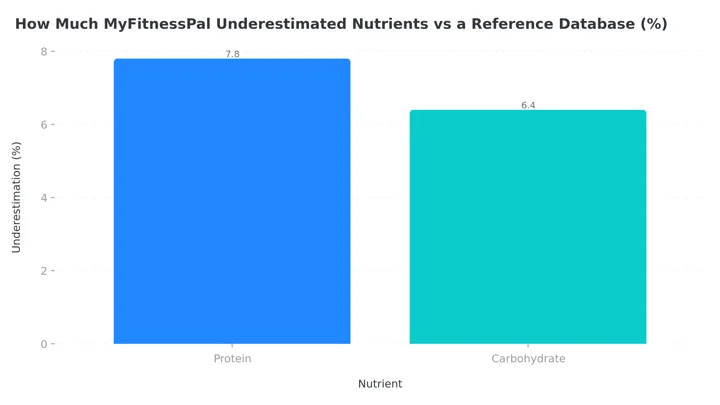 Figure 2: Even on matched foods, database entries drift from reference values. Building recipes from your own ingredients and amounts removes the guessing half of that error, which is the half you can control.
If you are setting calorie and macro targets to log against, our free macro calculator gives you the daily numbers, and a rolling diet plan keeps a bad day from becoming a bad week.
IMPORTANT
Recap: everything you covered this round.
You finished the run, save this for your next batch cook.
⏱️ Progress 4/4 • ~9 minutes in • Nicely done
✅ Step 1: Why recipe import beats database guessing
✅ Step 2: All 5 apps, ranked on three jobs
✅ Step 3: When a photo beats a recipe file
✅ The 60-second scale trick: weigh the pot ➡️ subtract the empty weight ➡️ log portions in grams (revealed)
Conclusion: Match the Tool to How You Cook ✅
If you cook from written recipes and repeat them, import them once and let a recipe file do the work: MyFitnessPal for the widest free importer, Cronometer for the most accurate serving math, MacroFactor if you want its coaching around the recipes, Samsung Food to organize the cooking itself, and Lose It for a budget-friendly basic version.
If your home cooking is improvised, or you eat home food you did not cook, recipe files will always lag behind reality. That is the case NutriScan was built for: photograph the plate, confirm the portion, set the oil level, done. You can try a scan free and see the details in our pricing breakdown. Whichever route you take, the goal is the same: keep cooking at home, and keep the log honest enough to learn from.
Frequently Asked Questions ❓
What is a recipe importer in a calorie tracking app?
It is a tool that reads a recipe web page from a URL you paste, extracts the ingredient list, matches each ingredient to the app's food database, and saves the result as one loggable food with per-serving nutrition. MyFitnessPal, Cronometer, MacroFactor, Samsung Food, and Lose It all offer a version of this in 2026.
Why are my imported recipe calories wrong?
The three usual causes are a wrong ingredient match the parser was confident about, missing cooking fat that the recipe site never listed by amount, and serving math that ignores cooking weight change. Review every match, add the oil yourself, and weigh the finished dish where possible.
Which app has the most accurate recipe nutrition?
Cronometer, for two reasons: it refuses to save recipes with unresolved ingredient matches, and its Set Cooked Recipe Weight feature recalculates nutrition based on what the dish weighs after cooking (Cronometer support). Accuracy still depends on you reviewing the ingredient matches.
Can I import recipes into NutriScan?
No. NutriScan does not currently offer URL recipe import or a custom recipe builder. It logs home cooking through photo scanning of the finished plate, with an editable portion size, 11 cooking method tags and a four-step oil level slider. If you need stored ingredient-level recipes, use one of the five apps ranked above, and use NutriScan when the meal in front of you does not match any saved recipe.
Is it better to log home meals by recipe or by photo?
Use a recipe when you follow written recipes and repeat them, because ingredient-level data is more precise than any estimate. Use a photo when the meal is improvised or cooked by someone else, because an estimate of the real plate beats a precise file for a dish you did not actually make. Many people use both.