Best App for Progress Photos and Body Measurements 2026
 ChatGPT
  Claude
  AI Mode
  Perplexity
TL;DR - Best Progress Photo and Body Measurement Apps 2026
• Best overall for photos plus measurements: MacroFactor, with up to 21 body metrics, three photo angles and automatic waist-to-height calculation.
• Best dedicated body tracker: Progress, if you budget for the Pro tier where photos live.
• Best free option: MyFitnessPal, whose Progress Photos feature attaches a photo to any weigh-in at no cost.
• Best for data people: Cronometer Gold, which charts your waist against any nutrient you log.
• Best for lifters: Hevy, with 14 circumference sites including separate left and right fields.
• The honest note: NutriScan has no photo or measurement features, so we are not in this ranking.
In a pooled analysis of Swedish cohort studies, a one standard deviation increase in waist circumference was linked to a 25% higher risk of established obesity-related cancers in men, compared with 19% for the same size increase in body mass index, and the difference between the two measures was statistically significant (Sun et al., 2025, Journal of the National Cancer Institute). The authors concluded that waist circumference "is a stronger risk factor than BMI for obesity-related cancer in men, conveying additional risk information, whereas this is less evident in women."
Read that finding as a practical instruction rather than a scary headline. A number you can measure at home with a $3 tape carries information your bathroom scale does not have. Yet almost nobody records it, because most tracking apps make weight easy and everything else hard.
So this ranking is about the two records that survive a flat week on the scale: the tape measure and the photo. NutriScan does not have either feature, so we are not in this ranking, and we explain near the end what we do instead. NutriScan publishes this post, and we make a competing app. Five apps are ranked below on what their own documentation says they can do.
IMPORTANT
Your progress tracking plan at a glance.
A quick roadmap so you can pick the right app without reading every review.
⏱️ Progress 0/4 • ~0 minutes in • Keep going
⏳ Step 1: Why a flat scale reading can hide real change
⏳ Step 2: The three jobs that decide this ranking
⏳ Step 3: All 5 apps ranked, plus one that is not
🔍 The once-a-week rule that decides whether this habit helps you or hurts you (revealed near the end)
Why a Flat Scale Reading Can Hide Real Change 📉
Body recomposition is defined in the research literature as "the simultaneous process of reducing body fat while maintaining or increasing lean mass, frequently with no changes in total body mass" (Bonilla et al., 2024, Frontiers in Nutrition). Read that last clause again. The scale can sit still for six weeks while your body composition moves in the direction you wanted.
 Week six, scale unchanged, doing mental math about where the effort went. The tape measure usually has the answer the scale is hiding.
Waist data behaves differently. In a 2025 analysis of the American Cancer Society's Cancer Prevention Study-II Nutrition Cohort, covering 50,618 women and 43,783 men with 48,323 deaths recorded through 2018, a waist-to-height ratio of 0.55 or above was associated with higher all-cause mortality risk compared with a ratio below 0.50, even after adjusting for body mass index. The relative risk was 1.23 in women and 1.11 in men (PLOS ONE, 2025). The phrase "after adjusting for BMI" is the important one. Your waist was telling the study something your weight had not already said.
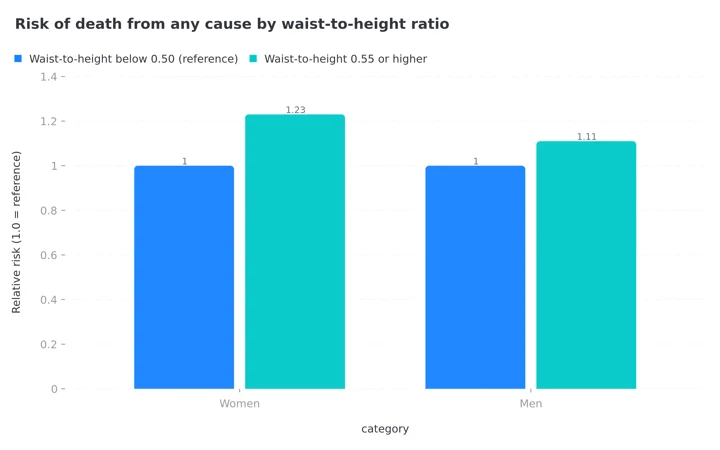 Figure 1: All-cause mortality risk by waist-to-height ratio in the Cancer Prevention Study-II cohort, after adjusting for BMI. The gap between the bars is information your bathroom scale never sees.
A 2020 consensus statement in Nature Reviews Endocrinology made the same argument for clinical practice and called for waist circumference to be measured alongside weight at routine visits (Ross et al., 2020). Most of us do not get that at a checkup. An app is the realistic substitute.
IMPORTANT
Checkpoint: here's where you are right now.
Quick status update so you always know the next best move.
⏱️ Progress 1/4 • ~2 minutes in • Keep going
✅ Step 1: Why a flat scale reading can hide real change (done)
👉 Step 2: The three jobs that decide this ranking (you're here)
⏳ Step 3: All 5 apps ranked, plus one that is not
🧩 The once-a-week rule that decides whether this habit helps or hurts (coming soon)
The Three Jobs That Decide This Ranking 📋
Job 1: does one entry hold the photo and the numbers together? A photo with no date and no waist number next to it is a picture. A measurement with no photo is a spreadsheet. The apps that win keep both in a single dated record, so twelve weeks later you can see the number and the shape that produced it.
Job 2: can you compare two dates without guessing? This is where most apps stop. Storing photos is easy. Putting two dates on one screen, at the same size, is the feature that makes the photos worth taking. If the app cannot do that, you are opening your camera roll and scrolling, which is exactly what you were trying to avoid.
Job 3: does it protect you from the habit going wrong? More measurement is not automatically better. I will cover the research on this below, and it changed where two of these apps landed.
Quick Comparison
| App | Body measurements | Progress photos | Compare two dates in-app | Price |
|---|---|---|---|---|
| MacroFactor | Up to 21 metrics, including ratios | Front, side and back views | Yes, gallery comparison | $71.99/yr, no free tier |
| Progress | 17 or more measurements | Yes, on the Pro tier | Gallery, photos are Pro only | Free tier, Pro price not listed on site |
| MyFitnessPal | Yes, inside Weight and Measurements | Yes, attached to a weigh-in | Not documented | Free |
| Cronometer | Custom biometrics, name your own | Not a dedicated photo gallery | Custom charts, any two data points | Free tier, Gold $4.99/mo annual |
| Hevy | 14 circumference sites plus body fat | Yes, with measurements attached | Not documented | Free tier, price not listed on site |
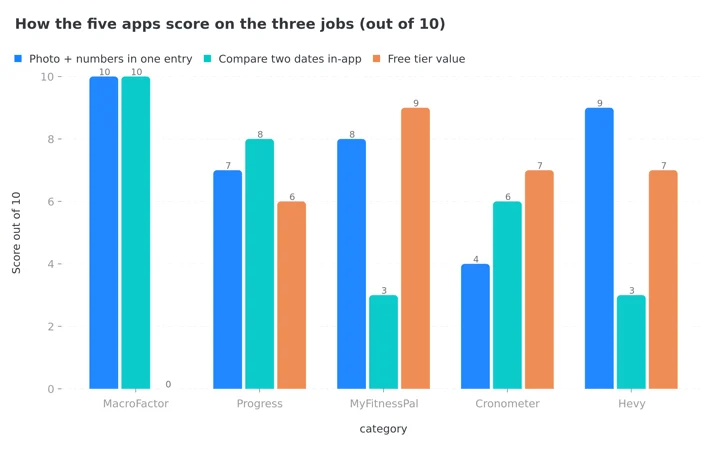 Figure 2: Scored from each app's own published documentation. MacroFactor sweeps the two core jobs but scores zero on free access, which is the whole trade this ranking turns on.
IMPORTANT
Checkpoint: midway progress update.
You're past the theory. The ranking starts now.
⏱️ Progress 2/4 • ~4 minutes in • Keep going
✅ Step 1: Why a flat scale reading can hide real change (done)
✅ Step 2: The three jobs that decide this ranking (done)
👉 Step 3: All 5 apps ranked, plus one that is not (current)
🧩 The once-a-week rule that decides whether this habit helps or hurts (next)
1. MacroFactor: Best Overall for Photos Plus Measurements 🥇
MacroFactor treats body tracking as a data set rather than a photo album, and that is why it takes the top place. The app supports up to three photo views, front, side and back, and up to 21 body metrics covering shoulder, chest, waist and hips, arm measurements like biceps and forearms, leg measurements like thighs and calves, and ratios including waist-to-height and waist-to-hip (MacroFactor, Body Metrics).
Those two ratios matter more than the feature list suggests. Waist-to-height is the exact measure the mortality analysis above used, and having the app compute it means you never do the division yourself or record it wrong.
On job 1, photos are added by creating a Body Metrics entry, so the picture and that day's measurements arrive as one record by design. On job 2, the gallery displays two progress photos from different dates alongside each other, with one-tap sharing. Any single metric can be brought into focus on an interactive chart that you can zoom and pan.
MacroFactor also publishes guidance most apps leave to the internet: knowledge base articles on taking good progress photos and on taking reliable body measurements. Reliable is the operative word. A tape measure that moves two centimeters up your torso between sessions will invent progress that is not there.
The limit is cost. There is no free tier. MacroFactor runs $11.99 monthly or $71.99 billed yearly, as covered in our MacroFactor cost guide. You are paying for a full diet coaching app and getting the best body tracking as part of it. If you will not pay a subscription, the next two entries are for you.
Buy it if: you want the tape, the camera and the ratios in one dated record, and a subscription does not bother you.

2. Progress: Best Dedicated Body Tracker 🎯
Progress does one job. It is not a food diary, not a workout log, and it does not try to coach you. It tracks the body and syncs the result to Apple Health.
The free tier covers unlimited entries, progress charts showing trends over time, a weight goal and Apple Health sync. The Pro tier adds progress photos, unlimited entries across multiple measurement areas, the ability to add past data, non-weight goals, notes on each entry, custom reports and Fitbit sync (Progress, features). The company describes the app as tracking "17+ measurements, photos, and sync with Apple Health and Fitbit."
Two things kept it out of the top spot. First, photos sit behind Pro, which means the free version answers only half of job 1. Second, the developer's own site links to the App Store only, so treat this as an Apple ecosystem app and check the store listing for the current Pro price before you plan around it.
What earns it second place is the notes field and the ability to backfill past data. If you have six months of measurements in a phone notes app, you can enter the history and get a real trend line instead of starting from zero. The company also states that your photos and measurements "stay private, securely stored on your device or iCloud" and that nothing is shared unless you choose to share it. That is the vendor's own claim, not an independent audit, but it is a claim most competitors do not make at all.
Buy it if: you want a quiet, single-purpose tracker and you are comfortable paying for Pro to unlock the camera half of the job.
3. MyFitnessPal: Best Free Option Inside a Food Diary 🆓
If you already log food, the cheapest correct answer is the app you are holding. MyFitnessPal's Progress Photos feature is free, and a photo attaches directly to a weigh-in: open More, then Weight and Measurements, select Weight, tap the plus icon, then the camera icon (MyFitnessPal, Progress Photos FAQs).
Two details in that support article are worth knowing before you commit. You can attach a photo to a previous weigh-in, which rescues the week you photographed yourself and forgot to log it. And photos are private to you inside the app, with a share button if you want to send one out.
The gaps are real. The feature is not available on the web version, so this is a phone-only workflow. The support documentation describes no built-in side-by-side comparison, which means job 2 comes down to scrolling your own history. And photos save inside your MyFitnessPal account rather than to your camera roll, so if you ever leave the app, plan the export before you cancel. Pricing for the paid tiers is in our MyFitnessPal pricing guide, though nothing in this section requires paying.
Buy it if: free is the requirement and you already keep a food diary there anyway.
4. Cronometer: Best for Measurements Next to Your Nutrition Data 🥗
Cronometer is here for a specific person: the one who wants to know whether the waist number moved when the protein number moved.
Gold includes custom biometrics, which let you define and track anything beyond the standard list, including lab results, symptoms and medication doses, and custom charts that correlate any two data points over time. Gold costs $4.99 per month billed annually or $10.99 on the monthly plan, as detailed in our Cronometer Gold cost breakdown.
That correlation feature is the reason it beats a dedicated photo app for some readers. You can chart waist against average daily fiber, or a sleep score against protein, in the same place your food already lives. Nobody else on this list can do that.
It ranks fourth because it is not a progress photo tool. There is no documented photo gallery for body shots and no side-by-side view. If your plan is measurements plus data analysis, Cronometer is first. If your plan involves the camera, it is not.
Buy it if: you think in charts, and the question you actually want answered is what changed my waist number.
5. Hevy: Best for People Who Lift 🏋️
Hevy is a workout tracker that quietly does body tracking well. You can upload progress photos alongside body weight, body fat and circumference measurements, and the measurement list is the most detailed here: neck, shoulders, chest, waist, abdomen, hips, plus left and right for biceps, forearms, thighs and calves (Hevy, track body measurements).
Left and right as separate fields is not a small thing. If you are training after an injury, a one centimeter gap between arms is information no combined field will show you. Adding a photo also lets you leave the other fields empty (Hevy, progress photos), so a rushed week still produces a record.
It ranks fifth because the body tracking sits inside a gym app. If you do not log workouts, you are carrying a lot of software for one screen. Hevy's site does not publish a pricing page, so check the app store listing rather than trusting a number from a comparison article.
Buy it if: you already log lifts, or the left-versus-right detail matters to your training.
Where NutriScan Fits (We Do Not Do Progress Photos) 📱
NutriScan has no progress photo feature and no body measurement fields. Not a limited version, not a paid add-on. They do not exist, and putting our own app in a ranking about features we do not sell would make everything else here worth less.
What we do hold is the other half. You can log weight from the Report on your home screen and see the weekly trend beside your macros, and the monthly view compares NutriScore, weight change, calories, protein hit rate, meals and streak side by side. We also read Active Energy, Steps and Sleep from Apple Health or Google Fit. So the food record, the weight trend and the daily nutrition quality live in one place, as our insights guide walks through.

Home. The Report widgets hold the weight trend and the health data next to the food you logged, which is the half a tape measure cannot do.
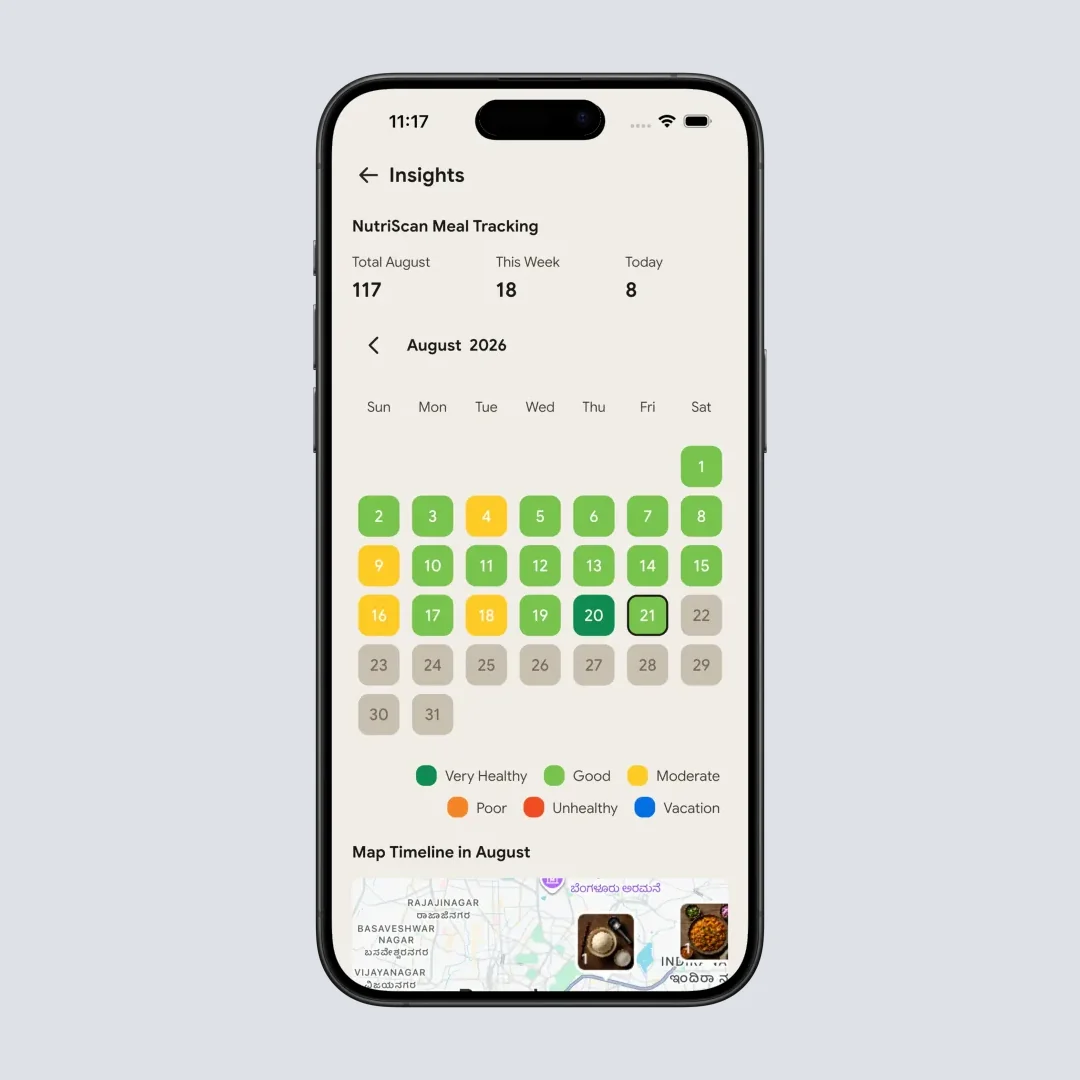
Home > Insights Widget. Each day is colored by its NutriScore, so the month your waist stopped moving comes with the eating record that explains it.
A sensible pairing: use NutriScan for what went in and how the weight trend responded, and use one of the five apps above for the tape and the camera. Photo apps cannot tell you that your protein hit rate dropped to 40% in the month your waist stopped moving. Our free tier and pricing are in the NutriScan pricing guide.
Set the target before you measure the change
A tape measure tells you what changed. It cannot tell you what to eat tomorrow. If you want a calorie and protein target calculated from your own body and goal instead of a generic number, use our free macro calculator once, then let the weekly trend judge it.
IMPORTANT
Checkpoint: final stretch before the reveal.
One last nudge, the rule that decides everything is next.
⏱️ Progress 3/4 • ~7 minutes in • Keep going
✅ Step 1: Why a flat scale reading can hide real change
✅ Step 2: The three jobs that decide this ranking
✅ Step 3: All 5 apps ranked, plus one that is not
✨ The once-a-week rule that decides whether this habit helps or hurts (about to reveal)
How to Measure Your Waist the Way Researchers Do 📏
The studies above are only useful if your measurement matches theirs. The CDC's NHANES anthropometry protocol is public, and the home version takes about a minute (NHANES Anthropometry Procedures Manual).
- Measure on bare skin. Clothing adds centimeters that vary by outfit, which is the fastest way to create fake progress.
- Find the landmark, not the belly button. The protocol locates the top of the hip bone, the uppermost lateral border of the ilium, and marks a horizontal line there. The belly button moves with body composition. The hip bone does not.
- Keep the tape horizontal. The manual suggests using a mirror to confirm the tape sits parallel to the floor all the way around. A tape that dips at the back reads high every time.
- Snug, not tight. The tape should lie flat against the skin without compressing it.
- Breathe out normally, then read. Take the measurement at the end of a normal expiration, and do not inhale and hold. Record to the nearest 0.1 cm.
- Measure twice. The protocol repeats the measurement. If your two readings differ by more than half a centimeter, do it a third time.
- Same time of day, same day of the week. Morning, before eating, after using the bathroom. Consistency matters more than which time you pick.
What Your Waist Number Actually Means 🎚️
The World Health Organization's reported cut-off points are 94 cm for men and 80 cm for women for increased risk of metabolic complications, and 102 cm for men and 88 cm for women for substantially increased risk (WHO, Waist Circumference and Waist-Hip Ratio).
Two cautions before you compare yourself to a threshold
These thresholds were developed largely in European populations, and the same WHO report documents lower proposed cut-offs for several Asian populations, so a single global number is a simplification. And a threshold is not a verdict. The trend in your own numbers over three months is more useful to you than which side of a line you started on.
The simpler rule many clinicians now prefer is waist-to-height ratio. Keep your waist below half your height. The European Association for the Study of Obesity has recommended a ratio above 0.5 as part of diagnosis and treatment planning, as noted in the PLOS ONE cohort analysis cited earlier. It needs no chart and no calculator, and MacroFactor computes it for you.

The Once-a-Week Rule: How Often Is Too Often 🔁
This is job 3, the mystery item from the checklist, and it is the section I would keep if I could only keep one.
In a naturalistic cross-over study, 179 women were asked to perform either their typical amount of body checking or three times their usual amount for three days each. Among women with high body concern, body dissatisfaction rose significantly after the increased-checking period, from 5.93 to 6.41 on the study's measure. Women at low risk were largely unaffected, though they reported a higher drive for thinness after the increased condition (Geiger et al., 2024, PLOS ONE).
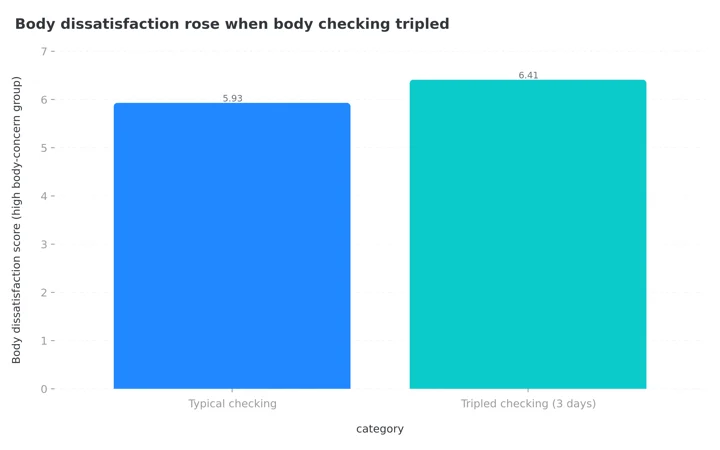 Figure 3: Three days of tripled body checking measurably raised body dissatisfaction in women who already had body concerns. The tool is not neutral for everyone, which is why frequency is a feature.
Photographing and measuring yourself is body checking with a database attached. For most people that is fine and useful. For someone already distressed about their body, an app that makes checking faster is not a neutral tool.
So here is the rule, and the reason this section was worth waiting for. Measure once a week, not daily. Photograph every two to four weeks, because a two-week change is usually invisible and the disappointment is not. Never compare consecutive weeks, compare eight weeks apart. And if opening the app produces dread rather than curiosity, that is a signal to stop and speak with a clinician, not a signal to try harder.
What the Research Says About Tracking More Things 📚
It would be convenient to claim that adding photos and measurements produces more weight loss. The honest answer is that nobody has proven which combination works best. A Stanford-led factorial randomized trial of 176 adults is currently testing exactly that question, comparing self-monitoring of diet, steps and body weight in different combinations over six months, and its published protocol states plainly that the optimal combination is not yet known (Patel et al., 2025, JMIR Research Protocols). That is a protocol, not results.
What is better established is that sticking with self-monitoring at all is associated with outcomes. In a 12-month behavioral trial of 502 adults, adherence to self-monitoring was associated with greater odds of achieving at least 5% weight loss (Burke et al., 2025, Obesity).
Put those two findings together and the practical advice is modest: pick the smallest set of measurements you will still be recording in six months. Two data points you keep beat nine you abandon in February.
Seven Habits That Make the Data Usable 💡
- Fix the camera position once. Same wall, same distance, phone at the same height, ideally propped rather than held. The comparison is only honest if the frame is.
- Shoot in the same light. Overhead bathroom light at night and window light at noon produce different bodies. Pick one and keep it.
- Same clothes, same pose, arms relaxed at your sides. Flexing on week 12 and not on week 1 is a lie you will believe.
- Write the number in the app, not on paper. A measurement without a date attached becomes worthless within a month.
- Record waist even if you record nothing else. It is the one with the strongest evidence behind it, per the cohort data above.
- Never delete a photo because you dislike it. The unflattering week is the data point that makes the good months credible.
- Review on a schedule, not on a mood. Set one day a month to open the gallery. Checking after a hard meal is how measurement becomes punishment.
 The eight-week comparison, when the frame, the light and the schedule were all kept honest. This is what the boring habits buy you.
The Short Answer ✅
If you want one app to hold everything and you will pay for it, choose MacroFactor. Twenty-one metrics, three photo angles, side-by-side comparison and automatic waist-to-height calculation is the most complete set here.
If you want a dedicated tracker that stays out of your food life, choose Progress, and budget for Pro if photos matter to you. If you want free and you already log food, MyFitnessPal's built-in progress photos are enough. If you want measurements charted against nutrients, choose Cronometer Gold. If you lift, Hevy already has the fields and you are probably in the app four times a week anyway.
Whichever you pick, the point is not the app. It is that your waist and your camera see changes your scale is not equipped to notice. Track what you eat with NutriScan, measure the rest once a week, and give the numbers three months before you judge them.
IMPORTANT
Recap: everything you covered this round.
You finished the run, save this for the day you set up your tracker.
⏱️ Progress 4/4 • ~9 minutes in • Nicely done
✅ Step 1: Why a flat scale reading can hide real change
✅ Step 2: The three jobs that decide this ranking
✅ Step 3: All 5 apps ranked, plus one that is not
✅ The once-a-week rule: measure weekly ➡️ photograph every 2-4 weeks ➡️ compare 8 weeks apart (revealed)
Frequently Asked Questions ❓
Do I need a paid app to track progress photos and measurements?
No. MyFitnessPal's Progress Photos feature is free and attaches photos directly to a weigh-in (MyFitnessPal support). Paid apps mainly add better comparison views, more measurement fields and automatic ratio calculations. Start free and upgrade only if you find yourself scrolling your camera roll to compare dates.
How often should I take progress photos?
Every two to four weeks is enough for most people. Shorter intervals rarely show visible change, and increased body checking has been linked to higher body dissatisfaction in women with existing body concerns (Geiger et al., 2024). Compare photos that are at least eight weeks apart.
Is waist circumference really better than weight?
It carries information weight does not. In pooled Swedish cohort data, waist circumference was a stronger risk factor than BMI for obesity-related cancers in men, and the association held after accounting for BMI (Sun et al., 2025). Track both. They answer different questions.
Where exactly do I put the tape measure?
The CDC's NHANES protocol marks the site just above the uppermost lateral border of the right hip bone, keeps the tape horizontal and snug without compressing the skin, and records the reading at the end of a normal breath out (NHANES manual). Use the same landmark every time, because switching sites changes the number by several centimeters.
Does NutriScan track progress photos or body measurements?
No. NutriScan has neither feature. You can log weight and see it trend alongside your macros and monthly nutrition patterns, but there are no measurement fields and no photo gallery. Pair NutriScan for food and weight with one of the apps above for the tape and camera.
This article is for general information and is not medical advice. If you have a history of disordered eating, or if tracking your body causes distress, speak with a qualified clinician before starting a measurement routine.