MyNetDiary vs Cronometer 2026: Diabetes vs Micronutrients
 ChatGPT
  Claude
  AI Mode
  Perplexity
IMPORTANT
Your tracker comparison roadmap at a glance.
Covered in order so you can skip straight to what matters for your goal.
⏱️ Progress 0/4 • ~0 minutes in • Keep going
⏳ Step 1: MyNetDiary - the full diabetes tracking dashboard
⏳ Step 2: Cronometer - the micronutrient oracle and its food-composition sources
⏳ Step 3: Free tier, pricing, and user review data
⏳ Step 4: 7 practical tips for choosing between them
🔍 The one consistency pattern that determines which app actually helps you long-term (revealed near the end)
Both MyNetDiary and Cronometer have earned their reputations by going deeper than calorie counting. But they serve different kinds of users, and that difference matters more in 2026 than it ever has.
As a NutriScan nutritionist, I get this question every month: "Which one should I use - MyNetDiary or Cronometer?" The answer almost always comes down to one question back: "Are you managing blood sugar, or are you trying to fix micronutrient gaps?"
A 2025 umbrella review pooled eleven systematic reviews covering 261 primary studies and 62,407 participants, and found that mobile app interventions produced a modest but statistically significant weight reduction of 1.32 kg, with high heterogeneity across the pooled studies at I² = 82 percent (Couto and de Almeida, 2025, PMC12294216). Web-based interventions showed no significant effect. So the app itself is doing something. The question is which nutrient layer is more useful for your specific health goal.
This comparison focuses on where these two apps truly diverge: MyNetDiary's dedicated diabetes tracking mode and Cronometer's deep micronutrient database. Everything else - pricing, free tier, logging speed - is secondary to understanding whether you need a blood glucose dashboard or a micronutrient oracle.
At a Glance: MyNetDiary vs Cronometer 2026 💡
| Factor | MyNetDiary | Cronometer |
|---|---|---|
| Nutrients tracked | 108 | Up to 95 |
| Food database | 2M+ verified foods | 1M+ lab-analyzed or verified foods |
| Dedicated diabetes mode | Yes (glucose, carbs, insulin, A1C, meds) | None published (biometrics plus custom charts) |
| Micronutrient oracle | AI meal suggestions (Premium Plus) | Oracle Nutrient Search (Gold) |
| Premium annual price | $59.99/yr | $59.99/yr |
| Free tier ads | None | Yes |
| Free tier history limit | Unlimited | 7-day reporting window |
| Works offline | Yes | No |
| Cross-variable charting | No | Yes (Gold) |
| Direct CGM integration | Via Apple Health / iOS Health | Via Dexcom direct sync |
Prices are standard US prices as of mid 2026 and change by region (Cronometer Gold, MyNetDiary pricing).
TL;DR
Managing diabetes or prediabetes? Pick MyNetDiary. Eating whole foods and tracking micronutrient gaps? Pick Cronometer. Both premium tiers cost $59.99 a year, so this decision is entirely about your health goal, not your budget.
 The right app tracks the nutrients that matter for your specific goal - not just calories
Two Apps Built on the Same Foundation
Before comparing the differences, it helps to understand what these apps share. Both draw on the same two research-grade sources: a USDA national nutrient database and the NCC database maintained by the University of Minnesota. Cronometer names USDA SR28 specifically, alongside a separate USDA branded-products feed (Cronometer data sources). Both vendors describe their entries as staff-verified, reviewed by human nutrition staff before going live. That puts them in a different category from crowdsourced apps, where anyone can submit an entry and the wrong one sits in search results until somebody flags it.
A validation study in the Journal of Medical Internet Research compared MyFitnessPal's calculations against Nubel, the Belgian national food composition database, and found strong agreement for energy and the macronutrients (r = 0.90 to 0.96) but weak agreement for cholesterol and sodium (rho = 0.51 and 0.53) (Evenepoel et al., 2020, PMID 33084583). Two things to take from that. Database quality shows up in the individual nutrients, not in the calorie total. And the authors got those macro correlations only after cleaning implausible entries out of the data, which makes it a logging-discipline point as much as a database one.
Where the apps diverge from this shared foundation is in scale and specialization. Cronometer adds five country-specific databases (Canadian, UK, Australian, Dutch, Irish) and goes deep on per-food nutrient completeness. MyNetDiary builds on the USDA/NCC core to reach 2 million verified foods and layers a full diabetes tracking system on top.

Section 1: MyNetDiary's Diabetes Tracking Mode 🩺
This is where MyNetDiary earns a clear advantage over Cronometer for one specific group: people managing diabetes, prediabetes, or any condition where blood glucose and carbohydrate intake are actively tied together.
The Dedicated Diabetes Dashboard
MyNetDiary has a standalone Diabetes Tracker app (separate iOS and Android download) and a dedicated diabetes mode built into the main Premium app. When you turn it on, you get a blood glucose dashboard that sits alongside your food log - not buried in settings.
Blood glucose logging. You can log pre-meal and post-meal readings with timestamps. The app lets you set custom target ranges for fasting, before and after each meal, and before bed. Readings outside your targets highlight in yellow (above range) or red (below range), so patterns stand out without manual analysis.
Insulin tracking. Log any insulin type, including ones you add yourself, with dose, time, a label, and optional notes. Multiple insulin types can be tracked simultaneously on the same timeline.
Medication tracking. Cronometer publishes nothing equivalent. If you are managing type 2 diabetes with metformin, a GLP-1 agonist, or anything else, you can log individual medications with time, dose, and label assignments, and see medication timing alongside your food and glucose data on the Day Timeline (MyNetDiary Premium guide). Reminders are a separate feature and MyNetDiary publishes them for blood glucose checks, not for medication doses.
A1C, cholesterol, and blood pressure. These are tracked in the same interface, so your quarterly lab values sit alongside your daily food log. Over months, the relationship between your eating patterns and your lab numbers becomes visible without needing to export anything.
Carb counting tools. You switch between Total Carbs and Net Carbs (total minus fiber minus sugar alcohols) in App Settings. Carbs Quick View shows a food's carb content during entry without opening the full nutrition panel, which is what you want when you are deciding at a restaurant counter rather than at home (MyNetDiary diabetes tracking).
Reporting that puts the pieces together. MyNetDiary does not publish an automated pattern detector that writes sentences for you. What it does publish is Daily Analysis, the Day Timeline report that stacks glucose, insulin, medications and exercise on one axis, plus weekly nutrient averages, macro distribution charts, and weight trend analysis on Premium. You read the pattern off the timeline yourself, which is slower than a machine-written insight but does not depend on one being right.
Why This Matters for Diabetes Management
A decade-long scoping review of 68 studies on calorie-counting apps for adults with weight-related chronic disease came out in April 2026, and its recommendation to developers was to cut tracking effort, automate what can be automated, and make the food database comprehensive enough that people do not give up mid-entry (Dugas et al., 2026, JMIR mHealth). It pools no weight-loss effect of its own, so treat it as a design argument rather than an outcome claim. The design argument is the one that applies here.
Logging food in one app and glucose in another means you never see the full picture. For anyone with type 2 diabetes or prediabetes, MyNetDiary's design puts everything on one timeline: what you ate, how many carbs, when you ate, what your glucose reading was two hours later, whether you took your medication, and how this week compares to last week. Cronometer does not offer this out of the box.
WARNING
Cronometer publishes no diabetes-specific mode. Glucose lives there as a biometric field, and any glucose-to-carb analysis is something you build yourself with Custom Biometrics and Custom Charts on Gold. That is workable if you like assembling your own dashboard. It is not the same as opening an app that already knows what a pre-meal reading is.
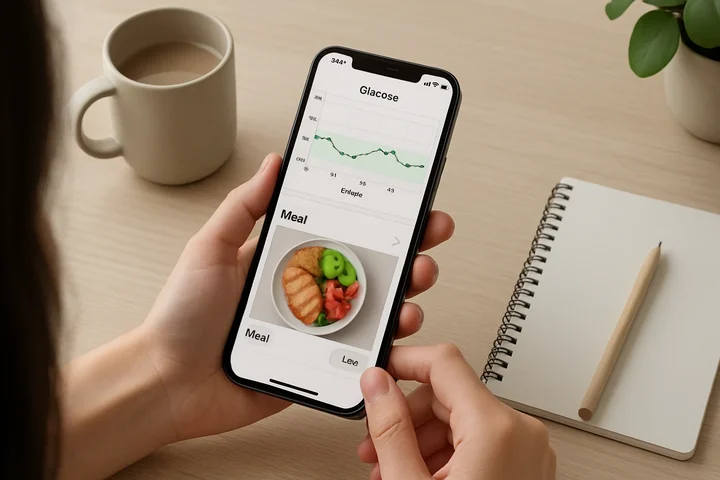 MyNetDiary's diabetes mode connects food, glucose, medication, and lab values in a single daily timeline - no switching between apps
IMPORTANT
Checkpoint: one section done.
Here's where you are in the comparison.
⏱️ Progress 1/4 • ~2 minutes in • Keep going
✅ Step 1: MyNetDiary's diabetes tracking (done)
👉 Step 2: Cronometer's micronutrient oracle (you're here)
⏳ Step 3: Free tier + pricing
⏳ Step 4: 7 practical tips
🧩 The consistency pattern that changes everything (coming soon)
Related: best app for tracking carbs for diabetes 2026.
Section 2: Cronometer's Micronutrient Depth 🔬
Cronometer's reputation for micronutrient tracking is real. The app tracks up to 95 nutrients per food entry on Gold, up to 84 on the free tier, drawing on what it describes as over 10 sources covering whole foods across multiple countries.
Where Cronometer's Numbers Come From
Cronometer names ten sources (Cronometer data sources): NCCDB, its own Cronometer Food Composition Database, USDA SR28, CNF 2015 (Canada), IFCDB (Ireland), NEVO (Netherlands), CoFID (UK), NUTTAB (Australia), Nutritionix, and USDA's Global Branded Food Products Database.
Read that list carefully, because it splits in two. Eight of them are national food-composition databases built on laboratory analysis. The last two, Nutritionix and the branded-products feed, are label-derived. Cronometer's own wording is "over 1M lab-analyzed or verified foods", and the "or verified" is doing real work. Whole-food entries come from chemical analysis of food samples. Branded entries come from labels that went through a verification process. Check the source tag on an entry before you trust its trace minerals.
That distinction is why Cronometer suits one specific eating pattern: whole foods. When you log "1 cup of cooked lentils" in Cronometer, the zinc, molybdenum, folate, and selenium values come from lab testing of actual lentil samples. When you log the same food in MyNetDiary, the core USDA data is also there. Branded entries in either app frequently carry only the label-reported nutrients, and US labeling rules require just vitamin D, calcium, iron, and potassium, so zinc, selenium, and magnesium can be missing entirely (FDA, What's on the Nutrition Facts Label).
For vegans and vegetarians tracking nutrients that are harder to get from plants - B12, iron, zinc, omega-3 DHA/EPA - Cronometer's whole-food micronutrient completeness is hard to match. A day of logged meals might reveal that your magnesium is at 68 percent of target and your selenium is at 112 percent, with your omega-6 and omega-3 intakes sitting side by side. No health authority has defined an optimal omega-6 to omega-3 ratio, and NIH's Office of Dietary Supplements notes that some researchers consider such ratios too nonspecific to be useful (NIH ODS, Omega-3 Fatty Acids). Seeing both absolute numbers still beats seeing neither before you decide whether to supplement.
INFO
Cronometer tracks up to 84 nutrients on the free tier and up to 95 on Gold (Cronometer Gold). Its own free-plan page says 95 free, so the split is not stated consistently across the site. The Gold comparison table is the more specific page, which is why we use 84 and 95. While MyNetDiary still leads at 108 total nutrients tracked, Cronometer's per-food completeness for whole foods remains the stronger differentiator for plant-focused eaters.
Oracle Nutrient Search
Oracle (Gold) is Cronometer's nutrient search. You pick a nutrient, and Oracle returns the top contributing foods for it from the database. Search "iron" and you get a ranked list of practical food options, no manual scrolling required. It is a database query, not a read on your day. The Gold feature that works off what you have already logged is a separate one, Food Suggestions, which points at foods that help you close the gap to your remaining targets (Cronometer Gold).
Oracle is directly useful for:
- Vegetarians finding non-heme iron sources to pair with vitamin C, which enhances the bioavailability of non-heme iron (NIH ODS, Iron)
- Athletes looking for foods high in leucine, the amino acid most closely tied to muscle protein synthesis (Ely et al., 2023, Clin Nutr)
- Anyone whose blood work shows low zinc, selenium, or vitamin D looking for food-first solutions before supplementing
Nutrition Scores by Category
Cronometer Gold lets you pick up to eight Nutrition Scores to show in your diary, from a published list of sixteen (Cronometer, Nutrition Scores). Instead of scrolling through 95 individual nutrient bars, you see grouped scores: Bone Health, Metabolism Support (thiamin, riboflavin, niacin, pantothenic acid, B6, iron, magnesium, manganese), Antioxidants, Immune Support, Blood Health, Keto Score, Plant-Based Score, and a Data Quality score that tells you how complete your entries actually are.
A Bone Health score of 74 percent tells you at a glance that your skeleton-supporting nutrients are below target without reading six separate bar graphs.
Cross-Variable Charting
Cronometer Gold lets you plot any two tracked variables against each other over time. Sodium intake vs. blood pressure. Fiber intake vs. body weight. Total fat vs. cholesterol readings. This is powerful for spotting correlations that single-variable charts miss.
For health-focused users running personal nutrition experiments or trying to understand how dietary changes affect specific lab markers, cross-variable charting is a meaningful differentiator.
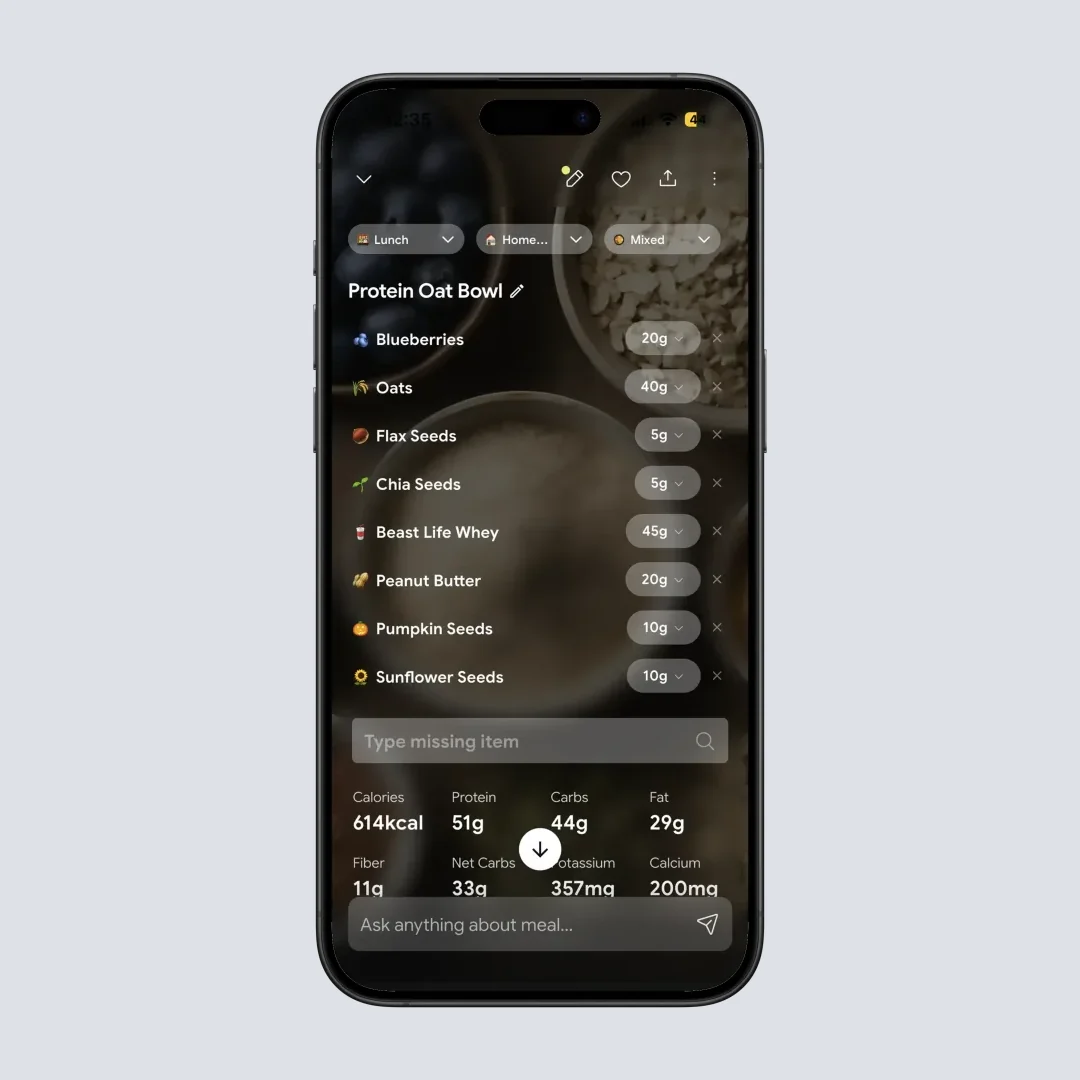
NutriScan gives you instant micronutrient detail after a photo scan - a complement to either tracker for meal-by-meal breakdown (Home > Camera Icon > Scan Meal)
IMPORTANT
Checkpoint: halfway through.
You're halfway - the decision gets clearer from here.
⏱️ Progress 2/4 • ~4 minutes in • Keep going
✅ Step 1: MyNetDiary's diabetes tracking (done)
✅ Step 2: Cronometer's micronutrient oracle (done)
👉 Step 3: Free tier + pricing (current)
⏳ Step 4: 7 practical tips
🧩 The consistency pattern that changes everything (next)
Section 3: Free Tier and Pricing 💰
The pricing difference between these two apps is almost nothing on the annual plan.
| Plan | MyNetDiary | Cronometer |
|---|---|---|
| Free | Ad-free, unlimited history, 108 nutrients | Ads, 7-day reporting window, up to 84 nutrients, barcode scanner |
| Premium / Gold (annual) | $59.99/yr (about $5.00/mo) | $59.99/yr ($4.99/mo as billed) |
| Premium / Gold (monthly) | $8.99/mo | $10.99/mo |
| Lifetime | $179.99 (one-time) | Not published on cronometer.com/gold |
Prices are standard US prices as of mid 2026 and change by region (Cronometer Gold, MyNetDiary pricing). The $5.00/mo figure for MyNetDiary is just $59.99 divided by twelve, not a SKU you can buy; its real monthly plan is $8.99. The annual price is the same on both, so it decides nothing here. What does matter is the free tier gap, and the Lifetime option if you plan to track for years.
MyNetDiary's free plan has no ads, requires no account or email to start, and keeps unlimited data history. Cronometer's free plan is ad-supported, requires an account before you can log, and limits reports and charts to a 7-day window. For someone testing either app before committing, MyNetDiary is the lower-friction free trial.
Both free tiers cover macros and a deep micronutrient panel, though Cronometer's free tier stops at 84 of its 95 nutrients and MyNetDiary sells deeper nutrient analysis as a Premium upgrade even while its scorecard describes all 108 as free. Custom nutrient targets are free in both. Barcode scanning is free in both. The functional difference on the free plan is ads, the account requirement, and how far back you can look.
MyNetDiary's Premium Plus tier ($99.99/yr) adds AI Coach, AI meal suggestions, AI restaurant menu scan, and AI voice logging. Cronometer Gold has its own AI coach, Crono Coach, plus Photo Log and Voice Log, but publishes no restaurant-menu scanner.
Cronometer's 7-day free window: what it actually means
Your week-1 entries are not deleted. Cronometer's free plan lets you generate reports and charts within a 7-day window, and Gold's benefit is described as unlimited data and looking back at historical data. So the entries stay, you just cannot see or report on them until you upgrade. MyNetDiary keeps unlimited history visible on its free plan. This is not a reason to avoid Cronometer, but it is a reason to commit to Gold if you are serious about long-term tracking there.
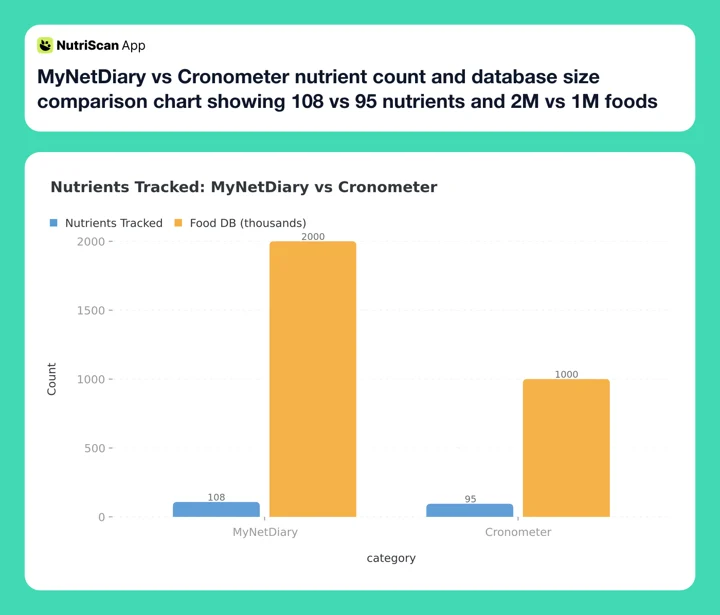 Figure 1: MyNetDiary leads on total nutrients tracked (108 vs 95) and database size (2M+ vs 1M+). Both figures are vendor-published, not independently audited.
Related: MyNetDiary pricing 2026 and Cronometer pricing 2026: Basic vs Gold vs Pro.
Section 4: User Reviews and App Store Data ⭐
Both apps have strong long-term ratings that reflect years of accumulated reviews. Recent data tells a more current story.
MyNetDiary's Diet App Scorecard (a monthly analysis published by MyNetDiary, whose CEO discloses the conflict on the page itself) gave MyNetDiary a 4.56/5 average across 304 filtered March 2026 US App Store reviews, the highest score among the 12 calorie tracking apps it analyzed that month (MyNetDiary Diet App Scorecard, March 2026). Cronometer scored 3.63/5 across 82 filtered reviews in the same period, down from 3.81 in February. Reviewers praised Cronometer's free micronutrient tracking and flagged full-screen ads that interrupt mid-entry and a connectivity bug that forces logouts.
Garage Gym Reviews rates Cronometer 4.4 out of 5, with the review built around the app tracking up to 84 nutrients rather than calories alone. Its tester scored accuracy 3.5 out of 5, which is worth knowing before you treat the nutrient count as a proxy for correctness (Bourgeois, updated May 2025). Cronometer's own Pro page claims over 15 million users, though it attaches no date to the figure.
IMPORTANT
Checkpoint: final stretch before the reveal.
One more section - then the finding that changes everything.
⏱️ Progress 3/4 • ~5 minutes in • Keep going
✅ Step 1: MyNetDiary's diabetes tracking
✅ Step 2: Cronometer's micronutrient oracle
✅ Step 3: Free tier + pricing
✨ The consistency pattern that changes everything (about to reveal)
 The right app for you depends on what you eat and what health metric you are actively managing - not which one has more features

Section 5: Practical Tips for Choosing Between These Two Apps 🎯
Tip 1: Start with your primary health condition.
If you or someone in your household manages diabetes, prediabetes, PCOS, or any condition where blood glucose and carbohydrate intake are actively monitored together, MyNetDiary's dedicated diabetes mode is a meaningful functional difference. Cronometer publishes no diabetes-specific mode. Glucose is a biometric field there, and correlating it against carbs means building your own Custom Chart on Gold.
Use the diabetes macro calculator to understand your carb targets before choosing between them.
Tip 2: Check what you eat, not just how much.
Cronometer's micronutrient depth is most useful for people who eat mostly whole, minimally processed foods - produce, legumes, whole grains, meat, fish, eggs, dairy. For these foods, Cronometer's lab-analyzed entries fill in dozens of nutrient fields that branded food labels do not include. If most of your meals come from packages, takeout, or restaurant chains, MyNetDiary's larger branded database will give better coverage even if individual entries have fewer filled nutrient fields.
Tip 3: Factor in the 7-day reporting window before choosing the free tier.
Cronometer's free plan generates reports and charts within a 7-day window, which is a real constraint if you want to compare a current diet phase to a previous one. Your older entries are still there, you just cannot chart them until you go Gold. MyNetDiary keeps unlimited history visible on the free plan.
Tip 4: Decide on cross-variable charting before paying.
Cronometer Gold's ability to plot two data points against each other over time is genuinely powerful for anyone running self-experiments. If this kind of analysis does not match how you think about your health, it is a Gold feature you will never use.
Tip 5: Test offline access if you travel or gym without signal.
MyNetDiary works offline and syncs when connectivity returns, on the free plan as well as Premium. Cronometer has no offline mode. Its own support team says the licensed databases are too large to store on-device and the licence agreements would not permit it anyway (Cronometer forums, staff answer, still the standing vendor position). If you train in a basement gym, travel in areas with weak data, or log meals on the subway, this is a practical difference that affects whether you actually track or skip meals.
Tip 6: Consider wearable integration depth.
Cronometer connects directly to WHOOP, Oura, Polar, Suunto, Strava, Dexcom (CGM), and Keto Mojo in addition to Fitbit, Garmin, and Withings. MyNetDiary integrates directly with Fitbit, Garmin, and Withings, and pulls from Apple Health and Health Connect for devices that pass data through those platforms, which is how its CGM readings arrive. For most users, the indirect path through Apple Health captures what they need. The real Cronometer edge is for users who want granular recovery scores from WHOOP or Oura.
Tip 7: Run the 3-day logging test before paying for either.
Which self-monitoring behavior matters most is still an open research question. The Spark factorial trial was set up in 2023 specifically because, in its authors' words, the optimal combination of self-monitoring strategies is unknown, and its results have not been published yet (Patel et al., 2025, trial protocol). So this tip is our recommendation, not a study finding. Before paying for either app, spend 3 days logging your actual meals in the free version. The app you open without friction on day 3 is the one more likely to become a long-term habit.
Section 6: The Research - and the Finding That Changes Everything 🔍
Food-tracking apps do shift what people eat, though less dramatically than the marketing suggests. A 2025 systematic review and meta-analysis of app-based dietary interventions found app use raised fruit and vegetable consumption by 0.48 portions a day and cut meat consumption by 0.10 portions a day (Curtin et al., 2025, PMC12487266). Half a portion of vegetables a day is a real change, and it is also the honest size of the effect.
A separate 2025 meta-analysis pooled 11 randomised trials and 1,717 participants on mobile apps in obesity management, and found a modest but statistically significant effect on weight at 4 to 6 months (SMD -0.33, 95% CI -0.48 to -0.17). Past six months the effect faded, and the authors attribute that to apps lacking the personalized support needed to sustain weight loss, which drives high dropout (Pujia et al., 2025, PMC12093073).
Neither app is exempt from that. The question is which form of nutrient feedback matches your actual eating pattern and health goal well enough that you keep going past month six. For diabetes and metabolic health, the feedback that matters is carbs, glucose timing, and medication correlation. For micronutrient optimization, it is amino acid profiles, vitamin completeness scores, and Oracle's answers for specific gaps.
The Reveal: Consistency Beats Features Every Time
You made it. Here is the finding that the feature comparison cannot show you.
The April 2026 scoping review of 68 studies measured what actually happens to people using these apps, and the number worth remembering is not an effect size: self-monitoring with MyFitnessPal dropped from 5.4 days a week to 1.4 days a week between week 4 and week 12, and Lose It! use fell to 4 days a week by week 12 (Dugas et al., 2026, JMIR mHealth). Adherence decayed in study after study. Nutrient depth was never the lever. Still logging in week 12 was. The app that produces better health outcomes long-term is the one you open consistently, not the one with the longest feature list.
A tracker with 108 nutrients that you abandon after two weeks delivers zero benefit. A tracker with 95 nutrients that you open every morning for six months delivers the full benefit of all six months of data.
This is why Tip 7, the 3-day test, is the most important tip in this entire comparison. The friction you feel on Day 3 is the friction you will feel on Day 93. The app you open without thinking about it is the one that will actually change your health outcomes.
The single most important question
Before comparing feature lists, ask yourself: "Which of these two apps will I still be opening on Day 30?" That answer matters more than any spec in the table above.
 After the research, the real question is simply: which app will you actually open tomorrow?
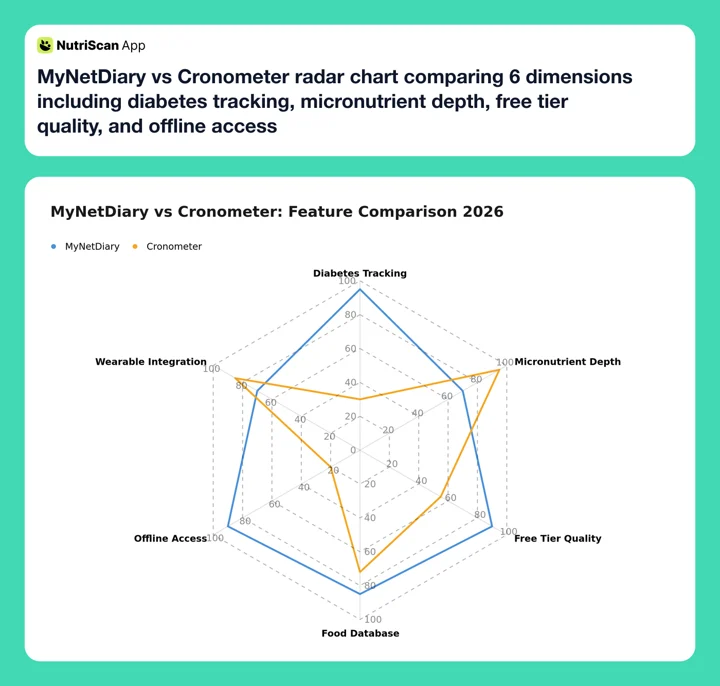 Figure 2: Six-dimension comparison shows MyNetDiary wins on diabetes tracking and free tier quality; Cronometer wins on micronutrient depth and wearable integration
Conclusion: Pick the Tracker That Matches Your Goal
MyNetDiary and Cronometer share the same research-grade data foundation. They track verified foods from USDA and NCC lab sources. They both cost around $60 a year for the full experience. They are, in that sense, peers.
The split happens at the use case level.
Pick MyNetDiary if you:
- Manage diabetes, prediabetes, or track blood glucose
- Want to see glucose readings and meal carbs on the same timeline
- Track insulin or oral medications alongside food
- Want glucose, insulin, medications and exercise stacked on one Day Timeline
- Need an app that works offline
- Want an ad-free free plan with no account requirement
Pick Cronometer if you:
- Eat mostly whole foods and want per-food micronutrient completeness
- Are vegan, vegetarian, or managing a specific nutrient deficiency
- Want to use Oracle to find foods that fill specific nutrient gaps
- Want to plot two health variables against each other over time
- Need direct integration with WHOOP, Oura, Dexcom CGM, or Keto Mojo
- Need a professional tool with HIPAA compliance (Cronometer Pro)
If you want a photo-first logging option alongside either app, NutriScan's AI meal scan gives you instant nutrition breakdown after a photo - useful when manual database lookup would slow you down at busy meal times. Just open NutriScan, point the camera at your plate, and get a full macro and micronutrient breakdown in seconds.

NutriScan's photo scan logs a full meal's nutrition in one tap - works alongside MyNetDiary or Cronometer for meals that are faster to photograph than to type (Home > Camera Icon > Crop Picture)
IMPORTANT
Recap: everything you covered this round.
You finished the comparison - save this for when someone asks.
⏱️ Progress 4/4 • ~7 minutes in • Nicely done
✅ Step 1: MyNetDiary's diabetes tracking - dedicated mode, glucose timeline, medication tracking
✅ Step 2: Cronometer's micronutrient oracle - 10 named sources, Oracle search, cross-variable charts
✅ Step 3: Free tier + pricing - MyNetDiary wins free; both at $59.99/yr premium
✅ Step 4: 7 practical tips - offline access, wearables, the 3-day test
✅ The consistency pattern (revealed) - the app you open on Day 3 is the one that works long-term
FAQ
Q: Which app is better for tracking carbs for diabetes?
MyNetDiary is the better choice. It has a dedicated diabetes mode that supports Total Carbs or Net Carbs counting, pre/post-meal glucose logging, custom BG target ranges, insulin tracking, and medication logging, all on a single Day Timeline. Cronometer publishes no diabetes-specific mode. Glucose is a biometric field there, and lining it up against carbs means building your own Custom Chart on Gold.
Q: Does Cronometer track more nutrients than MyNetDiary?
No. MyNetDiary tracks 108 nutrients, the most among the twelve apps MyNetDiary analyzed in its own March 2026 scorecard. Cronometer tracks up to 84 nutrients on its free tier and up to 95 on Gold. Where Cronometer leads is in per-food completeness for whole foods. Its eight national food-composition databases fill in more nutrient fields per entry for produce, legumes, and whole grains than branded food entries typically allow.
Q: Is Cronometer Gold or MyNetDiary Premium a better deal?
They are priced identically at $59.99 a year, Cronometer Gold and MyNetDiary Premium both. The value difference is in what each premium tier adds. Cronometer Gold adds Oracle Nutrient Search, Food Suggestions, custom charts, unlimited data history, a fasting timer, Photo Log, Voice Log, and Crono Coach. MyNetDiary Premium adds the diabetes mode, medication tracking, detailed reports and weekly analysis, meal planning tools, and hundreds of dietitian-created recipes. Offline access is not a Premium feature, MyNetDiary works offline on the free plan too. MyNetDiary's Premium Plus at $99.99/yr adds AI Coach, AI meal suggestions, AI restaurant menu scan and AI voice logging; Cronometer matches the coach and the voice logging but publishes no restaurant-menu scanner. MyNetDiary also sells a $179.99 one-time Lifetime plan, which Cronometer does not publish.
Q: Can I use either app for free without paying?
Yes. Both have functional free plans. MyNetDiary's free plan is the stronger of the two: no ads, no account required, unlimited data history, and full barcode scanning. Cronometer's free plan tracks up to 84 nutrients and includes the barcode scanner, but it is ad-supported, requires an account before you can log, and limits reports and charts to a 7-day window. Neither free plan includes the paid features, so no Oracle or Crono Coach on Cronometer, and no diabetes mode or weekly analysis reports on MyNetDiary.
Q: Which app should I use if I am trying to fix a micronutrient deficiency from blood work?
Cronometer is better suited for this use case. Its Oracle Nutrient Search (Gold) lets you pick a specific nutrient, say zinc or vitamin D, and returns the top contributing foods for it from the database. If you want suggestions weighted against what you have already eaten today, that is a separate Gold feature called Food Suggestions. Cronometer's eight national food-composition databases fill in amino acid profiles, fatty acid subtypes, and trace minerals for whole foods in a way that branded food entries typically do not. For general meal planning, check our macro calculator to understand your baseline targets first.
Sources:
- Couto FDFS, de Almeida CPB (2025). PMC12294216, Int J Environ Res Public Health 22(7):1152 - umbrella review of 11 systematic reviews, 261 primary studies, 62,407 participants.
- Evenepoel C et al. (2020). PMID 33084583, J Med Internet Res 22(10) - MyFitnessPal validated against Nubel, the Belgian food composition database.
- Curtin E et al. (2025). PMC12487266, Int J Behav Nutr Phys Act 22(1) - meta-analysis of 21 app-based dietary interventions, 12,898 participants.
- Pujia C et al. (2025). PMC12093073, J Med Internet Res 27 - 11 RCTs, 1,717 participants, mobile apps in obesity management.
- Patel ML et al. (2025). PMID 40986860, JMIR Res Protoc 14 - Spark factorial trial protocol, results not yet published.
- Dugas K et al. (2026). PMID 41329042, JMIR Mhealth Uhealth 14 - decade-long scoping review of 68 studies on calorie-counting apps.
- Ely IA et al. (2023). PMID 37625315, Clin Nutr 42(10):1849-1865 - leucine in the regulation of skeletal muscle metabolism.
- NIH Office of Dietary Supplements - Omega-3 Fatty Acids and Iron fact sheets.
- FDA - What's on the Nutrition Facts Label.
- Garage Gym Reviews, Chelsea Rae Bourgeois MS RDN LD (updated May 2025). Cronometer review, 4.4/5 overall, 3.5/5 on accuracy.
- MyNetDiary Diet App Scorecard (March 2026) - 4.56/5 MyNetDiary, 3.63/5 Cronometer. Published by MyNetDiary, conflict disclosed on the page.
- Cronometer Gold, data sources and Nutrition Scores pages, checked August 2026.