Cronometer vs MyNetDiary 2026: Best for Nutrients & Health
 ChatGPT
  Claude
  AI Mode
  Perplexity
TL;DR - Cronometer vs MyNetDiary in 30 seconds
- Nutrients: Cronometer 84 free, 95 on Gold (lab-verified) vs MyNetDiary 108 (mixed sources)
- Database: Cronometer 7 lab-analyzed sets vs MyNetDiary 2M+ branded foods
- Pricing: Cronometer Gold $59.99/yr vs MyNetDiary Premium $59.99/yr (or $199.99 lifetime)
- AI photo logging: both have it, both charge for it. MyNetDiary Meal Scan on Premium, Cronometer Photo Log on Gold
- Best for whole-food micronutrients: Cronometer
- Best for branded foods + diabetes: MyNetDiary
1. Two Nutrient Trackers, Two Very Different Approaches
Cronometer and MyNetDiary are two apps people compare when they want to go beyond simple calorie counting and into real nutrient tracking. A 2025 umbrella review of mobile and web-based weight management interventions found that app-based tracking produces statistically significant weight loss and BMI reduction in adults with overweight or obesity (Couto et al., 2025). But weight loss is only part of the picture. If you care about vitamins, minerals, and health markers like blood glucose or cholesterol, you need an app that tracks more than just calories. NutriScan publishes this post, and we make a competing app.
Cronometer and MyNetDiary both go deep on nutrients, but they take very different paths to get there. Cronometer builds on lab-verified food databases and tracks 84 nutrients free, 95 on Gold, with scientific precision. MyNetDiary tracks up to 108 nutrients across a 2-million-food database and adds AI-powered features like Meal Scan and an automated Insight Engine.
This comparison breaks down everything you need to decide: nutrient tracking depth, food database quality, pricing, health marker support, ease of use, and who each app actually fits in 2026.
 Picking the right nutrient tracker means matching depth to your real eating habits.
2. Nutrient Tracking Depth: 84 or 95 vs 108
The biggest number people compare is how many nutrients each app tracks.
Cronometer tracks up to 84 nutrients on the free plan and up to 95 on Gold (Cronometer Gold). That includes all macronutrients (calories, protein, fat, carbs, fiber, sugar) plus a deep list of vitamins and minerals - vitamin A, all B vitamins, vitamin C, D, E, K, calcium, iron, magnesium, zinc, selenium, copper, manganese, phosphorus, potassium, sodium, and more. It also tracks individual amino acids and fatty acid profiles (omega-3, omega-6, saturated, monounsaturated, polyunsaturated). For most people interested in micronutrients, the free 84 already covers everything you would realistically need to check.
MyNetDiary tracks up to 108 nutrients, the highest count of any mainstream nutrition tracker in 2026 (ROUVY, 2026). The extra nutrients include more detailed amino acid breakdowns, additional fatty acid subtypes, and some trace minerals that Cronometer groups differently. MyNetDiary displays these nutrients in a clean dashboard where you can see your daily intake vs recommended values at a glance.
The raw number matters less than how much of that data is actually filled in for the foods you eat. An app can track 108 nutrients, but if a database entry for your breakfast only has calorie and protein data, the other 106 fields sit empty. This is where database quality becomes the deciding factor.
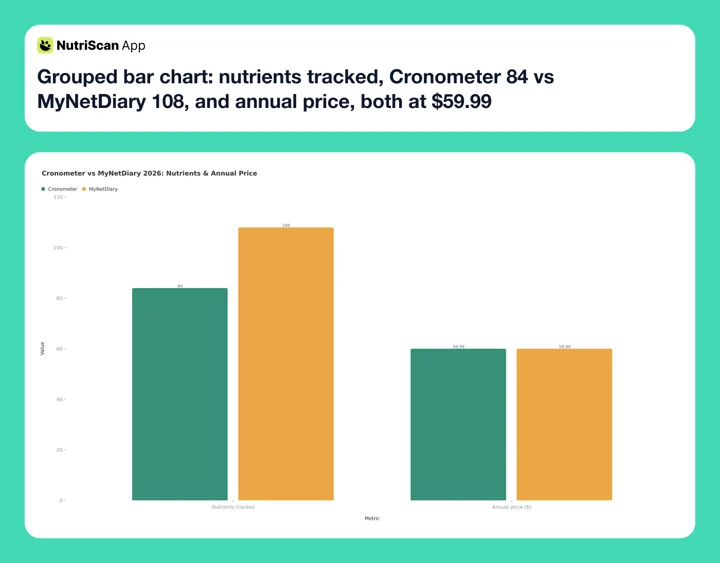 Figure 1: Side-by-side snapshot - MyNetDiary leads on raw nutrient count and database size, Cronometer leads on lab-verified accuracy. The two paid plans cost the same, $59.99 a year. Prices are standard US prices as of mid 2026 and change by region.

3. Food Database Quality: Lab-Verified vs Large and Branded
Cronometer uses seven lab-analyzed food databases: USDA FoodData Central, NCCDB (Nutrition Coordinating Center Database), CNF (Canadian Nutrient File), NUTTAB (Australia), CoFID (UK), NEVO (Netherlands), and IFCDB. Every entry in these databases comes from laboratory analysis, not user submissions. When you log "1 medium banana" in Cronometer, the vitamin B6, potassium, and magnesium values come from actual lab testing. Cronometer does allow users to add custom foods, but these entries are clearly marked and separated from verified data.
This matters more than it sounds. When researchers checked popular nutrition apps against a UK chemical-analysis reference, micronutrient estimates came out far less reliable than macronutrient estimates, and they traced the gap to the food composition data underneath each app: micronutrients are only voluntarily declared on labels, so apps built on manufacturer-supplied barcode data carry large holes (Fallaize et al., 2019, JMIR Mhealth Uhealth). Database quality is the deciding factor for micronutrients, not the headline nutrient count.
MyNetDiary has a database of more than 2 million foods (ROUVY, 2026). This is significantly larger than Cronometer's verified database. MyNetDiary pulls from USDA data but also includes a large number of branded and restaurant foods, many of which come from food labels and user submissions. The advantage is coverage - you are more likely to find the exact branded product you ate. The trade-off is that micronutrient data for branded foods often comes only from the nutrition label, which lists just a handful of vitamins and minerals. The entry for a frozen pizza might have calories, fat, sodium, and iron, but nothing for zinc, selenium, or B vitamins.
For macronutrient tracking (calories, protein, fat, carbs), both databases perform well. For deep micronutrient tracking, Cronometer's lab-verified data fills more nutrient fields per food entry.
4. Health Markers and Biometric Tracking
Both apps go beyond food logging to track health data, but they handle it differently.
Cronometer Gold lets you log custom biometrics - blood pressure, blood glucose, cholesterol (total, HDL, LDL, triglycerides), A1C, body fat percentage, ketones, and more. You can create custom biometric fields for any lab value your doctor gives you. The charting tools show trends over time, so you can see how changes in your diet relate to your health markers. Cronometer also supports direct integration with some glucose monitors and fitness trackers. The Oracle feature (Gold only) suggests foods that fill specific nutrient gaps based on your current intake.
MyNetDiary Premium tracks blood glucose, blood pressure, A1C, cholesterol, body measurements, and medications. It has a built-in Insight Engine that analyzes your food logs and identifies trends - for example, it might flag that your sodium intake spikes on weekdays or that you consistently miss your fiber target. MyNetDiary also offers diabetes-specific features through its dedicated diabetes mode, which includes carb counting tools and glucose logging designed for people managing type 2 diabetes.
A 2025 systematic review and meta-analysis of 12 randomized controlled trials found that mobile phone apps with integrated tracking features help users achieve clinically significant weight loss and BMI reduction compared to controls (Dugas et al., 2026). Apps that combine food logging with biometric feedback appear to keep users engaged longer.
For diabetes and metabolic health tracking, MyNetDiary has a slight edge because of its dedicated diabetes mode and automated insights. For general biometric logging and custom lab values, Cronometer gives you more flexibility to track whatever your doctor recommends.
Want one-tap nutrient depth without the learning curve?
NutriScan's nutrition details view shows the full micronutrient breakdown right after a photo scan, so you skip the manual logging step entirely. Pair it with our macro calculator to set your targets in under a minute.
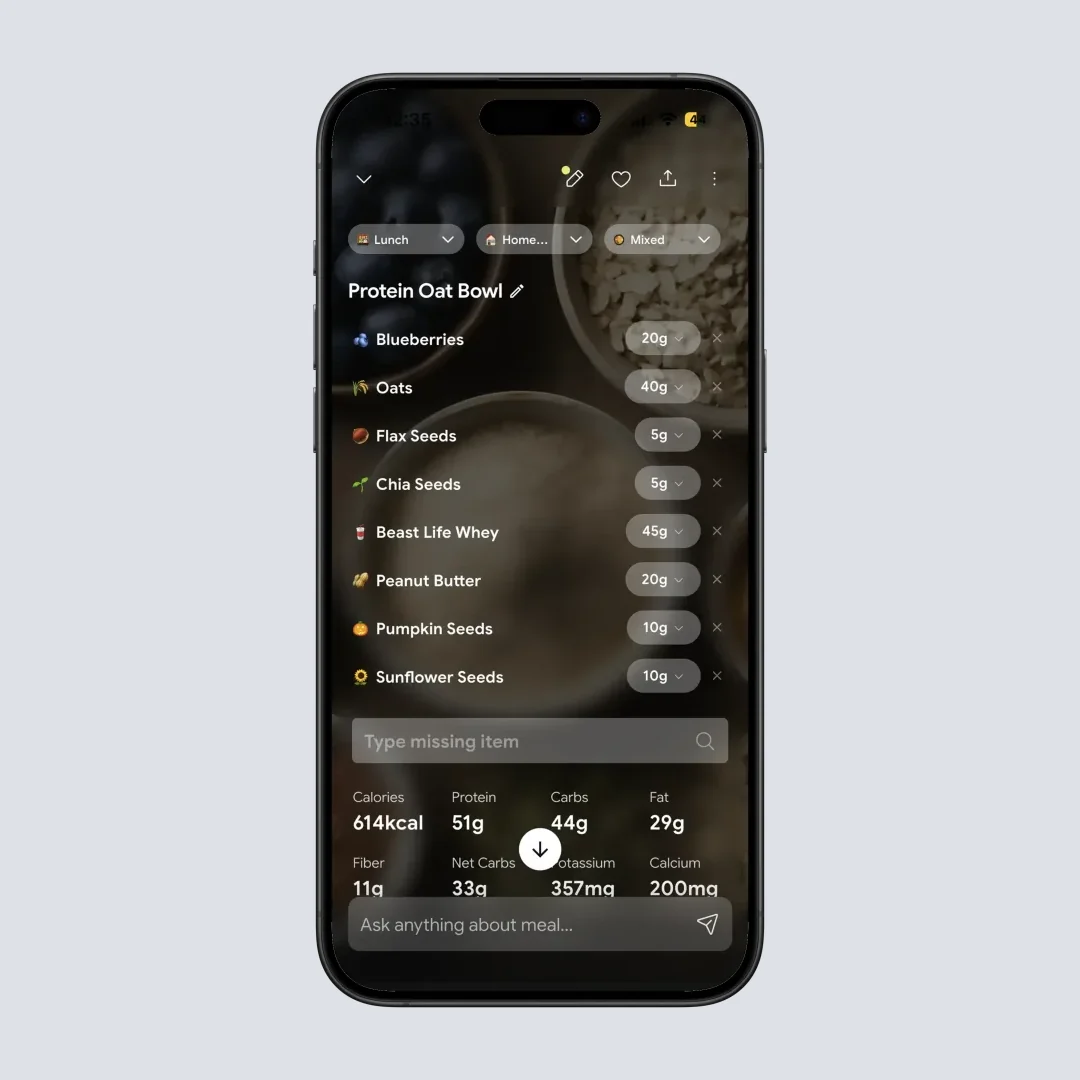
NutriScan @Path: Home > Tap any logged meal > Nutrition Details - shows the full vitamin and mineral breakdown after a scan.
5. Pricing in 2026: Side by Side
| Feature | Cronometer Free | Cronometer Gold | MyNetDiary Free | MyNetDiary Premium |
|---|---|---|---|---|
| Price | $0 (with ads) | $10.99/mo or $59.99/yr | $0 (no ads) | $8.99/mo or $59.99/yr |
| Nutrients tracked | 84 | 95 | 108 | 108 |
| Food database | Lab-verified | Lab-verified | 2M+ foods | 2M+ foods |
| Barcode scanner | Yes | Yes | Yes | Yes |
| Custom biometrics | No | Yes | No | Yes |
| Fasting timer | No | Yes | No | No |
| AI photo logging | No | Yes (Photo Log) | No | Yes (Meal Scan) |
| Recipe import | No | Yes (URL import) | Yes | Yes (URL import) |
| Insight Engine | No | No | No | Yes |
| Oracle Food Suggestions | No | Yes | No | No |
| Ads | Yes | No | No | No |
| Desktop/web access | Yes | Yes | Yes | Yes |
| Lifetime option | No | No | No | Yes ($199.99) |
Prices below are standard US prices as of mid 2026 and change by region.
Cronometer Gold costs $59.99/yr on the annual plan, which works out to $4.99/mo, or $10.99/mo billed monthly (Cronometer Gold). Gold is also where Photo Log, Voice Log, the fasting timer and Crono Coach live, so it is not only a data-access upgrade. Cronometer has a Pro tier as well, designed for nutrition professionals who need to manage client accounts.
MyNetDiary Premium costs $59.99/yr on the annual plan ($5.00/mo). MyNetDiary also offers a Lifetime plan at $199.99 (one-time purchase), which breaks even after several years of annual subscriptions.
One important free-tier difference: Cronometer's free plan has ads, while MyNetDiary's free plan does not. If you want a capable free nutrition tracker without ads, MyNetDiary has the better free experience.
Annual cost comparison: Cronometer Gold and MyNetDiary Premium are both $59.99/yr in current US pricing. MyNetDiary's $199.99 lifetime option only makes sense if you expect to use it for several years.
Related: Cronometer pricing 2026: Basic vs Gold vs Pro and MyNetDiary pricing 2026: free vs Premium.
6. Example Profiles: Who Each App Fits
The three profiles below are composite examples, not real users. They are here to show which app suits which tracking habit.
Example 1: The micronutrient optimizer. Take a vegetarian who wants to be sure she gets enough B12, iron, zinc, and omega-3 from food. She logs her meals in Cronometer and checks the nutrient bars each evening. Because Cronometer's lab-verified data fills in micronutrient values for whole foods like lentils, spinach, and quinoa, she can see exactly where she stands on iron and zinc without guessing. She uses the Oracle Food Suggestions feature (Gold) to find foods that fill her specific gaps - for example, Oracle might suggest pumpkin seeds when her zinc intake is low.
Example 2: The diabetes manager. Take someone managing type 2 diabetes who logs meals in MyNetDiary and checks blood glucose several times a day. The Insight Engine is built to surface exactly this kind of pattern, for example a run of higher readings on days that start with a high-carb lunch. He uses the diabetes dashboard to see carbs and glucose side by side. The app tracks his A1C over time and lets him generate reports for his doctor. MyNetDiary's larger branded food database also helps him log restaurant meals and packaged snacks quickly.
Example 3: The budget-conscious tracker. Take someone who wants calories and macros without paying for a subscription. Cronometer's free plan gives lab-verified food data but shows ads between actions. MyNetDiary's free plan has no ads, fast barcode scanning, and enough nutrient data for basic goals. If the extra micronutrient depth is not something you check, the ad-free plan is the easier one to stay on.
 Whichever app you pick, the win is sticking with one long enough to see patterns.
7. Tips for Choosing Between Cronometer and MyNetDiary
Tip 1: Start with your primary goal. If your main goal is deep micronutrient tracking with lab-verified accuracy, Cronometer is the better choice. The Fitness Mentors 2026 review ranked Cronometer as the best pick for "athletes, competitors, and micronutrient-focused users" (Fitness Mentors, 2026). If you want a well-rounded tracker with smart insights, a larger food database, and diabetes-specific features, MyNetDiary fits better.
Tip 2: Check your food overlap. Before committing to either app, log 3 days of your typical meals in both. See which database has better coverage for the foods you actually eat. If you eat mostly whole foods (fruits, vegetables, grains, meat), Cronometer's verified data will be more complete for micronutrients. If you eat a lot of branded and restaurant foods, MyNetDiary's 2-million-item database will save you time.
Tip 3: Consider the free tier first. Both apps have functional free plans. MyNetDiary's free plan has no ads, which makes it easier to test without friction. Cronometer's free plan still tracks 84 nutrients and keeps the barcode scanner, you just see ads between actions and lose reporting past 7 days. Try each for a week before paying for either.
Tip 4: Look at health marker needs. If you track blood glucose, A1C, cholesterol, or other lab values, compare the biometric features directly. Cronometer Gold lets you create custom biometric fields for any lab value. MyNetDiary Premium has a dedicated diabetes dashboard with automated insights.
Tip 5: Factor in AI features. MyNetDiary added Meal Scan (AI photo logging) to Premium in late 2025. Cronometer answered with Photo Log on Gold, which reads a meal photo and identifies the key ingredients and servings, plus Voice Log and Crono Coach. Both apps put photo logging behind the same $59.99 paywall, so this is no longer a reason to pick one over the other. It is a reason to check which one reads your food better during a trial week.
Tip 6: Think about export and sharing. Both apps let you export your food logs. Cronometer's CSV export includes every nutrient field it tracks for your plan, 84 on free and 95 on Gold. MyNetDiary generates PDF reports with daily summaries and nutrient breakdowns that are easy to share with a doctor or dietitian.
Tip 7: Check device integrations. Cronometer syncs with Fitbit, Garmin, Withings, Apple Health, and Google Fit. MyNetDiary syncs with Apple Health, Google Fit, Fitbit, Garmin, and Withings. Both have similar integration coverage.
8. What the Research Says About Nutrient Tracking Apps
A 2025 study on optimizing self-monitoring in digital weight loss interventions examined 471 adults over 12 months and found that tracking dietary intake is the single most important self-monitoring behavior for weight loss - more impactful than tracking steps or body weight alone (Patel et al., 2025). Participants who tracked food consistently lost significantly more weight than those who only tracked steps.
Another 2025 systematic review and meta-analysis found that apps with detailed nutrient feedback - not just calorie counts - led to greater improvements in diet quality, including higher fruit and vegetable intake and lower sodium consumption (Curtin et al., 2025). Both Cronometer and MyNetDiary fall into this category of detailed nutrient feedback apps, which is why they consistently rank among the most recommended trackers for health-focused users.
A 2025 meta-analysis on mobile apps in obesity management found that smartphone apps demonstrate a statistically significant effect on weight loss and BMI reduction over 4 to 6 months. The effect was strongest when apps included self-monitoring features and personalized feedback (Pujia et al., 2025).
Garage Gym Reviews gave Cronometer a 4.4 out of 5 rating in their 2026 expert-tested review. Registered dietitian Chelsea Bourgeois (MS, RDN, LD) highlighted the app's nutrient depth from lab-analyzed sources as a key differentiator (GGR, 2026). Cronometer's own page now puts that at 84 nutrients free and 95 on Gold. MyNetDiary's own analysis of 30 days of App Store reviews (December 2025 to January 2026) found MyNetDiary had the highest average recent rating at 4.5 out of 5 among major nutrition trackers (MyNetDiary, 2026).

9. The Factor Most Reviewers Miss: Logging Friction Beats Feature Count
Here's the one detail that flips the choice for a lot of readers, and it isn't in any spec sheet.
Logging friction matters more than nutrient count.
Every review compares 84 or 95 vs 108 nutrients and 7 lab databases vs 2 million foods. What they skip is the part that decides whether you are still logging in week four: how long one meal takes to enter. A 2025 review found apps with detailed nutrient feedback only outperform calorie-only apps if users actually keep logging (Curtin et al., 2025).
Here's the friction test, run it before paying for either:
- Time your first 10 logs. Put a stopwatch on one meal, then ask whether you would still do that on a busy weeknight.
- Count the taps for a typical breakfast. Cronometer's lab-verified database often needs you to pick the exact food version (raw, cooked, brand). MyNetDiary's larger branded database lets you scan a barcode and move on.
- Check the 3-day stick rate. If you skip a single day in the first 3 days, switch apps. The app you do not skip is the right app.
This is why MyNetDiary's larger branded database usually beats Cronometer for casual users, even though Cronometer is technically more accurate. Photo logging no longer separates them, both charge $59.99 for it. And it is why NutriScan's photo-first scanning approach exists: skip the search and tap loop entirely. Snap, confirm, done.
The fastest logger usually wins
The most nutrient-complete app on Earth is useless if you stop opening it. Pick the one your future, tired, busy self will still open at 9pm.
10. The Verdict: Which One Should You Pick?
Both Cronometer and MyNetDiary are excellent nutrient trackers - far above average for the category. The right choice depends on what you prioritize.
Pick Cronometer if:
- You want the most accurate micronutrient data from lab-verified sources
- You eat mostly whole, unprocessed foods
- You want to log custom biometrics and lab values with full flexibility
- You prefer Cronometer's Oracle and custom chart tools at the same $59.99/yr annual price
- You want a built-in fasting timer, Photo Log, Voice Log and Crono Coach in one subscription (all Gold)
- You want Oracle Food Suggestions to fill nutrient gaps (Gold)
- You are a nutrition professional who needs client management (Pro tier)
Pick MyNetDiary if:
- You want the highest nutrient count available (108 vs Cronometer's 84 free or 95 on Gold)
- You eat a lot of branded and restaurant foods and need a larger database (2M+ entries)
- You manage diabetes and want a dedicated diabetes mode with automated insights
- You want AI photo logging that reads branded and restaurant food well (Meal Scan)
- You want an ad-free experience even on the free plan
- You prefer a lifetime purchase option ($199.99 one-time)
- You want an Insight Engine that flags patterns in your eating habits automatically
Pick NutriScan if:
- You want fast AI photo scanning and a free plan that lets you test it on your hardest meals (5 scans/week, no ads)
- You want a referral program that earns free Premium time for you and your friends
For most people who are new to nutrient tracking, MyNetDiary is the easier starting point. Its clean interface, larger database, automated insights, and ad-free free plan make it less intimidating than Cronometer's data-heavy approach. For users who already understand their nutrient gaps and want the most precise lab-verified data per food entry, Cronometer's verified databases are hard to match.
Related: best app for micronutrient tracking in 2026.
11. FAQ
Q: Does Cronometer track more nutrients than MyNetDiary?
A: No. MyNetDiary tracks up to 108 nutrients. Cronometer tracks 84 on the free plan and 95 on Gold. However, Cronometer's nutrient data comes from 7 lab-analyzed databases, which means more nutrient fields are filled in per food entry for whole foods. MyNetDiary's higher count includes nutrients that may not have data for every food in its database, especially branded products.
Q: Which app is better for diabetes tracking?
A: MyNetDiary has a dedicated diabetes mode with carb counting tools, glucose logging, and a dashboard that shows carbs and blood glucose side by side. It also has an Insight Engine that detects patterns between your meals and glucose readings. Cronometer also supports glucose logging and A1C tracking but does not have a diabetes-specific mode.
Q: Can I use either app for free?
A: Yes. Both apps have free plans with core tracking features, and both include barcode scanning. Cronometer's free plan tracks 84 nutrients, shows ads, and limits reports to a 7-day window. MyNetDiary's free plan tracks basic nutrients with no ads. Neither free plan includes custom biometrics, advanced reports, photo logging, or premium-exclusive features like Oracle (Cronometer) or Insight Engine (MyNetDiary).
Q: Which app has a better food database?
A: It depends on what you eat. Cronometer's database is smaller but lab-verified across 7 international sources, so micronutrient data is more complete for whole foods. MyNetDiary's database has over 2 million entries including branded and restaurant foods.
Q: Is Cronometer Gold or MyNetDiary Premium cheaper?
A: Cronometer Gold costs $59.99/yr ($4.99/mo). MyNetDiary Premium costs $59.99/yr ($5.00/mo). MyNetDiary also offers a Lifetime plan at $199.99, which can be cheaper if you use it for several years.
Q: Do either of these apps have AI photo logging?
A: Both do. MyNetDiary added Meal Scan (AI photo logging) to its Premium plan in late 2025, and Cronometer has Photo Log on Gold, which reads a meal photo and identifies the key ingredients and servings. Neither offers it free, and both plans cost $59.99 a year. NutriScan offers AI photo scanning with 5 free scans per week, so you can test photo logging on your own meals before paying either of them.
Q: Can I export my data from either app?
A: Yes. Cronometer exports food logs, biometrics, and nutrition data as CSV files, with every nutrient field your plan tracks, 84 on free and 95 on Gold. MyNetDiary generates PDF and CSV reports with daily summaries, nutrient breakdowns, and weight history.
Try a faster way to track nutrients
If both apps still feel like work, give NutriScan's photo-first scanning a try - snap your meal, see the full micronutrient breakdown, and skip the database hunt. Start with our macro calculator to set your targets, then let the app handle the rest.