Cronometer vs Lifesum 2026: Detail vs Easier Daily Habits
 ChatGPT
  Claude
  AI Mode
  Perplexity
TL;DR - Cronometer vs Lifesum in 30 seconds
- Nutrients: Cronometer up to 84 free and up to 95 on Gold vs Lifesum macros only
- Database: Cronometer 7 lab-analyzed sets vs Lifesum AI text estimates
- Pricing: Cronometer Gold $59.99/yr vs Lifesum Premium pricing that varies by store offer
- AI photo or text logging: both yes. Lifesum uses AI text tracking, Cronometer Gold has Photo Log and Voice Log
- Best for micronutrient depth: Cronometer
- Best for fast daily habits and diet plans: Lifesum
1. The Core Difference You Need to Know
The question is whether to pick the app that tracks everything, or the one that makes tracking easy? A 2025 umbrella review of 261 studies covering 62,407 participants found that mobile app interventions led to a significant reduction in body weight, with a peak of 2.18 kg at 3 months (Couto and de Almeida, 2025). But the review also showed that sustained results depended on how consistently people used the app, not how many features it had.
That brings us to Cronometer and Lifesum. One tracks up to 95 verified micronutrients from lab-analyzed databases. The other pivoted to AI-powered text logging with diet plans and lifestyle scoring. They solve different problems, and the right choice depends on what you actually need from a nutrition tracker in 2026.
This comparison covers their features, pricing, accuracy, and daily experience, based on official listings and third-party reviews.
NutriScan publishes this post, and we make a competing app. This comparison uses publicly available data, official app listings, and third-party reviews. NutriScan appears once at the end as one alternative among several.
 Picking the right tracker means matching depth to your real eating habits.
2. Pricing Side by Side
Here is what each app costs in May 2026.
Cronometer:
- Free tier: Basic tracking with ads, the barcode scanner, up to 84 nutrients, and a 7-day reporting window
- Gold monthly: $10.99/mo
- Gold annual: $59.99/yr ($4.99/mo), which raises the nutrient count to 95 and adds Photo Log, Voice Log, a fasting timer and Crono Coach
- Trial availability depends on current store or web offers
Lifesum:
- Free tier: Very limited (restricted features, heavy upsell)
- Premium 3 months: $29.99 ($10.00/mo)
- Premium 6 months: $49.99 ($8.33/mo)
- Premium 12 months: pricing varies by region and promotion
- Trial availability is store- and offer-dependent
Cronometer Gold is currently listed at $59.99/year (Cronometer Gold). Lifesum Premium pricing varies by store, region, and promotion, so compare the current checkout price before subscribing. Prices are standard US prices as of mid 2026 and change by region.
Dollar for dollar, Cronometer delivers deeper nutrient data. Lifesum charges for lifestyle features such as diet plans, recipes, and AI tracking, which may matter more if speed and guidance matter more than micronutrient detail.
| Feature | Cronometer Gold ($59.99/yr) | Lifesum Premium (varies by offer) |
|---|---|---|
| Nutrients tracked | Up to 84 free, up to 95 on Gold | Calories, macros, and added details in Premium |
| Database source | USDA + 6 lab-analyzed sources | USDA, MyNetDiary, UK FSA, BLS, Livsmedelsverket, and user foods |
| Barcode scanner | Free (included) | Premium only |
| Diet plans | None | Multiple templates |
| Recipes | Manual recipe builder | Recipe library |
| Fasting timer | Yes (Gold) | No |
| AI photo logging | Photo Log (Gold) | Yes |
| Voice logging | Voice Log (Gold) | No |
| Life Score gamification | No | Yes (0-150) |
| Coaching | Crono Coach (Gold) | Diet plan guidance |
| Apple Watch | Health sync | Health sync |
| Web access | Yes | No |
| Ads in free tier | Yes | Yes (aggressive) |
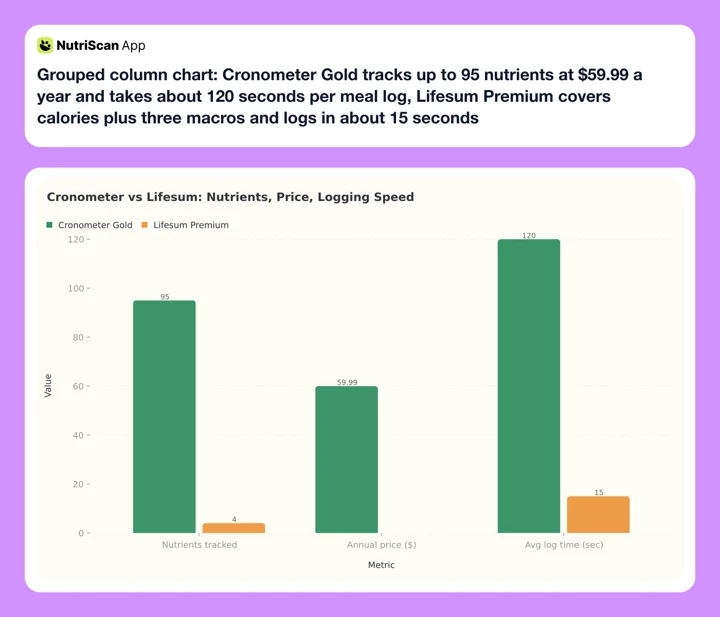 Figure 1: Time to log a multi-item meal. Cronometer Gold takes about 120 seconds and tracks up to 95 nutrients; Lifesum takes about 15 seconds and covers calories and the three macros. Prices are in the table above.
3. Real-World Scenarios: Three Users, Two Apps
User A: Sarah, 34, vegetarian training for a half marathon. Sarah needs to track iron, B12, zinc, and calcium alongside her macros. In Cronometer, she logs her daily lentil soup and gets a full amino acid breakdown plus up to 95 nutrients verified against the USDA National Nutrient Database. She spots that her zinc intake has been below 70% of the daily target for two weeks straight.
In Lifesum, she types "lentil soup with spinach" into the AI logger. The app returns calorie and macro estimates plus some Premium nutrition details, but it is not built for B12, amino acid profiles, or the same micronutrient depth Cronometer provides. For Sarah, the missing detail is not a minor gap - it is the entire reason she tracks.
User B: Mark, 41, father of two who wants to lose 10 pounds. Mark does not care about selenium or manganese. He wants to log meals fast and follow a simple plan. In Lifesum, he types "chicken stir fry with rice" and gets an instant calorie estimate. The app suggests a high-protein meal plan and shows his Life Score, a number from 0 to 150 that combines food quality, activity, and hydration.
In Cronometer, he searches the database, selects "chicken breast, cooked," adjusts the portion to 150g, then adds rice and vegetables separately. Three items, three searches, three portion entries. His data is more accurate, but the process takes 2-3 minutes per meal versus 15 seconds in Lifesum.
User C: The person who tried Lifesum and switched. A Reddit user in r/CICO shared their experience: "Lifesum used to be amazing but DO NOT bother any more. They've stripped back all the good features to replace with an AI that doesn't work" (Reddit r/CICO, 2025). Treat this as a user-experience warning, not a universal fact: Lifesum's help center says AI Tracking can be turned off in favor of Classic Tracking and tracked meals can be edited.
4. Database Quality: The Most Important Difference
This is the most important difference between these two apps, and it is not close.
Cronometer's database is built on verified institutional sources. The app draws from seven lab-analyzed databases: USDA, NCCDB (Nutrition Coordinating Center), CNF (Canadian Nutrient File), NUTTAB (Australia), CoFID (UK), NEVO (Netherlands), and IFCDB (International). When you log a food in Cronometer, the nutritional data has been validated against published nutritional research. The micronutrients it tracks, up to 84 on the free tier and up to 95 on Gold, are measured values from laboratory analysis, not estimates.
Lifesum combines a food database, classic logging, and optional AI Tracking. Its database uses sources including USDA, MyNetDiary, UK Food Standards Agency data, German BLS, Swedish Livsmedelsverket, and user-created foods. The AI flow is faster, but accuracy still depends on how well it interprets your description, which foods it matches, and how it handles portion sizes.
A 2025 systematic review by Cofre et al. examined AI-based dietary intake assessment tools and found variable accuracy across food types. The mean absolute percentage error for AI meal estimates ranged from moderate to high depending on food complexity, with mixed dishes and culturally specific foods producing the least reliable results (Cofre et al., 2025).
Some third-party reviews and user threads criticize Lifesum's AI direction, but Lifesum's own help center says AI meals can be edited after logging through chat commands or manual amount changes. The fair critique is not that correction is impossible; it is that AI-first logging adds a review step if you care about precise numbers.
For anyone tracking nutrition for health reasons - managing a deficiency, optimizing athletic performance, or monitoring a medical condition - the difference in data depth is significant. Cronometer's verified approach also means consistency over time. Lifesum can work for calorie and macro habits, but Cronometer is the stronger tool when the exact nutrient profile matters.
Data trust matters most for health goals
If you log food to manage iron-deficiency anemia, a thyroid condition, or athletic performance, an AI estimate you do not review is risky - it can give you false confidence in numbers that drift.
5. Logging Speed, Diet Plans, and Lifestyle Features
Credit where it is due: Lifesum's AI logging is faster when it works. Typing "avocado toast with two eggs" and getting an instant estimate is quicker than searching Cronometer's database, selecting the correct entry, and specifying a portion size. For users who log three to five meals per day, those saved minutes add up.
Lifesum also offers features Cronometer does not have:
- Diet plan templates: Keto, Mediterranean, high-protein, and others provide structured eating frameworks
- Recipe library: Premium includes meal ideas aligned to your chosen plan
- Life Score gamification: A number from 0 to 150 that combines nutrition, hydration, and activity into a single score
- Positive psychology approach: Pastel colors and encouraging feedback instead of red warnings
Cronometer offers none of this. There are no diet plans, no recipes, no gamification, and no coaching. Cronometer shows you data and expects you to interpret it. For users who want guidance alongside their numbers, Cronometer leaves a gap.
But the question is whether that speed and lifestyle advantage matters when the underlying data needs review. A Life Score calculated from inaccurate food logs is decorative rather than diagnostic. Diet plan adherence metrics are only meaningful if the food logs they reference are accurate.
Garage Gym Reviews tested Cronometer with a registered dietitian nutritionist (Chelsea Rae Bourgeois, MS, RDN, LD) and gave it 4.4 out of 5. The tester noted the app is "easy to use but also very dense" and that "the number of things to track can be overwhelming" (Garage Gym Reviews, 2026). That density is a feature for data-driven users and a drawback for casual trackers.
Lifesum's Trustpilot page tells a different story. One reviewer in 2025 described it as "a complete embarrassment" and noted that "what used to be a decent app has been getting worse with every update" with "major stability issues" (Trustpilot, 2025). App stability has been a recurring complaint since the AI pivot.
6. Seven Tips for Choosing Between Cronometer and Lifesum
Tip 1: Check whether you actually need micronutrients. If you are managing a deficiency, following a plant-based diet, or training for endurance sports, micronutrient tracking matters. Cronometer is built for this. If you only care about calories and macros for basic weight loss, you may not need 95 nutrients. Use our macro calculator to set baseline targets either way.
Tip 2: Test Lifesum's AI accuracy before committing. If you are considering Lifesum, log three meals you already know the calorie count for (a packaged food with a label, for example). Compare the AI estimate to the label. If the numbers are off by more than 15%, you will be tracking inaccurate data every day.
Tip 3: Use Cronometer's recipe feature for repeated meals. Cronometer's logging is slow for single meals but fast for repeated ones. Build your common meals as recipes once. After that, logging takes one tap instead of five separate food entries. Garage Gym Reviews noted this works best "if you meal prep or eat the same things daily."
Tip 4: Compare annual pricing, including promotions. Cronometer Gold costs $59.99/yr. Lifesum runs frequent promotions and store-specific offers. Check Lifesum's current pricing in your app store before deciding.
Tip 5: Try Cronometer's free tier first. Cronometer's free version includes basic tracking with up to 84 nutrients visible, plus the barcode scanner (with ads). Lifesum's free version is limited enough to push most users toward paying. Start with Cronometer free to see if the data depth matches your needs.
Tip 6: Check if your foods are in Cronometer's database. Cronometer's verified database is smaller than crowd-sourced databases. If you eat a lot of regional, ethnic, or packaged foods, search for them in Cronometer before subscribing. Missing entries mean manual data entry.
Tip 7: Do not assume AI logging saves time long-term. Fast logging is only valuable if the data is accurate enough for your goal. If you spend time second-guessing AI estimates, the speed advantage disappears. A 2023 study evaluating 11 dietary tracking apps found that apps with verified databases produced more consistent nutrient estimates than those relying on crowd-sourced or less complete data (Gioia et al., 2023).
 The best app is the one that fits your daily rhythm, not the one with the most features.
7. Step-by-Step: How to Decide Between Cronometer and Lifesum
Step 1: Define your tracking goal. Write down why you want to track food. Weight loss only? Micronutrient optimization? Following a structured diet plan? Managing a health condition? Your answer determines which app fits. Micronutrients and health data point to Cronometer. Diet plans and fast logging point to Lifesum.
Step 2: Assess your logging patience. Be honest about how much time you will spend logging. Cronometer requires 1-3 minutes per meal for manual search, selection, and portion input. Lifesum's AI logging takes 10-20 seconds per meal. If slow logging will make you quit after a week, data accuracy does not matter because you will not be logging at all.
Step 3: Check your food coverage. Open Cronometer's web version (free) and search for 10 foods you eat regularly. If 8 or more appear with full nutrient data, the database covers your diet. If you frequently eat foods that are missing, the logging experience will be frustrating.
Step 4: Try both free tiers for one week. Use Cronometer's free version for three days and Lifesum's free version for three days. Track the same meals in both. Compare: which one did you actually open every time you ate? Which data felt more useful?
Step 5: Decide based on experience, not features. After your trial week, pick the app where you logged every meal. A 2025 meta-analysis of 29 randomized controlled trials found that the primary predictor of weight loss success with mobile apps was consistent daily use, not the number of features available (Pujia et al., 2025). The best app is the one you will actually use tomorrow.

NutriScan home (Home page) - the photo-scan alternative that combines speed and verifiable corrections.

8. The Flipping Factor Most Reviews Miss
Here is what most comparisons skip: the cost of data you do not review.
Reviewers usually frame this fight as accuracy versus speed. The hidden third axis is review effort. Cronometer lets you edit entries, add custom foods, and override portion sizes. Lifesum also supports edits, but AI Tracking can still require a correction pass when a homemade or mixed dish is misread.
For half of readers - anyone whose meals are home-cooked, mixed, regional, or culturally specific - this can turn the speed advantage upside down. Fast logging of unreviewed data is not faster than slow logging of right data if you need precision.
If you eat mostly packaged or chain-restaurant foods, Lifesum's AI flow plus barcode tools can land close enough. If you eat mostly home-cooked or mixed dishes and need micronutrient precision, Cronometer's lab-verified database plus manual correction is the cleaner path.
The 60-second rule
Before committing to either app, log two of your most-repeated home-cooked meals. If the result is wrong and correcting it feels annoying, that app is not for you - no matter how fast it logs.
9. What the Research Says
The evidence on nutrition tracking apps supports one clear finding: consistency beats complexity.
A 2025 umbrella review published in the International Journal of Environmental Research and Public Health analyzed 11 systematic reviews covering 261 primary studies and 62,407 participants. The review found that mobile app interventions reduced body weight by an average of 1.32 kg, with effects peaking at 2.18 kg at 3 months and tapering to 1.63 kg at 12 months (Couto and de Almeida, 2025). Sustained engagement with the app was the strongest predictor of long-term results.
A separate 2025 systematic review and meta-analysis in the Journal of Medical Internet Research examined smartphone-based interventions for obesity management across 29 randomized controlled trials. The analysis found that apps incorporating self-monitoring features produced significantly better outcomes, with an overall effect of -1.45 kg compared to control groups (Pujia et al., 2025).
On the accuracy question, Cofre et al. (2025) examined AI-based dietary intake assessment tools and found variable accuracy. The mean absolute percentage error for AI estimates ranged from moderate to high depending on food complexity, with mixed dishes producing the least reliable results (Cofre et al., 2025). This matters for Lifesum users who rely heavily on AI Tracking instead of Classic Tracking.
A 2023 study published in Nutrients evaluated 11 dietary tracking apps from US app stores. The study found that apps with verified, lab-analyzed databases produced more consistent nutrient estimates than those relying on crowd-sourced or AI-generated data, particularly for micronutrients where small measurement errors compound over weeks of tracking (Gioia et al., 2023).
A 2025 review of mobile apps for healthy eating evaluated apps against 28 recognized health app evaluation frameworks. The review found that data accuracy and usability were the two factors most strongly associated with sustained user engagement (Zamora et al., 2026).
These findings suggest that both Cronometer and Lifesum can contribute to health goals, but through different mechanisms. Cronometer's strength is data quality. Lifesum's strength is logging speed. The research consistently shows that the app you use daily produces better outcomes than the app with better data that you abandon after a week.
10. Conclusion: Which App Wins?
Cronometer and Lifesum sit at opposite ends of the nutrition tracking spectrum. Cronometer gives you the deepest, most accurate nutritional data available in a consumer app - up to 95 nutrients and other compounds from lab-analyzed sources at $4.99/mo annually. Lifesum gives you fast AI-powered logging, classic logging, diet plans, and lifestyle gamification, but its lighter nutrient depth makes it less suitable for medical-style tracking.
Here is the simplest way to decide:
Choose Cronometer if:
- You need micronutrient tracking (vitamins, minerals, amino acids)
- You want verified, lab-analyzed data you can trust
- You are managing a health condition or dietary restriction
- You are an athlete monitoring protein quality and electrolytes
- You want more data for less money
Choose Lifesum if:
- You only care about calories and basic macros
- You want fast logging that takes under 15 seconds per meal
- You value diet plan templates and recipe suggestions
- You respond to gamification and visual progress indicators
- You are willing to accept AI accuracy limitations
If you want a middle ground - photo-based logging with the ability to review and correct results - apps like NutriScan, MacroFactor, and MyFitnessPal offer different balances of speed and accuracy worth exploring. For deeper reads, see our MacroFactor vs Cronometer and Cronometer vs MyNetDiary breakdowns, or MyNetDiary vs Cronometer and Lifesum vs Yazio.
| App | Annual cost | Key strength |
|---|---|---|
| Cronometer Gold | $59.99/yr | Up to 95 nutrients and other compounds |
| Lifesum Premium | Varies by offer | AI logging + diet plans |
| NutriScan Premium | Varies by region | Photo scan + corrections |
| MacroFactor | $71.99/yr | Adaptive macro coaching |
| MyFitnessPal Premium | $79.99/yr | 20M+ food database |
| YAZIO PRO | $47.90/yr | Fasting + calorie tracking |
Track what matters to you - whether that is 95 nutrients or a quick calorie count - and stick with the app that fits your daily routine.
11. FAQ
Q: Is Cronometer more accurate than Lifesum?
Yes. Cronometer uses verified data from the USDA National Nutrient Database and six other lab-analyzed sources. Every entry has been checked against published nutritional research. Lifesum's AI text logging generates estimates from your food descriptions, and the accuracy varies by food type. A 2025 systematic review found that AI dietary assessment tools showed variable mean absolute percentage errors, with mixed dishes producing the least reliable results (Cofre et al., 2025). Cronometer's data is more trustworthy, especially for micronutrients that Lifesum does not track at all.
Q: Is Cronometer cheaper than Lifesum?
Cronometer Gold costs $59.99/yr ($4.99/mo). Lifesum Premium pricing varies by store, plan length, region, and promotion. At checkout, compare the exact annual offer you see rather than relying on a single public price.
Q: Does Lifesum track micronutrients?
Lifesum Premium adds more nutritional details such as sodium, fiber, and cholesterol, but it is not a deep micronutrient tracker. If you need to monitor specific nutrients like iron, B12, zinc, or vitamin D, Cronometer is the better choice.
Q: Can I use Lifesum for free?
Lifesum has a free tier, but it is limited. The free version restricts access to diet plans, recipes, and some tracking features. Most users who try the free version find they need to subscribe. Cronometer's free tier is more functional - it includes tracking with up to 84 nutrients visible plus the barcode scanner, though it shows ads.
Q: Which app is better for weight loss?
Both can support weight loss. A 2025 meta-analysis of 29 trials found that consistent daily self-monitoring was the strongest predictor of weight loss with mobile apps, regardless of which app was used (Pujia et al., 2025). If Cronometer's detailed logging keeps you engaged, it is better for you. If Lifesum's fast logging helps you track every meal without skipping, it is better for you. The best weight loss app is the one you open every day.
Q: Does either app have an Apple Watch app?
No. Neither Cronometer nor Lifesum offers an Apple Watch app as of May 2026. Both integrate with Apple Health to sync data like steps and exercise, but neither supports food logging from the wrist. If Apple Watch logging is important, look at apps like MacroFactor or Lose It that offer watch support.
Q: Has Lifesum gotten worse recently?
Some users say yes. Since the AI pivot in late 2024 and 2025, Lifesum's Trustpilot page and Reddit communities show complaints about AI calorie estimates, pricing, and app stability. Lifesum's help center says AI Tracking is optional and logged meals can be edited, so the risk is workflow friction rather than an absolute inability to correct entries.