NutriScan vs Olive App: Which Food Scanner is Right for You?
 ChatGPT
  Claude
  AI Mode
  Perplexity
 Olive scans barcodes on packaged products to flag additives and seed oils; NutriScan photographs the meal and returns calories, macros, micronutrients and a NutriScore. They solve different problems, and the only overlap is packaged food. NutriScan's free plan gives 5 scans and 4 Monika voice calls a week, with Premium at about $59 a year.
Last verified: August 23, 2026
| NutriScan | Olive | |
|---|---|---|
| What it scans | Photo of any meal | Barcode on packaged products |
| Home-cooked meals | Covered | Not covered |
| Output | Calories, macros, micronutrients, NutriScore | Additive, seed-oil and toxin flags |
| Free plan | 5 photo scans and 4 Monika calls a week | Barcode scanning |
| Diet plans | 28-day plans on Premium | Not offered |
| Premium price | about $59 a year | Paid subscription |
Did you know that over 350,000 mobile health apps exist today, yet most nutrition apps struggle with accuracy when analyzing culturally diverse foods? 🤔
TL;DR - NutriScan vs Olive Comparison
NutriScan is for complete nutrition tracking: AI photo scanning of any food, personalized diet plans, macro tracking, and health goal support (weight loss, diabetes, PCOS, pregnancy)
Olive is for toxin detection: barcode scanning of packaged products to flag harmful additives, seed oils, and chemicals
Key difference: NutriScan works with home-cooked meals, restaurants, and any food type. Olive only works with packaged products that have barcodes.
Bottom line: These apps solve different problems. Choose based on whether you need nutrition tracking or toxin avoidance.
If you're reading this, you're probably confused between NutriScan App and the Olive food scanner app. Both apps promise to help you understand your food better. But they do it in very different ways. I spent weeks testing both apps and researching their features. Let me share what I found.
What Problem Are We Really Solving Here? 🎯
Before we compare features, let's understand why people download food apps in the first place.
Research published in the Journal of Medical Internet Research shows that the most important features users want in nutrition apps include a complete and reliable food database, easy navigation, and flexible food tracking options (JMIR, 2023). But here's the thing - different people have different needs.
Some people want to lose weight. Others want to manage diabetes. Some parents want to avoid harmful additives in their children's food. And some fitness lovers want detailed macro tracking.
This is exactly why NutriScan and Olive exist - they solve different problems for different people.
 Choosing the right app can feel overwhelming - but it doesn't have to be
NutriScan App: The Complete Meal Tracker 📱
NutriScan is an AI-powered nutrition tracking app that lets you take a picture of your meal and get instant nutrition breakdown. But it's more than just a scanner.
How NutriScan Works
The process is simple. You click a photo of your meal. The AI analyzes your food and gives you detailed information about calories, protein, carbs, fat, and over 20 micronutrients. You can also add voice input or type your meal details manually.
What makes NutriScan different is its focus on real meals - not just packaged foods with barcodes. This is a big deal because a systematic review of nutrition apps found that most apps focus primarily on branded packaged items and struggle with homemade or mixed dishes (Zečević et al., 2021).
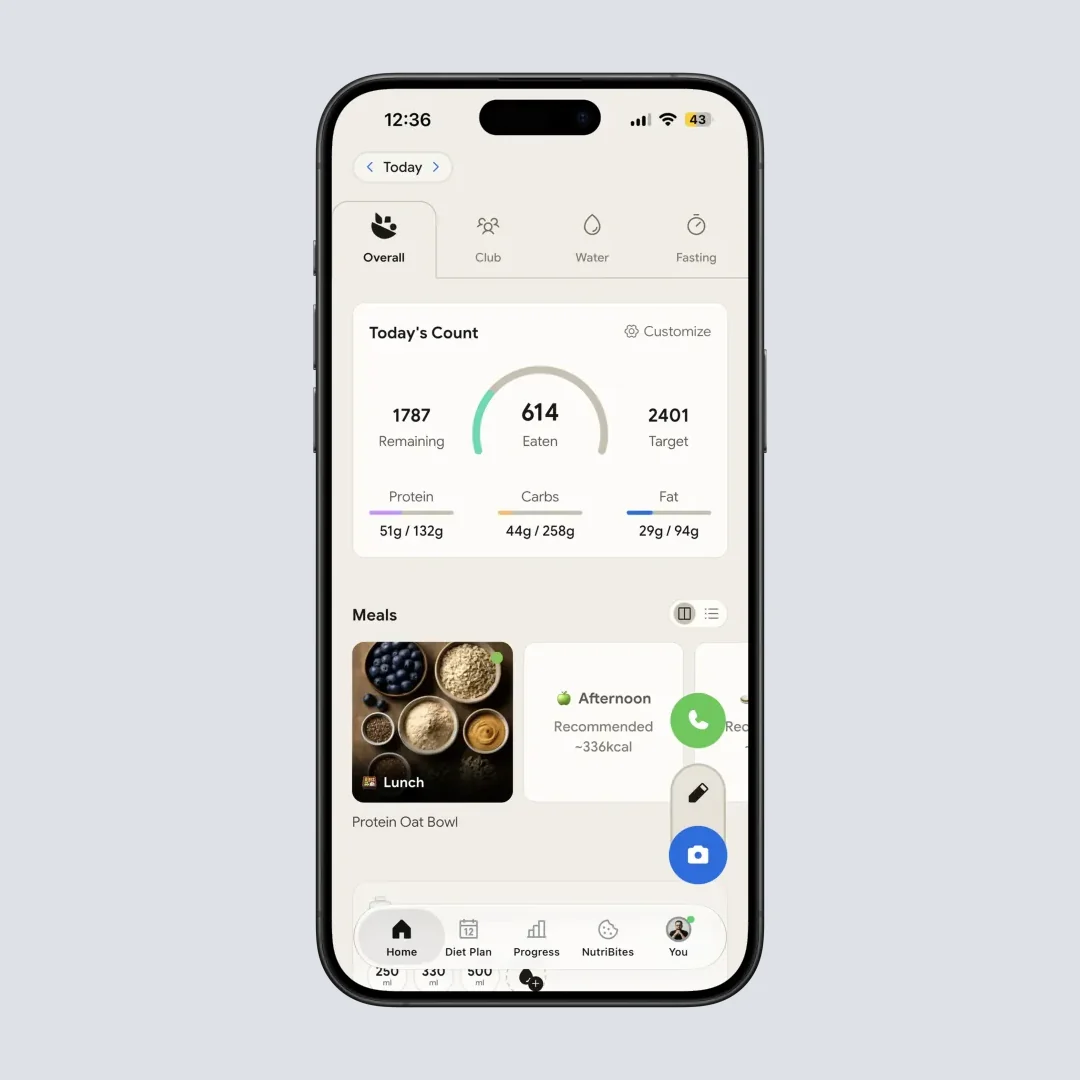
NutriScan home screen: Your daily nutrition at a glance (Home > View Daily Progress)
Key Features of NutriScan
1. AI Photo Recognition for Any Food
NutriScan can analyze home-cooked meals, restaurant food, street food, packaged items, supplements, and even hotel buffets. You select the food type and cooking method to get more accurate results.

NutriScan meal logging: Snap a photo and get instant nutritional breakdown (Meal Logging > Scan Food)
Pro Tip
When scanning meals, select the correct cooking method (Deep-fried, Stir-fried, Steamed, etc.) and oil level for more accurate calorie estimates. A stir-fried dish can have 200 or 400 calories depending on oil used.
2. Personalized Diet Planning
This is where NutriScan shines. The Premium plan offers a 28-day personalized diet plan based on your health goal (weight loss, muscle gain, diabetes, PCOS, pregnancy, or viral recovery), your food preferences (vegan, vegetarian, eggitarian, or non-veg), and your eating schedule.
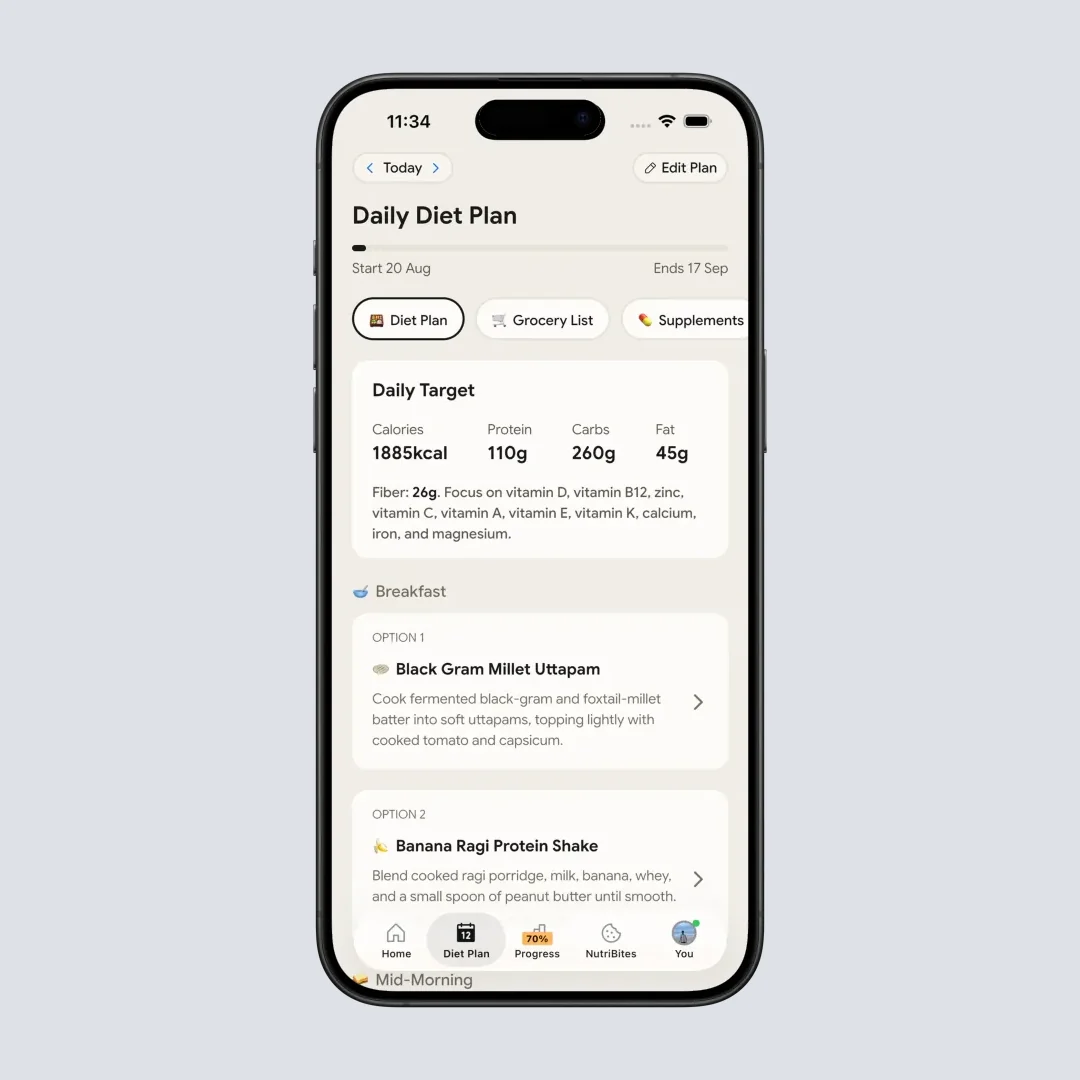
NutriScan diet plan: Personalized meal recommendations based on your health goals (Diet Plan > View Plan)
Research supports this approach. A study in the PMC database found that personalized nutrition programs improve lifestyle habits and reduce body weight more effectively than general dietary guidelines (Nutrients PMC, 2021).
3. NutriScore Rating
Every meal you log gets a NutriScore that tells you how healthy that meal is. This score helps you see patterns in your eating - are your weekday meals healthier than weekend meals? The formula considers the nutritional quality of what you ate, not just calories.
4. NutriBites - AI Meal Analysis
This feature lets you ask questions about your meal history. "What did I eat last Tuesday?" or "Show me my high-protein meals this week" - the AI searches your meal timeline and gives answers.
5. Voice-Powered AI Nutritionist - Monika
NutriScan includes Monika, an AI nutritionist you can talk to. You can ask questions, get advice, or even log meals through voice commands. Free users get 4 calls per week, while Premium users get unlimited access.
6. Grocery List Generator
Once you create a diet plan, NutriScan generates weekly and monthly grocery lists. You can copy these lists and take them to the store. No more wondering what to buy.
7. Health App Sync
NutriScan syncs with Apple Health to pull in data about your steps, sleep, and active energy. This gives you a more complete picture of your health.
Olive App: The Toxin Detector 🔍
Olive takes a completely different approach. It's designed to help you avoid harmful ingredients, additives, and toxins in packaged foods.
How Olive Works
You scan the barcode of any packaged product. Olive checks it against its database and tells you if the product contains harmful additives, seed oils, pesticides, or other concerning ingredients. It gives a simple SAFE or NOT SAFE result.
Key Features of Olive
1. Barcode Scanning for Packaged Foods
Olive's main function is scanning barcodes. It works well for packaged products in grocery stores.
2. Toxin and Additive Detection
The app flags ingredients like synthetic additives, seed oils, processed sugars, PFAS, microplastics, and heavy metals. This is useful for parents concerned about what goes into their children's food.
3. Healthier Product Alternatives
When Olive flags a product as problematic, it suggests cleaner alternatives. This feature helps you make quick swap decisions while shopping.
4. Seed Oil-Free Restaurant Map
Olive includes a map showing restaurants that avoid inflammatory seed oils. This is unique but currently limited to major cities.
5. Bottled Water Analysis
You can scan bottled water products to check for contaminants like fluoride, microplastics, and heavy metals.
6. Lab-Tested Data
Olive claims to use proprietary lab testing data rather than just label information. However, user reviews mention that many products show "help us grow our database" when scanned, suggesting the database is still growing.

Head-to-Head Comparison: NutriScan vs Olive 📊
Let me break down the key differences:
| Feature | NutriScan | Olive |
|---|---|---|
| Main Purpose | Complete nutrition tracking and diet planning | Toxin and additive detection |
| Scanning Method | AI photo recognition of any food | Barcode scanning of packaged products |
| Food Types | Home-cooked, restaurant, street food, packaged, supplements | Primarily packaged products |
| Nutritional Data | Full macro and micronutrient breakdown | Focus on ingredient safety, not nutrition values |
| Diet Planning | Yes - 28-day personalized plans | No |
| Calorie Tracking | Yes | No |
| Regional Food Support | Designed for diverse cuisines including Indian, Asian foods | Primarily Western packaged products |
| AI Assistant | Voice-powered nutritionist (Monika) | Not available |
| Restaurant Feature | Location mapping of where you ate | Seed oil-free restaurant finder |
| Community | Leaderboard with NutriScore rankings | Not available |
| Languages | English, German, Spanish, French, Hindi | English primarily |
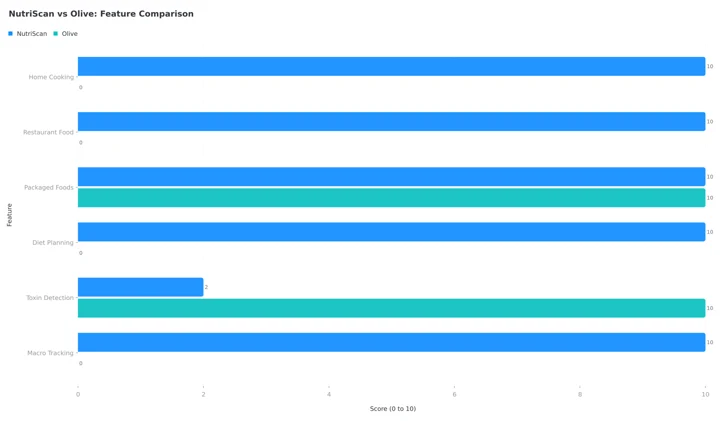 NutriScan scores 10 on home cooking, restaurant food, packaged foods, diet planning and macro tracking. Olive matches it only on packaged foods and wins toxin detection 10 to 2.
Real-World Testing: My Experience 🧪
Let me share what happened when I tested both apps with my actual meals.
Test 1: Home-Cooked Indian Meal
I had dal, rice, sabzi, and roti for lunch. With NutriScan, I took one photo and got a breakdown: 520 calories, 15g protein, 78g carbs, 14g fat, plus fiber, potassium, and other micronutrients. I could adjust portion sizes and see how it fit my daily goals.
With Olive? I couldn't scan this meal at all. There was no barcode to scan. Olive is simply not designed for home-cooked food.
Test 2: Packaged Snack
I scanned a popular chips brand. Olive immediately flagged the seed oils and gave it a poor rating. It suggested alternatives. Helpful.
NutriScan showed me the calorie count and nutritional breakdown, but didn't specifically call out the seed oils as a health concern. Different focus.
Test 3: Restaurant Meal
At a restaurant, I photographed my pasta dish. NutriScan analyzed it and estimated around 680 calories. The app asked about the cooking method (I selected "Not Sure") and gave me the breakdown.
Olive has no feature for restaurant meal analysis unless the restaurant serves packaged items with barcodes.
 Snap, scan, and know exactly what you're eating - that's the power of AI meal tracking
Who Should Use Which App? 🤔
Based on my research and testing, here's my honest recommendation:
Choose NutriScan If You:
- Want to track calories and macros for weight loss or muscle gain
- Eat home-cooked meals regularly
- Need a personalized diet plan for specific health goals
- Live in South Asia or eat diverse cuisines
- Want to understand your eating patterns over time
- Have diabetes, PCOS, or pregnancy-related nutrition needs
- Prefer AI-powered analysis over manual barcode scanning
For more on how AI meal tracking helps with specific conditions, check out our guide on meal tracking for PCOS or smart diet planning for blood sugar.
Choose Olive If You:
- Primarily buy packaged foods from grocery stores
- Are concerned about toxins, additives, and seed oils
- Want simple SAFE or NOT SAFE decisions while shopping
- Have children and want to avoid harmful ingredients
- Don't need calorie counting or diet planning
- Live in North America or Europe where the database is stronger
Consider Using Both If You:
- Want complete nutrition tracking AND toxin detection
- Buy packaged foods but also cook at home
- Are willing to pay for two premium subscriptions
Important Note
One thing most people don't realize is that food apps are only as good as their databases. Olive relies heavily on barcode databases, which means products not in their system show "help us grow our database." NutriScan uses AI image recognition, which works with any food but has inherent estimation variability.
The Science Behind Food Tracking Apps 🔬
Let me share some research findings that help explain why these apps matter.
A meta-analysis published in the Journal of the Academy of Nutrition and Dietetics found that dietary mobile apps improved nutritional outcomes in adults with chronic diseases (J Acad Nutr Diet, 2019). The apps that worked best were those that combined self-monitoring with personalized feedback.
Another study in the Nutrients journal evaluated AI-enabled food recognition apps and found that accuracy ranged from 92% to 97% for top-performing apps. However, the same study noted that apps struggled with mixed dishes and culturally diverse foods (Nutrients, 2024).
This is exactly why NutriScan lets you select food type and cooking method - these additional inputs help the AI give more accurate results for dishes that aren't in typical Western food databases.
A 2024 study from the University of Sydney found that most AI food tracking apps had issues with culturally diverse foods. Energy intake was overestimated for Western diets by 1,040 kJ but underestimated for Asian diets by 1,520 kJ (Nutrients, 2024). NutriScan addresses this by letting you provide additional context.
7 Tips for Getting the Most From Your Food Tracking App 💡
Whatever app you choose, here's how to use it effectively:
Tip 1: Be Consistent for at Least 2 Weeks
Research shows that diet monitoring adherence improves outcomes significantly (J Telemed Telecare, 2015). Track every meal for 14 days before judging if the app works for you.
Tip 2: Take Clear Photos in Good Lighting
AI food recognition works best with clear, well-lit images. Point your camera directly at the food from above.
Tip 3: Adjust Portion Sizes
Default portion sizes are often wrong. In NutriScan, tap the portion size and adjust it to match what you actually ate.
Tip 4: Use Voice Input for Quick Logging
When you're in a hurry, describe your meal by speaking. NutriScan's voice input is faster than typing.
Tip 5: Review Weekly Reports, Not Just Daily
One bad meal doesn't ruin your week. Look at weekly trends to understand your actual eating patterns.
Tip 6: Set Realistic Goals
Research from the Wageningen University found that setting realistic goals is one of the most important features for sustained app use (JMIR mHealth, 2023).
Tip 7: Use the Diet Plan as a Guide, Not a Rulebook
Personalized diet plans work best when you adapt them to your life, not the other way around.
The Decision Framework That Made My Choice Obvious 🎯
Here's the simple framework that made my decision crystal clear in under 60 seconds:
Ask yourself these 3 questions:
Question 1: What percentage of your meals are home-cooked or from restaurants?
- If more than 50% ➡️ NutriScan wins (Olive can't scan these)
- If less than 20% ➡️ Olive might be useful for your grocery shopping
Question 2: Do you need to track calories, protein, carbs, or other nutrients?
- Yes ➡️ NutriScan (Olive doesn't track nutrition)
- No, just ingredient safety ➡️ Olive could work
Question 3: Do you have a specific health condition like diabetes, PCOS, or pregnancy?
- Yes ➡️ NutriScan (personalized diet plans for these conditions)
- No, just general clean eating ➡️ Either could work
The truth is: For most people who cook at home or eat out regularly, NutriScan is the more practical choice. Olive is a specialized tool for a specific use case - avoiding toxins in packaged foods.
If you need help understanding your nutritional needs, try our macro calculator or check out our PCOS macro calculator for condition-specific guidance.

Common Mistakes People Make With Food Apps ❌
After testing these apps and talking to users, I've noticed some patterns that hurt results:
Mistake 1: Tracking Only "Bad" Days
Some people only log meals when they eat poorly - as a form of guilt tracking. This gives you a skewed view of your diet. Track everything, including your healthy meals, to see the full picture.
Mistake 2: Not Accounting for Cooking Oil
A vegetable stir-fry can have 200 or 400 calories depending on how much oil was used. NutriScan lets you adjust oil levels from "No Oil" to "High Oil" for this reason. Don't ignore this setting.
Mistake 3: Forgetting Beverages
That chai with sugar? The fruit juice? The evening beer? Liquids have calories too. A study on nutrition tracking accuracy found that beverages are commonly underreported (Public Health Nutrition, 2018).
Mistake 4: Expecting Instant Results
Diet apps show benefits over time, not overnight. Research suggests at least 2 weeks of consistent tracking before you see meaningful patterns.
Pricing Comparison 💰
NutriScan:
- Free: 5 meal scans a week, full nutrition tracking, NutriScore, micronutrients, unlimited meal history, and 4 Monika calls a week
- Premium: unlimited scans, unlimited Monika calls, 28-day personalized diet plans, recipes, and goal-based grocery lists
Five scans a week will not cover every meal, but it is enough to test the AI on the dishes a barcode database cannot read at all. NutriScan offers a 7-day Premium trial that starts through your app store; whether a card is collected depends on your platform and region.
Olive:
- Free version: Limited scans
- Premium subscription: Unlimited scans, advanced features
Both apps use subscription models. NutriScan offers monthly and yearly options with yearly being more cost-effective.
Frequently Asked Questions ❓
Q1: Can I use NutriScan to manage diabetes?
Yes. NutriScan has a specific diabetes goal setting. The personalized diet plan considers your condition, and you can track carbs and sugars closely. However, always follow your doctor's advice alongside any app. Studies show that dietary mobile apps can improve outcomes for people with chronic conditions (J Acad Nutr Diet, 2019), but they work best as a supplement to professional medical care.
Q2: Does Olive work for homemade food?
Not really. Olive is designed for barcode scanning of packaged products. If you cook at home frequently, Olive won't be very useful for daily tracking. Its strength is helping you make safer choices at the grocery store.
Q3: How accurate is AI food recognition?
Research shows that top AI food recognition apps achieve 92-97% accuracy for food identification (Nutrients, 2024). However, accuracy drops for mixed dishes and culturally diverse cuisines. That's why apps like NutriScan ask for additional context about your food.
Q4: Can NutriScan help with weight loss?
Yes. NutriScan includes personalized diet plans specifically designed for weight loss. The app tracks your calorie intake against your targets and shows daily progress. Research indicates that self-monitoring through apps can improve adherence to dietary changes (J Telemed Telecare, 2015).
Q5: Is Olive better for families with children?
Olive is specifically designed to flag harmful additives and toxins, making it useful for parents concerned about children's food safety. However, it won't help you track your child's nutritional intake or ensure they're getting enough protein, vitamins, and minerals. For complete family nutrition management, you might need both apps.
My Final Verdict 🏆
After testing both apps and reviewing the research, here's my honest conclusion:
NutriScan and Olive are not competitors. They solve different problems.
NutriScan is for people who want to understand their nutrition, track macros, and follow personalized diet plans. It works for any type of food - home-cooked, restaurant, street food, or packaged.
Olive is for people who want to avoid toxins and harmful additives in packaged foods. It's a shopping companion, not a nutrition tracker.
If you eat mostly home-cooked meals and want to manage your weight, build muscle, or address a health condition through diet, NutriScan is the better choice.
If you're a parent concerned about additives in packaged foods and want help making safer grocery choices, Olive has a place in your toolkit.
And if budget isn't a concern, using both apps together gives you the most complete picture - track your nutrition with NutriScan and check packaged products with Olive before buying.
The best app is the one you'll actually use consistently. Choose based on your real needs, not marketing promises.
Ready to understand your food better? Download NutriScan and start your free trial today. Click a photo, discover your nutrition, and plan meals that fit your health goals.
