Is Macro AI Free? Macro AI Pricing and Plans Explained
 ChatGPT
  Claude
  AI Mode
  Perplexity
Macro AI - Calorie Tracker is free to download, but its App Store listing carries ten in-app purchases, every one of them named "Unlimited", priced from $4.99 to $49.99, and the description ends with a line in capitals: "TRACKING AND ANALYSIS FEATURES REQUIRE AN ACTIVE SUBSCRIPTION." So the answer to "is Macro AI free" is no. You can install it for nothing. You cannot log a meal for nothing.
There is a complication that explains why answers online disagree. At least three separate apps are shipping under the name Macro AI in 2026, from three developers in three countries, and two of the three do have a free tier. If you searched for Macro AI pricing and found a free plan, you were probably reading about one of the other two.
IMPORTANT
Your Macro AI pricing plan at a glance.
A quick roadmap so you can decide fast.
⏱️ Progress 0/4 • ~0 minutes in • Keep going
⏳ Step 1: Which Macro AI you are actually looking at
⏳ Step 2: Every price on the listing and what the free tier contains
⏳ Step 3: Accuracy, weight loss evidence and how it compares
🔍 The 30-second check that shows your real price and renewal period before you are charged (revealed near the end)
 Free to download is not the same as free to use
The short answer
The Macro AI with the ratings, the downloads and the Instagram reels is Macro AI - Calorie Tracker, published by Impression Labs UG in Petersberg, Germany, copyright Stefan Neuber. It is App Store id 6741170067, rated 4.7 from 602 ratings, and on Google Play as Macro AI: Food Calorie Tracker, rated 4.7 from 1.56K reviews with 10K+ downloads. It runs on a subscription. The store description marks photo recognition, macro breakdown, history and the progress dashboard with an asterisk, and the asterisk means paid.
The other two Macro AIs are smaller and cheaper:
- AI Cal Scanner: Macro AI by Fatih Arkaya, iPhone only, first released 21 April 2026, one rating. Barcode scanning and manual entry are free. Photo and text AI logging need a subscription.
- Macro AI by Meralte Labs at macroai.fitness. Free core app, Premium at $7.99 a month or $24.99 a year with a 7-day trial. Its homepage says the app is still in App Store and Google Play review.
Same product name, three different pricing models. Check the developer name under the app title before you decide what Macro AI costs.
Every Macro AI price on the App Store listing
Apple publishes every in-app purchase on the product page, and the Macro AI - Calorie Tracker listing shows ten as of 28 August 2026. All ten carry the same product name.
| In-app purchase name | Price |
|---|---|
| Unlimited | $4.99 |
| Unlimited | $9.99 |
| Unlimited | $9.99 |
| Unlimited | $14.99 |
| Unlimited | $19.99 |
| Unlimited | $29.99 |
| Unlimited | $29.99 |
| Unlimited | $39.99 |
| Unlimited | $39.99 |
| Unlimited | $49.99 |
Not one of them says weekly, monthly or yearly. Neither does the description, which quotes no price at all.
The clearest data point on what people actually pay comes from a one-star review on the same listing: "I got the app and even payed for a yearly subscription and then all of a sudden the scan camera stopped working... Right after I payed the 30$ for the subscription too." That puts the yearly plan at $29.99 for at least one paywall variant, which lines up with the middle of the ladder.
IMPORTANT
Checkpoint: here's where you are right now.
Quick status update so you always know the next best move.
⏱️ Progress 1/4 • ~2 minutes in • Keep going
✅ Step 1: Which Macro AI you are looking at (done)
👉 Step 2: Every price and the free tier (you're here)
⏳ Step 3: Accuracy, evidence and comparison
🧩 The 30-second real-price check (coming soon)
Why one app carries ten prices with no labels
This is a price test, not a mistake. Apple lets a developer register many products at different price points and choose in code which paywall a given user sees. Ten identically named products at seven distinct prices is the pattern of a studio testing what converts: some installs see $29.99 a year, others $39.99 or $49.99, and the winner becomes the default.
Two practical consequences:
- The price you see is not the price a friend sees. Between the cheapest and dearest prices that could plausibly be annual plans ($29.99 to $49.99), the spread is 67 percent.
- Nobody can quote you a Macro AI price in advance. A roundup that lists one number is reporting whichever paywall its writer was shown.
The only reliable number is the one on the paywall inside the app. There is a way to confirm it, and the renewal period, before any money moves, and it takes about 30 seconds. That check is at the end of this piece.
 Ten prices, zero billing periods. You will not find the answer by scrolling the listing.

Is there a free trial?
Reviews say yes, the listing says nothing. One reviewer writes "I tried the free trial but I would still weigh my food and count my calories manually," which confirms a trial exists for at least some users. The App Store page does not state its length, and the in-app purchase block cannot show trial terms.
Another reviewer, in a one-star review titled "Can't use without purchasing a subscription," reports the opposite experience: "I'm not even allowed to access and part of the app until I sign up for a subscription." Read together, the two reviews describe an app where the trial is attached to the subscription sign-up rather than offered as a standalone free period. You start the trial by agreeing to the paid plan, and the plan bills if you do nothing.
Whatever length the trial turns out to be, it will end before you know whether you will keep logging. A 2024 JMIR meta-analysis pooling 18 studies and 525,824 participants found that roughly 70% of people stop using a health app within its first 100 days (Kidman et al., 2024). Any trial measured in days finishes long before that point.
What you get without paying
Read the store description and the free tier is one line: "Customizable Goals - Set and monitor your nutrition targets" is the only feature in the list without an asterisk. Photo recognition, the macro breakdown, meal history and the progress dashboard are all starred, and the footnote assigns all of them to the subscription.
The release notes describe what the paid plan has grown into. Version 3.0 in late 2025 redesigned the home screen and added barcode scanning and food label tracking. The Spring 2026 release, current version 3.1.6 from 29 June 2026, added voice and text logging, an AI coach with recipe ideas and weekly nutrition summaries, Apple Health sync, and favorites for repeat meals.
So the paid app is a full tracker. The free app is a goal-setting screen. There is no documented allowance of free scans, free text logs or free history, and no reviewer describes one.
The two Macro AIs that do have free plans
AI Cal Scanner: Macro AI (App Store id 6762296268) is the clearest freemium of the three. Its own description reads: "Barcode scanning and manual meal entry are free and can be used without a subscription," while "photo scanning, gallery photo analysis, and AI-based text meal entry" sit behind Premium. Pricing is not published anywhere; the description says subscription price, duration and any trial "are shown on the paywall screen before any purchase." As of July 2026 the app had one rating, fewer than 1,000 downloads and a 50.6 MB install, according to the MWM store profile. When we checked the US store page directly it returned a not-found error, so confirm it is still listed in your country before relying on it.
Macro AI by Meralte Labs is the only one of the three with a published price list. Its about page states: "The core app is free to use. Premium features are available via subscription: Monthly $7.99 USD / €6.99 EUR, Annual $24.99 USD / €22.99 EUR. All subscriptions include a 7-day free trial." The support page adds that photo recognition runs on GPT-4o Vision, that logs are stored on the device rather than a Meralte server, and that switching phones resets your log because cloud backup is still on the roadmap. The catch is that the homepage says the app "is currently in App Store and Google Play review," so on 28 August 2026 you cannot download it.
If the free tier is what brought you here, the Fatih Arkaya app is the one you can use today, and the Meralte app is the one to watch.
IMPORTANT
Checkpoint: midway progress update.
You're halfway - decisions get easier here.
⏱️ Progress 2/4 • ~4 minutes in • Keep going
✅ Step 1: Which Macro AI you are looking at (done)
✅ Step 2: Every price and the free tier (done)
👉 Step 3: Accuracy, evidence and comparison (current)
⏳ The 30-second real-price check (next)
How reliable are the calorie numbers?
Macro AI - Calorie Tracker's store copy promises "Accurate Macro Breakdown" and "Precise protein, carb, and fat calculations." Its reviewers are less sure. The most detailed Play Store review reads: "every single meal/snack ive had today, it calculated the calories completely wrong. it said one of my meals was 800 calories, when in reality I weighed out every ingredient, logged it, even the sauces and it was only 300 calories." An App Store reviewer says the app was "wayyy off of the calories even when I would write it down instead of take a pic."
Those are single cases, and the same listings hold five-star reviews saying the opposite. Independent testing sits between the two. A 2024 Nutrients review of AI food recognition across apps found accuracy running from 46% to 97% depending on the app, with mixed dishes the weak point (Li et al., 2024). A 2025 evaluation of large language models estimating nutrients from meal photographs recorded a 26.9 percent mean absolute error, with agreement against dietitians ranging from an intraclass correlation of 0.31 to 0.67 (O'Hara et al., 2025).
Neither study tested Macro AI itself, so neither is a verdict on it. What they establish is that an 800-calorie estimate for a 300-calorie plate is inside the range published testing has found for photo estimation, and that a curry, a bowl or a sauce is where it happens. Meralte's own support page says the same thing in plainer words: estimates "will sometimes be wrong, especially for mixed dishes, sauces, and hidden ingredients. Always review the estimate before logging."
That makes the edit step the feature to test during any trial. One App Store reviewer complains that Macro AI - Calorie Tracker only lets them change a serving by half, with no way to enter grams. If you cannot correct the portion, you cannot correct the estimate.

NutriScan's scan screen (Home ➡️ Camera Icon ➡️ Crop Picture) asks for food type, cooking method and oil level before it estimates, which is where mixed dishes usually go wrong. Available on the free plan as well as Premium.
Does paying for it help you lose weight?
The research on this is consistent: logging works when you keep doing it, and the app matters less than whether you open it.
Consistent self-monitoring is associated with greater odds of losing 5 percent or more of starting body weight within 6 months (Burke et al., 2025, Obesity), and a 2022 systematic review found dietary self-monitoring associated with short-term weight loss (Payne et al., 2022). The benefit fades when people disengage after about six months (Pujia et al., 2025), and a 2026 JMIR mHealth review found logging frequency in mainstream trackers falling steeply, with MyFitnessPal and Lose It users dropping to about 4 days a week by week 12 (Dugas et al., JMIR mHealth 2026).
Macro AI's pitch is aimed at exactly that drop-off. A photo takes less effort than a database search, and a 2025 review found perceived usefulness and ease of use were the strongest predictors of continued engagement with health apps (Mohd et al., 2025). That is the honest case for paying for a faster logger.
The counter-case is in the reviews. Two of the eight most recent App Store reviews complain that the app shows only the current Monday-to-Sunday week and will not let them look back at earlier logs, and one notes the streak counter stops at day 31. A tracker you pay $30 to $50 a year for should let you see what you ate last month.
How Macro AI's price compares
Annual prices for the apps people usually weigh against it, US pricing in 2026:
| App | Annual price | Free tier |
|---|---|---|
| Macro AI - Calorie Tracker | $29.99 to $49.99 depending on paywall, no period labels | None documented |
| AI Cal Scanner: Macro AI | Not published, shown on paywall | Barcode and manual entry |
| Macro AI (Meralte Labs) | $24.99, 7-day trial | Core app, still in store review |
| Cal AI | $29.99 | None, trial only |
| MacroFactor | Paid only, no free version | None, 7-day trial |
| MyFitnessPal Premium | $79.99 | Manual logging, no barcode |
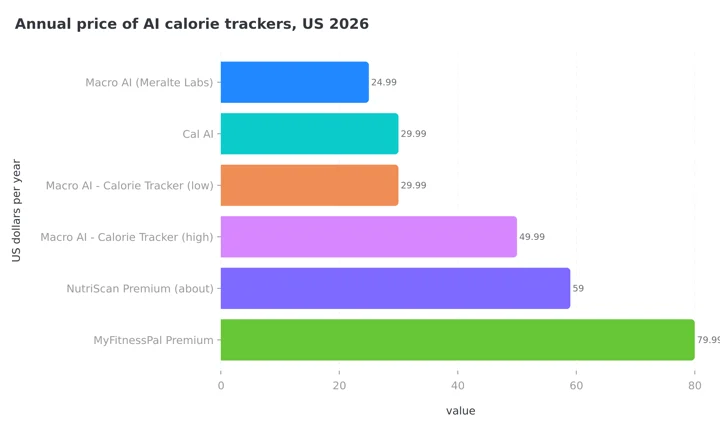 Figure 1: Macro AI - Calorie Tracker spans the widest range of any app in the set. The low end matches Cal AI. The high end costs more than NutriScan Premium's unlimited scanning at about $59 a year.
Two things stand out. First, if the reviewer's $30 is the standard yearly price, Macro AI - Calorie Tracker costs the same as Cal AI, the app it is most often mistaken for, and less than half of MyFitnessPal Premium. Second, if you are shown the $49.99 variant, it is one of the more expensive AI photo trackers on the market for an app that its own reviewers say cannot show last week's meals.
One more source of confusion is worth clearing up. Macro AI is not MacroFactor. MacroFactor is a coaching app from Stronger By Science with no free version and a published price. Macro AI is a photo scanner. People searching "is macro ai free" sometimes mean the former, and the answer there is also no.
If a permanent free tier is your requirement rather than a cheap paid plan, the apps that still offer one are compared in our best free AI calorie tracking apps roundup. NutriScan sits in that group with 5 free scans a week before Premium, and unlimited scanning on Premium at about $59 a year.
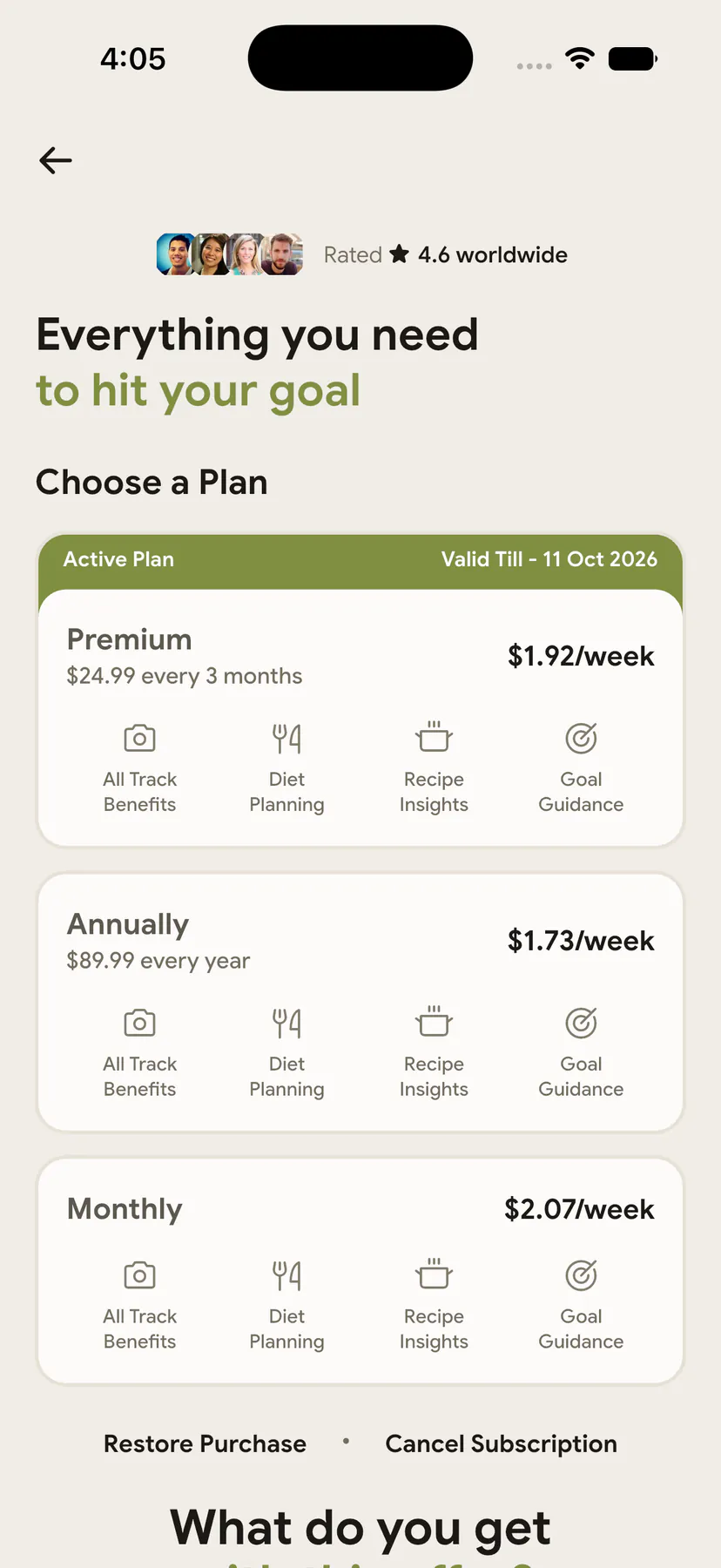
NutriScan's plan screen (Profile ➡️ Manage Subscription) shows the price and billing period on the same screen, before you tap anything.
What the privacy labels say
Because two of the three Macro AIs sell themselves on privacy, the store labels are worth a minute. Meralte's app and the Fatih Arkaya app both state that meal logs stay on the device and that photos are sent for analysis only and not retained.
The Impression Labs app's App Store privacy section lists purchases, coarse location, device identifiers and usage data under "Data Used to Track You," meaning it may be used to track you across other companies' apps and websites, and lists health data, purchase history and audio under data linked to your identity. The Google Play data safety card adds a line you rarely see on a calorie tracker: "Data can't be deleted."
Apple notes it has not verified the developer's answers. It is a real difference between the three apps, and the cheapest one is not the most private.
IMPORTANT
Checkpoint: final stretch before the reveal.
One last nudge - the reveal is next.
⏱️ Progress 3/4 • ~7 minutes in • Keep going
✅ Step 1: Which Macro AI you are looking at
✅ Step 2: Every price and the free tier
✅ Step 3: Accuracy, evidence and comparison
✨ The 30-second real-price check (about to reveal)

The 30-second check that shows your real price before you pay
The App Store listing hides the billing period. The in-app paywall shows a headline price but the studio controls the wording. The one screen neither of them controls is the store purchase sheet, the panel Apple or Google slides up when you tap Subscribe or Start Free Trial.
On that sheet the store itself prints the product name, the exact price you personally will be charged, the renewal period, the trial length if there is one, and the date the first charge lands. It is the only place all of that appears together, and it appears before you confirm.
iPhone
- Install Macro AI and reach the paywall.
- Tap the plan you are considering. The App Store sheet appears at the bottom.
- Read the line under the product name. It will say something like "1 year" or "1 week", and whether a free trial applies and for how long.
- If the price or period is not what you want, swipe the sheet down. Nothing has been charged.
Android
- Reach the paywall and tap the plan.
- The Google Play sheet lists the price, the renewal period and the trial end date.
- Tap outside the sheet or the back arrow to dismiss it without buying.
Do this once per plan the paywall offers and you have the labeled price list Apple's listing withholds. Screenshot the sheet; the refund form asks for it if a charge later disagrees.
How to cancel before you get charged
All three apps bill through Apple or Google, so cancelling inside the app does nothing. Use the store:
iPhone
- Open Settings and tap your name at the top.
- Tap Subscriptions.
- Select Macro AI.
- Tap Cancel Subscription and confirm.
Android
- Open the Play Store and tap your profile picture.
- Tap Payments and subscriptions, then Subscriptions.
- Select Macro AI and tap Cancel subscription.
Do this at least 24 hours before a trial or billing period ends, because both stores process renewals early. Cancelling does not cut off access straight away: you keep the paid features until the period you already paid for runs out. If a charge has already landed, request a refund at reportaproblem.apple.com on iPhone or through Google Play refunds on Android. Billing reasons, such as an unintended renewal, get more consistent results than complaints about accuracy.
Who Macro AI actually fits
Worth the money if you are shown the $29.99 yearly variant, you mostly eat single-item meals a camera can read, and the last three trackers you quit died at the food-search screen. The Spring 2026 release closed most of the feature gaps, and at $30 a year it costs the same as Cal AI with a comparable rating.
Skip it if you need any free logging at all, if you want to know the renewal price and period before you install, if you eat a lot of mixed dishes and want gram-level portion edits, or if seeing last month's meals matters to you. On the free-tier point, the Fatih Arkaya app covers barcode and manual logging for nothing today, and the Meralte app will publish a $24.99 annual plan once it clears review.
For a scanner you can test before a trial clock starts, NutriScan gives 5 photo scans a week on the free plan, each with full macros, micronutrients and a NutriScore, and shows its Premium price on the plan screen rather than behind a test.
Frequently asked questions
Is Macro AI free? No, not the one most people download. Macro AI - Calorie Tracker by Impression Labs UG is free to install, but its listing states that tracking and analysis features require an active subscription, and it shows ten Unlimited purchases from $4.99 to $49.99. Two smaller apps also called Macro AI do offer free tiers.
How much does Macro AI cost per year? Apple's listing labels none of the ten prices with a period. One reviewer reports paying about $30 for a yearly subscription. The ladder runs $4.99, $9.99, $14.99, $19.99, $29.99, $39.99 and $49.99, so the yearly figure you are shown could be anywhere from $29.99 to $49.99.
Which Macro AI has a free version? AI Cal Scanner: Macro AI by Fatih Arkaya keeps barcode scanning and manual meal entry free and charges only for AI photo and text logging. Macro AI by Meralte Labs publishes a free core app with Premium at $7.99 a month or $24.99 a year, but as of August 2026 it is still in store review.
Is Macro AI the same as MacroFactor? No. MacroFactor is a paid macro-coaching app with a published price and no free version. Macro AI is an AI photo calorie scanner. The two are unrelated.
How accurate is Macro AI? The store copy says precise. Reviewers report estimates off by hundreds of calories on mixed meals. Published testing of AI food recognition reports accuracy from 46% to 97% across apps (Li et al., 2024), with mixed dishes the weakest case. Treat the estimate as a starting point and correct the portion when a meal looks off.
Does Macro AI sync with Apple Health? Yes, on the paid plan. Apple Health sync arrived in the Spring 2026 release of Macro AI - Calorie Tracker, version 3.1.x.
How do I cancel Macro AI before I am charged? Cancel through the store, not inside the app. On iPhone open Settings, tap your name, tap Subscriptions, select Macro AI and tap Cancel Subscription. On Android open the Play Store, tap your profile picture, then Payments and subscriptions, then Subscriptions. Do it at least 24 hours before a trial or billing period ends.
Can I get a refund after Macro AI charges me? Apple and Google handle the refund, not the developer. Use reportaproblem.apple.com on iPhone or the Google Play refund form on Android, within the store's window. An unintended renewal is the reason most likely to succeed.
The bit that decides it
Macro AI's pricing question has a clean answer and a messy one. The clean answer: the popular Macro AI is not free, the listing says so in capitals, and the only free features are goal settings. The messy answer: what you will pay is one of ten unlabeled prices, and the only way to learn yours is the paywall and the store sheet behind it.
Read the developer name before you install, because the two other apps called Macro AI price themselves very differently. Then read the store purchase sheet before you confirm, because the App Store listing will not tell you. Prices in this piece are US App Store and developer-published figures verified on 28 August 2026 and will differ by country and by whichever paywall test you land in.
IMPORTANT
Recap: everything you completed this round.
You finished the run - save this for next time.
⏱️ Progress 4/4 • ~9 minutes in • Nicely done
✅ Step 1: Three apps share the name, only two have free tiers
✅ Step 2: Ten Unlimited prices, $4.99 to $49.99, none labeled
✅ Step 3: Photo estimates miss on mixed dishes, logging consistency does the work
✅ The store purchase sheet shows your real price and renewal period (revealed)
If you want a scanner that tells you the price before the paywall, download NutriScan and use your 5 free scans this week on the meals a database usually gets wrong.