NutriScan vs Foodvisor 2026: Photo Scan vs Dietitian Support
 ChatGPT
  Claude
  AI Mode
  Perplexity
 Foodvisor's free plan is a manual food diary with no photo scans, and Premium is around $84 a year with no standard trial. NutriScan gives 5 photo scans a week free, costs about $59 a year, and runs a 7-day trial. NutriScan asks for oil level and one of 11 cooking methods before it scores a plate, which is where mixed home-cooked dishes usually go wrong.
Last verified: August 23, 2026
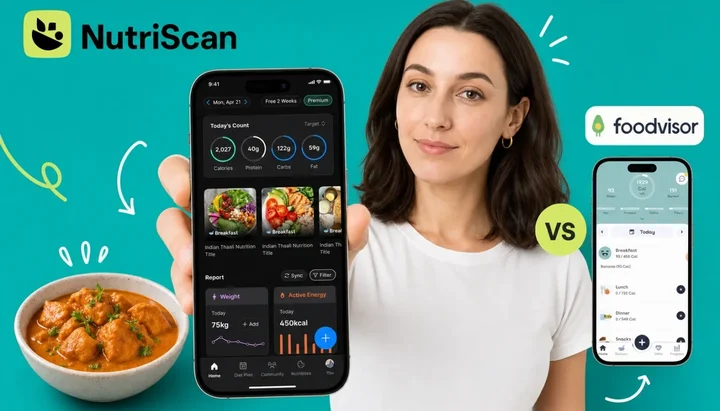
As a NutriScan nutritionist, I get this comparison question from two very different types of users. The first group wants to know which app scans food photos more accurately. The second group wants to know which app connects them with a real dietitian. A 2025 study in Nutrients ran 114 meal photographs through a leading vision model. It named the foods correctly 93% of the time, but agreed with the real values on only 6 of the 16 nutrients it reported, and its portion estimates fell apart on medium and large servings (O'Hara et al., 2025). Recognition is the easy half of photo logging. Portions are the half that decides your number, and that gap matters for both groups.
IMPORTANT
Your NutriScan vs Foodvisor comparison plan at a glance.
A quick roadmap so you can make the right choice faster.
⏱️ Progress 0/4 - ~0 minutes in - Keep going
⏳ The Dietitian Question: what Foodvisor actually gives you
⏳ Photo Scan Accuracy: where the two apps actually differ
⏳ Pricing and Free Plans: what you can test before paying
🔍 The One Factor That Decides Your Choice (revealed near the end)
Quick Verdict 📊
| NutriScan | Foodvisor | |
|---|---|---|
| Photo scan accuracy | AI scan + oil prompt + 11 cooking methods | General AI scan, no oil or cooking-method prompt |
| Dietitian access | Not available | Advertised, but 2026 testing could not find it |
| Free plan | 5 scans/week | Manual food diary only |
| Trial | 7 days | No standard trial, 14 days via referral |
| Annual price | about $59/yr | Around $84/yr (~$7/mo), promo-variable |
| Indian and Asian food | Strong database + Hindi language | European and Western focus |
| Wearable sync | Apple Health + Google Fit | Apple Health + Google Fit |
| Best for | Home cooks, health conditions, Indian meals | Western packaged foods, recipe library |
Prices are standard US prices as of mid 2026 and change by region. Foodvisor runs promotions, so what you see in your store may differ.
 Both apps promise accurate food scanning - but accuracy depends heavily on what you eat
The Dietitian Question: What You Actually Get in Foodvisor 🚫
Many users search "Foodvisor vs NutriScan" because they want a nutrition app that includes access to a registered dietitian. This is a reasonable goal. Apps that connect users with credentialed nutrition professionals tend to produce better outcomes.
Foodvisor built part of its brand identity around exactly this feature. Its Premium plan was sold with in-app chat with registered nutrition professionals, and that was a real differentiator.
Check the Dietitian Chat Before You Subscribe
Foodvisor's own Premium page still lists "Coaching by our dietitians" and "Advice by dietitians", with a named RD nutritionist (Foodvisor Premium, checked 7 August 2026), and the site-wide description on foodvisor.io promises "access to a team of dietitians". Independent hands-on testing in 2026 reports the opposite, that coaching access is no longer available in the app (Garage Gym Reviews, 2026). That same review contradicts itself elsewhere on the page, and no source anywhere gives a date for a change. Open the app and look for the coach chat before you pay for it.
This matters because the decision most users face is not purely about photo scanning. It is about which app gives the guidance they need. If a human dietitian is the reason you are considering Foodvisor, treat it as unconfirmed until you see the chat in your own account.
What Foodvisor's Premium plan definitely ships today:
- 500+ automated daily wellness lessons (not personalized to your individual logs)
- AI-generated meal and recipe suggestions
- A curated recipe library with 300+ options
The lessons are well-written and useful for beginners. They are not the same as personal guidance from a qualified professional. Registered dietitian Lynn Grieger found the app gave the same "high sugar content" flag to fresh blueberries and to a margarita, with no separation between naturally occurring and added sugar (Food & Health Communications, 2022). That was a 2022 test and the app has changed its model and database since, so treat it as a caution about oversimplified labels rather than a current bug report.
Looking for Human Coaching?
If expert coaching is your priority, NutriScan does not offer it and Foodvisor's is unconfirmed. Two apps do sell it openly: Noom puts human coaches on its paid plans, and HealthifyMe pairs its AI coach Ria with optional human nutritionist tiers.
IMPORTANT
Checkpoint: here's where you are right now.
Quick status update so you always know the next best move.
⏱️ Progress 1/4 - ~1 minute in - Keep going
✅ The Dietitian Question (done)
👉 Photo Scan Accuracy (you're here)
⏳ Pricing and Free Plans
🧩 The One Factor That Decides Your Choice (coming soon)
Photo Scan: Where the Two Apps Actually Differ 📸
Both apps use AI image recognition to identify food from a photo. Both have improved their models in recent years. But they approach the core accuracy problem very differently.
The Mixed Dish Problem
AI food recognition performs well on simple, single-ingredient foods - a banana, a grilled chicken breast, a carton of milk. Accuracy drops sharply for mixed dishes, home-cooked meals, and anything with hidden ingredients such as oils, sauces, or spices.
A 2024 study that evaluated seven AI-enabled food recognition apps found energy was consistently underestimated for an Asian diet pattern, because most app databases are built around Western foods (Li et al., 2024). The researchers noted that training AI models on culturally diverse and mixed dishes would be essential to improving accuracy. A 2025 systematic review of 13 studies was more positive on the direction of travel, reporting correlations above 0.7 for calorie estimates in six of them, while calling for larger samples and more diverse populations before anyone treats the validity as settled (Cofre et al., 2025).
How Foodvisor Handles Mixed Dishes
Foodvisor's scanner identifies the visible components of a dish and assigns estimated weights. For a plate of chicken tikka masala with rice, the app might recognize "chicken" and "rice" but miss the butter, cream, oil, and spices that make up a large share of the total calories. One widely-upvoted Google Play review puts the photo search at "about 50/50" for accuracy, which lines up with the research on the category (Google Play).
Barcode scanning is Foodvisor's most reliable input method, by the account of a certified nutrition coach who tested it: "the easiest and most accurate way to log nutritional information in Foodvisor" (Garage Gym Reviews, 2026). It returns accurate data for any packaged food with a recognized label. If most of what you eat comes in packages, that covers your typical use case well. Note that it is not a free-plan feature. Foodvisor's help center describes the free version as manual logging into the food diary (Foodvisor help center).
How NutriScan Handles Mixed Dishes
NutriScan adds two prompts after the initial photo scan that directly address the mixed dish problem.
The first is cooking method selection. The app offers 11 options: deep-fried, air-fried, stir-fried, oven-baked, roasted, steamed, boiled, grilled, raw, plus Mixed and Not Sure for the meals you cannot pin down. This changes the calorie output meaningfully. Grilled chicken and fried chicken from the same raw weight can differ by 100 to 200 calories depending on how much oil was absorbed during cooking.
The second is an oil level slider. You mark whether the meal was prepared with no oil, low oil, medium oil, or high oil. For Indian home cooking - where the same sabzi can be made with one tablespoon of oil or five tablespoons depending on the cook and the recipe - this distinction changes the estimate directly and meaningfully. Foodvisor does not offer an equivalent prompt.
The Oil Prompt Difference
One tablespoon of cooking oil is about 120 calories, so the gap between a lightly cooked sabzi and a heavy-handed one is roughly 100 to 300 calories on the same dish. That is the range the oil level input is there to catch, and it closes a systematic error that affects most photo-based calorie estimates for home-cooked meals.

NutriScan's scan flow: Home > Camera Icon > Crop Picture > Select Cooking Method + Oil Level
What the Measured Data Actually Says
Nobody has published a head-to-head accuracy test of these two apps, so here is the measured baseline for the technology both of them use.
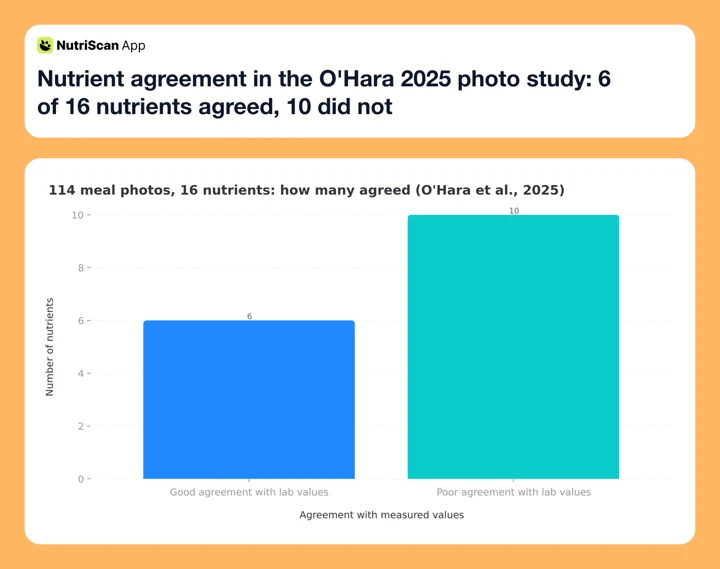 Figure 1: Across 114 meal photographs, a leading vision model named the foods correctly 93% of the time but agreed with the measured values on only 6 of 16 nutrients (O'Hara et al., 2025)
The table below is our editorial judgement from using both apps, not a measurement. Treat it as a starting hypothesis to test on your own meals, which is exactly what the five-step process further down is for.
| Meal type | Foodvisor | NutriScan |
|---|---|---|
| Simple protein + vegetables | Moderate-high | High |
| Restaurant plate, Western | Moderate | Moderate |
| Indian curry, home-cooked | Low-moderate | Moderate-high (with oil prompt) |
| Mixed biryani or thali | Low | Moderate (with cooking method) |
| Smoothies or wrapped foods | Low | Low-moderate |
If you eat mostly Western packaged food, Foodvisor's barcode scanner is the better tool and NutriScan has no barcode scanner at all, so packaged items go in through the Packaged Food tag with manual or voice entry. If you eat home-cooked Indian, South Asian, or other mixed-preparation meals, NutriScan's prompts address a systematic error that Foodvisor currently leaves alone.
Want to track the nutritional breakdown of your meals more precisely? Our meal scan guide walks through exactly how to get the most accurate results from photo-based logging.
IMPORTANT
Checkpoint: midway progress update.
You're halfway - decisions get easier here.
⏱️ Progress 2/4 - ~2 minutes in - Keep going
✅ The Dietitian Question (done)
✅ Photo Scan Accuracy (done)
👉 Pricing and Free Plans (current)
⏳ The One Factor That Decides Your Choice (next)

Free Plan and Trial: A Concrete Difference 💸
This comparison has a clear winner on the cost to try.
Foodvisor's free version covers manual logging into the food diary. Photo meal analysis, the daily courses and the recipe library all sit on Premium (Foodvisor help center). Foodvisor does not advertise a standard free trial on its pricing page, but a 14-day free trial exists through its referral program, and trial-priced SKUs appear on the US App Store listing.
Check What Your Store Offers Before Paying Foodvisor
There is no advertised trial on Foodvisor's own pricing page, and its help center says it cannot publish a fixed universal price because promotions and regions vary (Foodvisor help center). Whether you get a trial depends on your store, your region and whether someone referred you. Paying around $84 upfront for a feature whose accuracy varies substantially depending on what you eat is a real commitment, so find the trial before you skip it.
NutriScan's free plan includes 5 photo scans per week. A 7-day Premium trial sits on top of that, started through your app store, where card collection depends on your platform and region. That means you can test the scanner and the full Premium feature set before deciding whether to pay.
For users who are not sure whether photo scanning will work well for their typical meals, this matters. Spending those 5 scans on the dishes that usually break a food database, your curries, your thalis, your restaurant plates, gives you actual evidence about accuracy for your diet, rather than a marketing claim about averages.
Pricing in 2026 💰
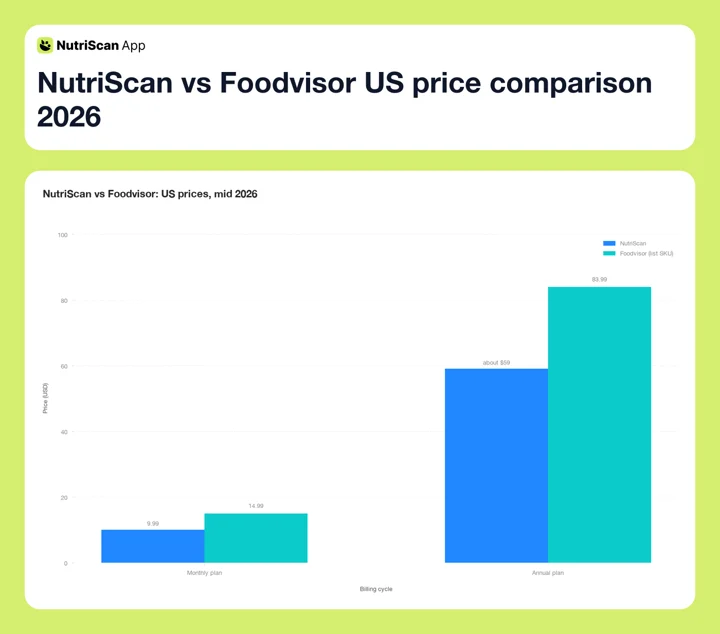 Figure 2: On the list SKUs, NutriScan is about $24 a year cheaper, roughly $48 over two years
| Plan | Foodvisor | NutriScan |
|---|---|---|
| Free | Manual food diary only | 5 photo scans/week + NutriBites AI |
| Monthly | Around $14.99/mo | annual only |
| Annual | Around $84/yr (~$7/mo) | about $59/yr |
| Free trial | Not advertised, 14 days via referral | 7 days |
| Referral program | Referred user gets a 14-day trial | 1 week free per successful referral |
Prices are standard US prices as of mid 2026 and change by region.
Foodvisor's numbers need a wider hedge than most. Its US App Store listing shows three different monthly SKUs live at the same time, $14.99, $29.99 and $39.99, alongside annual SKUs from $23.99 to $89.99, and the company's own help center says outright that it "cannot provide a fixed universal price" because region, platform and running promotions all move it. So $14.99 a month and around $84 a year are the common figures, not the only ones.
NutriScan is cheaper on both cycles at list price. The referral program is unusual among major nutrition apps: each person who signs up through your personal link gives you one free week of Premium, five referrals earns a free month, ten earns three months. Foodvisor's referral program works the other way round, giving the person you refer a 14-day trial.
Whichever annual SKU your store lands you on, paying around $84 upfront is a real commitment, especially for photo scanning, a feature whose accuracy varies substantially depending on what you eat.
Features Beyond the Photo Scan 🔍
The photo scanner is the shared headline feature, but each app offers a very different surrounding product.
Foodvisor's key strengths:
- 500+ daily wellness lessons on portions, sleep, hydration, stress, and habit building (Premium)
- 300+ recipes with full nutrition breakdown and meal plan integration
- Weekly meal planner (Premium)
- Available in 20 languages including English, Spanish, French, German, Japanese, and Korean (App Store)
- 15 million+ users and 10M+ downloads, self-reported on its Google Play listing, though its own website elsewhere says 4 million
- 4.7/5 on Google Play from about 188,000 reviews and 4.6/5 on the App Store from about 17,000 ratings, checked 7 August 2026
- Internal company study: users lost an average of 15.83 lb in 3 months (4,419 users, January 2026, average BMI 34.72), which is vendor marketing rather than peer-reviewed work
NutriScan's key strengths:
- NutriBites AI - a chatbot that analyzes your logged meals to answer pattern questions such as "what did I eat differently on days I felt bloated?" or "show me my eating patterns on weekends versus weekdays"
- Goal-specific diet plans for Weight Loss, Muscle Gain, Diabetes Management, PCOS, Pregnancy, and Viral Recovery
- Weekly and monthly grocery lists generated directly from your diet plan
- NutriScore - a science-based meal quality score that tracks nutritional quality over time
- Calendar view showing eating quality trends by day and week
- Voice AI assistant (Monika) for hands-free logging and meal questions
- Apple Health and Google Fit sync, the same pair Foodvisor covers

NutriScan's Home dashboard: daily macro breakdown, NutriScore, and complete meal history at a glance
Foodvisor's notable weaknesses in 2026:
- No integration with Fitbit, Garmin, Whoop, Oura, or Strava (Apple Health and Google Fit only)
- Color-coded food labels using red, orange, yellow, and green with emoji faces. A registered dietitian quoted in Garage Gym Reviews argues a diet program structured this way can promote an unhealthy relationship with food
- Dietitian coaching is advertised on the website but was not found in 2026 testing, and nothing states what replaced it
- No advertised free trial, and photo scanning is behind the paywall
- Prices differ by store, region and promotion, so what you are quoted may not be what a review says
NutriScan's notable weaknesses:
- Smaller user base and food database compared to Foodvisor
- No barcode scanner. Packaged food goes in through the Packaged Food tag with manual or voice entry
- No human coaching of any kind
- Smaller educational content library than Foodvisor's 500+ lessons
Manage a Health Condition?
If you are managing diabetes, PCOS, or pregnancy, NutriScan's condition-specific diet plans create a structured meal framework built for those needs. Use the macro calculator for diabetes or PCOS macro calculator to find your starting targets before logging your first meal.
IMPORTANT
Checkpoint: final stretch before the reveal.
One last nudge - the reveal is next.
⏱️ Progress 3/4 - ~3 minutes in - Keep going
✅ The Dietitian Question
✅ Photo Scan Accuracy
✅ Pricing and Free Plans
✨ The One Factor That Decides Your Choice (about to reveal)
6 Practical Tips for Choosing 💡
Tip 1: Test photo accuracy with your actual meals before paying. NutriScan's free plan gives you 5 scans per week. Use them on your five most common meals before committing to either app. If scan accuracy is good on your typical food, the paid upgrade makes sense. If you find yourself correcting estimates frequently, that tells you something important before you spend money.
Tip 2: Check your typical food database first. If you eat mostly Indian, Pakistani, or other South Asian home-cooked meals, NutriScan's database will recognize more items correctly and give you the oil level and cooking method controls you need. If you eat mostly Western packaged food, Foodvisor's barcode scanner covers your main use case well, but budget for Premium, because the free plan is manual food-diary logging only.
Tip 3: Do not subscribe to Foodvisor for dietitian access without checking first. Foodvisor's website still sells it and 2026 hands-on testing could not find it in the app. Open the app, look for the coach chat, and only then decide. If one-on-one nutrition coaching is the whole reason you are shopping, Noom and HealthifyMe sell it without the ambiguity.
Tip 4: Consider cooking oil as a real variable in your estimates. If you cook at home with variable oil amounts, NutriScan's oil level prompt gives you a direct accuracy tool that Foodvisor does not offer. At roughly 120 calories a tablespoon, a light hand versus a heavy one is worth 100 to 300 calories on the same fried dish, curry or stir-fry.
Tip 5: Think about your specific health goal. If you are managing diabetes, PCOS, or a pregnancy, NutriScan's condition-specific diet plans create a structured meal framework for those needs. Foodvisor's general weight management content is useful for broad health goals but is not designed around condition management.
Tip 6: Calculate the real annual cost difference, then check it in your own store. NutriScan at about $59 a year costs about $24 less than Foodvisor's roughly $84 annual SKU, so about $48 over two years. Foodvisor's promo pricing can narrow or widen that, so compare the two numbers your own app store shows you rather than the ones in any review, including this one.
 Testing both apps on your actual meals before committing takes less than 15 minutes and tells you everything
Step-by-Step: How to Decide in 5 Minutes ⏱️
This five-step process helps you find the right app using your actual usage data rather than feature lists.
Step 1: Download NutriScan (free). Scan the five meals you eat most often this week. Note how many corrections you needed to make to portions, dish names, or cooking methods.
Step 2: Download Foodvisor. Photo scanning is Premium, so do this inside a trial if your store offers one, or accept that this step costs money. Scan the same five meals and compare the correction rate for your personal food choices.
Step 3: With Premium access, check whether your typical packaged foods are in Foodvisor's barcode database. Scan three packaged products you use regularly. If all three return accurate results, Foodvisor's database covers your main use case well.
Step 4: Open Foodvisor's daily courses, also a Premium feature. Read three lessons on a topic relevant to your goals. If the educational content adds value and covers topics you care about, the 500+ lesson library has real daily usefulness. If you find the content too basic or the color-coded food labeling off-putting, those are strong signals about whether to renew.
Step 5: Check where your activity data lives. Both apps read Apple Health and Google Fit. If your steps and workouts sit in Fitbit, Garmin, Whoop, Oura or Strava, neither app pulls them in, and you should weigh that before you pay either one.
Research: What the Evidence Shows 🔬
Two studies are directly relevant to this comparison.
The first is a 2025 study in Nutrients that ran 114 meal photographs, covering 38 dishes at three portion sizes, through a leading vision model (O'Hara et al., 2025). Food identification was strong at 93% precision. Nutrient estimates were not: 10 of the 16 nutrients showed poor agreement with the measured values, and portion agreement held for small meals but broke down for medium and large ones. That is the baseline for the technology category both apps belong to. The model usually knows what is on your plate. It often does not know how much.
The second is a 2024 study in the journal Nutrients that evaluated AI food recognition across seven apps against three dietary patterns, Western, Asian and a recommended-guidelines diet (Li et al., 2024). Energy was overestimated for the Western pattern and consistently underestimated for the Asian one. Apps with more AI integration showed better overall functionality, but automatic energy estimation from food photos stayed inaccurate across every app tested.
One point we will make without a citation, because we could not find a study that actually says it: the accuracy of any single scan matters less than whether you keep logging at all. The best app for you is the one you will still be opening in week six, not the one with the highest theoretical accuracy on foods you rarely eat.
The One Factor That Decides Your Choice ✨
You have read the features, the pricing, and the accuracy data. Here is what most comparisons do not say directly:
The right app is determined by what you eat every day - not by what a feature list says.
Both apps work. Both have real weaknesses. The decision point is simple:
If your daily diet is primarily home-cooked Indian, South Asian, or variable-preparation meals - rice, dal, curries, sabzis cooked with different oil amounts on different days - NutriScan's oil level prompt and cooking method selector will produce meaningfully more accurate estimates for your real eating patterns. You will spend less time correcting estimates and more time actually tracking.
If your daily diet is primarily Western packaged and processed foods - items with barcodes, restaurant chain meals, pre-portioned snacks - Foodvisor's barcode scanner covers your main use case with high accuracy, and NutriScan has no barcode scanner to answer it with. The 500+ lesson library adds daily educational value that NutriScan's smaller content library does not match. Both sit on Premium, so price that in.
This is not a features question. It is a diet question. The app that matches your actual food habits will always outperform the "objectively better" app on paper.
IMPORTANT
Recap: everything you completed this round.
You finished the comparison - save this for your decision.
⏱️ Progress 4/4 - ~4 minutes in - Nicely done
✅ The Dietitian Question: Foodvisor's coaching is advertised but unconfirmed
✅ Photo Scan Accuracy: oil prompt + cooking methods = the gap
✅ Pricing and Free Plans: NutriScan leads on both list prices
✅ The One Factor: match the app to your daily food habits, not features
Who Should Choose Which App
Choose Foodvisor if:
- You eat mostly Western packaged foods and rely heavily on barcode scanning
- You want a large library of structured wellness lessons and recipes built into the subscription
- You are comfortable paying around $84 upfront, with a trial you may have to hunt for
- You need an app with broad language support for a non-English household (20 languages)
- Apple Health or Google Fit is your health data hub
Choose NutriScan if:
- You cook Indian, South Asian, or other home-cooked meals where oil and cooking method vary regularly
- You want to scan food before committing any payment (5 free scans/week + 7-day trial)
- You are managing a specific health condition (diabetes, PCOS, pregnancy, muscle gain)
- You want pattern-based meal analysis beyond basic calorie tracking
- You want the fasting timer, NutriScore and Monika voice logging in the same app
Need a baseline before starting? Use the online macro calculator to find your daily calorie and macro targets, then test whether either app's scan accuracy matches those numbers on your real meals.
Conclusion 📝
NutriScan and Foodvisor both use AI photo scanning to reduce the effort of manual food logging. They diverge clearly on what surrounds that core feature.
Foodvisor's strength is educational content - 500+ lessons, 300+ recipes, and a food database built around Western packaged products. Its main weakness in 2026 is that the dietitian access its own marketing promises could not be found in independent testing, combined with pricing that changes by store and promotion and no wearable support beyond Apple Health and Google Fit.
NutriScan's strength is accuracy for home-cooked and Indian meals through oil level prompts and 11 cooking method options, plus goal-specific diet plans for users managing particular health conditions. Its main weakness is a smaller content library and no human expert access.
If your daily diet involves home-cooked meals with variable preparation, NutriScan's scan-plus-prompt structure will tend to produce more accurate estimates for your real eating patterns. If your diet is primarily Western packaged food and you want a structured lesson library alongside calorie tracking, Foodvisor is worth its annual price, whichever version of that price your store shows you.
Use NutriScan's free plan to scan your typical meals before committing to either subscription. The data from your first 5 real scans will tell you more about photo scan accuracy for your personal diet than any comparison can.

Frequently Asked Questions ❓
Q: Does Foodvisor still give you access to a dietitian?
A: It is unclear, and anyone telling you otherwise is guessing. Foodvisor's own Premium page still lists "Coaching by our dietitians" and names an RD nutritionist, and foodvisor.io promises "access to a team of dietitians". Independent hands-on testing in 2026 reports the coaching feature is no longer available (Garage Gym Reviews, 2026), though that same page contradicts itself elsewhere. No source gives a date for a change. Look for the coach chat in the app before you subscribe for it. If one-on-one coaching is the point, Noom and HealthifyMe sell it outright.
Q: How accurate is NutriScan's photo scan compared to Foodvisor?
A: Both apps use AI image recognition that works well for simple foods and struggles with mixed dishes. A 2025 study in Nutrients ran 114 meal photographs through a leading vision model and found strong food identification (93% precision) alongside poor agreement on 10 of 16 nutrients and portion estimates that failed on medium and large servings (O'Hara et al., 2025). NutriScan adds oil level (no/low/medium/high) and 11 cooking method options after the scan, which corrects a systematic error that affects most photo-based estimates for home-cooked meals. Foodvisor has no equivalent prompt, and its barcode scanner remains its most accurate logging method.
Q: Can I try Foodvisor before paying for Premium?
A: Partly, and it depends on your store. Foodvisor does not advertise a standard free trial on its pricing page, but a 14-day free trial exists through its referral program, and trial-priced SKUs show up on the US App Store listing. The free version is manual logging into the food diary, so photo scanning, barcode scanning and the daily courses all need a paid plan (Foodvisor help center). NutriScan offers a 7-day Premium trial, started through your app store, where card collection depends on your platform and region. The free plan also includes 5 photo scans per week, which lets you test accuracy on your actual meals before making any commitment.
Q: Which app is better for Indian food tracking?
A: NutriScan has a stronger database for Indian and South Asian foods, with Hindi language support and a food database built to include regional dishes. Its oil level prompt is particularly useful for Indian home cooking, where oil amounts vary widely between households and recipes. A 2024 study found that AI food apps consistently underestimated energy for Asian diets because their databases were built around Western foods (Li et al., 2024). Foodvisor's database is primarily European and Western-focused.
Q: How does NutriScan's pricing compare to Foodvisor in 2026?
A: NutriScan Premium costs about $59 a year in the US. Foodvisor's monthly price is commonly around $14.99 as of mid 2026 and its annual plan around $84, but its US App Store listing carries several monthly and annual SKUs at once and its help center says it cannot publish a fixed universal price because region, platform and promotions all change it. Prices are standard US prices as of mid 2026 and change by region. On list prices NutriScan is cheaper on both cycles, and its free plan includes 5 photo scans per week plus a 7-day trial. NutriScan also runs a referral program where each successful referral earns one free week of Premium for both people.