Best Lifesum Alternatives 2026 (7 Apps Compared)
 ChatGPT
  Claude
  AI Mode
  Perplexity
 Lifesum's free plan gates meal plans, macro goals and AI Tracking, and the AI tracker has misfired since it launched in February 2025. YAZIO at $47.90 a year is the cheapest paid swap, MacroFactor at $71.99 recalculates your targets weekly, and MyFitnessPal is $79.99. NutriScan is about $59 a year and gives 5 free photo scans a week, asking for oil level and cooking method after each one.
Last verified: August 23, 2026

TL;DR - Best Lifesum Alternatives 2026
• Why people leave: a free plan that gates meal plans, macro goals and AI Tracking, an AI tracker that has misfired since its February 2025 launch, and meal plans that never adapt to your real results.
• Best adaptive coaching: MacroFactor recalculates your targets weekly from what you actually logged.
• Best budget swap: YAZIO at $47.90/yr, the cheapest paid plan here now that Lose It Premium has risen to $79.99/yr.
• Best photo logging for oily and complex meals: NutriScan asks for oil level and cooking method after every scan, and gives 5 free photo scans per week.
• How to choose: name the one gap that pushed you to search, then pick the app that fixes exactly that.
A 2026 scoping review of 46 calorie-counting apps found that adherence drops sharply over time, with one of the most-studied apps falling from 5.4 logged days per week to just 1.4 days between weeks 4 and 12 (Dugas et al., JMIR mHealth 2026). As a nutritionist at NutriScan, I see the same pattern: users who choose the wrong app for their habits stop logging, not from lack of motivation, but because the app stops fitting their life.
Lifesum has 65 million users and a Google Play Editors' Choice badge (Google Play, 2026). For many people, it works well. But if you have hit a wall with its AI scan accuracy, its static meal plans, or simply a missing feature you need, there are better options in 2026. This guide covers seven apps that address the main reasons Lifesum users leave, with pricing, free trial details, and who each one fits best.
IMPORTANT
Your Lifesum switching plan at a glance.
A quick roadmap so you can decide fast and switch without losing your streak.
⏱️ Progress 0/4 • ~0 minutes in • Keep going
⏳ Step 1: The 3 gaps pushing people away from Lifesum
⏳ Step 2: All 7 alternatives, priced and compared
⏳ Step 3: Who should actually stay with Lifesum
🔍 The Lifesum price puzzle - why two people pay very different amounts (revealed near the end)
Why People Leave Lifesum in 2026 🔍
Lifesum is a capable app, but three issues push users toward alternatives.
The Free Plan Gates More Than You Would Expect
Lifesum does run a free trial in 2026. Its App Store listing marks one on all three current Premium tiers, at $7.49 a month, $14.99 for three months, and $49.99 a year (Lifesum on the App Store). The friction is what sits behind the paywall once that trial ends.
Lifesum's own help center puts meal plans and programs, custom calorie and macro goals, detailed nutrient breakdowns such as sodium, fiber and cholesterol, the full recipe library, and AI Tracking itself on the Premium list (Lifesum help center). AI Tracking is the feature the app is currently sold on, and the free plan does not include it. Life Score is not gated, so if that score is what keeps you logging, the free tier still gives it to you.
Compare that with MyNetDiary, which also offers free trials on both paid plans (MyNetDiary Premium) and still leaves a usable free tier underneath: 108 tracked nutrients, no ads, and a barcode scanner. Lifesum's free plan is a teaser, MyNetDiary's is a product.
AI Tracking Regressions Since February 2025
Lifesum launched the Multimodal Tracker in February 2025, letting you log a meal by photo, voice, text or barcode (Lifesum press release). It has since been renamed AI Tracking, and it no longer replaces the old flow: Classic Food Tracking sits alongside it, and you can switch AI Tracking off completely under Diary, Customise Diary, Track with AI (Lifesum help center). The idea is good, but real-world accuracy has been inconsistent. App Store reviews from 2025 and 2026 describe cashews logged as shrimp, coffee added to a food log simply because a mug appeared in frame, and barcode scans that doubled or tripled a product's calorie count (Fuel Nutrition Lifesum review, 2026).
A user who had paid for Lifesum Premium for seven years wrote in a 2026 Reddit thread: "it used to be okay, and during 2022 to 2023 it was at its best" - acknowledging a clear decline.
 Photo logging only saves time when the app gets the photo right the first time.
We ran a side-by-side test of both scanners on identical meals in our NutriScan vs Lifesum photo scan showdown - the gap is widest on mixed and oily dishes.
Meal Plans Are Fixed Diet Templates, Not Adaptive Coaching
Lifesum's meal plans cover keto, paleo, high-protein, Mediterranean, Scandinavian and other diet programs, with nutritionist-built options such as 3-week weight loss, intermittent fasting, sugar detox and vegan for a week (Lifesum help center). They are structured and easy to follow. But targets do not adjust based on your real results over time. If you plateau or change your activity level, you adjust manually. MacroFactor recalculates targets from what you actually logged and what your weight did in response.
If you are not sure what your targets should even be, our free online macro calculator gives you a research-based baseline in under a minute.
IMPORTANT
Checkpoint: here's where you are right now.
Quick status update so you always know the next best move.
⏱️ Progress 1/4 • ~1 minute in • Keep going
✅ Step 1: The 3 gaps pushing people away from Lifesum (done)
👉 Step 2: All 7 alternatives, priced and compared (you're here)
⏳ Step 3: Who should actually stay with Lifesum
🧩 The Lifesum price puzzle (coming soon)
At a Glance: 7 Lifesum Alternatives in 2026 📊
| App | Price | Free Trial | Best For |
|---|---|---|---|
| MacroFactor | $71.99/yr | 7 days | Adaptive macro coaching |
| Lose It | $79.99/yr | 7 days | Photo + voice logging, no longer cheap |
| YAZIO | $47.90/yr | 7 days | Fasting plus calorie tracking, lowest paid price |
| Cronometer | $59.99/yr | 7 days | Micronutrient depth (95 nutrients on Gold) |
| MyFitnessPal | $79.99/yr | 7 days | 20M+ food database + Premium+ meal planner |
| MyNetDiary | $59.99/yr | Yes | No-ads tracking, 108 nutrients |
| NutriScan | about $59/yr | 7 days | Photo logging for oily and complex meals |
Prices are standard US prices as of mid 2026 and change by region. Lifesum is the odd one out here, because it does not have one annual price. Its App Store listing carries several annual tiers at the same time, from $49.99 up to $119.99, plus shorter tiers as low as $21.99 (Lifesum on the App Store). Figure 1 plots one of its listed $99.99 annual tiers so you can see the spread.
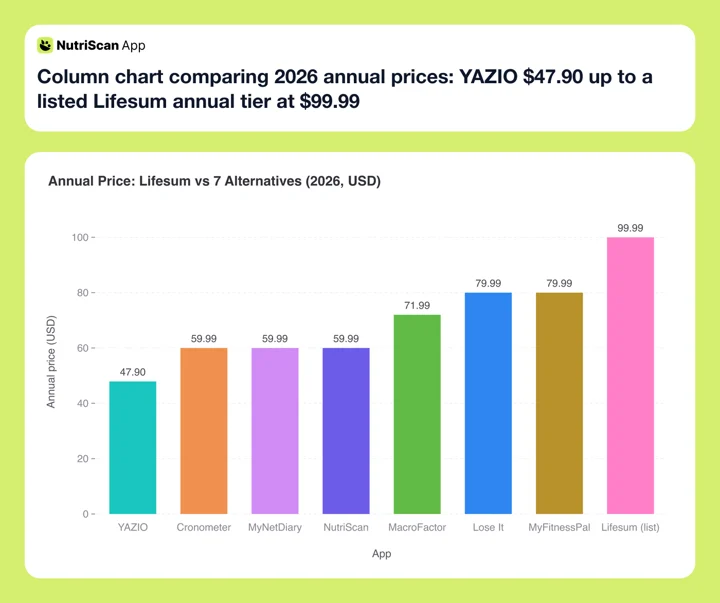 Figure 1: Annual price across the eight apps. The Lifesum bar is one of several annual tiers Apple lists at once, from $49.99 to $119.99, which we unpack near the end.
MacroFactor - Best for Adaptive Macro Coaching
Annual price: $71.99 | Free tier: No (7-day trial) | Platforms: iOS, Android
If Lifesum's static meal plans feel too rigid, MacroFactor is the clearest upgrade for macro-focused users. It tracks your logged calorie intake and body weight, then calculates your actual total daily energy expenditure (TDEE) from real data, not an estimate from an algorithm. When your results slow, targets adjust automatically.
Three coaching modes cover different needs: Coached (fully automatic target updates), Collaborative (you set targets, the app surfaces deviations), and Manual (full manual control) (MacroFactor feature breakdown). Where it wins against Lifesum: adaptive TDEE coaching that responds to your real results, fast barcode scanning, a clean interface, and full transparency in how targets are calculated.
The limits: no recipe meal-plan library and no fasting timer, so if a Lifesum diet program is what you actually open the app for, MacroFactor will feel narrower. Photo logging is not a gap any more, it shipped in April 2025 and picked up Snap and Describe modes in May 2026 (MacroFactor AI food logging). There is also no free tier after the trial ends. If the $71.99 price is the sticking point, we compared cheaper MacroFactor alternatives separately.
Verdict: if you track macros seriously and want targets that respond to your actual results, MacroFactor is designed for exactly that workflow.

Lose It - Photo and Voice Logging, No Longer the Cheap Option
Annual price: $79.99 | Free tier: Yes | Platforms: iOS, Android
Lose It Premium costs $79.99 per year, raised in 2026 from $39.99 (Lose It membership tiers and pricing). That increase moves it from the budget end of this guide to the top, level with MyFitnessPal Premium and well above the $49.99 annual offer Lifesum currently displays on the US App Store. There is no monthly Premium plan; the alternative is a lifetime license at $299.99, or $229.99 if you already subscribe. It includes a 7-day free trial. Two Premium features make it a direct Lifesum competitor for logging style: Snap It (photo logging) and Say It (voice logging).
Snap It lets you photograph a meal and receive a calorie and macro estimate. Say It lets you speak "two scrambled eggs and a slice of toast" and log it without searching the database. Both are included in the $79.99 annual plan.
One note: Lose It underwent a significant UI redesign in 2025-2026 that removed the weekly calorie summary view and reduced visible macro data in the default view. Some long-term users have reported frustration with this change - we covered the fallout in our Lose It alternatives comparison. Test the 7-day trial with your current meal habits before committing, because the price no longer makes the decision easy.
Verdict: still one of the friendlier multimodal loggers, but at $79.99 you are paying MyFitnessPal money, so pick it for the interface rather than the price.
YAZIO - Best for Fasting Plus Calorie Tracking
Annual price: $47.90 | Free tier: Yes (limited) | Platforms: iOS, Android
YAZIO costs $47.90 per year standard, and promotional prices have gone as low as $23.90. Since Lose It's 2026 increase, that standard price is the lowest paid annual plan in this guide. The PRO plan combines calorie tracking and intermittent fasting timers in a single app - something Lifesum offers in a basic form, but YAZIO takes further.
Where YAZIO goes deeper: 16 fasting window options, a customizable fasting schedule, a food database with over 4 million entries, and automatic activity sync with Fitbit, Garmin, Polar and Samsung Health on Android (YAZIO help center). PRO adds AI photo tracking, 3,000+ recipes built by YAZIO's nutrition team, and every fasting plan beyond 16:8, including 12:12, 5:2 and 1:1. The free tier gets 16:8 only.
The barcode scanner is still part of the free app (YAZIO calorie counter). What PRO actually gates is the recipe library, the fasting plans beyond 16:8, AI photo tracking, detailed nutrient breakdowns and the ad-free view. For a deeper feature-by-feature breakdown, see our Lifesum vs YAZIO comparison.
Verdict: if your primary use of Lifesum is intermittent fasting combined with calorie tracking, YAZIO is the most direct and affordable replacement.
Cronometer - Best for Micronutrient Depth
Annual price: $59.99 | Free tier: Yes (with ads) | Platforms: iOS, Android, web
Cronometer Gold costs $59.99 per year, billed annually at $4.99 per month, or $10.99 month to month (Cronometer Gold). It comes with a 7-day free trial and tracks up to 95 nutrients per food entry - including individual amino acids, omega-3 fatty acids, and each B vitamin separately. The free tier already reaches 84. Lifesum tracks macros, calories, and a basic micronutrient set; it does not reach this level of detail.
Cronometer's lab-analyzed entries come from eight sources: USDA, NCCDB, CNF, NUTTAB, CoFID, NEVO, IFCDB and CFCD (Cronometer data accuracy tips). It is not all lab data, though. Cronometer also carries the CRDB, its own user-submitted community database reviewed by the in-house nutrition team, plus barcode entries pulled from Nutritionix and the USDA branded products database (Cronometer data sources). Check the source tag on an entry before you trust its micronutrient detail: a lab-analyzed row reflects real testing, a community row is somebody's submission.
For anyone managing micronutrient deficiencies, PCOS nutrition, or diabetes-adjacent tracking, Cronometer Gold is a stronger tool than Lifesum Premium. It pairs well with our PCOS macro calculator if you need targets tuned for insulin resistance.
The limits: no meal plans, and the interface is dense enough that casual loggers bounce off it. Photo logging is no longer a gap. Gold now carries Photo Log, Voice Log, a fasting timer, and Crono Coach, though none of that reaches the oil and cooking-method prompts NutriScan asks for. If the data depth appeals but the density does not, our Cronometer alternatives comparison ranks lighter options.
Verdict: the deepest nutritional data in this comparison, with a verified database underneath it.
3 of 7 compared. Still ahead: the photo scanner built for oily home cooking, and the reason two Lifesum subscribers can pay very different amounts in the same month.
MyFitnessPal - Best for Database Size and Meal Planning
Annual price: $79.99 (Premium), $99.99 (Premium+) | Free tier: Yes (ads, limited scanner) | Platforms: iOS, Android, web
MyFitnessPal puts its database at over 20 million foods and calls it "one of the largest food databases in the world" (How MyFitnessPal's Food Database Works), an order of magnitude above MyNetDiary's 2 million staff-verified items. Size and curation are different things, though: MyNetDiary's entries are checked by its own staff, while most of MFP's come from users. It syncs with a wide range of third-party apps and devices. And at the Premium+ tier, it includes a structured Meal Planner with 1,500+ recipes and automated grocery lists.
This is the app most comparable to Lifesum's meal plan approach: MFP Premium+ generates weekly menus based on your calorie and macro targets, with a built-in shopping list organized by grocery category. The free trial runs 7 days, the same as everyone else here (MyFitnessPal Premium), so you get one week to decide on the most expensive plan in the guide.
Where MFP falls short in 2026: the free tier now shows ads, and barcode and meal scanning both sit behind Premium, and the post-March 2026 redesign has frustrated some longtime users. We ranked the escape routes in our MyFitnessPal alternatives guide, and compared the two head to head in MyFitnessPal vs Lifesum.
Verdict: the closest match to Lifesum's meal planning, at the highest price in this guide.
MyNetDiary - Best Free Tier With No Ads and 108 Nutrients
Annual price: $59.99 | Free tier: Yes (no ads, 108 nutrients) | Platforms: iOS, Android, web
MyNetDiary is the only app in this guide with a truly competitive free tier. The free plan includes barcode scanning, 108 tracked nutrients (the highest free-tier nutrient count of any tracker), staff-verified entries from USDA and NCC databases, and no ads (MyNetDiary). The diabetes tooling is not free: Premium is what adds detailed blood glucose tracking, with several timestamped readings a day and configurable targets (MyNetDiary Premium).
Compared to Lifesum, MyNetDiary's free plan beats Lifesum's free plan in practical terms: more nutrients tracked, no ads, barcode scanner included, no upgrade pressure for basic logging. If Lifesum's gated features have been a pain point, MyNetDiary lets you go much further before hitting a paywall. A December 2025 Premium Plus tier added AI features on top.
It has no Life Score equivalent, and its meal planning is lighter than Lifesum's diet library, though Premium does include hundreds of dietitian-created recipes (MyNetDiary Premium). Meal Scan photo logging is there. For tracking accuracy and nutrient depth without paying, it is the most practical no-cost alternative in this list.
Verdict: the strongest free plan in the comparison - evaluable end to end without entering a card.
NutriScan - Best for Photo Logging Oily and Complex Meals
Annual price: about $59 | Free tier: Yes (5 photo scans/week) | Platforms: iOS, Android
NutriScan is the photo logging specialist in this comparison, and it addresses the exact failure mode Lifesum's AI Tracking is criticized for. After you photograph a meal, NutriScan asks two questions Lifesum never does: an oil level on a slider (No Oil, Low Oil, Medium Oil, or High Oil) and a cooking method from 11 options (mixed, deep-fried, air-fried, stir-fried, oven-baked, roasted, steamed, boiled, grilled, raw, or not sure). Our meal scan guide walks through the full flow.

NutriScan's photo scan flow: Home > Camera Icon > Click Picture > Crop Picture, then confirm cooking method and oil level.
Why this matters: a 2025 study that ran meal photographs through ChatGPT found a mean absolute percentage difference of 26.9% against the real nutrient values, measured across 16 nutrients (O'Hara et al., Nutrients 2025). Cooking oil is one of the things a photo cannot show, and an explicit oil prompt after the photo is the most practical way to put it back without manual entry. For curries, stir-fries, restaurant plates, and any dish where cooking oil changes the calorie count significantly, this prompt captures what a standard photo scan misses.
The free plan includes 5 photo scans per week, plus NutriBites, an AI feature that answers questions about your meal timeline and suggests what to eat next based on your recent logs and goals.
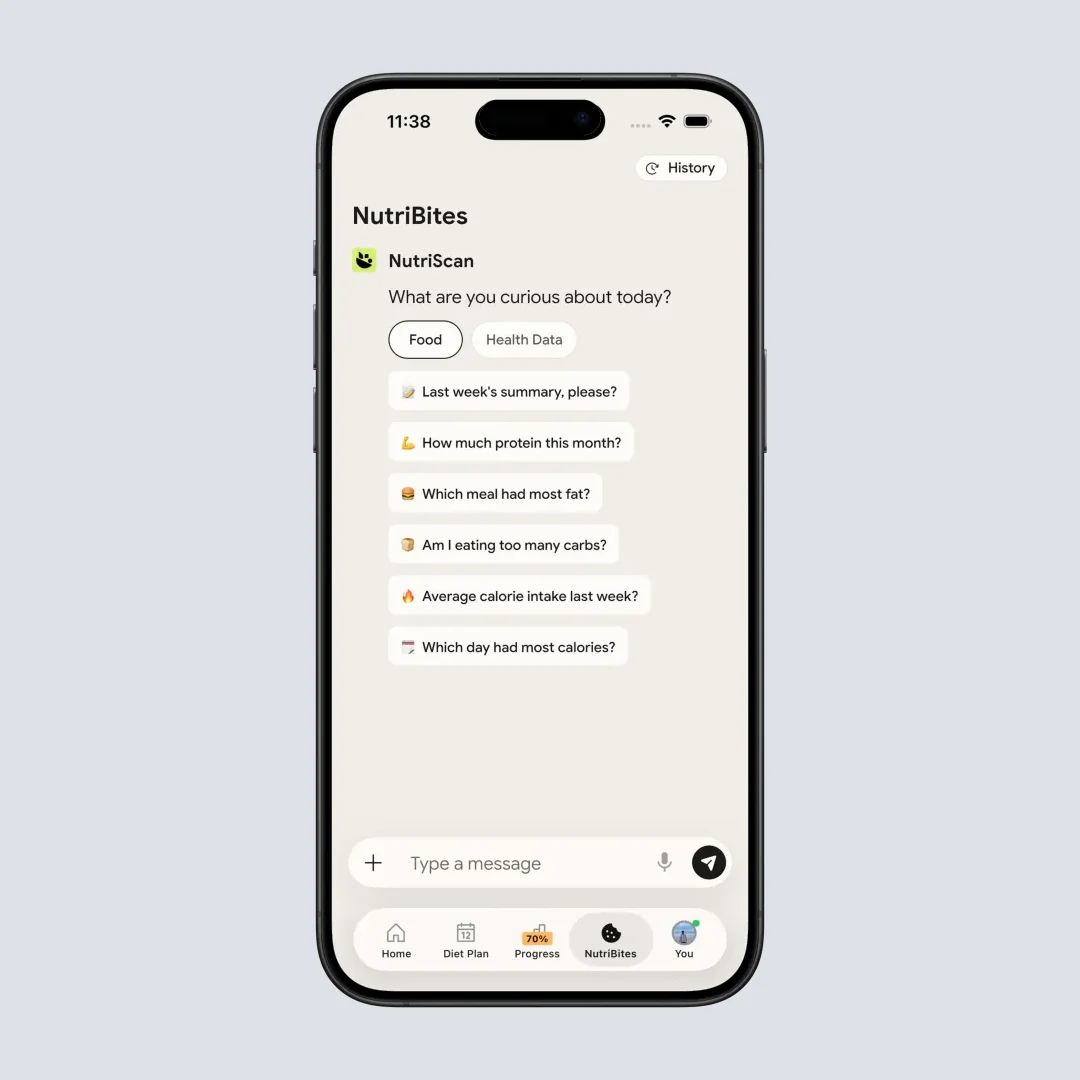
NutriBites (Home > Bottom Nav > NutriBites) answers questions about your meal history and suggests what to eat next.
Macros and micronutrients come with every meal on both plans. NutriScan Premium (about $59 a year) removes the scan limit and adds diet plan tools, weekly meal-plan suggestions, and a goal-based grocery list. The 7-day trial starts through your app store; whether a card is collected depends on your platform and region.
The limits: a smaller packaged-food database than MyFitnessPal for niche US brands, and the Premium diet plan is generated for you rather than picked off a shelf of named programs the way Lifesum's keto and paleo plans are.
Verdict: if Lifesum's AI scan regressions are what pushed you here, NutriScan's oil and cooking prompts fix exactly that gap - and 5 free scans a week let you verify it on the dishes that broke Lifesum before paying anything.
IMPORTANT
Checkpoint: midway progress update.
You're past the comparison - decisions get easier from here.
⏱️ Progress 2/4 • ~3 minutes in • Keep going
✅ Step 1: The 3 gaps pushing people away from Lifesum (done)
✅ Step 2: All 7 alternatives, priced and compared (done)
👉 Step 3: Who should actually stay with Lifesum (current)
🧩 The Lifesum price puzzle (next)
Who Should Stay With Lifesum in 2026 🤔
Not everyone should switch. Lifesum remains a good choice if:
- You use the diet plan library - keto, paleo, high protein, the 3-week weight loss and sugar detox programs - as a flexible guide and are satisfied with it
- The Life Score (food + hydration + activity composite) motivates you week to week and you actually check it
- You value Lifesum's positive, non-punitive design: pastel colors, progress celebration, no red warnings for "bad" meals
- You use Wear OS integration for quick logging from a smartwatch
- The barcode scanner and voice input work reliably for your typical meals
If the AI photo regressions, the size of the Premium paywall, or the static meal targets are genuine pain points, one of the seven alternatives above addresses each issue directly. And if you are on the fence about the subscription itself, our Lifesum Premium worth it breakdown runs the math feature by feature.

How to Switch From Lifesum in 5 Steps 🔁
Step 1: Export your data first, and start it early. Lifesum's self-serve export lives on the website, not in the app. lifesum.com/account/export-data returns the past 7 days of food items, meal type and calories, and nothing more (Lifesum help center). For your full history, including weight, you have to email Lifesum support and wait for them to send it, so open that request before you cancel anything.
Step 2: List your top 10 to 20 meals. These are the foods you log most often. Rebuilding these as favorites or custom foods in the new app during week one prevents database friction from breaking the habit.
Step 3: Start the new app's trial before canceling Lifesum. Run both in parallel for 3 to 5 days. This prevents a gap in your logging streak and shows you where the new app's database has gaps for your specific meals.
 Photo by S O C I A L . C U T on Unsplash
Step 4: Cancel Lifesum through the platform where you purchased it. iOS: Settings ➡️ Apple ID ➡️ Subscriptions ➡️ Lifesum ➡️ Cancel. Google Play: Payments and subscriptions. Web purchase: lifesum.com Account ➡️ Manage Subscription. If you subscribed from an Instagram or Facebook ad, the billing runs through Paddle, and Samsung buyers cancel in the Galaxy Store (Lifesum cancellation help). Deleting the app cancels nothing. Our step-by-step Lifesum cancellation guide covers every platform with screenshots.
Step 5: Treat week one as calibration, not performance. Use the first full week to rebuild favorites, test logging speed, and find any database gaps. Do not judge the new app by week-one friction.
 Five steps done, streak intact. That is how a clean switch feels.
IMPORTANT
Checkpoint: final stretch before the reveal.
One last nudge - the price puzzle is inside the next section.
⏱️ Progress 3/4 • ~4 minutes in • Keep going
✅ Step 1: The 3 gaps pushing people away from Lifesum
✅ Step 2: All 7 alternatives, priced and compared
✅ Step 3: Who should actually stay with Lifesum
✨ The Lifesum price puzzle (about to reveal)
The Lifesum Price Puzzle 💸
Lifesum does not have one annual price. It has a shelf of them, all live at the same time.
The App Store listing shows annual tiers at $119.99 and $99.99, twice, alongside the $49.99 annual offer currently on display, plus 1-month, 3-month and 6-month tiers running down to $21.99 (Lifesum on the App Store). Which one you are shown depends on when you open the app, where you are, and which promotion is running. That is why two people can pay very different amounts for the same subscription in the same month.
Two things you can actually check:
- The annual offer displayed on the US App Store right now is $49.99. Against this guide, that lands between YAZIO at $47.90 and the $59.99 pair of Cronometer and MyNetDiary. NutriScan Premium is about $59 a year.
- The highest annual tier on the same listing is $119.99, which is more than any alternative here, MyFitnessPal Premium+ included.
So the honest comparison is a range, not a number. If you signed up on a promotion and it renews at that tier, Lifesum is priced competitively. If it renews at $99.99 or $119.99, it is the most expensive app on this page. Two things to check before you relax:
- Verify your renewal price, not your signup price. Promotional rates do not always renew at the same tier. Open your subscription settings and check the actual amount of your next charge. Our Lifesum pricing breakdown tracks the current monthly and yearly tiers.
- A discount does not fix a feature gap. If the AI scanner mislogs your meals or the static plans stalled your progress, paying $49.99 instead of $119.99 for the same frustration is still paying for frustration. Price was never the real reason to leave, fit is.
WARNING
Lifesum gives you 14 days from the purchase confirmation to request a refund or withdraw from the contract (Lifesum refund policy). Past that window, a promotional annual charge that quietly renews at a full-price tier is the expensive mistake. Set a calendar reminder one week before your renewal date.
Lifesum runs extra promotional offers on top of the trial that ships with every Premium tier. Our guide to Lifesum free trial deals explains where those offers surface and how to catch one before paying full price.
What the Research Says About Logging Consistency 🔬
Adherence is the central challenge for any calorie tracker. A 2024 scoping review of health app abandonment (Kidman et al., JMIR 2024) found that a median 70% of users stop using a health app within the first 100 days. It sorted 22 stated reasons into six categories: technical and functional issues, privacy concerns, poor user experience, content and features, time and financial costs, and evolving user needs and goals. Poor user experience, meaning the app was confusing or awkward to use, was the most consistently reported of the six.
A 2025 systematic review and meta-analysis (Curtin et al., Int J Behav Nutr Phys Act 2025) found that app-based interventions raised fruit and vegetable intake by 0.48 portions a day and cut meat intake by 0.10 portions a day. Modest numbers, and they only accrue for as long as you keep opening the app.
The practical takeaway: the best alternative is the one you log with consistently. If you photograph meals, pick an app with a photo-first interface. If you cook from recipes, pick one with recipe import. If you fast, pick one where the fasting timer is easy to find. Switching to a "better" app that does not fit your habits produces worse results than staying with a familiar one that does.
IMPORTANT
Recap: everything you completed this round.
You finished the run - save this for when you make the switch.
⏱️ Progress 4/4 • ~5 minutes in • Nicely done
✅ Step 1: The 3 gaps pushing people away from Lifesum
✅ Step 2: All 7 alternatives, priced and compared
✅ Step 3: Who should actually stay with Lifesum
✅ The Lifesum price puzzle: annual SKUs run $49.99 to $119.99, so check your own renewal tier (revealed)
Conclusion
Lifesum is a solid app for casual users who want structured diet plans and an encouraging design. If you are leaving because of photo scan accuracy, static meal targets, or how much the free plan holds back, the seven apps above offer concrete improvements in each area:
- Adaptive targets when you plateau ➡️ MacroFactor ($71.99/yr, 7-day trial)
- Lowest paid price, with fasting timers ➡️ YAZIO ($47.90/yr, 7-day trial)
- Photo and voice logging in a friendly interface ➡️ Lose It ($79.99/yr, 7-day trial)
- Micronutrient depth ➡️ Cronometer Gold ($59.99/yr, 7-day trial)
- Meal planner with recipes and grocery lists ➡️ MyFitnessPal ($79.99-$99.99/yr, 7-day trial)
- Strong free plan, no ads ➡️ MyNetDiary (free, or $59.99/yr)
- Photo logging for oily and complex meals ➡️ NutriScan (5 free scans/wk, oil and cooking prompts)
Every one of these apps offers a free trial, and MyNetDiary and NutriScan both keep a usable free tier after it ends, so testing before paying costs you nothing. If photo logging is your main method, try NutriScan - the 7-day trial starts through your app store, and the 5 free photo scans per week remain available well after the trial ends.
Frequently Asked Questions ❓
Q: Does Lifesum have a free trial in 2026?
A: Yes. Lifesum's App Store listing marks a free trial on all three current Premium tiers, at $7.49 a month, $14.99 for three months and $49.99 a year (Lifesum on the App Store). The catch is not the trial, it is what the free plan holds back afterwards: meal plans and programs, custom calorie and macro goals, detailed nutrient breakdowns, the full recipe library and AI Tracking itself (Lifesum help center). Life Score is not gated. Every other app in this guide has a trial too, MyFitnessPal at 7 days (MyFitnessPal Premium) and MyNetDiary on both paid plans (MyNetDiary Premium).
Q: What is the cheapest Lifesum alternative in 2026?
A: YAZIO at $47.90 per year, and PRO covers both AI photo tracking and fasting timers. NutriScan comes next at about $59 a year for photo and voice logging. Lose It used to hold this spot at $39.99, but Premium moved to $79.99 per year in 2026 (Lose It membership tiers and pricing), which is the same as MyFitnessPal Premium. If free is the priority, MyNetDiary's free plan offers 108 nutrients, no ads, and barcode scanning without a subscription, and NutriScan's free plan includes 5 photo scans per week.
Q: Which Lifesum alternatives have meal plans?
A: MyFitnessPal Premium+ ($99.99/yr) includes a structured weekly Meal Planner with 1,500+ recipes and automated grocery lists. YAZIO PRO includes 3,000+ recipes organized by diet type. NutriScan Premium adds a 28-day personalized diet plan, weekly meal-plan suggestions and a goal-based grocery list. MacroFactor ships diet presets rather than a recipe library. Cronometer and Lose It have no meal plan library at all. Lifesum's diet library and MFP's Meal Planner remain the closest match to each other, though MFP's integrates more tightly with your macro targets.
Q: Can I export my food log before leaving Lifesum?
A: Partly, and not from inside the app. Lifesum's self-serve export at lifesum.com/account/export-data gives you the last 7 days of food items, meal type and calories (Lifesum help center). For your full history, including weight, you have to email Lifesum support and wait for them to send it, so start that request before you cancel. Most alternative apps do not import Lifesum's format directly either, so plan on rebuilding your top meals by hand. Give week one to setup.
Q: Is Lifesum accurate for Indian food and oily dishes?
A: Lifesum's photo scanner does not prompt for oil level or cooking method - two variables that significantly affect calorie counts for curries, stir-fries, and fried dishes. A 2025 study of AI nutrient estimates from meal photographs found a mean absolute percentage difference of 26.9% against real values (O'Hara et al., Nutrients 2025), and oil is exactly the variable a photo cannot resolve. NutriScan includes an explicit oil slider (No Oil, Low Oil, Medium Oil, High Oil) and 11 cooking method options, which produces more accurate estimates for these meal types.