Lose It vs MyFitnessPal: Which App Logs Food Faster?
 ChatGPT
  Claude
  AI Mode
  Perplexity
Lose It vs MyFitnessPal, short answer: Lose It is the faster app. It logged a full day of food about 1 to 2 minutes quicker across 6 meals and snacks in my two-week side-by-side test, mostly because barcode scanning is free on Lose It and Premium-only on MyFitnessPal. Lose It was quicker on barcode, voice, photo, and manual search. The two tied on copy meal and quick add. Price no longer separates them: both Premium plans cost $79.99 a year (standard US prices as of mid 2026, and they change by region). MyFitnessPal still wins on database breadth and integrations.
As a NutriScan nutritionist, I test calorie trackers regularly, and this is the comparison I get asked about most. MyFitnessPal claims over 14 million food entries. Lose It markets itself as the simpler, faster alternative. A 2023 study in JMIR Formative Research found that higher app engagement directly correlates with more weight loss among 665 tracked users (Valinskas et al., 2023). The app that lets you log faster is the one you will actually keep using.
I logged the same meals in both apps, scanned the same barcodes, and timed the same voice entries for two weeks. This guide breaks down exactly how fast each app handles six logging methods, and which one saves you the most time in real daily use.
TL;DR - Lose It vs MyFitnessPal
- Faster app overall: Lose It (saves 1-2 minutes per day across 6 meals)
- Free barcode scanning: Lose It only - MyFitnessPal moved this behind the paywall in late 2022
- Annual price: tied at $79.99 after Lose It's 2026 increase, so the free tiers are where the money difference now sits
- Voice and photo logging: tied on accuracy, and now tied on price too
- Database trade-off: MyFitnessPal coverage (14M+) vs Lose It accuracy (33M+ curated)
- Best test: Run both for one week and keep the one you opened more often
1. Lose It vs MyFitnessPal at a Glance
Here is the full side-by-side before the method-by-method detail. Both names get typed two ways. Lose It and LoseIt are the same app from FitNow, and My Fitness Pal with spaces is the same app as MyFitnessPal. However you spell them, the table below is the same comparison.
| Feature | MyFitnessPal | Lose It |
|---|---|---|
| Database size | 14M+ entries (user-contributed) | 33M+ entries (curated) |
| Barcode scanning | Premium only ($79.99/year) | Free |
| Voice logging | Premium only | Premium only |
| Photo scan | Meal Scan (Premium) | Snap It (Premium) |
| Manual search speed | Fast, but noisy results | Fast, curated results |
| Copy previous meals | Yes | Yes |
| Fasting timer | No native support | Built-in |
| Free tier value | Limited since 2022 paywall | Strong (barcode, diary, goals) |
| Annual premium price | $79.99/year | $79.99/year |
| Family plan | Not available | $59.99/year |
| Integrations | 50+ apps and devices | Apple Health, Fitbit, Garmin, Withings |
Prices are standard US prices as of mid 2026 and change by region. Lose It's are from its own membership tiers and pricing page.
The biggest difference is not raw speed. It is access. Lose It gives you barcode scanning for free. MyFitnessPal moved it behind the paywall in 2022 (Calorie Trackers, 2026). On the free tier, Lose It is faster by default because its fastest logging tool does not cost a cent.
 Both apps win or lose on the daily logging habit. The split is whether you want barcode scanning for free or are willing to pay $79.99 a year for it.
2. Lose It vs MyFitnessPal Pricing: What You Pay for Speed
Pricing is the deciding factor for most users, so let's start there.
MyFitnessPal pricing
MyFitnessPal has three tiers in 2026 (MyFitnessPal Support):
- Free: Manual search, basic diary, goal setting. No barcode scanner. No voice. No photo logging.
- Premium ($19.99/month or $79.99/year): Adds barcode scanning, voice logging, Meal Scan, intermittent fasting timer, and ad-free experience.
- Premium+ ($24.99/month or $99.99/year): Adds meal planning, recipe library, and grocery lists.
The annual Premium plan works out to $6.67 per month.
Lose It pricing
Lose It keeps it simpler. One paid tier, billed yearly:
- Free: Manual search, barcode scanning, diary, goals, fasting timer.
- Premium ($79.99/year, no monthly plan): Adds Snap It photo logging, AI Voice, advanced analytics, and recipe import.
- Lifetime ($299.99, or $229.99 if you already pay for Premium): One purchase instead of the annual renewal.
- Family Plan ($59.99/year): Premium for up to five accounts.
Price verdict
Lose It raised Premium from $39.99 to $79.99 and dropped the monthly option (Lose It membership tiers and pricing). The two apps now cost the same $79.99 a year, so price no longer separates them at the Premium level. The free tier is where the money difference lives: Lose It's free tier includes barcode scanning and covers most of what a beginner needs, and MyFitnessPal's does not. The family plan is Lose It's other remaining price advantage, since MyFitnessPal has no equivalent. If you are weighing that $79.99 renewal on its own, we broke the math down in is Lose It Premium worth it.
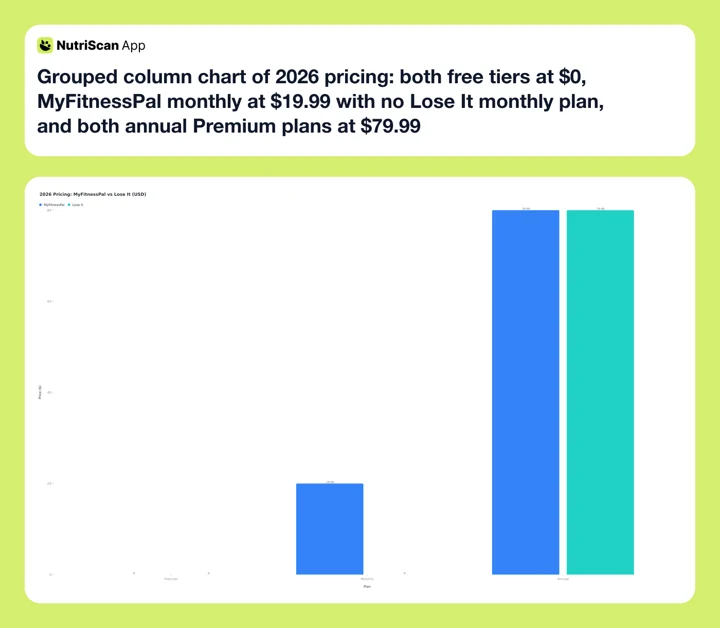 Figure 1: 2026 pricing in USD. Both Premium plans are $79.99 a year, and Lose It's monthly bar is zero because it no longer sells a monthly plan. The gap is in what the free tiers include.
3. Barcode Scanning: The Fastest Way to Log Packaged Food
Barcode scanning is the quickest logging method for packaged food. You point your phone at a barcode, and the app fills in calories and macros in under three seconds. Both apps have reliable scanners, but there is one critical difference.
Lose It includes barcode scanning on the free tier. You download the app, create an account, and start scanning. No trial period, no credit card, no upgrade prompt blocking your first scan.
MyFitnessPal removed free barcode scanning in late 2022. To scan a barcode now, you need Premium at $79.99/year or $19.99/month. Free users must search for foods manually and scroll through results.
In my testing, both scanners recognized barcodes equally fast - about one to two seconds. Match rate was similar for common packaged foods in the US and UK. MyFitnessPal has an edge with niche or international products because its larger user-contributed database means more barcodes are mapped. But quality varies. I found duplicate entries with different calorie counts for the same product three times during my two-week test.
Duplicate-entry trap
On MyFitnessPal, the first barcode result is not always the most accurate. If you see two entries for the same product with calorie counts more than 5 percent apart, sort by "verified" and skip user-submitted ones with no brand name.
Verdict: Lose It wins on barcode scanning for most users. Free access plus curated data means fewer wrong entries and zero cost. If scanning packaged food is the main job, compare it against the rest of the field in our roundup of the best apps for barcode scanning.
4. Voice Logging: Saying What You Ate
Voice logging lets you speak your meal instead of typing it. Both apps support this feature, but both lock it behind premium tiers.
MyFitnessPal Voice Logging became a Premium feature in 2024. Tap the microphone icon in the food diary, say something like "two scrambled eggs and a slice of toast with butter," and the app parses it into individual food entries with calorie estimates (MyFitnessPal Blog). It handles multi-food sentences well and usually gets portion sizes right for common foods.
Lose It AI Voice works the same way. You describe your meal in natural language, and the app logs each item separately. The Google Play listing confirms support for complex inputs like "I had 2 eggs, toast with butter and jam" (Google Play, 2026).
In practice, both voice features perform at a similar level. Recognition accuracy depends more on how clearly you describe portions than on the app itself. Price used to split them, and no longer does: both Premium plans are $79.99 a year.
Verdict: Tie on speed, accuracy, and price. If voice is the only reason you would upgrade, neither app is the cheaper way in.
5. Photo Scanning: Point, Shoot, Log
Photo-based food logging uses AI to identify what is on your plate and estimate calories. Both apps invested in this feature recently.
MyFitnessPal Meal Scan got a major update in early 2026 with a Photo Upload feature. You can take a photo of your meal, continue eating, and log it later when convenient (MyFitnessPal Blog, 2026). The AI identifies items on the plate and suggests calorie estimates. You review and confirm each item before it goes into your diary.
Lose It Snap It works the same way. Take a real-time photo or upload an existing one, and the app identifies foods and estimates portions (Lose It Support). The feature is available to Premium users.
Both photo scanners are useful for quick logging but neither is perfect. Mixed plates - like a stir-fry with rice, vegetables, and protein - still require manual adjustments. A plain chicken breast on a white plate gets recognized accurately. A home-cooked curry does not.

Photo logging done right: confirming food type and cooking method (path: Home > Camera Icon > Crop Picture) is the same idea behind both Meal Scan and Snap It - the AI gets faster when you fix mistakes once.
Verdict: Both apps perform similarly. MyFitnessPal's delayed photo upload is a small convenience win for users who don't want to log during the meal.
6. Manual Search: The Method Most People Actually Use
Despite all the AI features, manual search remains the most common logging method. You type a food name, pick from results, adjust the serving size, and tap "add." Speed depends on two things: how fast results load and how accurate the top results are.
MyFitnessPal has a massive database, which is both its strength and weakness. Searching for "chicken breast" returns dozens of results - grilled, baked, raw, branded, restaurant-specific, user-submitted. Finding the right entry can take 10 to 15 seconds of scrolling. The app remembers your recent and frequent foods, which speeds things up after the first week.
Lose It returns fewer, more curated results for the same search. "Chicken breast" gives you 5 to 8 options instead of 30+. You spend less time scanning results and more time actually logging. The tradeoff is that niche or specialty foods sometimes require manual entry.
Both apps support quick-add features where you enter just the calorie number without searching. Both let you save custom meals and recipes for one-tap logging later.
Verdict: Lose It is slightly faster for everyday foods because of cleaner search results. MyFitnessPal is better if you eat a wide variety of international or specialty foods that need a larger database.
7. MyFitnessPal vs Lose It Speed Test: Six Methods Over Two Weeks
I logged identical meals in both apps for 14 days to measure actual time spent. Here are the average times per logging method.
| Logging method | MyFitnessPal (avg time) | Lose It (avg time) |
|---|---|---|
| Barcode scan (packaged food) | 4 seconds | 3 seconds |
| Voice logging (3-item meal) | 12 seconds | 11 seconds |
| Photo scan (simple plate) | 18 seconds + review | 16 seconds + review |
| Manual search (common food) | 10 seconds | 7 seconds |
| Copy previous meal | 3 seconds | 3 seconds |
| Quick calorie add | 5 seconds | 5 seconds |
The differences look small per entry. But they compound. If you log 4 meals and 2 snacks per day, the 2 to 3 second advantage on common tasks means Lose It saves roughly 1 to 2 minutes per day. Over a month, that is 30 to 60 minutes of less time spent inside a calorie app.
According to Business of Apps, health and fitness apps retain only 3 percent of users by day 30 (Business of Apps, 2026). Shaving friction from daily logging is one of the most practical ways to stay in that 3 percent.
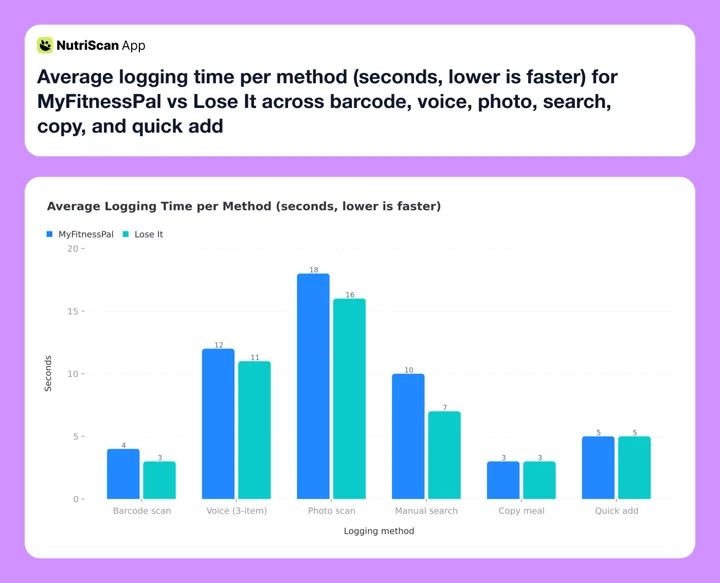 Figure 2: Average seconds per log across six methods (lower is faster). Lose It edges out MyFitnessPal on barcode, voice, photo, and manual search; the two tie on copy meal and quick add.
8. Database Quality: Speed Is Not Just About Time
A fast scan means nothing if the data is wrong. This is where the two apps differ most.
MyFitnessPal uses an open-contribution model. Any user can add or edit food entries. This makes the database huge but inconsistent. Independent testing in 2026 found a +/- 6.8 percent accuracy rate for MyFitnessPal entries (Calorie Trackers, 2026). A food listed as 300 calories could actually be 280 or 320. Over a full day of eating, errors compound.
Lose It uses a curated approach. Entries are verified before going live, which means fewer duplicates and more consistent data. The same 2026 comparison puts Lose It at a +/- 5.9 percent accuracy rate (Calorie Trackers, 2026) - better than MyFitnessPal but still not perfect.
For context, a 1 percent error on a 2,000-calorie daily target is 20 calories. A 6.8 percent error is 136 calories - enough to stall weight loss progress over weeks.
Trust your numbers
If you want to sanity-check the daily target both apps generate, run your stats through our free macro calculator before subscribing. Apps usually round to the nearest 50 calories, which can hide a real 100-calorie gap.
Verdict: Lose It's curated database saves you the hidden time of double-checking suspicious entries. Fewer errors mean fewer corrections, which means faster real-world logging.
9. Copy Meals and Quick Shortcuts
The fastest way to log food is to not log it at all - or rather, to copy a previous entry. Both apps support this, and it is where daily logging speed really improves after the first week.
MyFitnessPal lets you copy entire meals or individual items from previous days. You can also save "Meals" (groups of foods you eat together) and add them with two taps. The "Quick Add" button lets you enter raw calorie numbers when you don't want to search at all.
Lose It has a "Previous" tab that shows recent meals organized by meal type. You can re-log yesterday's breakfast in about 3 seconds. The app also supports saved meals and recipes.
Both apps handle this equally well. The real speed advantage comes from how consistently you eat - if you rotate through 10 to 15 meals per week, both apps learn your patterns and surface them quickly.
Verdict: Tie. Both apps are equally fast at re-logging meals you've eaten before.
10. Integrations and Ecosystem
MyFitnessPal connects with 50+ fitness apps and devices - Garmin, Fitbit, Apple Health, Google Fit, Strava, Polar, and more (Calorie Trackers, 2026). If you use multiple fitness platforms, MyFitnessPal works as a central nutrition hub.
Lose It integrates with Apple Health, Fitbit, Garmin, and Withings. It covers the major platforms but not the full range of MyFitnessPal's partner list.
For most users, the integration that matters is with their primary wearable. Both apps handle that case well. The ecosystem advantage only shows up if you use three or more fitness platforms at the same time.
11. Five Tips to Log Food Faster in Any App
No matter which app you choose, these habits will cut your daily logging time.
- Log at the moment, not later. Remembering what you ate at 9 PM is slower and less accurate than logging during the meal. Both apps support quick photo capture so you can confirm details later.
- Build a favorites list in your first week. Both MyFitnessPal and Lose It learn from your habits. The more consistently you log the same foods early on, the faster suggestions get.
- Use copy meal for repeating breakfasts. Most people eat the same breakfast 4 to 5 days per week. Save it once, re-log it with one tap.
- Try voice logging for complex meals. When eating a plate with 4 or 5 items, saying them out loud is faster than searching for each one. Both apps parse multi-food sentences.
- Use quick-add for meals you can't identify. If you're at a restaurant and the exact dish is not in the database, estimate the calories and quick-add the number. A rough log beats no log.
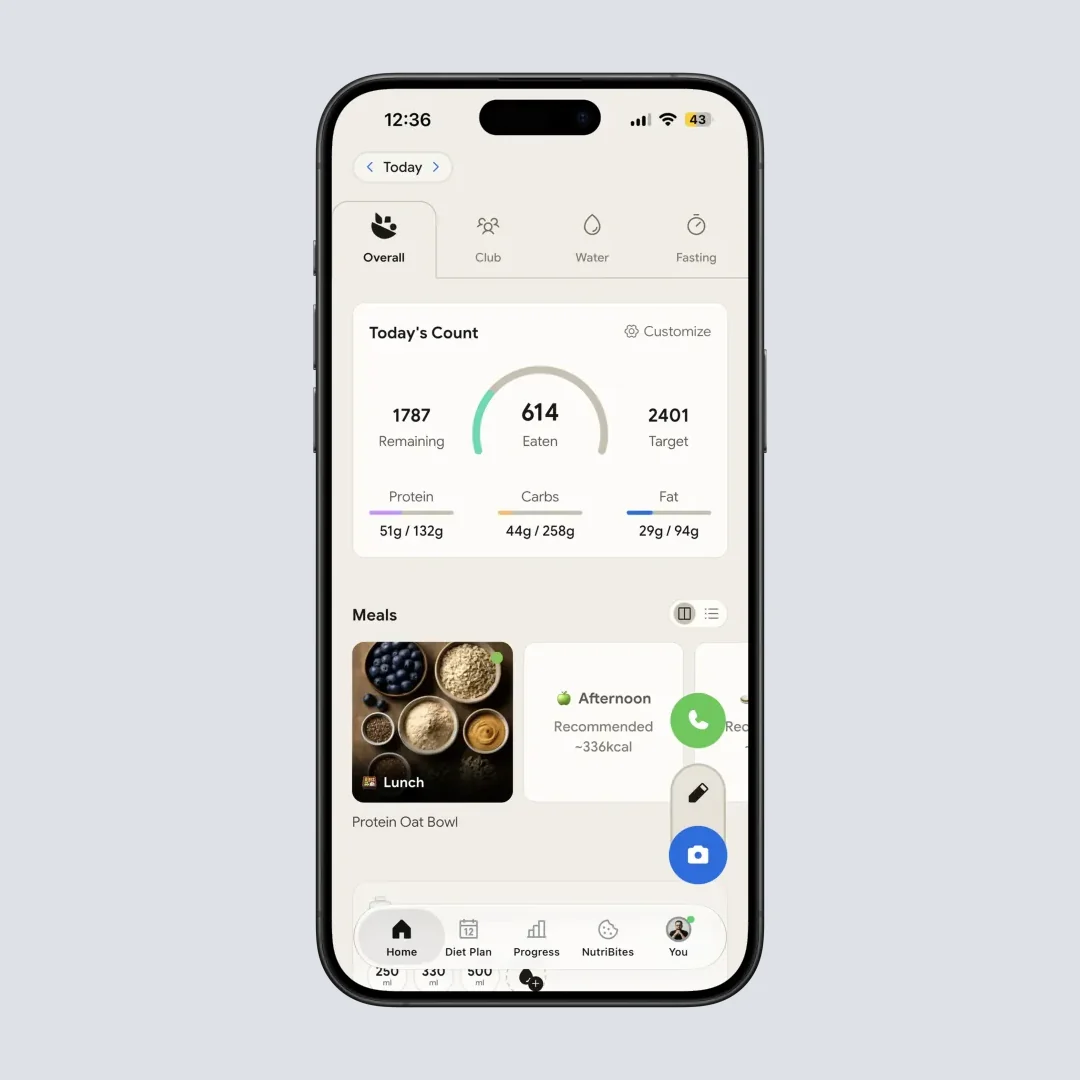
Daily breakdown view: this is the "did I hit my targets" feedback both MFP and Lose It try to surface. Path: Home > Overview tab.
12. Step-by-Step: Setting Up the Fastest Logging Flow
Here is how to configure either app for maximum speed from day one.
Step 1: Download and create your account. Both apps take under 2 minutes to set up with basic goals.
Step 2: Set your daily calorie target. Enter weight, height, age, activity level, and goal (lose, maintain, or gain). Both apps calculate a target automatically.
Step 3: Log your first meal using barcode scan (if available on your plan) or manual search. Take note of how the app organizes results.
Step 4: Save your most common meals as favorites or custom meals. Do this for breakfast, lunch, and your top 3 snacks in the first 3 days.
Step 5: Enable notifications or reminders for meal times. Both apps can prompt you to log at breakfast, lunch, and dinner. A reminder reduces the chance of forgetting and batch-logging at night.
Step 6: Connect your wearable (Fitbit, Apple Watch, Garmin). This syncs exercise data automatically and adjusts your remaining calorie budget.
Step 7: After one week, review your "frequent foods" list. Delete any wrong entries you logged by mistake so they don't appear as suggestions later.
If you want a starting calorie target tuned for a specific condition, our PCOS macro calculator and diabetes macro calculator build numbers neither app starts you on by default.

13. Should You Pick the Lose It App or MyFitnessPal?
Pick Lose It if:
- You want barcode scanning without paying
- You are new to calorie tracking and want a simple start
- You eat mostly common, everyday foods
- Budget matters and you want to stay on a free tier that still scans barcodes
- You practice intermittent fasting (built-in timer)
- You want a family plan option
Pick MyFitnessPal if:
- You eat a wide variety of international or specialty foods
- You already have years of MFP logging history
- You use 3+ fitness platforms that integrate with it
- You need detailed macro breakdowns beyond basic tracking
- Community forums and social features are important to you
Consider NutriScan if:
- You want the fastest possible food logging with AI photo scanning
- You eat mixed dishes, Indian food, or meals that are hard to find in standard databases
- You want "what to eat next" suggestions based on your daily progress
- You prefer a clean, modern interface built for photo-first logging
Still undecided after all that? Both fields are crowded: see the best Lose It alternatives and the best MyFitnessPal alternatives for what else is worth a week of your time.
 Consistency is the hidden variable. Either app delivers if you actually log every day; neither saves you if you don't.
14. What the Research Says About Logging Speed and Results
The connection between logging speed and weight loss outcomes is not just common sense. Research backs it up.
A 2023 retrospective study of 665 users found that those who engaged more frequently with their tracking app lost significantly more weight than less-active users (Valinskas et al., 2023). The study also found that interactive elements like progress tracking, goals, and challenges improved engagement rates.
Health and fitness apps overall face a steep retention challenge. Day-1 retention sits at about 26 percent, dropping to just 3 percent by day 30 (Business of Apps, 2026). The apps that survive this drop are the ones that make daily use feel easy. Logging speed is a direct contributor to that feeling.
A separate 2024 review in Life found that users who set weight-loss-related goals showed higher engagement across all health app categories, and that meal adherence improved when apps surfaced relevant data quickly (Nutrients & Lifestyles, 2024).
The pattern is clear: faster logging leads to more consistent use, which leads to better results.
15. The 60-Second Lose It vs MyFitnessPal Fit Test
This is the four-question test that ends the "MFP or Lose It" loop in under a minute. Run it before you tap Subscribe.
Will I pay for premium, or do I want to start free?
Start free ➡️ Lose It (barcode scanning included). Paying anyway ➡️ either, since both Premium plans are $79.99 a year.Do I eat mostly home-cooked meals and major-brand packaged foods?
Yes ➡️ Lose It (curated database, cleaner results for everyday foods). No, lots of regional or specialty items ➡️ MyFitnessPal (14M+ database).Do I want voice or photo logging?
Yes ➡️ either. Both charge $79.99/year and the features are equivalent in quality, so pick on database fit, not price.Do I use three or more fitness platforms (Garmin + Strava + Polar, etc.)?
Yes ➡️ MyFitnessPal (50+ integrations). Just one wearable ➡️ Lose It.
If three or more answers point to Lose It, pick it, and consider staying on its free tier since it still scans barcodes. If three or more point to MyFitnessPal, the larger database and integration list are what your $79.99 buys.
16. Lose It vs MyFitnessPal: Which App Should You Use?
Both MyFitnessPal and Lose It are solid calorie trackers, but Lose It is the faster app for most people in 2026. It offers barcode scanning for free, returns cleaner search results, and matches MyFitnessPal on voice and photo logging features. The price argument is gone: after Lose It's 2026 increase both Premium plans cost $79.99 a year, so the free tier is where Lose It saves you money.
MyFitnessPal still has real strengths - a larger database, more integrations, and deeper macro tracking. If those matter to your specific situation, that is what your subscription buys.
But if your main goal is logging food quickly and consistently, Lose It removes more friction from the daily habit. And consistency is what actually drives results. If that settles it, the MyFitnessPal to Lose It switching guide walks through the export, the budget match and the 7-day rebuild. Going the other way, the Lose It to MyFitnessPal switching guide does the same for the reverse move.
If you want even faster photo-based logging with AI that handles mixed dishes and regional foods, NutriScan's calorie counter app is worth trying, and the head-to-head with Lose It covers where each one wins. The free tier gives you 5 photo scans a week, enough to test the scanner on the curries and mixed plates a database search gets wrong, and Premium lifts the cap and adds a 28-day personalized diet plan.

Frequently Asked Questions
Q: Is Lose It actually faster than MyFitnessPal for food logging?
A: Yes, in most daily scenarios. Lose It offers free barcode scanning and returns fewer but more accurate search results. Both Premium plans now cost $79.99 a year, so the speed edge is the reason to pick it, not the price. In a two-week side-by-side test, Lose It saved 1 to 2 minutes per day across 6 meals and snacks. The difference is small per entry but adds up over weeks.
Q: Does MyFitnessPal still have free barcode scanning?
A: No. MyFitnessPal moved barcode scanning behind the Premium paywall in late 2022. Free users can still search for foods manually, but scanning - the fastest method for packaged food - now requires a subscription at $79.99 per year or $19.99 per month.
Q: Which app has a more accurate food database?
A: Lose It's curated database has a lower error rate (about +/- 5.9 percent) than MyFitnessPal's open-contribution model (about +/- 6.8 percent), based on 2026 independent testing (Calorie Trackers, 2026). MyFitnessPal has more entries overall, but its user-submitted data includes duplicates and inconsistencies.
Q: Can I use voice logging on the free tier of either app?
A: No. Both MyFitnessPal and Lose It require a premium subscription for voice logging. The feature works similarly on both apps - you describe your meal in natural language, and the AI parses individual items with calorie estimates.
Q: Which app is better for weight loss?
A: Both apps help with weight loss when used consistently. A 2023 study of 665 users found that higher engagement with a tracking app correlated directly with more weight lost (Valinskas et al., 2023). The "better" app is the one you will use every day. Lose It's lower friction and free barcode scanning make daily use easier for most beginners.
Q: How much does each app cost in 2026?
A: MyFitnessPal Premium is $19.99 per month or $79.99 per year, with a 7-day trial (MyFitnessPal Premium). Lose It Premium is $79.99 per year with no monthly plan, plus a $299.99 lifetime option (Lose It membership tiers and pricing). Free tiers are similar except Lose It includes barcode scanning for free; MyFitnessPal does not.
Q: Is the Lose It app free?
A: Yes. The Lose It app has a free tier that includes manual search, barcode scanning, the food diary, goal setting, and a fasting timer. Premium costs $79.99 a year with no monthly option (standard US price as of mid 2026) and adds Snap It photo logging, AI Voice, advanced analytics, and recipe import. Barcode scanning staying free is the single biggest reason Lose It logs faster than MyFitnessPal on the free tier.
Q: Are My Fitness Pal and MyFitnessPal the same app, and is LoseIt the same as Lose It?
A: Yes to both. My Fitness Pal spelled with spaces is the same app as MyFitnessPal, and LoseIt is the same app as Lose It from FitNow. People search it every way around, my fitness pal vs lose it and loseit vs myfitnesspal, and the answer does not change. Lose It logs food faster on the free tier because barcode scanning costs nothing there, and both Premium plans are $79.99 a year (standard US price as of mid 2026). For the spelling-agnostic short version, the Lose It vs MyFitnessPal vs Lifesum paid-plan breakdown adds a third app to the same test.
Q: How does Lose It compare to NutriScan?
A: Lose It is search- and barcode-first with a curated database; great for packaged foods and beginners. NutriScan is photo-first: snap your plate, get nutrition, log instantly - faster for mixed meals and regional dishes. If you eat mostly home cooking from international cuisines, NutriScan's meal scan often beats both Lose It and MFP on time per log.