Is MenuFit Free? MenuFit Pricing, Trial and Refund Rules
 ChatGPT
  Claude
  AI Mode
  Perplexity
As a NutriScan nutritionist, I start every "is this app free" question with the reason the app exists. When researchers measured 157 meals from independent and small-chain restaurants in Boston with a bomb calorimeter, the average meal carried 1,327 kcal, about 66% of a typical day's energy needs, and 7.6% of meals held more than a full day's worth (Urban et al., 2013). MenuFit sells a fix for that problem: tell it where you are eating and it ranks the menu against your calorie and macro targets. So, is MenuFit free? No. I checked both store listings, the company's terms and its website on September 25, 2026, and this post sets out what they say about price, the trial, cancelling and refunds. 🍔
IMPORTANT
Your MenuFit pricing check at a glance.
Four things to settle before you tap Subscribe.
⏱️ Progress 0/4 • ~0 minutes in • Keep going
⏳ Step 1: What MenuFit charges, store by store
⏳ Step 2: How the 7-day trial converts, and who gets it
⏳ Step 3: How to cancel and where a refund really comes from
🔍 The data label that reads "No data collected" on one store and "used to track you" on the other (revealed near the end)
The quick answer: free to download, paid to use
MenuFit is free to install on iPhone and Android. That is where free ends. The developer's own App Store listing says: "Our app requires a subscription to access the complete experience, including all premium features and full meal plans." Before you subscribe, the same text promises "a limited selection of meals, carefully crafted to give you a clear idea of the quality and variety we offer." That is a preview. It is not a free plan.
One US reviewer wrote that "you are confined to a paywall and can't use the app AT ALL without subscribing" and asked for "at least a free but restricted version." An Australian reviewer put it as "there is no way to see what the app looks like without going through a free trial." The developer's replies do not dispute this. In January 2026 it answered that "maintaining accurate menus, nutrition data, and personalized recommendations does involve ongoing costs, which is why access is gated."
So if you searched "menufit free version", one does not exist.
 Every MenuFit review that mentions the paywall reads like this
Who makes MenuFit and how big it is
MenuFit is published by Kosco Digital LLC. The developer section of the Google Play listing gives an apartment address in Palm Beach, Florida, and a Gmail support address. The Play package name, com.myhealthymenu.app, looks like a leftover from an earlier product name. On the MenuFit website, the first testimonial comes from Cole Kosco, listed as a nutrition coach, who shares a surname with the company. The other two are a fitness influencer and an "All-American Athlete."
The app is young. Apple's lookup data gives a release date of August 6, 2025, and version 1.0.49 shipped on September 3, 2026. On September 25, 2026 it showed:
| Store | Rating | Ratings or reviews | Other |
|---|---|---|---|
| App Store, US | 4.8 | about 54,400 ratings | #12 free app in Health and Fitness |
| Google Play | 4.6 | 15.1K reviews | 100K+ downloads, last updated July 24, 2026 |
| App Store, Canada | 4.5 | about 1,050 ratings | |
| App Store, UK | 4.5 | 341 ratings | |
| App Store, Australia | 4.5 | 192 ratings |
The website claims "over 1.5 million happy users" and "22.3 Million+ locations." I could not confirm either figure, and the store counts above do not show 1.5 million of anything. MenuFit is a US app with a thin audience elsewhere.
What you see before you pay
MenuFit's onboarding asks for your goal (cutting or bulking), age, weight, activity, food preferences and dislikes, then asks for an email login. Only then does the paywall appear. That order is the most common complaint on both stores. A US reviewer in July 2026 wrote that the app "makes you go as far as given them your email and making a login before telling you that it's a subscription based app."
The developer explains the order as personalization: "The onboarding process is designed to personalize recommendations based on your goals, preferences, and dietary needs." That is a fair reason, and most subscription apps in this category run the same funnel. The practical point is that you will not learn the price from the store listing on iPhone. You learn it on the last screen of the quiz.
What the preview shows is a handful of sample meals. The feature people pay for, a ranked menu for the restaurant in front of you, is marked "Subscription Required" on the listing, along with calorie breakdowns and daily meal suggestions.
MenuFit pricing on Google Play and the App Store
MenuFit's website shows no price list. The store listings do, in two different ways. All prices below were checked on September 25, 2026.
Google Play is the simpler of the two. The listing text names two plans:
| Plan (Google Play) | Price (USD) | Billing period | Cost over 12 months |
|---|---|---|---|
| Basic Plan | $9.99 | Monthly | $119.88 |
| Premium Plan | $19.99 | Yearly | $19.99 |
A monthly plan that costs six times the annual plan over a year is a strong push toward the yearly charge. It also explains a developer reply to an Australian reviewer in October 2025, which called the price "a small fee (less than $2 per month)." That is the $19.99 annual plan divided by twelve. It is not what you pay on monthly billing.
Apple's listing shows more, because the App Store publishes the in-app purchases an app offers. The US listing carries ten:
| Listed in-app purchase | Price (USD) |
|---|---|
| MenuFit Premium | $9.99 |
| MenuFit Premium | $14.99 |
| MenuFit Premium | $23.90 |
| MenuFit Premium | $30.00 (listed twice) |
| MenuFit Premium | $32.00 (listed twice) |
| Omni Plan | $34.99 |
| MenuFit Premium | $48.00 (listed twice) |
The listing does not say which of these are monthly and which are annual. My reading, from the Play prices and the reviews: $9.99 matches the monthly plan, and the rest are annual offers at different price points. A US reviewer in July 2026 reported "a 7 day free trial but then it's $50 per year," which fits the $48 price once sales tax is added. The "Omni Plan" at $34.99 is a separate product the listing does not describe.
The same spread shows up abroad in local currency. The Australian listing shows MenuFit Premium at A$14.99, A$22.99, A$39.90, A$49 (twice), A$50 (twice) and A$79 (twice), plus an Omni Plan at A$59.99. Ten prices for one product is what a paywall looks like when it tests offers on different users.
Screenshot the paywall
The price you are quoted depends on the offer you are shown. Take a screenshot of the paywall and of the purchase sheet before you confirm with Face ID or your fingerprint. It is your best evidence if the charge does not match.
IMPORTANT
Checkpoint: here's where you are right now.
You know the price range on both stores. Next is the part that causes most of the billing complaints.
⏱️ Progress 1/4 • ~2 minutes in • Keep going
✅ Step 1: What MenuFit charges (done)
👉 Step 2: How the trial converts (you're here)
⏳ Step 3: Cancel and refund
🧩 The mismatched data label (coming soon)
The free trial: who gets one and how it converts
Neither store listing names a trial. The trial exists anyway, and it is the source of most refund complaints.
Reviewers describe a 7-day window. The July 2026 reviewer above wrote: "only 7 days for free and $50 after is crazy." A January 2026 reviewer wrote that they "decided to start a free trial" and liked the app afterward. On Google Play, a reviewer whose complaint got a developer reply on September 22, 2026 said the app forced them "to profer my banking information in order to try it." So expect to add a payment method before the trial starts.
The trial does not always behave. An Australian reviewer wrote: "Charged me the whole year after stating I would receive a week free trial. Charge stated $0.00 on purchasing however immediately my card was charged the full year." The developer's reply, dated April 29, 2026, did not dispute the charge. It said that "all billing and refunds for App Store purchases are managed entirely by Apple, and we do not have the ability to access or process payments made through their platform."
I cannot tell whether that was a bug or a trial already used on that Apple ID. Apple's rule is simple: cancel at least 24 hours before the trial ends. Set a reminder for day 5, and check the price on the purchase sheet before you approve it.
What MenuFit Premium includes
For the money, the subscription opens the whole product. From the listing text and the version history, that is:
- Ranked menus for a chosen restaurant. The app scores meals against your goal and preferences and tells you "what to order and what to avoid."
- Restaurant search. The website says you can search "any restaurant in the world." Reviewers outside the US disagree, and a Google Play reviewer notes the app "doesn't list any hot coffee options from Starbucks."
- Calorie and macro breakdowns for each meal, with protein, carbs and fat.
- Healthify any meal. Suggested swaps that bring a menu item closer to your target.
- AI chat about the menu. The listing describes an assistant "ready to answer anything about the menu."
- Alcohol options based on your age.
- Seed-oil-free restaurant filter and a Restaurant Data Confidence Meter, both added in version 1.0.36 on May 2, 2026. The meter shows "how sure we are about each restaurant's data," which is a useful admission for an app in this category.
- Adjustable health level. Since version 1.0.16 in December 2025 you can "choose how healthy you want your meals to be."
What Premium does not include is a food log. MenuFit tells you what to order; it does not keep a daily total of what you ate, so you still need a tracker beside it.
 The moment MenuFit is built for: everyone reading the menu, nobody sure what fits the plan
How accurate are MenuFit's numbers?
A US reviewer compared MenuFit's numbers with the restaurants' published nutrition at two chains and found the app understated calories "by over 200 calories" both times, "a 28% error" at one and "a 40% error" at the other. A Google Play reviewer noted that a restaurant whose seasonal menu had ended "still reflects the holiday items." The developer's replies say MenuFit "sources menus directly from restaurants" and that rotating menus "can sometimes lag."
The recommendation logic draws sharper complaints. A reviewer on a high-protein target reported that MenuFit gave a "98 Excellent" score to two burgers plus two extra patties with the buns and vegetables thrown away, and that when they asked for eggs it "suggested an egg dish WITHOUT THE EGGS just to hit a macro target." Another review says "changing your weight goals barely seems to affect the recommended calories or macros at all." The developer answered that the team is "continuously refining how macro targets, calorie goals, and meal recommendations interact."
MenuFit's own terms, rewritten on September 2, 2026, are blunt about this. They say calories and macros may come from "restaurants, third-party databases, publicly available sources, automated systems, artificial intelligence or estimates" and "may be incomplete, outdated, estimated or inaccurate" (MenuFit Terms of Service). If your goal is a specific macro split, check the suggestion against the restaurant's own nutrition page before you order.
Does menu guidance help? What the research says
MenuFit's promise is that better information at the moment of ordering changes what you eat. The research is mixed.
Calorie information on menus does move orders, by less than most people expect. A 2015 meta-analysis of 19 studies found menu calorie labeling was linked to about 18 fewer kilocalories ordered per meal, with wide differences between studies (Long et al., 2015). A 2023 cohort study of 2,329 restaurants in a US fast food chain found that labeled restaurants sold 25 fewer calories per transaction over two years than unlabeled ones (Rummo et al., 2023). Real effects, but small ones.
The bigger problem is the number on the menu itself. When researchers lab-tested 269 restaurant foods, stated calories were accurate on average, but 19% of items held at least 100 kcal more per portion than stated. The 10% of foods with the biggest gap averaged 289 kcal more than the menu claimed, and lower-calorie items were the ones most likely to be understated (Urban et al., 2011). Any app that ranks menu items by published calories inherits that error.
Where apps show a steadier effect is daily tracking. A 2025 meta-analysis of 29 randomized trials found app interventions cut weight by 1.45 kg more than control in adults with overweight or obesity, and 25 of those trials used self-monitoring of behavior (Li et al., 2025). A second 2025 meta-analysis of 11 trials with 1,717 participants found smartphone-only apps with diet and exercise monitoring produced modest weight loss at 4 to 6 months, with a tendency to regain after that (de Azevedo Cardoso et al., 2025).
My reading: MenuFit aims at a real problem, but the evidence backs logging over ordering advice.
IMPORTANT
Checkpoint: midway progress update.
You know the price and the trial trap. Now the practical part: getting out, and getting money back.
⏱️ Progress 2/4 • ~5 minutes in • Keep going
✅ Step 1: What MenuFit charges (done)
✅ Step 2: How the trial converts (done)
👉 Step 3: Cancel and refund (current)
⏳ The mismatched data label (next)
How to cancel MenuFit
MenuFit is sold through the app stores, so you cancel in the store you paid through.
On iPhone (Apple's cancel steps)
- Open Settings and tap your name.
- Tap Subscriptions.
- Tap MenuFit - Healthy Eating Out.
- Tap Cancel Subscription. You might need to scroll down to find it.
- If you see an expiry date instead of a renewal date, it worked.
On Android (Google's cancel steps)
- Open subscriptions in Google Play.
- Select MenuFit.
- Tap Cancel subscription.
- Follow the instructions to confirm.
Google states that "when you uninstall the app, your subscription won't cancel," and the same holds on iPhone, because the subscription lives on your account.
To reach the company, try [email protected] (the terms) or [email protected] (a May 2026 developer reply). One reviewer said the in-app contact button failed and an email went a week without a reply, so do not rely on support for anything with a deadline.
Refunds: Apple and Google decide, not MenuFit
MenuFit's terms were rewritten on September 2, 2026, and now include a section on subscriptions. It says store purchases follow the store's own rules on "billing, cancellation and refund rights," and that cancelling "does not retroactively refund amounts already paid except where required by law or applicable platform rules." The same document sends most disputes to binding individual arbitration with the American Arbitration Association, waives class actions, and caps the company's liability at the greater of what you paid in the past 12 months or $100.
In practice the developer points refund requests back to the store. The Australian reviewer above reported that Apple called it "a developer issue, and the developer just defers to Apple." The way out of that loop is the store's formal process.
On iPhone: go to reportaproblem.apple.com, sign in, choose "I'd like to," then "Request a refund," pick your reason and select the MenuFit charge. Apple says to "wait 24 to 48 hours for an update on your request" (Apple refund steps). If a first request is declined, a second one with your paywall screenshot gives Apple something new to review.
On Android: go to play.google.com, open Payments and subscriptions, then Budget and order history, and choose "Report a problem" on the MenuFit charge. Google usually decides within a day, and for in-app purchases more than 48 hours old it tells you to contact the developer instead (Google refund steps). File inside that 48-hour window if you can.
The refund rules guide covers store refunds for every app in this category. For MenuFit, waiting on support gains you nothing: file with Apple or Google first.

Is MenuFit worth paying for?
Pay if three things are true: you eat at chain restaurants several times a week, you live in the US, and you want a ranked answer more than a food log. At $19.99 a year on Google Play, or a discounted annual price on iPhone, MenuFit is cheap for that job, and the positive reviews come from exactly this user. One reviewer wrote they "haven't been to a restaurant that is not found on the app even small mom and pop ones."
Skip it if you want a free plan, because there is none. Skip it outside the US: coverage complaints from Australia are consistent, and one Australian reviewer wrote that the recommendations "didn't exist here." Skip the monthly price, since $9.99 a month costs six times the annual plan for the same features. And skip it if you need precise macro targets, because the reviews about odd suggestions come from that group.
If you mostly want to know how many calories were on your plate after you ordered, MenuFit is the wrong tool. The restaurant meal logging comparison ranks the apps built for that job. The Foodvisor pricing guide and the Lose It pricing guide cover two trackers that keep a free tier.
IMPORTANT
Checkpoint: final stretch before the reveal.
One last thing to check before you install, and it depends on which phone you use.
⏱️ Progress 3/4 • ~7 minutes in • Keep going
✅ Step 1: What MenuFit charges
✅ Step 2: How the trial converts
✅ Step 3: Cancel and refund
✨ The mismatched data label (about to reveal)
The data label that changes with the store you install from
Here is the detail that surprised me most. The Google Play data safety section for MenuFit says "No data collected" and "No data shared with third parties." The App Store privacy section for the same app says usage data "may be used to track you across apps and websites owned by other companies," and lists precise location and usage data as linked to your identity, with advertising data under analytics.
Both labels are written by the developer, and Apple notes that its label "has not been verified by Apple." The company's privacy policy, also updated on September 2, 2026, lists account details, fitness metrics, dietary preferences, allergies, device identifiers and location among the data it handles. It says the app "may collect or process location information to identify restaurants near you" and that MenuFit "does not sell personal information in exchange for money."
Location makes sense for an app that finds nearby restaurants. The Apple label and the policy agree with each other; the Play label agrees with neither. Treat the Apple version as the closer description, whichever phone you use.
Where NutriScan fits
MenuFit tells you what to order. NutriScan tells you what you ate, and then keeps the whole day in one place. You photograph the plate, tag it as Restaurant / Cafe, set the cooking method and the oil level, and the scan returns calories, protein, carbs and fat. The free plan includes 5 photo scans a week, and Premium, at about $59 a year, makes scanning unlimited.

Home > Camera Icon > Click Picture
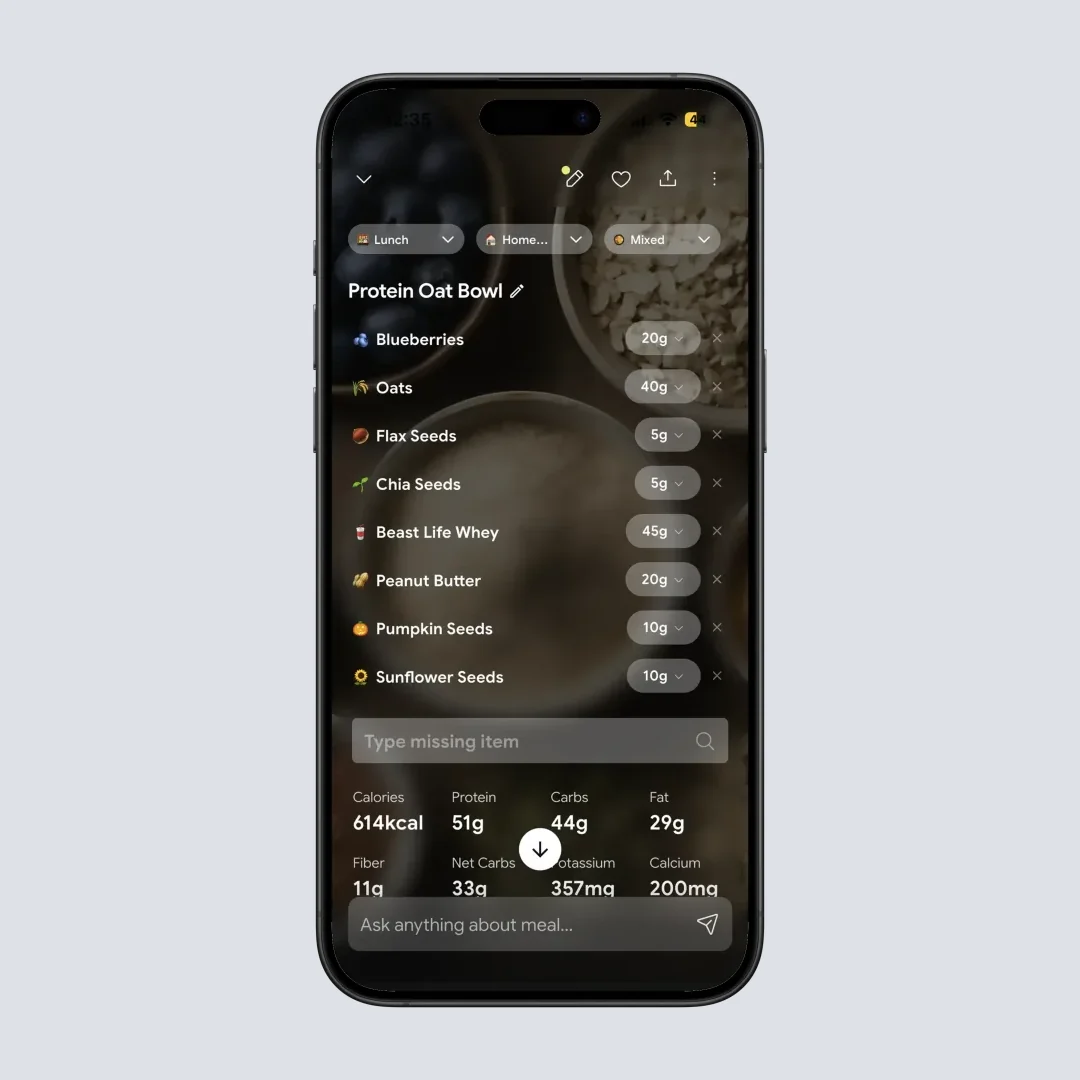
Restaurant portions are where photo estimates need help, so the meal details screen lets you adjust each item's grams, remove what you did not eat and type in anything the camera missed, like a sauce on the side.
Home > Meal Item
The rest of the app covers the parts MenuFit leaves out: a daily dashboard with calories and macros, NutriBites for questions about your meal history, Monika the voice nutritionist (4 calls a week free), plus fasting and water tracking. For fast food specifically, the fast food calorie counter page shows how a tray scan compares with a menu board number. If you want your own targets first, the macro calculator sets them in a minute. The NutriScan pricing guide lays out the free and paid tiers on the same terms as this one.
The takeaway
IMPORTANT
Recap: everything you checked this round.
You finished the run. Save this before you open the paywall.
⏱️ Progress 4/4 • ~9 minutes in • Nicely done
✅ Step 1: $9.99 a month or $19.99 a year on Play, ten prices from $9.99 to $48 on iPhone
✅ Step 2: 7-day trial for some users, payment method up front, cancel 24 hours early
✅ Step 3: Cancel in the store; refunds go through Apple or Google
✅ The data label that says different things on each store (revealed)
MenuFit is free to download and paid to use. Screenshot the paywall, cancel a day before any trial ends, and take refund requests straight to Apple or Google. If what you want is a record of what you actually ate, NutriScan's free plan lets you try photo logging with no trial clock at all.
FAQ
Is MenuFit free?
No. MenuFit is free to download, but both store listings say the app requires a subscription to access the complete experience. Before you pay you see a limited selection of sample meals. Recommendations, menu search and macro breakdowns sit behind the subscription.
How much does MenuFit cost?
Google Play lists a Basic Plan at $9.99 a month and a Premium Plan at $19.99 a year. The US App Store lists ten in-app purchases named MenuFit Premium or Omni Plan, priced $9.99, $14.99, $23.90, $30, $32, $34.99 and $48, without saying which are monthly or yearly. Prices checked September 25, 2026.
Does MenuFit have a free trial?
Some users get one. Neither store listing names a trial, but App Store reviewers describe a 7-day free trial that converts to an annual charge, and a Google Play reviewer says you must add payment details to start it. Cancel at least 24 hours before the trial ends to avoid the charge.
How do I cancel MenuFit?
Cancel in the store you paid through. iPhone: Settings, your name, Subscriptions, MenuFit, Cancel Subscription. Android: Google Play subscriptions, MenuFit, Cancel subscription. Deleting the app does not cancel the subscription.
Can I get a refund from MenuFit?
Through Apple or Google. MenuFit's terms, updated September 2, 2026, say cancelling does not refund amounts already paid except where the law or the store's rules require it, and the developer tells reviewers App Store refunds are handled by Apple. Use reportaproblem.apple.com on iPhone, or Report a problem in Google Play order history within 48 hours of an Android charge.