Is MacrosFirst Free? Premium Price, Trial and Refund Rules
 ChatGPT
  Claude
  AI Mode
  Perplexity
The US App Store lists nine MacrosFirst Premium purchases at four different prices: $11.99, $41.99, $71.99 and $79.99. The app itself is free, and it has 22,615 US ratings at an average of 4.86 stars. Yet three of the most recent one-star reviews in September 2026 say the same thing: the app is not free.
Both sides are telling the truth about what they saw. I read MacrosFirst's terms, its help center, its pricing section, its own comparison with MyFitnessPal, the Google Play listing and the 50 most recent US App Store reviews on 25 September 2026 while covering app pricing for NutriScan, then checked the App Store prices, the homepage, the terms and the affiliate page again on 7 October 2026. This guide explains what stays free, what Premium costs, why some people think they have to pay, how the 7-day and 14-day trials work, and how to cancel or get a refund.
Is MacrosFirst free? Yes. Macro goals in grams, meal-level goals, the food database and barcode and label scanning cost nothing and carry no ads. Premium is optional at $11.99 a month or $79.99 a year in the US, with a 7-day trial.
TL;DR - MacrosFirst Pricing
The free plan is real: Custom macro goals, meal goals, barcode and label scanning, unlimited custom foods and no ads
US Premium prices: $11.99 monthly, $79.99 yearly, plus a $71.99 yearly price and an unlabeled $41.99 entry on the App Store
The trial is 7 days: An affiliate code makes it 14, and only during sign-up
Refunds depend on where you paid: Apple or Google for store purchases, 14 days from MacrosFirst for website purchases
Deleting your account does not cancel Premium: Cancel in the store that bills you first
IMPORTANT
Your MacrosFirst pricing plan at a glance.
A quick roadmap so you can decide before any trial clock starts.
⏱️ Progress 0/4 • ~0 minutes in • Keep going
⏳ Step 1: What is free and what Premium costs
⏳ Step 2: The trial, the "not free" reviews and refunds
⏳ Step 3: How to cancel, and whether to pay
🔍 The one step to take before you cancel (revealed near the end)
Is MacrosFirst free?
Yes. MacrosFirst is free to download and free to use for daily macro tracking. The App Store description says it plainly: "MacrosFirst is free to download and use, with optional Premium features available through auto-renewing subscriptions." There are no ads in the free version, according to the company's comparison with MyFitnessPal, which says "MacrosFirst is ad free for everyone."
The MacrosFirst homepage lists the free plan at "$0/mo" with these features:
- Custom daily macro goals
- Unlimited custom daily meals
- Calorie and macro goals for each meal
- Offline access
- The full food database
- Unlimited custom foods, recipes and meals
- Free barcode and label scanning
The Premium help article adds a few more free features that other trackers charge for: "setting your daily macro goal in grams, converting alcohol calories to macros, viewing macro totals by meal, and simply scanning barcodes." The App Store description also lists body weight trends, sharing foods and recipes with friends, and following friends' logs in the free tier.
That is a generous free plan for a macro tracker. MyFitnessPal moved barcode scanning behind Premium in 2022, and MacrosFirst says on its own blog that its scanner "is free and will always be free."
What MacrosFirst Premium adds
Premium is the paid tier. The Premium help article and the App Store description list:
- AI Search: log food by typing, speaking or taking a photo. It also works with Siri on iPhone and Apple Watch.
- Recipe import from a recipe website link.
- Unlimited daily goals, so you can set different targets for training days and rest days.
- Recurring foods in your daily meals and a different meal schedule for each day of the week.
- Trend charts for any date range, plus nutrient averages and a full Top Sources view.
- Custom micronutrient targets instead of the default targets.
- Macro Math, which calculates calories from your macros so the two always match.
- Meal Nutrients Report, a nutrient breakdown for each meal.
- Google Sheets importer and an Excel export of your food log.
- Unlimited friends to follow. Free members can follow up to 5.
- One-off meals, net carb display, and notes for each day and meal.
- VIP support.
One detail on export matters if you ever leave the app. I come back to it near the end.
MacrosFirst Premium prices
Apple shows the live list of in-app purchases on the MacrosFirst listing. On 7 October 2026, the US list showed these entries, all called "MacrosFirst Premium":
| Price shown | Times listed | What it most likely is |
|---|---|---|
| $11.99 | 4 | Monthly plan |
| $79.99 | 2 | Annual plan, standard price |
| $71.99 | 2 | Annual plan, lower price |
| $41.99 | 1 | Not labeled |
Apple does not show the length of each plan on the listing, so I matched the prices against what MacrosFirst publishes. The company's comparison page gives "Monthly: $11.99" and "Yearly: $79.99." The homepage shows Premium at "$6.67/mo" with a note that it is "Billed annually." $79.99 divided by 12 is $6.67, so the homepage number is the same $79.99 annual plan.
The $71.99 price comes from MacrosFirst itself too. The affiliate program page uses it as an example: "an annual subscription priced at $71.99 purchased using your affiliate code would net you a commission of $25.92." So there are at least two annual prices in use, $71.99 and $79.99, for the same Premium features.
The $41.99 entry has no public explanation. One July 2026 App Store reviewer complained about being charged "41.99" more than once. I could not find a MacrosFirst page that names this price, so treat it as an offer you may or may not see.
What a year costs
| Plan | Price | Cost over 12 months |
|---|---|---|
| Monthly | $11.99 | $143.88 |
| Annual (standard) | $79.99 | $79.99 |
| Annual (lower price) | $71.99 | $71.99 |
The annual plan saves $63.89 over monthly at the standard price, or 44 percent. At $71.99 the saving is $71.89, or 50 percent. The monthly plan only makes sense if you want one or two months of Premium, for example to build a set of recurring meals and then drop back to free.
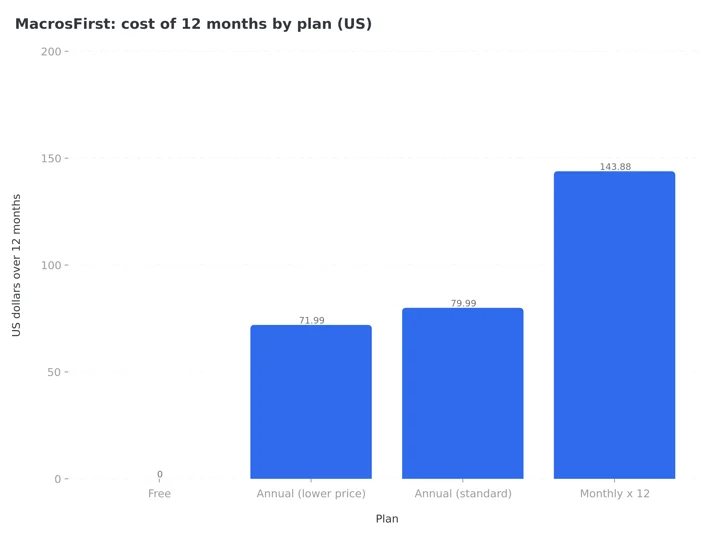 Figure 1: Twelve months of MacrosFirst on each US plan. Paying monthly costs 1.8 times the standard annual price for the same Premium features.
Prices outside the US differ. The homepage adds: "Prices may vary by location depending on conversion rates and local taxation laws." Check the price in the app before you confirm.
For context, our guides to MyFitnessPal pricing, Cronometer pricing and MacrosFirst's closest rival, MacroFactor, cover what those apps charge. MacroFactor has no free tier at all, which is the biggest difference between the two. My Macros+ keeps barcode scanning free and charges $29.99 a year for Pro on its website.
IMPORTANT
Checkpoint: here is where you are right now.
Prices are settled, the rules that catch people come next.
⏱️ Progress 1/4 • ~3 minutes in • Keep going
✅ Step 1: What is free and what Premium costs (done)
👉 Step 2: The trial, the "not free" reviews and refunds (you are here)
⏳ Step 3: How to cancel, and whether to pay
🧩 The one step to take before you cancel (coming soon)
Why some reviewers say MacrosFirst is not free
Read the newest App Store reviews and you find two groups. Several five-star reviews from July and August 2026 praise the free version. One says, "I have used for years now and honestly have been perfectly satisfied with the free version."
Then there are the one-star reviews:
- 19 September 2026, "Not free. Misleading": "You get a seven day free trial and then you must subscribe for money."
- 15 September 2026, "Bait and switch": the reviewer says the free version "only lasts for two weeks."
- 1 September 2026: "I was wanting to try this app but it requires a subscription."
- 30 June 2026, "Not free": "Once you get everything filled out they want $80 a year."
The help center explains the gap. The Premium article says: "You can start your free trial from your app at More > Subscription." The trial is an option, and the free app works without it. But going by the reviews, the Premium offer appears once sign-up is finished, as in the June review above. People who read that screen as a required step think the app costs $80 a year.
If you only want the free version, read the sign-up screens slowly. You do not need to start a trial to use the free features. If you do start one by mistake, cancel it in your phone's subscription settings before the trial ends, and the app drops back to free.
 An $80 a year screen at the end of sign-up reads like a bill, even when the free plan sits one tap behind it
The free trial: 7 days, or 14 with a code
The standard Premium trial lasts 7 days. The affiliate program page confirms this: "their free trial of Premium is extended from 7 days to a 14-day free trial."
To get the 14-day trial, you need an affiliate code from a coach or creator. The redeem code article sets one firm rule: you "can only redeem it during the initial onboarding process when creating your new account." The steps are:
- Download and open MacrosFirst.
- Go through sign-up until you reach the "How did you hear about us?" screen.
- Tap the Affiliate box at the top of the screen.
- Enter the code and wait for it to be validated.
- Finish sign-up. The 14-day trial is ready when you start your Premium trial.
If you already have an account, you missed the window.
Know who earns from the code. The affiliate page says affiliates "earn 36% commission on the first payment from every new Premium user who converts with your code." A coach who recommends MacrosFirst with a code may still like the app, but the code does not lower your price. It only makes the trial longer.
Refunds: it depends on where you paid
The MacrosFirst terms split refunds by where you bought Premium.
App Store or Google Play purchases. The terms say billing and refunds are "subject to the App Provider's terms and conditions. You must contact your App Provider if you have a query regarding billing or refunds." That means:
- On iPhone, request a refund from Apple at reportaproblem.apple.com.
- On Android, request it through your Google Play order history.
MacrosFirst cannot refund a store purchase for you.
Website purchases. Premium can also be bought at app.macrosfirst.com/subscribe. For these, the terms state that subscriptions are "eligible for a refund if the refund is requested within 14 days of the date of purchase or renewal." Email [email protected] to request it.
The 14-day window counts from each renewal too, not only the first purchase. If an annual renewal catches you by surprise, you have two weeks to ask for your money back, as long as you paid on the website.
IMPORTANT
Checkpoint: midway progress update.
You are halfway, and the cancel steps are short.
⏱️ Progress 2/4 • ~6 minutes in • Keep going
✅ Step 1: What is free and what Premium costs (done)
✅ Step 2: The trial, the "not free" reviews and refunds (done)
👉 Step 3: How to cancel, and whether to pay (current)
⏳ The one step to take before you cancel (next)
How to cancel MacrosFirst Premium
Cancel through the place that bills you.
On iPhone or iPad:
- Open the Settings app and tap your name.
- Tap Subscriptions.
- Select MacrosFirst.
- Tap Cancel Subscription.
On Android:
- Open the Google Play Store app.
- Tap your profile icon, then Payments and subscriptions, then Subscriptions.
- Select MacrosFirst.
- Tap Cancel subscription.
On the web: if you subscribed at app.macrosfirst.com, contact [email protected]. The terms do not describe a self-service cancel page for web plans, so ask support to confirm the cancellation in writing.
One warning. The account deletion article says: "If you are a Premium member, deleting your account will NOT cancel your subscription." Cancel first, then delete.
One July 2026 reviewer wrote that the app was "NEARLY IMPOSSIBLE TO CANCEL" after three attempts. Canceling through Apple or Google does not depend on the app. If you cancel in the store settings and still see a renewal date, check that you signed in with the same account that paid.
The food database: three different sizes
MacrosFirst gives three different numbers for its database depending on where you look:
- The homepage says "over 5 million foods."
- The App Store description says "over 3M+ verified foods."
- The Google Play description says "over 1.8M+ verified foods."
The help center gives the most detailed breakdown. The Core Foods article says the database has two parts:
- Core Foods: "over 28,000 highly accurate, lab-tested food entries" from sources such as the USDA. These typically include all 57 nutrients MacrosFirst reports. Core Foods cannot be found by barcode, only by name search.
- Branded Foods: "3+ million foods," with data from the manufacturer's nutrition label. Barcode scans search only this group.
So 3 million is the number the help center supports. For most people, the size matters less than how the data is checked, and MacrosFirst describes both groups as verified.
What the research says about labels and Macro Math
Macro Math is one of the more useful Premium features, and there is a reason for it. The calorie reporting explanation says that by default, MacrosFirst uses the calories printed on the label. With Macro Math on, it calculates calories from 4 per gram of protein, 4 per gram of carbs and 9 per gram of fat, so "your reported calories consumed always match your macros."
Labels and macros often disagree. In a laboratory test of 24 popular US snack foods, Jumpertz et al., 2013 found the measured calories were a median 4.3 percent higher than the label, and carbohydrate content was 7.7 percent higher than stated.
Macro Math does not fix a wrong label. It only makes your calorie total add up from your macros. If you set goals in grams, that consistency is useful. If you only follow calories, the free default is fine.
Setting goals in grams is also where MacrosFirst's free tier is strongest. A common reason to track grams is protein. A meta-analysis of 49 trials with 1,863 participants by Morton et al., 2018 found that protein intakes above about 1.62 g per kg of body weight per day gave no further gains in fat-free mass during resistance training. If you want to set a protein target like that, you can do it for free in MacrosFirst. Our online macro calculator and protein intake calculator give you a starting number.
What the research says about tracking itself
The free tier covers the part of tracking with the strongest evidence behind it, which is writing down what you eat, and simpler logging holds up well. In a Stanford pilot by Patel et al., 2022, people using a simplified tracking method lost about the same weight at three months as people doing detailed tracking, and the simplified group logged on far more days. The lesson is that logging often matters more than logging every detail.
Logging often is also the hard part. Carpenter et al., 2022 followed adults in a six-month program and found a median of 10 weeks before people stopped logging their food, and longer consistency predicted more weight lost. That is a good argument for using the free version for two or three months before paying for Premium.
Tips before you pay
- Use the free version for at least a month. Most people only need macro goals, barcode scanning and meal-level totals, and those are free.
- Pay for Premium when you need different goals on different days. Unlimited daily goals is the feature most people on a training plan or carb cycling actually use.
- Compare both annual prices. If the app shows $79.99 and you have seen $71.99 elsewhere, ask support which offer applies to you before paying.
- Pick annual over monthly for anything longer than 6 months. Six months at $11.99 is $71.94, almost the full year at the lower price.
- Set a reminder for day 6 of a 7-day trial, or day 13 of a 14-day trial, and decide then.
 Six months of monthly billing costs $71.94, which is why the annual math is worth two minutes
Limits to know before you commit
- Terms from 2017. The terms show "Last Updated: June 25, 2017" and name MacrosFirst, LLC, while the App Store now lists the seller as MacrosFirst, Inc. The privacy policy is newer, updated 19 September 2025.
- Water tracking. The homepage still lists "Track water intake" under Premium, but the 2025 year in review says water tracking "is now completely free for all users." The newer statement is the one to trust.
- AI results need checking. The AI Search article says image recognition "won't identify every food or portion perfectly every time," and marks foods it creates from web research with a ✨ symbol so you can check them.
Who makes MacrosFirst
MacrosFirst is published by MacrosFirst, Inc., the seller named on the App Store and Google Play. The iOS app first went live on 19 July 2017, and Apple's public data showed version 2.1.794 released on 29 September 2026.
The founder, Jacob Bockelmann, described the start on the Biceps After Babies podcast: a personal Google spreadsheet with a hand-built food database, shared online, which drew hundreds of comments from people with the same problem.
Coaches are a large part of the user base. The coaches article says MacrosFirst works with "thousands of nutrition coaches" and that its newsletter "goes out to 150k+ recipients." If you are a coach, the free tier lets you follow up to 5 clients. Beyond that you need Premium.
IMPORTANT
Checkpoint: final stretch before the reveal.
One last nudge, the reveal is next.
⏱️ Progress 3/4 • ~10 minutes in • Keep going
✅ Step 1: What is free and what Premium costs
✅ Step 2: The trial, the "not free" reviews and refunds
✅ Step 3: How to cancel, and whether to pay
✨ The one step to take before you cancel (about to reveal)
The one step before you cancel MacrosFirst Premium: export your food log
The download food log article says exporting your log "is a MacrosFirst Premium feature." Your history stays in the app after Premium ends, but the Excel export of it needs an active Premium plan.
So the order matters:
Export your log ➡️ cancel in the store that bills you ➡️ delete the account, if you want it gone.
To export, open Journal, tap the ... button, then Export Meal History. The file is sent to the email address on your account, so check that the address is one you still use before you start.
Do it in that order for two reasons. A canceled plan runs until the end of the period you paid for, so you can still export after you cancel, but not after the plan ends. And deleting the account removes the data without stopping the charge, which leaves you paying for a log you can no longer open.
Already on the free plan?
One month of Premium at $11.99 is the lowest listed price that includes the export. Export on day one, then cancel so it does not renew.
Which option to pick
- Free: pick this if you want macro goals in grams, meal-level goals, barcode scanning and no ads. Most people should start here.
- Premium Annual at $71.99 or $79.99: pick this if you train on some days and rest on others, want AI logging, or need charts, exports or custom micronutrient targets.
- Premium Monthly at $11.99: pick this for a short test only. A full year costs $143.88.
If you log most meals by camera instead of by search, a photo-first app may suit you better. NutriScan is built around the photo meal scan, runs on iPhone and Android, and Premium costs about $59 a year. Our guide to apps that adjust macro targets compares how different trackers handle changing goals.

MacrosFirst pricing FAQ
Is MacrosFirst completely free? The core app is. Custom macro goals, meal-level goals, the food database, barcode and label scanning, and unlimited custom foods, recipes and meals are free with no ads. Premium adds AI Search, unlimited daily goals, charts, export and Macro Math.
How much is MacrosFirst Premium? In the US, $11.99 a month or $79.99 a year, according to MacrosFirst's own pages. The App Store also lists a $71.99 annual price and an unlabeled $41.99 option. Prices vary by country.
Does MacrosFirst have a free trial? Yes. Premium comes with a 7-day free trial. An affiliate code entered during sign-up extends it to 14 days.
Why does MacrosFirst ask me to subscribe during sign-up? The Premium trial offer appears at the end of onboarding. It is optional. The free version works without starting a trial.
Can I get a refund from MacrosFirst? If you paid through Apple or Google, ask them. If you paid on the MacrosFirst website, email [email protected] within 14 days of the purchase or renewal.
Does deleting my MacrosFirst account cancel Premium? No. The help center says deleting your account will not cancel your subscription. Cancel in your App Store or Google Play settings first.
Is MacrosFirst available on Android? Yes. It is on Google Play with a 4.8 star rating and more than 100,000 downloads, and it syncs with Health Connect.
Is MacrosFirst free? The short answer
MacrosFirst is free in the ways that matter for most macro trackers: gram-level goals, meal goals, barcode scanning and no ads cost nothing. Premium costs $79.99 a year at the standard price, $71.99 on some offers, or $11.99 a month, and is worth it mainly if you need different goals on different days or AI logging. Start with the free version, skip the trial screen if you do not want it, and if you do pay, export your log before you ever cancel.
Prices in this piece are from the US App Store, Google Play and macrosfirst.com, checked on 7 October 2026. Local currency prices and the terms can change.
IMPORTANT
Recap: everything you covered this round.
You finished the run, save this for the day before your renewal date.
⏱️ Progress 4/4 • ~12 minutes in • Nicely done
✅ Step 1: What is free and what Premium costs
✅ Step 2: The trial, the "not free" reviews and refunds
✅ Step 3: How to cancel, and whether to pay
✅ The one step to take before you cancel (revealed)