Calorie Apps That Adjust Your Macros as You Lose Weight
 ChatGPT
  Claude
  AI Mode
  Perplexity
I work as a nutritionist on the NutriScan team, and the question I get most often is not about food. It is about a number that stopped working. Someone lost 6 kg, kept eating the same 1,800 calories the app gave them in January, and by April nothing was moving.
There is a measurable reason. In a randomized trial of 94 adults in the European Journal of Nutrition, the intervention group ran a mean deficit of 270 kcal per day for four months and lost 4.8% of body weight. Their measured adaptive thermogenesis, the drop in expenditure beyond what body composition explains, came out between 65 and 230 kcal per day across 13 calculation methods.
Put those numbers side by side. The planned deficit was 270 kcal. The unplanned slowdown was up to 230 kcal. On the higher estimate most of the deficit quietly disappeared, and the app that set the target had no idea.
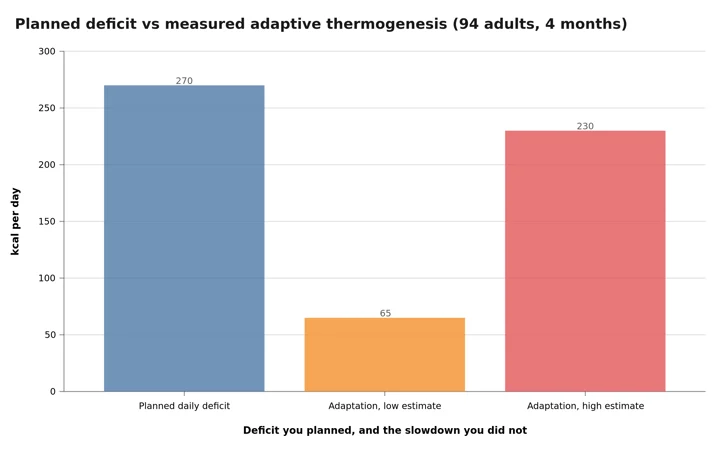 Figure 1: The planned deficit and the unplanned slowdown, from the same four-month trial. On the high estimate, 85% of the deficit is eaten by adaptation.
I checked what actually triggers a target change in five apps
☐ MacroFactor - measures your response weekly
☐ Carbon Diet Coach - measures it too, with one condition
☐ Cronometer and Lose It - rerun a formula, nothing more
☐ MyFitnessPal - prompts once every 10 lb, and that is all
☐ The blind spot that breaks all five - plus the four signs your current target expired weeks ago (revealed near the end)
So: which apps notice, and what actually makes them change your numbers?
The Short Answer
MacroFactor is the only app here that estimates your energy expenditure from your own intake and weight data every week, and it does not require you to hit your targets for the adjustment to work.
Carbon Diet Coach does the same job on a weekly check-in, with one condition: tell it you tracked everything, or it holds your targets flat.
Cronometer and Lose It rerun a formula when your weight input changes. Useful, but not the same thing.
MyFitnessPal offers to recalculate every ten pounds of recorded loss, and otherwise leaves your number alone.
The difference between those four behaviors decides whether your target is still true in month three.
 Three weeks of the same number is the most common way people find out their target went stale.
What "Adaptive" Actually Means
App marketing uses the word for three mechanisms. They are not equivalent, and mixing them up is why people buy the wrong thing.
Level 1: formula rescaling. When your weight drops, the app runs the same equation with the smaller number and gives you a slightly smaller target. A lighter body costs less to run, so this is directionally correct. It is also blind to everything the equation does not contain.
Level 2: response measurement. The app compares what you actually ate against how your weight actually moved, and solves for the expenditure that explains the gap. If you ate 2,500 and held steady, your expenditure is near 2,500, whatever any equation says.
Level 3: coach-style adjustment with conditions. The app measures your response but only trusts the data when you confirm you logged properly.
Level 1 keeps pace with your body mass. Only levels 2 and 3 catch the expenditure that drops for reasons no formula tracks.
Why the Starting Number Was Never Right Anyway
Before anything adapts, an app has to guess, almost always with a prediction equation built on height, weight, age, sex and an activity multiplier you pick from a dropdown. Our own online macro calculator runs the same math.
MacroFactor's engineering write-up is blunt about how well that works, noting that individual errors above 500 calories are common and errors above 1,000 calories a day are not unheard of. That is a vendor describing the method it competes against, so treat the framing with care.
Wearables are not a rescue either. A systematic review of 158 publications covering nine device brands in JMIR mHealth and uHealth found they measured steps and heart rate reasonably well in the lab, then reported the energy result in five words: "For energy expenditure, no brand was accurate."
So your starting calorie target is a population average presented as a personal number. Fine as a place to begin, a problem only if nothing ever corrects it.
MacroFactor: It Solves for Your Expenditure
MacroFactor is the cleanest example of level 2 on the market, and the company publishes its method in unusual detail. The app starts with an equation like everyone else. Then, as the company explains in its core philosophy article, it builds a smoothed weight trend, estimates the caloric content of the weight you gained or lost, subtracts your logged intake, and back-calculates the expenditure that would explain the result. The estimate starts moving on day three and settles after roughly 14 to 30 days of consistent logging.
The consequence that surprises people is that adherence is irrelevant to the math. The company states plainly that its algorithm works from "what you actually ate (logged nutrition intake) rather than what you were supposed to eat". If you were told 2,500, ate 2,600, and still lost weight at the rate you asked for, the app raises your target instead of punishing you, because 2,600 was demonstrably the better number.
On accuracy, MacroFactor published its own analysis of new users from a 2025 challenge: a median monthly weight prediction error of about 1.15 lb after the first few weeks, against 2.6 to 3.1 lb for a daily-recalculated formula, which converts to expenditure errors of 60 to 240 calories versus 155 to 590. Two caveats: the company analyzed its own data, and excluded users showing signs of partial logging.
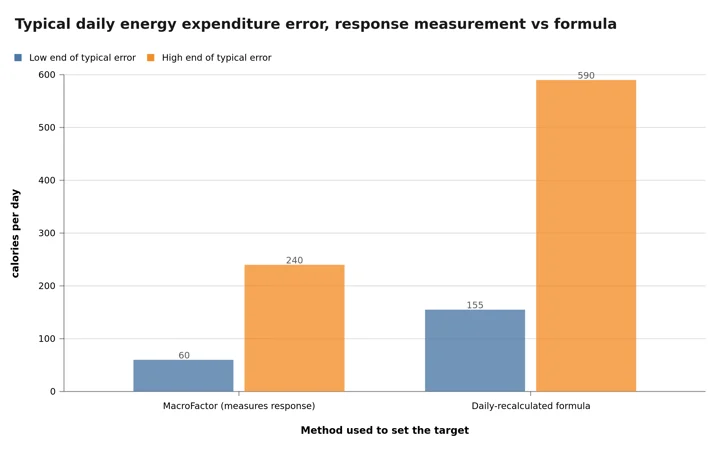 Figure 2: MacroFactor's self-reported error range against a formula approach. Vendor data on vendor users, so read it as a ceiling.
MacroFactor also refuses to import expenditure from a smartwatch, which follows from the wearable evidence above.

Carbon Diet Coach: Weekly, But It Asks First
Carbon runs the same idea through a coaching interface. Each week you open the Coach tab, answer one question about how you tracked, enter your weight, and get a report. That first question is the whole design. Carbon's help center lists the options: say "I tracked everything I ate this week" and the app analyzes your logged macros and adjusts. Say you only tracked some meals and it holds your targets steady, because "partial logs can't produce an accurate adjustment."
Carbon can also override its own prescription. Its documentation gives the example of a 2,000-calorie target, a 2,500-calorie intake, and weight still moving as planned, where the coach "might adjust your target calories upward to align with what's working for you."
Two practical notes. The adjustment features only run if your macros are set to From Coach rather than Custom Macros, and answering that you did not track, even when you did, freezes your numbers for another week.
Carbon costs $99.99 a year or $11.99 a month with no free tier, so you are paying for the adjustment engine and nothing else.
Two down, three to go
☑ MacroFactor, measures your response
☑ Carbon, measures it if you confirm you tracked
☐ Cronometer, Lose It, MyFitnessPal
☐ The blind spot, and the four warning signs
The first two change your number because of something your body did. The next three change it because of something you typed.
Cronometer: Recalculates the Formula, Not the Response
Cronometer sits at level 1, and is honest about it. Your Energy Target is calculated from your Weight Goal by default. You update your current weight, set a goal weight, and use plus and minus buttons to set a loss or gain rate, which produces a daily deficit or surplus. Change the weight and the underlying BMR calculation changes with it. Nothing in that loop checks whether the deficit produced the result it promised.
Cronometer does give you two levers most apps do not. A Custom Energy Target lets you type your own number and ignore the formula, which is what you want if you worked out your real maintenance elsewhere. An Add Expenditure Above Baseline toggle adds exercise to the day's target, so the number moves with your activity rather than your metabolism.
For micronutrients, Cronometer remains the strongest option in the category. Just do not expect its calorie number to teach you anything about your metabolism. Gold runs $59.88 a year.
Lose It: BMR Times Activity, Minus a Deficit You Pick
Lose It publishes its arithmetic, which I appreciate. The app calculates BMR from your weight, height, age and sex, multiplies it by one of four activity levels, then subtracts a fixed daily deficit tied to your rate: 250 calories for half a pound a week, 500 for one pound, 750 for one and a half, 1,000 for two.
The same page ends with a sentence more apps should copy: "This calculation depends on accurately estimating your daily calorie burn, which may vary due to factors like metabolism or activity level. You can adjust your calorie budget or activity level."
That is a level 1 system telling you to do the level 2 work yourself. Lose It Premium is $39.99 a year, the cheapest paywall here, and its logging speed is genuinely good. Budget management is a manual job.
MyFitnessPal: Every Ten Pounds, If You Say Yes
MyFitnessPal is the negative example, and the most widely used app on this list, which is why it matters. The support documentation is specific. Every time you record your weight, MyFitnessPal checks whether you have lost 10 pounds since your goals were last calculated, and if so asks whether you want to reset them. Between those checkpoints, nothing happens.
Ten pounds is a long gap. Somebody losing half a pound a week waits five months for the prompt, and the adaptive thermogenesis from the trial I opened with has ample time to accumulate.
There is a workaround, and its shape tells you how the system was built. The company's own instructions for forcing an update on mobile are to change your current weight to a value higher or lower than your actual weight, save it, then change it back. That is a gap with a manual procedure over the top of it.
MyFitnessPal Premium is $79.99 a year and Premium+ is $99.99. You are not paying for adaptive targets, because there are none.
Side by Side: What Triggers a Change
| App | Level | What triggers a target change | Needs adherence? | Manual override |
|---|---|---|---|---|
| MacroFactor | 2 | Weekly check-in, from your logged intake and weight trend | No | Yes, custom program |
| Carbon | 3 | Weekly check-in, if you confirm full tracking | Yes, by self-report | Yes, Custom Macros |
| Cronometer | 1 | You update your current weight or rate | No | Yes, Custom Energy Target |
| Lose It | 1 | You edit your plan, weight or activity level | No | Yes, edit budget |
| MyFitnessPal | 1 | A 10 lb change since the last calculation, then a prompt | No | Yes, custom goals |
The column that matters is the third one. All five apps are now checked off. The blind spot is next, and it applies to every one of them.
The Limit Nobody Advertises
Every level 2 and level 3 system has one large blind spot. The algorithm cannot tell a fast metabolism from an incomplete food log. Both look identical in the data: intake lower than expected, weight not falling as predicted.
A systematic review and meta-analysis of dietary record apps in Advances in Nutrition pooled 11 studies and found apps underestimated energy intake by 202 kcal per day on average (95% CI: -319 to -85), with 72% heterogeneity.
The follow-up finding is the interesting one. When the app and the reference method used the same food composition table, the gap fell to 57 kcal per day, heterogeneity 0%. Much of what looks like user error is two databases disagreeing about one food.
The error you cannot see
If your log runs 200 calories light, an adaptive app concludes your expenditure is about 200 calories lower than it is, and hands you a target 200 calories below the honest one. You still lose weight at the rate you asked for, because the error cancels on both sides. MacroFactor argues for exactly this, calling it optimizing for prediction rather than accuracy. It works. Just know that the expenditure figure on your screen is a number tuned to make your logging habits produce the right outcome, not a measurement of your metabolism.
Why Your Expenditure Falls Faster Than Your Weight
A 2023 review in Obesity defines adaptive thermogenesis as the mass-independent fall in energy expenditure caused by caloric restriction, and notes it appears in every phase of weight loss and persists during maintenance afterwards.
Two details matter. The adaptation shows up in both resting and non-resting expenditure, and during maintenance the non-resting share is larger. Non-resting means daily movement, which is what falls when you are tired and underfed, without you deciding anything.
A retrospective cohort of hospitalized patients with obesity in Archives of Endocrinology and Metabolism adds a counterpoint. Across 17 patients on fully controlled diets, the change in resting expenditure tracked the ratio of intake to expenditure (r = 0.66 at one week, r = 0.71 at two) and not weight change. The drop "can be minimized by matching energy intake to energy expenditure, even during the weight loss process." Small sample, hospital setting, so preliminary. The direction is useful: a gentler deficit costs you less slowdown.
Where NutriScan Sits, Plainly
If adaptive targets are what you want, buy MacroFactor or Carbon. NutriScan does not do this, and I would rather write that sentence than overstate something we have not built.
It calculates your macros once during setup from your goal, age, sex, height, weight and activity level, shows them on a slider screen so you can adjust protein, carbs and fat before you start, then lets you change them later through Custom Macros or an Auto-Set Macros by Goal flow that reruns the calculator.

Profile > Modify Macros. Custom Macros uses gram or percentage sliders for protein, carbs and fat; Auto-Set Macros by Goal reruns the calculator from your goal and body stats.
You can log your weight from the home report widget on any plan. The Progress tab, which shows weight change month over month next to your calories, protein hit rate and meals, is a Premium feature.

Home > Report. The Weight widget takes a new entry with the plus button and shows the weekly trend beside active energy, steps and sleep.
That adds up to a level 1 system that does not auto-trigger. Nothing recalculates on its own. If your weight has moved and your target has not, you open Auto-Set Macros by Goal and rerun it. A calendar reminder for the first Sunday of each month is the honest workaround, and it is what I tell people.
Where NutriScan earns its place is the input side. Adaptive systems live on complete food logs, and logs go incomplete because of friction. Photo scanning with an oil slider, a cooking method dropdown, portion adjustment and voice entry all exist to cut the meals you skip. A complete log in a static app beats a patchy log in a smart one. Free versus paid is in our pricing breakdown.

How to Tell If Your Target Has Gone Stale
Here are the four signals I promised at the top, in the order they usually appear.
Your weight trend has been flat for three weeks while your logging has not changed. Long enough to clear water weight noise, short enough to act on.
You have lost more than 5% of your starting body weight since the target was set. That is roughly where the trial data starts showing measurable adaptation.
Your daily step count has quietly dropped. Non-resting expenditure falls before you notice. Compare this month against your first.
Your hunger has changed shape. Not dramatic, just persistent. It often arrives before the scale stalls.
Any one of these means the number on your screen was calculated for a body you no longer have.
 The fix is usually one settings screen, not a new diet.
Five Steps to Set This Up Properly
Step 1: Log your weight at least three times a week, same time of day. A monthly weigh-in gives an algorithm almost nothing and a formula only a stale input.
Step 2: Log food for two full weeks before you judge any target. MacroFactor's own documentation puts its settling period at 14 to 30 days. Changing your target inside that window means reacting to noise.
Step 3: Log completely rather than perfectly. A rough estimate for the restaurant meal beats skipping it. Partial days are the one input that breaks a response-measuring system.
Step 4: Pick a deficit you can hold. In an analysis of 90 adults in Obesity Science and Practice, participants logged 50.1% of days on average, and each additional consistent tracking week was associated with 0.23% more weight lost.
Step 5: Review the number monthly, whatever app you use. In MacroFactor and Carbon this happens at check-in. In Cronometer, Lose It, MyFitnessPal and NutriScan it happens when you open settings. Put it in your calendar.
When You Should Not Let an App Change Your Numbers
Three situations, and the first two come from the vendors themselves.
When your weight changed for a reason that is not energy. Creatine, a swing from low-carb to high-carb, or a jump in fiber all shift body water and gut contents without shifting stored energy. MacroFactor's guidance is to skip that week's check-in.
During a one-off week of unusual activity. A hiking trip is a real increase in expenditure, but it is not your new normal, and an algorithm cannot know that.
When tracking is becoming a problem in itself. A systematic review of 27 studies in the European Eating Disorders Review found reasonably consistent evidence linking disordered eating to fitness and diet tracker use, while noting the association was not replicated experimentally. Correlation, not verdict. Still, if a shrinking number is driving your mood, an app that shrinks it automatically every week is the wrong tool. Talk to a clinician.
Simplifying is allowed too. A pilot randomized trial in Obesity compared tracking only high-calorie foods against full tracking in 72 adults: similar tracking days (86.2 versus 89.2), weight loss 4.0% against 5.7%. Full tracking won, and the lighter habit still worked.
What I Would Buy
If you have plateaued once already and want the mechanism rather than the interface, MacroFactor at $71.99 a year is the pick. It measures your response, it does not require you to be perfect, and it publishes how it works.
If you would rather answer a few questions weekly and be told what to do, Carbon at $99.99 a year fits, provided you answer the tracking question honestly.
If micronutrients matter more than calorie precision, Cronometer Gold at $59.88 is the better buy and you set the target yourself. For cheap, fast logging with a budget you manage, Lose It at $39.99 a year is the value option. On MyFitnessPal, put a monthly reminder in your calendar to rerun the guided setup. Waiting for the ten-pound prompt is the most common way a working plan quietly stops working.
The habit underneath matters more than the algorithm on top. In an analysis of 502 participants published in 2025, consistent self-monitoring was associated with higher odds of at least 5% weight loss. No adjustment engine works on data you did not give it. If you want the input side to be less work, NutriScan handles photo, voice and portion edits on the free plan, alongside whichever app owns your targets. Run the two together.
Frequently Asked Questions
Q: Does MyFitnessPal adjust my calories automatically as I lose weight?
A: Only at ten-pound checkpoints, and only if you accept the prompt. MyFitnessPal checks each recorded weight against the weight used for your last goal calculation and offers a reset once the gap reaches 10 lb. Between those points the target is fixed, though you can force an update through the guided setup on the website.
Q: What is adaptive TDEE and is it real?
A: Estimating your total daily energy expenditure from your own intake and weight data instead of a population equation. The physiology is well established: a 2023 review in Obesity describes measurable falls in expenditure beyond what body composition explains. Whether a given app implements it well is separate, and only MacroFactor and Carbon here attempt it.
Q: Why did my app increase my calories after a week I ate over target?
A: Correct behavior in a response-measuring system, not a bug. If you ate more than prescribed and still lost weight at the intended rate, the higher intake was the better estimate of your maintenance. MacroFactor treats each week as a self-contained unit.
Q: Do I need a smartwatch for accurate targets?
A: No, and it may not help. The JMIR review of 158 studies across nine device brands concluded no brand measured energy expenditure accurately. A bathroom scale and a complete food log carry more signal than a wrist estimate.
Q: How often should my macro targets change?
A: Weekly is the fastest cadence that makes sense, because body weight is too noisy day to day. Monthly is fine in a formula-based app you review yourself. Longer than six weeks in an active weight loss phase and you are likely eating for a body you no longer have.
Q: Can I use two apps, one for logging and one for targets?
A: Yes, and Carbon explicitly supports it. Its check-in includes an "I tracked in another app" option where you enter weekly totals or daily averages by hand, though there is no direct integration. Plenty of people log in a faster app and carry the numbers over weekly.