Best Apps for Restaurant Meal Logging in 2026 (Ranked)
 ChatGPT
  Claude
  AI Mode
  Perplexity
TL;DR - Best Restaurant Meal Logging Apps 2026
• Best for chain meals: MyFitnessPal, because official menu numbers beat every estimate when your exact item exists.
• Best when nothing matches: MacroFactor, whose AI Describe turns a spoken or typed sentence into separate editable ingredients.
• Best for hidden oil and mixed plates: NutriScan, with a Restaurant / Cafe tag, 11 cooking method tags and a four-step oil slider.
• Fastest at the table: Cal AI. Both jobs in one app: Lose It.
• The habit that fixes most of it: log the sauce ➡️ assume high oil on glossy dishes ➡️ scale the portion up at full-service restaurants.
• The honest note: NutriScan has no chain menu database. If your week is branded fast food, two apps here beat ours.
In April 2022, England made calorie labels mandatory on the menus of large restaurants. Researchers then surveyed 6,578 customers at 330 food outlets before and after the change. The share of people who noticed the labels almost doubled, from 16.5% to 31.8%. Calories purchased did not drop at all (Polden et al., 2025). There was one quiet win buried in the data: after the labels appeared, diners underestimated the energy in their own meal by about 61 fewer calories. Printing the number on the menu did not change what people ordered, but it did make them less wrong about what they ate.
That result is the whole case for restaurant logging. When you eat out you are guessing, and the guesses run low. A tracking app is the tool that closes that gap meal by meal, without the willpower a menu label quietly assumes you have.
As a NutriScan nutritionist, I spend most of my week helping people log meals somebody else cooked. I will be upfront about my own app in this ranking: NutriScan has no chain menu database, so if you want the official entry for a Big Mac, other apps do that job better. Where NutriScan competes is the photo side and the corrections that follow it, and I have placed it honestly on that basis. Prices below are standard US prices as of mid 2026 and change by region.
IMPORTANT
Your restaurant logging plan at a glance.
A quick roadmap so you can pick the right app for where you actually eat.
⏱️ Progress 0/4 • ~0 minutes in • Keep going
⏳ Step 1: Why restaurant meals break your food log
⏳ Step 2: Menu database or photo, and when each one wins
⏳ Step 3: All 5 apps, ranked on three jobs
🔍 The 4-line rebuild that logs any dish no database has (revealed near the end)
Why Restaurant Meals Break Your Food Log 🍽️
Home cooking is easy to track. You know the ingredients, you control the oil, and the portion is whatever you served yourself. A restaurant meal removes all three of those advantages in one plate.
You cannot see the fat. Restaurant kitchens finish dishes with butter, oil, cream and sugar because those things sell food. A curry that looks like your home version can carry double the fat because the pan started with four tablespoons of oil instead of one. None of that is visible on the plate in front of you.
Portions run bigger than the reference serving. Database entries describe a standard serving. The plate in front of you may hold 1.5 or 2 times that amount, especially at full-service restaurants where portion size is part of the value proposition.
The menu name hides the recipe. "Grilled chicken salad" can mean 350 calories or 900 calories depending on dressing, cheese, croutons and candied nuts. A text search cannot tell those two salads apart. Your camera can at least see the toppings.
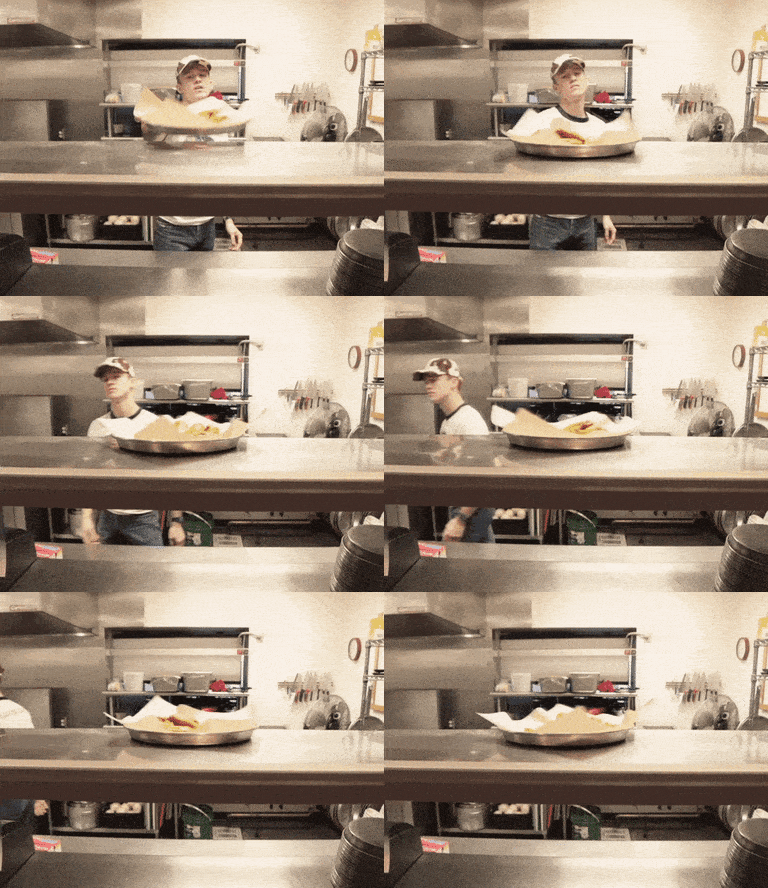 Somebody else's kitchen, somebody else's recipe, no published numbers. That is the case every app in this ranking is trying to solve.
This is not a small corner of your diet either. A 2026 analysis of the Qatar Biobank found that 49.7% of adults ate fast food at least once a week, with the highest rates among adults aged 18 to 24 (Massarweh et al., 2026). If half your dinners involve somebody else's kitchen, restaurant logging is the main event, not an edge case.
IMPORTANT
Checkpoint: here's where you are right now.
Quick status update so you always know the next best move.
⏱️ Progress 1/4 • ~2 minutes in • Keep going
✅ Step 1: Why restaurant meals break your food log (done)
👉 Step 2: Menu database or photo, and when each one wins (you're here)
⏳ Step 3: All 5 apps, ranked on three jobs
🧩 The 4-line rebuild that logs any dish no database has (coming soon)
Menu Databases vs Photo Logging: Two Tools That Fail Differently 🔍
Every app in this ranking uses one or both of two approaches, and they fail in opposite directions.
Menu databases store the nutrition numbers chains publish themselves. Order a burrito bowl from a large chain and the database entry matches what the company measured in its own test kitchen. This is the most accurate option that exists, but only when your exact item is in the database and you did not customize it. Independent restaurants, street food and home-style local places are mostly missing.
Photo logging points AI at your actual plate. It works anywhere, including the family-run place with no website. The trade-off is precision. A 2025 study in Nutrients ran ChatGPT-4 against 114 meal photographs and compared it with seven dietitians. It named the foods well, 93.0% precision on identification, and then underestimated the weight in 87 of the 114 photographs, 76.3% of them, with agreement collapsing as the meals got bigger (O'Hara et al., 2025). Naming what is on the plate is the solved half. Weighing it is not.
The rule I give clients
Use the menu database when your exact chain item exists. Use the photo when it does not. The best restaurant logging app is the one that makes both moves easy and lets you correct the result in seconds, because the first estimate is almost never the right one.
How I Ranked These Apps 📋
I scored each app on the three jobs that decide whether a restaurant meal gets logged accurately, in this order of weight.
- Chain coverage. When you eat a common chain meal, can you find the official menu item fast? Database size and verified entries matter most here.
- The no-menu fallback. When there is no database entry, how good is the app's best guess from a photo or a typed description, and how easy is it to edit portions afterward?
- Fixing what you cannot see. Hidden oil, heavy dressing and oversized portions are where restaurant logs go wrong. Does the app give you a fast way to correct for them, or does it lock you into its first estimate?
I did not rank on coaching, fasting tools or barcode scanning. We have compared those separately in our barcode scanning ranking and our mixed-dish photo logging comparison.
IMPORTANT
Checkpoint: midway progress update.
You're past the theory. The ranking starts now.
⏱️ Progress 2/4 • ~4 minutes in • Keep going
✅ Step 1: Why restaurant meals break your food log (done)
✅ Step 2: Menu database or photo, and when each one wins (done)
👉 Step 3: All 5 apps, ranked on three jobs (current)
🧩 The 4-line rebuild that logs any dish no database has (next)

1. MyFitnessPal: Best for Common Chain Meals 🥇
For the specific job of logging a known chain meal, MyFitnessPal is still the app to beat. It calls its database one of the largest in the world, at over 20 million foods and 68,500 brands (MyFitnessPal), and it covers menus from more than 380 restaurant chains (TechCrunch, 2026). Tap the location icon beside the search bar and you browse an actual restaurant menu instead of guessing at matching entries (MyFitnessPal). For a fast-food combo or a chain burrito, this is the closest you will get to official numbers in two taps.
The weakness is quality control. The same database that covers everything also holds member-submitted duplicates of the same dish carrying different numbers, and MyFitnessPal says so itself: a food without a green check has not been reviewed, and its own advice is to prioritize Best Match entries and green-checked foods (MyFitnessPal). Photo logging exists through Meal Scan, which is Premium only. The app's center of gravity is search, and search only helps when the dish has a name the database already knows.
Choose MyFitnessPal if most of your eating out happens at larger chains and you want official menu numbers. I compared the free and paid tiers in my MyFitnessPal Premium review.
2. MacroFactor: Best "Describe It" Fallback ✍️
MacroFactor's AI food log gives you three ways in: Photo, Photo & Text, and Upload from your library (MacroFactor Help). Alongside those sits AI Describe, where you speak or type the meal with no photo at all, like "large chicken shawarma wrap with garlic sauce and fries," and the AI works out the ingredients and quantities from that sentence (MacroFactor). AI Describe is the most useful restaurant tool I have tested.
It matters for restaurants because some meals are hard to photograph and easy to explain. A shared platter. A dish half eaten before you remembered to log it. A dark restaurant where the photo came out useless. In each case a sentence beats a picture. The results arrive as separate, editable ingredient entries rather than one locked total, so you can raise the fries and lower the wrap without redoing the meal (MacroFactor). The app is paid only, at $71.99 a year or $11.99 a month after a 7-day trial (MacroFactor), which puts it under both MyFitnessPal and Lose It at $79.99. Its verified search database is about 1.36 million foods (MacroFactor), far smaller than MyFitnessPal's for chain menus, a gap MacroFactor concedes on its own page.
Choose MacroFactor if you often eat at independent restaurants and want the strongest text-based fallback with editable results.
3. NutriScan: Best for Hidden Oils and Mixed Dishes 🍛
This is our app, so read this section knowing that, and knowing what I said at the top: NutriScan has no chain menu database. If your week is mostly branded fast food, the two apps above will serve you better for those meals.
NutriScan's approach is built around the photo and the corrections that follow it. On the crop screen after a scan you tag the food type from eight options, and three of them are the ones that matter here: Restaurant / Cafe, Street Food, and Hotel / Event Buffet. You then set the cooking method from 11 tags, including Deep-fried, Stir-fried, Grilled, Steamed and Roasted, and move an oil slider between No Oil, Low Oil, Medium Oil and High Oil. That slider exists precisely because restaurant oil is invisible in a photograph. A scanned paneer dish logged at High Oil produces a very different and more honest number than the same photo logged on defaults.

Home > Camera Icon > Click Picture. The food type tag, cooking method and oil slider are all set before the scan is processed, not after you have accepted a wrong number.
You can add a text or voice note with the scan too, so "restaurant portion, extra ghee" becomes part of the estimate. Everything stays editable on the nutrition details page afterward: adjust the portion with plus and minus or type the number directly, remove an item the AI invented, or add a missing one by typing or voice. Each meal also carries a NutriScore, which is more useful than it sounds when you eat out often, because it separates a heavy meal that was nutritionally decent from one that was just heavy. Read how the score is calculated in our NutriScore guide.
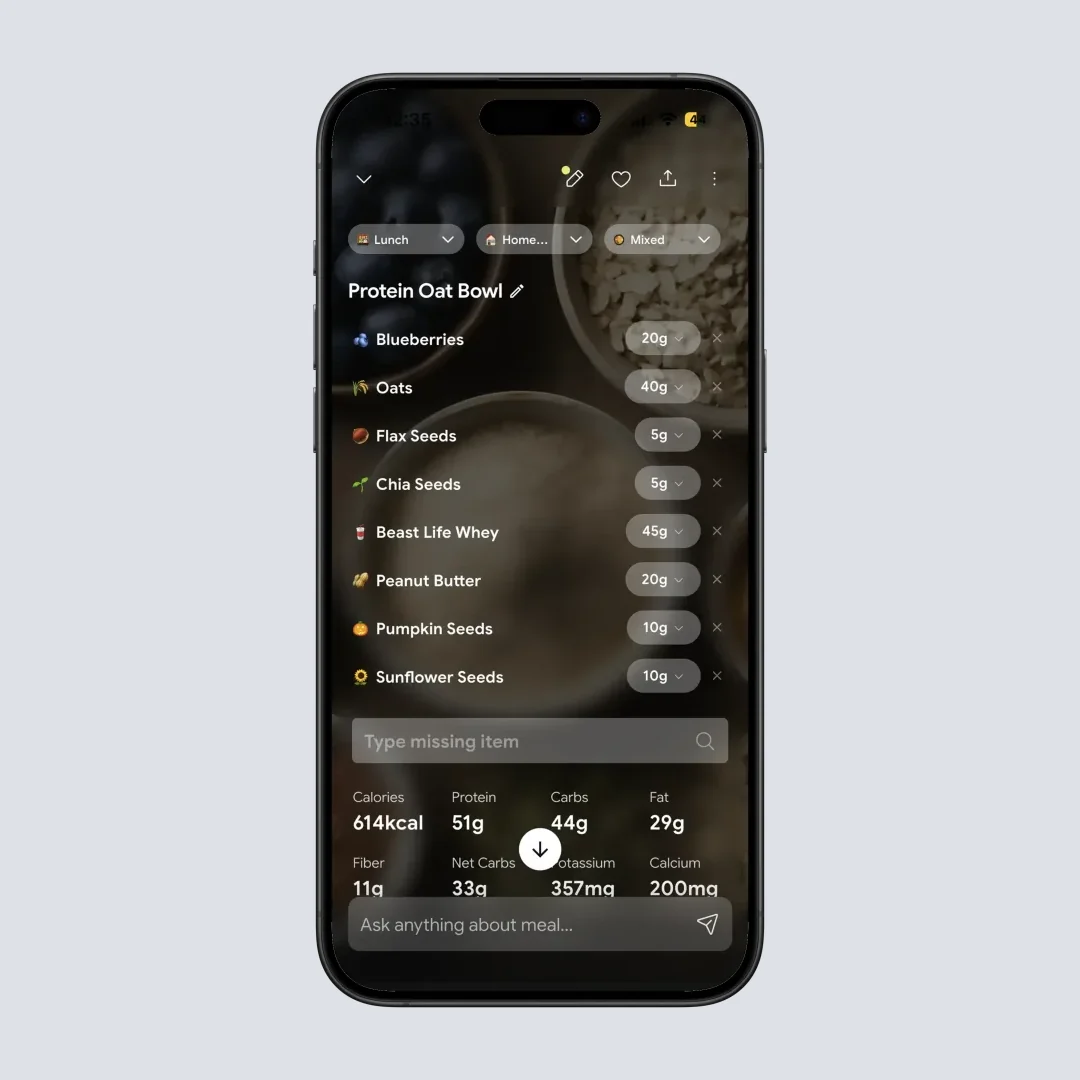
Home > Camera Icon > Click Picture > Crop Picture. Portion size, cooking method and food type stay editable after the scan, and Favorite or Copy Meal to Today turns a repeat order into one tap.
For mixed plates, thalis, curries, noodle bowls and anything without a menu entry anywhere, this correction-first design is the entire point. The AI makes the first guess and the app assumes you will improve it. One more thing that pays off over months: the Progress tab's monthly view breaks your food down by food type, so you can see what share of the month actually came from restaurants rather than guessing. More on that in our insights guide.
Choose NutriScan if your restaurant meals are mostly mixed dishes and local places rather than chains. Free and paid tiers are broken down in our pricing guide.
Related: best app for photo logging mixed dishes and Cal AI vs NutriScan photo scanner comparison.
4. Cal AI: Fastest Photo-First Logging ⚡
Cal AI made its name on one promise: point the camera, get a number, move on. For restaurant logging that speed is a real advantage, because the biggest cause of missing logs is friction at the table. Nobody wants to spend three minutes searching a database while their food gets cold. Cal AI also logs by voice and barcode. One thing to know while reading this ranking: MyFitnessPal bought Cal AI in a deal that closed in December 2025, and Cal AI has run on MyFitnessPal's database ever since, the same 20 million foods and 380+ restaurant chains behind the app at number one (TechCrunch, 2026). Number one and number four are the same company now. Cal AI's own marketing has not caught up and still advertises "over 1 million foods."
The trade-off is depth of correction. Cal AI's flow is optimized for accepting the first estimate, and adjusting one takes more steps than in MacroFactor or NutriScan. For restaurant food, where the first estimate is most likely to be wrong, that matters. It is also subscription only after a 3-day free trial (Cal AI), and its US App Store listing carries ten in-app purchase SKUs at once, from $2.99 to $29.99 as of August 2026 (App Store), so the price you are shown is not necessarily the price somebody else is shown.
Choose Cal AI if speed is the difference between logging and not logging for you. I looked at whether the subscription earns its price in my Cal AI Premium review.
5. Lose It: Both Jobs In One App 📷
Lose It covers both sides of restaurant logging without leading on either. Its database includes restaurant items, its Snap It feature recognizes the food and the amount from a photo, and voice logging is available to Premium members (Lose It). Both of those AI tools are Premium, and everyone gets three free uses of each before the app asks for an upgrade (Lose It). Three photos and three voice logs is enough to see how the recognition behaves, not enough to run a week of restaurant meals through it. Premium is $79.99 a year with no monthly option, exactly level with MyFitnessPal (Lose It).
On raw size Lose It publishes the bigger number of the two, 50 million foods against MyFitnessPal's 20 million (Lose It). What it does not publish is a restaurant-chain count, and nothing on its pages matches MyFitnessPal's location-icon menu browse, which is the specific thing this article is ranking. So it lands fifth: a solid all-rounder rather than a specialist, which is exactly what some people want.
Choose Lose It if you eat out a few times a week and want restaurant database entries and photo logging from one app rather than the best version of either.
Restaurant Logging Compared: The Quick Table 📊
| App | Chain menu coverage | No-menu fallback | Oil and portion fixes | Best for |
|---|---|---|---|---|
| MyFitnessPal | Excellent (380+ chains) | Meal Scan (Premium) | Manual only | Chain meals |
| MacroFactor | Good | Excellent (photo, photo + text, AI Describe) | Editable ingredients | Independent restaurants |
| NutriScan | None | Photo + voice note | Oil slider + 11 cooking methods | Mixed dishes, local food |
| Cal AI | Good (MyFitnessPal's database) | Fast photo | Limited editing | Lowest-friction logging |
| Lose It | Good (50M+ foods, no chain count) | Photo (Snap It, 3 free) | Manual only | Both jobs in one app |
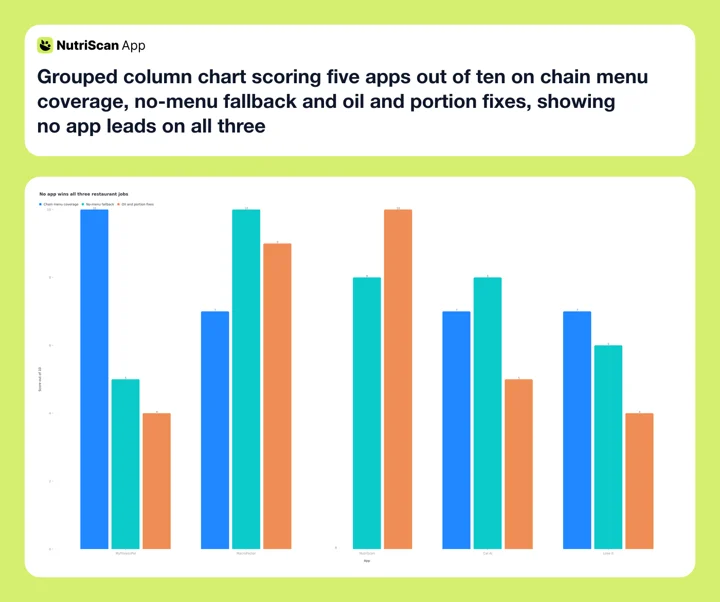 Figure 1: Scored on the three restaurant jobs, no app wins all three. MyFitnessPal ranks first because chain coverage carries the most weight for most people, not because it has the highest total.
The Sauce and Oil Problem 🫒
Whatever app you pick, the biggest single error in a restaurant log is invisible fat, and it deserves its own habits.
Oil is the densest common food, at roughly 120 calories per tablespoon (USDA). A kitchen that finishes your vegetables with two extra tablespoons adds about 240 calories that no photo and no menu name will show you. Sauces do the same thing: the same USDA list puts regular mayonnaise at 94 calories a tablespoon, so two tablespoons of a mayonnaise-based sauce is roughly 190 calories.
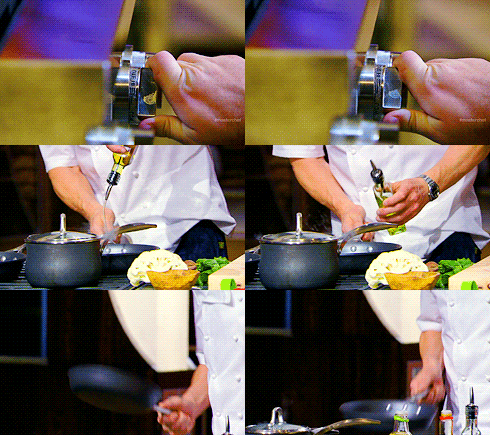 Nobody pours a measured tablespoon in a professional kitchen. Everything that goes in the pan is invisible by the time you photograph the plate.
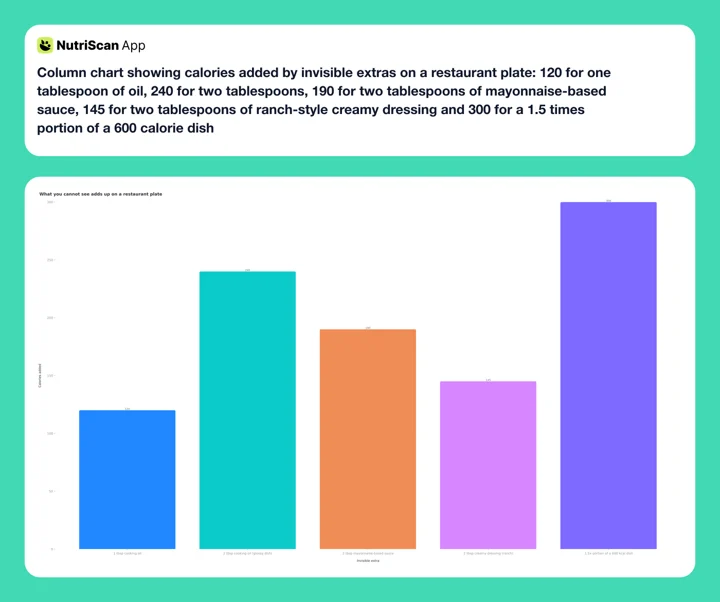 Figure 2: Five things you cannot see on the plate, and what each one adds, with the oil and mayonnaise bars at USDA per-tablespoon values. Any two of them together can outweigh the entire dish you thought you logged.
Three habits fix most of it. First, log the sauce as its own line item instead of hoping the dish entry includes it. Second, when a dish arrives glossy, assume high oil and adjust upward, using an oil setting if your app has one or adding a tablespoon of oil manually if it does not. Third, order dressings on the side when accuracy matters, because a dressing you pour is a dressing you can measure.
The portion error compounds with the oil error
These two mistakes do not cancel out, they stack. Underestimate a 1.5 times portion and skip the oil line on the same glossy dish and you can be 500 calories light on a single meal. If you want to see what that gap does to a weekly target, run your numbers through our macro calculator and compare against what you have been logging.
Low-Light Photos and Other Real-World Failures 📸
Photo logging is honest about plates but fussy about conditions, and restaurants are close to a worst case: dim lighting, deep bowls, and sauces covering everything. The Nutrients study cited earlier photographed real meals in ordinary conditions and still found the model underweighing three quarters of them, with agreement worst on the medium and large plates a restaurant serves (O'Hara et al., 2025).
You can rescue most bad conditions with small adjustments:
- Shoot from about 45 degrees, not directly overhead, so the AI can read depth and portion height.
- Add light with a second of screen brightness or your companion's phone light in a dark room.
- Photograph before you mix or cut, because a biryani photographed after stirring loses the visual cues that identify its parts.
- Switch tools instead of retrying. If the photo fails twice, a typed description in MacroFactor or a voice note in NutriScan beats a third attempt at a dark photo. Our voice logging comparison covers which apps handle spoken entries well.
IMPORTANT
Checkpoint: final stretch before the reveal.
One last nudge, the reveal is next.
⏱️ Progress 3/4 • ~7 minutes in • Keep going
✅ Step 1: Why restaurant meals break your food log
✅ Step 2: Menu database or photo, and when each one wins
✅ Step 3: All 5 apps, ranked on three jobs
✨ The 4-line rebuild that logs any dish no database has (about to reveal)
The 4-Line Rebuild That Logs Any Dish 🧩
Here is the method I promised at the top, and it is the one thing in this article that works in every app on the list, including the ones I ranked below yours.
When a dish returns nothing in any database and the photo cannot capture it, stop searching and build the meal yourself in four lines. It takes about two minutes the first time and ten seconds every time after.
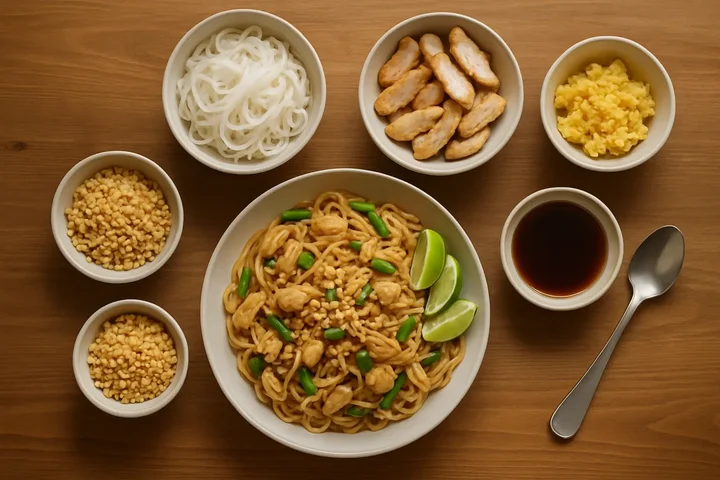
Line 1: the base. Log the carb the dish is built on as a generic food. "Rice noodles, cooked." "Basmati rice, cooked." "Naan." One loose fist is about one cup cooked. Generic staples exist in every database and are the most reliably measured part of the plate.
Line 2: the protein. Log the meat, paneer, egg or legume separately. One palm without fingers is roughly 100 grams of cooked protein. Restaurant protein portions are usually closer to the reference serving than the carb portion is, so this line is the least likely to be wrong.
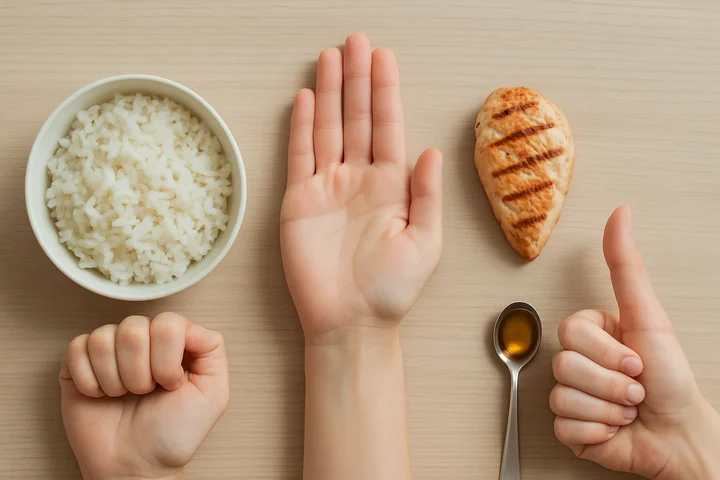 Fist for the base, palm for the protein, thumb for the fat. You carry the measuring set with you, which is the only reason this method survives contact with a restaurant table.
Line 3: the fat you cannot see. Add cooking oil as its own line. One tablespoon at about 120 calories (USDA) for a sauteed or stir-fried dish, two for anything glossy or deep-fried. This is the line most people skip and the single biggest source of error in restaurant logs.
Line 4: the sauce or dressing. Add it as its own line rather than assuming the dish entry covers it. One thumb is about one tablespoon. USDA puts regular mayonnaise at 94 calories a tablespoon (USDA), so a two-thumb pour of a creamy sauce is close to 190 calories on its own.
The rebuild in practice: a restaurant pad thai
| Line | What you log | Calories |
|---|---|---|
| 1. Base | Rice noodles, cooked, 1.5 cups (USDA, 176 g per cup) | 285 |
| 2. Protein | Chicken breast, 1 palm (100 g) + 1 egg | 237 |
| 3. Invisible fat | Cooking oil, 2 tbsp (the dish arrived glossy) | 240 |
| 4. Sauce and topping | Pad thai sauce 2 tbsp + crushed peanuts 1 tbsp | 142 |
| Total | 904 |
Then do the one step that catches your mistakes: sanity check the total against a published number for a similar chain dish. If your rebuild had come out at 550 against a chain's published number for the same dish, that gap would tell you exactly what happened. You skipped line 3.
Finally, save the assembled meal under the restaurant's name. Most people rotate five or six restaurant orders. Build each one accurately once and every future log of it is a single tap. In NutriScan this is the manual route rather than the camera, and the food type tag and oil slider are both there too.
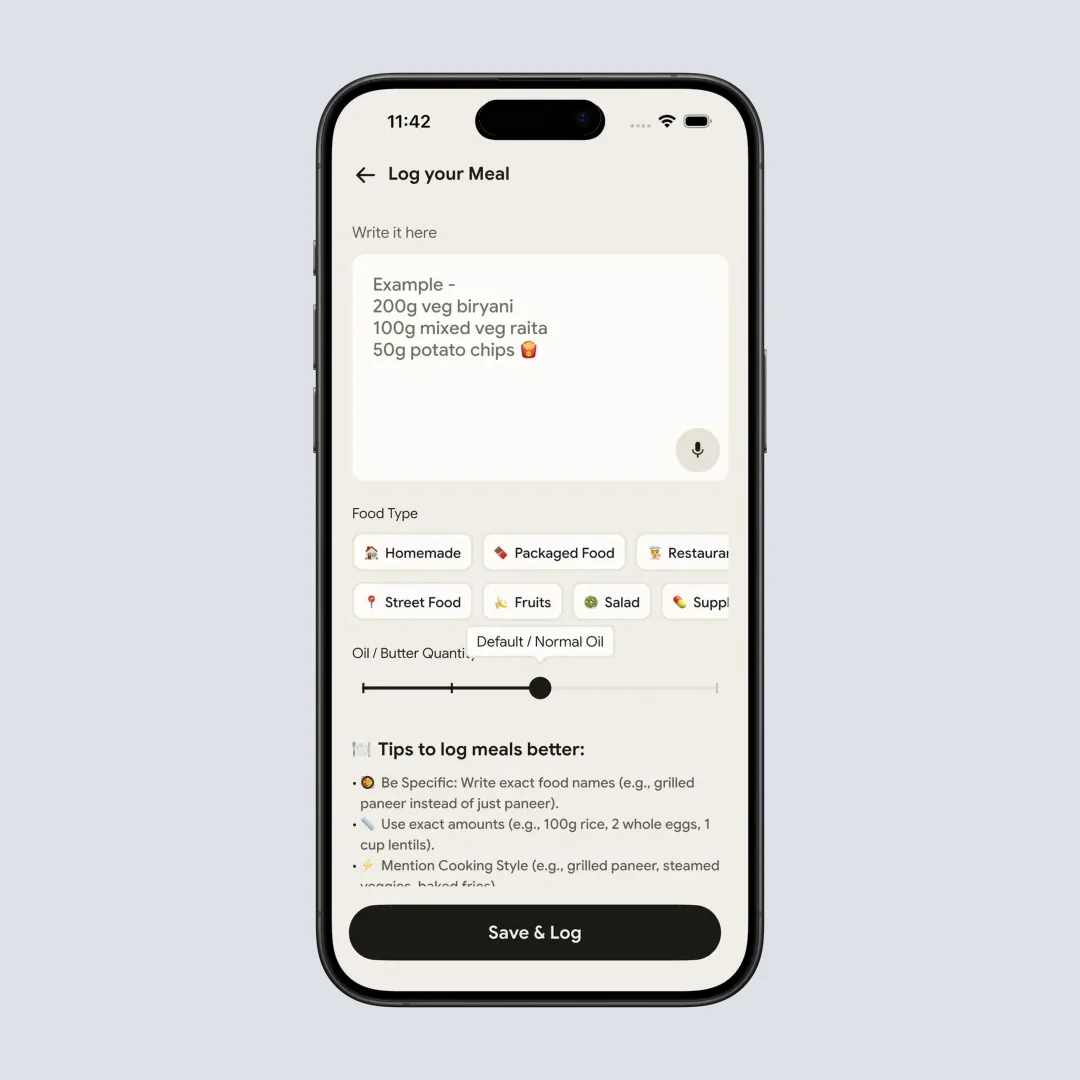
Home > Pencil Icon > Write About Meal. The same food type and oil controls apply to a typed meal, which is how the 4-line rebuild gets saved for next time.
Why four lines and not the full recipe
You could break a restaurant dish into fifteen ingredients, and it would be marginally more accurate. It would also take fifteen minutes, which means you would do it twice and then stop. Four lines captures most of the calories in most restaurant dishes, because base, protein, fat and sauce are where the energy lives. Spices, garnish and vegetables round to noise.
Seven Habits for More Accurate Restaurant Logging 💡
- Log before the food arrives when you can. Menu decisions are calmer than table decisions. If the item is in a database, enter it while you wait.
- Photograph first, eat second. An untouched plate gives the AI its best chance. It takes five seconds and becomes automatic within a week.
- Scale portions up at full-service restaurants. If the database serving looks smaller than your plate, multiply by 1.5 as a starting point. Underestimation is the default error.
- Add a restaurant tax line for oil. When a dish was clearly cooked in fat you cannot see, add one tablespoon manually or use your app's oil setting.
- Accept the estimate and move on. A log that is 20% off still shows the pattern of your week. A missing log hides it completely.
- Save your repeat orders. Once you have built an accurate version, saving it makes every future log instant.
- Review the day, not the meal. After eating out, check whether dinner pushed your daily total over target and adjust tomorrow rather than punishing tonight. A rolling diet plan makes that adjustment automatic instead of a daily judgment call.
What the Research Says About Eating Out and Logging 📚
Two findings anchor everything above.
First, consistency beats precision. In the SMARTER trial, 502 adults tracked their diet for 12 months, and adherence to self-monitoring was associated with achieving at least 5% weight loss (Burke et al., 2025). The people who benefited were the ones who kept logging, not the ones who logged perfectly. An imperfect restaurant log entered in ten seconds serves you better than a perfect one you never entered.
Second, information alone does not steer behavior, but it does improve awareness. England's menu labels moved noticing and label use sharply upward without reducing calories purchased. A separate analysis, drawing on the International Food Policy Study rather than those exit surveys, found the clearest behavioral shift was people ordering different meals, up from 12.6% in 2020 to 17.7% in 2022, rather than eating out less often (Essman et al., 2025).
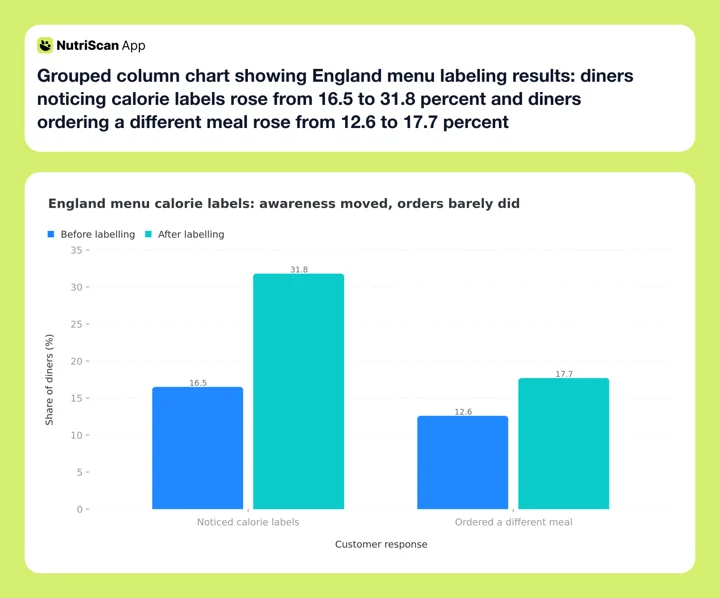 Figure 3: Two separate English surveys. Polden's exit surveys found noticing roughly doubled around the policy; Essman's International Food Policy Study found ordering a different meal up five points between 2020 and 2022. Neither found total calories purchased falling, which is the job an app takes on instead.
An app closes the loop a printed label cannot. It connects tonight's meal to your week's pattern, and that connection is where decisions actually change.
IMPORTANT
Recap: everything you covered this round.
You finished the run, save this for the next time nothing matches.
⏱️ Progress 4/4 • ~9 minutes in • Nicely done
✅ Step 1: Why restaurant meals break your food log
✅ Step 2: Menu database or photo, and when each one wins
✅ Step 3: All 5 apps, ranked on three jobs
✅ The 4-line rebuild: base ➡️ protein ➡️ invisible fat ➡️ sauce (revealed)
The Verdict: Match the App to Where You Eat ✅
If you mostly eat at chains, get MyFitnessPal. The official menu numbers beat every estimate, and no amount of AI closes that gap.
If you mostly eat at independent places and want the strongest fallback tools, get MacroFactor. AI Describe plus editable ingredients is the best answer to a dish with no name a database knows.
If your plates are mixed dishes where hidden oil is the main error, that is the exact problem NutriScan's scanner was built around. Five free scans a week is enough to test it on the plates a database cannot read, your curries, your restaurant thalis, your mixed bowls, before deciding whether Premium is worth it for you. See how the scanner handles a plate in our meal scan guide.
Whichever you pick, the app you will actually open at the table beats the theoretically perfect one every time. And when none of them can name what is in front of you, you now have four lines that will.
Frequently Asked Questions ❓
What is the most accurate way to log a restaurant meal?
Use the restaurant's own published nutrition numbers when they exist, since chains measure their standard recipes. When they do not exist, a photo scan corrected for portion size and cooking oil is the next best option. Research shows AI photo tools identify foods well but often misjudge portions, so always review the amount before you save (O'Hara et al., 2025).
Do calorie counts on menus actually help?
They improve awareness more than behavior. In England, mandatory menu labels doubled the share of diners who noticed calorie information, but calories purchased did not fall. Diners did become better at estimating what their meal contained (Polden et al., 2025). Labels give you the number. A tracking app turns the number into a decision.
How many calories should I add for restaurant cooking oil?
A practical default is one extra tablespoon, about 120 calories, for any sauteed or stir-fried restaurant dish, and two tablespoons for dishes that arrive glossy or deep-fried (USDA). Apps with a built-in oil adjustment handle this in one tap. If your dish comes with a sauce or dressing, add it as its own line: USDA puts regular mayonnaise at 94 calories a tablespoon.
Is photo logging accurate enough for weight loss?
Yes, if you keep doing it. A 12 month trial of 502 adults found that consistent self-monitoring was associated with clinically meaningful weight loss (Burke et al., 2025). That trial measured self-monitoring in general, not photo logging specifically. Photo estimates carry error on portions, but a slightly off log every day gives you a trend you can act on, which matters more than any single meal's precision.
Which app is best for logging Indian or other mixed-cuisine restaurant food?
Mixed dishes are the hardest case for menu databases because recipes vary between kitchens. A photo-first app with correction tools works best. NutriScan lets you set the cooking method and oil level after scanning, and MacroFactor lets you describe the dish in words and edit each ingredient. For any mixed plate, check the portion the app assumed and adjust it to what you actually ate.
Does NutriScan have a chain restaurant menu database?
No. If you want the official entry for a named fast-food item, MyFitnessPal or Lose It will serve you better. NutriScan is built for the mixed plate with no menu entry anywhere: a Restaurant / Cafe food type tag, 11 cooking method tags and a four-step oil slider you set before the scan is processed.