Is NutriScan Premium Worth It? Price, Free Plan, and Monika
 ChatGPT
  Claude
  AI Mode
  Perplexity
As a NutriScan nutritionist, I hear this one almost daily: "I already get free photo scanning, so why would I pay?" Short answer: pay for NutriScan Premium when you want the app to plan your meals for you. Stay on Free when you only want the calorie total after each meal. Premium is about $59 a year. Pricing varies by country and app store. Free already covers 5 photo scans a week, macros, NutriScore and micronutrients on every meal, so what the money actually buys is the 28-day diet plan, unlimited scans and unlimited Monika calls.
A 2025 review in Nutrition Reviews found that digital diet-monitoring apps improve weight and diabetes management, yet most users quit because the tools lack structured meal guidance (Abeltino et al., 2025). That gap is what Premium is built to close, by telling you what to eat next.
TL;DR - Is NutriScan Premium Worth It?
- Who it's for: People with a real health goal (weight loss, diabetes, PCOS, pregnancy) who want structured meal guidance, not just calorie totals.
- Main outcomes: AI 28-day diet plans, unlimited meal scans, unlimited Monika voice calls, recipe and grocery lists.
- Price: About $59 a year on the yearly plan. Pricing varies by country and app store. 7-day free trial. The free plan runs on 5 scans a week.
- Skip if: You only want a calorie counter or eat out most days without a meal plan.
I've used both the free plan and Premium side by side for months. The difference is clear for certain users and invisible for others. Here is the honest breakdown.
What NutriScan Is and How the Free Plan Works
NutriScan is a nutrition tracking app on iOS and Android. The free plan gives you 5 AI meal scans a week, manual logging, calorie and macro tracking, NutriScore meal ratings, micronutrients on every meal, copy meals, hydration tracking, and Apple Health and Google Fit sync. You also get 4 calls per week with Monika, the voice-powered AI nutritionist.
That free plan still puts NutriScan ahead of several competitors on what you can reach without paying. MyFitnessPal moved its barcode scanner behind a paywall in recent updates. Cal AI locks photo scanning behind Premium from day one. NutriScan hands every free user 5 AI scans a week, which is enough to see how the scanner handles your own food before you decide anything.
A 2024 study from the University of Sydney evaluated seven AI-enabled food image recognition apps and found accuracy varied widely. Several apps performed poorly on mixed dishes and non-Western cuisines (Chen et al., 2024). NutriScan addresses this by letting you tag food type (home made, restaurant, packaged, street food), pick from 11 cooking methods (deep-fried to steamed), and adjust oil with a slider. These inputs give the AI more context, which improves estimates for complex or regional dishes.
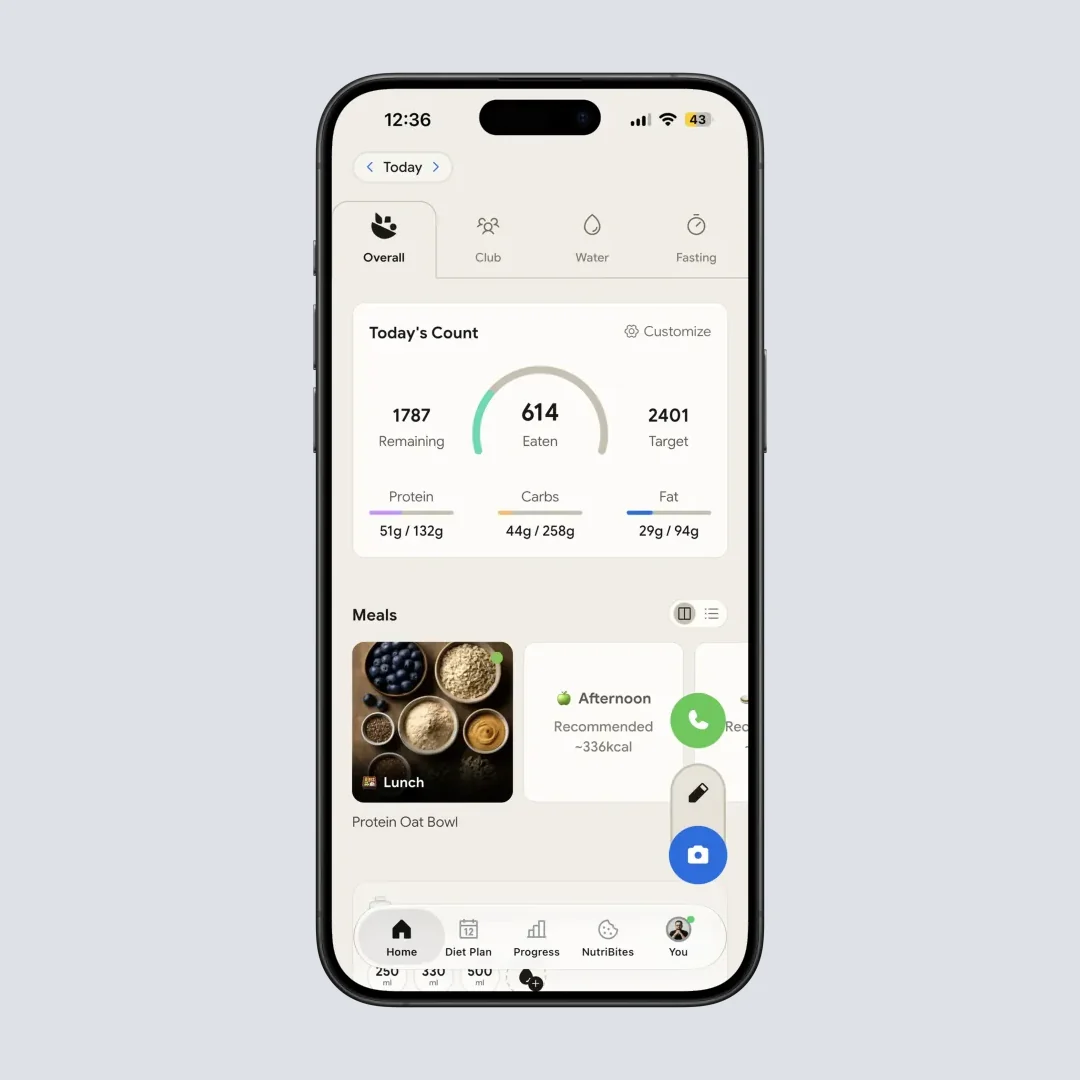
Home > Daily breakdown shows calories, macros, and meal log on the free plan.
Five scans a week is not daily photo logging. It is enough to point the camera at the meals a food database cannot read, your curries, your restaurant plates, your mixed bowls, and see whether the estimate holds up. Tracking alone still leaves the question most people struggle with, which is what to eat tomorrow.
 That moment every meal: "what should I actually eat next?"
NutriScan Free vs Premium: Feature-by-Feature
Here is what changes when you upgrade:
| Feature | Free | Premium |
|---|---|---|
| AI Meal Scanning | 5/week | Unlimited |
| Manual Logging | Yes | Yes |
| Calorie and Macro Tracking | Yes | Yes |
| Micronutrient Tracking | Yes | Yes |
| NutriScore Ratings | Yes | Yes |
| Meal History | Full | Full |
| Copy Meals | Yes | Yes |
| Monika AI Calls | 4/week | Unlimited |
| Apple Health/Google Fit Sync | Yes | Yes |
| Hydration Tracking | Yes | Yes |
| 28-Day Diet Plans | No | Yes |
| Recipe Recommendations | No | Yes |
| Grocery Lists | No | Yes |
| Advanced Macro Reports | No | Yes |
| Priority Support | No | Yes |
The biggest additions are the 28-day diet plans, unlimited scans, and unlimited Monika calls. Those three change how you use the app, from passive logging to active dietary guidance.
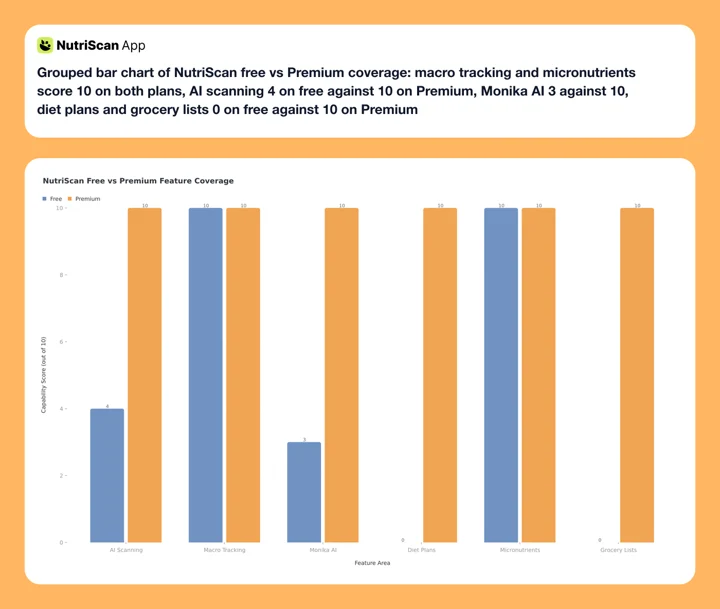 Figure 1: Free covers the tracking side in full, including micronutrients on every meal. Premium fills the guidance gap with diet plans, grocery lists, and it lifts the weekly caps on scans and Monika calls.
NutriScan Premium Pricing in 2026
NutriScan keeps pricing simple. The public choice is Free or Premium, with no "Gold" or "Plus" confusion. Our full pricing breakdown covers every region and the trial rules:
Premium is about $59 a year on the annual plan, the app's recommended option. The exact amount and currency depend on your country and app store; check the Upgrade screen for your figure.
7-day free trial = full Premium access
The trial starts through your app store, and whether a card is collected depends on your platform and region. You are not charged during the 7 days. Cancel before day 8 and you go back to the free plan with no charge. We wrote up what happens after the 7-day trial ends if you want the detail.
There is also a referral program. Share your invite link and both you and your friend get 1 week of Premium free. After 5 successful referrals you earn 1 month free. After 10 referrals you earn 3 months free. You can realistically get Premium for free just by sharing the app with people you know.
Compared to competitors, NutriScan Premium sits in the mid-range:
| App | Annual Price | Monthly Equivalent |
|---|---|---|
| NutriScan Premium | about $59/yr | annual only |
| MyFitnessPal Premium | $79.99/yr | $6.67/mo |
| Cronometer Gold | $59.99/yr | $5.00/mo |
| Lose It Premium | $79.99/yr | $6.67/mo |
| Cal AI Premium | $29.99/yr | $2.50/mo |
| YAZIO PRO | $47.90/yr | $3.99/mo |
Standard US prices as of mid 2026, and they change by region. Lose It Premium moved to $79.99 a year and no longer sells a monthly plan (Lose It Membership Tiers & Pricing), and Cronometer Gold is $4.99 a month billed annually at $59.99 (Cronometer Gold).
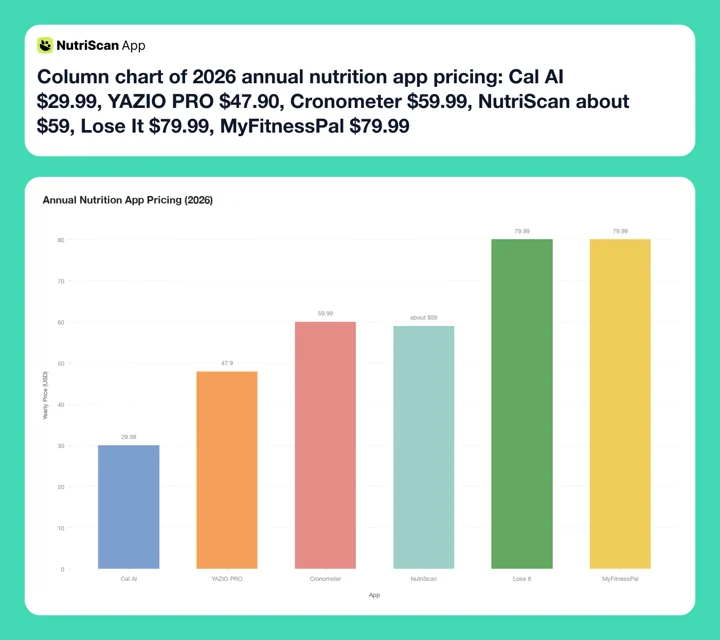 Figure 2: NutriScan Premium is about $59 a year in 2026, level with Cronometer Gold's $59.99 and $20 under MyFitnessPal and Lose It, and it still includes AI diet plans and a voice nutritionist.
NutriScan costs more than Cal AI and YAZIO PRO, and less than MyFitnessPal Premium and Lose It Premium, which both charge $79.99 a year. What you pay the difference for is the 28-day AI diet plan and Monika, the voice nutritionist.
Who Benefits from Premium
These three are worked examples built from the usage patterns described above, not individual users.
Example 1: The Weight Loss Beginner
Take someone with 8 kg to lose before a wedding. The free plan covers the first couple of weeks fine, then comes the wall: you can see you are eating too many carbs, but you have no idea what to swap them with. Premium generates a 28-day diet plan for weight loss built around your cuisine preference, with two meal options per slot. Because the plan is generated against your macro targets, it fills those slots with higher-protein options you would not have picked yourself. That swap work is what a structured macro plan does for you.
Example 2: The Diabetes Manager
Take someone tracking carbs for Type 2 diabetes. Fiber, potassium and sodium show on every meal on both plans, so the free tier already tells you where you stand. If your doctor asks you to push fiber to 30g a day, what Premium buys is the step after the number: the 28-day diet plan factors in the diabetes goal, and the recipe suggestions fill the fiber gap instead of just reporting it. Our diabetes macro calculator is the free starting point if you want to test that approach first.
Example 3: The Casual Tracker
Take someone who logs a few meals a week to stay generally aware, with no specific diet and no deadline. They run the 7-day trial, open the diet plan once, and never go back to it. The free plan already does everything they need. Cancel before day 8 and you have lost nothing.
The pattern is clear. Premium adds the most value when you have a specific health goal and need structured guidance. If you scan a handful of meals a week and want the calorie total, the free plan handles that.
Stories and Facts Behind Premium Features
The Diet Plan Engine
NutriScan's 28-day diet plan collects 15+ data points during onboarding: health goal (weight loss, muscle gain, diabetes, pregnancy, PCOS, viral recovery), food preference (vegan, vegetarian, eggitarian, non-veg), up to 5 cuisine preferences (Indian, Mediterranean, East Asian, Latin American, Continental, Middle Eastern, American, African), eating schedule, activity level, and even what raw items you currently have in your kitchen.
The plan generates specific meals with 2 options per slot, full nutrition breakdowns, portion sizes, and cooking tips. After 28 days you can renew or modify by updating your inputs.
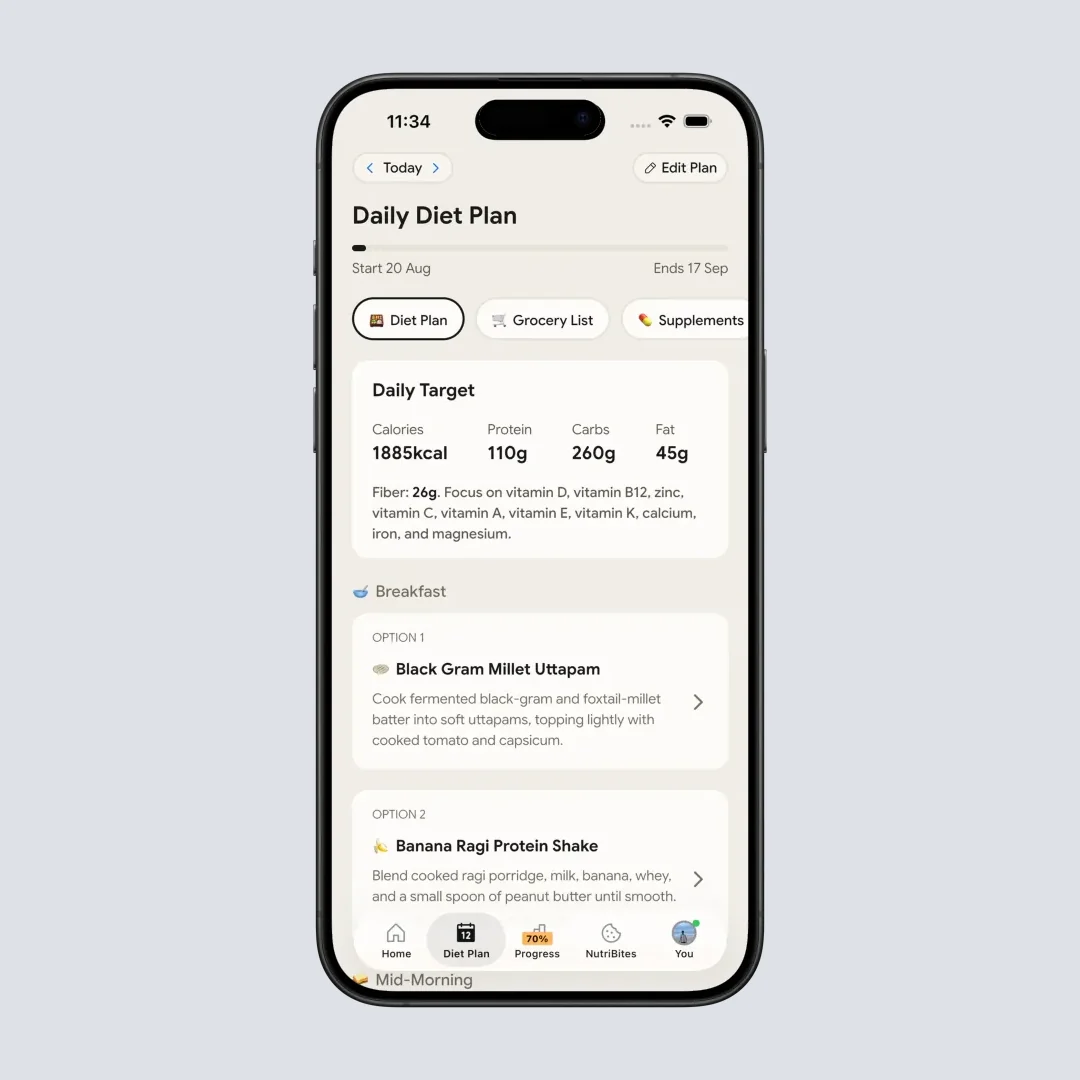
Diet Plan tab > 28-day plan with two meal options per slot and full nutrition breakdowns.
A 2025 systematic review in Nutrients found AI-driven personalized nutrition recommendations hold promise for improving health outcomes, especially when they integrate multiple data points like activity, dietary habits, and goals (Kassem et al., 2025). NutriScan's approach mirrors this model.
Monika: The Voice AI Nutritionist
Monika is not a chatbot. You call her like a phone call, ask questions with your voice, and get spoken answers. Free users get 4 calls per week. Premium removes that limit.
Ask Monika to log a meal by voice ("I just had two rotis with dal and a glass of buttermilk"), get feedback ("Am I getting enough protein this week?"), or request recipes ("What can I make for dinner with chicken and spinach?"). She responds in real time based on your meal history.
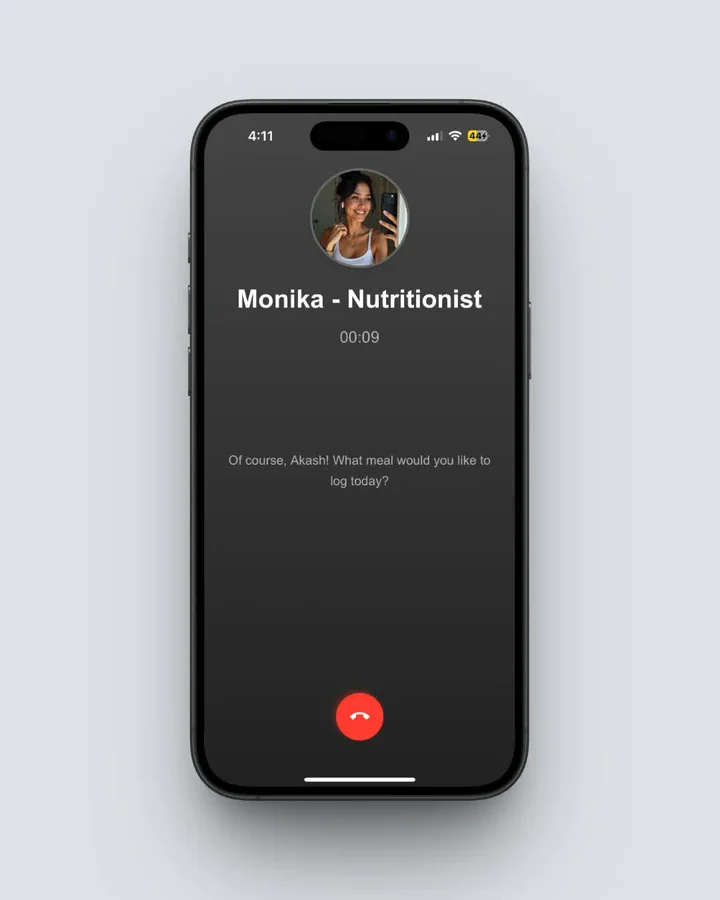 Home > Monika icon > Call. Voice answers based on your logged meals and goals.
This is the "what to eat next" feature. Instead of opening a recipe app, searching, then logging, you ask Monika. She knows your goals, your macros for the day, and what you already ate.
NutriBites: Chat with Your Meal Timeline
NutriBites is available to all users (free and Premium) and lets you ask questions about your own eating data. "What did I eat on Tuesday that had the most fiber?" or "How much sugar am I averaging this week?" The answers include clickable meal cards that take you straight to the nutrition detail screen.
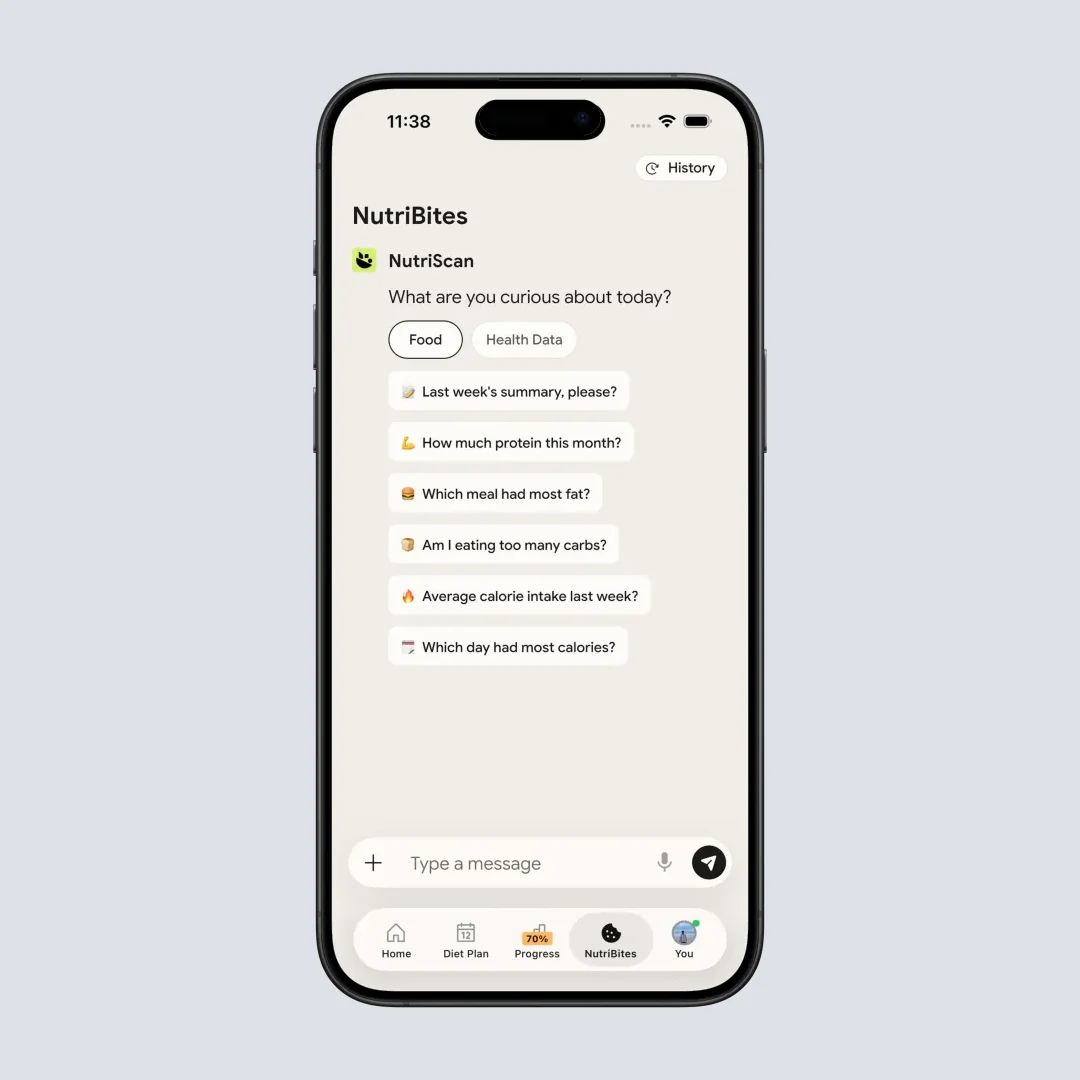
Home > NutriBites > Ask anything about your meal history and get clickable answers.
7 Tips to Decide If NutriScan Premium Is Right for You
- Check if you ask "what should I eat?" regularly. If you spend time every day deciding on meals, the 28-day plan removes that decision. That alone can justify $5/month.
- Count your Monika calls. If you hit the 4-call weekly limit on the free plan, you clearly find value in the AI nutritionist.
- Count your scans. If you burn through the 5 free scans by Wednesday, unlimited scanning on its own is most of the upgrade.
- Use the 7-day trial fully. Generate your diet plan on day 1. Follow it for a full week. Call Monika at least 3 times. Check the advanced macro reports. Then decide.
- Try the referral path first. Ten successful referrals = 3 months Premium free. Enough time to see if the features stick.
- Compare with current spending. Paying $6.67/month for MyFitnessPal or $13.99/month for Noom? NutriScan Premium at $5.00/month gives you AI scanning, diet plans, and a voice nutritionist for less.
- Do not upgrade for tracking alone. The free plan already includes macro tracking, NutriScore, micronutrients, full meal history, and health app sync. Premium is worth it for guidance and for scan volume.
 If your week looks like this, the diet plan and grocery list are doing real work.
Step-by-Step: How to Test Premium Before You Pay
- Download NutriScan. Get it from the App Store or Google Play.
- Complete the onboarding quiz. Set language, goal, food preferences, age, height, weight, and activity level. The app calculates your macro targets.
- Use the free plan for a week. Spend the 5 scans on your hardest meals, the curries, the restaurant plates, the mixed bowls, and log the rest by text or voice. NutriBites and the Club leaderboard are open on the free plan.
- Start the 7-day free trial. Tap Upgrade on the home screen. No charge until day 8.
- Generate your diet plan. Diet Plan tab > complete the questionnaire (cuisine, schedule, restrictions, kitchen inventory). Wait for the plan to generate.
- Follow the plan for one week. Try at least one suggested meal per day. Use the grocery list to prep ahead.
- Call Monika daily. Ask about progress, request meals, or log by voice.
- Review your reports. Check the advanced macro reports at end of week. Keep Premium if the data gives actionable insights. If not, cancel before day 8.
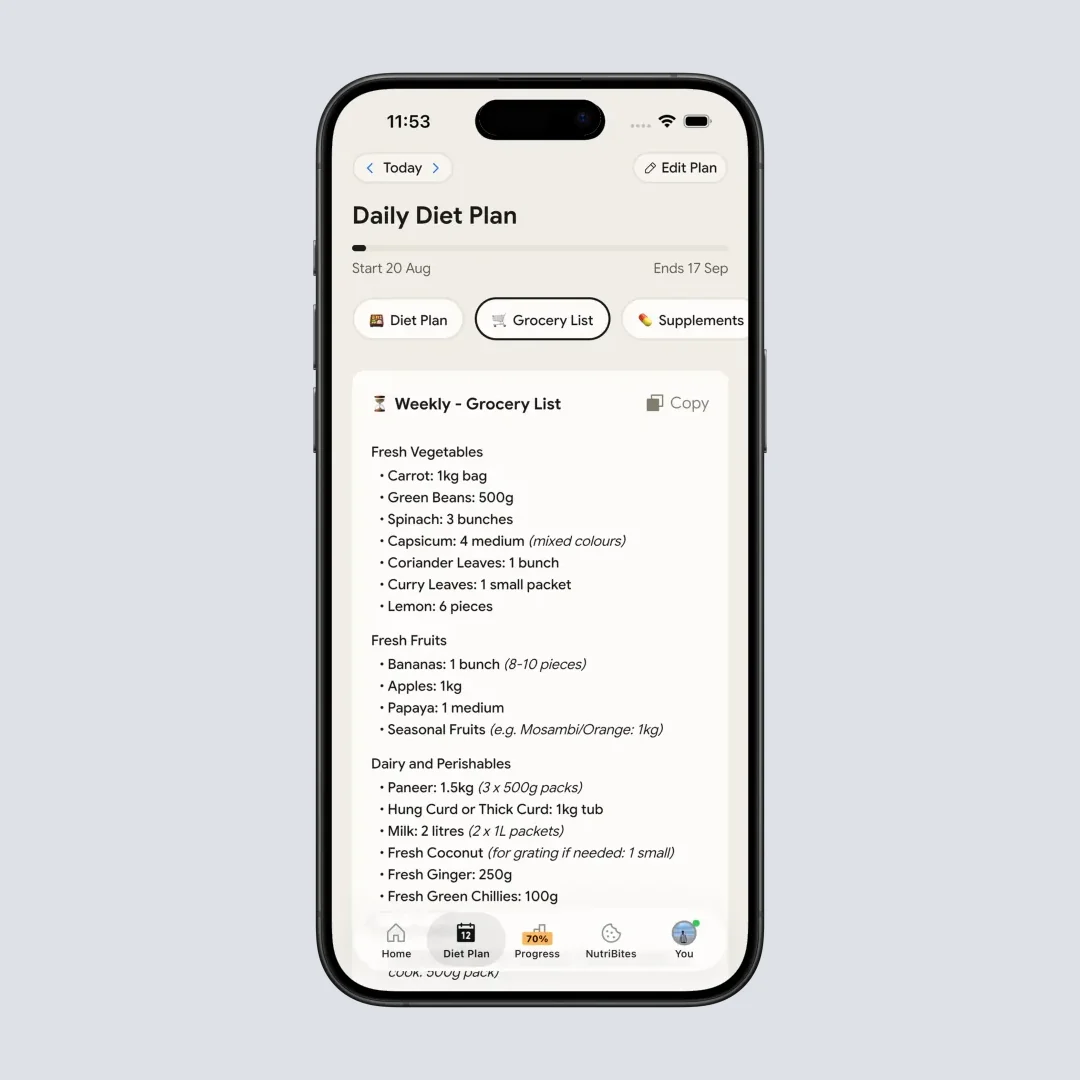
Diet Plan > Grocery list. Auto-generated from the week's recommended meals.
What the Research Says About Nutrition App Features
A 2022 study in Obesity Science and Practice found consistent app-based dietary self-monitoring was significantly correlated with weight loss. Each 1% increase in monitoring frequency was associated with a 0.02% decrease in weight (Payne et al., 2022). This supports the base case for tracking, which the free plan already provides.
But tracking alone has limits. The 2024 University of Sydney study found AI food apps overestimated calories for beef pho by 49% and underestimated pearl milk tea by up to 76% without enough context inputs (Chen et al., 2024). NutriScan's cooking method tags, oil sliders, and food type labels help close that gap.
A 2024 study in JMIR found higher app engagement predicted greater weight loss in blended-care interventions (JMIR, 2024). Features that increase engagement - personalized diet plans, voice interaction, daily meal suggestions - keep users active longer. That is exactly what Premium is designed to do.
Is NutriScan Premium Worth Paying For? Who Should and Who Should Not
Premium is worth it if you:
- Have a specific health goal with a timeline (wedding, diabetes, pregnancy, PCOS)
- Want a structured diet plan instead of figuring out meals on your own
- Use Monika regularly and hit the 4-call weekly limit
- Run out of the 5 weekly scans and want to photo-log every meal
- Cook at home and want grocery lists generated from your plan
- Currently pay more for a competitor app that offers less
Stay on the free plan if you:
- Track meals casually without a specific target
- Eat out most days and do not follow a meal plan
- Only need calorie and macro totals after each meal
- Prefer to manage your own diet without AI suggestions
- Are budget-constrained and the referral program does not cover the cost
The honest answer is that NutriScan's free plan is usable long-term if you are happy scanning 5 meals a week and logging the rest by text or voice. Premium adds structured guidance, unlimited scanning, and an AI coach. Whether $5/month is worth it depends on what you need.
The 60-Second Upgrade Test 🎯
Here is the simple test that tells you in under a minute whether to pay or stay free. Use it on day 5 of your free trial:
- 15-second meal-decision check. Open the Diet Plan tab. If the suggested dinner already matches what you would have eaten anyway, Premium is not adding much for you. If it makes you say "oh, I would not have thought of that," that is value.
- 15-second Monika call. Ask Monika one real question: "Based on what I ate today, what should I have for dinner?" If the answer feels personalized and uses your actual meals, that is value. If it feels generic, the free plan's 4 weekly calls are enough.
- 15-second grocery-list check. Open the grocery list the plan generated. If it is a list you would actually shop from this week, that is value. If you would rewrite it anyway, the free plan is fine.
- 15-second swap check. Pick one suggested meal from the plan and add it to tomorrow. If you actually follow through, you will use Premium. If you skip it, you won't.
Why it works: most people overestimate how much they will use a feature. This test forces real, in-the-app behavior in 60 seconds. Three or four "yes" answers means upgrade. One or two means stay free and revisit in a month.
Conclusion: Is NutriScan Premium Worth $5 per Month?
NutriScan Premium is worth it if you want more than tracking. The 28-day diet plans, unlimited scans and Monika calls, and recipe recommendations turn the app from a food diary into a nutrition coach. At $5.00/month on the yearly plan, it costs less than a single coffee shop visit.
Start with the free plan. Use it for a week. If you find yourself wanting meal guidance, more scans, or more Monika calls, activate the 7-day free trial. Run the 60-second test on day 5. If three answers come back yes, commit to the yearly plan. If not, stay free.
Track your meals and nutrition goals with NutriScan. The free plan gives you 5 AI photo scans a week plus macro tracking, NutriScore and micronutrients, and Premium adds the guidance layer when you are ready. While you are exploring, our meal scan guide and diet plan guide walk through both features step by step.

FAQ ❓
Q: Is NutriScan Premium worth it for weight loss?
Yes, if you need structured meal guidance. A 2025 review found apps with diet planning features improve adherence and health outcomes more than tracking alone (Abeltino et al., 2025). Premium's 28-day diet plan generates meals matched to your calorie and macro targets. For casual tracking without a deadline, the free plan is enough.
Q: Can I use NutriScan for free without upgrading?
Yes. The free plan includes 5 AI meal scans per week, calorie and macro tracking, NutriScore ratings, micronutrients on every meal, full meal history, hydration tracking, 4 Monika AI calls per week, and Apple Health and Google Fit sync. There are no ads and no time limits. Many users stay on the free plan long-term.
Q: How does NutriScan photo scanning compare to other apps?
Every free user gets 5 AI scans a week and Premium removes the cap. Most competitors lock photo scanning behind a paywall entirely. NutriScan also collects food type, cooking method, and oil level for each scan, which gives the AI more context for accurate calorie estimates (Chen et al., 2024).
Q: What is the cheapest way to get NutriScan Premium?
The yearly plan is the cheapest subscription, about $59 a year. The referral program can make it free: each successful referral gives both users 1 week free, 5 referrals = 1 month free, 10 referrals = 3 months free. Combine yearly + referrals for the lowest effective cost.
Q: How do I cancel NutriScan Premium if I do not like it?
Open Settings, App Store subscriptions (iPhone) or Google Play subscriptions (Android), find NutriScan, tap Cancel Subscription. The step-by-step cancel guide has the screens for both stores. You keep Premium until the current billing period ends. During the 7-day trial, cancelling before day 8 means no charge at all.
Q: Does Premium work offline?
AI meal scanning and Monika voice calls need an internet connection. Manual logging, viewing existing meal history, and reading saved diet plans work offline. Once you are back online the app syncs.
Q: Can I share Premium with family?
Apple Family Sharing and Google Play Family Library both apply where the platform supports subscription sharing. Check your store's subscription page after purchase.