Simple Premium: How to Cancel Your Simple Life Subscription
 ChatGPT
  Claude
  AI Mode
  Perplexity
TL;DR
Simple Premium is the paid tier of the Simple Life app. It runs $59.99 a year, or roughly $14.99 to $29.99 a month depending on tier (standard US prices as of August 2026, and they change by region). To cancel, go back to the platform you paid on: App Store, Google Play, or the Simple website. Deleting the app does NOT stop billing, there is no cancel phone number, and Commitment Plans follow separate rules.
Simple Premium buys you the full Coach Avo AI, Avo Vision photo scanning, personalized fasting plans, and the workbook library. Canceling it takes about two minutes once you know where you paid, and your fasting history stays in your account either way.
The short version, by where you paid:
- iPhone or iPad: Settings > your name > Subscriptions > Simple > Cancel Subscription.
- Android: Play Store > profile icon > Payments and subscriptions > Subscriptions > Simple > Cancel subscription.
- simple.life website: Simple app > profile icon > Manage subscription (tap it twice) > verify your email > Plan Management > Turn off auto-renewal.
- Commitment Plan: those steps will not release you during the locked 3, 6, or 10 months. Read the Commitment Plan section first.
Simple has over 20 million downloads, 800,000+ active subscribers, and a 4.7-star rating across 345,000 App Store reviews. Fortune named it the best intermittent fasting app in 2026, and it won Best Virtual Health Coach from MedTech Breakthrough in 2025.
As a NutriScan nutritionist, I see this pattern constantly. A 2019 usage analysis of 93 popular mental health apps (Baumel et al.) found that a median of only 3.3% of users were still active 30 days after installing. That does not mean the app failed. Goals change, and sometimes a different tool fits better.
Simple has three separate cancel paths depending on how you originally paid, plus a Commitment Plan that locks you in for months. This guide covers every path. If you are still deciding, our Simple Premium review breaks down what each tier actually gives you.
 Three platforms, two subscription types, one guide to get through it all.
What Happens When You Cancel Simple Premium
Before you tap anything, know what canceling actually does.
- You will not be charged again. Your subscription stops renewing at the end of the current billing period.
- You keep Premium access until your paid period ends. If you paid for a year and cancel in month three, you still have nine months of Premium features.
- Your account stays active. Canceling does not delete your fasting history, weight data, or profile.
- You drop to the free plan. You keep the basic fasting timer, limited Avo coach replies (2 per day), and 1 photo scan per day.
- Uninstalling the app does not cancel your subscription. This is the single most common mistake users make.
What Is the Simple Premium Charge on My Bank Statement?
If an unfamiliar charge showed up, it is almost always an auto-renewing Simple Life subscription or a trial that converted to a paid plan. The descriptor is short and easy to miss. Common forms are SIMPLE, SIMPLE PREMIUM, SIMPLE.LIFE, or a store line like APPLE.COM/BILL and GOOGLE*SIMPLE when you bought through the App Store or Google Play.
The descriptor also tells you who to cancel with:
- SIMPLE or SIMPLE.LIFE, sometimes with a payment processor name, means you paid on the website.
- APPLE.COM/BILL means Apple billed you, so the subscription lives in your Apple ID.
- GOOGLE*SIMPLE or GOOGLE*AM APPS means Google Play billed you.
The plan you are on and the amount you paid are shown in your store receipt or your Simple account, not on the bank line. Once you know the channel, cancel there: iPhone, Android, or the website.
Which Simple Premium Plan Are You On? 🔍
Simple has two very different subscription models. Picking the wrong cancel path is the most common mistake.
Regular Premium Plans
| Plan | Typical Price | Billing |
|---|---|---|
| Monthly | ~$15/mo | Renews every month |
| Quarterly (3 months) | ~$9.99/mo | Renews every 3 months |
| 9-month | Varies | Renews every 9 months |
| Annual | Less than $5/mo | Renews every 12 months |
Prices vary by region and promotional offers. The App Store lists multiple tiers including Simple Premium at $59.99/year and Simple Pro at $14.99-$29.99.
Commitment Plans
These are different. You agree to pay a reduced monthly rate for a locked period of 3, 6, or 10 months. You generally cannot cancel a Commitment Plan early.
CHECK YOUR PLAN TYPE
Open the Simple app. Tap your profile icon. Tap "Manage Subscription." If you see the words "Commitment Plan" above your billing details, you are on a commitment plan and need a different cancel process. See the Commitment Plan section below.
Where You Bought Simple Premium Decides Where You Cancel 📍
Simple sells subscriptions through three channels. You must cancel through the same channel where you purchased. Canceling in the wrong place does nothing.
| Purchase Channel | How to Identify |
|---|---|
| Apple App Store | Check Settings > Apple ID > Subscriptions |
| Google Play Store | Check Play Store > Payments & subscriptions |
| Simple website | You entered email + card on simple.life or signed up via Facebook/PayPal |
CHECK YOUR BANK STATEMENT
- "APPLE.COM/BILL" = App Store purchase
- "GOOGLE*SIMPLE" or "GOOGLE*AM APPS" = Google Play purchase
- "SIMPLE.LIFE" or payment processor name = Website purchase
What you lose with Simple, and what NutriScan gives you free
If you are canceling because the price stopped making sense, here is how the paid Simple features line up against NutriScan's free plan.
| Simple Premium paid feature | NutriScan |
|---|---|
| Coach Avo AI chat | Monika, a voice AI nutritionist you talk to out loud. 4 calls a week on the free plan, unlimited on Premium |
| Avo Vision photo scanning | Photo food scan, 5 a week free, unlimited on Premium |
| Personalized fasting plans | Fasting timer, schedules and history, free, no paid tier needed |
| Personalized meal plans | 28-day diet plans with macros, grocery list and swaps. This one is Premium in NutriScan too |
| Food logging | Typed or voice logging, sharing the free 5-a-week limit with photo scans, with calories, macros, micronutrients and a NutriScore per meal |
Simple Premium is $59.99 a year. NutriScan Premium is about $59 a year, and the free plan has no time limit.
Simple Premium Price: What Simple App Premium Costs 💰
Before you cancel, here is what you are currently paying. Prices below are standard US prices as of August 2026 and change by region and promotion.
| Plan | Annual Cost | Per Month |
|---|---|---|
| Monthly | ~$180/year | ~$15.00 |
| Quarterly | ~$119.88/year | ~$9.99 |
| Annual (Premium) | $59.99/year | ~$5.00 |
| Annual (Pro) | $14.99-$29.99 | ~$1.25-$2.50 |
Source: Simple on the App Store. The App Store also lists Simple Pro at $14.99/month and Simple Premium at $29.99/month on monthly billing, which is the split our Simple Premium review walks through tier by tier. Our Simple app pricing guide lays the free tier and every paid tier side by side if you want the full picture before you cancel.
At the high end ($180/year on monthly billing), Simple costs more than most competitors. At the annual rate ($59.99/year), it sits in the middle:
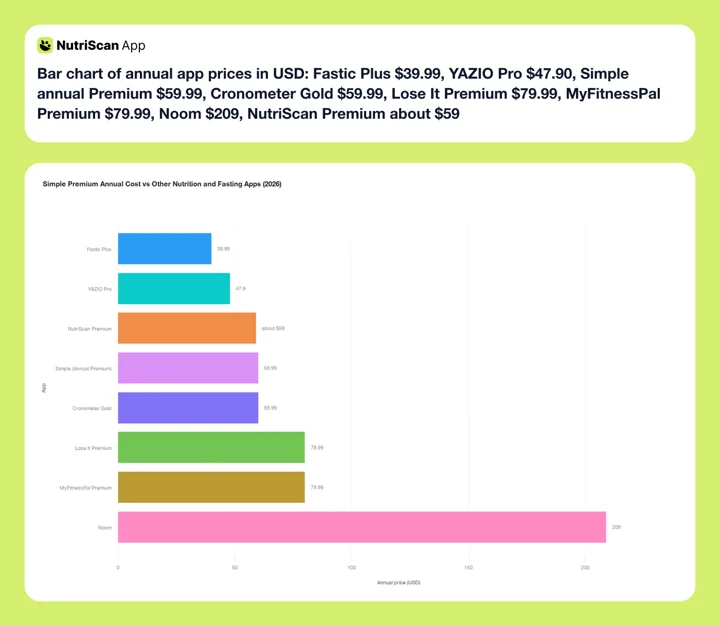 Figure 1: Simple Premium at its $59.99 annual rate sits mid pack, level with Cronometer Gold and well under Noom at $209. NutriScan Premium is about $59 a year. Prices are standard US annual rates as of mid 2026 and change by region.
Cancel a Simple Life App Subscription on iPhone 📱
If your bank statement shows APPLE.COM/BILL, Apple manages your billing. Simple cannot cancel it for you.
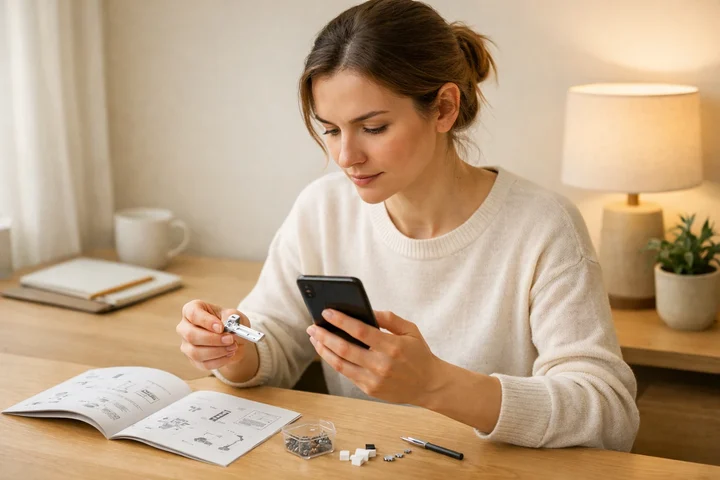 Follow these steps carefully to ensure your Simple subscription is fully canceled.
Steps:
- Open Settings on your iPhone.
- Tap your name at the top of the screen (Apple ID).
- Tap Subscriptions.
- Find Simple in the list and tap it.
- Tap Cancel Subscription.
- Confirm the cancellation when prompted.
You will see the expiration date of your current billing period. Premium features remain active until that date.
ON iPAD OR MAC
On iPad, go to Settings, tap your name, then Subscriptions. On Mac, open the App Store, click your name, then Account Settings and Subscriptions. You can also manage subscriptions at appleid.apple.com.
Cannot find Simple in your subscriptions? You may have purchased through Google Play or the Simple website instead. Check the sections below.
Refund for App Store purchases: Apple handles all refunds. Visit reportaproblem.apple.com, sign in, find the Simple charge, and submit a refund request.
Cancel a Simple Life App Subscription on Android 🤖
Google Play gives you two options. Both work the same way.
Option A: Cancel from inside the Simple app
- Open the Simple app. Tap the profile icon in the top right corner.
- Scroll down and tap "Manage subscription."
- Tap "Manage subscription" again on the next screen. This redirects you to Google Play.
- Tap "Simple: AI Weight Loss and Health."
- Tap "Cancel subscription" and confirm.
Option B: Cancel directly in Google Play Store
- Open the Google Play Store app.
- Tap your profile icon (top right).
- Select "Payments & subscriptions," then tap "Subscriptions."
- Find Simple in the list of active subscriptions.
- Tap it, then select "Cancel subscription" and follow the prompts.
Refund for Google Play purchases: Visit Google Play Support or go to Play Store > Account > Order history > find the charge > Request a refund.
Cancel a Simple Life Subscription Bought on the Website 🌐
If you subscribed on simple.life (or through a Facebook ad, PayPal, or direct card payment on the website):
- Open the Simple app. Tap the profile icon at the top.
- Tap "Manage subscription." Then tap it again on the next screen.
- Enter the email address you used when subscribing. Simple will send you a verification code. Enter the code.
- You will be redirected to your profile page. Scroll down and tap "Plan Management."
- Tap "Turn off auto-renewal" to cancel your subscription.
- Complete the short survey. You will see a confirmation once cancellation is complete.
WEBSITE REFUND POLICY
Simple offers a 30-day refund window for website subscriptions. Cancel first, then contact the support team through the chat widget inside the app or on the Simple help center to request your refund.
Source: Simple Help Center - How to Cancel
Refund windows differ by app and by store. Our guide to fasting app refund rules covers what you can reasonably ask for on each platform before you open a ticket.
Is There a Simple Life App Cancel Subscription Phone Number? ☎️
No, there is no Simple Life cancel subscription phone number. Simple does not publish a customer service line, and no phone line can cancel your subscription for you.
That surprises people, so here is why it works this way. If you paid through the App Store or Google Play, Apple and Google hold the billing relationship, and only you can cancel it from your own account settings. Simple support cannot reach into your Apple ID. If you paid on simple.life, the cancel switch lives in the app under Plan Management, which again only you can reach.
Where you can actually get a human:
| What you need | Where to go |
|---|---|
| Cancel an App Store subscription | Settings > your name > Subscriptions, or appleid.apple.com |
| Cancel a Google Play subscription | Play Store > profile icon > Payments & subscriptions |
| Cancel a website subscription | Simple app > profile icon > Manage subscription > Plan Management |
| Refund, pause, or Commitment Plan question | In-app chat widget, or the Simple help center |
| Apple refund | reportaproblem.apple.com |
WATCH FOR FAKE SUPPORT NUMBERS
Search results and social posts sometimes list a "Simple Life cancellation number." Simple has no such line. Calling one risks handing your card details to a stranger. Cancel in your own account settings instead.
How to Cancel a Commitment Plan 🔒
Commitment Plans are the most confusing part of Simple billing. Here is what you need to know.
What is a Commitment Plan? You agree to pay a reduced monthly rate for a fixed period (3, 6, or 10 months). In exchange, you get a lower price per month than the regular subscription.
Can you cancel early? Generally, no. You are locked in for the full duration.
COMMITMENT PLAN WARNING
If you are on a 3, 6, or 10-month Commitment Plan, the standard cancel flow will not work during your locked period. Check your plan type before attempting to cancel.
Exceptions (when you can cancel early):
- Within 7 days of purchase: Contact Simple support through the in-app chat widget.
- EU cooling-off period: Consumer protection laws in the EU give you a right to cancel within 14 days, regardless of what the app terms say.
After the commitment period ends: It converts to a regular subscription. At that point, follow the standard cancel steps above for your platform.
For full details: How to cancel your Commitment Plan
9 Common Mistakes That Cost Money 💸
Here are the mistakes Simple users make most often:
Mistake 1: Deleting the app instead of canceling. Uninstalling Simple does not cancel your subscription. You will keep getting charged until you cancel through Settings (Apple), Play Store (Google), or the app's manage subscription flow (website).
Mistake 2: Canceling on the wrong platform. If you bought on the website but try to cancel through Apple Settings, you will not find the subscription.
Mistake 3: Canceling too late. You need to cancel at least 24 hours before your next renewal date.
Mistake 4: Not checking for a Commitment Plan. If you are on a 3, 6, or 10-month Commitment Plan, the standard cancel flow will not work during your locked period.
Mistake 5: Trying to change payment method instead of canceling. Simple does not let you update your payment method directly. Cancel the current subscription and resubscribe with the new method.
Mistake 6: Confusing pause with cancel. Simple offers a pause option for website subscriptions. Pausing stops charges temporarily but keeps your subscription active.
Mistake 7: Ignoring the confirmation screen. If you do not see a confirmation, the cancel did not go through. Take a screenshot.
Mistake 8: Assuming a refund is automatic. Canceling does not trigger a refund. You must request it separately through Apple, Google, or Simple support.
Mistake 9: Not checking bank statements after canceling. Even after a successful cancel, check your statement on your next expected billing date.
Real User Experiences
Users on Reddit and Apple Discussions report common frustrations with Simple cancellation:
- Difficulty finding the cancel option for website purchases (requires email verification and multiple taps)
- Confusion about Commitment Plans (users expected to cancel anytime but were locked in for months)
- Charges appearing after deleting the app
A 2024 focus group and interview study with 38 patients (Giebel et al.) found that cost was one of ten problem categories patients raised about health apps, alongside usability, data privacy, and everyday adherence.
What Happens After You Cancel 📋
| Event | What Happens |
|---|---|
| Day of cancel | Premium stays active. No immediate change. |
| End of billing cycle | Premium features locked. You drop to the free plan. |
| Free plan access | Basic fasting timer, limited Avo coach replies (2/day), 1 photo scan/day. |
| Data | Your logged data, weight history, and progress stay in your account. |
| Resubscribe | You can upgrade again anytime from inside the app. |
If you are not sure about canceling, pausing might be a better first step.
 You made it through the cancel process. Time to pick your next move.
Compare Simple Cancel Process to Other Apps 📊
| App | Cancel Paths | Trial Length | Refund Window |
|---|---|---|---|
| Simple | Apple, Google Play, Website | Varies (promotional) | 30 days (website) |
| Fastic | Apple, Google Play, PayPal | 14-day guarantee | 14 days |
| YAZIO | Apple, Google Play, Website | 7 days (website only) | 14 days (EU) |
| Noom | Apple, Google Play, Website | 7-14 days | 14 days |
| NutriScan | Apple, Google Play | None, free plan instead | Per platform |
| MyFitnessPal | Apple, Google Play, Web | 7 days | Per platform |
| Lose It | Apple, Google Play, Website | 7 days | Per platform |
Looking for a calorie tracker with a straightforward cancel process? NutriScan has a free plan with 5 meal scans a week, no commitment plans, and cancellation through standard App Store or Google Play settings.
If you want to keep fasting after Simple ends, compare the field in our roundup of Simple alternatives, or read how NutriScan handles the same job in our intermittent fasting tracker guide.
Track your nutrition with NutriScan. Use our online macro calculator to find your daily targets, then scan meals with AI-powered photo recognition. The free plan includes 5 meal scans a week.
Conclusion
Canceling Simple Premium takes under two minutes once you know which platform you purchased through. The key steps: check whether you are on a regular plan or Commitment Plan, find your purchase platform (Apple, Google Play, or website), and follow the cancel steps for that platform. You keep Premium access until your current billing period ends, and your fasting data stays safe in your account.
If you are looking for a nutrition tracker with a simpler cancel process and no commitment plans, NutriScan has a free plan, and Premium cancels through standard App Store or Google Play settings. Try the meal scan feature to see how AI-powered food logging compares.
FAQ
How do I cancel a Simple Life app subscription? Cancel on the platform you paid on. On iPhone: Settings > your name > Subscriptions > Simple > Cancel Subscription. On Android: Play Store > profile icon > Payments and subscriptions > Subscriptions > Simple > Cancel subscription. If you subscribed on simple.life, open the Simple app, tap the profile icon, tap "Manage subscription" twice, verify your email, then open Plan Management and tap "Turn off auto-renewal." Deleting the app cancels nothing.
What is Simple Premium? Simple Premium is the paid tier of the Simple Life fasting app: the full Coach Avo AI, Avo Vision photo scanning, personalized fasting and meal plans, and the workbook library. It runs $59.99 a year on the annual plan, and the App Store also lists monthly tiers at $14.99 (Simple Pro) and $29.99 (Simple Premium). Prices are standard US rates as of August 2026 and change by region.
How long does it take for the cancellation to go through? Cancellation is instant on all platforms. Your Premium access continues until the end of your current billing period.
Will I get a refund if I cancel mid-cycle? For website purchases, Simple offers a 30-day refund window. Contact their support team. For App Store or Google Play, refunds are handled by Apple or Google. Visit reportaproblem.apple.com (Apple) or Google Play order history (Google).
Can I cancel my Simple subscription from a computer? Not directly through Simple. But you can manage Apple subscriptions at appleid.apple.com or Google Play subscriptions at play.google.com from any browser.
What is the difference between Simple Premium and Simple Pro? Simple Premium is the standard paid tier with full access to personalized plans, Avo AI coach, Avo Vision photo scanning, and advanced tracking. Simple Pro is a separate in-app purchase tier at a lower price point ($14.99-$29.99). Feature differences vary by region.
How do I know if I am on a Commitment Plan? Open the Simple app. Tap your profile icon. Tap "Manage Subscription." If you see "Commitment Plan" above your billing details, you are on one.
Can I switch from a Commitment Plan to a regular subscription? Not directly. Wait for the commitment period to end. After it expires, cancel and resubscribe on whatever plan you prefer.
How much does Simple Premium cost? Simple Premium is $59.99 a year on the annual plan, roughly $5 a month. On monthly billing the App Store lists Simple Pro at $14.99/month and Simple Premium at $29.99/month. Prices are standard US rates as of August 2026 and change by region.
Is there a Simple Life app cancel subscription phone number? No. Simple does not publish a support phone number, and no phone line can cancel for you. App Store and Google Play subscriptions can only be canceled from your own Apple or Google account settings. Website subscriptions cancel inside the Simple app under Plan Management. For refunds or Commitment Plan questions, use the in-app chat or the Simple help center.
Is there a way to get a free trial of Simple? Simple occasionally offers introductory periods at a reduced price. If a trial is offered, it will be shown during signup. The trial converts to a paid subscription unless you cancel before it ends.
What happens to my Workbooks if I cancel? Workbooks purchased as a separate one-time buy ($29.99 Workbooks Bundle) stay in your account. They are a separate purchase, not tied to your subscription.
Does Simple sell my data if I cancel? Simple's privacy policy applies whether you are free or paid. If you want your data deleted entirely, request account deletion through Simple support, which is a different process from canceling.
What is the Simple Premium charge on my bank statement? It shows up as a short descriptor such as SIMPLE, SIMPLE PREMIUM, or SIMPLE.LIFE. If you bought through a store, the line reads APPLE.COM/BILL or GOOGLE*SIMPLE instead. The charge is an auto-renewing Simple Life subscription, often a trial that converted to a paid plan. The descriptor tells you which channel billed you, and that is where you cancel. Your plan and the amount are on your store receipt.
Why was my credit card charged by Simple app? Simple subscriptions renew automatically until you cancel them. A charge usually means an annual or monthly plan renewed, or a discounted introductory period ended and rolled into the full plan. Commitment Plans also bill on their own schedule for the locked term. Deleting the app does not stop any of it. Cancel on the channel named in your bank descriptor to stop future charges.
Sources: Simple Help Center - How to Cancel, Simple FAQs for Premium, Simple Refund Policy, Simple on the App Store, Fortune Best IF Apps 2026