Best Foodvisor Alternatives 2026 (Dietitian Coaching Apps)
 ChatGPT
  Claude
  AI Mode
  Perplexity
 Foodvisor lists $83.99 a year on its US App Store page, but it runs promo-variable pricing with annual SKUs from $23.99 to $89.99 live at the same time, so the number you pay depends on when you look. The alternatives publish steadier prices: MacroFactor about $5.99 a month, Lose It and MyFitnessPal $6.67, Simple $5.00 on its $59.99 SKU. Nourish is the pick if you want a licensed dietitian, and it says 94% of its patients pay $0 out of pocket through insurance.
Last verified: August 23, 2026
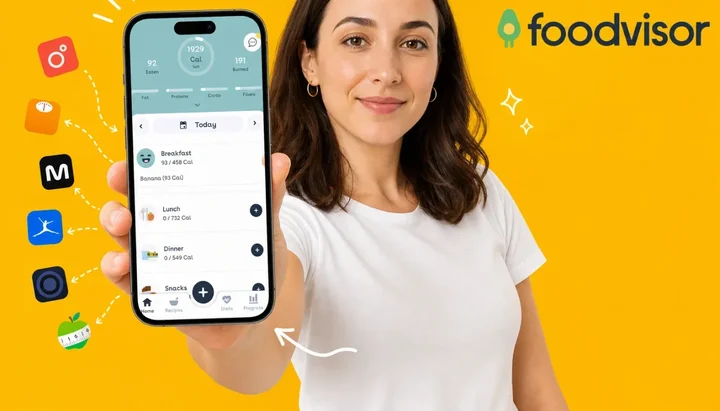
TL;DR - Best Foodvisor Alternatives 2026
• Why people leave: the dietitian coaching that built Foodvisor's reputation appears to be gone while the website still sells it, the free tier has no photo logging so you cannot test the headline feature, and wearable sync stops at Apple Health and Google Fit.
• Best for real dietitian access: Nourish connects you with licensed RDs, and says 94% of its patients pay $0 out of pocket through insurance.
• Best coaching-plus-tracking bundle: Noom pairs CBT-trained Goal Specialists with daily lessons.
• Best photo logging replacement: NutriScan gives 5 free photo scans a week and asks the oil and cooking method questions other scanners skip.
• How to choose: name the one feature you actually signed up to Foodvisor for, then pick the app that still delivers it.
Digital health interventions carry a pooled dropout rate of about 43%, a figure a 2025 systematic review of 35 studies cites when explaining why self-guided programs struggle to hold users (Loughnane et al., 2025). As a NutriScan nutritionist, I see the same pattern with Foodvisor: people chose the app for its dietitian coaching and then could not find that coaching in the app, leaving a self-guided tracker at a premium price with no refund.
If you are evaluating Foodvisor before committing, or already decided to leave, this guide covers seven alternatives matched to different needs - from apps with real registered dietitians to the photo loggers you can test before paying. Prices below are standard US prices as of mid 2026 and change by region.
IMPORTANT
Your Foodvisor switching plan at a glance.
A quick roadmap so you can decide fast and switch without losing your streak.
⏱️ Progress 0/4 • ~0 minutes in • Keep going
⏳ Step 1: The 3 gaps pushing people out of Foodvisor
⏳ Step 2: All 7 replacements, priced and compared
⏳ Step 3: How to switch without losing your data
🔍 The $0 coaching stack behind about three times the weight loss in an 8-week study (revealed near the end)
Why People Are Leaving Foodvisor in 2026 🔍
Foodvisor has solid fundamentals. The Play listing shows more than 10 million downloads and a 4.7 out of 5 rating from about 187K reviews (Google Play, checked 7 August 2026), and the US App Store shows 4.6 out of 5 from about 17K ratings (App Store, checked 7 August 2026). But three specific gaps are driving users to look elsewhere.
Price is harder to pin down than most reviews admit. Foodvisor lists $83.99 a year, about $6.99 a month, on its US App Store page, but it runs promo-variable pricing, with annual SKUs from $23.99 to $89.99 and monthly SKUs from $14.99 to $39.99 live at the same time (App Store in-app purchase list, checked 7 August 2026). Garage Gym Reviews puts the real-world figure lower again, at "about $5 per month (about $65 annually)" (Garage Gym Reviews, 2026).
The Dietitian Coaching Is Missing, and the Website Still Sells It
Foodvisor built its reputation on in-app access to registered dietitians. Premium subscribers could message a nutrition professional for personalized guidance. Whether that is still true depends on which page you read.
Garage Gym Reviews says Foodvisor "previously offered access to nutrition coaches with a premium subscription, but this feature is no longer available" (Garage Gym Reviews, 2026). Foodvisor's own site-wide description still sells "access to a team of dietitians" (foodvisor.io, checked 7 August 2026). No source anywhere puts a year on the change, and Foodvisor has never explained it. What Premium demonstrably includes today is 500+ automated daily lessons and AI-generated suggestions. If the coaching is why you are subscribing, look for the coach chat inside the app before you pay, not on the marketing page.
Foodvisor does label foods by color, red through green, with a smiley face on green foods and an angry face on red ones (Garage Gym Reviews, 2026). Registered dietitian Destini Moody, quoted in the same reviewer's Noom write-up, said of Noom's color coding that it can "promote an unhealthy relationship with food and avoidance of foods we get joy from". She was talking about Noom, not Foodvisor, but the two schemes work the same way, and without a human coach to reframe those signals the risk of food guilt goes up.
The Free Tier Has No Photo Logging
Foodvisor's free plan is a manual food diary. Photo scan, barcode, the 500+ daily courses and the recipe library are all Premium (Foodvisor help center), which means you cannot test the app's headline AI scan feature without paying first.
Trials do exist, contrary to a lot of older reviews. Foodvisor's help center describes a 14-day free trial through its referral program (Foodvisor help center), and two trial-priced SKUs sit on the live App Store listing. The catch is the route: the trial arrives through a referral link or a promo, not as a standing button on the paywall. Figure 1 shows what each app publishes.
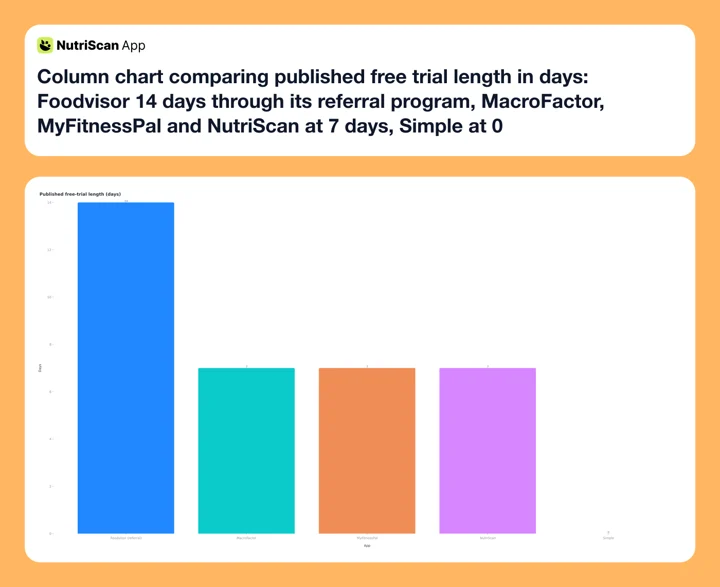 Figure 1: Published free-trial length. Foodvisor's 14 days comes through its referral program rather than the standard paywall. Noom says most people can start with a free trial but publishes no length, Lose It runs trials as promotions, and Nourish bills through insurance instead.
Paying for a photo feature you have never tested is a real risk. A 2024 scoping review found a median of 70% of users discontinued use within the first 100 days, with 22 reasons grouped into six categories and poor user experience the most consistent (Kidman et al., 2024). Testing before you pay is the cheapest way to find out which category you are about to land in.
 Photo logging is the feature people pay Foodvisor for, and the free tier does not include it.
Platform Health Apps Only
Foodvisor syncs with Apple Health and Google Fit (Google Play listing). Fitbit, Garmin, Whoop, Oura, and Strava are not supported. If your steps and workouts live on a wrist device rather than in your phone's health app, food data and activity data stay in separate silos. This matters because calorie targets calibrated to activity are more accurate than static daily goals, and Lose It and MyFitnessPal both connect to the tracker brands directly.
Who Should Still Use Foodvisor 🤔
If none of the three issues above apply to you, the annual Foodvisor plan earns its price. The app makes sense if you:
- Want 500+ wellness lessons bundled with macro tracking
- Track activity through Apple Health or Google Fit rather than a Fitbit or Garmin
- Do not need human coaching
- Eat foods well-covered by a European-focused database
- Want a structured recipe library, 300+ options across dietary preferences (Garage Gym Reviews, 2026)
Our full breakdown of what the paid plan delivers is in the Foodvisor 2026 worth-it review, and the Foodvisor pricing guide tracks what free vs Premium actually includes now.
IMPORTANT
Checkpoint: here's where you are right now.
Quick status update so you always know the next best move.
⏱️ Progress 1/4 • ~1 minute in • Keep going
✅ Step 1: The 3 gaps pushing people out of Foodvisor (done)
👉 Step 2: All 7 replacements, priced and compared (you're here)
⏳ Step 3: How to switch without losing your data
🧩 The $0 coaching stack (coming soon)
At a Glance: 7 Foodvisor Alternatives in 2026 📊
Prices are standard US prices as of mid 2026 and change by region.
| App | Coaching Type | Photo Logging | Free Trial | Annual Price/mo | Wearable Sync |
|---|---|---|---|---|---|
| Foodvisor | Disputed | Premium only | 14 days via referral | $6.99 (list SKU, promo-variable) | Apple Health, Google Fit |
| Nourish | Licensed RDs | No | Insurance-covered | Free / insured | Limited |
| Noom | Goal Specialists | No | Yes, length not published | $17.42 | Limited |
| MacroFactor | Adaptive AI | Yes (2025) | 7 days | $5.99 | Apple Health, Google Fit |
| Simple | AI coach Avo | Yes (Premium) | None standard | $5.00 on the $59.99 SKU, promo-variable | Limited |
| Lose It | None | Yes - Snap It (Premium) | Promotional only | $6.67 | Wide |
| MyFitnessPal | None | Yes | 7 days | $6.67 | Wide |
| NutriScan | Monika voice AI | Yes - 5/wk free | 7 days | about $4.92 | Apple Health |
Price alone tells a clear story, as Figure 2 shows. Noom charges nearly three times what most trackers do, because you are paying for the human coaching layer Foodvisor's subscribers are struggling to find.
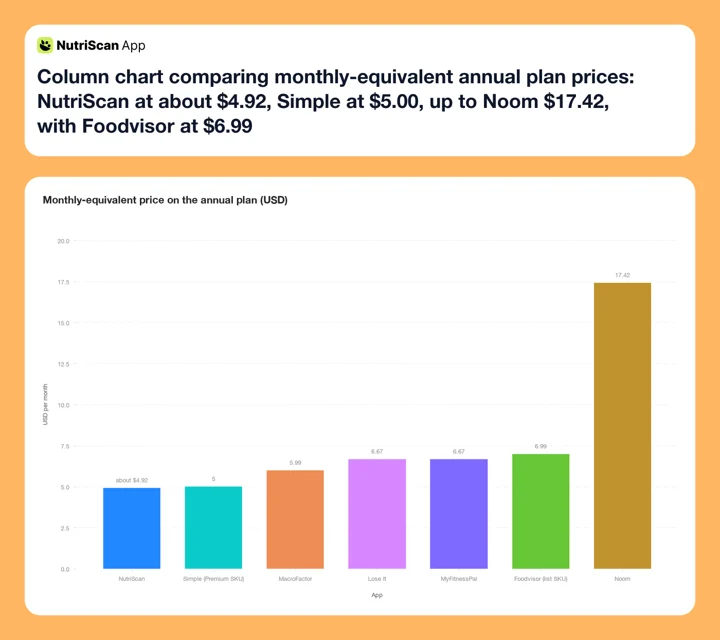 Figure 2: Monthly-equivalent price on each app's annual plan. Foodvisor and Simple both run promo-variable pricing, so their bars plot one listed SKU rather than a fixed price. Lose It sat at the bottom of this chart until 2026, when Premium went from $39.99 to $79.99 a year and moved it up beside MyFitnessPal (Lose It membership tiers and pricing, 2026).
1. Nourish - For Real Licensed Dietitian Access
Best for: Anyone whose primary reason for leaving Foodvisor is the missing human nutrition coaching
Nourish is the most direct replacement for what Foodvisor used to advertise. The app connects users with licensed registered dietitians for video or messaging sessions, and its provider cards carry RD, RDN, LDN and CDN credentials across a network it puts at more than 10,000 providers (Nourish, checked 7 August 2026). Unlike goal specialists or AI assistants, those coaches can give clinically appropriate nutrition guidance.
The pricing model sets Nourish apart. Nourish says 94% of its patients pay $0 out of pocket, because its dietitians are in network with hundreds of insurance policies in all 50 states, naming United Healthcare, Blue Cross Blue Shield, Aetna, Cigna, Anthem and Medicare (Nourish, checked 7 August 2026). If you have coverage, you may pay nothing for the dietitian access Foodvisor charged a premium for.
For cash-pay users or international subscribers, Nourish sessions are priced individually, making it more expensive than a flat monthly subscription. The app does not include a food database or calorie counter in the traditional sense. It is a telehealth dietitian platform rather than a self-serve tracker.
A 2024 retrospective cohort study in Nutrients (N=10,297, 8 weeks) found that participants using a mobile nutrition tracker with active dietitian guidance lost -4.78% body weight, compared to -1.54% in the app-only group (Chueh et al., 2024, PMC11280451). Groups were self-selected rather than randomised, and the guided arm also got a 2:1:1 portion-control plate and a low-carbohydrate plan, so coaching is not the only difference. If you want both layers, pair Nourish coaching with a free tracker for daily logging.
Where it beats Foodvisor: Licensed RDs with published credentials instead of automated lessons. Insurance can make it free, something no app subscription can replicate.
Limitation: No built-in food database or calorie log. Works best as a coaching layer on top of a separate tracker.
2. Noom - For Structured Habit-Based Coaching
Best for: Users who want a program with structured psychological habit coaching and daily lessons
Noom is the closest competitor to Foodvisor's original positioning: a paid subscription that bundles a tracking layer with a coaching layer. The difference is that Noom's coaches are "Goal Specialists" trained in Cognitive Behavioral Therapy (CBT) and motivational techniques, not registered dietitians.
Pricing: $17.42 per month on the annual plan ($209 per year) or $70 per month for a single month (Noom plan pricing). Noom says that "in most cases, you can start with a free trial" without publishing a length (noom.com), and its US App Store listing carries nine Program SKUs at once from $44.99 to $199.99, so what you are actually charged varies a lot from list price. Noom also uses a color-coded food system, green, yellow and red, similar to Foodvisor's labeling, which draws the same criticism from nutrition professionals about binary food judgments.
Where Noom genuinely improves on Foodvisor is the coaching structure. Goal Specialists conduct regular check-ins, ask reflective questions, and adjust the curriculum based on your responses. The daily lessons are psychologically framed around behavior change, not just macro information. For users who relied on Foodvisor's lesson library and found it too passive, Noom's interactive model provides more accountability. We compared the two coaching models head to head in Foodvisor vs Noom.
Those coaching touchpoints are the reason people pay $209 a year instead of picking a cheaper tracker, and the dropout figure at the top of this post is the reason the touchpoints matter: an app you stop opening in week three tracks nothing. If the price stings, we ranked cheaper Noom alternatives separately.
Where it beats Foodvisor: Human coaching you can confirm exists. Goal specialists provide live check-ins that Foodvisor's automated lessons cannot replicate.
Limitation: Expensive ($209/yr), and goal specialists are not registered dietitians.
3. MacroFactor - For Adaptive Data-Driven Coaching
Best for: Users who want coaching without the human coach - where the app adjusts your targets based on actual results
MacroFactor has no human coach. What it has instead is algorithmic adaptive coaching: the app reads your logged intake and weekly weight trend, then updates your macro targets each week to reflect what your body is actually responding to. Static calorie targets from intake formulas drift wrong over months. MacroFactor corrects for this drift automatically.
Pricing: $11.99 per month, $47.99 for six months, or $71.99 per year, which works out at $5.99 a month (MacroFactor pricing). There is a 7-day free trial that starts through your app store, so whether a card is collected depends on your platform and region.
MacroFactor added AI photo logging in 2025. You can scan a meal, review and edit the items, and log in one flow. The photo feature is newer than Foodvisor's but has improved quickly and handles common whole foods reliably.
The adaptive coaching model replicates the most evidence-backed part of dietitian-guided programs: systematic target adjustment based on observed data. A dietitian reviewing your 4-week log would make similar adjustments. MacroFactor does it faster and without an appointment. If you are new to macro targets, our free online macro calculator gives you a research-based starting point in under a minute.
Where it beats Foodvisor: Weekly adaptive macro updates and photo logging in a single app, with a trial you can start from the paywall instead of a referral link. Foodvisor's targets are static; MacroFactor's change with your results.
Limitation: No human touchpoint. Steep learning curve for users who are new to macro coaching. No free tier after trial - see our MacroFactor alternatives guide if that is a dealbreaker.
4. Simple - For AI Coach-Led Habit Loops
Best for: Users who want active AI coaching that responds to questions rather than a static lesson library
Simple pairs intermittent fasting tools with an AI coach named Avo. You log fasting windows and meals, and Avo responds with coaching messages, daily "missions" (short habit-building tasks), and guided workbook exercises. Fortune's 2026 weight-loss app roundup names Simple its Best Weight Loss App for iOS (Fortune, updated 4 August 2026).
Pricing moves around. Simple's US App Store page lists Pro and Premium SKUs from $14.99 to $59.99 at the same time, so the price you see depends on the offer you land on (App Store, checked 7 August 2026). The $59.99 Premium SKU is exactly $5.00 a month over a year. Fortune quotes $30 a month for premium. No standard free trial is available.
The key difference vs Foodvisor's lesson library is interactivity. You can type a question to Avo - "Why is my energy low in the afternoon?" or "How much protein do I need today?" - and get a direct response tailored to your recent logs. Foodvisor's 500+ lessons are comprehensive but cannot respond to your specific situation.
Simple Premium includes Avo Vision photo scanning (Simple help center). Accuracy on common foods is solid, but like all AI scanners, performance on mixed dishes and oil-heavy meals depends on portion prompts and editing. Nothing in Avo Vision's documentation describes an oil or cooking-method step after a scan.
Where it beats Foodvisor: Responsive AI coaching vs passive lesson consumption. Avo is conversational. Foodvisor's content is a library you browse.
Limitation: Fasting-focused design may not suit users who have no interest in fasting protocols. No standard free trial. Photo scan lacks oil and cooking method prompts.
4 of 7 compared. Still ahead: the widest wearable support in the guide, the only free photo scanner, and the $0 coaching stack behind about three times the weight loss in an 8-week study.
5. Lose It - For Voice Logging and Wearable Sync
Best for: Users leaving Foodvisor because their Fitbit or Garmin data is stranded, who also want voice logging
Lose It Premium costs $79.99 per year ($6.67 per month), and there is no monthly plan (Lose It membership tiers and pricing, 2026). That is a change worth knowing about if you read about this app a year ago: Premium used to cost $39.99, which made it the obvious budget swap for Foodvisor. At $79.99 it sits just under Foodvisor's $83.99 list SKU, not at half the price, and it costs more than MacroFactor and NutriScan. Premium includes Snap It (AI photo logging), Say It (voice logging), and barcode scanning. Free trials appear as promotions rather than as a standing offer.
Lose It is a pure tracker. There is no coaching layer. The reason to pick it now is the device support and the voice logging, not the price.
Snap It uses AI to identify foods from photos and suggest serving sizes. Say It converts spoken meal descriptions - "grilled chicken with rice and salad, medium portion" - into a structured log entry. For fast logging without a food scale, these two features cover most situations better than barcode scanning alone.
Wide wearable support includes Fitbit, Garmin, Apple Watch, and Strava. Users leaving Foodvisor because their Fitbit or Garmin data is stuck in a silo will find Lose It solves that problem immediately. One caveat: the 2025-2026 redesign frustrated some long-term users - we covered the fallout in our Lose It alternatives comparison.
Where it beats Foodvisor: Voice logging, a 50M+ item food database (Lose It App Store listing), and direct connections to tracker brands rather than platform health apps only. The price advantage is now marginal, $6.67/mo against Foodvisor's $6.99/mo list SKU.
Limitation: No coaching, lessons, or recipes. Purely a logging and tracking tool. Macro tracking and Snap It require Premium, the free Basic tier is a calorie budget and a food search. No monthly plan and no standing free trial, so the entry price is the full $79.99.
6. MyFitnessPal - For Wide Wearable Sync and the Largest Database
Best for: Users who eat mostly packaged and branded foods, or who rely on a non-Apple wearable for activity tracking
MyFitnessPal's 20.5 million+ item food database is one of the largest in the category (MyFitnessPal blog). That scale means barcodes scan reliably across packaged products from multiple countries, restaurant chains, and regional brands that smaller databases miss. It also supports Fitbit, Garmin, Apple Watch, Strava, Polar, Withings, Samsung Health and dozens more (MyFitnessPal partner list), far wider than Foodvisor's Apple Health and Google Fit.
Pricing: Free tier (with ads and limited features), Premium at $79.99 per year ($6.67 per month), and Premium Plus (Meal Planner + grocery list) at $99.99 per year. A 7-day free trial is available for Premium (MyFitnessPal Premium, 2026), which is the same window most of this list offers.
AI photo recognition accuracy varies significantly across apps. A 2024 study testing seven AI-enabled food image recognition apps found food-component identification accuracy ranging from 46% to 97% depending on the app (Li et al., 2024, PMC11314244). MyFitnessPal scored highest at 97%. The same paper found it underestimated energy badly on some mixed dishes, missing a hamburger by 45%, so mixed and home-cooked meals remain harder for every AI scanner, MyFitnessPal's included.
There is no coaching in MyFitnessPal. It is a tracking platform, not a coaching product. Seven days is enough to test whether the database covers your regular foods, so log your normal week rather than saving the trial for later. If the answer is no, we ranked the exits in our MyFitnessPal alternatives guide.
Where it beats Foodvisor: A 7-day trial straight off the paywall, a 20.5M+ food database, wide wearable compatibility, and the top AI photo score in the Li et al. test.
Limitation: No coaching, no lessons, no recipes. Premium costs $6.67/mo, similar to Foodvisor's list SKU but built around database scale and device integration instead of education content.
7. NutriScan - For Free Photo Logging with Oil Prompts
Best for: Users who want photo logging accuracy for home-cooked and restaurant meals, including oily or mixed dishes
NutriScan's free plan includes 5 AI photo scans a week with no subscription required, and it is the only app in this comparison that gives photo logging away on the free tier. Five a week will not cover every meal, but it is enough to test the scanner on the dishes that break a database, your curries, your restaurant plates, your mixed bowls. There is also a 7-day Premium trial, which starts through your app store, so whether a card is collected depends on your platform and region.
The oil prompt is what separates NutriScan from most photo loggers. After scanning a meal, the app shows an oil slider - No Oil, Low Oil, Medium Oil, or High Oil - and a cooking method selection with 11 options (mixed, deep-fried, air-fried, stir-fried, oven-baked, roasted, steamed, boiled, grilled, raw, or not sure). Most photo scanners assume a default oil level that systematically underestimates calories in curries, restaurant dishes, and home-cooked stir-fries. Our meal scan guide walks through the full flow.

NutriScan's photo scan flow: Home > Camera Icon > Click Picture > Crop Picture, then confirm cooking method and oil level.
When researchers put 114 meal photographs through ChatGPT-4, the model identified the foods well (93% precision) but agreed poorly with the real values on 10 of 16 nutrients, and its portion estimates fell apart on medium and large servings (O'Hara et al., 2025, PMC11858203). Portion and preparation, not food recognition, are where photo logging goes wrong. The oil prompt is a direct, low-friction fix for that gap.
Monika, NutriScan's voice-powered AI nutritionist, answers nutrition questions, explains scan results, and suggests what to eat next based on the day's log. The interaction is conversational - similar to Simple's Avo, but by voice (Home > Call Button). The free plan includes 4 Monika calls per week; Premium makes it unlimited.
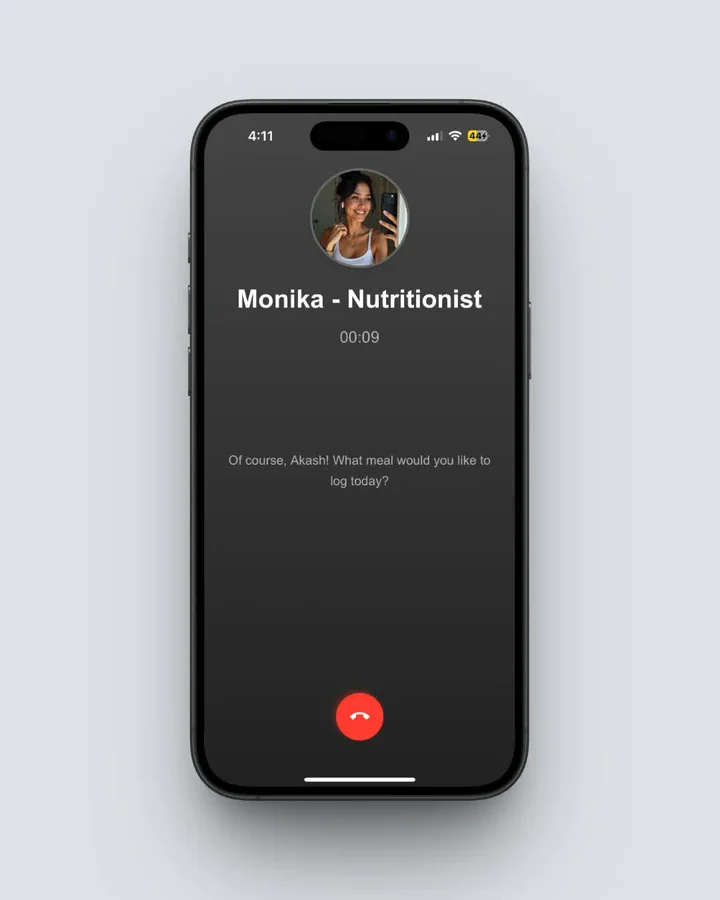 Monika (Home > Call Button) answers nutrition questions by voice - the closest thing to a coaching conversation in a tracking app.
Premium costs about $59 a year, about $5 a month, removes the scan limit, makes Monika calls unlimited, and adds the diet plan tools. Macros and micronutrients show on every meal on both plans, so the free tier stays usable without ever paying.
Where it beats Foodvisor: Free photo logging (5/wk), oil prompt for home-cooked accuracy, a 7-day Premium trial from the paywall, voice AI coaching on the free plan, and a fixed about $59 annual price against Foodvisor's shifting SKUs. We ran both scanners on identical meals in NutriScan vs Foodvisor.
Limitation: Coaching is AI-only. No licensed RD access. Wearable sync is Apple Health only at this time.
IMPORTANT
Checkpoint: midway progress update.
You're past the comparison - decisions get easier from here.
⏱️ Progress 2/4 • ~3 minutes in • Keep going
✅ Step 1: The 3 gaps pushing people out of Foodvisor (done)
✅ Step 2: All 7 replacements, priced and compared (done)
👉 Step 3: How to switch without losing your data (current)
🧩 The $0 coaching stack (next)
How to Switch From Foodvisor in 5 Steps 🔁
Step 1: Screenshot your progress. Foodvisor does not offer a structured data export. Before you leave, screenshot your macro averages, weight trend, and any recipe or meal data you want to reference later.
Step 2: Match your reason to the right replacement. If you need coaching, look at Nourish or Noom. If you need better photo logging, look at NutriScan, MacroFactor, or Lose It. If you need wearable sync, look at Lose It or MyFitnessPal. If price is the driver, NutriScan is the lowest fixed annual price at about $59, about $4.92 a month, and its free tier costs nothing at all. Simple can land at the same figure on its $59.99 Premium SKU, but it prices by promotion so the offer decides. Lose It was the price answer until 2026, when Premium doubled to $79.99 a year.
Step 3: Run a parallel test before cancelling. Most alternatives in this list offer free trials. Start the trial and log the same meals in both apps for 3-5 days. Compare the calorie and macro results. This tells you whether the new app's database covers your regular foods accurately.
 Photo by Steve Daniel on Unsplash
Step 4: Rebuild your top 5 repeat meals first. Most people eat the same 8-10 foods or meals regularly. Set those up in the new app before you cancel Foodvisor. This removes the main friction point of switching - starting from zero on a Tuesday when you are already tired.
Step 5: Cancel Foodvisor through the correct store. On iOS, go to Settings ➡️ Apple ID ➡️ Subscriptions and cancel from there. On Android, open Google Play ➡️ Payments and subscriptions. Cancel the renewal and let the billing period run to completion before deleting the app. Our step-by-step Foodvisor cancellation guide covers every platform.
WARNING
Deleting the Foodvisor app does not cancel the subscription. Whatever annual price you signed up at, anywhere from $23.99 to $89.99 on the current SKU list, renews until you cancel through the App Store or Google Play. And because Foodvisor offers no structured data export, anything you have not screenshotted is gone once you delete your account.
 Five steps done, logging streak intact. That is how a clean switch feels.
IMPORTANT
Checkpoint: final stretch before the reveal.
One last nudge - the $0 coaching stack is inside the next section.
⏱️ Progress 3/4 • ~4 minutes in • Keep going
✅ Step 1: The 3 gaps pushing people out of Foodvisor
✅ Step 2: All 7 replacements, priced and compared
✅ Step 3: How to switch without losing your data
✨ The $0 coaching stack behind three times the weight loss (about to reveal)
The $0 Coaching Stack Behind Three Times the Weight Loss 🔬
Here is the reveal you have been waiting for, and it costs less than Foodvisor charges for coaching you may not be able to find.
A 2024 retrospective cohort study in Nutrients (N=10,297, 8 weeks) compared participants using a mobile nutrition tracker with active dietitian guidance against people using the app on their own. The guided group lost -4.78% of body weight vs. -1.54%, about three times as much, with 73.52% diet record completeness vs. 28.91% (Chueh et al., 2024, PMC11280451). Read it as an association, not a proven effect of coaching: people opted into the program rather than being assigned to it, and the guided arm also received a 2:1:1 portion-control plate and a low-carbohydrate plan.
The stack that replicates this setup in 2026 looks like this:
- Nourish for the coaching layer ➡️ licensed RD sessions, with 94% of Nourish patients paying $0 out of pocket through insurance
- A free tracker for the logging layer ➡️ NutriScan's 5 free photo scans a week for the meals with no label (or MyNetDiary's free tier if you prefer barcode-first logging)
Total cost with insurance coverage: $0 per month. Foodvisor charges up to $89.99 a year for automated lessons with no confirmed human in the loop. The study setup, a human dietitian plus a daily tracker, is exactly the combination Foodvisor's subscribers say they can no longer find, and you can rebuild it for less than Foodvisor's price, sometimes free.
This is the piece the change disrupts for existing subscribers. The tracking tools, photo scanner, macro dashboard, fiber tracking, are all still in the app. The coaching context that made them more effective is what people cannot locate.
For users who never used the dietitian feature, the stack is overkill: switching to a cheaper tracker like NutriScan, or a better-integrated one like Lose It or MyFitnessPal, makes more sense than paying for features that did not change your habits. But if the coaching was why you signed up, do not settle for lessons - rebuild the layer that actually moved the needle.
IMPORTANT
Recap: everything you completed this round.
You finished the run - save this for when you make the switch.
⏱️ Progress 4/4 • ~5 minutes in • Nicely done
✅ Step 1: The 3 gaps pushing people out of Foodvisor
✅ Step 2: All 7 replacements, priced and compared
✅ Step 3: How to switch without losing your data
✅ The $0 coaching stack: insurance-covered Nourish RD + a free tracker, about 3x the weight loss in one observational study (revealed)
Conclusion
Foodvisor is still a capable tracker if you want wellness lessons bundled with macro tracking. But if the vanished dietitian coaching, the paywalled photo scan, or the missing Fitbit and Garmin support pushed you here, the seven apps above each fix one of those gaps directly:
- Real licensed dietitians ➡️ Nourish (insurance-covered, 94% of patients pay $0)
- Structured human coaching ➡️ Noom ($209/yr)
- Adaptive data-driven targets ➡️ MacroFactor ($71.99/yr, 7-day trial)
- Conversational AI coach + fasting ➡️ Simple ($59.99/yr Premium SKU, promo-variable)
- Voice logging + direct tracker support ➡️ Lose It ($79.99/yr, up from $39.99, promotional trials only)
- One of the largest databases + wide wearables ➡️ MyFitnessPal ($79.99/yr, 7-day trial)
- Free photo logging with oil prompts ➡️ NutriScan (5 free scans/wk, 7-day trial)
Most of these apps let you test before paying. If photo logging is your main method, try NutriScan and spend the 5 free scans a week on the meals no database describes properly. They stay available long after the 7-day trial ends.
Frequently Asked Questions ❓
Q: Which Foodvisor alternative has real dietitian access in 2026?
A: Nourish connects users with licensed registered dietitians via video or messaging sessions, and its provider cards list RD, RDN and LDN credentials. Nourish says 94% of its patients pay $0 out of pocket, because its dietitians are in network with hundreds of insurance policies in all 50 states (Nourish). Noom offers goal specialist coaching, but those coaches are not licensed RDs.
Q: Did Foodvisor remove its dietitian coaching?
A: The sources disagree. Garage Gym Reviews says the coaching that came with Premium is no longer available, while foodvisor.io still sells "access to a team of dietitians" in its site-wide description. No source puts a year on the change and Foodvisor has never explained it. The most likely driver is cost at scale, since keeping dietitians available for real-time in-app chat needs staffing that automated lessons do not. Check for the coach chat inside the app before you subscribe for it.
Q: Which Foodvisor alternative is best for home-cooked Indian or Asian meals?
A: NutriScan's oil slider and cooking method selection make it the most accurate option for curries, stir-fries, and mixed dishes where oil estimation drives most of the calorie error. The oil level prompt (No Oil, Low Oil, Medium Oil, High Oil) captures the biggest variable that generic photo scanners miss. NutriScan's free plan includes 5 scans a week, enough to test it on the dishes that usually come out wrong before you pay.
Q: Is there a completely free alternative to Foodvisor with photo logging?
A: NutriScan's free plan includes 5 AI photo scans a week with no subscription required. That is the only free photo scanning in this comparison. Foodvisor's free tier does not include photo logging at all, and Lose It locks its Snap It photo feature behind Premium.
Q: Which alternative has the longest free trial?
A: Foodvisor's, at 14 days, but only through its referral program rather than the paywall. MacroFactor, MyFitnessPal (MyFitnessPal Premium, 2026) and NutriScan all offer 7 days off the paywall, Lose It runs trials as promotions, and Noom says most people can start with a free trial without publishing a length. Simple has no standard free trial. All of these start through your app store, so whether a card is collected depends on your platform and region. If you want more than a week to decide, test on a free tier instead: NutriScan gives 5 photo scans a week with no time limit.