Lose It vs MyNetDiary: Calorie Tracking and Fitness Sync Compared
 ChatGPT
  Claude
  AI Mode
  Perplexity
TL;DR - Lose It vs MyNetDiary at a glance
- Lose It wins on simplicity, free community groups, and the fastest path to a daily logging habit.
- MyNetDiary wins on depth: 108 nutrients on every tier, A1C tracking, and free Professional Connect sharing with a dietitian.
- Free barcode scanner: MyNetDiary yes, Lose It Premium only.
- Annual Premium list price: Lose It $79.99, MyNetDiary $59.99. Lose It raised its price in 2026 and is now the pricier of the two on list.
- The pick most people miss is revealed near the end of this post.
IMPORTANT
Your decision plan at a glance.
A quick roadmap so you can pick fast.
⏱️ Progress 0/4 • ~0 minutes in • Keep going
⏳ Step 1: Database and accuracy
⏳ Step 2: Nutrient depth and fitness sync
⏳ Step 3: Pricing and real user behavior
🔍 The third option most readers overlook (revealed near the end)
As a NutriScan nutritionist, I compare calorie tracking apps feature by feature against what each vendor publishes. A 2025 umbrella review of 11 systematic reviews covering 62,407 participants found that mobile app interventions produced a mean weight loss of 1.32 kg more than control groups (Couto & Almeida, 2025). Both Lose It and MyNetDiary help you build that tracking habit, but they do it very differently. Lose It keeps things simple so you log more often. MyNetDiary gives you deeper data so you learn more from what you log. This comparison covers every feature that matters - calorie tracking accuracy, nutrient depth, fitness sync options, database quality, and pricing - so you can pick the right app for your goals.
Full disclosure: I work with NutriScan. Every competitor claim below is sourced to the vendor's own help center, its live App Store listing, or a peer-reviewed paper. Nothing here is sponsored by either app.
 Both apps live on the lock screen. The one you actually open every day is the one that works.
The Short Answer
Lose It is the better app if you want a clean daily calorie budget, a free community to log alongside, and the fastest path to building a habit. MyNetDiary is the better app if you want 108 nutrients on the free tier, A1C and glucose history in one place, and a diary you can hand to a dietitian at no cost. Lose It wins on simplicity. MyNetDiary wins on depth. MyNetDiary also wins on list price now: $59.99 a year against Lose It's $79.99, though both apps run promotions that move the real number.
Side-by-Side Feature Comparison
This table covers every major difference between the two apps. Every cell was re-checked against the vendors' own pages and their live US App Store listings on 7 August 2026. Prices are standard US prices as of mid 2026 and change by region; both apps also run promotional pricing, so the price you are shown may be lower.
| Feature | Lose It | MyNetDiary |
|---|---|---|
| App Store rating | 4.8/5 (770K ratings) | 4.8/5 (161K ratings) |
| Food database size | 50 to 60 million items, depending on the page | Over 2 million verified items |
| Database type | Mixed (verified + user-submitted) | Verified only, 2,500 to 3,500 foods checked daily |
| Nutrients tracked | 8 with goals, 18 more view-only | 108, on every tier including free |
| Barcode scanner | Premium | Yes, free |
| AI photo logging | Snap It (Premium) | Meal Scan (Premium) |
| Voice logging | Say It (Premium) | Yes, free; AI voice on Premium |
| Apple Health sync | Yes, free | Yes, free |
| Google Fit sync | Retired March 2026, Health Connect instead | Connection exists, tier not published |
| Fitbit direct sync | Yes (Premium) | Yes (Premium) |
| Garmin direct sync | Yes (Premium) | Yes (Premium) |
| Withings sync | Yes, scale and blood pressure monitor (Premium) | Yes (Premium) |
| Samsung Health | Yes, via Health Connect | Not published |
| Apple Watch app | Yes, calorie budget and Calorie Bonus (free) | Yes, with widgets (free) |
| Web access | Yes, loseit.com | Yes, mynetdiary.com |
| Blood glucose tracking | Yes (Premium) | Yes (Premium) |
| A1C tracking | Not published | Yes (Premium) |
| Blood pressure tracking | Yes (Premium) | Yes (Premium) |
| Professional Connect | Not published; weekly reports by email or print | Yes, free (share diary with dietitian) |
| Community and challenges | Community groups free; challenges not documented | Community feed free; no challenges published |
| Intermittent fasting timer | Yes (Premium) | Yes (Premium) |
| Recipe builder | Yes, all users | Yes (Premium) |
| Weekly calorie budget | Yes, Calorie Schedule | Yes, calorie and macro cycling (Premium) |
| Premium price (monthly) | No monthly plan | $8.99/mo |
| Premium price (annual) | $79.99/yr list | $59.99/yr list |
| Lifetime plan | $299.99 ($229.99 for current Premium members) | Reported at about $179.99; MyNetDiary does not publish it |
| Free trial | 7 days | Yes, on both paid plans |
Food Database: Tens of Millions vs Two Million Verified
The numbers look very different, but bigger does not mean more accurate.
Lose It's own pages give three sizes: 50M+ on the pricing page, 56+ million on the App Store listing, and "60+ million foods" in its nutrients article. Call it 50 to 60 million, covering user submissions, restaurant chains, and branded groceries. The trade-off is who filled the row in. Lose It says outright that users can add missing nutrient values themselves, with an AI validation step before the edit goes global. That is how you get 50 million rows, and also why two entries for the same sandwich can disagree.
MyNetDiary has over 2 million foods, every one verified, with 2,500 to 3,500 checked per day by its own staff. USDA FoodData Central and the NCC database from the University of Minnesota go in as-is, already lab-analyzed, and branded foods are reviewed before publication. The PhotoFood Service lets you photograph a label and enter a few numbers, and MyNetDiary's research team fills in the rest, usually within 24 hours. People, not a parser.
A 2026 scoping review of 68 studies covering 46 calorie-counting apps named limited food databases and manual entry among the main barriers to sticking with an app (Dugas et al., 2026, JMIR mHealth and uHealth). Each app here fails a different half: Lose It has coverage with variable quality, MyNetDiary has quality on a narrower shelf. Packaged food and chains, Lose It. Home cooking and micronutrients you plan to act on, MyNetDiary.
IMPORTANT
Checkpoint: database and accuracy reviewed.
Quick status so you always know the next best move.
⏱️ Progress 1/4 • ~1 minute in • Keep going
✅ Step 1: Database and accuracy (done)
👉 Step 2: Nutrient depth and fitness sync (you're here)
⏳ Step 3: Pricing and real user behavior
🧩 The third option most readers overlook (coming soon)

Nutrient Tracking: Eight Goals vs 108 Nutrients
This is the single biggest difference between the two apps, and the raw counts undersell it.
Lose It lets you set goals on eight core nutrients and view 18 more, 26 in total. The split matters more than the total: you can hold yourself to a protein or fiber target, but the 18 micronutrients underneath are read-only. For basic weight loss, where the job is holding a calorie deficit, eight goal nutrients cover it.
MyNetDiary tracks 108 nutrients and does not charge for them: its App Store listing puts "up to 108 nutrients (vitamins, minerals, omegas, amino acids)" in the free tier. The data comes from two research-grade sources, USDA FoodData Central and the NCC Food and Nutrient Database from the University of Minnesota, licensed in 2023. For anyone managing diabetes, heart health, or iron deficiency, that is the panel a doctor or dietitian can read.
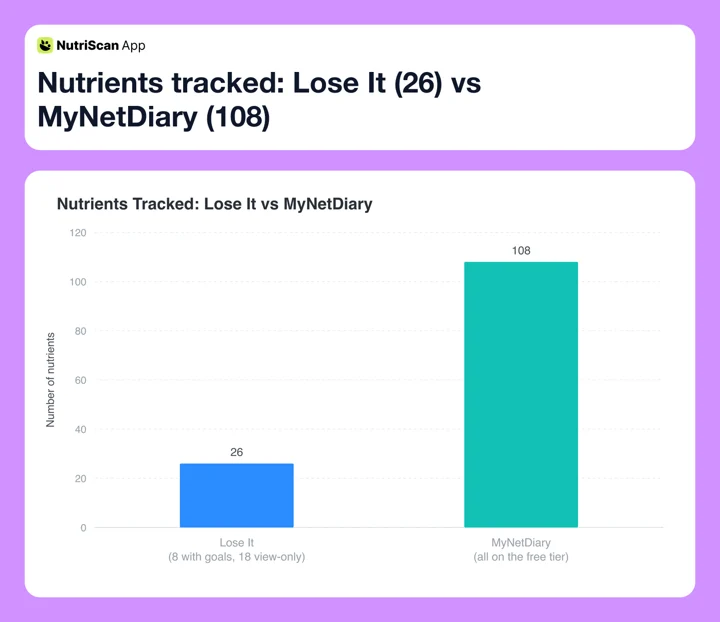 Figure 1: Nutrient depth gap. MyNetDiary tracks 4.2x more nutrients than Lose It, and only eight of Lose It's 26 accept a goal.
Who needs 108 nutrients? People tracking iron, calcium, potassium, vitamin D, vitamin B12, magnesium, zinc, or omega-3 intake. Anyone working with a dietitian who wants to review a full nutrient panel. Users managing PCOS, anemia, osteoporosis, or metabolic conditions. If your only goal is a calorie deficit and you do not care about micronutrients, Lose It's eight goal nutrients are enough.
Pro tip
If you are unsure whether you need 108 nutrients, start with a free macro calculator to see whether the basics already cover your goal. Most weight-loss plans only need 5 to 8 numbers, not 108.
Fitness Sync and Wearable Integration
Both apps connect to popular fitness platforms, but the depth and method differ.
Lose It fitness sync:
- Apple Health (free, all iOS users)
- Apple Watch (free, feeds the Calorie Bonus)
- Samsung Health through Health Connect on Android
- Fitbit (Premium)
- Garmin (Premium)
- Withings scale and Withings blood pressure monitor (Premium)
- Google Fit is gone: you cannot connect or reconnect it since March 2026
Lose It reads steps and exercise from a connected tracker and adds the surplus back to your budget. Its own example: 2,595 calories burned against a 2,102 target gives you a 493-calorie bonus to spend. That path runs through the Premium device syncs, so on the free tier it is Apple Health and Apple Watch only.
MyNetDiary fitness sync:
- Apple Health (free, writes 51 data types and reads 14)
- Apple Watch app with widgets (free)
- Fitbit, Garmin, and Withings direct sync (Premium)
- Sleep, hydration, and body measurement trackers (Premium)
MyNetDiary reads steps, exercise, and weight from connected devices, plus blood pressure from a Withings monitor and body composition from a smart scale. Apple Health is the free lane and a wide one, 51 data types written back. Google Fit and Health Connect are murkier: a connection exists, but MyNetDiary does not publish which tier it belongs to, so treat Android device sync as Premium until they say otherwise.
The key difference: Lose It treats fitness data as a calorie adjustment. MyNetDiary treats it as one input to a health record that also holds weight, blood pressure, glucose, and body composition. Lose It Premium has caught up on more of that than its reputation suggests, tracking blood pressure, glucose, and cholesterol too. What MyNetDiary still holds alone is A1C, ketones, and medication logging, plus a free tier that carries all 108 nutrients while Lose It's free tier carries no device syncs at all.
Real-World User Experiences
Real users on Reddit's r/CICO community frequently compare the two apps. One common theme stands out: barcode scanning.
"I love Lose It but ended up using MyNetDiary. I didn't want to pay for premium just to use the barcode scanning feature," wrote one user in a 2025 r/CICO thread. Lose It lists barcode scanning among its Premium features, which pushes budget-conscious users toward MyNetDiary, where the scanner is free.
Users who switch the other way usually cite the cleaner interface and the social layer. Lose It's App Store listing puts community support in the free tier: add friends, join support groups, pay nothing. MyNetDiary's answer is thinner, a feed of daily success stories rather than groups you log alongside. Neither company publishes a competitive challenges feature, so treat the "Lose It challenges" you may read about elsewhere as unconfirmed.
A pattern from reviews: people who start with Lose It and later pick up specific health goals, micronutrients, blood sugar, a dietitian, tend to graduate to MyNetDiary. People who find MyNetDiary too data-heavy simplify back to Lose It.
IMPORTANT
Checkpoint: midway progress update.
Decisions get easier from here.
⏱️ Progress 2/4 • ~2 minutes in • Keep going
✅ Step 1: Database and accuracy
✅ Step 2: Nutrient depth and fitness sync
👉 Step 3: Pricing and real user behavior (current)
⏳ The third option most readers overlook (next)
Tips for Choosing Between the Two
- Check if barcode scanning matters to you. If you scan packaged foods daily and do not want to pay, MyNetDiary gives you this for free. Lose It puts it in Premium.
- Count how many nutrients you actually track. If you only check calories, protein, and maybe fiber, Lose It's eight goal nutrients are plenty. If you track vitamin D, iron, calcium, or B12, MyNetDiary gives you 108 without paying.
- Look at your wearable ecosystem. Fitbit, Garmin, and Withings need Premium on both apps, so a tracker is not a tiebreaker. Apple Health and Apple Watch are free on both. Lose It reaches Samsung Health through Health Connect, and dropped Google Fit in March 2026.
- Decide if you need health condition tracking. Both apps track blood glucose and blood pressure on Premium. A1C, ketones, and medication logging are the parts only MyNetDiary publishes.
- Consider whether social features motivate you. Lose It puts friends and support groups in the free tier, which is the closest thing either app has to accountability from other people.
- Test both free tiers before paying. MyNetDiary's free plan carries barcode scanning, voice logging, all 108 nutrients, Apple Health, web access, and Professional Connect. Lose It's is narrower: calorie tracking, a weight-loss plan, community support, Apple Health, Apple Watch.
- Factor in where you log. Both run in a browser, MyNetDiary at mynetdiary.com and Lose It at loseit.com, and both cover iPhone, iPad, Android, and Apple Watch. Desk logging is a tie.
 The pick depends on whether you want fewer numbers to watch or more data to learn from.
Step-by-Step: How to Pick Your App in 5 Minutes
Step 1: Define your primary goal. Write it down in one sentence. "I want to lose weight by tracking calories" points to Lose It. "I want to track my full nutrient intake and share it with my dietitian" points to MyNetDiary.
Step 2: Check your devices. Open Apple Health, or Health Connect on Android, and see what is already feeding it. A Withings device connects to both apps and both charge Premium for it, so budget for that instead of letting it pick the app.
Step 3: Try the free tier of your top pick for 3 days. Log every meal, and count the days you actually finish. A study of 90 adults logging with a calorie app for eight weeks found that consistent and frequent logging, not complete logging, was what tracked with weight loss (Payne et al., Obesity Science & Practice). How often you open the app matters more than how thoroughly you fill it in.
Step 4: Check the nutrient view after 3 days. If the extra data in MyNetDiary feels useful, stay. If it feels noisy, Lose It's simpler view may suit you better.
Step 5: Decide if Premium is worth it. Lose It Premium lists at $79.99 per year. MyNetDiary Premium lists at $59.99 per year. Check what your own App Store offers you first, because both run promotions well below those numbers.
Pricing Breakdown
Both apps offer functional free tiers. Premium buys different things in each app.
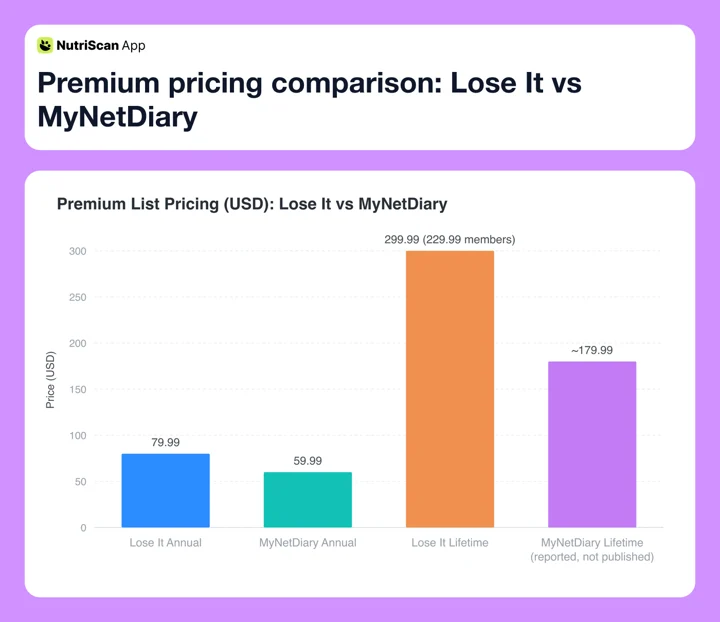 Figure 2: Annual and lifetime list prices in USD. The Lose It lifetime bar shows the $229.99 existing-member rate as well.
| Plan | Lose It | MyNetDiary |
|---|---|---|
| Free | Calorie tracking, weight-loss plan, community support, Apple Health and Apple Watch | Calorie tracking, barcode scanner, voice logging, all 108 nutrients, web access, Professional Connect |
| Premium monthly | No monthly plan | $8.99/mo |
| Premium annual | $79.99/yr list ($6.67/mo) | $59.99/yr list ($5.00/mo) |
| Lifetime | $299.99, or $229.99 for current Premium members | Reported at about $179.99, not published by MyNetDiary |
Prices are standard US prices as of mid 2026 and change by region. Lose It's figures come from its own membership tiers and pricing page, MyNetDiary's from its live App Store listing. Read both as list prices. Lose It says it "adjusts prices based on various factors like seasonal promotions and how often you use the app", and its App Store page shows Premium SKUs from $9.99 to $79.99; MyNetDiary's shows $59.99, $39.99, and $29.99 side by side. The MyNetDiary lifetime tier is real, announced in its own version 9.99 release note, but the company publishes no price for it, so $179.99 is a buyer-reported figure.
The value question: this one flipped in 2026. Lose It raised Premium from $39.99 to $79.99 and dropped the monthly option, so on list price MyNetDiary is $20 a year cheaper, and it hands you 108 nutrients, barcode scanning, voice logging, web access, and dietitian sharing before you pay anything. If price decides it, MyNetDiary is the pick. Lose It's money argument is now the promotional SKUs, which can land well under MyNetDiary's list, and a lifetime plan you can buy outright.
Related: Lose It pricing: free vs Premium and MyNetDiary pricing: free and Premium plans.

Research: What Studies Say About Tracking Apps and Weight Loss
The evidence for calorie tracking apps is real but modest, and it does not all point the same way.
A 2025 umbrella review in the International Journal of Environmental Research and Public Health pooled 11 systematic reviews covering 62,407 participants. Mobile apps produced a mean weight difference of -1.32 kg against controls, long-term eHealth interventions produced similar modest reductions, and web-based approaches showed no significant effect. The authors flag high heterogeneity, I2 of 82 percent (Couto & Almeida, 2025).
A 2025 systematic review and meta-analysis of 11 randomized controlled trials with 1,717 participants found a modest but statistically significant effect on weight and BMI over 4 to 6 months, and notes the effect looks limited past 6 months, with a tendency to regain (Pujia et al., 2025).
The 2024 Cochrane review is the cold water. Across 18 trials with 2,703 participants, the authors concluded the evidence does not demonstrate a clear benefit from weight-loss apps: against no or minimal intervention the effects were minor and mostly not clinically significant, and at 12 months an app made little to no difference to weight change on low-certainty evidence. Apps also vary so much in what they contain that comparing them head to head is hard (Metzendorf et al., 2024, Cochrane Database of Systematic Reviews).
The practical takeaway: the app is the tool, not the intervention. Nothing here says a 108-nutrient panel beats a simple calorie budget, so pick the one you will still be opening in week 12.
IMPORTANT
Checkpoint: final stretch before the reveal.
One last nudge - the third option is next.
⏱️ Progress 3/4 • ~3 minutes in • Keep going
✅ Step 1: Database and accuracy
✅ Step 2: Nutrient depth and fitness sync
✅ Step 3: Pricing and real user behavior
✨ The third option most readers overlook (about to reveal)
The Third Option Most Readers Overlook
You came here to pick between Lose It and MyNetDiary. But there is a third path that most comparison posts skip: a photo-first AI tracker that removes the search step entirely.
Both Lose It and MyNetDiary still ask you to search a database or scan a barcode. That is fine for boxed foods. It is slow for a home-cooked curry, a mixed plate, or anything your local cafe makes from scratch. This is exactly where NutriScan takes a different swing.
Here is what changes when you log with a photo instead of a search:
- Speed: point, snap, done. No keyboard, no "which entry is the right one," no 50-million-row haystack to filter.
- Mixed plates: AI reads the full plate at once, the grain, the curry, the vegetables, the salad, and breaks them out as separate items.
- Confidence on home food: the app does not need a verified database row to recognize what is on your plate.
- Insight on top: you still see calories, protein, carbs, fat, fiber, plus a simple NutriScore so you don't have to interpret 108 numbers.
- More than the camera: micronutrients on every meal at no cost, a fasting timer, and Monika, the voice AI nutritionist you can call four times a week on the free plan.

NutriScan home (Home tab) shows your remaining calories, macro split, and the day's logged meals at a glance.

Home > Camera icon > Click picture > Crop. The crop step keeps AI focused on the plate, not the background.
Try the photo-first path
If you spend more than 30 seconds searching for a single meal entry, you are paying a friction tax. A photo-first tracker like NutriScan can replace barcode + search with one snap for most home meals. Try it free at nutriscan.app.
This does not make Lose It or MyNetDiary wrong choices. Lose It still wins if your day is mostly branded snacks and the support groups keep you honest. MyNetDiary still wins if your dietitian wants a 108-nutrient export. NutriScan wins when most of your food is cooked at home or eaten out, and you want the logging step to disappear into your camera roll.
Related: NutriScan vs Lose It and NutriScan vs MyNetDiary.
Conclusion
Lose It and MyNetDiary are both strong calorie trackers, but they serve different users. Lose It is built for people who want the shortest path between opening the app and logging a meal. Its clean interface, free support groups, and Calorie Schedule make it one of the best weight loss apps for beginners. MyNetDiary is built for people who want their food diary to double as a health dashboard. Its 108 nutrients on every tier, A1C and medication logging, and free Professional Connect sharing make it the better choice for health-focused users and anyone working with a dietitian.
If you are still unsure, start with the free tier of whichever app matches your primary goal. You can always switch later. And if you want a photo-first approach that combines AI scanning with a simple NutriScore and macro view, try NutriScan free.
IMPORTANT
Recap: everything you completed this round.
Save this for next time you compare apps.
⏱️ Progress 4/4 • ~4 minutes in • Nicely done
✅ Step 1: Database and accuracy
✅ Step 2: Nutrient depth and fitness sync
✅ Step 3: Pricing and real user behavior
✅ The third option: photo-first AI tracking (revealed)
FAQ
Q: Is Lose It or MyNetDiary better for weight loss?
Both apps support weight loss through calorie tracking. Lose It is often better for beginners because its simple interface and free support groups keep people opening the app. A 2025 umbrella review found that mobile app interventions produced 1.32 kg more weight loss than control groups (Couto & Almeida, 2025). The app you open daily is the one that works.
Q: Does MyNetDiary have a free barcode scanner?
Yes. MyNetDiary includes barcode scanning in its free plan. Lose It lists barcode scanning among its Premium features, which is one of the most common reasons users switch to MyNetDiary.
Q: Can I sync my Fitbit with both apps?
Yes, and both charge for it. Lose It's help center says plainly that syncing Fitbit is a Premium feature, and MyNetDiary puts Fitbit, Garmin, and Withings in Premium as well. Fitbit is a tie, so let something else decide.
Q: Which app tracks more nutrients?
MyNetDiary tracks 108 nutrients on every tier, built on USDA FoodData Central and the NCC database from the University of Minnesota. Lose It gives you goals on eight core nutrients and a view-only breakdown of 18 more. For calories, protein, carbs, fat, and fiber, Lose It is enough. For vitamins, minerals, amino acids, or fatty acids, MyNetDiary is the clear choice, and it does not charge for them.
Q: Can I share my food diary with my doctor or dietitian?
MyNetDiary offers Professional Connect free, which lets you share your complete food diary, nutrient reports, and health data with a registered dietitian or healthcare provider. Lose It publishes no dietitian-sharing feature. Its closest equivalent is weekly reports you send by email or print.
Q: Which app has a better Apple Watch experience?
Both have free Apple Watch support. MyNetDiary offers Watch widgets for quick logging and progress checks. Lose It's Watch article covers calorie burn and the Calorie Bonus that lands in your budget; it does not document logging food from the wrist.
Q: Is there a web version?
Both do. MyNetDiary runs at mynetdiary.com, and Lose It at loseit.com and my.loseit.com, where you can log food and build recipes in a browser. For keyboard logging at a desk, either works.