MyFitnessPal Premium vs Premium+ in 2026: Every Feature Compared
 ChatGPT
  Claude
  AI Mode
  Perplexity
MyFitnessPal Premium has 20 features. Premium+ has 24. But which 4 extras actually matter? This is the only guide that lists every single feature in both tiers so you can stop guessing and start deciding.
TL;DR - Premium vs Premium+ Feature Breakdown
Premium ($79.99/yr) includes 20 features: ad-free, barcode scanner, macros by gram, meal scan, IF tracker, data export, and 14 more tracking tools
Premium+ ($99.99/yr) includes everything in Premium plus 4 exclusives: Meal Plan Builder, Meal Prep Mode, Diet Preference Customization, and Automatic Grocery Lists with delivery integration
The $20/year gap ($1.67/month) only matters if you need meal planning, not just meal tracking
Decision shortcut: If you cook at home and want the app to tell you what to eat, get Premium+. If you already know what to eat and just need to log it, Premium is enough.
MyFitnessPal now has two paid tiers, and the naming makes the difference sound bigger than it is. Premium and Premium+ share 20 identical features. The gap comes down to four meal-planning tools that cost an extra $20 per year. Whether that $20 matters depends entirely on how you eat.
This guide is different from our Is $20 Worth It? post (which focuses on value judgment) and our Pricing Guide (which covers all three tiers including Free). Here, we list every feature in both paid tiers, count them, compare costs to standalone apps, and give you a framework to decide.
 That face when you're comparing subscription tiers for the fifth time this week...
The Quick Answer 🎯
Summary Box
Premium ($79.99/yr): 20 features focused on tracking what you eat. Barcode scanner, macros by gram, meal scan, food analysis, IF tracker, data export, and more.
Premium+ ($99.99/yr): All 20 Premium features plus 4 planning features. Meal Plan Builder, Meal Prep Mode, Diet Preference Customization, and Automatic Grocery Lists with delivery.
The difference: Tracking vs. tracking + planning. That's it.
What Both Premium Tiers Include (20 Shared Features) 🔓
Before looking at what separates the two tiers, here's the complete list of features you get with either Premium or Premium+. These 20 tools form the core of the paid experience.
Ad-Free Experience
No banners, no pop-ups, no video ads. The free version shows ads throughout the app. Both paid tiers remove them completely. This alone makes a noticeable difference in daily usage.
Barcode Scanner
Scan packaged food to log it instantly. MyFitnessPal removed this from the free tier, making it one of the top reasons people upgrade. Works with the 20M+ food database.
Macros by Gram
Set protein, carbs, and fat targets in grams instead of just percentages. Essential if you follow a structured plan like 40/30/30 or need precise numbers for cutting, bulking, or body recomposition.
Meal Scan (AI Camera)
Point your phone camera at a meal, and MyFitnessPal's AI estimates calories and macros. You can edit the results before logging. Works for home-cooked and restaurant meals.
Quick-Add Macros
Log macro totals directly without searching the database. Useful when you already know your numbers from a meal prep label or coach's spreadsheet.
Here are the remaining 15 shared features:
| # | Feature | What It Does |
|---|---|---|
| 6 | Food Analysis | Compare two foods side by side for macros and calories |
| 7 | Different Goals by Day | Separate calorie/macro targets for training vs rest days |
| 8 | Exercise Calorie Settings | Adjust or disable exercise calories added to daily target |
| 9 | Macros by Meal | See macro breakdown per meal, not just daily totals |
| 10 | Calorie Goals by Meal | Set per-meal calorie targets (bigger dinner, lighter lunch) |
| 11 | Net Carbs Tracking | Total carbs minus fiber for keto and low-carb dieters |
| 12 | Food Timestamps | See exact time each meal was logged |
| 13 | Home Screen Dashboard | Customize which metrics show on your home screen |
| 14 | Recipe Discovery | 1,500+ recipes with full nutrition info, loggable in one tap |
| 15 | Workout Routines | Pre-built strength and cardio plans synced to food diary |
| 16 | Intermittent Fasting Tracker | Set fasting windows (16:8, 18:6), track streaks |
| 17 | Multi-Day Logging | Copy meals from previous days or log food in advance |
| 18 | Data Export | Download diary and logs as CSV for spreadsheet analysis |
| 19 | Priority Support | Faster responses from the MyFitnessPal support team |
| 20 | Unlimited Daily Digests | Email summaries of daily food log and progress |
Key Takeaway
If you only need tracking, scanning, and macro control, Premium covers everything. Premium+ adds zero improvements to any of these 20 features.
What Premium+ Adds (The 4 Exclusive Features) ✨
Premium+ costs $20 more per year ($1.67/month). That money buys four features, all centered on meal planning.
 The 4 features that separate Premium+ from Premium - all focused on meal planning
1. Meal Plan Builder
The flagship Premium+ feature. It generates a personalized 7-day meal plan based on your inputs:
- Calorie target - set manually or let MFP calculate
- Diet type - Standard, Mediterranean, Keto, Low-Carb, Vegetarian, Vegan, Pescatarian, Paleo, or Whole-Food Focus
- Food preferences - mark foods to avoid or prioritize
- Portion size - small, medium, or large servings
- Cooking time - quick meals vs longer prep
- Budget level - economy, moderate, or premium ingredients
The app builds a full week of breakfast, lunch, dinner, and snacks. Every meal links to a recipe with nutrition data and cooking instructions. Meals auto-log to your diary. You can swap any meal for an alternative that still fits your targets.
2. Meal Prep Mode
Built for Sunday batch-cookers. Meal Prep Mode reorganizes your weekly plan for bulk cooking:
- Select which days you cook (Sunday, Wednesday, etc.)
- Mark which meals to prep in advance
- The app scales portions and creates a batch schedule
- Grocery list consolidates across all prep days
Example: If grilled chicken appears three times that week, Meal Prep Mode tells you to cook all portions at once and store them. No more cooking the same protein three separate times.
3. Diet Preference Customization
Goes deeper than basic diet type selection:
- Exclude ingredients - mushrooms, bell peppers, seafood, anything
- Per-meal portions - big breakfast, small lunch, medium dinner
- Meal complexity - simple one-pot meals vs multi-step recipes
- Cuisine priority - Asian, Italian, Mexican, American, Indian
- Skill level - beginner-friendly vs advanced techniques
This is the feature that prevents "generic meal plan" failure. Plans include foods you actually enjoy, cooked at a difficulty level you can handle.
4. Automatic Grocery Lists + Delivery Integration
Premium+ generates a categorized grocery list (produce, dairy, meat, pantry) from your meal plan. The list integrates with three delivery services:
- Instacart - tap to transfer items to your cart
- Walmart+ - same one-tap integration
- Amazon Fresh - same workflow
You can also use the list manually for in-store shopping. It syncs across all your devices.
 Figure 1: Feature count breakdown - Premium+ adds just 4 features on top of Premium's 20
Breaking Down the Value: Is $20 Worth It? 💰
Let's run the numbers.
| Premium | Premium+ | Difference | |
|---|---|---|---|
| Annual price | $79.99/yr | $99.99/yr | $20/yr |
| Monthly equivalent (annual plan) | $6.67/mo | $8.33/mo | $1.67/mo |
| Month-to-month price | $19.99/mo | $24.99/mo | $5.00/mo |
Monthly Plans Cost 3x More
Paying monthly for Premium+ costs $299.88/year vs $99.99 on the annual plan. If you're upgrading, always lock in the annual rate.
The Time Savings Math
For that $1.67/month, Premium+ gives you:
- Meal planning - standalone meal planning services charge $10-30/month
- Meal prep scheduling - similar tools cost $5-15/month separately
- Grocery list integration - saves 1-2 hours/week of shopping time
- Diet customization - reduces wasted food from meals you won't eat
If you value your time at $15/hour and Premium+ saves you even 30 minutes per week on meal planning and grocery shopping, that's $30/month in time savings for a $1.67 investment.
Full Cost-Benefit Breakdown
Premium+ pays for itself if any of these apply:
- You currently pay for a separate meal planning app ($50-70/year)
- You spend more than 30 minutes per week planning meals
- You waste food because you buy groceries without a plan
- You order takeout 2+ times/month because you "don't know what to make"
- You want structure but can't afford a nutritionist ($50-200+/month)
Who Should Upgrade to Premium+ 👤
1. You Meal Prep Weekly
Meal Prep Mode was designed for you. If you already batch-cook on Sundays, Premium+ organizes the process and generates consolidated shopping lists for your prep days.
2. You Use Grocery Delivery
The Instacart/Walmart+/Amazon Fresh integration removes the friction of manually adding 30+ items to your cart. If you order groceries online regularly, this feature saves real time every week.
3. You Struggle With "What Should I Eat?"
Decision fatigue kills consistency. The Meal Plan Builder answers the question every week with meals that fit your macros, preferences, and cooking skill level.
4. You Want Coaching Without Hiring a Coach
Nutritionists cost $50-200+/month. Premium+ provides structured weekly meal plans for $8.33/month. It's algorithm-based, not personalized coaching, but it's structured enough for most people tracking general fitness goals.
5. You're New to Cooking for Health Goals
Step-by-step recipes, pre-portioned grocery lists, and skill-level filtering reduce the intimidation of cooking healthy meals from scratch. Premium+ holds your hand through the entire process.
6. You Waste Food Because You Don't Plan
No plan = random grocery trips = expired produce rotting in the back of your fridge. Premium+ builds a grocery list based on what you'll actually cook that week. Less waste, lower bills.
 When the meal prep is organized and the grocery list writes itself...
Who Should Stick With Premium ✋
1. You Already Have a Meal Routine
If you eat the same meals most weeks, cook instinctively, or have a system that works, the Meal Plan Builder adds nothing. Save the $20.
2. You Track Macros Flexibly
Flexible dieters who hit targets with varied foods don't need a fixed weekly plan. Premium's macros-by-gram, barcode scanner, and quick-add cover this perfectly.
3. You Eat Out Frequently
If most meals come from restaurants or takeout, the Meal Planner and grocery integration go unused. Premium's barcode scanner and meal scan AI work better for this lifestyle.
4. You Already Use a Separate Meal Planner
If you pay for Eat This Much, Mealime, or PlateJoy and you're satisfied, Premium+ duplicates what you already have. Don't pay twice for the same function.
5. You're on a Tight Budget
$20/year is small, but if you're on the monthly plan, Premium+ is $5/month more. If money is tight, Premium covers the essentials. Upgrade later if you need meal planning.
How Premium+ Compares to Standalone Apps ⚖️
If you're considering Premium+ specifically for meal planning, here's how it stacks up against dedicated planners:
| App | Annual Cost | Meal Plans | Grocery Lists | Calorie Tracking | Diet Customization |
|---|---|---|---|---|---|
| MFP Premium+ | $99.99 | Yes | Yes + delivery | Yes (full suite) | Yes |
| Eat This Much | $59.99 | Yes | Yes | Basic only | Yes |
| Mealime | $49.99 | Yes | Yes | No | Limited |
| PlateJoy | $69.00 | Yes | Yes | No | Yes |
| MFP Premium | $79.99 | No | No | Yes (full suite) | No |
 Figure 2: Annual subscription costs compared - Premium+ bundles tracking and planning for less than two separate apps
The Bundle Math
Premium ($79.99) + Eat This Much ($59.99) = $139.98/year for tracking + planning in two apps.
Premium+ ($99.99) = $99.99/year for tracking + planning in one app.
You save $40/year by choosing Premium+ over the two-app approach. Plus, meals auto-log to your diary with zero manual entry.
What Premium+ Still Doesn't Give You ⚠️
Even at $99.99/year, these gaps remain:
5 Limitations to Know Before Upgrading
No dynamic macro coaching - MacroFactor adjusts macros weekly based on your weight trend. MFP sets targets once; you adjust manually.
No deep micronutrient tracking - Cronometer tracks vitamins, minerals, and micronutrients in detail. MFP shows some but doesn't prioritize them.
No verified-only food database - The 20M+ database includes user-submitted entries with potential inaccuracies. Always double-check.
No one-on-one coaching - Meal plans are algorithm-generated, not reviewed by a human dietitian or nutritionist.
Limited grocery chain support - Delivery integration works with Instacart, Walmart+, and Amazon Fresh only. Regional and international chains aren't supported.

How to Decide: Premium vs Premium+ (3-Question Framework)
You've made it. This is the shortcut that replaces hours of comparison shopping. Three questions, 60 seconds, done.
Question 1: Do you need help deciding what to eat, or just tracking what you already eat?
- Planning help ➡️ Premium+
- Tracking only ➡️ Premium
Question 2: Do you meal prep or use grocery delivery?
- Yes to either ➡️ Premium+ adds clear value
- No to both ➡️ Premium is enough
Question 3: Will you open the Meal Planner every week?
- Yes, weekly ➡️ The $20 is worth it
- Occasionally or never ➡️ Don't upgrade
Decision Shortcut
If you answered "tracking only," "no," and "never" to all three questions, Premium is your tier. You'd be paying $20 for tools you won't open.
If you answered "planning," "yes," and "yes," Premium+ pays for itself in time savings and reduced food waste within the first month.
Real User Scenarios 🎯
Scenario 1: Priya - Vegetarian Struggling With Protein
Priya tracks macros but can't hit 100g protein on a vegetarian diet. She's bored eating the same paneer and dal combos every week.
Best Choice: Premium+
The Meal Plan Builder's Vegetarian mode generates high-protein recipes weekly. Diet Preference lets her exclude foods she dislikes and prioritize Indian cuisine. The grocery list ensures she buys everything she needs without a second trip to the store.
Scenario 2: Jake - Bodybuilder on a Cut
Jake has tracked macros for three years. He eats chicken, rice, and broccoli on repeat. He knows his numbers cold and doesn't need meal suggestions.
Best Choice: Premium
Jake needs macros by gram, quick-add, and the barcode scanner. Premium+ features would sit untouched. He'd pay $20/year for tools he'll never open.
Scenario 3: Sarah - Busy Mom Using Instacart
Sarah works full-time and orders groceries through Instacart weekly. She spends 45 minutes every Sunday planning dinners and building her cart manually. She wants to lose 10 kg but can't stick to a plan.
Best Choice: Premium+
The Meal Plan Builder removes Sunday planning. Grocery integration sends ingredients directly to Instacart. Sarah saves an hour per week and gets meals that fit her calorie target automatically.
Scenario 4: Tom - Business Traveler, Eats Out Daily
Tom is on the road four days a week. Hotel breakfasts, restaurant lunches, takeout dinners. He logs everything using the barcode scanner and meal scan camera.
Best Choice: Premium
Tom doesn't cook, doesn't grocery shop, and doesn't meal prep. Every Premium+ feature assumes home cooking. Premium covers his needs completely.
Track Your Meals Smarter With NutriScan 📱
If you're comparing nutrition apps, there's one more option worth considering. NutriScan takes a different approach to meal logging: snap a photo of any meal and get accurate macro estimates in seconds using AI.
What makes it different:
- AI-powered meal scanning - point your camera at any plate and get instant calorie and macro estimates
- Built for Indian cuisine - accurate logging for thali, biryani, dal-rice, and regional dishes that other apps struggle with
- No database searching - skip the manual entry entirely
- 7-day free trial - test it before committing
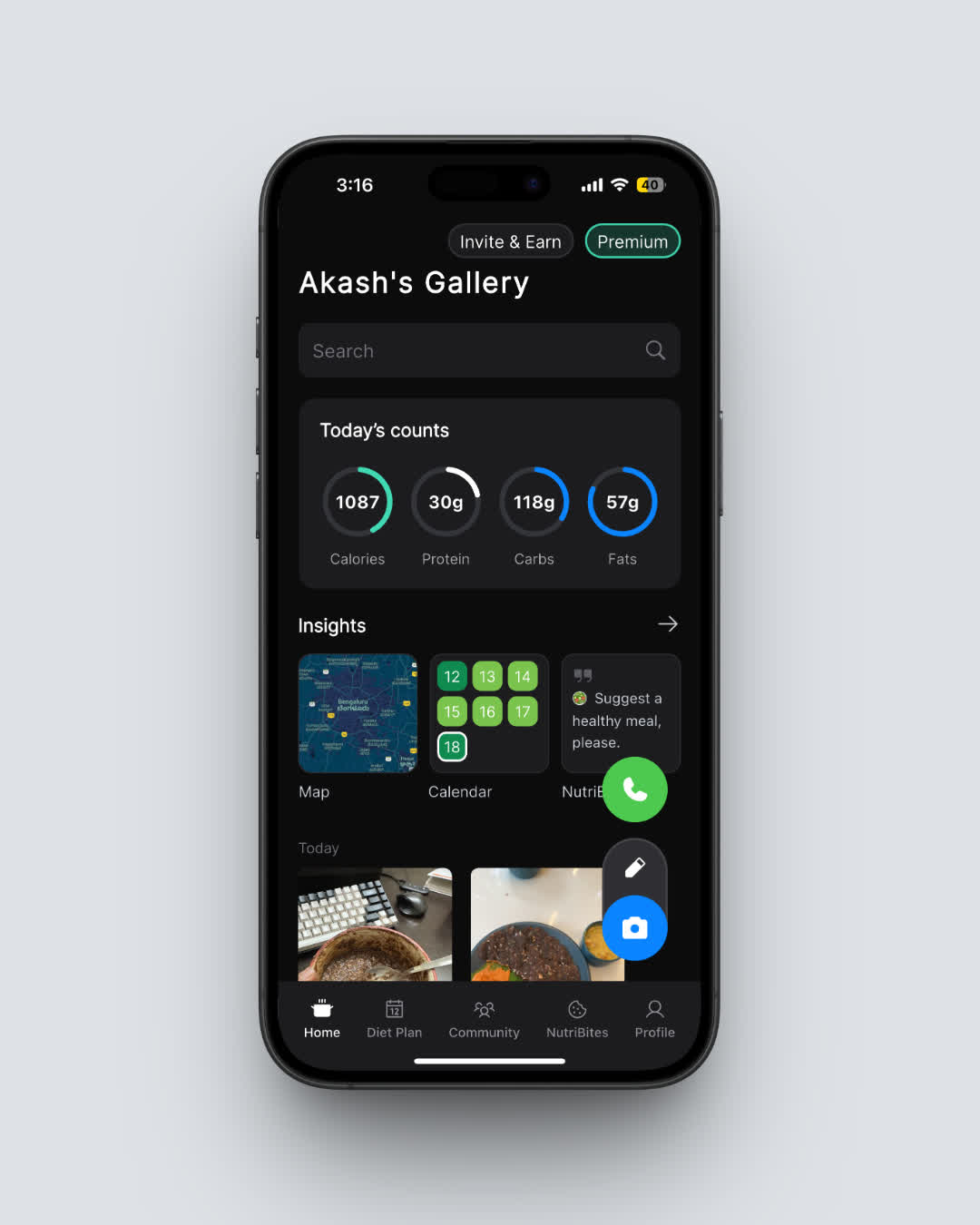 NutriScan's daily breakdown: see your calories, macros, and meal history at a glance
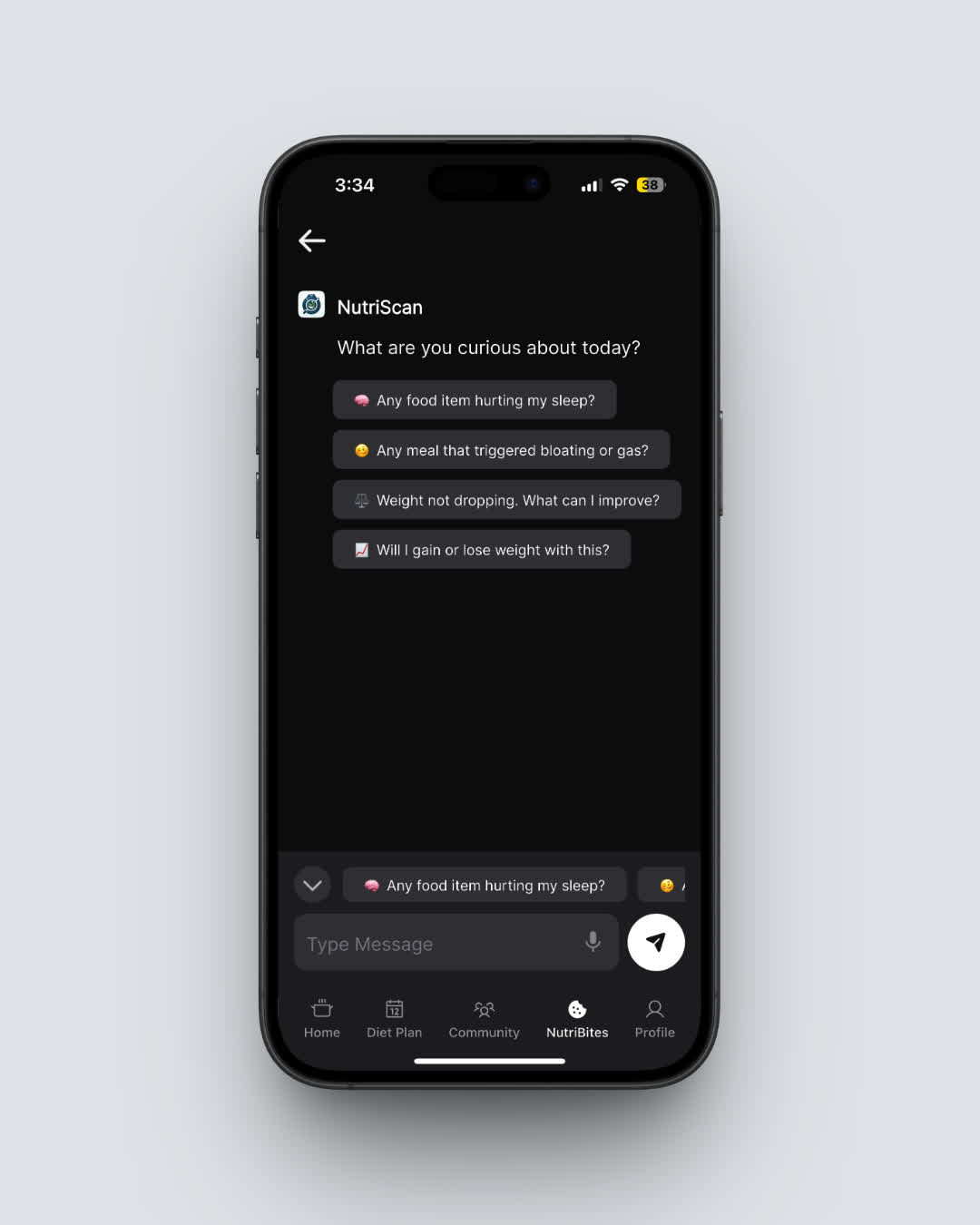 NutriBites: daily nutrition insights personalized to your eating patterns
Whether you stick with MyFitnessPal or want to try something new, the best app is the one you'll actually use every day. Check out NutriScan and see how AI photo logging compares to manual tracking. You can also explore our meal scan guide or calculate your personal targets with the free macro calculator.

Frequently Asked Questions ❓
How many features does MyFitnessPal Premium include?
MyFitnessPal Premium includes 20 features: ad-free experience, macros by gram, barcode scanner, meal scan, quick-add macros, food analysis, different goals by day, exercise calorie settings, macros by meal, calorie goals by meal, net carbs tracking, food timestamps, home screen dashboard, recipe discovery, workout routines, intermittent fasting tracker, multi-day logging, data export, priority support, and unlimited daily digests. All 20 are also included in Premium+.
What are the 4 exclusive Premium+ features?
Premium+ adds Meal Plan Builder (personalized 7-day meal plans), Meal Prep Mode (batch cooking schedules and portion scaling), Diet Preference Customization (ingredient exclusions, cuisine priorities, cooking skill level), and Automatic Grocery Lists with delivery integration for Instacart, Walmart+, and Amazon Fresh.
Is the barcode scanner in Premium or only Premium+?
The barcode scanner is included in both Premium ($79.99/year) and Premium+ ($99.99/year). It was removed from the free tier, which is why it's one of the most common reasons users upgrade to a paid plan.
How much more does Premium+ cost than Premium?
Premium+ costs $20 more per year on the annual plan ($99.99 vs $79.99), which works out to roughly $1.67/month. On the monthly plan, Premium+ is $5/month more ($24.99 vs $19.99).
Can Premium+ replace a standalone meal planning app?
For most users, yes. Premium+ combines calorie tracking and meal planning in one app for $99.99/year. Standalone planners like Eat This Much ($59.99/year) or PlateJoy ($69/year) cost less individually but don't include calorie tracking. If you need both, Premium+ is cheaper than two separate subscriptions.
Does Premium+ automatically adjust macros based on my progress?
No. MyFitnessPal Premium+ lets you set macro targets, but it doesn't dynamically recalculate them based on your weight trend. For automatic weekly macro adjustments, apps like MacroFactor ($71.99/year) offer that specific feature. With MFP, you update targets manually when your goals change.