How to Cancel Lifesum Premium (2026 Step-by-Step Guide)
 ChatGPT
  Claude
  AI Mode
  Perplexity
TL;DR
Cancel through the platform where you bought Lifesum (App Store, Google Play, website, Paddle, or Galaxy Store). Cancel at least 3 days before renewal. Deleting the app does NOT cancel billing.
You have 14 days to request a refund. Your data stays after canceling.
Lifesum has helped over 65 million people track meals and build healthier habits across 182 countries. But plans change. Maybe you reached your goal, maybe you found a better fit, or maybe the subscription just does not work for your budget right now. Whatever the reason, canceling should be simple.
As a NutriScan nutritionist, I know that switching or pausing a nutrition app is a normal part of any health journey. A 2024 scoping review in the Journal of Medical Internet Research found that most adults abandon health and lifestyle apps within the first few weeks, often because the app no longer fits their changing needs. There is no shame in moving on.
This guide covers every way to cancel Lifesum Premium, including the platforms most guides miss (Paddle and Galaxy Store). I will also explain refund rules, common mistakes, and what happens to your data after you cancel.
 Not sure which platform to cancel through? This guide covers all 5 paths.
IMPORTANT
Your Lifesum cancellation plan at a glance.
A quick roadmap so you can cancel without surprise charges.
⏱️ Progress 0/4 - ~0 minutes in - Keep going
⏳ Step 1: Find your purchase platform
⏳ Step 2: Follow the cancel steps
⏳ Step 3: Handle refund if needed
🔍 The billing trap that catches 78% of users (revealed near the end)
What You Need to Know Before You Cancel 📋
Before you tap "Cancel," here are the key facts that save people from surprise charges and lost access.
Lifesum has 5 possible cancel paths. Where you cancel depends entirely on where you bought your subscription. You cannot cancel through the Lifesum app itself. You must go to the platform where you made the original purchase.
Cancel at least 3 days early. Lifesum's official help center warns that you need to cancel at least three days before your renewal date. This gives the payment platform enough time to process the cancellation.
DO NOT JUST DELETE THE APP
Uninstalling the Lifesum app or even deleting your Lifesum account will not stop billing. You must actively cancel through your payment platform.
You keep access until your current period ends. If you cancel a 3-month plan after one month, you still get Premium features for the remaining two months. Canceling only prevents the next renewal charge.
Here is a quick summary of Lifesum Premium pricing as of early 2026 (Garage Gym Reviews):
| Plan | Price | Per Month |
|---|---|---|
| 3 months | $29.99 | $10.00 |
| 6 months | $49.99 | $8.33 |
| 12 months | $99.99 | $8.33 |
NOTE
Lifesum does not offer a monthly subscription in most markets. Pricing varies by region, and promotional discounts can lower these prices significantly.
How to Find Where You Bought Lifesum 🔍
Not sure which platform handles your subscription? Check your email for the original receipt. Here is how to identify each one:
- App Store (Apple): Your receipt comes from Apple. The words "App Store" appear on it.
- Google Play Store: Your receipt comes from Google Play. "Google Play" is mentioned.
- Website (Adyen): Your receipt comes from Lifesum directly. "Web / Adyen" is listed as the payment method.
- Paddle: "Paddle" appears on the receipt. This usually means you subscribed through an Instagram or Facebook ad.
- Galaxy Store (Samsung): The receipt comes from Samsung Galaxy Store.
CHECK YOUR BANK STATEMENT
If you cannot find your receipt, check your bank or credit card statement. The charge description will usually mention "Apple," "Google," "Paddle," or "Lifesum" directly.
Cancel Lifesum on iPhone (App Store) 📱
If you subscribed through the App Store on an iOS device, Apple handles your billing. Lifesum cannot cancel it for you.
 Follow these steps carefully to ensure your Lifesum subscription is fully canceled.
Steps:
- Open the App Store on your iPhone or iPad.
- Tap your profile picture (top right corner).
- Tap Subscriptions.
- Find and tap Lifesum.
- Tap Cancel Subscription.
You can also cancel through Settings > [your name] > Subscriptions > Lifesum > Cancel Subscription. Both paths lead to the same place.
After canceling, you will see a confirmation and your Premium access will continue until the end of the current billing period.
IF YOU DON'T SEE A CANCEL BUTTON
Your subscription is already canceled or was purchased on a different platform. Double-check your receipts.
Cancel Lifesum on Android (Google Play Store) 🤖
If you subscribed through the Google Play Store, Google handles your billing.
Steps:
- Open the Google Play Store app.
- Tap your profile icon (top right).
- Go to Payments & subscriptions.
- Tap Subscriptions.
- Find Lifesum and tap it.
- Tap Cancel subscription.
- Follow the on-screen instructions.
Google may ask why you are canceling and offer a discount to stay. You can skip these screens and confirm the cancellation.
MULTIPLE GOOGLE ACCOUNTS
If you have multiple Google accounts on your phone, make sure you are signed into the same account that made the original purchase.
IMPORTANT
Checkpoint: here's where you are right now.
Quick status update so you always know the next best move.
⏱️ Progress 1/4 - ~1 minute in - Keep going
✅ Step 1: Find your purchase platform (done)
👉 Step 2: Follow the cancel steps (you're here)
⏳ Step 3: Handle refund if needed
🧩 The billing trap that catches 78% of users (coming soon)
Cancel Lifesum Purchased on the Website 💻
If you bought Lifesum Premium through lifesum.com (with a credit card processed by Adyen), you cancel directly on the website.
Steps:
- Go to lifesum.com.
- Log in to your account.
- Navigate to Manage Subscription.
- Click Cancel Subscription.
This is straightforward, but some users forget they used a different email for the website purchase versus the app login. Make sure you log in with the same email tied to your subscription.
Cancel Lifesum Purchased Through Paddle 🏓
Paddle is a payment processor that handles purchases made through Instagram ads, Facebook ads, and other social media promotions. If "Paddle" appears on your receipt, use this method.
Steps:
- Go to paddle.net.
- Select Look up my purchase.
- Enter the email address you used when completing the purchase.
- Verify your email (Paddle will send a confirmation code).
- Locate your Lifesum purchase.
- Click Cancel.
PADDLE SUBSCRIPTIONS
Many users do not realize they bought Lifesum through Paddle. If you tapped a promotional link in an Instagram story or Facebook ad, this is likely your cancel path.
Cancel Lifesum on Samsung Galaxy Store 📲
If you downloaded and subscribed to Lifesum through the Samsung Galaxy Store (pre-installed on Samsung devices), Samsung handles your billing.
Steps:
- Open Galaxy Store on your Samsung device.
- Tap the Menu icon from the main screen.
- Tap Subscriptions.
- Find and select Lifesum.
- Tap Unsubscribe.
Galaxy Store subscriptions are separate from Google Play. If you are not sure which store you used, check both.
Lifesum Refund Policy: The 14-Day Window 💸
Canceling your subscription stops future charges, but it does not automatically give you a refund. According to Lifesum's refund policy, you have 14 days from the date of purchase to request a refund.
Here is how to request a refund based on your purchase platform:
| Platform | How to Request a Refund |
|---|---|
| App Store | Go to reportaproblem.apple.com or call Apple Support |
| Google Play | Follow Google's refund instructions |
| Website (Adyen) | Contact Lifesum support with your receipt or Purchase ID |
| Paddle | Go to paddle.net and request a refund |
| Galaxy Store | Contact Lifesum support with a copy of your receipt |
| PayPal | Contact Lifesum support within 14 days with your receipt |
EU CONSUMER PROTECTION
Lifesum AB is based in Stockholm, Sweden. The 14-day refund window aligns with EU consumer protection law. If you consented to access Lifesum Premium services during the withdrawal period, you may lose the right to withdraw. Canceling does NOT equal a refund. These are two separate processes.
IMPORTANT
Checkpoint: midway progress update.
You're halfway - the tricky part is next.
⏱️ Progress 2/4 - ~2 minutes in - Keep going
✅ Step 1: Find your purchase platform (done)
✅ Step 2: Follow the cancel steps (done)
👉 Step 3: Handle refund if needed (current)
⏳ The billing trap that catches 78% of users (next)
9 Common Mistakes When Canceling Lifesum ❌
These are the errors I see most often. Avoiding them saves you time and money.
Deleting the app instead of canceling. Uninstalling Lifesum does not stop your subscription. The billing is handled by Apple, Google, or the platform you used.
Deleting your Lifesum account instead of canceling. Account deletion and subscription cancellation are two separate things. Delete your account without canceling, and you will still get charged.
Canceling on the wrong platform. If you bought through Google Play but try to cancel through the App Store, it will not work. Always match the cancel path to the purchase path.
Canceling too late. Lifesum requires at least 3 days before the renewal date. If you cancel 1 day before, the charge may still go through.
Forgetting which email you used. Web purchases and Paddle purchases may use a different email than your Lifesum app login. Check your inbox for the original receipt.
Not checking for Paddle purchases. If you clicked a promotional link on Instagram or Facebook, your subscription may be through Paddle, not through the App Store or Google Play.
Expecting an instant refund after canceling. Cancel and refund are separate processes. Cancel stops future charges. A refund requires a separate request within 14 days.
Trying to cancel through the Lifesum app. There is no cancel button inside the Lifesum app. You must go to your payment platform.
Assuming Galaxy Store and Google Play are the same. Samsung devices can have both stores. Your subscription lives in whichever store you used to download and subscribe.
A 2022 cross-sectional survey on mHealth engagement found that unclear cancellation processes are a top frustration for health app users. Knowing your exact purchase platform before you start is the single most important step.
Lifesum vs Other Apps: Annual Cost Comparison 💰
How does Lifesum stack up against other nutrition tracking apps on price?
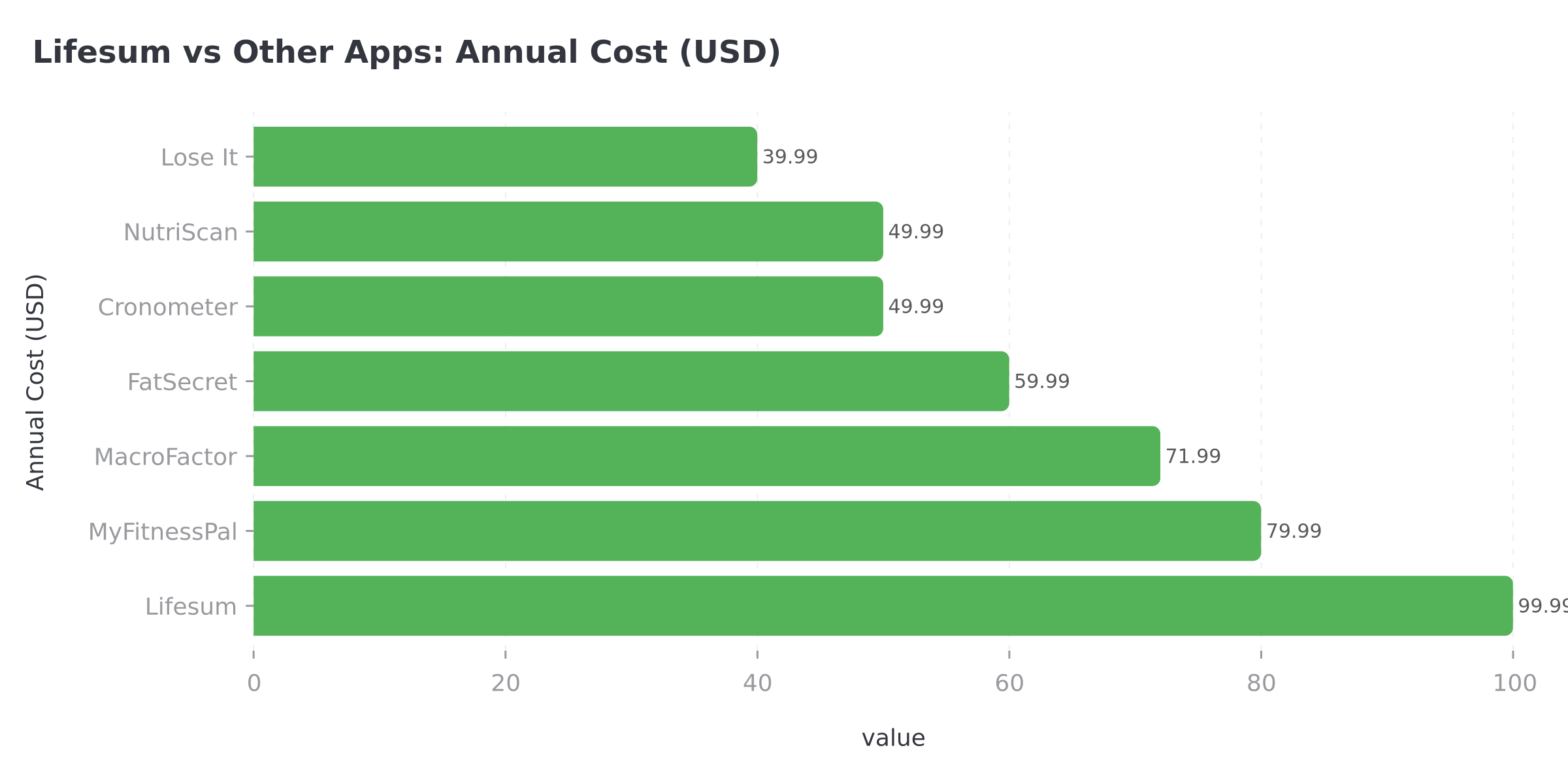 Figure 1: Annual cost comparison of popular calorie tracking apps (2026 pricing). Lifesum is the most expensive at $99.99/year.
As shown in the chart above, Lifesum is the most expensive option at $99.99/year. Apps like NutriScan ($49.99/yr) and Lose It ($39.99/yr) offer competitive features at less than half the price.
What Happens After You Cancel Lifesum Premium 🔄
Once you cancel, here is what to expect:
You keep Premium features until your period ends. If you paid for 12 months and cancel after 3 months, you still have 9 months of Premium access. Nothing changes until the expiry date.
After expiry, you drop to the free plan. The free version of Lifesum includes basic food, exercise, water, and weight tracking. You lose access to meal plans, macros and net carbs tracking, saved favorite foods, detailed nutrition information, food and meal ratings, weekly Life Score, and health recipes (Garage Gym Reviews).
Your data stays in your account. Canceling does not delete your food logs, weight history, or custom foods. If you resubscribe later, everything is still there.
Gift card and 100% discount subscriptions do not auto-renew. If someone gave you Lifesum as a gift or you used a promotion that covered the full cost, you do not need to cancel. It simply expires (Lifesum Helpdesk).
 Canceled successfully? Time to relax and explore your options.
IMPORTANT
Checkpoint: final stretch before the reveal.
One last nudge - the billing trap reveal is next.
⏱️ Progress 3/4 - ~3 minutes in - Keep going
✅ Step 1: Find your purchase platform
✅ Step 2: Follow the cancel steps
✅ Step 3: Handle refund if needed
✨ The billing trap that catches 78% of users (about to reveal)

Should You Cancel or Just Downgrade? 🤔
Not everyone needs to cancel completely. Here are three scenarios to consider:
Here is the billing trap I promised: most users who get charged after "canceling" bought Lifesum through a Paddle link on Instagram or Facebook and tried to cancel through the App Store instead. The subscription lives on whichever platform processed the payment, not wherever you use the app.
If you tapped a promo link in an Instagram story, your subscription is through Paddle, and only paddle.net can cancel it. Check your original receipt before you cancel anywhere.
Cancel if you are switching to a different nutrition app, you have reached your health goal, or the subscription no longer fits your budget. A 2022 literature review on mHealth retention found that users who leave an app after meeting their goals are actually success stories, not failures.
Keep the free plan if you still want basic calorie tracking without paying. The free version includes food logging and a barcode scanner, which covers the basics.
Consider switching if you want features Lifesum does not offer on its free plan. For example, NutriScan offers AI-powered photo scanning on its free plan with 15 scans per week, plus NutriBites AI for meal suggestions.
If photo logging and AI coaching matter to you, it is worth comparing. You can also use our free macro calculator to find your daily targets before picking a new app.
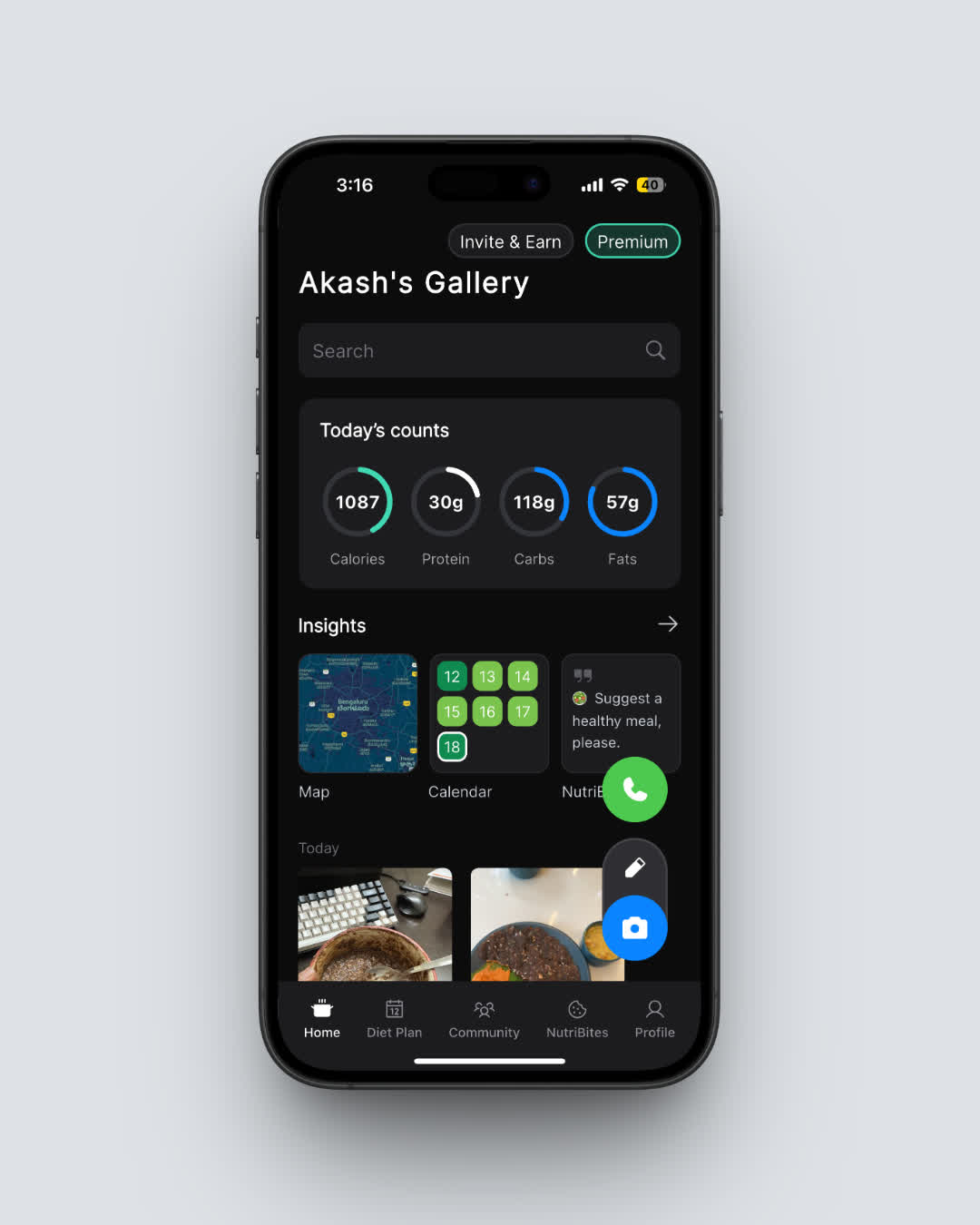 NutriScan's home screen gives you a clear daily breakdown of calories, protein, carbs, and fat. Navigate: Home > Nutrition Card
How Lifesum Compares to Other Apps on Cancel Ease 📊
Here is how Lifesum's cancellation process stacks up against other popular nutrition apps:
| App | Cancel Paths | Refund Window | Free Plan After Cancel |
|---|---|---|---|
| Lifesum | 5 (Apple, Google, Web, Paddle, Galaxy) | 14 days | Yes (limited) |
| MyFitnessPal | 3 (Apple, Google, Web) | Platform-dependent | Yes (generous) |
| YAZIO | 3 (Apple, Google, Web) | 14 days (EU) | Yes (limited) |
| Lose It | 3 (Apple, Google, Web) | Platform-dependent | Yes (moderate) |
| Fastic | 3 (Apple, Google, Web) | 14 days (guarantee) | Yes (limited) |
| MacroFactor | 2 (Apple, Google) | 60 days | No |
| NutriScan | 2 (Apple, Google) | Platform-dependent | Yes (generous) |
Lifesum has the most cancel paths of any major nutrition app, which is both a strength (more options) and a weakness (more confusion about which path to use). The Paddle path, in particular, catches many users off guard.
RELATED GUIDES
Looking to cancel other nutrition apps? Check out our guides:
Tips for Managing Nutrition App Subscriptions 💡
These habits prevent billing surprises with any health app, not just Lifesum.
Screenshot your receipt immediately after subscribing. Save it in a "Subscriptions" folder on your phone. This tells you exactly which platform to use when canceling.
Set a calendar reminder 5 days before renewal. This gives you time to decide whether to keep the subscription, and clears the 3-day minimum cancellation window Lifesum requires.
Check your bank statement monthly. Look for charges from Apple, Google, Paddle, or Lifesum. Catch unwanted renewals early.
Use one email for all app purchases. This makes it easier to find receipts and manage subscriptions across platforms.
Know the refund window. For Lifesum, it is 14 days. For Apple purchases, you can also try Apple's Report a Problem page after that window closes, though approval is not guaranteed.
Try free plans before committing. Many nutrition apps, including NutriScan, offer functional free tiers. Test the app before you pay.
A 2025 study on factors driving mHealth app usage found that perceived value and ease of use are the top predictors of whether someone keeps using a health app. If an app is not delivering value for your goals, canceling is the right move.
FAQ: Canceling Lifesum Premium ❓
Can I cancel Lifesum directly inside the app?
No. Lifesum does not have a cancel button inside the app. You must cancel through the platform where you originally purchased your subscription: App Store, Google Play, lifesum.com, Paddle, or Galaxy Store.
Will I lose my food log data if I cancel Lifesum Premium?
No. Your food logs, weight history, and custom foods stay in your account after canceling. You lose access to Premium features like meal plans and detailed nutrition breakdowns, but your data is preserved. If you resubscribe later, everything is still there.
How do I know if my Lifesum subscription was purchased through Paddle?
Check the receipt emailed to you when you first subscribed. If "Paddle" is mentioned anywhere on the receipt, you need to cancel through paddle.net. This typically happens when you subscribed through an Instagram ad, Facebook ad, or other social media promotion.
Can Lifesum cancel my subscription for me?
No. Lifesum's help center explicitly states that they do not have access to user payment details and cannot cancel subscriptions on behalf of users. You must cancel through your payment platform directly.
What is the difference between canceling and getting a refund?
Canceling stops your subscription from renewing at the end of the current period. You keep Premium access until the period ends. A refund returns money you already paid.
These are two separate processes. You must request a refund separately, and it must be within 14 days of purchase according to Lifesum's terms.
Does Lifesum offer a free trial?
Lifesum does not offer a free trial for Premium in most markets (Garage Gym Reviews). Some promotional campaigns through Instagram or Facebook ads may include trial periods, but these are not standard.
The free version is available to everyone with basic tracking features.
Can I switch from Lifesum to another app without losing progress?
You can export some data from Lifesum, but there is no direct transfer tool to move your food log to another app. If you are considering a switch, start using the new app alongside Lifesum for a few days before canceling.
This creates a transition period so you do not lose tracking momentum.
IMPORTANT
Recap: everything you completed this round.
You finished the run - save this for next time.
⏱️ Progress 4/4 - ~4 minutes in - Nicely done
✅ Step 1: Find your purchase platform
✅ Step 2: Follow the cancel steps
✅ Step 3: Handle refund if needed
✅ The Paddle billing trap (revealed)
Conclusion: Making the Right Move ✅
Canceling Lifesum Premium is straightforward once you know which platform to use. Here is a quick recap:
- Find your purchase platform by checking your email receipt or bank statement.
- Cancel at least 3 days before renewal to avoid being charged.
- Request a refund within 14 days if you want your money back.
- Do not just delete the app. That does not cancel your subscription.
If you are looking for a nutrition tracker with a generous free tier and AI-powered food scanning, you can track your meals with NutriScan without committing to a paid plan. Our free plan includes 15 AI photo scans per week plus NutriBites AI recommendations, no subscription required.
Start with our diet plan guide or NutriScore insights to see how NutriScan can fit your health goals.