How to Cancel Lose It Premium (2026 Step-by-Step Guide)
 ChatGPT
  Claude
  AI Mode
  Perplexity
TL;DR
Cancel through the platform where you bought Lose It (App Store, Google Play, or LoseIt.com). Deleting the app does NOT cancel billing. You keep Premium access until the current period ends. Your food log data stays safe after canceling.
Lose It has helped over 50 million people track calories and build healthier eating habits. But sometimes Premium just is not the right fit anymore. Maybe you reached your weight goal, maybe the features overlap with what you get for free, or maybe you found a different app that works better for your routine.
As a NutriScan nutritionist, I see this all the time. A 2024 scoping review in the Journal of Medical Internet Research found that most adults abandon health apps within the first few weeks because the app no longer matches their changing needs. There is nothing wrong with that.
This guide covers exactly how to cancel Lose It Premium on every platform - Apple, Google Play, and LoseIt.com - plus how to get a refund and what to watch out for.
 Not sure which platform to cancel through? This guide covers all three paths.
IMPORTANT
Your Lose It cancellation plan at a glance.
A quick roadmap so you can cancel without surprise charges.
⏱️ Progress 0/4 - ~0 minutes in - Keep going
⏳ Step 1: Find your purchase platform
⏳ Step 2: Follow the cancel steps for your platform
⏳ Step 3: Handle refund if needed
🔍 The mistake that keeps 1 in 2 people paying after they think they canceled (revealed near the end)
Step 1: Find Where You Purchased 🔍
This is the most important step. Lose It has three possible purchase channels, and you must cancel through the same one you used to subscribe (Lose It Support).
Check your bank or credit card statement. Here is how each transaction appears:
| Purchase Channel | Statement Description |
|---|---|
| Apple App Store | APPLE.COM/BILL or ITUNES.COM/BILL |
| Google Play | GOOGLE*LOSE IT |
| LoseIt.com (website) | LOSE IT! HTTPSWWW.LOSE MA |
CHECK YOUR SUBSCRIPTION STATUS
If you are still unsure, open the Lose It app and check your account settings. The subscription status usually shows which platform manages your billing.
Key rule: Lose It cannot cancel or refund Apple App Store or Google Play purchases on your behalf. You must go through the platform where you bought it.
Lose It Premium Pricing Quick Reference 💰
Before you cancel, here is what you are currently paying:
| Plan | Price | Billing |
|---|---|---|
| Lose It Free | $0 | Forever |
| Lose It Premium (Annual) | $39.99/year | Renews yearly |
| Lose It Premium (Lifetime, current members) | $149.99 | One-time |
| Lose It Premium (Lifetime, non-members) | $189.99 | One-time |
FSA/HSA ELIGIBLE
Lose It Premium qualifies for FSA and HSA reimbursement. If cost is your main reason for canceling, check whether your employer health plan covers nutrition app subscriptions before you cancel.
Step 2: Cancel on iPhone (Apple App Store) 📱
If your bank statement shows APPLE.COM/BILL, Apple handles your billing. Lose It cannot cancel it for you.
 Follow these steps carefully to ensure your Lose It subscription is fully canceled.
Steps:
- Open Settings on your iPhone.
- Tap your name at the top of the screen.
- Tap Subscriptions.
- Find Lose It! in the list and tap it.
- Tap Cancel Subscription.
- Tap Confirm on the cancellation screen.
You can also go directly to the Apple Subscriptions page, which opens the iTunes Store subscriptions manager.
After canceling, your Premium access continues until the end of your current billing period. Apple lets you use what you already paid for.
ON iPAD OR MAC
On iPad, go to Settings > your name > Subscriptions. On Mac, open the App Store, click your name in the bottom left, then click Account Settings > Subscriptions > Manage. For the full walkthrough, see the official Apple guide.

Step 3: Cancel on Android (Google Play) 🤖
If your bank statement shows GOOGLE*LOSE IT, Google handles your billing.
Steps:
- Open the Google Play Store app.
- Tap your profile icon (top right).
- Tap Payments & subscriptions.
- Tap Subscriptions.
- Find Lose It! and tap it.
- Tap Cancel subscription.
- Follow the on-screen prompts to confirm.
You can also cancel through play.google.com/store/account/subscriptions on a web browser.
Like Apple, Google Play lets you keep Premium access until your current period ends. Canceling stops the next renewal.
MULTIPLE GOOGLE ACCOUNTS
If you have multiple Google accounts on your phone, make sure you are signed into the same one that made the purchase. This is the most common reason the subscription does not appear in the list.
IMPORTANT
Checkpoint: here's where you are right now.
Quick status update so you always know the next best move.
⏱️ Progress 1/4 - ~1 minute in - Keep going
✅ Step 1: Find your purchase platform (done)
👉 Step 2: Follow the cancel steps (you're here)
⏳ Step 3: Handle refund if needed
🧩 The mistake that keeps people paying (coming soon)
Step 4: Cancel on the Website (LoseIt.com) 💻
If your bank statement shows LOSE IT! HTTPSWWW.LOSE MA, you purchased directly through the Lose It website (Lose It Support).
Steps:
- Open a web browser and go to my.loseit.com.
- Sign in with your email and password, or use Sign in with Apple.
- Click Purchases on the left-hand sidebar.
- Click Cancel next to your active subscription.
- Confirm the cancellation when prompted.
This is the only channel where Lose It handles the billing directly. If you need a refund for a website purchase, you can request one through their refund form.
Step 5: How to Get a Refund 💸
Refund options depend entirely on where you purchased (Lose It Refund Guide):
Apple App Store Refund
Apple does not allow app developers to issue refunds for App Store purchases. You must request a refund directly from Apple:
- Go to reportaproblem.apple.com.
- Sign in with your Apple ID.
- Click I'd like to, then tap Request a refund.
- Choose the reason for your refund request, then tap Next.
- Find the Lose It Premium charge and tap Submit.
Apple reviews refund requests case by case. Requests made within a few days of an accidental charge are usually approved.
Google Play Refund
Google Play has a 48-hour refund window for subscriptions. After that, you can still try:
- Go to play.google.com/store/account/orderhistory.
- Find the Lose It charge.
- Click Request a refund or Report a problem.
LoseIt.com (Website) Refund
Fill out the Lose It refund form with your account information. The system shows you what refund options are available based on your purchase history.
IMPORTANT
Checkpoint: midway progress update.
You're halfway - the hardest part is done.
⏱️ Progress 2/4 - ~2 minutes in - Keep going
✅ Step 1: Find your purchase platform (done)
✅ Step 2: Follow the cancel steps (done)
👉 Step 3: Handle refund if needed (current)
⏳ The mistake that keeps people paying (next)
What Happens After You Cancel 📋
Canceling does not delete your account or your food log data. Here is what changes:
| Feature | After Cancel (Free Plan) |
|---|---|
| Calorie tracking | Still available |
| Food database | Still available (user-verified foods Premium only) |
| Barcode scanning | Moves behind paywall for new accounts |
| Macronutrient tracking | Limited in free version |
| Meal planning | Not available |
| Custom insights | Not available |
| Exercise syncing | Limited |
| Ad-free experience | Ads return |
Your data stays in your account. If you ever want to resubscribe, everything is still there.
 That feeling when you finally cancel a subscription you forgot about.
A 2023 study on mHealth app quality noted that user data portability and account persistence are key factors in whether people return to health apps after a break. Lose It handles this well.
How Lose It Compares to Other Cancel Processes 📊
If you are thinking about switching apps, here is how cancel difficulty compares across popular calorie trackers:
| App | Cancel Paths | Free Tier After Cancel | Refund Process |
|---|---|---|---|
| Lose It | Apple, Google Play, LoseIt.com | Yes, generous free plan | Apple: reportaproblem.apple.com / Web: refund form |
| MyFitnessPal | Apple, Google Play, Web | Yes, basic tracking | Platform-dependent |
| YAZIO | Apple, Google Play, yazio.com | Yes, limited | EU 14-day withdrawal for web |
| Fastic | Apple, Google Play, Web | Yes, basic fasting | 14-day Feel Good Guarantee |
| Cal AI | Apple, Google Play, calai.app | Yes, very limited | ToS says non-refundable |
| MacroFactor | Apple, Google Play | No free tier | 60-day refund window |
| Cronometer | Apple, Google Play, Web | Yes, ad-supported | Platform-dependent |
| NutriScan | Apple, Google Play | Yes, 15 scans/week free | Platform-dependent |
Lose It stands out for having a dedicated refund form for website purchases and a relatively generous free plan.
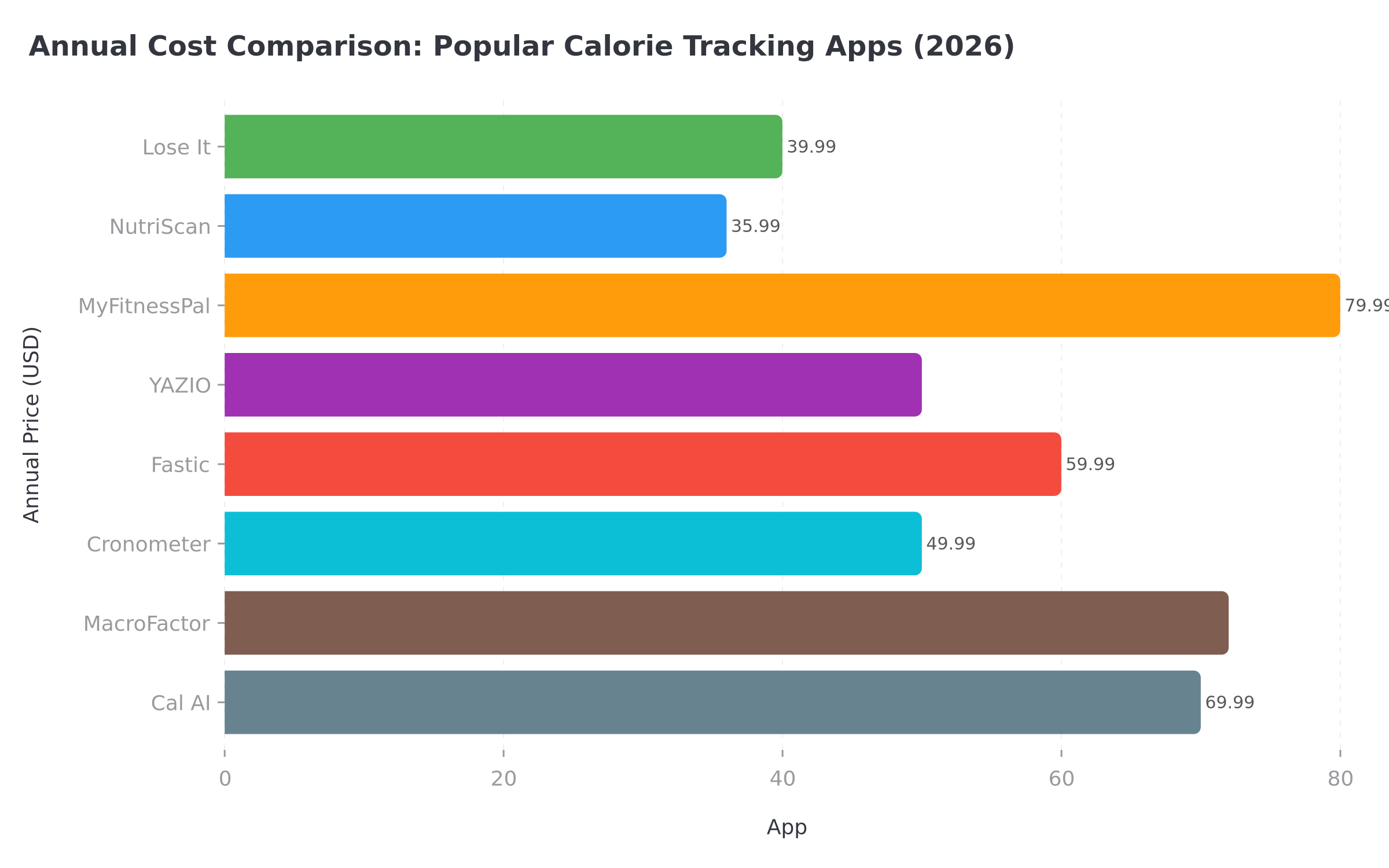 Figure 1: Annual pricing comparison shows Lose It and NutriScan as the most affordable premium options among major calorie trackers
IMPORTANT
Checkpoint: final stretch before the reveal.
One last nudge - the reveal is next.
⏱️ Progress 3/4 - ~3 minutes in - Keep going
✅ Step 1: Find your purchase platform
✅ Step 2: Follow the cancel steps
✅ Step 3: Handle refund if needed
✨ The mistake that keeps people paying (about to reveal)
9 Common Mistakes When Canceling Lose It 🚫
These are the errors people make most often. Avoid them and the process takes under two minutes.
1. Canceling on the wrong platform
If you bought through Apple but try to cancel on the Lose It website, it will not work. Always check your bank statement first.
2. Deleting the app instead of canceling
Uninstalling Lose It from your phone does not cancel your subscription. Apple and Google Play continue charging you until you cancel through their subscription settings. A 2022 literature review on mHealth engagement confirmed that many users mistakenly believe uninstalling an app stops billing.
THIS IS THE #1 MISTAKE
A 2022 survey of over 1,000 mHealth users found that nearly 50% abandon a health app within 30 days. Many of those people simply delete the app and assume billing stops. It does not. You must actively cancel through your payment platform.
3. Canceling too late in the billing cycle
Cancel at least 24 hours before your renewal date. If you cancel the same day your subscription renews, you may still be charged for the next period.
4. Forgetting about the free trial deadline
If you are on a 7-day trial, set a calendar reminder for day 5 or 6. Lose It charges the full subscription fee automatically when the trial ends. For a detailed trial cancel guide, see our Lose It free trial cancel guide.
5. Not confirming the cancellation
On Apple, you must tap Confirm after tapping Cancel Subscription. If you back out before confirming, the subscription stays active.
6. Trying to get a refund from Lose It for an Apple purchase
Lose It cannot issue refunds for Apple purchases. Apple handles all App Store billing. Go to reportaproblem.apple.com instead.
7. Assuming canceling deletes your data
Your food logs, weight history, and custom foods stay in your account after canceling. You only lose access to Premium features.
8. Not checking FSA/HSA eligibility first
Lose It Premium qualifies for FSA and HSA reimbursement. If cost is your main reason for canceling, check whether your employer health plan covers nutrition app subscriptions. You might be able to pay with pre-tax dollars and keep Premium at a lower effective cost.
9. Canceling right before a promotional period
Lose It occasionally offers discounted renewal rates, especially around New Year and back-to-school periods. If you are a few weeks from a potential discount, it may be worth waiting to see if a promotional offer appears.

Should You Cancel or Downgrade? 🤔
A 2024 study on factors driving mobile health app usage found that perceived usefulness and habit formation are the two strongest predictors of continued app use. If you are still logging food but the Premium features are not adding value, downgrading to free might be the right move.
Consider keeping Premium if:
- You use barcode scanning daily
- You rely on macronutrient goals and custom insights
- You track exercise syncing with a smartwatch
- You value the ad-free experience
Consider canceling if:
- You only use basic calorie logging
- You log food less than three times per week
- You reached your goal and want to maintain without tracking
- You found a different app that fits your routine better
- You prefer photo-based logging over manual food search
THE LIFETIME OPTION
If you love Lose It but dislike recurring charges, the Lifetime plan at $149.99 (for current Premium members) pays for itself in under four years compared to the $39.99 annual plan. If you have been using Lose It for more than two years and plan to continue, Lifetime might be a better financial choice than canceling.
The Mistake That Keeps 1 in 2 People Paying After They "Cancel" 💡
You have been patient. Here is the mistake that catches more Lose It users than any other, and it is simpler than you think.
They delete the app and assume the subscription stops.
A 2022 cross-sectional survey of over 1,000 mHealth users found that nearly 50% abandon a health app within 30 days. The overwhelming majority just uninstall the app from their phone. They never visit their App Store or Google Play subscription settings.
Here is the exact 60-second fix:
- Open Settings (iPhone) or Google Play Store (Android) - not the Lose It app.
- Go to Subscriptions - this shows every active subscription on your device.
- Find Lose It and tap it.
- Tap Cancel Subscription and confirm.
- Take a screenshot of the confirmation screen and save it.
That screenshot is your proof. If you ever see another charge, you have documentation for a refund request. Most people skip this step. Do not be most people.
The reason this catches so many users: Lose It (like most subscription apps) does not have a "cancel" button inside the app itself. The cancel action lives in your device settings or payment platform, not in the app.
IMPORTANT
Recap: everything you completed this round.
You finished the run - save this guide for next time.
⏱️ Progress 4/4 - ~4 minutes in - Nicely done
✅ Step 1: Find your purchase platform
✅ Step 2: Follow the cancel steps
✅ Step 3: Handle refund if needed
✅ The mistake that keeps people paying (revealed)
Looking for a Free Alternative? 🌟
If you are leaving Lose It because you want simpler calorie tracking without a paywall, NutriScan gives you 15 AI-powered food photo scans per week on the free plan. No credit card required. Just point your camera at your meal and get instant calorie and macro breakdowns.
For help planning your macros after canceling Lose It, try our free macro calculator. And if you want to understand how different calorie tracking apps compare on features and pricing, check our guide to the best calorie tracking apps under $10/month.
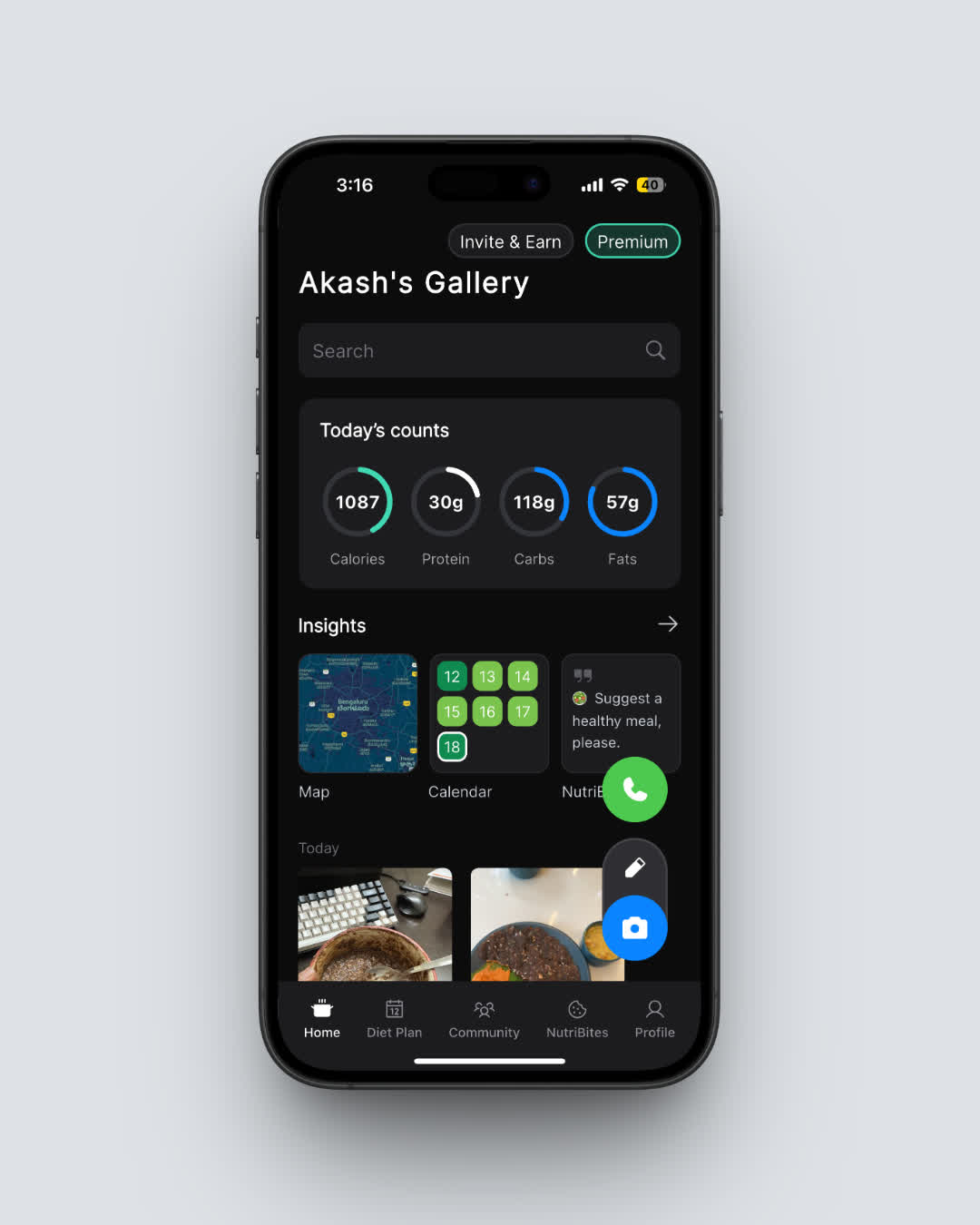 NutriScan's free plan includes 15 AI-powered food scans per week with full macro breakdowns
Frequently Asked Questions
How do I know if my Lose It subscription is still active?
Open the Lose It app and check your account or subscription status. On iPhone, go to Settings > your name > Subscriptions to see all active subscriptions. On Android, open Google Play > Payments & subscriptions > Subscriptions.
Can I cancel Lose It Premium and get my money back?
It depends on where you purchased. Apple handles refunds at reportaproblem.apple.com. For LoseIt.com purchases, use the refund form. Google Play offers a 48-hour refund window.
Will I lose my food log data if I cancel?
No. Your food logs, weight history, custom foods, and recipes stay in your account. You lose access to Premium features like detailed macronutrient tracking, barcode scanning (for new accounts), meal planning, and custom insights. But your data is safe.
Can I transfer my Lose It Premium to a different account?
Yes. Lose It supports transferring Premium to a different account through their support team.
Does Lose It offer Apple Family Sharing?
Yes. Lose It supports Apple Family Share for Premium subscriptions purchased through the App Store.
What if I was charged before my trial ended?
If you believe you were charged before your free trial was over, Lose It has a support article addressing this. Contact Apple or Google Play for a refund, or reach out to Lose It support for website purchases.
Is Lose It Premium FSA/HSA eligible?
Yes. Lose It Premium qualifies for FSA and HSA reimbursement. Check with your plan administrator for specific requirements (FSA/HSA Eligibility).