Best App for Couples or Families 2026: Shared Recipes and Plans
 ChatGPT
  Claude
  AI Mode
  Perplexity
TL;DR - Best Apps for Couples and Families 2026
• Overall winner: AnyList, at $14.99 a year for the whole household, with separate logins and shared recipes, plans and lists.
• Best free option: Samsung Food, where several people can add, move or remove recipes from the same week.
• Deepest planner: Plan to Eat at $49 a year, with one awkward catch: household members share a login.
• Only real family plan in tracking: Foodnoms+ Family, $70 a year for six people, Apple devices only.
• The order to judge them in: who gets an account ➡️ what both people can edit ➡️ who pays and for how many.
• The honest note: NutriScan has no family plan and no shared grocery list. Pair it with a household planner instead.
In 2024, researchers published a trial called Partner2Lose. They took 231 couples, gave every person a proper weight management program, and randomized half the couples so the partner also attended sessions and both people were trained in communication skills. Two years later the partner-assisted group had lost 2.66 kg and the solo group had lost 2.89 kg. The difference was 0.23 kg, with a confidence interval running from -1.58 to 2.04 and a p value of 0.80. The authors wrote that the two approaches "led to similar outcomes in index participants" (Voils et al., BMC Public Health, 2024).
So involving your partner does not automatically make the scale move faster. That single finding changes what a household app should be judged on. The thing to judge is logistics, not motivation or accountability streaks.
A household has one kitchen, one grocery budget, and usually one person doing more of the planning than the rest. The right app removes duplicated work. It does not turn your partner into your coach. I am a nutritionist at NutriScan, and I will be direct about our own app early: it has no family plan, so it cannot win this ranking. Prices below are standard US prices as of mid 2026 and change by region.
IMPORTANT
Your household setup plan at a glance.
A quick roadmap so you can pick the right app for the way your house actually eats.
⏱️ Progress 0/4 • ~0 minutes in • Keep going
⏳ Step 1: The three jobs a household app has to do
⏳ Step 2: All 5 apps, ranked on those jobs
⏳ Step 3: Who in the house should never see a calorie number
🔍 The five-step setup that decides whether any of this survives a real week (revealed near the end)
What a Household Actually Needs From an App 🏠
Two people living together do not have two separate food problems. They have one shopping trip, one fridge, and two or more sets of goals.
The daily friction is boring and specific. One person finds a recipe and the other never sees it. One person builds the grocery list and the other is standing in the store guessing. One person plans Wednesday dinner and nobody tells the person who gets home first.
None of that is solved by a bigger food database. It is solved by shared write access to three things: recipes, the plan, and the list.
 One kitchen, two people, one grocery budget. Every app below is trying to remove the duplicated work that comes out of that arrangement.
The Three Jobs I Ranked On
Job 1: Who gets an account. Does each person get their own login and their own goals, or does the household share one set of credentials? This matters more than it sounds. Shared credentials mean shared history, shared weight entries, and no privacy.
Job 2: What actually gets shared, and can both people edit it. A recipe you can send by text is not shared. A plan both people can add to, move, and delete from is shared. Read-only sharing fails this job.
Job 3: Who pays, and for how many people. A household plan that covers everyone for one price is a different product from five individual subscriptions. Very few nutrition apps offer one at all.
I checked every claim below against each company's own pricing, help, or support pages in August 2026. Prices change, so verify before you buy.
IMPORTANT
Checkpoint: here's where you are right now.
Quick status update so you always know the next best move.
⏱️ Progress 1/4 • ~2 minutes in • Keep going
✅ Step 1: The three jobs a household app has to do (done)
👉 Step 2: All 5 apps, ranked on those jobs (you're here)
⏳ Step 3: Who in the house should never see a calorie number
🧩 The five-step setup that decides whether any of this survives a real week (coming soon)
Quick Comparison: Five Household Apps 📊
| App | Household price | Separate logins | Shared recipes | Shared meal plan | Shared list | Platforms |
|---|---|---|---|---|---|---|
| AnyList | $14.99/yr household | Yes | Yes | Yes | Yes, free tier too | iOS, Android, web, Mac |
| Samsung Food | Free | Yes | Yes, with limits | Yes, co-editable | Yes | iOS, Android, web |
| Plan to Eat | $49/yr, one account | No, shared login | One account, so yes | Yes | Yes | iOS, Android, web |
| Foodnoms+ Family | $70/yr, up to 6 | Yes | No | No | No | Apple devices only |
| MyFitnessPal | No household plan | Yes | Workaround only | No | No | iOS, Android, web |
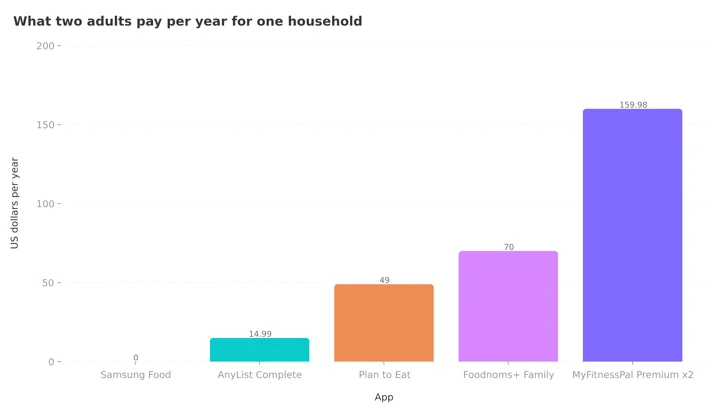 Figure 1: The same job, priced across a ten times range. Two MyFitnessPal Premium subscriptions cost more than ten times an AnyList household plan, and MyFitnessPal is the one product here with no shared list at all.
1. AnyList: The Cheapest Real Household Plan 🥇
AnyList is a grocery list app that grew into a meal planner, and it is the only product here that does all three jobs without a compromise.
The pricing is the headline. AnyList's own comparison page states that AnyList Complete is "$9.99 / year for an individual or $14.99 / year for a household" (AnyList features page). For a couple, that is under thirty cents a week for the whole household.
The free tier is unusually generous for this category. On that same features page, AnyList states that "core functionality, like creating and sharing lists, is free to use," and its comparison table caps free recipe imports at five against unlimited on Complete. So two people can share a live grocery list at no cost, on iOS or Android, before anyone pays anything.
Complete is what turns on the household side properly: unlimited recipe imports, the meal planning calendar, sharing recipes and the meal plan with other household members, recipe scaling for a double batch, item prices with a running total, and list item photos so the person at the store knows which brand you meant (AnyList Complete).
It runs on iPhone, Android, the web, and Mac, which matters because mixed-device households are the normal case.
Buy it if: you want one bill, two logins, and a list that updates in your partner's hand while you are still in the kitchen.
Skip it if: you want calorie and macro tracking. AnyList does not do that.

2. Samsung Food: The Best Free Option for a Household 🆓
Samsung Food is free, cross-platform, and its sharing model is collaborative rather than send-only.
Its support documentation says you can share recipes, shopping lists, and the meal planner with "anyone who has a Samsung Food account," and describes the meal planner sharing as "allowing multiple people to add, move or remove recipes from each day of the week" (Samsung Food support). That is job 2 done correctly. Both people edit the same week.
There are two limitations you should know before you build your whole system on it, and both come from Samsung Food's own help article.
First, shared Recipe Collections do not stay in sync. The page states that if you or someone you shared a Collection with "makes any changes to the recipes in that Collection, those changes will not be visible to you or anyone else who has access to that Collection." So a Collection is a snapshot, not a living shared cookbook.
Second, in Private Communities, "only original recipes can be shared" and the platform "does not allow sharing of recipe tweaks" to protect recipe creators. If your household's version of a dish is a modified import, that modification is the thing you cannot pass around.
Check this before you commit a year of recipes
A snapshot is not a shared cookbook. If one person tweaks the family dal recipe in a shared Samsung Food Collection, nobody else sees the change. Keep your ten core dishes somewhere both people can genuinely edit.
Buy it if: budget is the constraint and you mostly need a co-edited weekly plan and a shared list.
Skip it if: your shared recipe box needs to update for everyone when one person changes an ingredient.
3. Plan to Eat: The Deepest Planner, With One Awkward Catch 📅
Plan to Eat is the most serious meal planning tool in this ranking. You bring your own recipes from anywhere on the web, including social apps, and it builds the shopping list from your calendar automatically. It now calculates nutrition facts for your recipes and lets you track macros on the planning calendar too.
Pricing is plain and published: "$5.95/month or $49/year," with a 14-day free trial that does not ask for a card, a 60-day no-questions-asked refund policy, and no automatic rebill by default when an annual subscription expires (Plan to Eat FAQ). The company is openly subscription-funded and says it does not sell user data, which is why there is no free tier.
Now the catch, and it is a real one. When asked whether a subscription works for more than one person, Plan to Eat's answer is that you can use one account on as many devices as you like, and "you can also share your account with other members of your household by sharing your login credentials."
That is not a household plan. That is one account with the password written down. It works, and plenty of families run it that way, but it means no separate profiles, no separate goals, and no privacy between household members. On job 1 it fails, and it is the reason a $49 product ranks below a $14.99 one.
Buy it if: one person does the planning for everyone and wants the best tool for that job.
Skip it if: two adults want their own accounts.
4. Foodnoms+ Family: The Only Real Family Plan in Nutrition Tracking 🍎
Here is the odd thing about this category. Dozens of calorie trackers exist. Almost none of them sell a family plan.
Foodnoms does. Its help page states that "the Foodnoms+ Family plan supports Apple Family Sharing, allowing up to six family members to share a single subscription," activated through Restore Purchase once "Share with Family" is on (Foodnoms family sharing). On its comparison page, updated February 2026, Foodnoms lists Foodnoms+ at $40 per year and Foodnoms+ Family at $70 per year, and says MyFitnessPal does not offer a family plan (Foodnoms vs MyFitnessPal). That last part is Foodnoms describing a competitor, so treat it as their claim, though I could not find a MyFitnessPal household plan either.
What you get for $70 is six people, each with their own log, their own goals, and their own history, under one payment. Foodnoms also keeps barcode scanning and its nutrition label scanner on the free tier, and its comparison page points out that MyFitnessPal moved barcode scanning behind its paywall in 2022, which our MyFitnessPal pricing guide also covers.
Two hard limits. Foodnoms is Apple only, with no Android app, so a mixed household cannot use it. And it does not share recipes, plans, or lists between accounts. It shares the bill, not the work.
Buy it if: everyone in the house is on Apple devices and each person wants their own real food log.
Skip it if: anyone uses Android, or your problem is the grocery list rather than the subscription cost.
5. MyFitnessPal: Sharing Exists, But It Was Not Designed for This 📱
MyFitnessPal is the app most households already have, so it deserves an honest look rather than a dismissal.
Diary sharing is real and it is free. MyFitnessPal's support pages explain how to make your diary visible to other users, and confirm that "if you have friends or family who have set their Diary Sharing options to allow you to view their diary, you may copy a meal from a friend" (MyFitnessPal support). For a couple who eat the same dinner, that is a legitimate time saver.
Recipe sharing is where the app is dated. Its support article on the subject states plainly: "You can't share a recipe directly right now, but you can copy the nutritional information after you log the recipe as a meal in your food diary." The method is a workaround rather than a feature, and it only works if your partner enabled diary sharing first. The same page adds a small limitation. If your partner added a fifth or sixth meal to their diary, "you need to have a meal in the same spot in your diary before you can copy from those slots" (MyFitnessPal support).
There is no shared grocery list between accounts, no co-edited meal plan, and no household subscription. Two people who both want Premium pay twice. At $79.99 each per year, that is the most expensive way to feed a household in this comparison. Our MyFitnessPal pricing guide breaks the plan tiers down in full.
Buy it if: you both already use it and diary visibility is all you wanted.
Skip it if: you are choosing fresh and the household is the point.
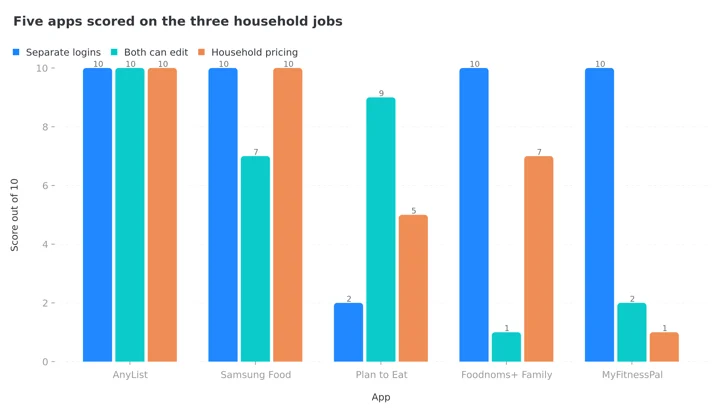 Figure 2: AnyList is the only app that clears all three jobs. Plan to Eat loses on logins, Foodnoms shares the bill but not the work, and MyFitnessPal shares neither.
IMPORTANT
Checkpoint: midway progress update.
The ranking is done. The part people get wrong is next.
⏱️ Progress 2/4 • ~5 minutes in • Keep going
✅ Step 1: The three jobs a household app has to do (done)
✅ Step 2: All 5 apps, ranked on those jobs (done)
👉 Step 3: Who in the house should never see a calorie number (current)
⏳ The five-step setup that decides whether any of this survives a real week (next)
Where NutriScan Fits, and Where It Does Not 🔍
I work on NutriScan, so I will be direct about this. NutriScan has no family plan, no household profiles, no shared grocery list, and no shared recipe book. If those are your requirements, buy AnyList or use Samsung Food. Nothing in this section is going to change that.
What NutriScan does have that touches households is narrower and worth naming honestly.
Favorite Meals can be saved and then copied, shared, or set to auto repeat, which covers the "we eat this same dinner every Tuesday" case. There is also a Share Food Timeline option that makes your meal timeline public and shares it by URL. Read that carefully before you use it with a partner: it is a public link, not a private invitation, so anyone holding the URL can open it. And Invite & Earn gives both sides a week of Premium when someone you invite signs up, which is explained in our referral program guide.
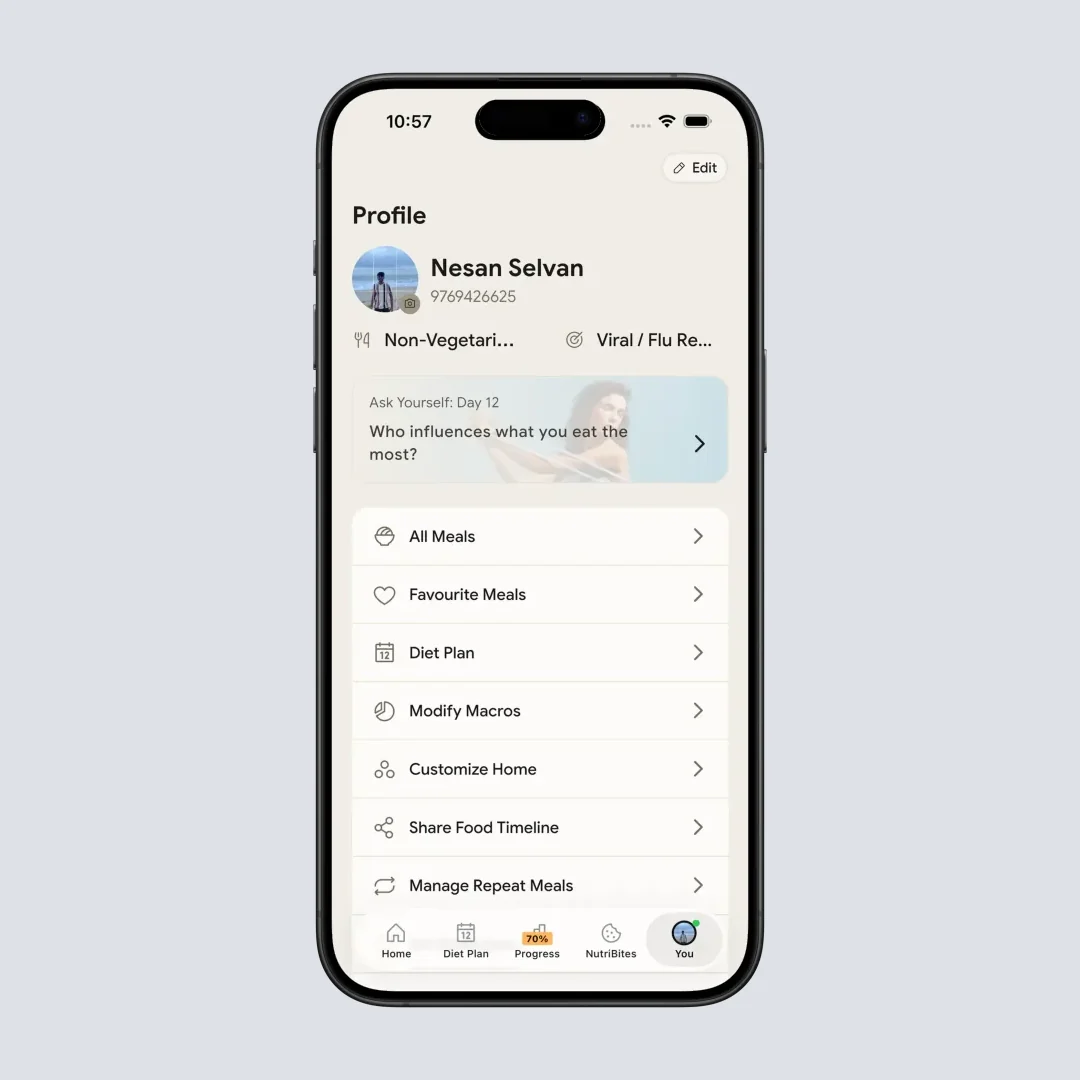
Home > Bottom Nav Profile > Profile Page. Favorite Meals and Share Food Timeline both live here. The timeline share publishes a public URL, so treat it as a link anyone can open, not a private invite.
The pairing I would actually recommend to a couple: run a household planner for the shared side, and let each person log their own food separately in whatever tracker suits them. NutriScan's photo scan handles the part a recipe app cannot, which is the plate that did not come from your meal plan. Five free scans a week is enough to test it on the meals a database usually gets wrong, your curries, your restaurant plates, your mixed bowls. See how the scanner handles a plate in our meal scan guide, and the full tier breakdown is in our NutriScan pricing guide.
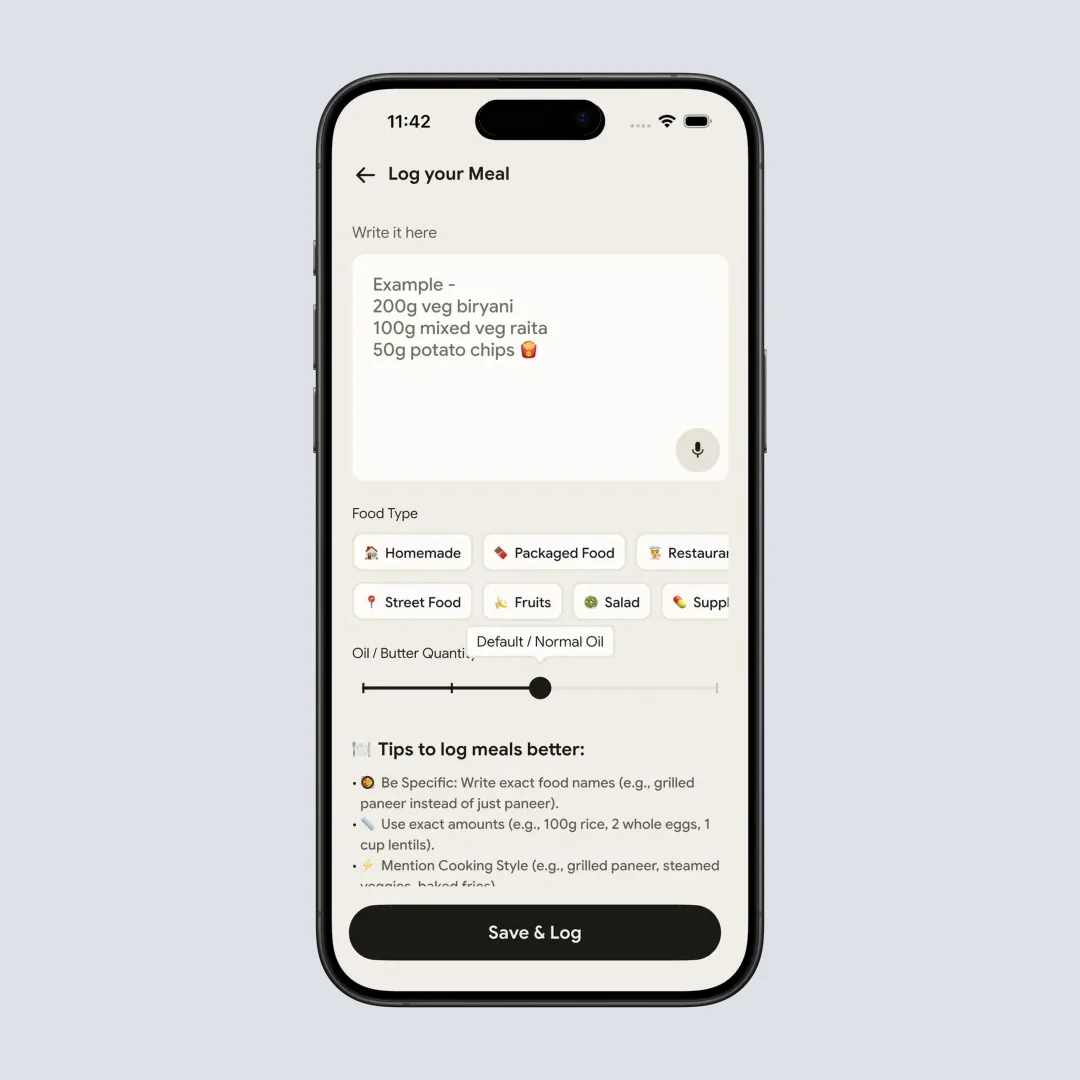
Home > Camera Icon > Manual entry. Typing the meal works when a photo does not, which is most of what happens when somebody else plated your dinner.
The Outcome Worth Optimizing For 🎯
If the goal is not "one partner loses more weight," what is it?
A 2024 cross-sectional study of 1,887 Brazilian schoolchildren aged 6 to 11 and their caregivers gives a useful answer. Regular family meals, defined as five or more per week, were associated with higher dietary diversity in children (adjusted odds ratio 1.78, 95% CI 1.4 to 2.3) and in caregivers (AOR 1.66, 95% CI 1.0 to 2.7), and with less unhealthy BMI in caregivers (AOR 0.74, 95% CI 0.5 to 0.9). Children who ate regular family meals were also more likely to combine high dietary diversity with low ultra-processed food intake (AOR 1.45, 95% CI 1.0 to 2.1) (Oliveira et al., Foods, 2024).
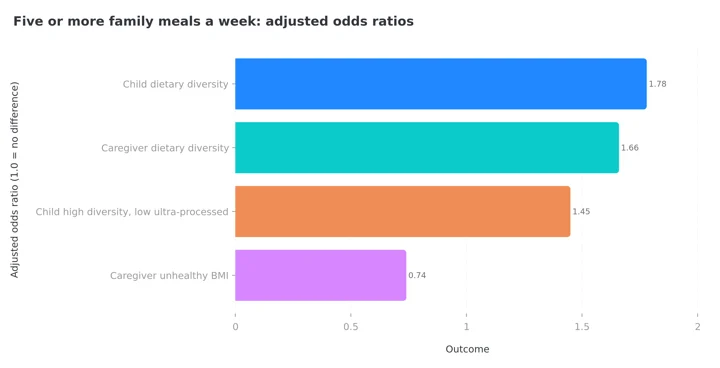 Figure 3: Ratios above 1.0 mean the outcome was more common in households with five or more family meals a week; 0.74 for caregiver unhealthy BMI means it was less common. This is observational data, so it shows association, not cause.
 The measurable outcome is not a streak. It is how often a planned meal actually gets cooked and eaten together.
Some of those intervals sit very close to 1.0, and cross-sectional data cannot prove that family meals cause the difference. But the direction is consistent, and it points at a target an app can actually influence: how often a planned meal gets cooked and eaten together.
That is a logistics outcome. Recipes, plans, and lists move it. Calorie counts do not.
Please Do Not Put Children on a Calorie Tracker ⚠️
This is the part I care most about in a family article.
A 2025 systematic review of 27 studies in European Eating Disorders Review found "reasonably consistent evidence of an association between disordered eating and fitness and diet tracker use," covering global disordered eating, dietary restraint, excessive exercise, and disordered muscle-oriented behavior. The authors also noted, importantly, that "this association was not replicated in experimental research" (Moody et al., 2025).
So this is not proof that a tracking app causes an eating disorder. It is a strong reason to be careful about who in your house sees a calorie number.
If tracking is causing anxiety, stop
My practical rule: adults can track if they want to. Children and teenagers should be given food, not numbers. If tracking is making anyone in your household anxious about eating, stop and speak to a clinician.
A shared meal plan and a shared grocery list involve a whole family in eating well without giving anyone a daily calorie score to fail. That is another reason the planners rank above the trackers on this particular list. Adults who do want their own numbers can start from a macro calculator instead of guessing at a target.
IMPORTANT
Checkpoint: final stretch before the reveal.
One last nudge, the setup is next.
⏱️ Progress 3/4 • ~8 minutes in • Keep going
✅ Step 1: The three jobs a household app has to do
✅ Step 2: All 5 apps, ranked on those jobs
✅ Step 3: Who in the house should never see a calorie number
✨ The five-step setup that decides whether any of this survives a real week (about to reveal)
The Five-Step Setup That Makes a Shared System Stick 🧩
Most households that abandon a meal planner do not abandon it because they picked the wrong app. They abandon it in week three, because the setup was built for an imaginary week. Here is the order that survives a real one.
Step 1: Choose on job 3 first. Count the people who need access. If it is more than one, a household plan like AnyList Complete at $14.99 per year beats two individual subscriptions every time.
Step 2: Create separate accounts where the app allows it. If the app only supports a shared login, decide deliberately whether you are comfortable with shared history.
Step 3: Import ten real recipes before anything else. Not aspirational ones. The dishes your household ate last month.
Step 4: Plan four dinners, not seven. Leave gaps for leftovers and the night nobody cooks. A plan with spare room survives; a full week does not.
Step 5: Generate the grocery list from the plan and shop from it once. This is the step that converts the subscription into saved time, and it is the one almost everybody skips. If either of you is still writing a separate list on the way to the store, the app is decoration. The plan has to be the thing that produces the list, every week, or the whole system quietly becomes a recipe folder nobody opens.
The fifteen minute rule
Book the same fifteen minutes each week for planning, on a fixed evening. A slot beats a habit, because a slot survives a bad week and a habit does not.
Seven Habits for Making a Shared System Work 💡
- Pick one owner for the plan and one for the list. Shared does not mean simultaneous. It means both can edit when needed.
- Agree on a planning slot, not a planning habit. Fifteen minutes on the same evening each week beats good intentions.
- Build a repeat list of ten dinners the household already likes. Most weeks should come from that list, not from new recipes.
- Scale recipes rather than doubling by hand. Wrong quantities are the most common reason a shared plan ends with someone ordering food instead.
- Add photos to unclear grocery items. The specific brand of yogurt is not obvious to the person who did not add it.
- Keep separate food logs if you both track. Different bodies, different goals. Merging them helps nobody.
- Review once a month, not daily. Which planned meals actually got cooked? Drop the ones that never do.
What the Research Says About Shared Effort 📚
Put the three findings together and a clear picture appears.
Partner involvement, delivered as coaching and communication training, did not beat solo treatment over two years (Voils et al., 2024). Regular shared meals are consistently associated with better dietary diversity in both children and the adults feeding them (Oliveira et al., 2024). And tracker use is associated with disordered eating in cross-sectional work, though not in experimental work (Moody et al., 2025).
The reasonable conclusion is that a household app should reduce shared work and increase shared meals, while keeping numbers optional and adult-only. Judge the app on the grocery list, not on the motivation.
IMPORTANT
Recap: everything you covered this round.
You finished the run, save this for the evening you actually set it up.
⏱️ Progress 4/4 • ~11 minutes in • Nicely done
✅ Step 1: The three jobs a household app has to do
✅ Step 2: All 5 apps, ranked on those jobs
✅ Step 3: Who in the house should never see a calorie number
✅ The five-step setup: price ➡️ accounts ➡️ ten real recipes ➡️ four dinners ➡️ list from the plan (revealed)
The Short Answer ✅
Buy AnyList at $14.99 per year for the household. It is the only product here that gives each person a login, gives both people editable recipes, plans, and lists, works on every platform, and charges once.
Use Samsung Food if you want to spend nothing and can live with Collections that do not stay in sync.
Choose Plan to Eat at $49 per year if one person plans for everyone and wants the strongest planning tool, accepting a shared login.
Choose Foodnoms+ Family at $70 per year only if the household is all-Apple and each person wants their own nutrition log.
Keep MyFitnessPal if you already use it and free diary sharing is enough, but do not pay twice for it.
Then track your own meals separately from the shared plan. NutriScan's five free scans a week are enough to see how the scanner handles the plates your planner never covered, and our pricing guide shows what Premium adds if you want a 28-day diet plan on top.
Frequently Asked Questions ❓
Is there a calorie tracking app with a real family plan?
Very few. Foodnoms is the clear one, with Foodnoms+ Family at $70 per year supporting up to six people through Apple Family Sharing (Foodnoms help). Most major trackers, including MyFitnessPal, sell individual subscriptions only, so a couple pays twice.
Can my partner and I share one subscription instead?
Sometimes, but check the mechanism. AnyList sells a household tier at $14.99 per year with separate accounts. Plan to Eat's own FAQ says household members share the subscription "by sharing your login credentials," which means one account and no privacy between you (Plan to Eat FAQ). Those are very different arrangements at similar sounding prices.
What is the best free app for a couple's grocery list?
AnyList, because its own comparison page states that creating and sharing lists is free (AnyList features). Samsung Food is the free pick if you also want a co-editable weekly meal planner, since multiple people can add, move, or remove recipes from each day.
Can we share recipes on MyFitnessPal?
Not directly. MyFitnessPal's support article describes a workaround: if your partner enables diary sharing, you can copy a logged recipe from their diary into yours, and the meal slots have to line up (MyFitnessPal support).
Does NutriScan have a family plan or shared recipes?
No. NutriScan has no family plan, no household profiles, and no shared grocery list. It has Favorite Meals you can copy, share, and set to auto repeat, plus a Share Food Timeline option that publishes your timeline at a public URL. For shared household planning, pair it with AnyList or Samsung Food.
Should my teenager use one of these apps?
Use the planning and grocery features together as a family, and keep calorie tracking to adults. A 2025 systematic review found consistent cross-sectional associations between diet tracker use and disordered eating, even though experimental studies did not replicate it (Moody et al., 2025). Given the uncertainty, the cautious choice is to involve young people in cooking and shopping rather than in counting.
This article is for general information and is not medical advice. Prices were checked against each company's own pages in August 2026 and may change. If you or anyone in your household has a history of disordered eating, speak to a qualified clinician before starting any food tracking.