Best App for Streak Motivation 2026: Who Uses Streaks Well
 ChatGPT
  Claude
  AI Mode
  Perplexity
Researchers at the University of British Columbia followed 41,207 real users of a health app for a full year, and the pattern they found is not the one the flame icon implies. The average run of uninterrupted use lasted about 20 weeks, the average break lasted about 16 weeks, and the median user hit their first break at week 18 (Lau et al., 2022, Frontiers in Public Health). Most people did not quit. They paused and came back. The researchers called this a "multiple-lives" perspective, and it describes something almost every streak counter is built to punish.
I work as a nutritionist on the NutriScan team, and I read app support pages for a living. The nutrition apps with streaks in 2026 have completely different ideas about what a streak even is. One counts days you opened the app. One counts days you tapped a button saying you are finished. One counts gaps between fasts rather than calendar days. Two will let you type in whatever number you want.
That matters more than which app has the prettiest flame.
TL;DR - Best Apps for Streak Motivation 2026
• Best overall: Cronometer. Its streak counts real logging, refuses backdated entries, and it documents how to turn the display off.
• Best for streak anxiety: Simple. A 14, 30 or 60 day goal you can complete, plus a streak freeze for missed days.
• Best for planned breaks: NutriScan. Vacation mode keeps your streak running with no penalty, and its fasting tracker page documents that a day counts at 80 percent of your target window.
• Skip if you want an off switch: MyFitnessPal. Two competing counters, no way to hide them, and its help page tells you to backfill from memory.
IMPORTANT
Your streak-picking plan at a glance.
A quick roadmap so you can act fast.
⏱️ Progress 0/4 • ~0 minutes in • Keep going
⏳ Step 1: The three jobs a streak has to do
⏳ Step 2: The rankings, Cronometer to Zero
⏳ Step 3: What the research actually shows
🔍 The 5-step restart method that works even after a 16 week break (revealed near the end)
What a Streak Is Actually Measuring
A streak counts consecutive units where you did a thing. The design question is which thing, and every app answers it differently.
Some count presence: you opened the app. Some count action: you logged food. Some count quality: you hit a target. These behave nothing alike. A presence streak rewards a two second habit that changes nothing about your eating. A quality streak breaks on the day you needed the record most, which is the day you ate badly and did not want to write it down.
The apps that use streaks well are the ones that count action and only action. Logging is the behavior that predicts results. In a study of 502 adults, higher adherence to diet, activity and weight self-monitoring, and to calorie goals, was associated with greater odds of achieving at least 5 percent weight loss (Burke et al., 2025, Obesity). Nobody has shown that opening an app does anything at all.
 Opening the app takes two seconds. Some streaks count exactly that, and nothing more.
The Three Jobs I Ranked On
Job 1: What does the counter count? Presence, action, or quality. Action wins. A streak you can protect by tapping an icon is not measuring your health behavior, it is measuring your reflexes.
Job 2: What happens the day you miss? This is the job that reorders the whole list. Reset to zero, backfill from memory, spend a freeze, or a documented pause. Given that the average real user takes a 16 week break, an app with no answer here is designing against its own data.
Job 3: Can you get out? Can you hide the counter, reset it honestly, or leave it behind when it starts to feel like a debt? Very few apps let you, and it is the clearest signal of whether the streak was built for your habit or for their retention numbers.
IMPORTANT
Checkpoint: here's where you are right now.
Quick status update so you always know the next best move.
⏱️ Progress 1/4 • ~2 minutes in • Keep going
✅ Step 1: The three jobs a streak has to do (done)
👉 Step 2: The rankings, Cronometer to Zero (you're here)
⏳ Step 3: What the research actually shows
🧩 The 5-step restart method (coming soon)
Quick Comparison
| App | What the streak counts | If you miss a day | Can you hide it |
|---|---|---|---|
| Cronometer | Any diary entry: food, exercise, biometric, fast | Resets, and backdated entries do not count | Yes, documented toggle |
| Simple | A daily check-in or a logged action | Use a streak freeze | Not documented |
| NutriScan | Logged days, plus fasts at 80 percent of target | Vacation mode continues it with no penalty | Not documented |
| Lose It | Days you tapped "Done Logging" | Resets | Not documented |
| Zero | Fasts logged less than 24 hours apart | Add the fast retroactively to restore it | Not documented |
| MyFitnessPal | Two counters: food logged, and app opened | Resets, but you can backfill from memory | No, stated on their help page |
1. Cronometer: The Only One You Can Switch Off
Cronometer's support page on Streaks is the most honest document in this entire comparison, and it wins on the two rules it sets.
First, the streak counts a wide range of real work: "consecutive days of logging items to your diary. This can be foods, exercises, metrics, or fasting." A day you only weighed yourself still counts. That flexibility matters, because it means a busy day does not force a choice between an accurate record and a number.
Second, and this is the rule nobody else has, the page states that "you must access your account and log the item day-of for it to count towards your streak. Logging items retroactively will not contribute to your streak." Backdating does not buy you anything. That single sentence turns the counter into a measurement instead of a score, and it is the reason Cronometer sits at the top of this list.
The dashboard also shows a "streak to beat," your longest run across your whole account history, so a broken streak leaves a record rather than vanishing.
The honesty caveat: a Reset Streak control under More, then Display, then Dashboard Settings lets you "manually enter how many days you'd like to reset your streak to." The stated purpose is migrating from another app, but any number you can type is a number you can invent.
It ranks first anyway because of the last section of that page. The same settings screen has a Show Streaks toggle, and Cronometer tells you plainly that you can turn the widget off at any time "if you decide you'd rather not see it." No other app here documents an exit. Cronometer Gold costs $4.99 a month billed annually or $10.99 monthly, and what Gold adds sits in a separate piece, but the streak is not the reason to pay.

2. Simple: The Streak That Has an End Date
Simple did something in January 2026 that I have not seen elsewhere in this category: it gave the streak a finish line. On their Streaks announcement, the first step is "you choose a streak goal, like 14, 30, or 60 days."
A target of 30 is a different psychological object from an open-ended counter. It can be completed. An infinite counter can only ever be lost, which is exactly the asymmetry that makes long streaks feel heavy rather than motivating.
Miss a day and you spend a streak freeze. Simple's own framing is "no shame, no you failed, just a simple reset," and the actions that count are broad: a check-in, a meal, a workout, a drink, a fast, or your weight.
Two things keep it out of the top spot. A daily check-in counts as a qualifying action, which drags this back toward a presence streak. And the page states that "the data shows that longer streaks leads to better weight loss outcomes" without publishing that data or citing a source, so treat it as the company's claim rather than a finding. Simple has no free tier, so the streak arrives attached to a subscription. The full Simple pricing breakdown covers what that costs.
3. NutriScan: Streaks That Survive a Planned Break
I work for NutriScan, so read this section knowing that. Here is what the app does and does not do.
NutriScan shows a Best Streak on the Progress tab and includes your streak in the monthly comparison alongside NutriScore, weight change, calories, protein hit rate and meals, so the streak sits next to outcomes rather than standing alone. Photo scanning (5 scans a week) and manual logging are both on the free plan, with Premium at about $59 a year for unlimited scans.
Two design decisions earn the third place. Vacation mode, which you toggle from your profile, continues your streak with no penalty and counts those days as tracked. A holiday, a hospital stay or a week of travel does not cost you anything, and it is declared in advance rather than repaired afterwards. Given the Lau finding that breaks are the normal shape of long-term app use, an announced pause is the feature that matches how people actually behave.
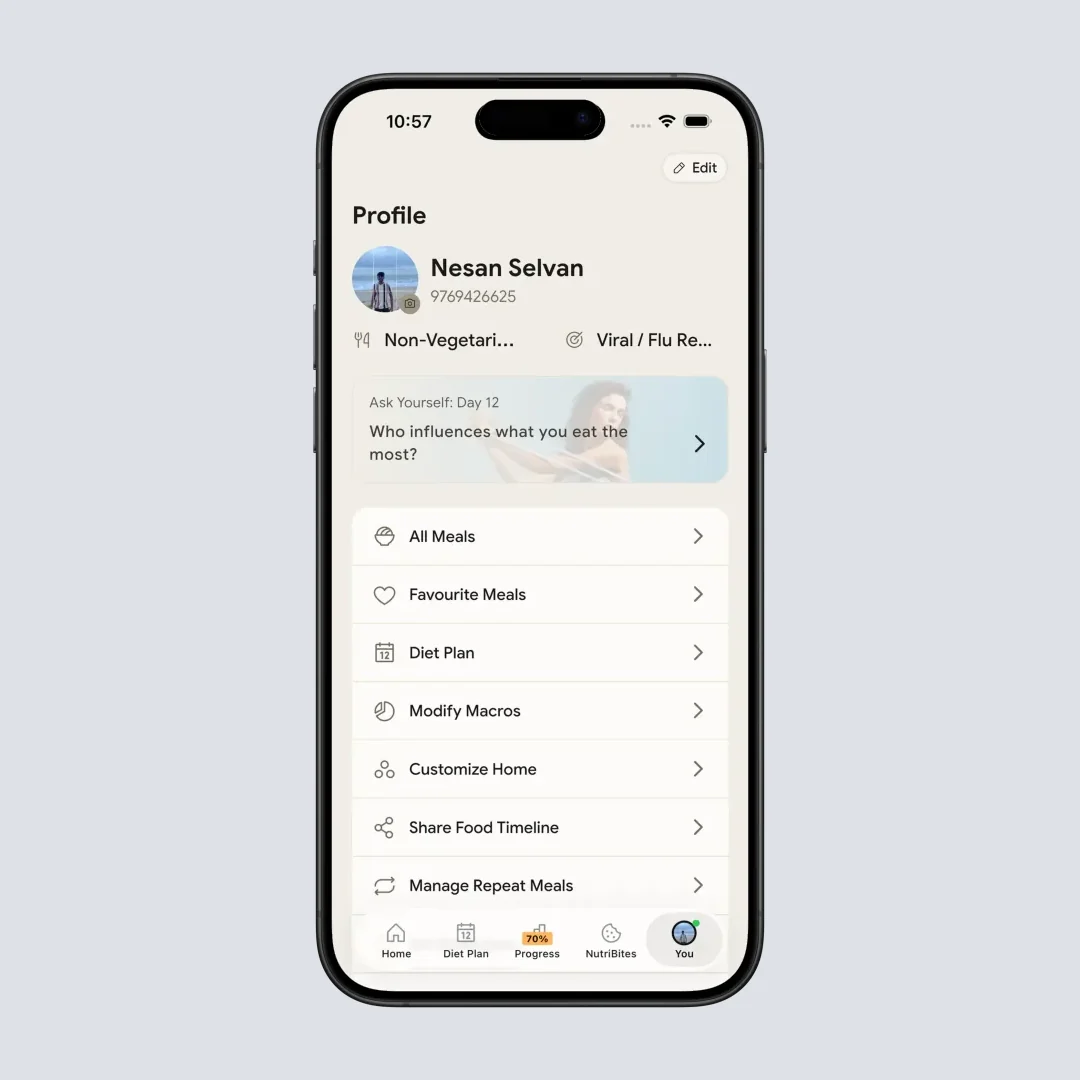
Vacation mode lives at Profile > Toggle Vacation Mode. Declare the break before you leave and the streak keeps running.
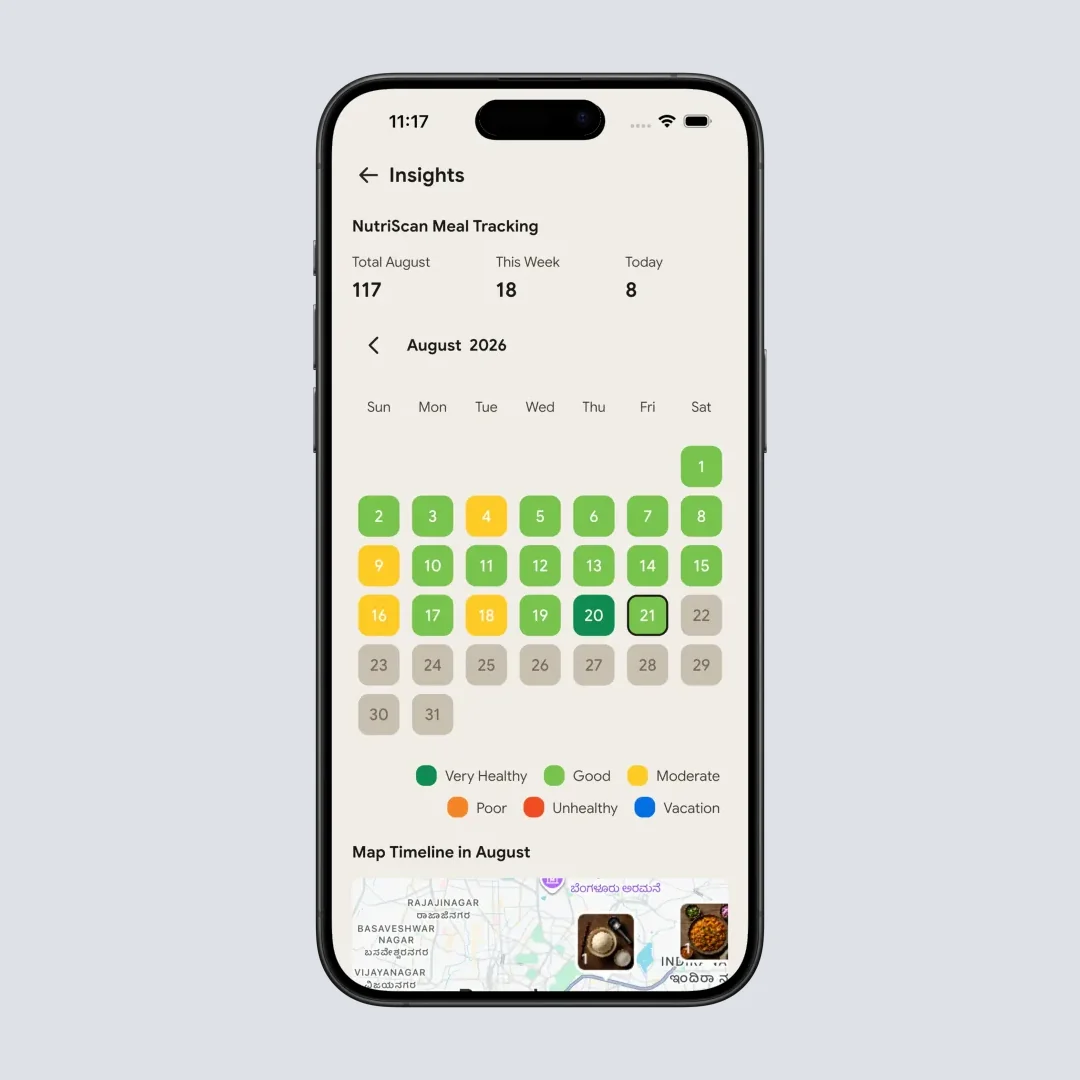
The calendar keeps counting vacation days as tracked, so a planned week away leaves no hole in the record.
The second is the fasting streak, which NutriScan's own fasting tracker page documents as counting a day when you complete at least 80 percent of your target window. A 13 hour fast against a 16 hour goal still counts. Partial credit is rare, and it removes the incentive to either lie or give up.
Now the gaps, because they are real. NutriScan has no streak freeze and no way to repair a broken meal-logging streak after the fact. There is no documented setting to hide the streak from the Progress tab. If the counter is the thing that makes tracking feel bad for you, Cronometer's off switch is the better answer and I would rather you use it.
4. Lose It: You Decide When the Day Is Done
Lose It builds its streak around a deliberate act. "In Lose It!, your streaks are tracked by tapping 'Done Logging' at the bottom of the app each day. That action marks the day complete and keeps your streak alive," says Anna Smith, RD, the company's chief nutrition officer, in their article on logging streaks, published in October 2025 and reviewed by psychologist Thomas Rutledge, PhD.
Requiring a closing action is a defensible choice. It means the streak counts a day you finished rather than a day you started, and it stops a single logged coffee from qualifying. The cost is obvious: forgetting the tap breaks a streak even when you logged every meal, which frustrates people who did the work.
What lifts Lose It above MyFitnessPal is what the company publishes around the feature. That same article tells readers to "build in flexibility," notes that tracking five days a week rather than every day is enough to affect weight loss, and quotes Smith saying the streak "isn't about what you ate or how well you did, it's about the fact that you showed up. Logging is about accountability, not perfection." A company that sells a streak and then tells you five days a week is fine is not trying to trap you. Streak milestones and pattern summaries sit alongside it, and Lose It Premium remains one of the cheaper paid tiers, covered in our Lose It pricing guide.
5. Zero: A Streak Built on Gaps, Not Calendar Days
Zero measures something genuinely different. Its Fasting Streaks page explains that "whenever you log a fast and less than 24 hours passes between your next logged fast, you start to build a fasting streak." The unit is the gap between fasts, not the calendar day, which suits a behavior that does not line up neatly with midnight.
It is also forgiving in a specific way. If you forgot to log and the counter reset, the page tells you to use the Add Fast button and "your streak should be reestablished the next time you refresh Zero." Zero shows a current streak and a longest streak.
It ranks fifth because it is narrow. Only fasts count. If you fast four days a week by design, this streak will never work for you, and there is no partial credit for a shorter fast. Our comparison of fasting timers and food logs covers where Zero sits among the other fasting apps.
MyFitnessPal: Two Streaks, and One of Them Rewards Guessing
MyFitnessPal is not ranked here, and the reason is on their own help page for the redesigned Today tab.
The app runs two counters at once. A Food Logging streak on the Today screen counts consecutive days you logged at least one food item. A separate Login streak on your profile is, in their words, "based on simply opening or syncing the app." The company concedes the point immediately, writing that "we feel logging food is a better indicator for streaks." They are right, which raises the question of why the weaker counter is still displayed on your profile.
The second problem is the advice for a missed day. Streaks reset, but the page suggests you "use the date picker at the top of the page to go back to the missed day and log your food the best you recall." That is an app telling you to enter a guess so that a number survives. Every guessed entry lands in the same history you later use to work out why a month went the way it did. The number gets protected and the record gets worse.
There is also a separate support form that resets your login counter to any figure you type in, which is a strange thing to build unless the number matters to somebody.
Finally, the exit. Asked whether streaks can be turned off, MyFitnessPal answers that "the streak feature is part of the new design. We have not added an option to hide them at this time." Note also that the same page limits the new Today tab to iOS and Android version 26.16.0 and above, in English, in six countries, so your app may not show any of this yet. If you are weighing the paid tier for other reasons, our MyFitnessPal pricing guide covers it.
IMPORTANT
Checkpoint: midway progress update.
You're halfway - decisions get easier here.
⏱️ Progress 2/4 • ~5 minutes in • Keep going
✅ Step 1: The three jobs a streak has to do (done)
✅ Step 2: The rankings, Cronometer to Zero (done)
👉 Step 3: What the research actually shows (current)
⏳ The 5-step restart method (next)
What Duolingo Got Right That Food Apps Copied Badly
Every streak in this category descends from one design, so it is worth reading the original. Duolingo's help page defines the streak as days in a row you completed a lesson, then adds two ways to protect it. A streak freeze "must be purchased in advance of the day of a missed lesson," and if you forgot to buy one, a streak repair can be purchased with gems afterwards.
Notice the structure. There is a way to protect a day before it goes wrong, and a way to recover after it does. Both cost something, so neither is frictionless, but the design assumes you will miss days.
Most nutrition apps copied the flame and skipped both protections. Of the six apps here, only Simple ships a freeze, only Zero and MyFitnessPal offer a repair, and MyFitnessPal's version asks you to invent food data to use it. A fabricated Spanish lesson corrupts nothing. A fabricated dinner corrupts your own record.
What the Research Says About Gamified Motivation
Gamification works, and the size of the effect depends heavily on when you measure it.
A systematic review and meta-analysis of 16 randomized controlled trials covering 2,407 participants found a small to medium effect of gamified interventions on physical activity, with a Hedges g of 0.42 (95% CI 0.14 to 0.69). Against active control groups that already included a non-gamified intervention, the effect was smaller at 0.23 (95% CI 0.05 to 0.41). At follow-up, averaging 14 weeks after the intervention ended, it fell to 0.15 (95% CI 0.07 to 0.23) (Mazeas et al., 2022, Journal of Medical Internet Research).
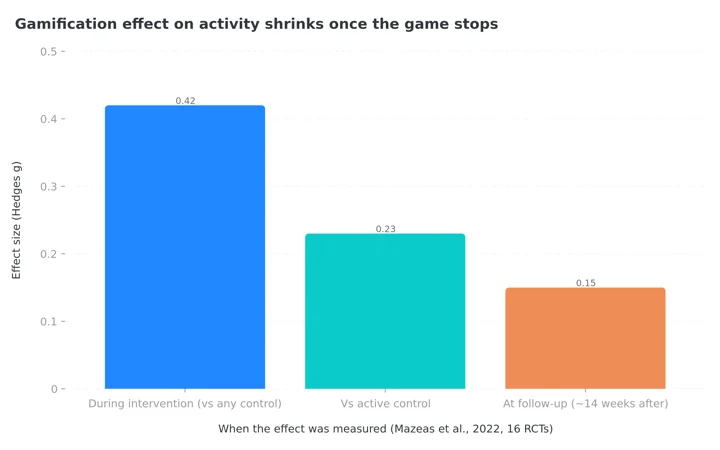 Figure 1: The effect of gamified features shrinks by roughly two thirds once the intervention ends (Mazeas et al., 2022).
Read that decline carefully. The game moves behavior while the game is running. Once it stops, most of the effect goes with it. A streak is worth having only if it is buying you time to build something that survives without it.
The behavior underneath is what pays. In a study of 90 adults using a commercial tracking app, participants logged on 50.1 percent of days on average, consistent tracking lasted about 4.4 weeks, and each additional week of consistent tracking was associated with 0.23 percent more weight lost (Payne et al., 2022, Obesity Science and Practice). Consistency is measurably valuable. The flame is just one way of noticing it.
The Day You Break It Is the Day That Matters
Return to the numbers at the top. Across 41,207 users, streaks and breaks alternated between one and nine times per person, the mean streak ran 20.22 weeks and the mean break ran 16.14 weeks, and the median time to resume a second streak was between 12 and 32 weeks (Lau et al., 2022). The authors concluded that "long-term mHealth app usage is possible" and that breaks and re-engagement are a normal part of it.
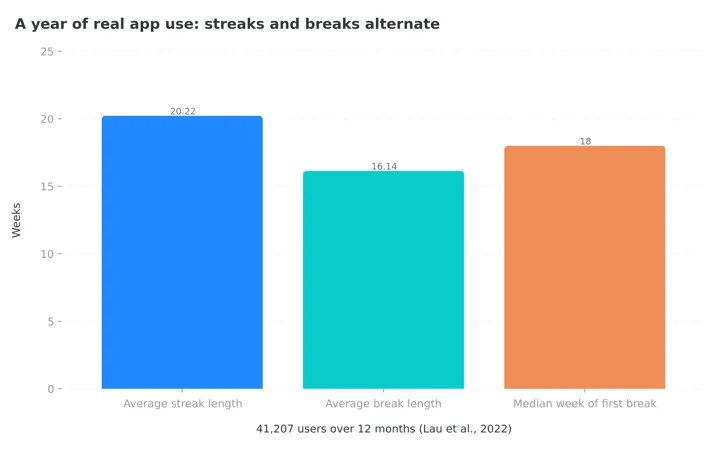 Figure 2: In a year of real usage data, breaks are nearly as long as streaks. Apps that punish every pause are designing against their own users (Lau et al., 2022).
An app that treats day one after a break as identical to day one of your entire life is discarding the most useful information it has about you. You are not a beginner. You are a returning user with 140 logged days behind you.
This is why "streak to beat," lifetime totals and monthly comparisons matter more than the current number. They survive the break. Look for them, and judge an app on what it remembers rather than on what it resets.
When a Streak Turns Into a Problem
A streak is a pressure device. For most people the pressure is mild and useful. For some it is not.
A 2025 systematic review of 27 studies found "reasonably consistent evidence of an association between disordered eating and fitness and diet tracker use," while noting that "this association was not replicated in experimental research" (Moody et al., 2025, European Eating Disorders Review). The evidence is an association rather than a demonstrated cause, and that is exactly why the sensible response is caution rather than alarm.
Three signals suggest a streak has stopped helping. You log food you did not eat, or skip logging food you did eat, to protect the number. You feel real distress on the day it breaks, out of proportion to the missed record. You eat or avoid eating on a schedule that serves the counter rather than your appetite.
If the counter is hurting more than helping
If any of those signals apply, switch to an app where the counter can be hidden, or stop tracking and speak to a clinician. Children and teenagers should not be using calorie streaks at all.
Seven Rules for Using a Streak Without Being Used By It
Pick an action streak, not a presence streak. If tapping the app counts, the number is measuring nothing you care about.
Set the bar at the busiest day you have. A streak you can only keep on a good day will break in week three. If your Thursdays are chaos, define a countable day as something you can do on a Thursday.
Never backfill from memory. A guessed entry protects a number and damages the record you will use later. Cronometer's rule against backdating is the right instinct even in apps that allow it.
Declare planned breaks in advance. Use vacation mode or the equivalent before you travel, rather than trying to repair the damage afterwards.
Watch your longest streak, not your current one. Lifetime numbers are the honest measure of a habit that includes normal breaks.
Restart on the same day you notice, not next Monday and not the first of the month. The Lau data shows that people who come back stay for months, and the delay before restarting is wasted time.
Check the counter against an outcome once a month. If a 90 day streak has not moved your protein intake, your weight, or how you feel, then the streak has become the goal instead of the instrument.
 A streak that survives your busiest week is worth a small celebration. One that only survives perfect weeks is not a streak, it is a countdown.
IMPORTANT
Checkpoint: final stretch before the reveal.
One last nudge - the reveal is next.
⏱️ Progress 3/4 • ~8 minutes in • Keep going
✅ Step 1: The three jobs a streak has to do
✅ Step 2: The rankings, Cronometer to Zero
✅ Step 3: What the research actually shows
✨ The 5-step restart method (about to reveal)
How to Restart a Streak in Five Steps
- Open the app and log today, not the missed days. Today is the only entry that counts in Cronometer anyway, and it is the only one that is accurate everywhere else.
- Write down your old record. Whether the app keeps it or not, the number of days you managed before is a fact about you and it is worth knowing.
- Lower the bar for what counts. For the next two weeks, define a logged day as one meal plus your weight, not a complete diary. A pilot trial comparing a simplified approach with full tracking found broadly similar numbers of tracking days in both groups, and while the full-tracking group lost more weight, the lighter habit still produced results (Nezami et al., 2022, Obesity).
- Set one reminder at the time you actually eat. Not a morning reminder for an evening behavior.
- Review after 14 days. If the streak is running and the record is honest, raise the bar. If it broke twice, lower it again rather than trying harder.
IMPORTANT
Recap: everything you completed this round.
You finished the run - save this for next time.
⏱️ Progress 4/4 • ~9 minutes in • Nicely done
✅ Step 1: The three jobs a streak has to do
✅ Step 2: The rankings, Cronometer to Zero
✅ Step 3: What the research actually shows
✅ The 5-step restart method (revealed)
The Short Answer
Choose Cronometer if you want a streak that means something. It counts real logging across food, exercise, biometrics and fasts, it refuses to count days you filled in later, and it is the only app here that documents how to turn the display off.
Choose Simple if open-ended counters make you anxious. A 30 day target you can finish, plus a freeze for the day you miss, is a healthier shape than a number that can only be lost.
Choose Lose It if a deliberate end-of-day action helps you finish the day properly, and take the company's own advice that five days a week is enough.
Choose Zero only if fasting is the habit you are building, since nothing else counts.
Be careful with MyFitnessPal, which runs two competing counters, cannot be switched off, and suggests logging a missed day from memory.
If you want a streak that survives a planned break, NutriScan keeps yours running through vacation mode with no penalty, and its fasting tracker page sets the bar for a fasting day at 80 percent of target, which is the closest thing here to a streak that understands how real months work. The free plan includes 5 photo scans a week and unlimited manual logging, so you can test whether its streak fits your life before paying anything.
Frequently Asked Questions
Q1: Which nutrition app has the best streak system in 2026? Cronometer. Its streak counts any real diary entry, food, exercise, biometrics or a fast, and its support page states that retroactive logging will not contribute to your streak, which keeps the number honest. It is also the only one that documents a Show Streaks toggle so you can remove the counter entirely.
Q2: Do streaks actually help with weight loss? Consistent tracking does, and the streak is one way to encourage it. Each additional week of consistent tracking was associated with 0.23 percent more weight lost in a study of 90 adults (Payne et al., 2022). Gamified design helps mostly while it is running: a meta-analysis of 16 trials found the effect on activity fell from a Hedges g of 0.42 during the intervention to 0.15 at follow-up (Mazeas et al., 2022).
Q3: What happens if I miss a day of my food logging streak? It depends entirely on the app. Cronometer resets it and will not accept a backdated entry. MyFitnessPal resets it but tells you to go back with the date picker and log the day "the best you recall." Simple lets you spend a streak freeze. Zero restores the streak if you add the missing fast. NutriScan continues it through vacation mode with no penalty.
Q4: Can you turn off streaks in MyFitnessPal? No. Their Today tab help page says the streak feature is part of the new design and that no option to hide it has been added at this time. Cronometer is the alternative if a visible counter bothers you.
Q5: Is a login streak the same as a logging streak? No, and the difference is the whole topic. A login streak counts days you opened or synced the app, which changes nothing about your eating. A logging streak counts days you recorded food. MyFitnessPal runs both and says on its own help page that food logging is the better indicator.
Q6: Are streaks bad for people with a history of disordered eating? They can be a poor fit. A 2025 systematic review of 27 studies found reasonably consistent evidence of an association between diet tracker use and disordered eating, though experimental research did not replicate it (Moody et al., 2025). If a broken streak causes real distress, or you find yourself logging food you did not eat, choose an app where the counter can be hidden and talk to a clinician.
This article is for general information and is not medical advice. App behavior was checked against each company's own support and help pages in August 2026 and may change. If you have a history of disordered eating, speak to a qualified clinician before starting or restarting food tracking.