How to Cancel Your YAZIO PRO Subscription or Account
 ChatGPT
  Claude
  AI Mode
  Perplexity
TL;DR
Cancel through the platform where you bought YAZIO PRO (App Store, Google Play, or yazio.com). Deleting the app does NOT cancel billing. You keep PRO access until the current period ends. Your food log data stays safe after canceling.
Cancel YAZIO PRO in the same place you bought it. On iPhone: Settings, your name, Subscriptions, YAZIO, Cancel Subscription. On Android: Play Store, profile picture, Payments and subscriptions, Subscriptions, YAZIO, Cancel subscription. Bought on yazio.com: log in at yazio.com/app/account and click Cancel subscription. Billing stops at the end of the period you already paid for, PRO features stay on until that date, and your food log stays where it is. Deleting the app cancels nothing. Deleting your YAZIO account cancels nothing either, so cancel the subscription first and delete the account after.
YAZIO PRO has over 45,000 App Store ratings with a 4.7 out of 5 score. It is a solid calorie tracking app. But sometimes PRO is not the right fit anymore. Maybe you hit your goal weight, maybe the free plan covers what you need, or maybe you found a tracker that works better for your routine.
As a NutriScan nutritionist, I see this constantly. A 2022 cross-sectional survey of mHealth users found that about 53 percent of users uninstall a health app within 30 days of download. That does not mean the app failed you. Goals change, budgets shift, and sometimes a different tool fits better.
This guide covers how to cancel YAZIO PRO on every platform, Apple, Google Play, and the YAZIO website, how to cancel or delete your YAZIO account, how refunds work, and what you keep on the free plan. Dutch readers searching for yazio opzeggen get the Dutch button labels further down.
 Not sure which platform to cancel through? This guide covers all three paths.
What Happens When You Cancel YAZIO PRO
Before you tap anything, know what canceling actually does.
According to the YAZIO Help Center:
- You will not be charged again. Your subscription stops renewing at the end of the current billing period.
- You keep PRO access until your paid period ends. If you paid for a year and cancel in month three, you still have nine months of PRO features.
- Your account stays active. Canceling does not delete your food logs, recipes, or body data.
- You cannot pause or shorten an active subscription. There is no "freeze" option.
- Uninstalling the app does not cancel your subscription. This is the single most common mistake users make.
Once your paid period ends, YAZIO switches you back to the free version automatically. No extra steps needed.
Step 1: Find Where You Purchased YAZIO PRO 🔍
This is the most important step. YAZIO has three possible purchase channels, and you must cancel through the same one you used to subscribe.
Check your bank or credit card statement. Here is how each transaction appears:
| Purchase Channel | Statement Description |
|---|---|
| Apple App Store | APPLE.COM/BILL or ITUNES.COM/BILL |
| Google Play | GOOGLE*YAZIO |
| YAZIO Website | YAZIO or a payment processor name |
CHECK INSIDE THE APP
Open YAZIO, go to Profile ➡️ Settings ➡️ Account ➡️ Subscription. The app shows your subscription details and purchase source.
You can also check your email inbox for the original purchase confirmation. Apple sends from [email protected], Google from [email protected], and YAZIO sends directly from their own domain.
YAZIO PRO Pricing Quick Reference 💰
Before you cancel, here is what you are currently paying:
| Plan | Price | Per Month |
|---|---|---|
| Monthly | $11.90/mo | $11.90 |
| 3 Months | $23.99 | $8.00 |
| 6 Months | $34.99 | $5.83 |
| 12 Months | $47.90 | $3.99 |
Prices from the US App Store as of March 2026. Pricing varies by region and platform. Our YAZIO pricing breakdown breaks down what each tier includes.
At $3.99 per month on the annual plan, YAZIO PRO is one of the more affordable premium trackers. For comparison:
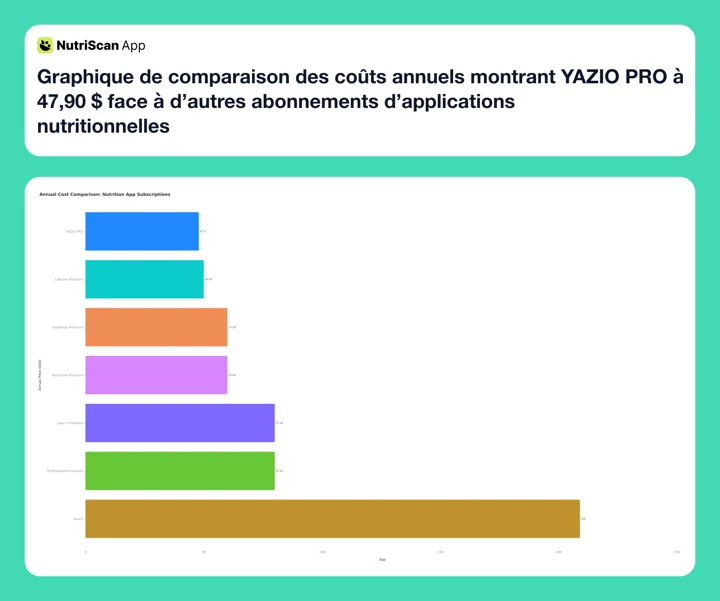 Figure 1: YAZIO PRO annual cost compared to other popular nutrition apps
STUDENT DISCOUNT
YAZIO sometimes offers Student Beans discounts of up to 40 percent off. If cost is your main reason for canceling, check for active promotions before you cancel.
Step 2: Cancel on iPhone (Apple App Store) 📱
If your bank statement shows APPLE.COM/BILL, Apple manages your billing. YAZIO cannot cancel it for you.
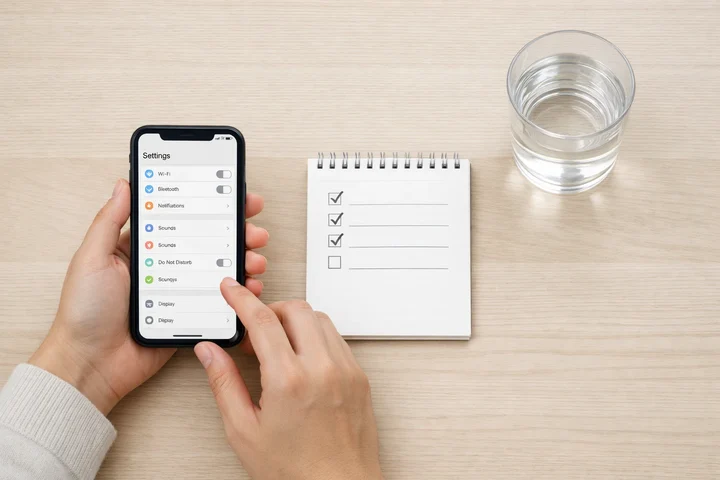 Follow these steps carefully to ensure your YAZIO subscription is fully canceled.
Steps:
- Open Settings on your iPhone.
- Tap your name at the top of the screen.
- Tap Subscriptions.
- Find YAZIO in the list and tap it.
- Tap Cancel Subscription.
- Confirm the cancellation when prompted.
You will see the expiration date of your current billing period. PRO features remain active until that date.
ON iPAD OR MAC
On iPad, go to Settings ➡️ your name ➡️ Subscriptions. On Mac, open the App Store, click your name in the bottom left, then click Account Settings ➡️ Subscriptions ➡️ Manage. For the full walkthrough, see the official Apple guide.
Cannot find YAZIO in your subscriptions? You may have purchased through Google Play or the YAZIO website instead. Check the sections below.
Apple Support: If you run into issues, contact Apple Support directly. YAZIO does not have access to your App Store subscription details.
Step 3: Cancel on Android (Google Play) 🤖
If your bank statement shows GOOGLE*YAZIO, Google manages your billing. YAZIO cannot cancel it for you either.
Steps:
- Open the Google Play Store app on your Android device.
- Tap your profile picture in the top right corner.
- Tap Payments and subscriptions.
- Tap Subscriptions.
- Select your YAZIO subscription.
- Tap Cancel subscription.
- Confirm by tapping Unsubscribe.
You will see the status change to "Canceled" and the end date of your subscription period.
MULTIPLE GOOGLE ACCOUNTS
If you have multiple Google accounts on your phone, make sure you are signed into the same one that made the purchase. This is the most common reason the subscription does not appear in the list.
Google Play website alternative: You can also cancel at play.google.com by signing in, clicking your profile, then going to Payments and subscriptions and following the same steps.
Google Support: For refund or billing questions, contact Google Play Support directly.
Step 4: Cancel from the YAZIO Website 💻
If you purchased YAZIO PRO directly on the YAZIO website, you have two cancel options.
Option A: Cancel via Browser
- Go to yazio.com/app/account in any browser.
- Log in to your YAZIO account.
- Find your active subscription.
- Click Cancel subscription.
- Confirm by clicking Unsubscribe.
You will see the updated status "Canceled" and the end date of your subscription period.
Option B: Cancel in the YAZIO App
- Open the YAZIO app.
- Go to the Profile tab.
- Tap Settings.
- Tap Account.
- Select Subscription.
- Tap Cancel subscription and confirm.
WHY THE WEBSITE PATH MATTERS
Unlike Apple and Google Play purchases, website purchases give you the most direct control. You can cancel either online or in the app, and YAZIO handles the billing directly. Website purchases also come with the EU 14-day withdrawal right for refunds.
Step 5: How to Get a Refund 💸
Canceling stops future charges but does not automatically give you a refund. Here is how refunds work on each platform, based on the YAZIO refund policy.
Apple App Store Refund
- YAZIO cannot issue refunds for App Store purchases.
- You must request a refund through Apple's refund page.
- Apple reviews each request individually. There is no guaranteed refund window.
Google Play Refund
- YAZIO cannot process refunds for Google Play purchases.
- Contact Google Play Support to request a refund.
- Google typically offers refunds within 48 hours of purchase. After that, approval varies.
Website Purchase Refund (EU 14-Day Right)
This is where YAZIO is different from most competitors. Because YAZIO GmbH is based in Erfurt, Germany, EU consumer protection law applies to website purchases.
You have a 14-day withdrawal right from the date the contract is concluded. No reason required.
How to request a website refund:
- Email [email protected] within 14 days of purchase.
- Include your invoice number, name, email registered with YAZIO, and a clear statement that you want to withdraw.
- You can also send a letter to: YAZIO GmbH, Kartauserstr. 13a, 99084 Erfurt, Germany.
YAZIO provides a sample withdrawal form in their Help Center. You do not have to use the exact form, but your request must be sent before the 14-day period expires.
EU REFUND DEADLINE
The 14-day withdrawal window is strict. After it passes, no refund is guaranteed for website purchases until the subscription period ends. Mark the date in your calendar if you are considering a refund.
How to Cancel or Delete Your YAZIO Account 👤
Two separate things hide behind the word cancel. Canceling YAZIO PRO stops the billing. Deleting your YAZIO account removes the login and the data behind it. Doing one does not do the other.
The order matters:
- Cancel the subscription first through whichever channel charged you: Apple, Google Play, or yazio.com.
- Wait for the confirmation. You want a "Canceled" status with an end date, not an active renewal date.
- Delete the account after that. In the app, account deletion sits with the rest of your account settings under Profile ➡️ Settings ➡️ Account. If you cannot find the option, email [email protected] from the address registered on the account and ask for deletion.
DELETING THE ACCOUNT DOES NOT STOP APPLE OR GOOGLE
If you bought PRO through the App Store or Google Play, the store holds the billing, not YAZIO. Delete your YAZIO account while that subscription is still active and the charge keeps landing every renewal. Cancel in the store first.
If you only want your food log gone and not the subscription, canceling alone is enough. Your data stays until you delete the account yourself.
YAZIO Opzeggen: Canceling YAZIO from the Netherlands 🇳🇱
Dutch searches for yazio opzeggen, yazio abonnement opzeggen, and yazio account opzeggen all end at the same three paths above. Only the button labels change:
- iPhone: Instellingen ➡️ je naam ➡️ Abonnementen ➡️ YAZIO ➡️ Annuleer abonnement.
- Android: Play Store ➡️ profielfoto ➡️ Betalingen en abonnementen ➡️ Abonnementen ➡️ YAZIO ➡️ Abonnement opzeggen.
- Website: log in at yazio.com/app/account and cancel the subscription there.
De YAZIO app opzeggen, in the sense of deleting the app from your phone, stops nothing at all. Apple or Google keeps charging until you cancel inside the store.
One upside for Dutch buyers: YAZIO GmbH is based in Erfurt, Germany, so a purchase made on yazio.com falls under the EU 14-day withdrawal right described below. App Store and Google Play purchases follow Apple's and Google's own refund rules instead.
The Mistake That Keeps Charging You After You "Cancel" 🚨
A 2022 literature review on mHealth engagement challenges found that low barriers to exit and lack of clear support features contribute to poor retention and confusion around subscription management. Here is the number one mistake with YAZIO.
Deleting the app is not the same as canceling your subscription.
This sounds obvious, but it catches thousands of people every month across every subscription app. When you uninstall YAZIO from your phone, your subscription with Apple or Google Play keeps running. The billing does not stop until you explicitly cancel through your device settings or the app store.
Here are the other common mistakes to watch for:
Deleting your YAZIO account instead of canceling. Account deletion and subscription cancellation are separate actions. Delete your account without canceling first, and the subscription keeps charging.
Canceling on the wrong platform. If you bought through Apple, you must cancel through Apple. Canceling in the YAZIO app only works for website purchases.
Waiting until the last day. Apple and Google sometimes need 24 hours to process cancellations. Cancel at least one day before your renewal date.
Expecting an immediate refund. Canceling stops future charges only. You keep PRO access until your paid period ends.
Forgetting about the website purchase path. If you signed up during a YAZIO website promotion or through a Student Beans discount, your subscription is managed by YAZIO directly, not Apple or Google.
Not checking your bank statement. If you cannot remember where you purchased, your statement shows "APPLE.COM/BILL," "GOOGLE*YAZIO," or "YAZIO" directly.
Missing the 14-day EU withdrawal window. Website purchases come with a 14-day refund right. After that, no refund is guaranteed.
Assuming you can pause. YAZIO does not offer a pause option. Cancel and re-subscribe later if you want a break.
 That feeling when you finally cancel without surprise charges.
What You Keep (and Lose) After YAZIO PRO Expires
Understanding what changes helps you decide if canceling is the right move.
What you keep on the free plan:
- Calorie and macro tracking (unlimited)
- Basic food database access (4 million+ items)
- Barcode scanner for packaged foods
- Water tracking with reminders
- Step and activity tracking
- Basic meal logging and daily summaries
- Weight tracking
What you lose without PRO:
- AI photo food scanning (snap a meal, get calories)
- 100+ premium recipes and meal plans
- Extended nutrition analysis (sugar, fiber, salt, saturated fat tracking)
- Body fat, blood pressure, and blood sugar tracking
- Progress tracking beyond 7 days (PRO gives 2.5+ years of history)
- Intelligent food ratings that score your meals
- Ad-free experience
- Nutrition Coach feature with personalized guidance
- Detailed diet and body statistics reports
The free plan is more generous than many competitors. MyFitnessPal recently moved barcode scanning behind a paywall for new accounts. Lose It limits food logging features on the free tier. YAZIO keeps core tracking free, which means canceling PRO does not kill your daily logging routine.
A 2025 survey on factors driving mHealth app usage found that system usability and unobtrusiveness are among the strongest predictors of continued engagement. If YAZIO's free plan covers your core needs, there is no reason to keep paying for PRO.

What you lose with YAZIO, and what NutriScan gives you free
YAZIO keeps core logging free, which is more than most. The PRO list still costs less on NutriScan.
| YAZIO PRO paid feature | NutriScan |
|---|---|
| AI photo food scanning | Photo food scan, 5 a week on the free plan, unlimited on Premium |
| Extended nutrition analysis, sugar, fiber, salt, saturated fat | Micronutrients on every meal you log, free |
| Intelligent food ratings that score your meals | A NutriScore on every meal, with weekly and monthly trends, free |
| Progress history beyond 7 days | Full meal history on the free plan |
| 100+ premium recipes and meal plans | 28-day diet plans with macros, a grocery list and swaps. This one is Premium in NutriScan too |
YAZIO PRO is $47.90 a year or $11.90 a month. NutriScan Premium is about $59 a year, and the free plan has no time limit.
How YAZIO Compares on Cancellation
| App | Cancel Paths | Refund Window | Free Plan After Cancel |
|---|---|---|---|
| YAZIO | Apple, Google Play, Website (2 options) | 14 days (website), varies (Apple/Google) | Yes, generous |
| MyFitnessPal | Apple, Google Play, Web | Varies by platform | Yes, limited |
| Lose It | Apple, Google Play, Website | Varies by platform | Yes, moderate |
| Lifesum | Apple, Google Play, Website, Paddle, Galaxy Store | 14 days (website) | Yes, limited |
| Foodvisor | Apple, Google Play, Website (Stripe) | 14 days (website, EU) | Yes, very limited |
| Fastic | Apple, Google Play, Website | 14 days ("Feel Good Guarantee") | Yes, limited |
| NutriScan | Apple, Google Play | Varies by platform | Yes, generous |
YAZIO and Lifesum share the EU 14-day withdrawal advantage for website purchases since both are European companies (YAZIO is German, Lifesum is Swedish). This gives website buyers more refund protection than most US-based apps offer.
Tips Before You Cancel 💡
Screenshot your subscription details before canceling. This gives you proof of the cancellation date and remaining access period.
Export any data you want to keep. Check if YAZIO allows data export in Profile ➡️ Settings. Save your food log history if you plan to switch apps.
Cancel early, not at the last minute. You keep PRO until the paid period ends, so there is no reason to wait.
Set a calendar reminder for your renewal date minus 2 days. This way, if you change your mind about canceling, you still have time to re-subscribe.
Check for promotional pricing before you cancel. YAZIO sometimes offers Student Beans discounts or seasonal deals. If cost is the issue, a discount may make it worth keeping.
Try the free plan first. Cancel and use the free version for a month. If you miss PRO features, you can always re-subscribe. Your data stays intact.
Consider switching platforms. If you originally bought through Apple or Google Play and want more refund protection, let the current subscription expire and re-subscribe through the YAZIO website. Website purchases come with the EU 14-day withdrawal right.
Check if your employer or insurance covers it. Some wellness programs reimburse nutrition app subscriptions. Ask before you cancel.
Forbes Health includes YAZIO in their list of best calorie counting apps, and Garage Gym Reviews features it in their 2026 best weight loss app roundup. The app is solid. But paying for a subscription you do not use helps no one.
Switching to a Different Tracker?
If you are looking for a different nutrition app after canceling YAZIO PRO, here are some options to consider:

NutriScan's AI meal scan: snap a photo and get instant calorie and macro breakdown (Home > Camera Icon > Crop Picture)
- NutriScan - AI-powered meal scanning with a generous free plan and unlimited scans on Premium. Use the macro calculator to set your targets before switching.
- MyFitnessPal - Largest food database, but Premium costs $79.99/year.
- Lose It - Simple calorie tracking, but Premium is now $79.99/year, the same as MyFitnessPal, and there is no monthly plan (membership tiers and pricing). If you are leaving YAZIO PRO to spend less, this is not the move. See our Lose It cancellation guide if you try it and decide to move on.
- Lifesum - Meal plans and recipes focus, similar EU refund protection as YAZIO.
For a wider list, see our best YAZIO alternatives roundup, or compare the two head to head in NutriScan vs YAZIO. If all you want back is plain calorie counting, the calorie counter app page shows what that looks like without a subscription.
Whatever you choose, the goal is the same: track your nutrition in a way that works for your life.
Conclusion
Canceling YAZIO PRO takes less than two minutes on any platform. The key steps: find where you purchased (Apple, Google Play, or website), follow the cancel steps for that platform, and confirm the cancellation. You keep PRO access until your current billing period ends, and your food log data stays safe.
A 2023 review on mHealth app quality highlighted that transparent usability and clear support features are key markers of app quality. YAZIO does this well with clear help center articles and multiple cancel options for website purchases.
If you are switching to another tracker, NutriScan's free plan lets you test photo-based food logging before committing. Try the meal scan feature to see how AI-powered tracking compares to manual logging.
FAQ
Can I cancel YAZIO PRO and get an immediate refund?
Canceling does not trigger a refund. For App Store purchases, request a refund at reportaproblem.apple.com. For Google Play, contact Google Play Support. For website purchases, email [email protected] within 14 days for a full refund under EU consumer protection law.
Will I lose my food log data if I cancel YAZIO PRO?
No. Your food logs, body measurements, and account data remain intact after canceling. You simply lose access to PRO features like premium recipes, extended nutrition tracking, and AI photo scanning when your paid period ends.
Does deleting the YAZIO app cancel my subscription?
No. Removing YAZIO from your phone does not stop your subscription. You must cancel through Apple Settings, Google Play, or the YAZIO website depending on where you originally purchased.
How do I cancel my YAZIO account?
Cancel the subscription first through whichever channel charged you, then delete the account. In the app, account deletion sits under Profile ➡️ Settings ➡️ Account. If the option is missing, email [email protected] from the address on the account. Deleting the account on its own never stops an App Store or Google Play charge.
YAZIO opzeggen: how do I cancel YAZIO in Dutch?
Opzeggen means cancel, and the paths are the same ones above. On iPhone: Instellingen ➡️ Abonnementen ➡️ YAZIO ➡️ Annuleer abonnement. On Android: Betalingen en abonnementen ➡️ Abonnementen ➡️ YAZIO ➡️ Abonnement opzeggen. On the website: cancel at yazio.com/app/account. Uninstalling the app does not stop the billing.
Can I re-subscribe to YAZIO PRO after canceling?
Yes. You can re-subscribe at any time through the app or the YAZIO website. Your previous data will still be there. However, promotional pricing from your original signup may not be available again.
Does YAZIO offer a free trial before I commit to PRO?
YAZIO offers a 7-day free trial for new subscribers in some markets. The trial is typically available through the website, not always through the app stores. If you cancel the trial before it ends, you will not be charged. See our YAZIO free trial guide for more details.
Does YAZIO offer a pause option instead of canceling?
No. YAZIO does not offer a pause or freeze option. If you want to take a break, cancel and re-subscribe later. Your data stays intact when you return.
How do I know if my YAZIO PRO cancellation went through?
After canceling, you should see a "Canceled" status with an end date. On Apple, check Settings ➡️ Subscriptions. On Google Play, check Payments and subscriptions. For website purchases, check your YAZIO account page. If the status still shows "Active," the cancellation may not have processed. Try again or contact the relevant platform support.
Is YAZIO PRO worth keeping instead of canceling?
At $3.99 per month on the annual plan, YAZIO PRO is one of the cheapest premium trackers available. If you use the AI photo scanning, premium recipes, or extended nutrition tracking regularly, the value is strong. If you only use basic calorie and macro tracking, the free plan covers those features and canceling makes sense.