Is the NutriScan App Free? Pricing, Free vs Premium Plans
 ChatGPT
  Claude
  AI Mode
  Perplexity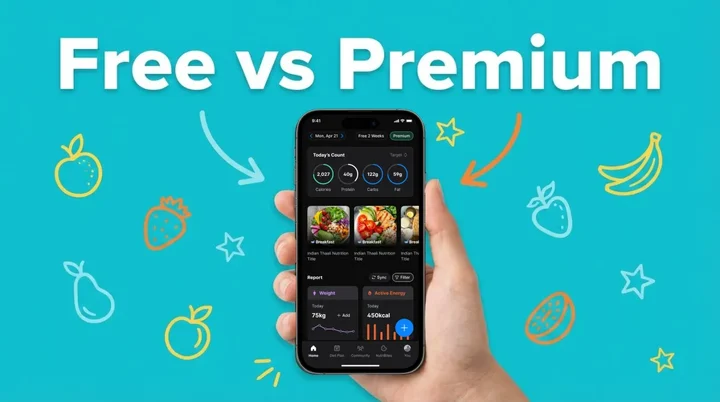
Yes, the NutriScan app is free, and it stays free with no time limit. The free plan gives you 5 AI meal scans a week, calories, macros, micronutrients, and a NutriScore on every meal, with no ads. Premium costs about $59 a year. Prices here are standard US prices as of mid 2026 and change by region.
TL;DR - NutriScan pricing
- Free plan: 5 AI meal scans a week, macros and micronutrients, NutriScore ratings, 4 Monika AI calls/week, Apple Health/Google Fit sync, no ads
- Premium: about $59 a year
- Referral rewards: Earn Premium weeks by inviting friends (up to 3 months with 10 referrals)
- Two plans to choose from: Free or Premium
NutriScan is on iOS and Android, free to download, and free to keep using. A 2025 review in Nutrition Reviews found that people abandon diet-tracking apps when the cost structure is confusing (Abeltino et al. 2025, Nutrition Reviews), so here is every number in one place.
 *Trying to figure out app pricing be like...*
 Is the NutriScan App Free? What You Get for $0 🆓
NutriScan's free plan is not a stripped-down demo. There is no time limit on it, and it stays free without a subscription.
Free Tier Features
| Feature | Details |
|---|---|
| AI Meal Scanning | 5 photo scans a week for instant calorie, macro, and micronutrient estimates. The count resets weekly |
| Manual Meal Logging | Type packaged items, restaurant dishes, or home-cooked meals |
| Daily Calorie & Macro Tracking | Meal timeline with breakfast, lunch, dinner, snack entries and running totals. Use our macro calculator to set targets |
| NutriScore Ratings | Each meal gets a NutriScore showing how balanced it is |
| Copy Meals | Hold a previous meal and tap "Copy Meal to Today" |
| Monika Voice Assistant | 4 AI nutritionist calls per week (Home > Call Button) |
| Health App Sync | Apple Health and Google Fit integration (steps, sleep, weight) |
| Hydration Tracking | Log water intake alongside meals |
| Meal Tagging | 8 food sources: Home Made, Packaged, Restaurant, Office, Hostel, Street Food, Supplements, Hotel/Event |
| Cooking Methods | 11 options: Deep-fried, Air-fried, Roasted, Steamed, and more |
Forbes Health notes that most calorie-counting apps offer free versions with basic features but lock barcode scanning, community tools, or macro tracking behind a paywall (Forbes Health). NutriScan keeps macro tracking, micronutrients, and NutriScore free on every meal, and gives free users 5 AI scans a week with no ads.

NutriScan's home dashboard: daily calorie and macro tracking at a glance (Home > Daily Overview)
WHAT THE FREE PLAN GETS RIGHT
Most competitors keep photo scanning out of the free tier entirely. MyFitnessPal moved its barcode scanner behind Premium. Lose It is restricting its Scan It feature. NutriScan gives free users 5 AI meal scans a week, enough to point the camera at the meals a food database usually gets wrong, plus macros, micronutrients, and NutriScore on everything you log by hand.
NutriScan Premium: What It Costs 💰
Free and Premium are the plans you can pick today. Prices below are standard US prices as of mid 2026 and change by region.
Premium is about $59 a year. The subscription screen inside the app shows the current price for your country.
Regional Pricing
Premium is about $59 a year in the US. India and the EU are priced separately in local currency, and your app store shows the exact figure before you confirm.
Sources: Apple App Store US, Apple App Store India.
PROMOTIONAL PRICING
The US App Store occasionally shows other IAP tiers. Check the subscription screen inside the app for current offers.
What Premium Adds 🔓
Every Premium feature builds on top of the free plan. Nothing you already use goes away.
| Feature | Free | Premium |
|---|---|---|
| AI Meal Scanning | 5/week | Unlimited |
| Manual Logging | Yes | Yes |
| Calorie & Macro Tracking | Yes | Yes |
| Micronutrient Tracking | Yes | Yes |
| NutriScore Ratings | Yes | Yes |
| Copy Meals | Yes | Yes |
| Monika AI Calls | 4/week | Unlimited |
| Apple Health/Google Fit Sync | Yes | Yes |
| Hydration Tracking | Yes | Yes |
| 28-Day Diet Plans | No | Yes |
| Supplement Recommendations | No | Yes |
| Recipe Recommendations | No | Yes |
| Grocery Lists | No | Yes |
| Advanced Macro Reports | No | Yes |
| Priority Support | No | Yes |
A Closer Look at Each Premium Feature
1. Personalized 28-Day Diet Plans (Profile > Diet Plan)
Premium generates a custom diet plan based on your health goal (weight loss, diabetes management, PCOS, pregnancy nutrition, or muscle building), dietary preference, and activity level. Plans include specific meal recommendations with 2 options per eating schedule, portion guidance, and cooking tips. The onboarding collects 15+ data points including goals, restrictions, schedules, and kitchen items.
2. Unlimited Monika AI Consultations (Home > Call Button)
Free users get 4 calls per week. Premium removes that cap. Ask Monika about your eating patterns, get real-time meal feedback, request recipe ideas, or check how a specific food fits your daily targets.
3. Supplement Recommendations
The vitamin and mineral breakdown itself is free on both plans, so anyone can watch iron for pregnancy, vitamin D for general health, or sodium for blood pressure. Premium reads the gaps in what you logged and suggests what to add. See our insights guide for how NutriScan surfaces these patterns.

NutriScan's meal scanning: snap a photo for instant nutrition analysis (Home > Camera Icon > Crop Picture)
4. Recipe Recommendations
Based on your diet plan and nutritional gaps, NutriScan suggests recipes that fill what is missing. Low on fiber this week? The app surfaces high-fiber recipes.
5. Grocery List Generation
Premium creates weekly and monthly grocery lists from your diet plan. The lists match your planned meals so you buy what you need.
6. Advanced Macro Reports
Weekly summaries, trend analysis, and pattern insights. See how your protein intake changed over the past month or whether your calorie distribution shifts on weekends.
Invite and Earn: The Referral Program 🤝
NutriScan runs a referral program called Invite and Earn. It is available to all users, free and Premium.
How It Works
- Open NutriScan and go to the Home screen
- Tap Invite and Earn (Home > Click Invite & Earn)
- Share your personal referral link with friends via any messaging app, email, or social media
- When a friend downloads NutriScan and signs up using your link, both of you get 1 week of Premium
Cumulative Rewards
| Successful Referrals | Your Reward |
|---|---|
| 1 referral | 1 week of Premium (for you AND your friend) |
| 5 referrals | 1 month of Premium |
| 10 referrals | 3 months of Premium |
The referral approach is uncommon among nutrition apps. Forbes Health reviewed nine top calorie-counting apps and none listed a referral-based reward system as a standard feature (Forbes Health). NutriScan's model lets users earn Premium access through social sharing rather than spending more money. Our Invite and Earn walkthrough shows the screens step by step.
NutriScan vs Other Calorie Counter Apps: Price Compared 📊
Here is how NutriScan stacks up against popular nutrition trackers in 2026. Prices below are standard US prices as of mid 2026 and change by region. NutriScan publishes this post, and we make a competing app.
| App | Free Plan | Monthly | Yearly | Yearly/Month |
|---|---|---|---|---|
| NutriScan | Yes (5 AI scans/week + macros) | yearly (weekly in some regions) | about $59/yr | - |
| MyFitnessPal | Yes (limited) | $19.99 | $79.99 | $6.67 |
| Lose It | Yes (basic) | No monthly plan | $79.99 | $6.67 |
| Cronometer | Yes (basic, ads) | $10.99 | $59.99 | $5.00 |
| YAZIO | Yes (limited) | ~$12.99 | $47.90 | $3.99 |
| Lifesum | Yes (basic) | varies | $99.99 list, often discounted | varies |
| MyNetDiary | Yes (basic) | $8.99 | $59.99 | $5.00 |
Sources: Lose It Membership Tiers & Pricing, Cronometer Gold, MyFitnessPal Premium, Forbes Health, Garage Gym Reviews 2026.
Two of those numbers moved in 2026. Lose It raised Premium from $39.99 to $79.99 and stopped selling a monthly plan, which puts it level with MyFitnessPal instead of at the bottom of the table. Cronometer Gold lists at $59.99 a year, not the $59.88 that older comparisons carried over from twelve months at $4.99.
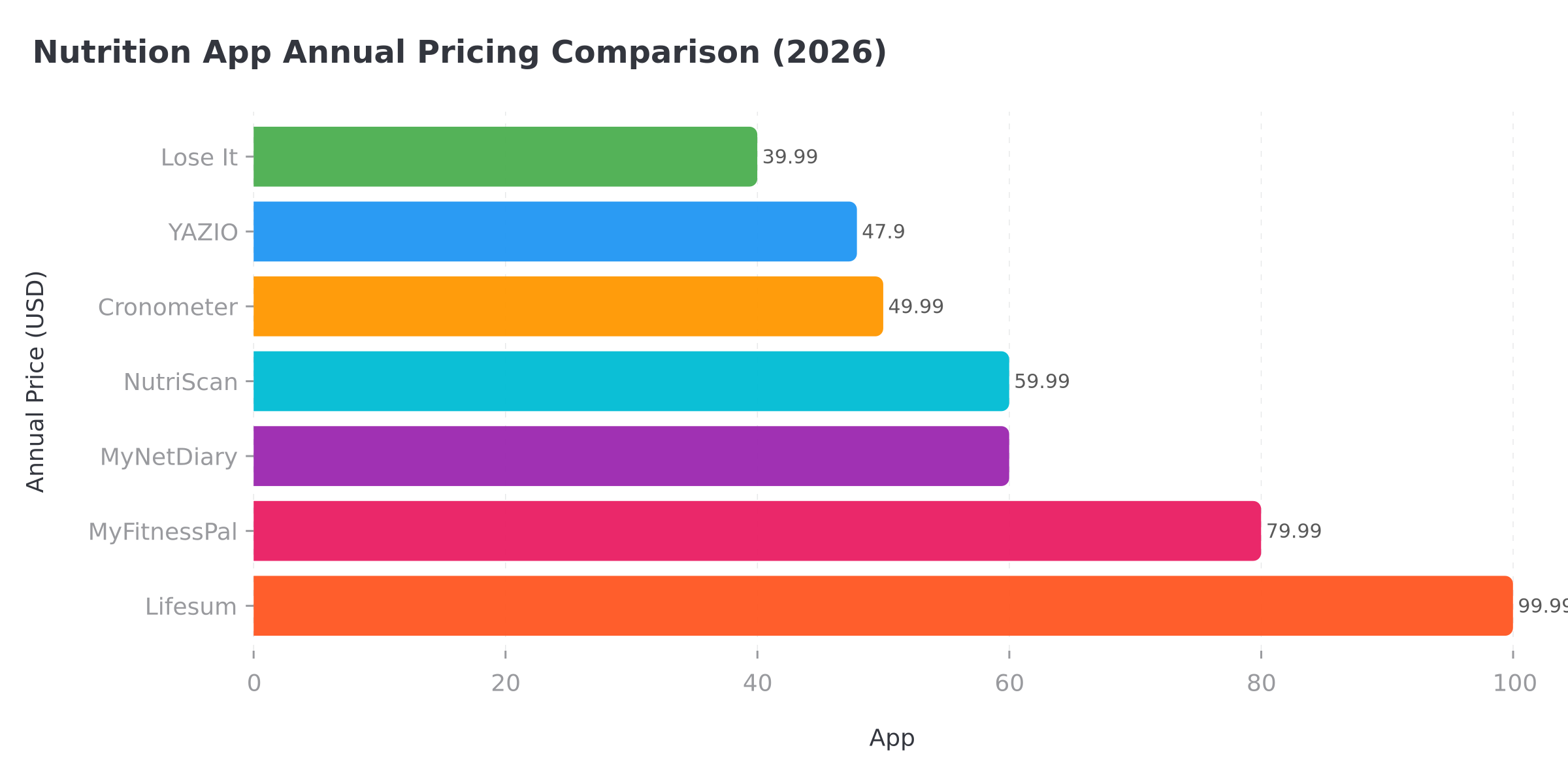 *Figure 1: NutriScan sits in the mid-range at about $59 a year, level with Cronometer and MyNetDiary and about $20 under Lose It and MyFitnessPal, with a free tier that keeps macros, micronutrients, and NutriScore open to everyone*
  *When you compare what each app gives you for free*
 What the Price Comparison Does Not Show
The table compares sticker prices. But value depends on which features you use most. The free plan's 5 weekly scans are enough to see how the camera handles your own food before you pay for anything, and the macro, micronutrient, and NutriScore layers stay free after that. If you want to scan every meal, or you need personalized diet plans and unlimited AI coaching, NutriScan Premium at about $59 a year works out cheaper than MyFitnessPal Premium and Lose It Premium, both at $79.99, and well under Lifesum's list price.
No other app on this list offers a structured way to earn free Premium time by inviting friends.
Is NutriScan the Best Free Calorie Counter App in the UK? 🇬🇧
The free plan is the same wherever you download it. A UK user gets the same 5 AI meal scans a week, and the same calories, macros, micronutrients, and NutriScore on every meal, with no ads.
Two things are worth knowing before you compare it with other UK options:
- Prices show in pounds. Apple and Google bill through your local store, so the subscription screen inside the app shows the pound figure for your account. The dollar amounts on this page are US prices as of mid 2026.
- Photo scanning is the part rivals charge for. MyFitnessPal moved barcode scanning behind Premium and Lose It is restricting Scan It, so the 5 free weekly scans are the piece that decides whether a free tier is useful to you.
If you are shortlisting, our roundup of free AI calorie tracking apps compares the free tiers side by side rather than the paid ones.
Real-World Examples: Who Pays What 💡
Example 1: The free user who scans the hard meals
Priya downloads NutriScan and spends her 5 weekly scans on the plates she cannot guess, her mother's curries and the two restaurant dinners she eats out. Everything else she types in. She checks her daily macro totals and uses Monika 3-4 times a week to ask about snack ideas. She never upgrades. Cost: $0.
Example 2: The Premium subscriber managing diabetes
Raj wants a 28-day diet plan for type 2 diabetes management. He signs up for Premium. He scans every meal without a weekly cap and watches his fiber and sodium in the micronutrient breakdown.
Example 3: The referral power user
Ananya starts on the free plan. She shares her referral link with 5 coworkers during a wellness challenge. All 5 sign up. Ananya gets 1 month of Premium free. She keeps referring and reaches 10. Cost: $0 for the Premium time she earns.
Example 4: The pregnancy tracker
Meera is in her first trimester. She takes Premium because she wants the pregnancy diet plan and daily scanning; the iron and folate numbers she checks every evening are free on any plan. Total first-year cost: about $59, less than a single dietitian session in many cities.
How to Get Premium at Zero Cost 🎯
Share your referral link early. Send it to friends, coworkers, or your fitness group. Each successful referral adds 1 week of Premium, 5 referrals add 1 month, and 10 referrals add 3 months, all at no cost.
Tips for Getting the Most Value
7 WAYS TO MAXIMIZE YOUR NUTRISCAN EXPERIENCE
- Start with the free plan. Spend the 5 weekly scans on the meals a food database usually gets wrong, your curries, your restaurant plates, your mixed bowls, and type in the simple stuff. That tells you whether the scanner is worth paying for.
- Time your upgrade. Start Premium when you have a full week ahead, not before a vacation. You want 7 days of real meals to test the diet plan feature.
- Share your referral link early. Each successful referral gives you and your friend 1 week of Premium, and 5 of them make a month.
- Check for promotional pricing. NutriScan runs occasional offers that appear in the app's subscription screen.
- Use Monika's free calls wisely. Save your 4 weekly calls for specific questions like "Is my dinner balanced?" rather than general questions.
- Sync Apple Health or Google Fit early. Once connected, NutriScan pulls in steps, sleep, and weight data automatically, making Monika's advice more accurate.
Step-by-Step: How to Subscribe, Cancel, or Switch Plans 📱
To Subscribe to Premium
- Open NutriScan and tap your Profile icon
- Tap Subscription or Upgrade to Premium (Profile > Manage Subscription)
- Choose Premium, about $59 a year
- Confirm through Apple App Store or Google Play Store payment
- Premium features activate immediately
To Cancel Your Subscription
- Open your phone's Settings (not the NutriScan app)
- Go to App Store (iPhone) or Google Play (Android) subscription management
- Find NutriScan and tap Cancel Subscription
- You keep Premium access until the current billing period ends, then drop to the free plan
CANCELLATION NOTE
Cancellation must happen through your phone's settings or app store, not inside the NutriScan app. This is how Apple and Google handle all subscription cancellations. NutriScan does not charge a cancellation fee.
To Change Your Plan
- Go to Profile > Subscription inside NutriScan
- The app shows your current plan alongside other options
- Select the plan you want to switch to
- The change takes effect at the next billing cycle
To Restore a Subscription
If you reinstall the app or switch devices, go to Profile > Subscription > Restore. The app checks your purchase history and reactivates Premium.
Why Pricing Transparency Matters 🔬
The 2025 Nutrition Reviews analysis found that "affordability" is a key limitation that holds users back from long-term engagement (Abeltino et al. 2025).
NutriScan addresses this by keeping the choice simple: the free plan or Premium. No hidden charges and no features locked behind a separate purchase.
The Garage Gym Reviews 2026 roundup recommended comparing annual pricing rather than monthly to find the best deal (Garage Gym Reviews 2026).
APP RATINGS
NutriScan holds a 4.6 star rating with 150k+ downloads.
Conclusion: Which Plan Is Right for You? 🎯
The free plan covers 5 AI meal scans a week, macros, micronutrients, NutriScore, and 4 Monika calls a week, with no ads. Premium at about $59 a year lifts the scan and call caps and adds diet plans, recipes, grocery lists, supplement suggestions, and advanced reports.
Choose Free if:
- You scan a handful of meals a week and log the rest by hand
- You are comfortable with 4 Monika calls per week
- You do not need structured diet plans
Choose Premium if:
- You want a personalized 28-day diet plan for pregnancy, diabetes, or PCOS
- You photograph most of your meals, so 5 scans a week runs out by Wednesday
- You need unlimited Monika AI coaching
- You want recipe recommendations and grocery lists
Use the Referral Program if:
- You know others who track their food
- You want Premium access without paying
Track your meals and see what your food tells you with NutriScan.
FAQ
Is NutriScan free to use?
Yes. NutriScan's free plan includes 5 AI meal scans per week, macro and calorie tracking, micronutrients, NutriScore ratings, copy meals, 4 Monika AI calls per week, Apple Health and Google Fit sync, and hydration tracking. The scan count resets weekly. There is no time limit and no ads.
How much does NutriScan Premium cost in 2026?
NutriScan Premium costs about $59 a year on the US App Store. Prices vary by country and app store.
How does the NutriScan referral program work?
Open the app, tap "Invite and Earn" on the Home screen, and share your referral link. When a friend signs up, both of you get 1 week of Premium free. After 5 successful referrals you earn 1 month free. After 10 referrals you earn 3 months free.
How do I cancel NutriScan Premium?
Go to your phone's Settings, open App Store (iPhone) or Google Play (Android) subscription management, find NutriScan, and tap Cancel Subscription. You keep Premium until the current billing period ends, then move to the free plan. NutriScan does not charge a cancellation fee.
Does NutriScan have a lifetime plan?
The US App Store shows several IAP tiers, but the standard option is about $59 a year. Check the subscription screen inside the app for any promotional or limited-time offers.
Can I use NutriScan in languages other than English?
Yes. NutriScan is available in 12 languages: English, German, Spanish, French, Hindi, Vietnamese, Japanese, Italian, Russian, Swedish, Polish and Portuguese.
Is NutriScan a full calorie counter on the free plan?
Yes. Calories, protein, carbs, fat, and micronutrients appear on every meal you log, scanned or typed, on both plans. The weekly cap of 5 applies to AI photo scans.
Is NutriScan the best free calorie counter app in the UK?
That depends on how you log. NutriScan's free plan is identical in the UK: 5 AI photo scans a week, and macros, micronutrients, and NutriScore on everything. Most UK rivals keep photo or barcode scanning behind a paid tier, so NutriScan is worth a look if scanning matters to you. Subscription prices show in pounds on your app store.
Is NutriScan worth it compared to MyFitnessPal?
NutriScan's free tier includes 5 AI photo scans a week plus NutriScore ratings and micronutrients, which MyFitnessPal keeps behind Premium ($79.99/year). NutriScan Premium (about $59 a year) adds unlimited scanning, personalized diet plans, and unlimited AI coaching. MyFitnessPal has a larger food database (14M+ items) but charges $20 more per year for Premium. See the full NutriScan vs MyFitnessPal comparison.