Is SnapCalorie Accurate? Review, Free Plan, and Pricing
 ChatGPT
  Claude
  AI Mode
  Perplexity
 SnapCalorie claims a 15% mean caloric error and gives 3 AI logs a day free, with premium around 89.99 EUR a year (every US price is in our SnapCalorie pricing guide) and no diet planning even when you pay. NutriScan gives 5 AI meal scans a week free with full macros, all micronutrients and a NutriScore on every meal. NutriScan Premium is about $59 a year and adds 28-day personalized diet plans.
Last verified: August 23, 2026
| NutriScan | SnapCalorie | |
|---|---|---|
| Free AI logs | 5 a week | 3 a day |
| Premium price | about $59 a year | About 89.99 EUR a year |
| Portion method | Food type, 11 cooking methods, 4 oil levels | Depth-sensor volume estimate |
| Diet planning | 28-day personalized plans | Not offered |
| Condition support | Diabetes, PCOS, pregnancy | Not offered |
| Free trial | Free plan | Free logs instead of a trial |
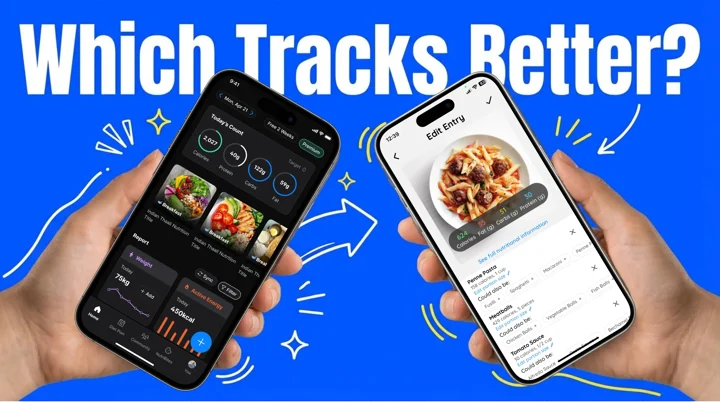
SnapCalorie is accurate to about 15% mean caloric error by its own published number, which is roughly plus or minus 150 calories on a 1000 calorie plate (SnapCalorie FAQ). That is tighter than the 20% tolerance US nutrition labels are allowed, and it holds up on single Western foods shot with a depth-sensor phone. It slips on mixed plates and non-Western dishes. SnapCalorie is free for 3 AI logs a day, with premium listed at roughly 89.99 EUR per year as of August 2026; prices change by region and store. I have been testing AI food trackers for years, and below is what SnapCalorie got right and wrong on real meals, next to NutriScan App.
TL;DR - SnapCalorie in five lines
Accuracy: 15% mean caloric error claimed, best on single Western foods, weaker on mixed and regional dishes
Free plan: 3 AI logs a day; NutriScan's free plan gives 5 AI meal scans a week plus full macros, all micronutrients and NutriScore
Price: SnapCalorie premium around 89.99 EUR a year as of August 2026, no diet planning even when you pay
Main difference: NutriScan adds personalized diet planning and 12 languages; SnapCalorie focuses on depth-sensor portion accuracy
Who should pick which: SnapCalorie for plain tracking of Western food, NutriScan if you want guidance on what to eat
 The eternal struggle: which app should you choose?
Is SnapCalorie Accurate? The 15% Error Number, Checked
SnapCalorie was built by ex-Google AI researchers, including a co-founder of Google Lens, and the accuracy pitch rests on one number: about 15% mean caloric error (SnapCalorie FAQ). On a 1000 calorie dish that is a swing of roughly 150 calories in either direction.
Two things are worth knowing about that number before you trust it with a cut.
First, it comes from the company, measured on the food it trained on. SnapCalorie uses the Nutrition5k dataset, about 5,000 dishes, and adds depth-sensor readings from your phone to estimate volume. Volume is the hard part of photo logging, and measuring it beats guessing it. On a burger, a chicken breast, a bowl of oats, the estimate lands close.
Second, the error is a mean. A mean hides the tail. Push a mixed plate at it, a thali, a biryani, a curry where half the calories are the oil you cannot see, and the estimate drifts well past 15%. A study in the Indian Journal of Medical Research found calorie counting apps often miss daily intake by a wide margin when tested against established nutritional standards (IJMR Study). Photo AI inherits that problem and adds portion guessing on top.
So: accurate for what you photograph on a plate in Ohio, less so for what comes out of a pressure cooker in Chennai. If most of your meals are homemade or mixed, read our test of apps that log mixed dishes from a photo before you commit to one tracker.
How Accurate Is Snap Calorie Against a Nutrition Label?
Tighter than the label, on the foods it reads well. US nutrition labels are allowed a 20% tolerance, so a bar printed at 200 calories can legally be 240. Snap Calorie's claimed 15% mean error beats that on paper.
The two numbers are not measured the same way. A label is tested once in a lab and then printed on every pack forever. A photo estimate starts from scratch at every meal and has to guess portion size, oil and cooking method before it can even reach the database. Get the portion right and miss the two tablespoons of ghee, and 15% stops describing your plate.
How SnapCalorie and NutriScan Reach Their Numbers Differently
SnapCalorie: depth sensors measure food volume, then the model maps that volume to USDA database values. The strength is portion size. The weakness is anything the camera cannot see, like the ghee stirred through a dal.
NutriScan App: you tag the meal instead. Food type (8 options, from Home Made to Street Food), cooking method (11, from Deep-fried to Raw) and oil level (No Oil, Low Oil, Medium, High) go into the analysis with the photo. That is more taps, and it catches the calories a lens cannot. NutriScan's own accuracy claim is 95% for foods our database covers, and it is our claim, not a published study.
Verdict on accuracy
SnapCalorie wins on portion size because of the depth sensor. NutriScan wins on cooking method and regional dishes because it asks. Neither is a food scale.
Is SnapCalorie Free? Free Logs, Premium Price, and Limits
Yes, partly. SnapCalorie gives you 3 AI logs a day at no cost. That covers breakfast, lunch and dinner, and nothing else, so a snack or a second coffee logged with food pushes you into the paywall. Premium is listed at roughly 89.99 EUR per year as of August 2026, and app store pricing changes by region and by promotion.
What the paid tier does not add is diet planning. You get more logs and the AI nutritionist chat, still no answer to what you should eat tomorrow.
NutriScan App free plan:
- 5 AI meal scans a week
- Full macros plus every micronutrient, no gating
- NutriScore on every meal
- Unlimited meal history
- 4 Monika voice calls a week
- Intermittent fasting timer and the Club leaderboard
Five scans a week is 0.7 meals a day, so it is not a daily logging plan. What it is good for is a real test on the meals that usually break a food database, your curries, your restaurant plates, your mixed bowls, before you decide the prompts are worth paying for. Premium adds unlimited scanning, the 28-day diet plan, grocery lists and supplement suggestions. The full breakdown sits in our NutriScan pricing guide.
Invite & Earn adds free Premium weeks: one week each when a friend signs up through your link, a month at 5 referrals, three months at 10.

Where AI Food Trackers Break: Cultural Diversity
Research from the University of Sydney in 2024 found that AI food tracking apps struggle with cultural diversity - for example, calories for beef pho were overestimated by 49%, while bubble tea calories were underestimated by up to 76% (University of Sydney Research).
I have seen this problem first-hand. When I started my weight loss journey, I used an app that could not recognize my dal chawal or my grandmother's homemade curry. The app would show completely wrong calorie counts, and I wondered why I was not losing weight despite "tracking" everything.
WARNING
The wrong app can set you back months in your health journey.
Meet the Contenders: NutriScan App vs SnapCalorie
What is NutriScan App?
NutriScan App is an AI-powered nutrition tracker that helps you understand the nutritional content of your meals. You just click a photo, and the app gives you detailed information about calories, proteins, fats, carbs, and all micro-nutrients. What makes it different is that it goes beyond just tracking - it tells you what went wrong in your eating pattern.
The app supports multiple health goals including weight loss, muscle gain, diabetes management, PCOS, and pregnancy nutrition. It also creates personalized diet plans based on your location, lifestyle, and regional food preferences.
Key features include:
- AI-powered meal scanning with photo recognition
- Personalized diet planning based on your goals
- NutriScore rating for each meal
- Voice-powered AI nutritionist (Monika)
- Support for regional and local foods
- Community leaderboard for motivation
- Multi-language support (12 languages)
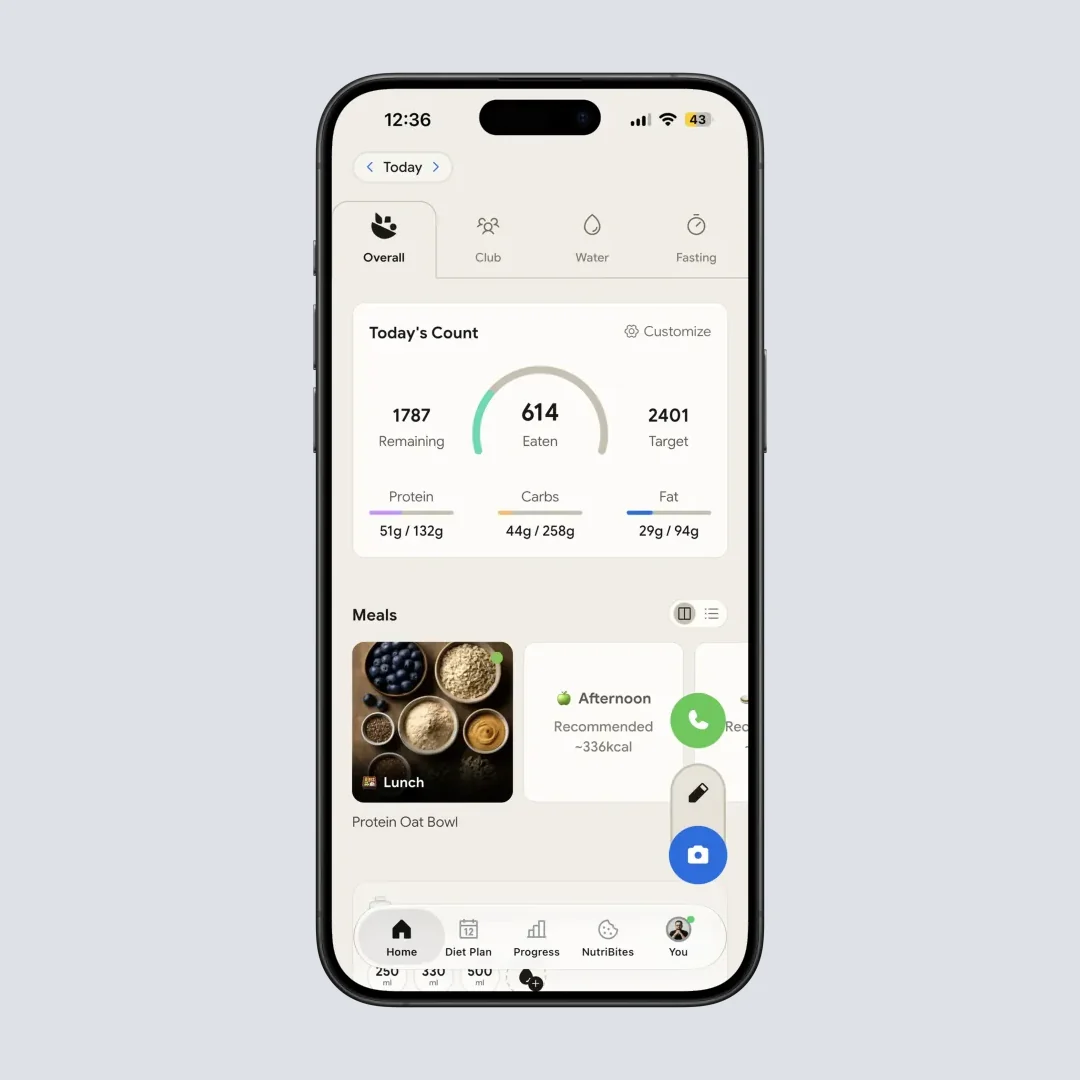
NutriScan home screen: Your daily nutrition at a glance (Home > Dashboard)
What is SnapCalorie?
SnapCalorie was created by ex-Google AI researchers, including a co-founder of Google Lens. The app claims to be twice as accurate as visually estimating portion sizes. It uses depth sensors on your phone to scan food volume - something most other apps do not do.
According to their website, SnapCalorie has around 15% mean caloric error, which means about plus or minus 150 calories on a 1000 calorie dish. This is actually better than the 20% error allowed on nutrition labels (SnapCalorie FAQ).
Key features include:
- Photo-based calorie counting
- Voice note meal logging
- Depth sensor for portion size accuracy
- Barcode scanning
- Apple HealthKit integration
- AI chatbot for questions
- USDA database values
Head-to-Head Comparison: The Real Differences
1. Diet Planning Capability
This is where the two apps show the biggest difference.
NutriScan App: Offers a full premium diet planning feature. The app creates personalized meal plans based on your health goal, eating schedule, food preferences, and even what raw items you have in your kitchen. You get a 28-day diet plan with breakfast, lunch, dinner options, grocery lists, and supplement recommendations. Each meal comes with quick recipes, portion sizes, benefits, and nutrition breakdown.
SnapCalorie: Does not offer diet planning. The app focuses purely on tracking what you eat. You get calorie counts and macro tracking, but there is no guidance on what you should eat to reach your goals.
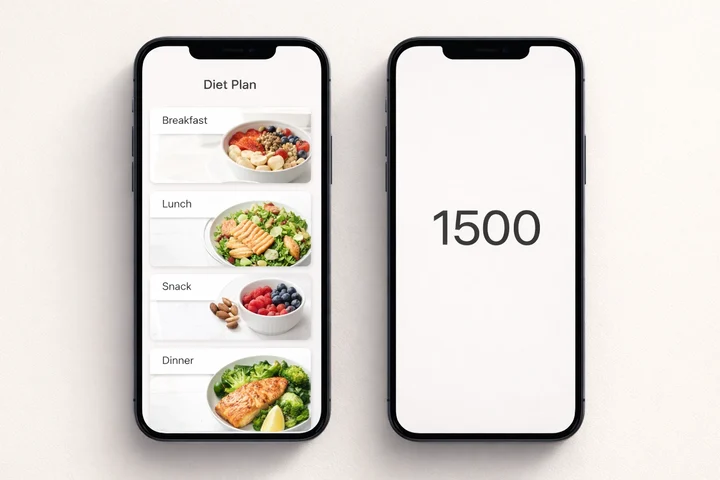 The difference is clear: diet planning (left) vs just calorie numbers (right)
Winner: NutriScan App - by a huge margin
A 2024 study published in Nutrients journal found that mobile apps combined with dietitian guidance led to significant weight loss, with dietary compliance being a major factor in success (Nutrients Study). Having a diet plan built into the app removes a major barrier.
2. Regional Food Recognition
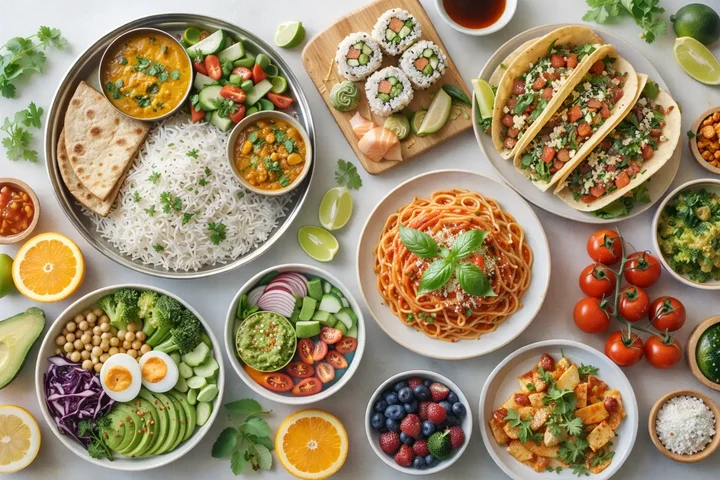 Regional food recognition matters - can your app identify all of these accurately?
NutriScan App: Built specifically with regional foods in mind. The app understands Indian home-cooked meals, street food, regional cuisines from different countries, and local dishes. It can recognize dal, roti, sambar, dosa, and hundreds of other regional foods accurately.
SnapCalorie: Uses the Nutrition5k dataset with about 5,000 diverse food dishes. While this is good for Western foods, reviews suggest it struggles with Asian and regional cuisines. A WellnessPulse review found that SnapCalorie did not always provide accurate measurements for diverse meals (WellnessPulse Review).
Winner: NutriScan App
Especially if you eat regional or Asian foods regularly. The University of Sydney research confirms that apps trained on diverse food databases perform much better for international users.
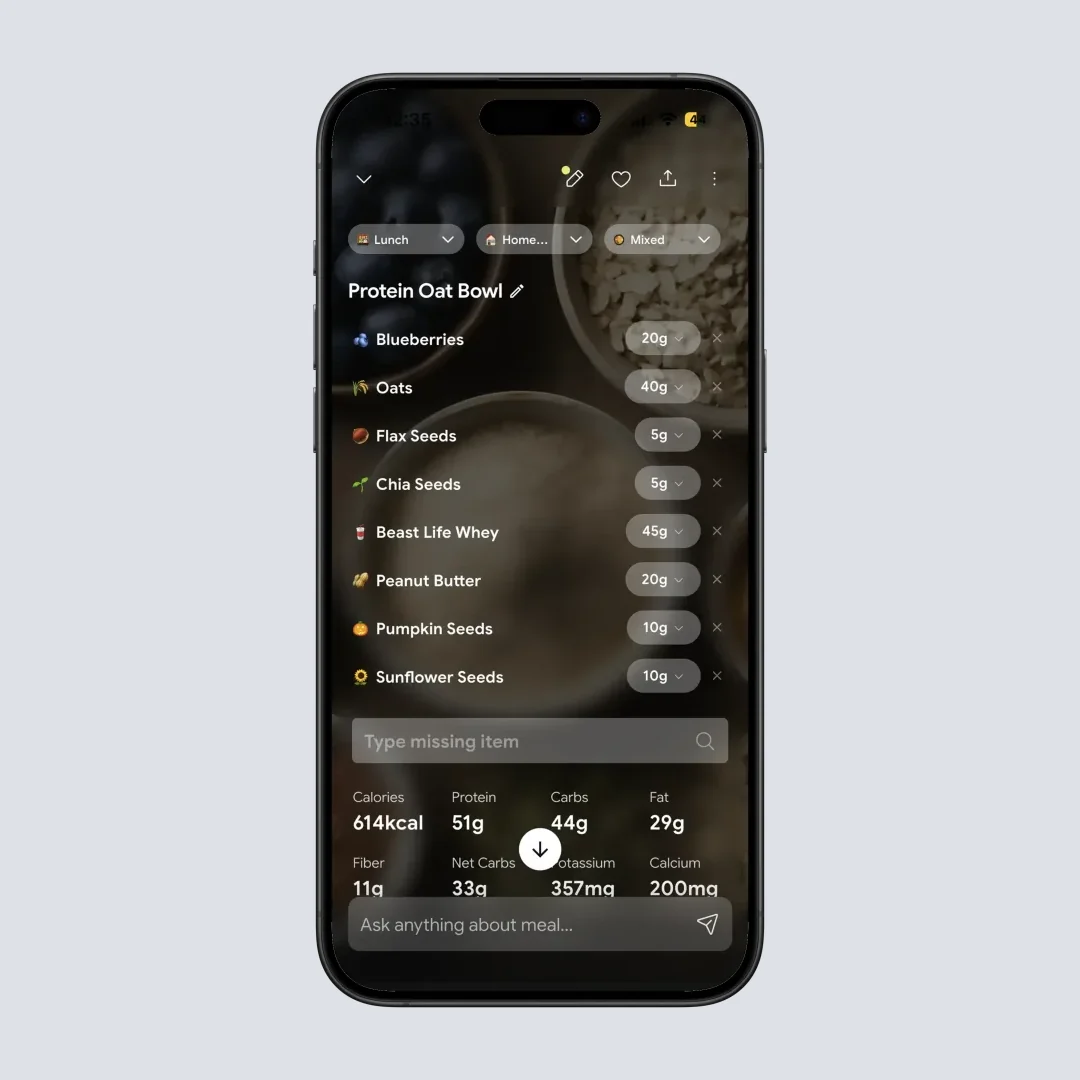
NutriScan recognizes regional foods like Indian thali with accurate breakdown (Home > Meal Item > Nutrition Details)
3. Health Condition Support
NutriScan App: Supports multiple specific health conditions including:
- Weight Loss
- Muscle Gain
- Diabetes Management
- PCOS
- Pregnancy Nutrition
- Viral/Flu Recovery
The diet plans are customized based on your specific condition. For example, a diabetes diet plan will focus on low glycemic foods and controlled carb intake.
SnapCalorie: General calorie and macro tracking. No specific support for health conditions like diabetes or PCOS. You get the numbers, but you have to figure out how to use them for your specific condition.
Winner: NutriScan App
Especially important for anyone managing a health condition. Research published in PMC shows that nutrition apps with behavior change techniques and personalized feedback are significantly more effective for people with chronic diseases (PMC Behavior Change Study).
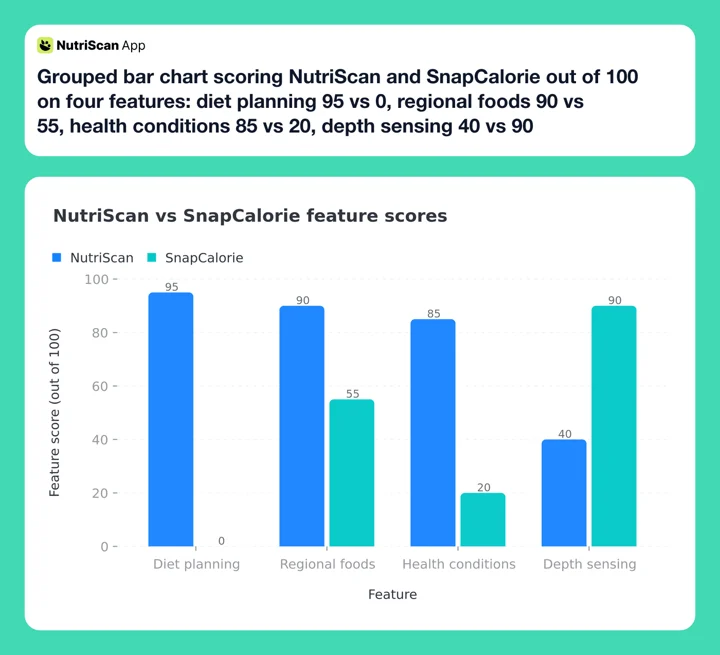 Figure 1: Head-to-head feature scores out of 100. NutriScan leads on diet planning, regional foods and health conditions. SnapCalorie leads on depth sensing, 90 to 40. Language support is not scored here: NutriScan offers 12 languages and SnapCalorie only English.
4. User Experience and Support
NutriScan App:
- Multi-language support (12 languages)
- Voice-powered AI nutritionist for questions
- NutriBites feature to ask questions about your meal timeline
- Community leaderboard for motivation
- Map insights showing where you eat
- Calendar view of your nutrition patterns
SnapCalorie:
- English only
- AI chatbot for general questions
- Voice note logging
- Photo timeline of meals
Winner: NutriScan App
The additional features like voice AI nutritionist, community, and insights make the tracking experience more engaging and useful.
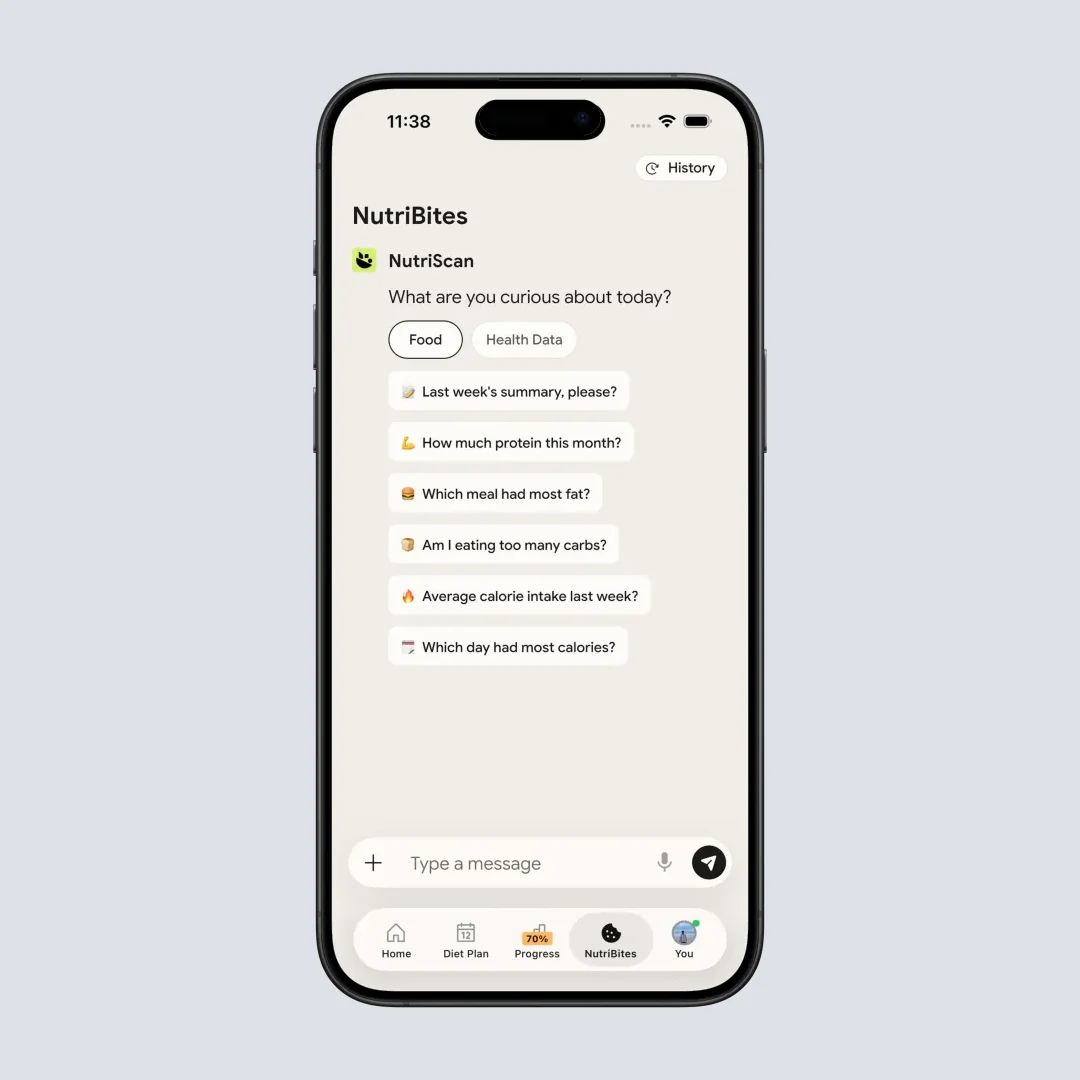
NutriBites: Ask questions about your eating patterns (Home > NutriBites)
SnapCalorie Review: Three Real Meals, Two Apps
A review that only quotes spec sheets is worth nothing. Here is what happened when I put the same three meals through both apps. If you want the same treatment across the wider category, we ran it in our roundup of the best AI photo calorie counter apps.
Scenario 1: Logging a Homemade Indian Thali
I tested both apps with a typical Indian thali - rice, dal, sabzi, roti, and curd.
NutriScan recognized each component separately and asked about oil levels and cooking method. It gave me a detailed breakdown including fiber, potassium, and other micronutrients. The NutriScore helped me understand if the meal was balanced.
SnapCalorie struggled to identify the dal correctly and estimated the entire plate as one dish. The calorie count seemed off by about 200 calories compared to my manual calculation.
Scenario 2: Tracking a Restaurant Burger
Both apps performed similarly here. SnapCalorie's depth sensor gave a slightly better portion estimate. NutriScan asked about the restaurant type and cooking method, which helped refine the estimate. Both were within acceptable accuracy ranges for Western fast food.
Scenario 3: Planning a Week of Healthy Eating
NutriScan created a full diet plan based on my weight loss goal, with 6 meals per day, grocery list, and even lifestyle tips. I could swap meals I did not like and get alternatives.
SnapCalorie... well, it cannot do this at all. I had to plan my own meals and just track them.
 That feeling when your food tracking finally works!
Who Should Use Which App?
Based on my testing and the research, here is my recommendation:
Choose NutriScan App if you:
- Want a personalized diet plan, not just tracking
- Eat regional or Asian foods regularly
- Have specific health goals like diabetes, PCOS, or pregnancy
- Want AI guidance on what to eat, not just what you ate
- Prefer multi-language support
- Like community features and gamification
- Want to understand patterns in your eating (NutriBites feature)
Choose SnapCalorie if you:
- Only need basic calorie and macro tracking
- Eat primarily Western foods
- Are comfortable planning your own diet
- Want depth sensor accuracy for portion sizes
- Need a simple, no-frills tracking app
- Are okay with English only
The Science Behind Why Diet Planning Matters
A systematic review published in PMC found that mobile apps can help patients lose weight as well as or better than traditional interventions - but only when they include self-monitoring, goal setting, and personalized feedback (PMC Weight Loss Review).
Tracking calories alone leaves the harder question open: what to eat next, and how to adjust as the weight moves.
Another study from 2024 found that AI-generated dietary interventions showed a 39% reduction in IBS symptom severity and a 72.7% diabetes remission rate when compared to traditional dietary approaches (PMC AI Nutrition Study). The key difference was personalization based on individual factors.

7 Tips to Get the Most from Your Food Tracking App
No matter which app you choose, here are my tips for success:
1. Take Clear Photos at 45-60 Degree Angle Research shows that photos taken at this angle give AI the best view of your food for accurate analysis. Avoid shadows and make sure lighting is good.
2. Be Honest About Cooking Methods Deep fried food has very different calories than steamed food. Always select the correct cooking method for accurate results.
3. Track Everything, Including Drinks Many people forget to log beverages. That chai with sugar or that cold drink can add hundreds of hidden calories.
4. Use the App Daily for at Least 30 Days A study in JMIR found that app engagement is directly correlated with weight loss success. The more consistently you track, the better your results.
5. Review Your Weekly Patterns Do not just track daily - look at weekly trends. Both apps offer some form of historical view. Use it to spot patterns.
6. Verify Unusual Results If a calorie count seems way off, double-check it manually. No AI is perfect. Use common sense.
7. Combine Tracking with Diet Planning If your app has no diet planning, like SnapCalorie, pair it with a nutritionist consultation or another planning tool.
Step-by-Step Guide: Getting Started with NutriScan
Step 1: Download the app and select your language preference (12 languages are available).
Step 2: Complete the onboarding by selecting your health goal (Weight Loss, Muscle Gain, Diabetes, Pregnancy, PCOS, or Viral/Flu).
Step 3: Enter your basic details - age, gender, height, weight, and activity level. The app will calculate your macro targets.
Step 4: If you want diet planning, subscribe to the Premium Plan and fill out the detailed diet questionnaire.
Step 5: Start scanning your meals! Click the camera icon, take a photo, select food type and cooking method, and get your nutrition analysis.
Step 6: Use NutriBites to ask questions about your eating patterns and get AI-powered insights.
Step 7: Check your NutriScore daily to understand if you are on track with your goals.

Easy meal logging: Select food type and cooking method for accurate results (Home > Camera > Crop)
My Final Verdict
After testing both, NutriScan offers more value for most users, especially those who:
- Want guidance on what to eat, not just tracking
- Eat diverse regional foods
- Have specific health conditions to manage
- Need support in a language other than English
SnapCalorie is a solid option for simple calorie tracking with good portion size accuracy, but it lacks the diet planning and health condition support that can make a real difference in your health journey.
A study in Nature Medicine found that following a personalized diet led to improvements in weight, waist circumference, and HbA1c compared to standard dietary advice (Nature Medicine Study). This personalization is exactly what NutriScan delivers through its goal-based diet planning.
Remember
The best app is the one you will actually use consistently. Try both if you want - NutriScan has a free plan, and SnapCalorie has a free tier. See which one fits your lifestyle better.
If you want to see how the photo scan handles your own meals before picking a side, the AI food tracker page walks through what happens between the shutter and the macro breakdown.
Frequently Asked Questions
Q: Is SnapCalorie accurate?
A: SnapCalorie's own FAQ puts its mean caloric error near 15%, so a 1000 calorie plate can read about 150 calories high or low. That holds up best on single, separated Western foods photographed with a depth-sensor phone. On mixed plates and non-Western dishes the error grows, because the model leans on the Nutrition5k dataset of roughly 5,000 dishes.
Q: How accurate is Snap Calorie compared with a nutrition label?
A: SnapCalorie's 15% mean caloric error is tighter than the 20% tolerance US nutrition labels are allowed, on the foods it reads well. The comparison is not like for like. A label is measured once in a lab, while a photo estimate has to guess portion size, oil and cooking method every single time.
Q: Does SnapCalorie work for Indian and Asian dishes?
A: It reads them, but less reliably than Western plates. University of Sydney research in 2024 found AI food trackers overestimated beef pho by 49% and underestimated bubble tea by up to 76%. NutriScan asks for cooking method and oil level, which are the two variables that move the calorie count most in Indian home cooking.
Q: Is NutriScan App more accurate than SnapCalorie for Indian food?
A: Based on my testing and the University of Sydney research showing AI apps struggle with non-Western foods, NutriScan performs significantly better for Indian and Asian cuisines. This is because NutriScan was specifically trained on regional food databases and allows you to specify cooking methods and oil levels, which dramatically affect calorie counts in Indian cooking.
Q: Can I use SnapCalorie for diabetes management?
A: SnapCalorie provides calorie and macro tracking, but it does not have specific diabetes management features. You would need to manually interpret the data for your diabetes diet. NutriScan, on the other hand, has a dedicated diabetes goal option that creates meal plans focused on glycemic control and carb management.
Q: Which app is better for weight loss - NutriScan or SnapCalorie?
A: Both can help with weight loss by tracking calories. However, research from PMC shows that apps with diet planning, goal setting, and personalized feedback lead to better weight loss outcomes. NutriScan includes all these features in its Premium Plan, while SnapCalorie only offers tracking. For serious weight loss, NutriScan provides more support.
Q: Is SnapCalorie free?
A: SnapCalorie is free for up to 3 AI logs a day. Past that you need the premium subscription, listed at roughly 89.99 EUR per year as of August 2026, and prices change by region and store. NutriScan's free plan gives 5 AI meal scans a week plus full macros, all micronutrients, NutriScore, unlimited meal history and 4 Monika voice calls a week.
Q: Can NutriScan App work offline?
A: NutriScan requires internet connection for AI meal analysis as the processing happens on servers. However, you can view your past meals and diet plans offline. SnapCalorie similarly requires internet for photo analysis. For offline tracking, both apps have limitations - you would need to log meals when you get back online.
Q: Does NutriScan support multiple languages?
A: Yes, NutriScan supports 12 languages: English, German, Spanish, French, Hindi, Vietnamese, Japanese, Italian, Russian, Swedish, Polish and Portuguese. SnapCalorie only supports English.
Q: Which app has better in-app support?
A: NutriScan offers voice-powered AI nutritionist (Monika) for questions, plus NutriBites feature for meal-related queries. SnapCalorie has an AI chatbot for general questions. Both provide in-app support, but NutriScan's multilingual support gives it an edge for non-English speakers.
Q: Does NutriScan offer diet planning?
A: Yes, on Premium. The app builds a personalized 28-day meal plan around your health goal, eating schedule, food preferences, and even the raw items already in your kitchen. SnapCalorie has no diet planning on any tier.
