YAZIO Discount Code: Where to Enter It and Fix Common Errors
 ChatGPT
  Claude
  AI Mode
  Perplexity
TL;DR - YAZIO Discount Code Guide
Where to enter: YAZIO website only (yazio.com/app/onboarding/coupon) - not inside the app
Best deal: 40% student discount via Student Beans ($28.75/year) or 20% off on official promo page ($38.32/year)
Common fix: Copy and paste codes exactly - they are case-sensitive. Remove extra spaces before and after
Key rule: Coupon codes only apply to the 12-month subscription plan
If code fails: Check expiration, capitalization, plan type, and existing PRO status
 When you can't find where to enter that YAZIO coupon code...
A YAZIO discount code only works on the YAZIO website, at yazio.com/app/onboarding/coupon, opened in a browser. There is no promo code field anywhere inside the iPhone or Android app, which is why most people cannot find it. Log in on the web, paste the code, pay, then open the app with the same email address and PRO switches on. As of March 2026, YAZIO's own promo page takes 20% off the 12-month plan with no code needed ($38.32 a year), and students get 40% off through Student Beans ($28.75 a year). Prices here are standard US prices as of March 2026 and change by region.
So you found a code, and the app gives you nowhere to type it. You are not alone. YAZIO's own help center answers this in three steps, and the first two both happen on the website (YAZIO Help Center). The app only shows up at step three, when you log back in with the same account.
This guide will walk you through exactly where to enter your YAZIO coupon code, what to do when it does not work, and how to find the best discounts available right now.
Where to Enter a YAZIO Discount Code
You cannot enter a YAZIO discount code inside the app. Coupon codes only work on the YAZIO website. If you have been tapping around in the iPhone or Android app looking for a "promo code" box, that is why you cannot find one.
YAZIO handles coupon codes through a dedicated web page. This is different from apps like MyFitnessPal or Lose It, where you can sometimes apply codes during the in-app checkout flow. With YAZIO, the entire coupon process happens in your phone or computer browser - not inside the app itself.
This matters because the purchase platform determines how your subscription is managed. When you use a coupon code on the YAZIO website, your subscription is billed directly by YAZIO (through their payment processor). When you subscribe through the App Store or Google Play Store, Apple or Google handles the billing. These are two separate systems, and mixing them up is the number one reason coupon codes "fail."
The Three Purchase Platforms
| Platform | How You Subscribed | Coupon Code Support |
|---|---|---|
| YAZIO Website | Browser checkout at yazio.com | Yes - full coupon support |
| Apple App Store | In-app purchase on iPhone/iPad | No - Apple does not allow external codes |
| Google Play Store | In-app purchase on Android | No - Google does not allow external codes |
WARNING
If you already have a YAZIO PRO subscription through Apple or Google, a website coupon code will not replace it. You would need to cancel the app store subscription first, wait for it to expire, and then use the coupon code on the website to start a new subscription.
 Most YAZIO users search inside the app for a coupon field that does not exist
Why a YAZIO Discount Code Gets Rejected: Three Common Cases
Example 1: The case-sensitive trap. Say you find a code on a coupon site and type it as "YAZIO20" when the real code reads "Yazio20." It gets rejected. YAZIO's help center asks you to watch the spelling and the upper and lower case letters, so one wrong capital is enough to fail. Copy and paste instead of typing.
Example 2: The wrong account. Take a gift code redeemed on the gift card redemption page with a brand new account, while the phone is still signed in to an older one. PRO never appears, because the code sits on the account used in the browser. The fix is to log into the app with the same email address used on the website.
Example 3: The expired code. Or a "50% off YAZIO PRO" code copied off a deal page that was last touched two years ago. It goes in correctly and still errors out. Most YAZIO coupon codes have expiration dates, and third-party deal sites list expired ones alongside current ones with no clear way to tell them apart.

How Coupon Codes and Discount Systems Actually Work
Behind the scenes, nutrition app coupon codes follow a predictable pattern. Every coupon code is a unique string stored in the company's database with specific rules attached to it: how many times it can be used, when it expires, which subscription plan it applies to, and whether it requires a new account.
YAZIO's coupon system is website-only because they use a direct payment processor rather than routing everything through Apple or Google. This gives YAZIO more control over pricing and promotions - they can offer bigger discounts because they avoid the app store commission on in-app purchases, which Google Play sets at 15% for subscriptions and 30% on earnings above $1 million a year.
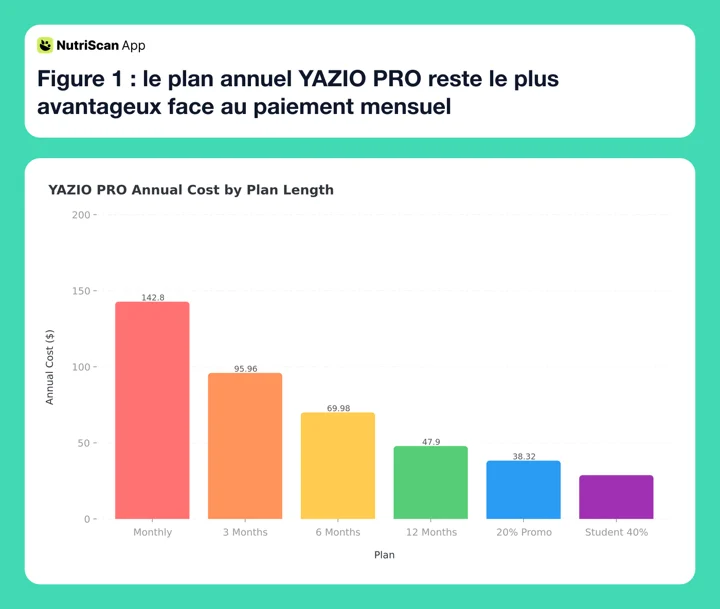 Figure 1: YAZIO PRO pricing across all plan lengths - the annual plan saves 66% compared to paying monthly
Step-by-Step: How to Redeem a YAZIO Coupon Code
Follow these steps exactly. Each one matters.
Step 1: Open the Redemption Page in Your Browser
Go to yazio.com/app/onboarding/coupon in your phone or computer browser. Do not open the YAZIO app. You need a browser - Safari, Chrome, Firefox, or any other browser.
Step 2: Sign In or Create an Account
Log in with your existing YAZIO account email and password. If you do not have an account yet, create one. Important: Remember the exact email address you use here. You will need it later.
Step 3: Click "Redeem Coupon Code"
On the next page, you will see a button or link that says "Redeem coupon code." Click it. A text field will appear where you can enter your code.
Step 4: Enter the Code Exactly
Type or paste your coupon code. Pay attention to:
- Capital vs lowercase letters (codes are case-sensitive)
- Spaces before or after the code (remove them)
- The number zero vs the letter O
- The number one vs the lowercase letter l
Step 5: Complete Payment
After the code is accepted, the discounted price will show on screen. Confirm the purchase. You will receive a confirmation email from YAZIO.
Step 6: Open the App and Log In
Download the YAZIO app from the App Store or Google Play Store if you do not have it. Open it and log in with the same email address you used in Step 2. Your PRO status should activate automatically.
Step 7: Force-Sync If PRO Does Not Appear
If the app still shows the free version after logging in:
- On Android: Force-close the app (swipe it away from recent apps), then reopen it
- On iPhone: Go to Profile ➡️ Settings ➡️ Account ➡️ Restore subscription
- Website purchase: Log out of the app, then log back in
TIP
According to the YAZIO Help Center, syncing issues between website purchases and the app are common. The force-close or logout method works in most cases.
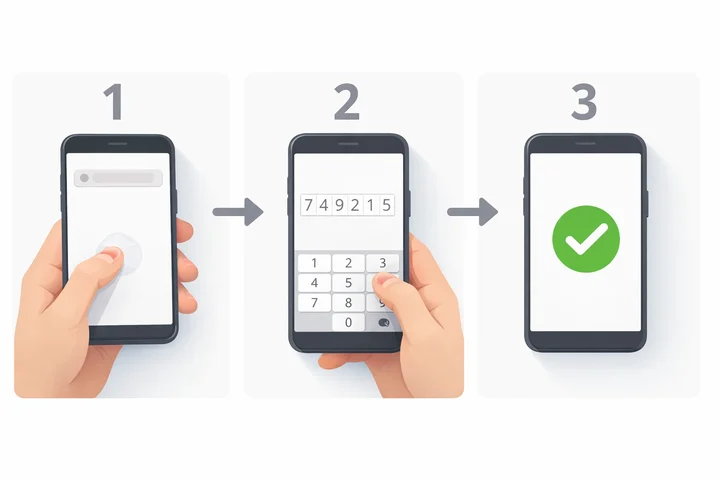 The 7-step process from opening your browser to seeing PRO in the app
How to Get the Biggest YAZIO Discount
Here are seven practical ways to pay less for YAZIO PRO.
1. Use the official promo page first. YAZIO maintains a permanent discount page at yazio.com/en/promo-code. As of March 2026, it offers 20% off the 12-month PRO subscription. The discount is applied automatically - no code needed.
2. Check Student Beans if you are a student. YAZIO offers a 40% student discount on the 12-month PRO plan through Student Beans, listed at $28.75 per year / $2.39 monthly. You need to verify your student status to access the deal.
3. Coupon codes only apply to 12-month subscriptions. The FAQ on YAZIO's own promo page states: "The Yazio Pro discount is valid for the 12-month subscription. There are currently no coupon codes for the 3-month subscription." If you want the shortest possible commitment with a discount, the 12-month plan with a code is still your only option.
4. Always copy and paste codes. Never type a coupon code manually. Codes are case-sensitive, and one wrong character means rejection. Copy directly from the source and paste into the code field.
5. Check the expiration date. Third-party coupon sites list YAZIO deals, but many codes expire without the sites updating their pages. If a code does not work, try the official YAZIO promo page instead.
6. Only new or non-PRO users qualify for most deals. The Student Beans listing states its condition plainly: "Only new and registered users without a current YAZIO PRO membership are eligible." Most coupon codes have similar restrictions.
7. Compare the total cost before choosing a plan. YAZIO PRO pricing without any coupon:
| Plan | Regular Price | Per Month |
|---|---|---|
| Monthly | $11.90/mo | $11.90 |
| 3 Months | $23.99 | $8.00 |
| 6 Months | $34.99 | $5.83 |
| 12 Months | $47.90 | $3.99 |
Our YAZIO pricing breakdown covers what PRO adds for that money. With the 20% official promo, the annual plan drops to about $38.32 ($3.19/mo). With the 40% student discount, it drops to $28.75 ($2.39/mo). Even without a coupon, the annual plan already saves 66% compared to paying monthly.
Research and Data: Why Discount Codes Matter for Health Apps
Price is one reason people give up on a health app, but it is not the main one. In a 2022 cross-sectional survey of mHealth users, the top reasons for abandoning an app were lack of interest or declining motivation (31.6%), downloading several apps and keeping only one (21.5%), and missing features (18.7%), while the cost of apps came up separately as a significant concern (User Engagement and Abandonment of mHealth: A Cross-Sectional Survey).
That is worth holding on to before you spend an hour hunting for a code. A discount lowers the cost of starting. What decides whether you are still logging in three months is whether the app fits your day.
For a deeper look at how calorie tracking apps compare on features and pricing, check out our best monthly plan under $10 guide.
Why Your YAZIO Discount Code Is Not Working
If you entered a code and it did not work, go through this checklist:
Check 1: Are you on the right page? Codes must be entered at yazio.com/app/onboarding/coupon - not inside the app, and not on the general YAZIO homepage.
Check 2: Is the code case-sensitive? Try different capitalizations. "YAZIO20" and "yazio20" and "Yazio20" are three different codes.
Check 3: Has the code expired? Most promotional codes have an expiration date. If you found the code on a third-party site, check when the page was last updated.
Check 4: Does the code apply to your plan? YAZIO coupon codes currently only apply to the 12-month PRO subscription. If you are trying to apply a code to a 3-month or 6-month plan, it will not work.
Check 5: Do you already have PRO? Most coupon codes require that you do not have a current PRO subscription. If you are already a PRO member, you typically cannot stack a new code on top of your existing plan.
Check 6: Are there extra spaces? When copying a code from a website or email, hidden spaces sometimes get included before or after the code text. Delete everything in the code field and re-paste, then manually check for any whitespace.
Check 7: Try the official promo page. If the third-party code does not work, go directly to yazio.com/en/promo-code. The 20% discount there is always active and does not require entering any code.
Check 8: Contact YAZIO support. If none of the above works and you believe the code should be valid, reach out to YAZIO's support team through the chat widget on help.yazio.com or email them directly.

How YAZIO Compares to Other App Discounts
YAZIO is not the only nutrition app that offers coupon codes and student discounts. Here is how the discount landscape looks across popular apps:
| App | Coupon Codes | Student Discount | Where to Redeem |
|---|---|---|---|
| YAZIO | Yes (website only) | 40% via Student Beans | yazio.com/app/onboarding/coupon |
| MyFitnessPal | Occasional promo | No | In-app or website |
| Lose It | Rare promotions | No | In-app |
| Lifesum | Varies by campaign | No official program | Website or in-app |
| Fastic | Feel Good Guarantee (14 days) | No | In-app or website |
| Cronometer | Seasonal sales | No | Website |
| NutriScan | Generous free plan | Referral discounts | In-app |
 When the coupon code finally works and you see the discount applied
YAZIO stands out for having a permanent, always-available discount on the website (20% off) plus a verified student program. Most other nutrition apps rely on occasional seasonal sales or limited-time promotions. If you want to compare cancellation processes across these apps, our YAZIO cancellation guide has the full walkthrough, and our YAZIO alternatives roundup covers the apps worth checking before you pay for a year.
The Free Trick That Beats Every Coupon Code
Here is the approach that saves more money than any coupon: use a free plan that actually works.
Most people chase coupon codes because they assume the free version of a calorie tracking app is too limited. With YAZIO's free tier, you get basic food logging and a limited food database. But here is what many users miss: some apps give you significantly more on their free plans.
NutriScan, for example, offers AI-powered food scanning, macro tracking, and personalized meal insights on its free plan - features that YAZIO locks behind PRO. Before you spend $28-48 per year on YAZIO PRO with a coupon, consider whether a free calorie counter app covers what you actually need.
Here is a quick comparison:
| Feature | YAZIO Free | YAZIO PRO | NutriScan Free |
|---|---|---|---|
| Food logging | Basic | Full database | Full database |
| AI food scanning | No | No | Yes |
| Macro tracking | Limited | Full | Full |
| Personalized insights | No | Yes | Yes (AI-powered) |
| Price | $0 | $28.75-47.90/year | $0 |

NutriScan's home screen - free AI-powered macro tracking with no subscription needed (Home > Daily Breakdown)
TIP
Before hunting for coupon codes, try a free plan that includes the features you need. You might save yourself the coupon hunt entirely. Get started with NutriScan.
Conclusion
Getting the best price on YAZIO PRO comes down to three things: knowing that coupons only work on the website (not in the app), entering codes carefully (case-sensitive, no extra spaces), and checking the official promo page before hunting on third-party sites.
The 20% discount on yazio.com/en/promo-code is always available. Students can get 40% off through Student Beans. And the annual plan at full price ($47.90/year, about $3.99/month) is already one of the best values in calorie tracking.
If you want an option with a generous free plan that includes AI-powered food scanning, give NutriScan a try - it offers features that many premium apps charge for.
Whatever app you choose, the discount only pays off if you keep logging. Pick the plan you can afford without thinking about it, and start. For help understanding your nutritional needs, try our macro calculator to plan a sustainable eating strategy.
Frequently Asked Questions
Where do I enter a YAZIO discount code?
On the YAZIO website at yazio.com/app/onboarding/coupon, opened in a browser. Log in with your YAZIO email, click "Redeem coupon code," paste the code exactly as written, and complete payment. Then open the YAZIO app and log in with that same email address so PRO activates. There is no code field inside the app on either iPhone or Android.
What is a YAZIO kortingscode?
Kortingscode is the Dutch word for discount code, and it means the same thing as a YAZIO coupon code. Dutch readers land on the same redemption page: yazio.com/app/onboarding/coupon. The same rules apply, so the code is case-sensitive, it covers the 12-month PRO subscription, and the 20% promo page discount works without any code at all.
Can I use a YAZIO coupon code inside the app?
No. YAZIO coupon codes can only be redeemed on the YAZIO website at yazio.com/app/onboarding/coupon. You need to log in through your browser, enter the code, and then sync the purchase with your app by logging in with the same account. This is because in-app purchases go through Apple or Google, which do not support external promotional codes.
Why is my YAZIO coupon code not working?
The most common reasons are: the code has expired, you are entering it with the wrong capitalization (codes are case-sensitive), you already have an active PRO subscription, or you are trying to apply the code to a plan length it does not cover. Most YAZIO coupons only work on the 12-month subscription. Try the official promo page at yazio.com/en/promo-code for a guaranteed 20% discount.
Does YAZIO offer a student discount?
Yes. YAZIO offers a 40% discount on the 12-month PRO subscription through Student Beans. The discounted price is $28.75 per year ($2.39 per month). You need to verify your student status through the Student Beans platform. Only new users and existing users without a current PRO membership are eligible.
Can I use a coupon code if I already subscribe through the App Store?
Not directly. If you have an active YAZIO PRO subscription through the Apple App Store or Google Play Store, you need to cancel that subscription first and wait for it to expire. Once your app store subscription ends, you can then use a coupon code on the YAZIO website to start a new subscription at the discounted price. Your data and progress will remain in your account.
What is the cheapest way to get YAZIO PRO in 2026?
The cheapest option is the Student Beans 40% discount at $28.75 per year ($2.39/month). If you are not a student, the next best option is the official promo page (yazio.com/en/promo-code) at 20% off the 12-month plan (about $38.32/year or $3.19/month). Without any discount, the annual plan is $47.90/year ($3.99/month). Paying monthly at $11.90/month is the most expensive option at $142.80 per year.
Are third-party YAZIO coupon codes safe to use?
Codes from established platforms like Student Beans are verified and safe. Codes from general coupon aggregator sites are sometimes outdated or expired. YAZIO's official recommendation is to use their own promo code page. Never enter personal information on unfamiliar coupon sites, and avoid "coupon generators" or sites that ask you to complete surveys before revealing a code - those are typically scams.
How do I know if my YAZIO coupon was applied correctly?
After entering the code on the redemption page, the discounted price should display on screen before you confirm payment. If the total still shows the full price, the code was not applied. Check the error message (if any) for clues. After purchase, your confirmation email from YAZIO will show the amount charged. Compare this to the expected discounted price to confirm the coupon worked.