Best Apple Watch Calorie Tracker 2026 (Quick, Glanceable)
 ChatGPT
  Claude
  AI Mode
  Perplexity
TL;DR - Best Apple Watch Calorie Trackers 2026
• Best overall wrist logging: MacroFactor, the only app here that treats the watch as a full input device with a food editor on your wrist.
• Best free watch app: MyNetDiary, with food and water logging plus the largest complication library.
• Biggest food database: MyFitnessPal, but the watch app cannot search it. Best micronutrient view: Cronometer.
• The one to be careful with: Lose It adds your watch burn to your food budget and does not let you switch it off.
• The accuracy fact behind every ranking: your watch is excellent at heart rate and poor at energy expenditure.
• The honest note: NutriScan has no Apple Watch app, so we are not in this ranking.
A meta-analysis of 56 Apple Watch validation studies, covering 270 separate measurements, found that every single subgroup for energy expenditure failed the 10% accuracy threshold used to judge measurement devices. No subgroup for heart rate failed it (Choe and Kang, 2025, Physiological Measurement). Same watch, same wrist, two very different levels of accuracy. The number your watch is best at is your pulse. The number most people use to decide what to eat is the weakest thing it produces.
That one number causes a lot of damage. This ranking is built around a simple idea: buy your Apple Watch calorie app for what it does with food, not for what it claims about burn.
NutriScan does not have an Apple Watch app at all, so we are not in this ranking. NutriScan publishes this post, and we make a competing app. We explain near the end what we do instead. Prices below are standard US prices as of mid 2026 and change by region.
IMPORTANT
Your Apple Watch tracking plan at a glance.
A quick roadmap so you can pick the right wrist app without reading every review.
⏱️ Progress 0/4 • ~0 minutes in • Keep going
⏳ Step 1: What your watch measures well, and what it guesses
⏳ Step 2: The three jobs that decide this ranking
⏳ Step 3: All 5 apps ranked, plus one that is not
🔍 The six-step setup that decides whether wrist tracking survives week three (revealed near the end)
What Your Watch Measures Well, and What It Guesses 🔬
The Choe and Kang review pooled 56 studies and 270 effect sizes across energy expenditure, heart rate and step counts. The mean bias for energy expenditure looked small, at 0.30 kcal per minute, but the limits of agreement ran from minus 2.09 to plus 2.69 kcal per minute.
In plain terms, the average is close and the individual reading is not. Two people doing the same 40 minute workout can get numbers that are hundreds of calories apart from the truth, in opposite directions.
 The gesture the whole category depends on. Whether it shows you something worth acting on is the question this ranking answers.
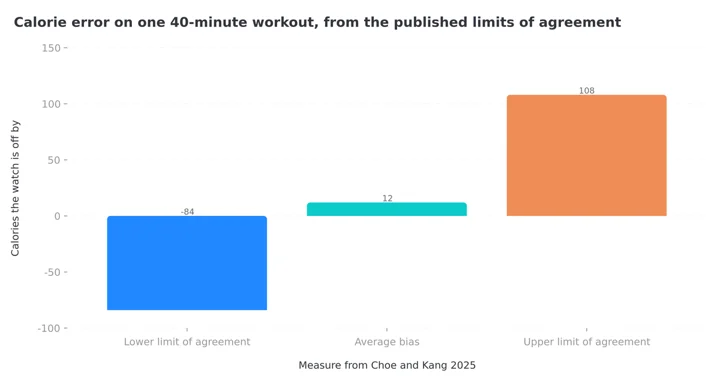 Figure 1: The same 40 minute session can read 84 calories under or 108 calories over, using the limits of agreement reported by Choe and Kang. The average bias of 12 calories is the number people quote. The spread is the number that matters.
This is not an Apple problem. A systematic review of 65 studies covering wrist-worn trackers from many brands reported that for energy expenditure, the mean absolute percentage error was above 30% for every brand tested (Germini et al., 2022, Journal of Medical Internet Research). Switching to another watch does not fix it.
So the watch is excellent hardware for reminding you and receiving quick input. It is unreliable hardware for setting your food budget. A good calorie app respects that difference. A weak one lets the burn estimate quietly inflate what you are allowed to eat.
The one number to distrust
Active calories are an estimate built from heart rate, motion and your body profile. Treat them as a rough range, never as a credit balance you have earned. If you want a target you can actually plan against, calculate it from your own body and goals with our macro calculator instead of reading it off your wrist.
IMPORTANT
Checkpoint: here's where you are right now.
Quick status update so you always know the next best move.
⏱️ Progress 1/4 • ~2 minutes in • Keep going
✅ Step 1: What your watch measures well, and what it guesses (done)
👉 Step 2: The three jobs that decide this ranking (you're here)
⏳ Step 3: All 5 apps ranked, plus one that is not
🧩 The six-step setup that decides whether wrist tracking survives week three (coming soon)
The Three Jobs That Decide This Ranking 📋
Every app below was scored on three things you can verify from its own documentation.
Job 1: can you log food from the wrist, or only look at it? This is the real dividing line in 2026. Several well known apps ship something called an Apple Watch app that can only display today's totals. That is a dashboard, not a tracker. The apps that win here let you pick a food, adjust the portion and save it without touching your phone.
Job 2: is it glanceable without opening anything? Complications are the small items on your watch face. If your remaining calories or protein live on the face, you check them twenty times a day for free. If they live inside an app, you check them twice. Apple's own guide covers adding complications to a watch face if you have never set one up.
Job 3: who controls the burn number? Given the research above, the question is not whether an app can read your active calories. They all can. The question is whether it adds them to your food budget automatically, whether it tells you it is doing so, and whether you can switch it off. One app in this list will not let you switch it off.
Quick Comparison
| App | Log food on the watch | Complications | Watch burn changes your food budget | Price |
|---|---|---|---|---|
| MacroFactor | Yes, 8 methods including voice | Yes, configurable | No auto add, expenditure calculated from your own data | $71.99/yr, no free tier |
| MyNetDiary | Yes, foods and water | Vendor claims 20+ types | Optional through Apple Health | Free tier, Premium $59.99/yr |
| MyFitnessPal | Quick add calories and water only | Calories, carbs, fat, protein | Yes, from step data | Free tier, Premium $79.99/yr |
| Cronometer | Yes, from a most recent list | Yes, consumed and remaining | Depends on your energy settings | Free tier, Gold $59.99/yr |
| Lose It | Not documented | Calorie bonus, burn, maintenance | Yes, and you cannot turn it off | Free tier, Premium $79.99/yr |
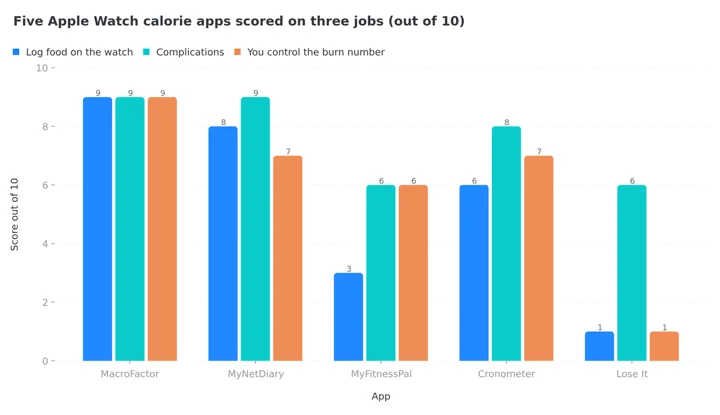 Figure 2: Scored from each app's own published documentation. Notice that complications are the one job almost everybody does well, and wrist logging is where the field splits apart.
IMPORTANT
Checkpoint: midway progress update.
You're past the theory. The ranking starts now.
⏱️ Progress 2/4 • ~4 minutes in • Keep going
✅ Step 1: What your watch measures well, and what it guesses (done)
✅ Step 2: The three jobs that decide this ranking (done)
👉 Step 3: All 5 apps ranked, plus one that is not (current)
🧩 The six-step setup that decides whether wrist tracking survives week three (next)
1. MacroFactor: Best for Logging Without Your Phone 🥇
MacroFactor shipped its watchOS app in late 2025, and it is the only one here that treats the watch as a full input device rather than a screen. The company describes it as bringing "fast food logging, at-a-glance nutrition, and weight tracking to the place you check most often" (MacroFactor, Apple Watch).
The specifics behind that phrase are what earn the top place: AI logging plus, in their words, "one of seven other watch-optimized methods", a food editor on the watch for adjusting serving and quantity, an interactive food timeline that updates as you log, and weight logging from the wrist.
The complication setup is unusually thoughtful. In the watch app settings you choose what tapping the complication does: open "to log food, water, or weight", open "to the timeline", or open "to where I was" (MacroFactor help). That last option matters more than it sounds. Logging a meal in three visits over ten minutes is normal, and being dropped back where you left off removes the reason people give up.
On job 3, MacroFactor takes a different route from everyone else. It calculates your energy expenditure from your own weight trend and intake history rather than adding your watch's active calories to your target. Given how wide the error range is on wrist energy estimates, deriving the number from what actually happened to your body is the more defensible design.
The cost is the obvious limit. There is no free tier. MacroFactor runs $11.99 monthly, $7.99 per month on the six month plan, or $5.99 per month billed yearly at $71.99, with a workouts bundle at $89.99 per year, as covered in our MacroFactor cost guide. If you will not pay a subscription, skip to the next entry.
Buy it if: you log several times a day, you cook at home, and you want the watch to replace the phone rather than summarize it.

2. MyNetDiary: Best Free Watch App 🆓
MyNetDiary has had a real watch app for years, and it is the strongest free option. The App Store listing confirms iPhone, iPad and Apple Watch support and describes "Apple Watch and widgets for quick logging and progress checks on the go" (App Store). At the time of writing the listing showed a 4.8 rating from roughly 160,000 ratings, with version 10.27 released in July.
The company's own page goes further, claiming "there is no better watch diet app than MyNetDiary", "fewer steps than in any other app to log foods", and over 20 complication types (MyNetDiary for iPhone and Watch). Those are the vendor's claims, not an independent test, so treat the superlatives with the same skepticism you would apply to any marketing page. The verifiable parts are that food and water logging both exist on the watch, and that the complication library is genuinely large.
What makes it the value pick is the free tier. Barcode scanning and the food diary are free and ad free, which is rare in this category, and the paid plans sit at $8.99 monthly or $59.99 yearly with a Premium Plus tier above it, as detailed in our MyNetDiary pricing breakdown.
Buy it if: you want wrist logging without a subscription, and you would rather have a large complication library than the smoothest interface.
3. MyFitnessPal: Best for Quick Add and the Biggest Database 🔎
MyFitnessPal's watch app is honest about being a companion. Its support page lists exactly what it does: use step data from the watch to adjust your calorie goal, add water to your diary, quick add calories, view remaining calories and remaining nutrients for the day, and view steps against your step goal. Complications are available for calories, carbs, fat and protein (MyFitnessPal, Apple Watch App).
Read that list again and notice what is missing. You cannot search the food database from the watch. "Quick add calories" means typing a number you already know, which is useful for a coffee or a packaged snack and useless for dinner. The large food database that makes MyFitnessPal worth using stays on the phone. That is the reason it sits third rather than first.
The same page carries a limitation worth knowing before you trust your goal: "currently only step data and individual 'other' workouts sent from the watch via Apple Health are considered". So a logged run may not adjust your calories the way you assume, while a day of walking will. If you are deciding whether the paid tier is worth it, our MyFitnessPal Premium review covers the $79.99 per year question in full.
Buy it if: most of your logging happens on the phone anyway, and you want the four macro complications plus the deepest food database behind them.
4. Cronometer: Best for Glanceable Nutrient Targets 🥗
Cronometer's watch app is built around widgets rather than a menu. The support article lists a Consumed widget, a Remaining widget, an Add Food widget, Highlighted Targets and Nutrition Scores (Cronometer, Apple Watch App). The Add Food widget is real logging, with an important qualifier stated on the page: "the items will be listed by Most Recent". So you can re-log breakfast in two taps, and you cannot find a new food.
Where Cronometer pulls ahead is the nutrient view. No other watch app in this list will show you how much magnesium or vitamin B12 you have left today. If you track micronutrients, the Highlighted Targets widget turns your wrist into a live checklist, and the sections mirror whatever you selected in the phone app.
Two limits to plan for. Free accounts see only the All Targets score, and the full set of nutrition scores requires Gold. And the Remaining number varies with your energy settings, so how much of your watch burn feeds into it is a choice you make in the phone app rather than a default you can ignore. Gold pricing works out to $4.99 per month billed annually, charged as $59.99 upfront, or $10.99 month to month, as covered in our Cronometer Gold cost guide.
Buy it if: micronutrients are the reason you track at all, and you mostly repeat the same foods.
5. Lose It: Best at Counting the Burn, Weakest at Controlling It ⚠️
Lose It is the clearest example of job 3 going wrong, and it is worth studying even if you never install it.
The integration itself is free and iOS only. Lose It receives your resting calories as estimated by Apple Health plus the active calories recorded by your watch, and turns anything above your daily Target Burn into a Calorie Bonus that is added to your budget (Lose It, Using Apple Watch). Your Target Burn equals your maintenance calories, so the bonus only starts once you pass the level that holds your weight steady. That design is more careful than most people assume.
Then comes the line that decides the ranking. The same support page states: "You cannot turn off the Calorie Bonus feature if your Apple Watch is integrated with Lose It! If you would like this option, please submit a feature request."
Set that beside the finding that every energy expenditure subgroup in the Apple Watch meta-analysis failed the validity threshold, and you have an app that permanently attaches an unreliable number to your daily allowance. Lose It's own help section includes an article titled "Apple Watch Calories Seem Too High", which suggests the company knows how the complaint arrives.
The page also describes watch syncing as "the most accurate way to track your calorie burn". That is the vendor's claim and it does not match the published measurement research. Food logging from the watch is not documented at all, though complications exist for Calorie Bonus, Calorie Burn and Maintenance Calories. Premium is $79.99 per year, doubled from $39.99 and now level with MyFitnessPal at the top of this group, detailed in our Lose It pricing guide.
Buy it if: you specifically want exercise to expand your food budget and you are comfortable with that arrangement being permanent.
One More Worth Knowing: Foodnoms 🔐
Foodnoms is not ranked because it is iPhone and Apple Watch only, which rules it out for anyone who might switch phones. But it does two things well.
Its help page confirms a watch app plus complications, with "one for each of your goals", and warns that the phone and watch must connect once before complications appear (Foodnoms help). It also requires no account to use, with an optional paid tier, which puts it in a small group of trackers that never ask who you are. If you are shopping for privacy alongside wrist logging, that combination is unusual.
Where NutriScan Fits (There Is No NutriScan Watch App) 📱
NutriScan does not have an Apple Watch app, and there is no reason to pretend that is secretly good. If wrist logging is your requirement, buy one of the five above.
What NutriScan does is the part a watch cannot do. Our main input is a photo of the plate, which needs a camera, a viewfinder and a portion prompt, so it is a phone job by nature. You can read how that flow works in our meal scan guide.

Home > Camera Icon > Crop Picture. Three sets of tags and a slider, on a screen that fits them.
On the health data side we read active energy, steps and sleep from Apple Health or Google Fit into your reports, and we write fasting sessions back out, so your watch data and your food data end up in the same picture even without a watch app. That combined view lives in the Report on your home screen, where the Active Energy, Steps and Sleep widgets sit next to today's macros.

Home. The Active Energy, Steps and Sleep widgets are your watch data, sitting next to the food you logged on the phone.
The honest pairing is this. Use a wrist app for the repeat items you already know: coffee, water, the same breakfast. Use photo scanning for the mixed plate you cannot name or measure. Five free scans a week plus four Monika voice calls a week is enough to test the scanner on the meals that usually break a food database, your curries, your restaurant plates, your mixed bowls. Premium is about $59 a year, which our NutriScan pricing guide breaks down region by region.
IMPORTANT
Checkpoint: final stretch before the reveal.
One last nudge, the setup that decides everything is next.
⏱️ Progress 3/4 • ~7 minutes in • Keep going
✅ Step 1: What your watch measures well, and what it guesses
✅ Step 2: The three jobs that decide this ranking
✅ Step 3: All 5 apps ranked, plus one that is not
✨ The six-step setup that decides whether wrist tracking survives week three (about to reveal)

The Six-Step Setup That Decides Whether Wrist Tracking Survives Week Three ⌚
Almost everyone who quits wrist tracking quits for the same reason, and it is never the app they blamed. They installed it, tapped a complication that showed nothing, tried to log dinner from the watch, could not find the food, and went back to the phone. Three weeks later the app is still installed and never opened.
These six steps take about fifteen minutes and remove every one of those failure points before they happen. Do them in order.
- Install the watch app deliberately. Open the Watch app on your iPhone, scroll to Available Apps, and install your tracker. Most of these apps will not appear on the wrist until you do this, and several support pages list it as the first troubleshooting step.
- Open the phone app once to sync. Complications stay blank until the phone and watch have exchanged data at least once. Foodnoms documents this explicitly, and it applies to the others too. A blank complication on day one is the most common reason people decide the app is broken.
- Add one complication, not five. Pick the single number that changes your behavior, usually calories remaining or protein remaining. A crowded face gets ignored, and a face you ignore is a tracker you stop using.
- Decide your burn policy before you log anything. Choose whether exercise calories expand your food budget. If your app forces them on, as Lose It does, subtract mentally or pick a different app. Making this choice on day one stops you renegotiating it every time you finish a workout.
- Preload your favorites on the phone. Wrist logging is fast only for foods the app already knows. Spend ten minutes saving your usual breakfast, snacks and drinks as favorites or recents. This is the step everyone skips, and it is the one that makes the difference between a two tap log and a two minute fight.
- Test one real day without your phone. Log breakfast, a snack and water from the wrist alone. Whatever breaks in that test is the thing that will make you quit in week three. Fix it now, while you still care enough to bother.
The fifteen minute rule
Step 5 does more work than the other five combined. Ten favorite items covers most of what a normal person eats in a week. If you set nothing up, every wrist log becomes a search, and search is exactly what a 40mm screen is worst at.
Seven Habits That Make Wrist Tracking Stick 💡
- Log the small things on the watch, the meals on the phone. Water, coffee, a banana and a protein shake are perfect wrist entries. A curry is not.
- Treat active calories as a range, not a figure. The published limits of agreement span several kcal per minute in both directions. Round down and you will be wrong less often.
- Do not eat back a burn you did not verify. If your app must add exercise calories, consider using only a portion of them and watching your weight trend for two weeks.
- Use haptics as the reminder, not the guilt. A tap on the wrist at 8pm asking whether you logged dinner is useful. Six notifications a day are not.
- Check that workouts are not counted twice. Lose It, for example, excludes calories from a synced workout so they are not added on top of active calories. Other apps handle this differently, so read your app's page once.
- Pick complications that show remaining, not consumed. Consumed makes you feel finished. Remaining tells you what decision to make next.
- Keep the wrist list short. Ten favorite items covers most days. A hundred turns a two tap action into a scroll.
What the Research Says About Watches, Apps and Weight Loss 📚
The evidence for app based tracking is real but modest. A 2025 meta-analysis of 11 randomized controlled trials with 1,717 participants found that app based interventions significantly reduced body weight at four to six months, with a standardized mean difference of minus 0.33, and reduced BMI by 0.76, while showing no significant change in waist circumference (The Role of Mobile Apps in Obesity Management). Useful, not miraculous.
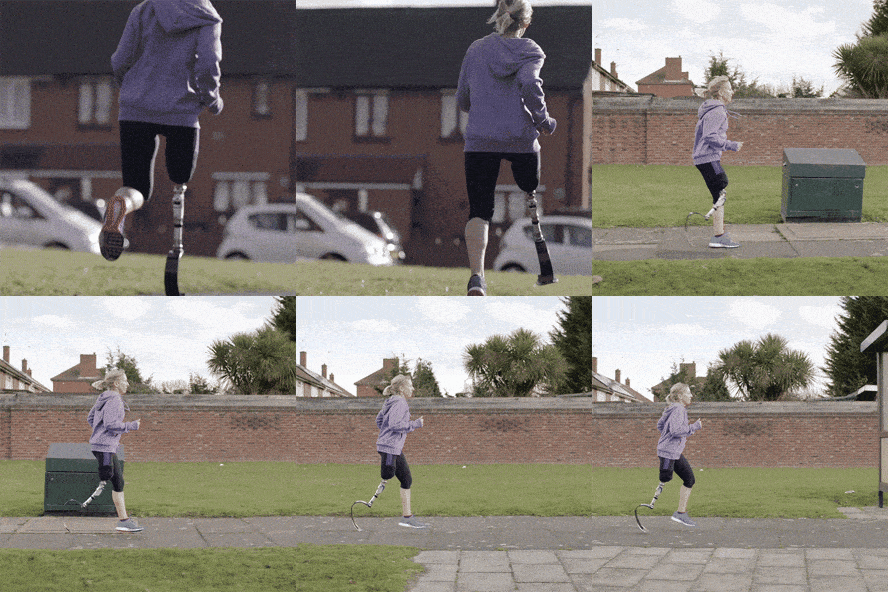 The run happened. The calorie figure attached to it is an estimate with a range wider than most people realize.
What predicts results is not the device but the habit. In the SMARTER trial of 502 adults, higher adherence to self-monitoring of diet, physical activity and weight was associated with greater odds of achieving at least 5% weight loss (Burke et al., 2025, Obesity).
That is the entire argument for wrist logging. A watch does not measure better than a phone. It removes the four seconds of friction between deciding to log and logging, and that friction is what ends most tracking habits.
Which brings the accuracy question back around. If your watch is accurate at heart rate and steps and poor at energy expenditure, then the correct use of the device is as an input surface and a reminder, and the incorrect use is as a calorie authority. Every ranking decision above follows from that one sentence.
The Verdict ✅
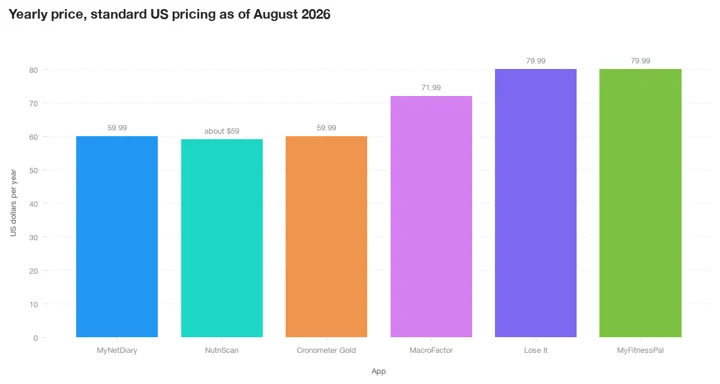 Figure 3: Standard US yearly pricing as of August 2026. Lose It doubled from $39.99 to $79.99, so the app that gives you the least control over your burn number is now also the joint most expensive, which is a trade worth naming before you buy.
Buy MacroFactor if you want the watch to genuinely replace your phone for logging and you accept a subscription. Buy MyNetDiary if you want most of that capability for free. Choose MyFitnessPal if the food database matters more than wrist entry, Cronometer if micronutrients are the point, and Lose It only if you actively want exercise to raise your calorie budget every day, permanently.
Whichever you pick, set the burn policy on day one. The apps in this list differ far more in how they treat the number your watch estimates than in how they let you type a food. Your wrist is a great place to record what you ate. It is a poor place to learn what you burned.
If your problem is the other half of the job, meals you cannot name and portions you cannot weigh, try NutriScan with five photo scans a week and let your watch handle the coffee.
Related: which calorie tracker is worth paying for in 2026 and the best AI photo calorie counter apps.
IMPORTANT
Recap: everything you covered this round.
You finished the run, save this for the next time you set up a watch.
⏱️ Progress 4/4 • ~9 minutes in • Nicely done
✅ Step 1: What your watch measures well, and what it guesses
✅ Step 2: The three jobs that decide this ranking
✅ Step 3: All 5 apps ranked, plus one that is not
✅ The six-step setup: install ➡️ sync ➡️ one complication ➡️ burn policy ➡️ favorites ➡️ test day (revealed)
Frequently Asked Questions ❓
Can I log food on an Apple Watch without my phone nearby?
It depends on the app, and most people overestimate what is possible. MacroFactor offers AI logging plus seven other watch optimized methods including voice, Cronometer offers an Add Food widget limited to your most recent items, and MyNetDiary supports food and water logging from the wrist. MyFitnessPal's watch app only offers quick add calories and water, with no food search. All of them sync to the phone app when it is back in range.
Should I eat back the calories my Apple Watch says I burned?
Be cautious. The 2025 meta-analysis of 56 studies found every energy expenditure subgroup exceeded the 10% error threshold, and a separate review of wrist devices reported errors above 30% for every brand tested. If your app adds exercise calories automatically, consider using only part of them and letting your weight trend over two to four weeks tell you whether the number is fair.
How accurate are Apple Watch active calories?
Less accurate than most people assume. Across 56 validation studies and 270 measurements, every energy expenditure subgroup failed the 10% accuracy threshold while no heart rate subgroup failed it (Choe and Kang, 2025). The pooled mean bias was 0.30 kcal per minute, but the limits of agreement ran from minus 2.09 to plus 2.69, so any single reading can be far out in either direction.
Which calorie app has the best Apple Watch complications?
MyNetDiary claims the largest library at over 20 complication types, though that is the company's own figure. MacroFactor's are the most configurable, since you choose whether tapping one opens the log screen, the timeline, or your last position. MyFitnessPal keeps it simple with calories, carbs, fat and protein.
Is there a free calorie tracker with a real Apple Watch app?
Yes. MyNetDiary's free tier includes watch access and an ad free diary, and Cronometer's free tier includes the watch widgets, though full nutrition scores require Gold. Lose It's Apple Watch integration is also free, but it only handles burn data, not food logging.
Does NutriScan have an Apple Watch app?
No. NutriScan has no watch app and no complications. It reads active energy, steps and sleep from Apple Health or Google Fit and writes fasting sessions back, so watch data appears in your reports, but logging happens on the phone because photo scanning needs a camera. If wrist logging is essential to you, pair NutriScan with one of the apps above.
This article is for general information and is not medical advice. Calorie and activity estimates from consumer devices are approximations. If you have a health condition, are managing an eating disorder, or are unsure how many calories you should eat, speak to a qualified health professional before making changes.